To avoid these ads, REGISTER NOW!

Between 265 & 485 SQ/FT Woody's Works Garage

Workspaces sized between 265 and 485 squarefeet.

drivesitfar

Well-known member
Joined
Oct 23, 2013
Messages
36,007
Location
Pacific Northwest
Woody: just saw you posted more information about your search for better air and heat in your home and garage. looks like a neat idea and system. just curious were there holes already in the brick or did you have to drill, cut and make them? looks nice and sounds like you are pretty happy with it.

are you above freezing or still below 0 and snow on the ground up there near the NORTH POLE?

hope you've had time for a few family outings on those skis of yours.

cheers
 
To avoid these ads, REGISTER NOW!
OP
D

Denwood

Well-known member
Joined
Sep 22, 2014
Messages
4,185
Location
Thunder Bay, Ontario, Canada
Drive, it's been busy indeed with the girls...and yes we have been out skiing. The snow is disappearing very quickly :-(

I didn't have holes in the brick for the ERV, so rented a Bosch hammer drill and 5" bit from Home Depot. It only took about 10 minutes to do the holes once I was sure they were in the right place. We're just around freezing during the day, so spring is definitely in the air :)

The garage is getting a bit cluttered with the house project detritus and will need a spring clean/organize soon. I have a computer, and the vacuum system to install in there when time permits.
 

tjpavlov

Well-known member
Joined
May 18, 2012
Messages
1,277
Location
Providence, RI
Denwood, such a fascinating thread. Thanks for posting everything. You always manage to surprise me with your projects.

I was wondering whether you could share more about your home's HVAC setup; particularly the basement. I too live in a cold climate (but not nearly as cold as you!). I am planning to finish our basement and am stuck on what to do about HVAC. We just have a basic, 95% efficient forced hot air and AC system for the first floor. There is one in the attic which takes care of the second floor (typical center hall colonial house).

Do you run one system with several zones, or do you have multiple HVAC systems in the house? What advice would you have for conditioning a basement area?

Thanks so much for your thoughts and advice!
 
OP
D

Denwood

Well-known member
Joined
Sep 22, 2014
Messages
4,185
Location
Thunder Bay, Ontario, Canada
Tj, thanks very much for your comments. My wife mostly thinks I'm slightly nuts on the energy front, so it's nice to hear from folks here on the journal. Our building (Cinevate) is being featured in a popular local magazine as the first in a "Green Spaces" series. I figure if we leave sustainability to politics, not enough will get done in the timeframe we have.

Our house likely had a center coal fired "octopus" gravity heater way back, so our furnace remains in the basement, centrally located. It's a Lennox Elite with modulating burner and ECM motor. It only draws 3 amps at max 2nd stage. The 16 Seer AC unit is tied into the furnace but rarely runs. The house is not huge, so one balanced system has been perfect.

If your main floor furnace has capacity, I'd run supply and return as required into your basement. If you have the option to insulate and run radiant...that would be ideal. Add in something like the Panasonic ERV and you're done. One multi zoned furnace (with an ECM motor that compensates for CFM zone requirements) makes a lot of sense as well..but you'll be spending a few bucks there for sure. Multi-zoning is not done as often as perhaps it should be...not sure why. ECM motors with variable CFM, a control and a few motorized dampers are not too complicated IMHO.
 
Last edited:

Lyndon

Well-known member
Joined
Aug 11, 2014
Messages
2,534
Location
Sydney, Australia
Den

Couldn't let that go ^^^^^.

Some of us think you're slightly nuts. But - you're amongst friends, and you're nuts in a good way anyway, so it don't count. :beer: :thumbup: :lol_hitti

Lyndon
My goodness - is that the time? :dunno:
 

drivesitfar

Well-known member
Joined
Oct 23, 2013
Messages
36,007
Location
Pacific Northwest
Woody: wanting to do the best you can is NEVER a bad thing. I would think the way you have the heat and AC working at your company's building should give you a gold star of some kind. nice work on the house and it couldn't have been easy drilling through brick and also knowing where to drill.

congrats on another great job and keep waking up trying to improve your life and surroundings is REALLY a good thing so carry on.

cheers and hope you are having a great weekend.

we just rented Bridge of Spies with Tom Hanks so having one or two IPA's and calling it a day soon.
 

HCNDM

Well-known member
Joined
Oct 20, 2015
Messages
682
Location
Netherlands (tiny little country in western Europe
Re: Woody's Works Garage - rebirth!

Hi Dennis,

Really cool to see what you have done to to automate your house and corporate building. All the while making the buildings more economical and better for the environment.

I was pretty happy with my house in terms of insulation and circulation. The standard is pretty high in holland. That said your thread has made me realize I have a lot of gains left yet through automation and smart timing control.

Thank you as always for the motivation!

Niels


Sent from my iPhone using Tapatalk
 
OP
D

Denwood

Well-known member
Joined
Sep 22, 2014
Messages
4,185
Location
Thunder Bay, Ontario, Canada
1/2, so you're saying my cup of nuts is 1/2 full, or 1/2 empty ? :)

Lyndon, I believe on second thought that you're exactly right. I'm in good hands here based on some posts I've read!

Drive, sitting on a deck in a place a lot, lot warmer than home. So cheers!

Niels, I often wish our building codes here were moving a lot more quickly to net zero and Passivhaus standards. Much of what I write about here is already a standard in parts of Europe. The truth is that these homes are 10-15% more expensive to build (but not at all if one scales down the size) and not much more work is required to make them net energy contributors. I was surprised to look at our older 47" LCD TV, using 300 watts, compared to a newer 52" at only 100. There are savings to be seen everywhere, although sometimes at the expensive of consumption.

Three products have really helped to reduce standby power.

1. Staples EcoEasy Surge Protectors (when power to the master outlet is reduced, it turns off the slaves). These strips are my least favourite as they can be temperamental based on the master "resting" voltage, and cannot be scheduled or automated...and standby power to the master plug is never turned off to zero. The SmartThings and Aeon devices draw less than a watt when off..but measure energy use and of course can be automated and scheduled however you like.

s0694790_sc7


2. SmartThings power outlet. I use these with SmartThings to turn power off at night to the entertainment unit among other things.

box-outlet.png


3. And finally, these work very well with Z-wave (use them with Vera Edge) to turn off power at the office to power strips hosting printers, scanners etc. Arming the security system in turn sends "off" commands to these devices in the building. I also use one to control a smaller HRV that services our studio. In our boardroom, the computer/conference/monitor system is turned off with a security arm event, but never turned on. We do that manually ,via the small switch, if the equipment is needed. This way some items are left off if not needed. This Aeon switch is the least expensive of the above, highly rated, and works flawlessly so far. It also measures energy consumption.

_2327661_orig.jpg
 
Last edited:

JohnnieMo

Well-known member
Joined
Nov 25, 2014
Messages
1,175
Location
Calgary, Alberta
Re: Woody's Works Garage - rebirth!

Hope this isn't too off topic:

I've started to look a lot at energy savings here in Alberta. What I've learned is that 50% of my power bill is not the cost of electricity. Well over 50% of my gas bill is not the cost of gas. We pay a lot for the transmission system, plus various taxes and riders.

So although it makes some sense to reduce consumption to save money (environmental impacts notwithstanding) it's actually a very poor return compared to the cost of investment.

For example I could pay to replace the rest of my windows for about $15000 and save maybe $15 a month. Or I could spray foam the whole place for around $20,000 and save another $50 per month. (Given today's ultra low gas price). However it doesn't make financial sense.

Where we can really save money is by finding efficiencies in the distribution system. For example - local generation.

But then you run in to problems like in Nevada. Even if you go off grid you are still expected to pay for your part of said grid.

See this link and video:
http://www.bloomberg.com/features/2016-solar-power-buffett-vs-musk/

I suggest looking past the the conspiracy theory element.

Anyways you are far ahead of me on this curve but I like to follow along and learn.


Sent from my BlackBerry Priv
 
Last edited:
OP
D

Denwood

Well-known member
Joined
Sep 22, 2014
Messages
4,185
Location
Thunder Bay, Ontario, Canada
Johnnie, when doing the building project I looked less at the short term return, and more in terms of how much less C02 we would generate. Yes, transport is a big factor, but at least here, it is a calculated as a percentage of use. We're also on time of use, so at peak times power here is 17c/KWh and climbing. So with respect to any building in Canada, you start with the envelope and work from there. Ultimately, the technology is already here, and maturing rapidly, in terms of grid tied, net zero.

Peak times are always during the day pretty much everywhere..and this correlates also where solar potential is highest. I would agree that local generation and sustainability should be our goal, starting from our homes :)

Atmospheric CO2 was 250 ppm for the last 10-15 million yrs, and in a scant 100 yrs of burning fossil fuels (essentially a lot of stored carbon) we've taken it to 400. I rarely express these thoughts out loud, (preferring to just set the best example possible), but I firmly believe our vision needs to be 20-30 yrs looking ahead if there is any hope for our kids. This means conventional ROI goes out the window if we look at the big picture. I know those numbers are controversial for some, but since studying these issues 30 yrs back during my undergrad, things have transpired predictably like a bad movie script.

We got ourselves into this, and we can of course get our way out. Discussions like these as we communicate instantly world-wide, and our ability to adapt and innovate are key. Among other things, the exponential curve we've been on with respect to population (completely predictable) needs to match our resources, like any other ecosystem.

Steps off soapbox and meekly retreats to the shop...
 
Last edited:

JohnnieMo

Well-known member
Joined
Nov 25, 2014
Messages
1,175
Location
Calgary, Alberta
Hey Woody - I fully respect that. Most folks just want to tell everyone else what to do. You put your money where your mouth is - literally.... and make a difference. Very cool.

I'm not as informed on the C02 issue as I'd like to be. I've read a couple books and obviously some internet research. I also have a good friend studying arctic sea ice so I often bounce things off him. I try not to spout about anything that I don't truly understand. That's my personal motto for internet forums and life in general. (It's for that reason that I dislike Twitter, because that's all it is for)

I think it is hard to dispute that mankind is putting more CO2 in the atmosphere. It's also hard to dispute that CO2 is a greenhouse gas. Ergo, it is next to impossible to dispute that man is contributing to the warming of the planet. I think where it gets messy is whether or not our contribution is the "defining element" to warming, and whether or not spending $250B trying to fix it will actually make any difference.

But in short, reducing dependance on fossil fuels makes all kinds of sense for all kinds of other reasons too.
 
Last edited:
OP
D

Denwood

Well-known member
Joined
Sep 22, 2014
Messages
4,185
Location
Thunder Bay, Ontario, Canada
I was almost afraid after that last post...but I figure the ultimate responsibility falls on each one of us. One of the ways to explain the CO2 issue is to consider that oil, gas and coal represent millions of years of stored carbon from plant material. We're releasing a lot of that carbon back to the atmosphere over a tiny, tiny fraction of that time. If you look at how successful we were in recognizing CFCs connection to ozone depletion (the big hole is finally closing!) then I figure carbon is no different...just harder to correct as we're very much reliant on petroleum for almost everything we do. In many ways, sustainability points back to higher levels of self reliance, and very few would take exception to that. I'd argue many garages on this forum reflect that very mind set.

Having a week with a Nissan Leaf (all electric car) I was struck by a few things. It's ugly...sorry, but I'm shallow :) It's dead quiet and quite torquey for what it is. I strangely would miss oil changes, brake work and the usual car stuff. On the other hand, it sure has a lot less to maintain...and the idea of running completely from a PV panel array is hugely appealing. I almost bought one as the urban hauler.

Population growth and environmental change are rather married to each other. The planet of course will be just fine with or without us..I'd just prefer the former :).
 

JohnnieMo

Well-known member
Joined
Nov 25, 2014
Messages
1,175
Location
Calgary, Alberta
Re: Woody's Works Garage - rebirth!

Hey, the cool thing about having your own thread is that you can talk about whatever you want!!

I would love an electric car. So many advantages. I looked long and hard at a Volt before we bought the Vibe but it was just a touch too small. It was also a lot more money. I thought the styling was excellent (unlike the Leaf, which is about as exciting as a head of lettuce).

On a slightly related note I recall a tax credit in the past decade whereby you could get credit for increasing the energy efficiency of your home. Such a terrific program. I made a variety of changes to the homestead at that time. I wish we could get something like that going again. It's nice because in a way the taxpayer gets to decide how our tax dollars are used to decrease our own carbon footprint (rather than a massive government led green scheme).

Sent from my BlackBerry Priv
 
Last edited:

drivesitfar

Well-known member
Joined
Oct 23, 2013
Messages
36,007
Location
Pacific Northwest
Woody: while I might not fully understand all that you are saying I truly appreciate your effort to try to make the world a better place and for sharing the information. I know we'll have a good chance of living out our days with plenty of water and fuel, but the kids and grandkids are going to run out if we don't DO something.

thanks and I for one hope some of the powers at be are reading your posts so keep posting as you have time.

I share a lot of tool information here on GJ that I've learned and know because the kids today don't HAVE TO take shop class and some schools don't have it anymore.

It's sunny and 60's today in my paradise so lots to do now that the rain has stopped for a few days.

cheers
 

HCNDM

Well-known member
Joined
Oct 20, 2015
Messages
682
Location
Netherlands (tiny little country in western Europe
Woody: while I might not fully understand all that you are saying I truly appreciate your effort to try to make the world a better place and for sharing the information. I know we'll have a good chance of living out our days with plenty of water and fuel, but the kids and grandkids are going to run out if we don't DO something.


thanks and I for one hope some of the powers at be are reading your posts so keep posting as you have time.


I share a lot of tool information here on GJ that I've learned and know because the kids today don't HAVE TO take shop class and some schools don't have it anymore.


It's sunny and 60's today in my paradise so lots to do now that the rain has stopped for a few days.


cheers


My thoughts excactly... I want my little girl to to have as much fun in her life as I have.

That and living in the Netherlands under sea level means ice must stay ice


Sent from my iPhone using Tapatalk
 
OP
D

Denwood

Well-known member
Joined
Sep 22, 2014
Messages
4,185
Location
Thunder Bay, Ontario, Canada
A Smart Roll Up Garage Door with SmartThings :)

Johnnie, my brother took advantage of that tax credit to the tune of nearly 10K. My timing however was not so good :-(

Drive, I finally have some honest garage stuff to post!

HCN, we have a rather massive challenge ahead with respect to our kid's quality of life. The only thing stopping us, it seems, is a rather wandering sense of urgency.


About 11:30 on Thursday I got a call at work from my very awesome neighbour Joe asking if I wanted my garage door closed. It was open for several hours...not cool. This is the second time this has happened as the roll up door senses load and will reverse if it thinks something is amiss. Normally I wait and watch, but evidently I missed it reversing. Apparently this was on display for a few hours:

rd5.jpg


Because I have been adding lights and door automation using SmartThings, I figured it was time to tackle some automation and added security for the shop.

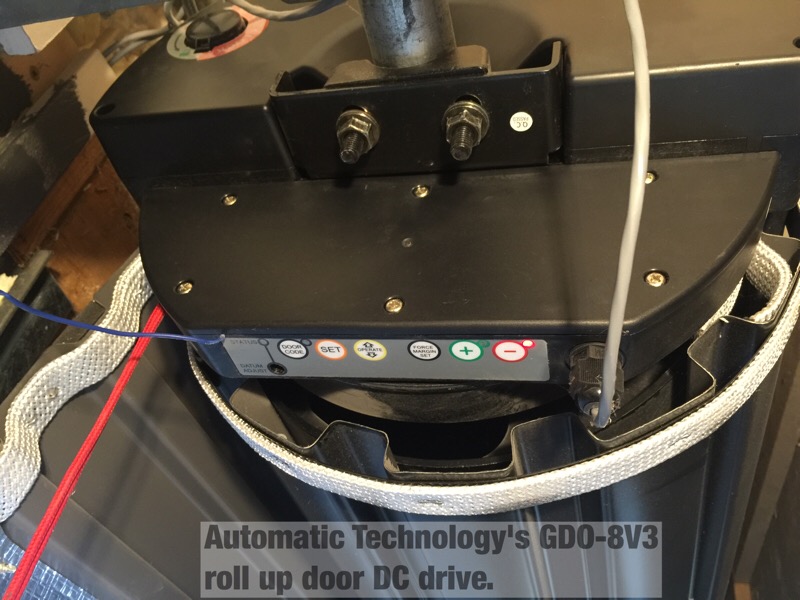
My roll up door came from www.smartgarage.ca with the GDO-8V3 direct drive opener from Automatic Technologies in Australia. This opener has no wired open/close switches, using wireless only. It detects load, and will reverse if it senses an obstruction. It also has a safety beam to stop the door. This means adding a relay switch to open and close the door is not so easy as there are no provided contacts on the motor drive unit. I was able to find a way around this without touching the drive motor or electronics.

garage_st1.jpg


SmartThings uses two wireless mesh technologies, namely ZigBee and Zwave. This makes it a lot easier to mix and match components. I am using the $99 SmartThings V2 hub which is a requirement for these automations. With nearly 50 devices on the hub (lights, locks, sensors etc., I'm quite impressed with it so far.

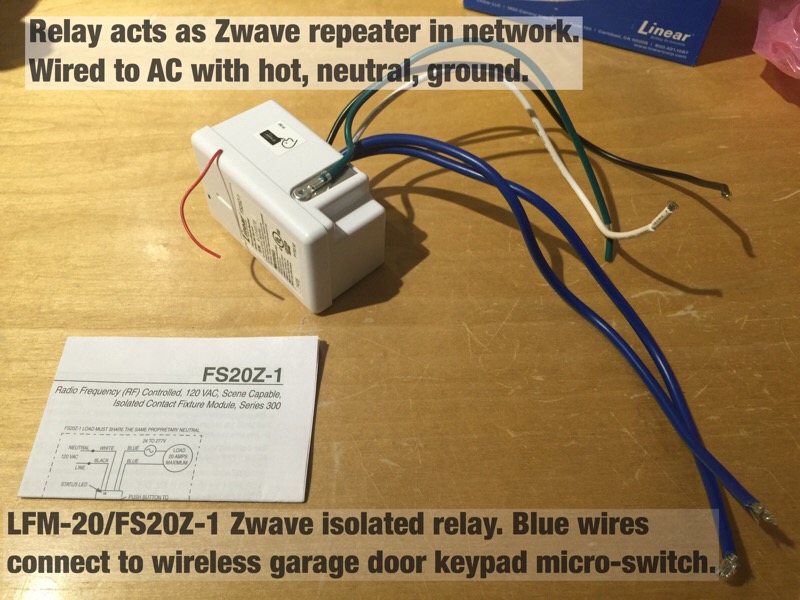
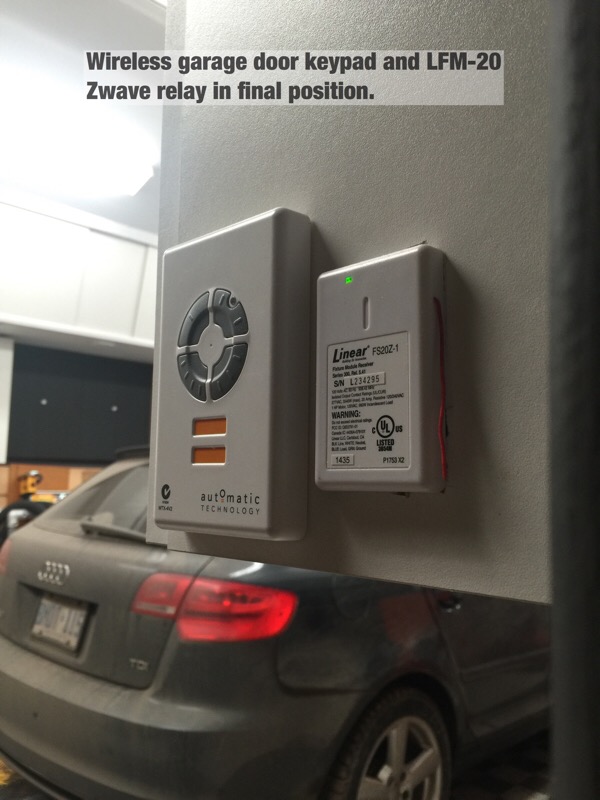
This relay, commonly known as the LFM-20 is perfect for this job. You wire it like any 110 AC device (it draws about 1 watt). It's also sold as the FS20Z-1 for $35 on Amazon. The blue wires provide an isolated relay which is simply on/off and can manage a wide range of loads and voltages. Once you install one, it functions as a node repeater for your Zwave network to increase range.

garage_st2.jpg


Because I'm using ZigBee SmartThings motion and contact sensors, I needed to add one of these SmartThings outlets into the shop, and another inside our kitchen to extend the ZigBee network 80 ft or so to the detached garage. Zigbee and Zwave use different radios and technology but are similar in that both form a mesh network. Battery operated sensors don't typically work as network repeaters as that would kill battery life. This is why you may need powered Zwave or Zigbee devices to extend a network.
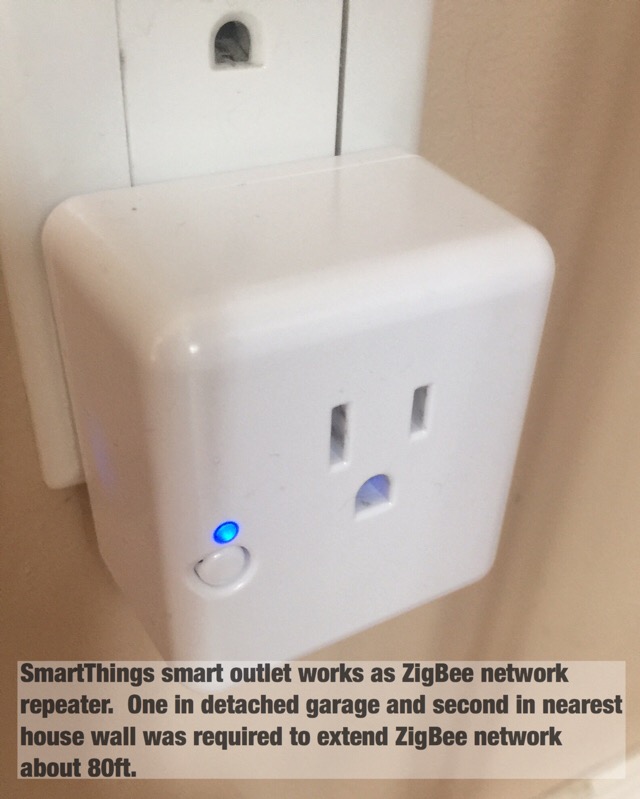
garage_st3.jpg


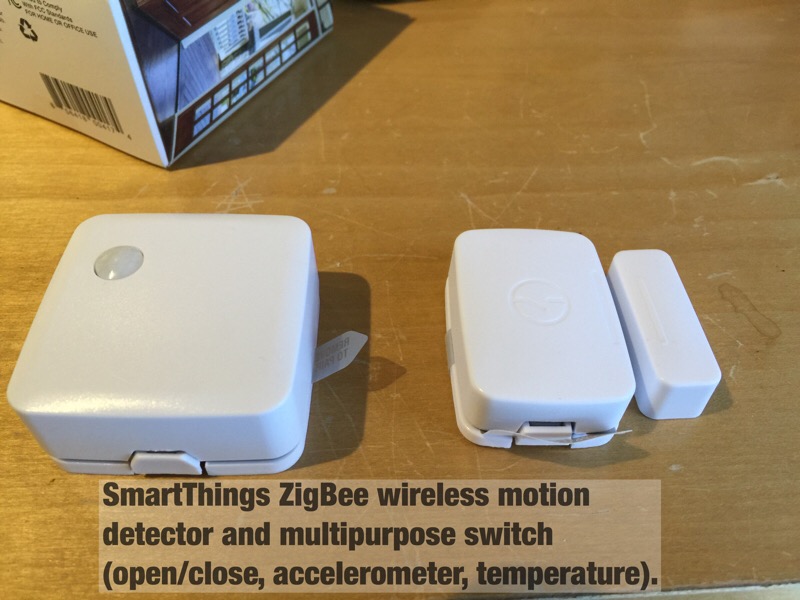
These SmartThings sensors are quite nice. The motion sensor responds very quickly, and also reports temperature. The multipurpose sensor on the right works like a contact switch, but also reports temperature. The multipurpose sensor also hosts an onboard accelerometer which reports both motion and position making it quite handy. With a conventional garage door, you can mount this sensor directly to your door and configure it to report the door position. Door closed, the sensor would be vertical, and open, the sensor would be horizontal. This is not so easy with a roll up door, so I've set it up a bit differently.

garage_st4.jpg


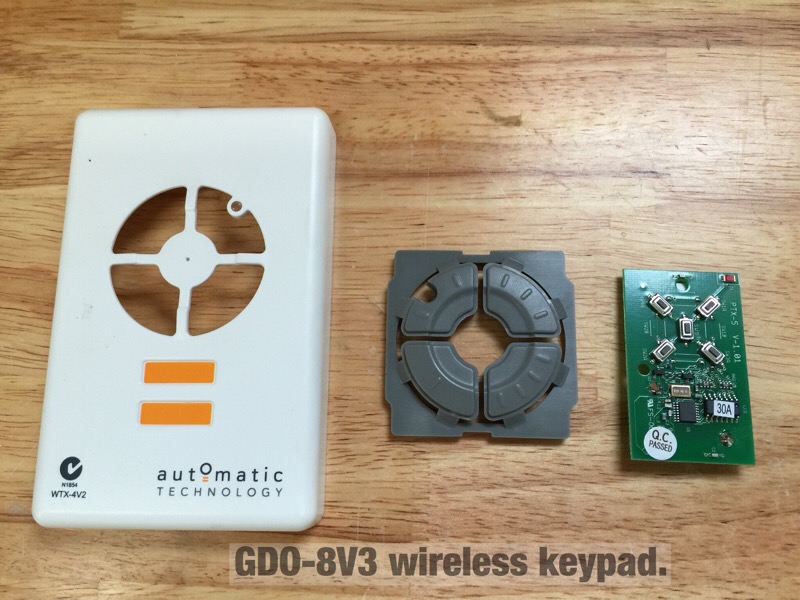
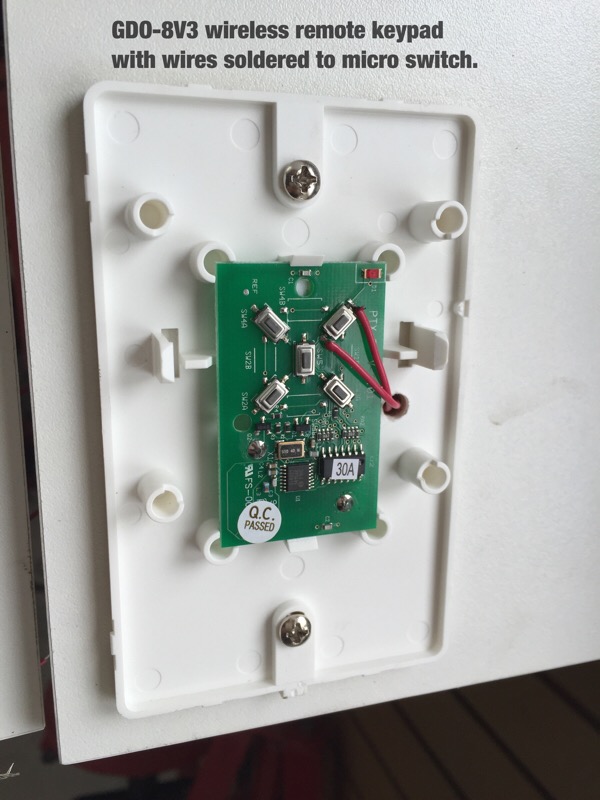
With no way to wire a relay into the motor, I took the wireless keypad apart and noted it used micro-switches. This controller is a bit different as there is no discrete up/down switch. Press once, the door goes up. Press again, it stops. Press again, it lowers. There are four buttons there in case you have multiple doors (up to four) to control.

garage_st5.jpg


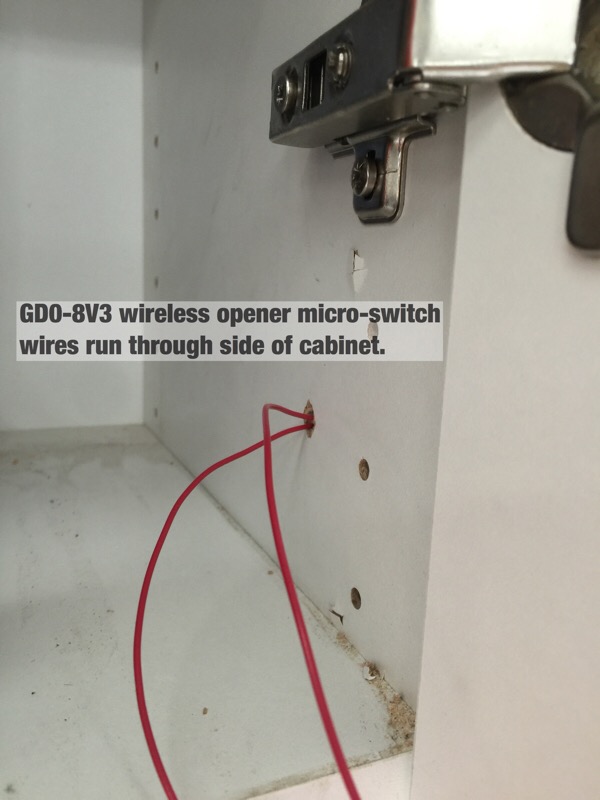
I carefully soldered on some light gauge wires and mounted the keypad back in position. A hole drilled into the mounting plate allows the wire to pass through the cabinet hosting the switch. Touching the wires together is essentially the same as pressing a button on the keypad. The LFM-20 relay will do this for us.

garage_st6.jpg


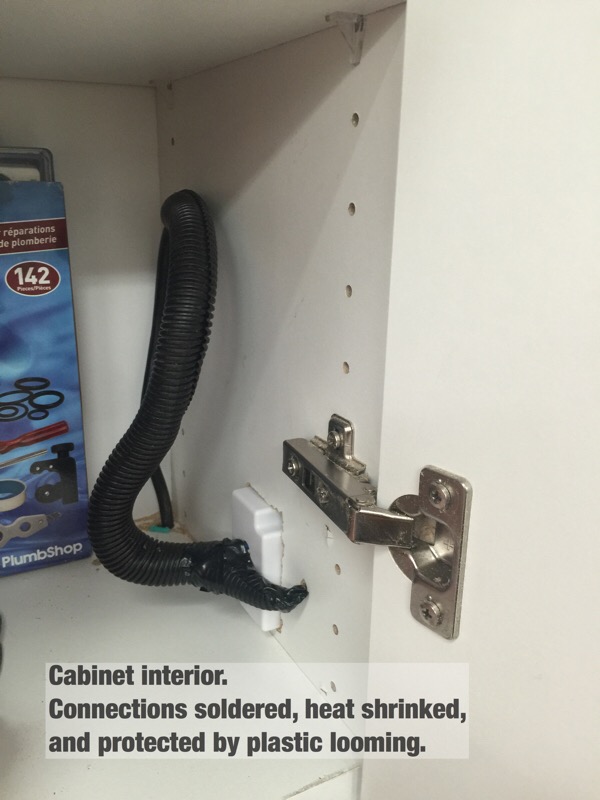
Inside the cabinet. These red wires connect to the LFM-20 blue wires.

garage_st7.jpg


Power comes to the LFM-20 from an extension cord running from a GFCI outlet. The connections are soldered, heat shrinked, and protected by looming.

garage_st8.jpg


After cutting a hole for the LFM-20, the end result is nice and clean.

garage_st9.jpg


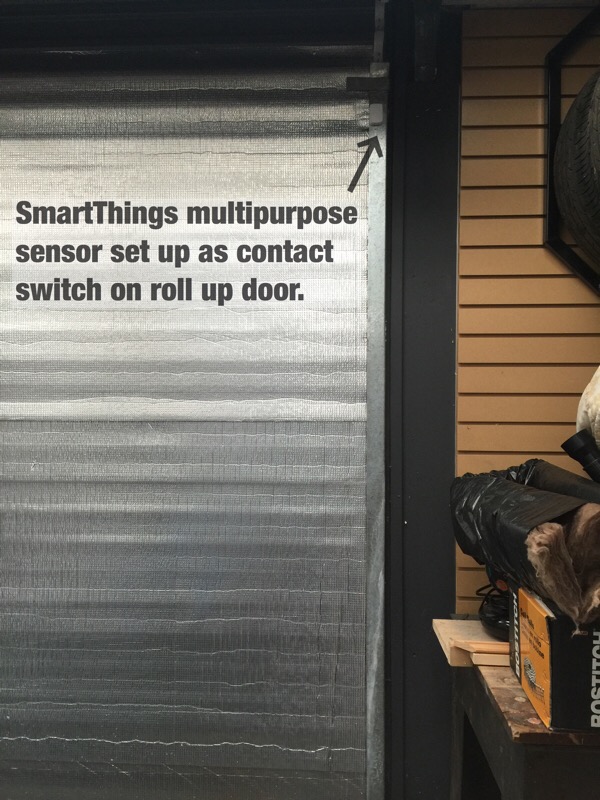
The other important component is a sensor to indicate if the door is open or closed. This is where the SmartThings multipurpose sensor comes in handy. It also reports temperature, so can drive alerts if desired for low or high temps.

garage_st10.jpg


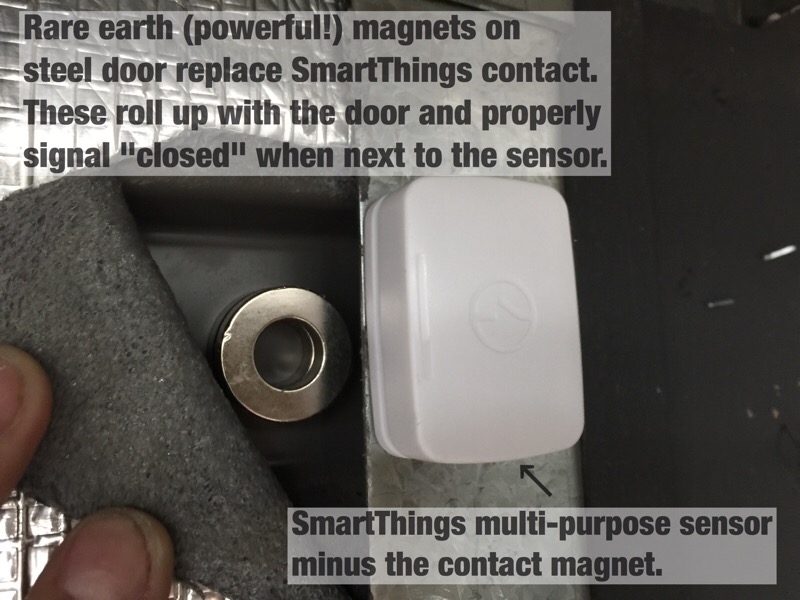
The ST sensor has two components when used as a contact switch. The smaller 2nd bit is just a magnet, that normally needs to line up with the sensor quite closely to indicate open/close. In this case, I'm getting the same effect (note that the magnets sit below the sensor) by using some powerful ring magnets, stuck to the door. They sit nestled in a door corrugation, so can roll up with the door and clear the door stop right above them.

garage_st11.jpg


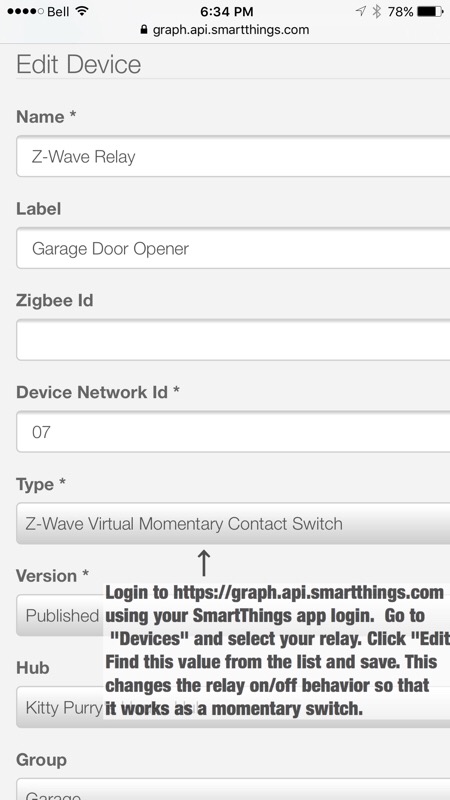
Once you include the relay and sensors into your network, there is one step left to change the behaviour of the LFM-20 relay from on/off to a momentary switch. The SmartThings app is used to manage your network and automations from a smartphone, however to get under the hood like this, you log into their developer web site using your SmartThings app login. This lets you customize code, devices etc. You can also publish third part automation "apps" to yourself, which then show up on your smartphone.


garage_st12.jpg


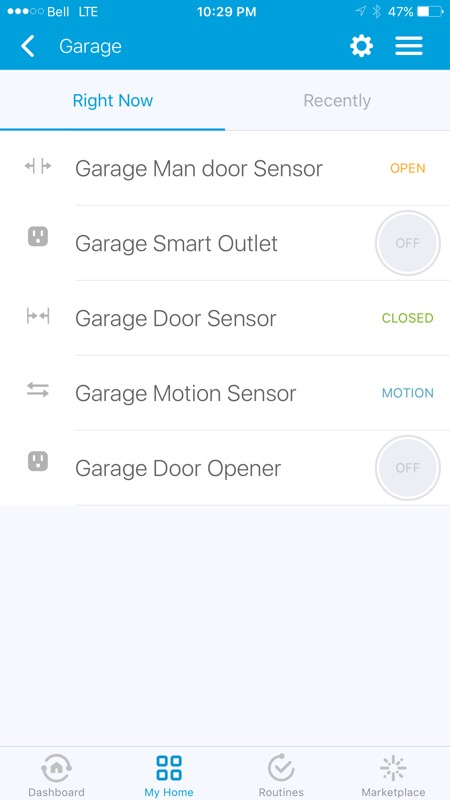
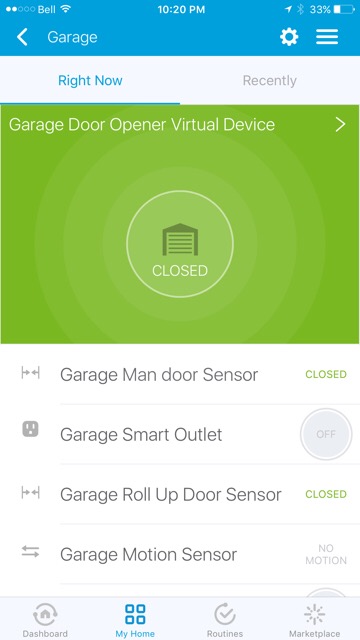
Now, you can see the shop is all set with a few sensors. Touching the "Garage Door Opener" button sends a command to the door relay which will open or close the door anywhere you have a data connection for your phone.


garage_st13.jpg


By setting up alerts in the SmartThings app, I now get notifications on my phone if I've left the house (using geo-fencing built in to the app) and the door is open. Arming the security function also sends a notification if any defined door is open, another way to check. One could also use geo-fencing to disarm the system and open the garage door if a family member returns to the house. I use this feature right now to turn on the entry lights if it's night, and my wife has arrived at the house.

By adding the motion sensor for security, you can leverage its operation to do quite a few things, like turn on any your overhead lights (and turn them off if no motion for say 10 minutes) etc. As I mentioned to JohnnieMo in his thread, you could use the multipurpose sensor output to manage a furnace using this same relay (on/off) and therefore get around the low temp limit most thermostats are limited by.
 
Last edited:

drivesitfar

Well-known member
Joined
Oct 23, 2013
Messages
36,007
Location
Pacific Northwest
Woody: we have a feature on our new garage door opener that closes the door if we forget to hit the button after driving out. only issue is if we don't watch it go down all the way sometimes our cat will run in and send the door back up.

i'll read your post closer later, but just wanted to say hi and wish you and your family

HAPPY EASTER

cheers big guy
 
OP
D

Denwood

Well-known member
Joined
Sep 22, 2014
Messages
4,185
Location
Thunder Bay, Ontario, Canada
1/2, Drive thanks..and Happy Easter Gentlemen :) Reposting here as it seems we've turned yet another page:

About 11:30 on Thursday I got a call at work from my very awesome neighbour Joe asking if I wanted my garage door closed. It was open for several hours...not cool. This is the second time this has happened as the roll up door senses load and will reverse if it thinks something is amiss. Normally I wait and watch, but evidently I missed it reversing. Apparently this was on display for a few hours:

rd5.jpg


Because I have been adding lights and door automation using SmartThings, I figured it was time to tackle some automation and added security for the shop.

My roll up door came from www.smartgarage.ca with the GDO-8V3 direct drive opener from Automatic Technologies in Australia. This opener has no wired open/close switches, using wireless only. It detects load, and will reverse if it senses an obstruction. It also has a safety beam to stop the door. This means adding a relay switch to open and close the door is not so easy as there are no provided contacts on the motor drive unit. I was able to find a way around this without touching the drive motor or electronics.

garage_st1.jpg


SmartThings uses two wireless mesh technologies, namely ZigBee and Zwave. This makes it a lot easier to mix and match components. I am using the $99 SmartThings V2 hub which is a requirement for these automations. With nearly 50 devices on the hub (lights, locks, sensors etc., I'm quite impressed with it so far.

This relay, commonly known as the LFM-20 is perfect for this job. You wire it like any 110 AC device (it draws about 1 watt). It's also sold as the FS20Z-1 for $35 on Amazon. The blue wires provide an isolated relay which is simply on/off and can manage a wide range of loads and voltages. Once you install one, it functions as a node repeater for your Zwave network to increase range.

garage_st2.jpg


Because I'm using ZigBee SmartThings motion and contact sensors, I needed to add one of these SmartThings outlets into the shop, and another inside our kitchen to extend the ZigBee network 80 ft or so to the detached garage. Zigbee and Zwave use different radios and technology but are similar in that both form a mesh network. Battery operated sensors don't typically work as network repeaters as that would kill battery life. This is why you may need powered Zwave or Zigbee devices to extend a network.

garage_st3.jpg


These SmartThings sensors are quite nice. The motion sensor responds very quickly, and also reports temperature. The multipurpose sensor on the right works like a contact switch, but also reports temperature. The multipurpose sensor also hosts an onboard accelerometer which reports both motion and position making it quite handy. With a conventional garage door, you can mount this sensor directly to your door and configure it to report the door position. Door closed, the sensor would be vertical, and open, the sensor would be horizontal. This is not so easy with a roll up door, so I've set it up a bit differently.

garage_st4.jpg


With no way to wire a relay into the motor, I took the wireless keypad apart and noted it used micro-switches. This controller is a bit different as there is no discrete up/down switch. Press once, the door goes up. Press again, it stops. Press again, it lowers. There are four buttons there in case you have multiple doors (up to four) to control.

garage_st5.jpg


I carefully soldered on some light gauge wires and mounted the keypad back in position. A hole drilled into the mounting plate allows the wire to pass through the cabinet hosting the switch. Touching the wires together is essentially the same as pressing a button on the keypad. The LFM-20 relay will do this for us.

garage_st6.jpg


Inside the cabinet. These red wires connect to the LFM-20 blue wires.

garage_st7.jpg


Power comes to the LFM-20 from an extension cord running from a GFCI outlet. The connections are soldered, heat shrinked, and protected by looming.

garage_st8.jpg


After cutting a hole for the LFM-20, the end result is nice and clean.

garage_st9.jpg


The other important component is a sensor to indicate if the door is open or closed. This is where the SmartThings multipurpose sensor comes in handy. It also reports temperature, so can drive alerts if desired for low or high temps.

garage_st10.jpg


The ST sensor has two components when used as a contact switch. The smaller 2nd bit is just a magnet, that normally needs to line up with the sensor quite closely to indicate open/close. In this case, I'm getting the same effect (note that the magnets sit below the sensor) by using some powerful ring magnets, stuck to the door. They sit nestled in a door corrugation, so can roll up with the door and clear the door stop right above them.

garage_st11.jpg


Once you include the relay and sensors into your network, there is one step left to change the behaviour of the LFM-20 relay from on/off to a momentary switch. The SmartThings app is used to manage your network and automations from a smartphone, however to get under the hood like this, you log into their developer web site using your SmartThings app login. This lets you customize code, devices etc. You can also publish third part automation "apps" to yourself, which then show up on your smartphone.


garage_st12.jpg


Now, you can see the shop is all set with a few sensors. Touching the "Garage Door Opener" button sends a command to the door relay which will open or close the door anywhere you have a data connection for your phone.


garage_st13.jpg


By setting up alerts in the SmartThings app, I now get notifications on my phone if I've left the house (using geo-fencing built in to the app) and the door is open. Arming the security function also sends a notification if any defined door is open, another way to check. One could also use geo-fencing to disarm the system and open the garage door if a family member returns to the house. I use this feature right now to turn on the entry lights if it's night, and my wife has arrived at the house.

By adding the motion sensor for security, you can leverage its operation to do quite a few things, like turn on any your overhead lights (and turn them off if no motion for say 10 minutes) etc. As I mentioned to JohnnieMo in his thread, you could use the multipurpose sensor output to manage a furnace using this same relay (on/off) and therefore get around the low temp limit most thermostats are limited by.
 
Last edited:
To avoid these ads, REGISTER NOW!
OP
D

Denwood

Well-known member
Joined
Sep 22, 2014
Messages
4,185
Location
Thunder Bay, Ontario, Canada
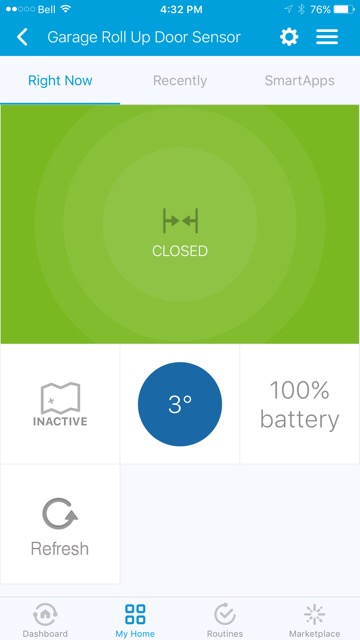
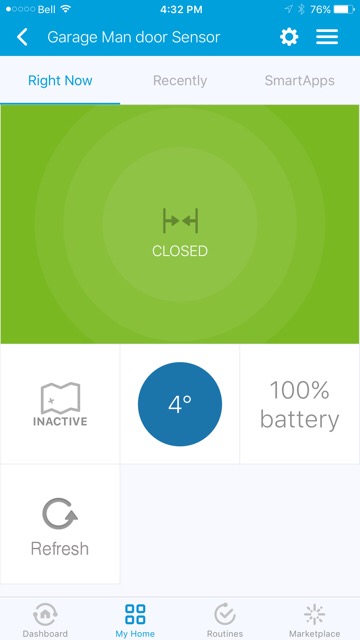
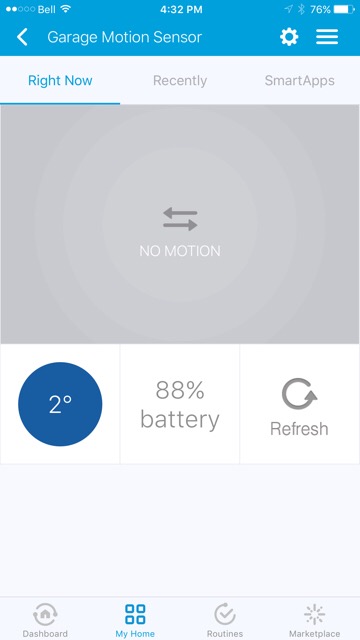
Johnnie was asking about stats that can maintain temps below 45F, so I figured I'd post the temp output of the roll up door, motion, and man door sensors. Using the same relay (LFM-20) these sensors could manage your garage at any temp you'd like, including below freezing if desired. A closed LFM-20 relay would call for heat if connected to your stat wires, and off, would stop the heater. Assuming you had a hub already, you're looking at $80 or so to create your own "wifi" stat that could be managed pretty much from anywhere, turn off with no motion detected over a period, and alert you of just about anything. I'm going to wire this up and see how it works. I have left my shop furnace on more than a few times, so this way I could shut it off remotely. Normally I turn the furnace completely off via the breaker as the old stat won't let me set the temp as low as I'd like it.

Perhaps the next trending thermostat won't be a thermostat at all??

stemp1.jpg


stemp2.jpg


stemp3.jpg
 
Last edited:

JohnnieMo

Well-known member
Joined
Nov 25, 2014
Messages
1,175
Location
Calgary, Alberta
This is very cool. I already ordered a cheap digital thermostat, but now I want to do this :)

Would there be a way to install these in my boat engine compartment to prevent the block from freezing in the spring and fall seasons? This would extend boating season by up to 6 to 8 weeks :)
 
OP
D

Denwood

Well-known member
Joined
Sep 22, 2014
Messages
4,185
Location
Thunder Bay, Ontario, Canada
Scottish, thanks for the kind words :)

Johnnie, for sure you could. The sensor can be used to trigger a zwave switch or relay etc. I'm setting one up to run the car block heaters so outside temp and time can be used to hold the heaters off when not needed. Most automation hubs don't need an outside sensor at all..they can read weather using the local forecast...but a sensor in the engine compartment would be most accurate.
 
Last edited:

bj383ss

Well-known member
Joined
Sep 29, 2011
Messages
3,166
Location
TX
Dennis,

Everything you are doing is very inspirational. I would love to wire my garage up with everything you are doing. Maybe someday I will get to it.

Bret
 
OP
D

Denwood

Well-known member
Joined
Sep 22, 2014
Messages
4,185
Location
Thunder Bay, Ontario, Canada
Thanks Bret. I'll be leaning heavily on your dust collection posts in about a month, so right back at you :)

For anyone looking to replicate the door opener tweaks, there's a great little free app (written by a user, like most of them!) that really adds some intelligence to the system. This basically syncs the smarthphone app with the door if you manually open/close it, and adds a lot of intelligence to the system so that SmartThings treats the garage door like a switch. In other words, if the door reversed for some reason, the app will figure this out. Additionally, you can "arm" the system when it detects your smartphone has left your property (the GPS based geofencing works in a ~500ft radius) and have it toggle the momentary relay..but only if it detects that the door is actually open. This is good...a highly recommended tweak if you go this route.

st_garagedevice.jpg
 
Last edited:

JohnnieMo

Well-known member
Joined
Nov 25, 2014
Messages
1,175
Location
Calgary, Alberta
Re: Woody's Works Garage - rebirth!

Okay I fully get it now. These Smart Things are really.... Smart..... Things!

For anyone who is lost just read this:

Smart Things are a network of sensors which talk to each wirelessly. Each sensor has a different function but they could turn things on or off, detect motion, detect water, sample temperature etc. You can then view or adjust all these sensors from your phone.

The thing I didn't realize at first was in that they are 120V compatible (and beyond). They are so heavy duty I could even run my (future) 4 post lift with one! (Although that seems dangerous)

I will definitely be buying some of these. The boat 'block heater' is just one idea.

Thanks for the evaluation. Took me a while but I get it now.

Sent from my BlackBerry Priv
 
OP
D

Denwood

Well-known member
Joined
Sep 22, 2014
Messages
4,185
Location
Thunder Bay, Ontario, Canada
Sorry Johnnie...I never did really describe the system did I? "Home" automation basically boils down to a hub, and connected peripherals. The hub is a hardware device that you plug into your home network. You connect to it using a web browser, smartphone app, or computer software. The hub is where you define your rules. Example: If temp sensor1 falls below 0 degrees, then turn switch A on. When you add a new device, you join it to the hub.

The devices I'm using use "ZigBee", or "Zwave" encrypted wireless communication to communicate with the hub. As you add devices to your hub, they form a mesh network, like your own internet, which relays data around the private network to extend its range.

You can purchase quite a few devices with these ZigBee or Zwave radio chips onboard. Decora switches, receptacles, dead bolt locks, motion sensors etc. Using your hub, you can create rules that control how these devices behave. At the office, if we arm the security system, the Ecobee thermostats are switched to "Away" mode using a rule on that hub.

SmartThings is one of the newer players in the market, recently purchased by Samsung. They have become popular due to the fairly simple interface and the fact that their hub is inexpensive ($100) with both ZigBee and Zwave radios onboard. Control4 (ZigBee), Vera (Zwave) and HomeSeer(Zwave) are other more popular players in this market.. All of them use a hub, but of these options, only Smarthings and Wink have multiple radios. Vera is about to start shipping their first multiple radio product. Cree, GE, and Philips have all introduced LED bulbs under $20 with ZigBee chips onboard, so you screw them in, join to your hub...and start automating them quite easily.
 
Last edited:
OP
D

Denwood

Well-known member
Joined
Sep 22, 2014
Messages
4,185
Location
Thunder Bay, Ontario, Canada
In setting up lighting automation in the house and shop, I set up a cool little app "AutoDimmer" on our SmartThings Hub. The "Smart Weather Tile" device (free) looks up light level (LUX) readings (outside) from a local Weather Underground weather station.

Basically our house lights now dim in proportion to how bright it is outside.

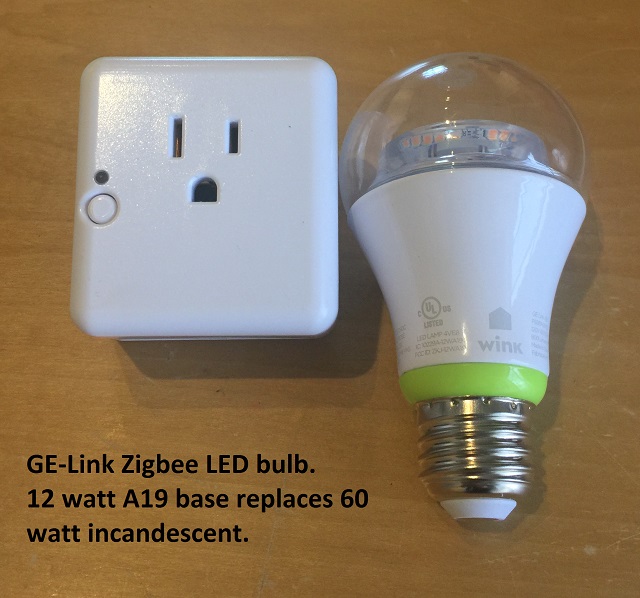
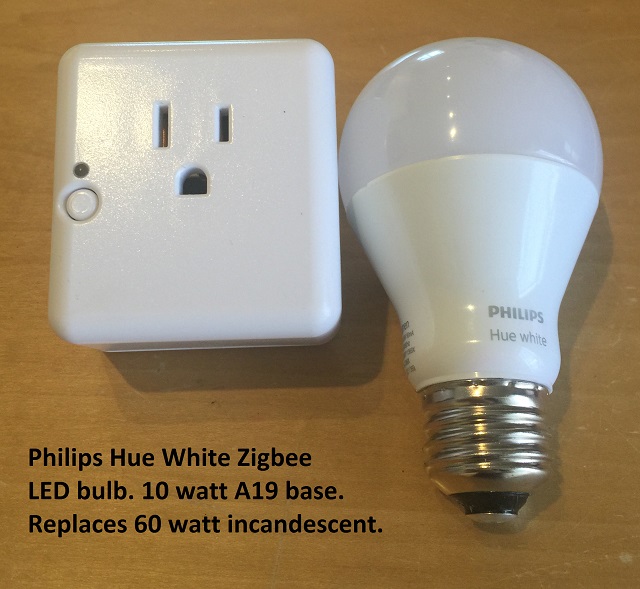
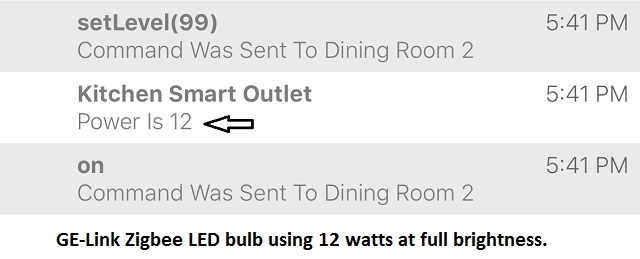
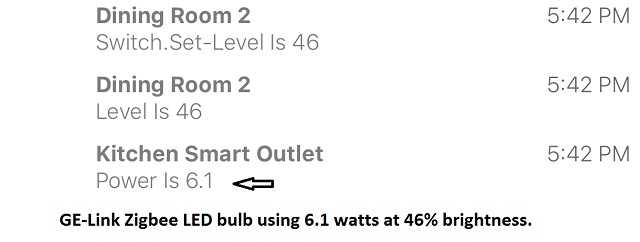
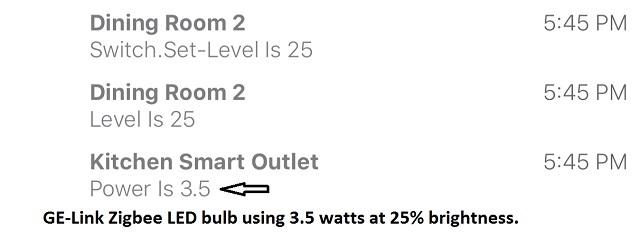
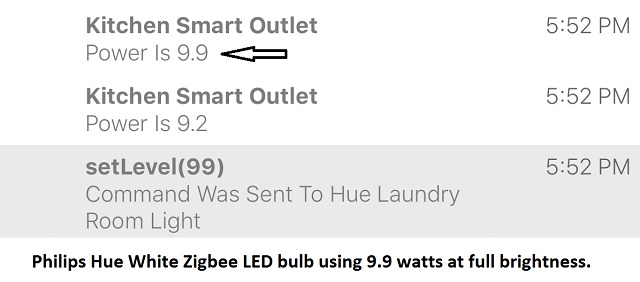
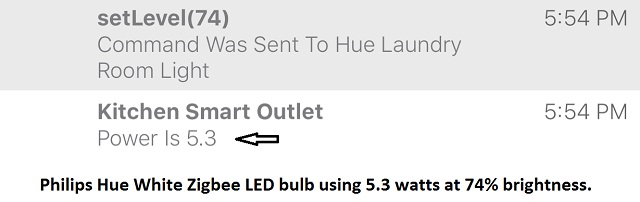
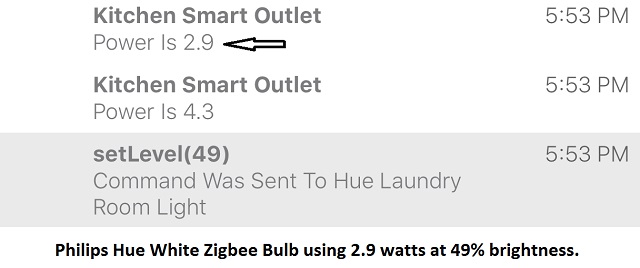
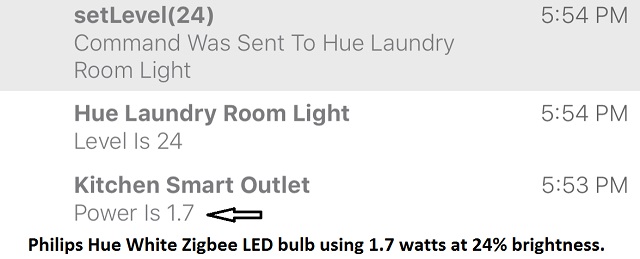
If you've been following this thread, you know I've been on a power saving kick for a few months now. The question (I could not find an answer to using Google) was how efficient is the built-in dimming functions of these LED bulbs. Each bulb has it's own Zigbee radio and therefore can be automated on/off and dimmed. Turns out they are very efficient..and dimming during daylight in our case will save another 80% of power during brighter days. The kitchen and dining area use 7 LED downlights, and 3 GE-link LED, so the power savings in just this area are significant...and the two apps are free.

These bulbs tend to run quite hot at full brightness (particularly the GE-Link) but at 80% brightness run only warm to the touch. So running then only as bright as required will almost certainly extend their life.

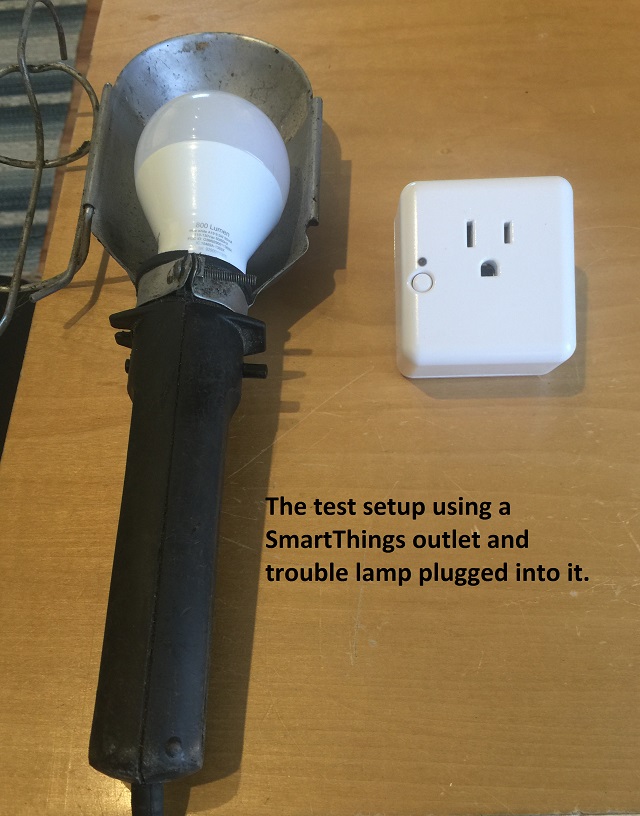
Because the SmartThings Zigbee controlled wall plug reports power use in the iPhone app, I just used that to read power as I set the bulbs at various brightness levels. The bulbs were removed and installed in my shop trouble light, plugged into the SmartThings outlet, for testing.

led_testsetup.jpg


These LED bulbs once screwed into a regular light socket, become automation friendly, as long as you leave the switch on. They turn on normally using the existing wall switch, so pass the wife test too. My kids of course leave switches on all over the place, but the motion sensors and automation hub turn them off at whatever one decides to program them at. When we leave the house for example, all lights turn off, regardless if any were left on at the switch. The "Auto Dimmer" smart app I'm using is free, and essentially works like a whole house dimmer, that varies with outside light levels.

At night, only select LED lights fire up, dimmed to 10% as you move through the home, turning off a few minutes if no motion is detected.

led_gelinkbulb.jpg


led_huebulb.jpg


GE-link at full bright:
dim_gelink1.jpg


GE-Link at 50% brightness:
dim_gelink2.jpg


GE-Link at 25% brightness:
dim_gelink3.jpg


Philps Hue White at full brightness:
dim_hue1.jpg


Philps Hue White at 75% brightness:
dim_hue4.jpg


Philps Hue White at 50% brightness:
dim_hue2.jpg


Philps Hue White at 25% brightness:
dim_hue3.jpg
 
Last edited:

sublime68charger

Well-known member
Joined
Sep 9, 2014
Messages
5,415
Location
SW Wisconsin
Nice work!

Let me know when the automated car repair system goes in!

At this rate you'll have that in a year or so!

This place has come a long way that is for sure!
 
OP
D

Denwood

Well-known member
Joined
Sep 22, 2014
Messages
4,185
Location
Thunder Bay, Ontario, Canada
Thanks Sub. You'll like the next post on Zwave deadbolts...ha :) These have rated the highest in terms of wife/kids approval. I've done very little actual work in the shop this winter, but that will change very soon.

We cut about 25% from our gas and 18% from our electricity usage at the business so far with this focus on efficiency. It will be interesting to see how this all plays out on the home budget.
 

1/2 Cup

Member Emeritus
Joined
Apr 28, 2012
Messages
19,283
Location
Shepparton. Victoria. Australia
Thanks Sub. You'll like the next post on Zwave deadbolts...ha :) These have rated the highest in terms of wife/kids approval. I've done very little actual work in the shop this winter, but that will change very soon.

We cut about 25% from our gas and 18% from our electricity usage at the business so far with this focus on efficiency. It will be interesting to see how this all plays out on the home budget.

Top effort on the efficiencies you have made. Dennis.:thumbup:

Regards
 

HCNDM

Well-known member
Joined
Oct 20, 2015
Messages
682
Location
Netherlands (tiny little country in western Europe
Hi Dennis,

Great! I Just started On the downstairs renovation and this seals the deal with regards to automation.

Gonna go back and read about the smart hubs and choices you made.

I'll probably go with the Phillips hue bulbs as they are readily available here.

The one thing I still need to make a choice on is thermostat.

Currently I have a web enabled unit. But other than being able to use smartphones as a remote and set up a fixed schedule there is little intelligence.

Requirements for the thermostat are 1) good design as its in view in the middle of the living room 2) open therm euro standard so it speaks well with the gas heater. 3) simple and intuitive to use so the missus never says stupid device.

I have been considering a nest because of point three.

Here too I need to go a read your post on thermostats!

Thank you for getting me off my a.. And getting me to start on energy saving and automation!

P.s the points mentioned for the thermostat come after intelligence and staving cApabilities


Sent from my iPhone using Tapatalk
 
Last edited:
OP
D

Denwood

Well-known member
Joined
Sep 22, 2014
Messages
4,185
Location
Thunder Bay, Ontario, Canada
HC, the Philips Hue bulbs are a good choice as once you purchase the Hue bridge (if all you want to do is manage lights, this is all you need) the Hue White bulbs are the least expensive of them all. They run cooler too.

For a hub on the consumer side, SmartThings is what you likely want. Basic lighting automations on the SmartThings V2 hub run locally (on the hub itself), and have a battery backup in the hub. The Vera Edge is more reliable, processes 100% locally, but will take longer to get set up. If you have a larger budget, Control4 sits at the top of the heap, but they have no DIY options. Either way, ZigBee and Zwave is a standard, so switching hubs in the future should not require replacing any automation devices.

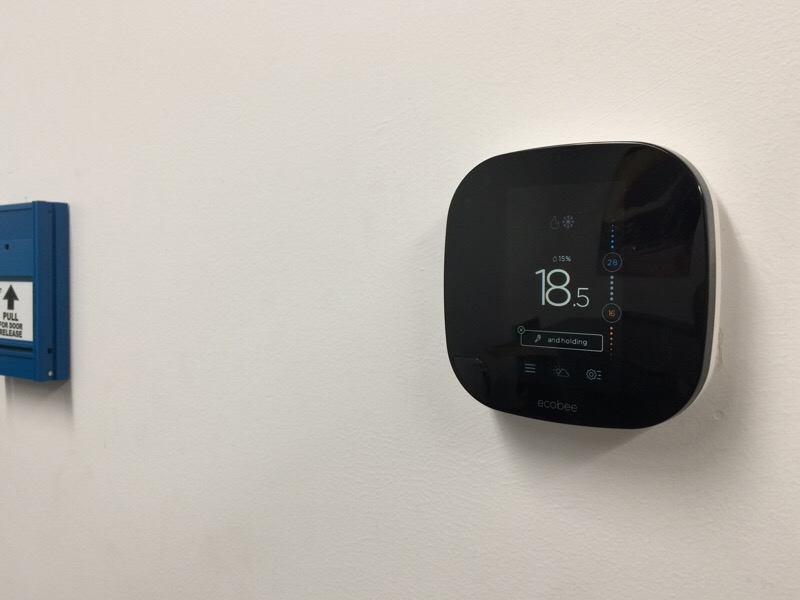
I wrote a review in the HVAC section on the nine Ecobee 3 stats we installed at the office. They are the clear choice based on my research and now having 9 of them in service. Because you can add up to 32 remote temp/occupancy sensors to the Ecobee 3, you can use these to manage your HVAC system completely and reliably separate from automation. That said, I use the Ecobee temperature sensors to drive automation events on the Vera hub, and use the Vera hub to trigger Away/Home mode changes on the Ecobee stats when the various security zones are Armed/Disarmed. This works great, but if the automation system is removed, HVAC still works efficiently. The combination of remote sensors and data logging is pretty much responsible for the 25% drop in gas use as we dropped temps in various zones, and used more aggressive setbacks for times with no occupancy. We're in a cold climate, so these changes are low hanging fruit in the efficiency game.

They are actually pretty small (3.9"x3.9") and sit out about 1" from the wall.

ecobee1.jpg


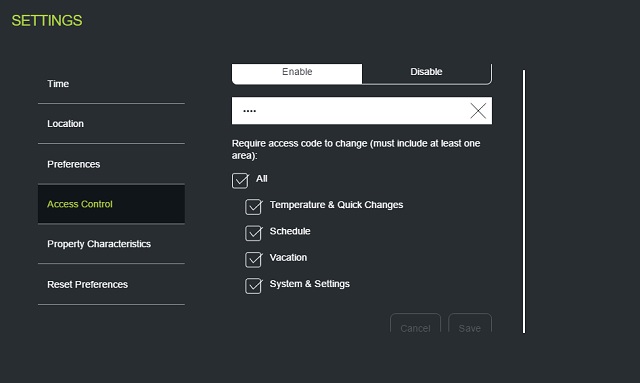
Programmed correctly, the user interface is absolutely "wife friendly", and if you program temp limits etc., they become even child proof. Once you set cool and heat temp limits (this limits the adjustment range on the stat) and set access control, pictured below, you can restrict some or all of the adjustments on the stat itself, bypassed with a code. The web interface remains open for administration once you log in.

ecobeelockdown.jpg
 
Last edited:

drivesitfar

Well-known member
Joined
Oct 23, 2013
Messages
36,007
Location
Pacific Northwest
Woody: i'm enjoying all the posts you've been making on all this high tech stuff and i'm hoping to sit down and really soak it in some day. thanks for sharing and keep up the great thinking and work.

i'm thinking maybe your weather is finally up over the freezing temps and snow is almost gone, but Sub is mentioning it's still cold in Wisconsin so maybe you still have some snow or cold weather.

it's been about 80 the last few days here which is really about 20 degrees warmer than usual and I went out last night without my sweat shirt or coat and when it dipped down to 50's I wish I had it. I don't know how you survive that cold weather for so long, but your smile and lifestyle seem to enjoy it.

cheers and you can find me watching the Masters from noon to 4PM today while Jordan the 22 year old Wonderkid shows the world what he's made of while he wins again. :beer:
 

HCNDM

Well-known member
Joined
Oct 20, 2015
Messages
682
Location
Netherlands (tiny little country in western Europe
HC, the Philips Hue bulbs are a good choice as once you purchase the Hue bridge (if all you want to do is manage lights, this is all you need) the Hue White bulbs are the least expensive of them all. They run cooler too.

For a hub on the consumer side, SmartThings is what you likely want. Basic lighting automations on the SmartThings V2 hub run locally (on the hub itself), and have a battery backup in the hub. The Vera Edge is more reliable, processes 100% locally, but will take longer to get set up. If you have a larger budget, Control4 sits at the top of the heap, but they have no DIY options. Either way, ZigBee and Zwave is a standard, so switching hubs in the future should not require replacing any automation devices.

I wrote a review in the HVAC section on the nine Ecobee 3 stats we installed at the office. They are the clear choice based on my research and now having 9 of them in service. Because you can add up to 32 remote temp/occupancy sensors to the Ecobee 3, you can use these to manage your HVAC system completely and reliably separate from automation. That said, I use the Ecobee temperature sensors to drive automation events on the Vera hub, and use the Vera hub to trigger Away/Home mode changes on the Ecobee stats when the various security zones are Armed/Disarmed. This works great, but if the automation system is removed, HVAC still works efficiently. The combination of remote sensors and data logging is pretty much responsible for the 25% drop in gas use as we dropped temps in various zones, and used more aggressive setbacks for times with no occupancy. We're in a cold climate, so these changes are low hanging fruit in the efficiency game.

They are actually pretty small (3.9"x3.9") and sit out about 1" from the wall.

ecobee1.jpg


Programmed correctly, the user interface is absolutely "wife friendly", and if you program temp limits etc., they become even child proof. Once you set cool and heat temp limits (this limits the adjustment range on the stat) and set access control, pictured below, you can restrict some or all of the adjustments on the stat itself, bypassed with a code. The web interface remains open for administration once you log in.

ecobeelockdown.jpg


Hi Dennis,

I was sold on the ecobee when you did your original post on them. They are not currently sold in holland and I am not sure I am willing to go the eBay route. Replacing the unit quickly if it ever fails is important. This is the primary reason I was considering the nest three at this stage. I realize it doesn't tie in to other home automation very nicely.

Both the Vera and smart things are available. The Vera instantly feels like the more suitable product for my now and future needs.

Kr,

Niels
 
OP
D

Denwood

Well-known member
Joined
Sep 22, 2014
Messages
4,185
Location
Thunder Bay, Ontario, Canada
Drive, it's more like Christmas out there tonight. Snow and temps right around freezing. Just came back from an evening walk with my daughter...quiet and peaceful out there! It sounds like golf and warm temps have you in a very relaxed place indeed. The Green jacket seems to be circulating amongst the young fellows of late.

Niels, Holland..I'd agree on going with what is supported locally. The Phillips bulbs and ZigBee are not directly supported on Vera, however the Philips Hue bridge is. This just means you'll need to add a Hue bridge (about $50) to your setup. Then you'll be able to manage the Hue bulbs from Vera. You'll want to read up on PLEG which is a Vera plugin allowing enhanced IF/AND/OR logic and scheduling to your automations. Nest looks to be well supported on Vera as well with a free plugin.
 
Last edited:

HCNDM

Well-known member
Joined
Oct 20, 2015
Messages
682
Location
Netherlands (tiny little country in western Europe
Drive, it's more like Christmas out there tonight. Snow and temps right around freezing. Just came back from an evening walk with my daughter...quiet and peaceful out there! It sounds like golf and warm temps have you in a very relaxed place indeed. The Green jacket seems to be circulating amongst the young fellows of late.

Niels, Holland..I'd agree on going with what is supported locally. The Phillips bulbs and ZigBee are not directly supported on Vera, however the Philips Hue bridge is. This just means you'll need to add a Hue bridge (about $50) to your setup. Then you'll be able to manage the Hue bulbs from Vera. You'll want to read up on PLEG which is a Vera plugin allowing enhanced IF/AND/OR logic and scheduling to your automations. Nest looks to be well supported on Vera as well with a free plugin.


Hi Dennis,

Thanks again. I think that's the route. Vera + hue bridge + nest. Will do some reading up on all the possible add ons for the Vera.
 
OP
D

Denwood

Well-known member
Joined
Sep 22, 2014
Messages
4,185
Location
Thunder Bay, Ontario, Canada
Niels, as long as you're ok with some copy/paste coding, the Vera will be great :)

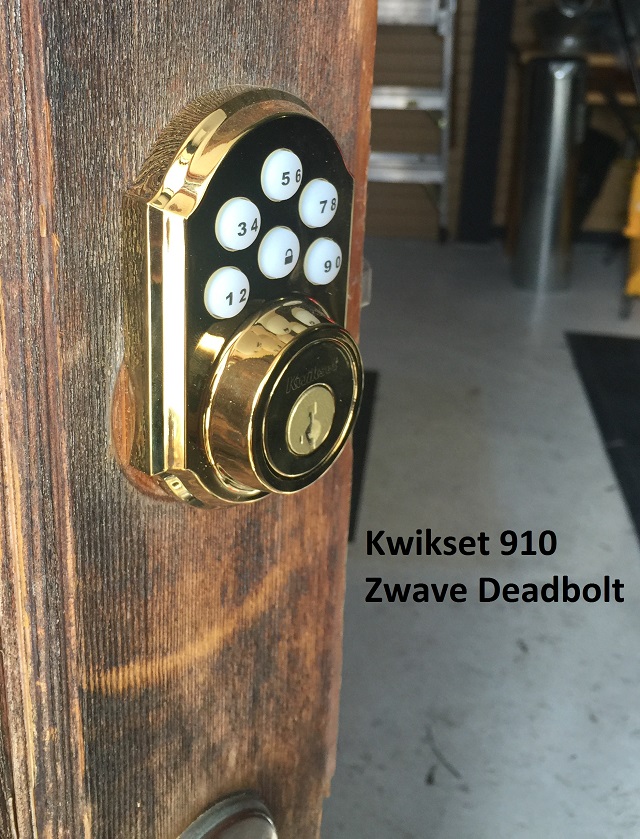
Easily one of the best updates to date in terms of wife/kid approval has been these Kwikset 910 Zwave motorized dead bolts. You can program up to 30 codes on each (although only two if you don't use an automation hub), and if you have existing "Smart Key" locks (we have Weiser locks which support SmartKey) then you can key everything the same.

These locks have a tapered dead bolt which helps **** the door in snug to weather strip when closed. I found that it's very important to proper operation to make sure the dead bolt can be closed easily by hand. Everything needs to be lined up correctly with respect to your jam.

They take 4 AA batteries..and given the shop unit in particular will see cold temps, I opted for these lithium versions instead of the rechargeables we typically use:

10VY14_AS02.JPG


After trying a few options to manage the locks using the SmartThings hub (you do everything from your smartphone), I ended up purchasing this Lock Code manager app. This app allows all sorts of options, like "burn after use" and scheduled codes (code only works at certain times). It even retracts the dead bolt if someone has opened the door and extended the dead bolt to prevent damage to your frame. If you have contact sensors on your doors, the app can also detect once the door is closed, and lock it for you. This scared the jeeps out of a Mom dropping her daughter off for a play date (the lock motor is loud)..but it can keep things more secure if your area dictates this. It's also a nice hand's free option.

The wife and kids love not using keys, although they can be used for backup. Doors left open are pretty much a thing of the past, as our "Goodbye" routine automatically locks everything down. You can also set up quite a few notifications so for example particular unlock codes can trigger notifications to your phone. A successful code entry can also disarm the security system if you program the app that way. These locks don't re-transmit other Zwave device signals, so if you're shop is detached, you may require a wired in Zwave device to make sure your hub can communicate with the lock. Fortunately, the garage door opener "hack" uses an LFM-20 relay, which is wired in and therefore serves as a Zwave repeater close to the lock.

garage_st9.jpg


Aside from the automation perks using a hub like SmartThings, you can of course open the locks remotely. This is handy if you're like me and have folks stopping by to borrow or return tools every now and then.

kwik910.jpg


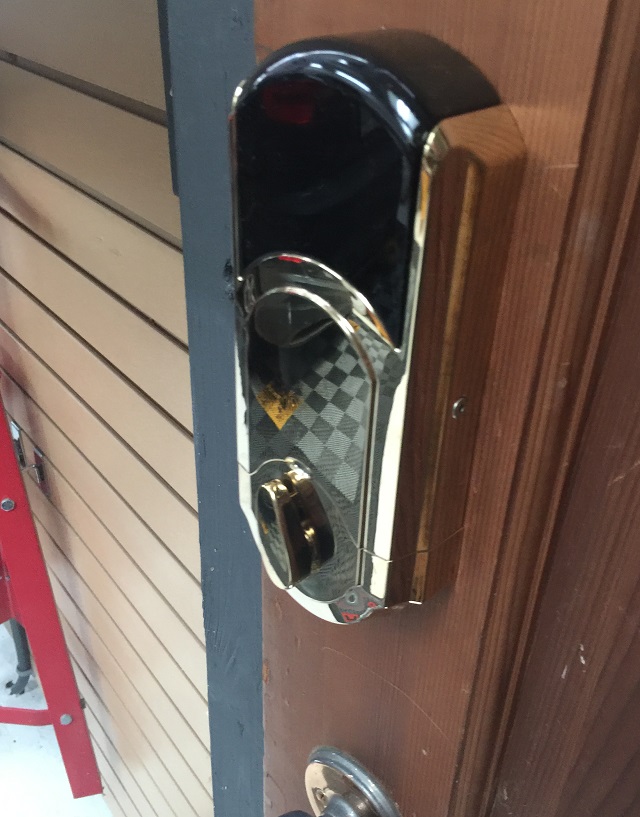
The batteries fit into a sled, which is slid into the top of this housing. If you're replacing existing dead bolts, installation is pretty straightforward..about 20-30 minutes.

kwik910_2.jpg
 
Last edited:

rvieceli

Well-known member
Joined
Nov 3, 2013
Messages
775
Location
Illinois
Dennis - Do each of these automation pieces need to have access to the home wifi network to work? Assuming they do..

thanks
ron
 
To avoid these ads, REGISTER NOW!
Top Bottom