To avoid these ads, REGISTER NOW!

Starlink mounting options - Let's see yours

ScaldedDog

Well-known member
Joined
Jan 15, 2008
Messages
1,065
Location
Sedalia, CO/NSB, FL
Thinking about replacing our WISP service with Starlink. The hardest part, of course, is figuring out where and how to mount it, power it, protect against lightning, etc. I found a few pics around the forum, but let's see how you did it. I need some ideas.

Mark
 
To avoid these ads, REGISTER NOW!

kbuhagiar

Well-known member
Joined
Dec 27, 2005
Messages
1,736
Location
Escondido, CA
I'm considering Starlink to replace my existing T-Mobile internet service.
What are typical Starlink up/download speeds, and is latency a problem? Is it affected by the weather?
 

Buckgnarly

Well-known member
Joined
Oct 8, 2010
Messages
7,651
Location
VT
I have Residential Light we see at worst 50MPS, but average well over 100. Latency is like 19 milliseconds. Weather has not ever been an issue.

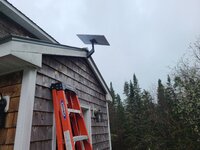
We have ours on the peak of our mud room door.
 

Attachments

  • 20250426_150224.jpg
    20250426_150224.jpg
    705.9 KB · Views: 75
  • 20250426_150244.jpg
    20250426_150244.jpg
    1.2 MB · Views: 64
  • 20250427_144911.jpg
    20250427_144911.jpg
    1.5 MB · Views: 67

TurnipTruck

Well-known member
Joined
Aug 28, 2005
Messages
1,552
Location
Southcentral Alaska
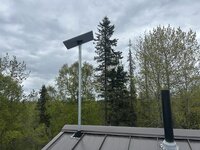
Years ago, I didn’t want to screw a TV antenna stand to my brand new metal roof so I instead drilled a big hole and stuck a 1-1/2” galvanized pole through it bolted to the inside of the attic gable wall. This Spring I tossed the OTA antenna and stuck the starlink to the pole, with the cable running down inside.
IMG_5702.jpeg
 

Hank11

Well-known member
Joined
Aug 19, 2019
Messages
1,139
Location
Tennessee
I don’t think there’s any big trick to mounting a Starlink receiver. When you set it up, it gives you a chance to determine if there’s any obstruction to its view of the sky. Mine is mounted on one of those L shape pipe mounts about halfway up a gable end of the house, just peeking out around the top of the roof.

I started as a beta user in the very beginning and still have the old equipment. It works really well, perhaps only losing signal in a very strong thunderstorm. That outage might last for just a few minutes. It’s very rare though. It’s fast enough for two people to work on video conferences at the same time. That’s about the hardest test we put to it here.
 

Snakecharmer383

Well-known member
Joined
Sep 2, 2022
Messages
179
I've looked at it but the upfront cost scared me away. I have dish so removing that and mounting there would be nice but wife won't let me cut the cord. I usually have about 5-7 devices running off our Verizon and it slows at times but I pay $45 month.
 

gmcgeo

Well-known member
Joined
Mar 11, 2019
Messages
3,701
I've looked at it but the upfront cost scared me away. I have dish so removing that and mounting there would be nice but wife won't let me cut the cord. I usually have about 5-7 devices running off our Verizon and it slows at times but I pay $45 month.
I thought the same, upfront was high. But worth the speeds i get.

In my area, we have Brightspeed. ITS AWFUL getting 10 up and 7 down.

Im now in the 200s.
 

Sumboodie

Well-known member
Joined
Mar 20, 2021
Messages
10,660
Location
AK
I looked into it, but it's $120+ a month and many complaints locally that it's very slow.

My cell based setup (ATT Internet Air) is about $50 and was fine till something happened with the cell network this winter. Now neither my internet or phone work worth a darn. Can barely load email or order parts at times, never mind load a podcast or a movie.

It's often like around 2-3 mbps down and under 1 up.

I don't need 16 gazillion speed or whatever, but good enough I'm not stuck with it loading even doing simple stuff, like looking on forums even.
 
OP
S

ScaldedDog

Well-known member
Joined
Jan 15, 2008
Messages
1,065
Location
Sedalia, CO/NSB, FL
I looked into it, but it's $120+ a month and many complaints locally that it's very slow.
Where are you?

We pay $129/month for 60Mbps/25Mbps through our WISP, but they are having reliability issues. They have no intention of upgrading the tower that serves us and, frankly, they'd just as soon we go away.

Mark
 

Sumboodie

Well-known member
Joined
Mar 20, 2021
Messages
10,660
Location
AK
Where are you?

We pay $129/month for 60Mbps/25Mbps through our WISP, but they are having reliability issues. They have no intention of upgrading the tower that serves us and, frankly, they'd just as soon we go away.

Mark
Not sure what WISP is, but they said it's due to network overcrowding. Even though right now the Starnet has a sale where the dish is free.
 
OP
S

ScaldedDog

Well-known member
Joined
Jan 15, 2008
Messages
1,065
Location
Sedalia, CO/NSB, FL
Not sure what WISP is, but they said it's due to network overcrowding. Even though right now the Starnet has a sale where the dish is free.
Sorry. Wireless ISP. Also known as fixed wireless providers, they are common in rural areas, and do a pretty good job if you have line of site to one of their towers. There are at least three that service our area, but I only have line of site to one, and that to a tower they no longer want. If you can hook up with one who's upgraded their tower recently, you can get 300-500Mbs for less than $100/month. Alas, I cannot.

Mark
 

58Yeoman

Well-known member
Joined
Oct 1, 2010
Messages
8,999
Location
Central IL
I've got the equipment here, but it's not set up yet. The installer never showed up yesterday, and they told me they are looking for someone to do it. We have Brightspeed, which is a misnomer, and our speed is usually 50 to 55 down and about 5 up...when it's running. the whole area was out for about 4 or 5 days and that's why we're switching to Starlink.
 

Sumboodie

Well-known member
Joined
Mar 20, 2021
Messages
10,660
Location
AK
Sorry. Wireless ISP. Also known as fixed wireless providers, they are common in rural areas, and do a pretty good job if you have line of site to one of their towers. There are at least three that service our area, but I only have line of site to one, and that to a tower they no longer want. If you can hook up with one who's upgraded their tower recently, you can get 300-500Mbs for less than $100/month. Alas, I cannot.

Mark
I'd be happy with 10% of those speeds even.... it'd be 10x faster than now.

The DSL was about that for speed (10 mbps) and worked fine, but was almost $1500 a year vs $640 I'm paying for the AT&T. I think it's WISP? I have a box that gets the cell signal that then goes to the wifi box.

The most usage it sees is a movie here or there or YouTube and 2 outside cameras and a doorbell. Mostly just records moose though.

The internet issue is also the same issue on my phone, so it's something with the towers. I had no issues for ~2 years, it started this winter.
Lot of times I can't even make calls.
Have 3 towers within 2 miles and several not much further. I can even see 2 from my place.
 
Last edited:

SouthernIllinois

Well-known member
Joined
Jan 14, 2024
Messages
1,657
Love it!
18 months now - not so much as a hiccup.
Stream two TVs, two laptops simultaneously without an issue.
 

Attachments

  • IMG_7976.jpeg
    IMG_7976.jpeg
    493.8 KB · Views: 54

petebob

Well-known member
Joined
Nov 13, 2008
Messages
73
Location
Graham, NC
20250710_192925.jpg

We live in central NC and used a wisp service (Nomad - awful!) Until I could get starlink. It was reliable, unless it was raining heavily, and worked great for a couple of years until we were able to get fiber installed. I think we typically got 30-50 down and a bit less up. I still have the equipment and won't use it again. If you're interested, send me a PM.
 

Natty Bumppo

Well-known member
Joined
Dec 8, 2019
Messages
368
Location
Savoy, MA
I repurposed a DirecTV mount to install my Starlink. We have few options for internet in the Berkshires where I live. Previously the best I could do was about 12 download. Went with Starlink 2 years ago and now get around 100 to 150 download. A very heavy thunderstorm or a heavy snow squall can knock it out as it passes through...but otherwise no issues. We can do several TV's, phones, and my kid on Call of Duty at the same time with lag.


IMG_5540.jpg
 

Innovate1

Well-known member
Joined
Jul 28, 2014
Messages
4,279
Location
Illinois near St. Louis, Missouri
I mounted ours near the peak of the roof - we have some good sized trees fairly close that were close to the needed sky view near the horizon so wanted it as high as practical. It worked well but as soon as Spectrum put in lines we went with them - lower initial and ongoing cost. For lightening protection I suggest wifi or wired connection with optical fiber converters to eliminate any conductive connection to the rest of the network so if it does fry the starlink at least it doesn't kill other network stuff. As far as slowdowns I think they are often caused by overloaded systems. For years we had DSL as that was our only option (other than traditional satellite) and it worked fine at 6 Mbps for our use - max we could get at our location but we could stream one movie and do other stuff. But toward the end we were getting much less than that which I am thinking was due to system overloading.
 

CraigStu

Well-known member
Joined
May 22, 2014
Messages
4,013
Location
Blacksburg, Va
I installed Starlink 3 weeks ago. Our Viasat satellite internet was $197/month. Starlink is $120. We also have satellite DirectTV. Last week we had a storm and the TV signal was out for about an hour. We had previously gotten a Firestick to experiment w/ Prime etc. So TV is out, I thought, how about Prime which is coming through the Starlink? BINGO Prime worked just fine. My feeling is that old school satellite has your antennae looking at just their single satellite while Starlink is connecting to many satellites at the same time. So it is much less susceptible to weather. BTW, while I haven't bothered to check internet speeds, they are obviously much faster. FoxNews is my home page. It is a very picture and video heavy page. It now loads so fast I can't get to the X fast enough to stop it loading when I want to go to something else. I am on the desktop and wife on her tablet often at the same time. Used to be that, if she was watching a youtube video, I could feel it slow me down. No more. We are thrilled w/ Starlink.
 
To avoid these ads, REGISTER NOW!

Jackfre

Well-known member
Joined
Dec 26, 2010
Messages
4,406
Location
N CA
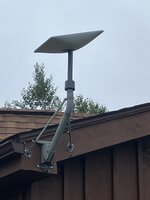
On mine I adapted off the old dish mount. This pictured was a mast I welded up for a friends a few years back.
 

Attachments

  • IMG_3826.jpeg
    IMG_3826.jpeg
    711.8 KB · Views: 41
  • IMG_3823.jpeg
    IMG_3823.jpeg
    1.6 MB · Views: 33

CraigStu

Well-known member
Joined
May 22, 2014
Messages
4,013
Location
Blacksburg, Va
I don't like heights much so wanted a way to install a pipe on the gable side vs roof. I had a 3-4 year old 8ft stick of aluminum 1" square w/ 1/8" walls. So I welded up some Vees. Inside the gable truss had 2x4 verticals 24" apart at the center so I made the Vees so the feet screw tabs had holes 24" apart. Screwed through the siding w/ 5/16" x 4" GRK construction screws. 3" would have worked fine. I bought a 10ft piece of 1.5" chain link fence pipe. Ended up cutting maybe 15" off of that. BTW the pole adapter uses two long maybe 5/16" screws to tighten the pipe into a 2.5 in recess. It would be better I think to use a 2-2.5" pipe but larger seemed to weigh a lot to me. If I did another I'd use 2.5" aluminum at least 1/8" wall.
20250712_122325.jpg
 

dcg9381

Well-known member
Joined
Jun 20, 2018
Messages
11,627
Location
Austin, TX
BTW someone mentioned lightening protection. Do you run a ground wire from the mount to the ground or...?
Direct strike won't matter. Even nearby strike probably won't matter either. Cat5/6 loves induction... You can get grounded Cat5/6.
 
OP
S

ScaldedDog

Well-known member
Joined
Jan 15, 2008
Messages
1,065
Location
Sedalia, CO/NSB, FL
BTW someone mentioned lightening protection. Do you run a ground wire from the mount to the ground or...?

Direct strike won't matter. Even nearby strike probably won't matter either. Cat5/6 loves induction... You can get grounded Cat5/6.

I should have asked my original question better, as I was also looking for cable routing options, lightning protection, etc.

I'm planning to get the wire into the house the same way a couple of existing ones are done:

20250714_200720.jpg

The existing surge protectors are for a Ubiquiti bridge node and my ISP's antenna, but both work the same way: The shielded CAT6 wire comes in from the device, and a separate CAT6 wire is routed from the surge protector into the house where it runs through the crawl space and then is terminated at a patch panel in the utility room. The shielding on both wires is connected to a ground rod driven into the ground below. The shielding is not grounded inside the patch panel. I'm planning to just add a third surge protector to this wall. (Pay no attention to the unused loop on the right. It's from something the previous home owner had.)

In the utility room, I'll plug the Starlink "router" (really just a glorified PoE injector in my use case) into its own outlet on the APC UPS. I might put a copper-to-fiber media converter between the Starlink router and my real router, but I'm not sure if that's worth the effort. Thoughts?

Mark
 

csp

Well-known member
Joined
Mar 23, 2010
Messages
5,719
Location
Franktown, CO
Ours is Gen 3 mounted to a former dish network mount. I bought a pole mount adapter off of Amazon.

Seems that the costs vary by region and demand in that region. We give $120/month, but it's $30 in the little rural town my grandmother lived in.
 

Ole Slewfoot

Well-known member
Joined
Feb 22, 2016
Messages
5,098
Location
Freedom, CA
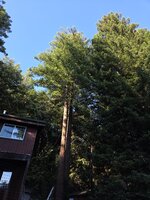
Its hard to see but the tree on the left is topped at maybe 90', creating a level 6" pad for the starlink. Open skies now.
 

Attachments

  • 1000003906.jpg
    1000003906.jpg
    1.1 MB · Views: 37

DeeDubz

Well-known member
Joined
Nov 20, 2019
Messages
1,430
Location
Socal
not to thread jack but how fast is your guys internet speed? Im interested in getting star link but im afraid it can't keep up with my DSL. I run a lot of stuff of the internet. Cameras, thermostat, garage door/gate, tvs ect....
 

NakeDiesel

Well-known member
Joined
Sep 6, 2007
Messages
2,729
Location
oklahoma
Just ran a speed test on mine, I'm at 188.5 Mbps down and 11.5 Mbps up. I'm in NE OK and the ground station I'm hitting is in Denver. I have no issues with viewing my camera's while away or adjusting thermostats, etc...
 

sjvicker

Well-known member
Joined
Aug 9, 2014
Messages
601
Location
SW Washington
not to thread jack but how fast is your guys internet speed? Im interested in getting star link but im afraid it can't keep up with my DSL. I run a lot of stuff of the internet. Cameras, thermostat, garage door/gate, tvs ect....
I’ve never had an issue with speed running those and with 2 of us on MS teams calls.

I think Starlink can be an issue for gamers
 

jmdirk

Well-known member
Joined
May 4, 2015
Messages
695
I'm considering Starlink to replace my existing T-Mobile internet service.
What are typical Starlink up/download speeds, and is latency a problem? Is it affected by the weather?

Really going to depend on where you are. If you go to their website, they have a map with estimated download, upload and latency. I've seen people claiming upwards of 400 Mbps download. I'm in a pretty congested area and still get 50+ at minimum. More than enough for both the wife and I to work remotely, stream Netflix etc.

Yes, it can be affected by weather. But more resilient than say DirecTV or Dish. It's really only in very extreme weather that it has issues.


BTW someone mentioned lightening protection. Do you run a ground wire from the mount to the ground or...?

I have an Ethernet surge protector on mine. It won't protect the Starlink itself, but should help minimize damage in the house

I should have asked my original question better, as I was also looking for cable routing options, lightning protection, etc.

I'm planning to get the wire into the house the same way a couple of existing ones are done:

20250714_200720.jpg

The existing surge protectors are for a Ubiquiti bridge node and my ISP's antenna, but both work the same way: The shielded CAT6 wire comes in from the device, and a separate CAT6 wire is routed from the surge protector into the house where it runs through the crawl space and then is terminated at a patch panel in the utility room. The shielding on both wires is connected to a ground rod driven into the ground below. The shielding is not grounded inside the patch panel. I'm planning to just add a third surge protector to this wall. (Pay no attention to the unused loop on the right. It's from something the previous home owner had.)

In the utility room, I'll plug the Starlink "router" (really just a glorified PoE injector in my use case) into its own outlet on the APC UPS. I might put a copper-to-fiber media converter between the Starlink router and my real router, but I'm not sure if that's worth the effort. Thoughts?

Mark

Pretty sure I have that exact Ubiquiti surge protector on my Starlink Gen 1

not to thread jack but how fast is your guys internet speed? Im interested in getting star link but im afraid it can't keep up with my DSL. I run a lot of stuff of the internet. Cameras, thermostat, garage door/gate, tvs ect....

Reference this link for an expected speed in your area. I've got tons of smart devices, cameras etc. 2 of us working from home. Rarely an issue. There was a global outage last weekend (maybe the one before) but that's the first major issue we've had in quite some time. Might have been out 2 hours.


DeeDubz

Well-known member
Joined
Nov 20, 2019
Messages
1,430
Location
Socal
@jmdirk Thanks, Ill check it out. My home internet goes out about every month. It's pretty frustrating. A few of my friends have star link and they all love it.
 

58Yeoman

Well-known member
Joined
Oct 1, 2010
Messages
8,999
Location
Central IL
My Starlink is a bit slow today at 150 down, it's usually in the 200's at least. I've enclosed a pic of the mount I put on the roof, standard roof mount from Starlink. I have one very tall tree to the front of my house that blocks a bit of the dish, but it doesn't affect the operation much. My dsl was usually around 60 down.

We wanted to keep a landline and went with OOMA which uses the 'net. My landline number was ported today so I can cancel my phone company on Monday with their terrible internet service. No landline only service in my area other than VoiP. We paid about $200 total for the equipment and will only pay local and state taxes every month for the service (basic).Starlink mount.jpg
 

theoldwizard1

Well-known member
Joined
Feb 22, 2011
Messages
43,100
Location
SE MI
My cell based setup (ATT Internet Air) is about $50 and was fine till something happened with the cell network this winter. Now neither my internet or phone work worth a darn. Can barely load email or order parts at times, never mind load a podcast or a movie.
I am sure you have complained, but got no response ! (I hate AT&T ! I am surprised they are still in business after the U-Verse debacle and their attempt at cable TV !!!)

There are dozens of 4G (4G+/LTE) cellular modems for sale for very reasonable prices ($100 - $200?). If you get any kind of 4G signal at your location, they all should work.

Get cellular mode with 2 external antenna connections and mount a pair of antennas on top of a pole. Yagi style antennas are very directional, so make sure you are pointing at the nearest tower. If you are mounting a pair, twist one 90° from the other.

The biggest problem you will have is getting a SIM card. The only way I have found to do it is buy an old cheap cell phone. Register it with the carrier and then move the SIM card to the cellular modem. Some tweaking on the cellular modem may be required.
 

58Yeoman

Well-known member
Joined
Oct 1, 2010
Messages
8,999
Location
Central IL
Fixed it for you !

Opinion on OOMA ? (The adapter box is $100, plus about $7/mo service charge including 911.)
Yeah, that's it. I haven't had a chance to try it for real yet, but I did call my wife on it from my cell phone. Seemed to be a bit of a lag when talking. We wanted the 'landline' for when we're gone and one of our many doctors offices call and leaves a message, it's at home and hot bothering us when we're on the road. Plus we had just bought six Panasonic phones last year that are scattered around the various buildings at our place, and we can also use them for wireless intercoms.
 

theoldwizard1

Well-known member
Joined
Feb 22, 2011
Messages
43,100
Location
SE MI
We wanted the 'landline' for when we're gone and one of our many doctors offices call and leaves a message, it's at home and not bothering us when we're on the road. Plus we had just bought six Panasonic phones last year that are scattered around the various buildings at our place,
Same here !

I am using a Polycom Obi200 with Google Voice. FREE, but officially "unsupported" in 2024. No 911.
 
To avoid these ads, REGISTER NOW!
Top Bottom