To avoid these ads, REGISTER NOW!

Try my new easy cabinet designer

sansbury

Well-known member
Joined
Oct 7, 2023
Messages
105
(Apologies in advance if this is considered spam/too promotional/OT/etc)

Since finishing my very upgraded shop last year I’ve found myself building a steady number of basic cabinets, and while I like the process of building them, the design and drawing are tedious, especially if I take the time to do it right. As many in this forum are also occasional cabinet builders I thought this might be of interest

Anyway, after some committed effort I have a very “alpha” version of something I’ve wanted to build for 15 years running, and I’m starting to share it in some of the DIY communities I’m in to get feedback. Basically, if you need to build a single case piece like a bookshelf, chest of drawers, and so on, this will take your dimensions and interior configuration and spit out a PDF with everything you need worked out for you.


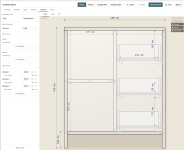
Here's a view showing a cabinet with a shelf and three drawers. This took about 30 seconds to input and the panels view shows every panel with cut dimensions , joinery placements, and drawer slide mounting holes, and the drawer boxes are included too. Basically every thing you need to go to the shop and start making sawdust.
1772984679360.png


Right now it’s in metric only and has been a bit more optimized for undermount drawer slides and Festool Domino joinery than other options. Other choices are in there but I haven’t tested and tweaked them as much—yet. Imperial support was planned from the beginning and will be added soon, but if you've never built cabinets in metric before, try it--I switched a year ago and it's so much easier. Right now it's capable of generating frameless or "Euro" style cabinets but I am working on face frame support for a future update.

It should work on a smartphone but for the best experience you will want to try it on a tablet or PC for the larger screen.
 
To avoid these ads, REGISTER NOW!

Smilodon

Well-known member
Joined
Oct 27, 2009
Messages
1,170
Location
Titusville, FL
I call false advertising! This clearly doesn't *make me* a cabinet, just a drawing of one! :lol:

Seriously, looks pretty handy. The simple math and layout of something like this gets a little complicated quick when you start adding stuff to it.
 

manwithtools

ALLIANCE MEMBER
Joined
Aug 24, 2015
Messages
13,639
Location
Lebanon, TN
Wow, that is pretty impressive @sansbury. I've got some upcoming shop cabinets to build. I'll give this a try. At first glance it looks very well along in development. Just curious, did you use AI at all in the creation of this app?

I particularly like the sheet goods cut optimizer being integrated into this.
 
OP
S

sansbury

Well-known member
Joined
Oct 7, 2023
Messages
105
I call false advertising! This clearly doesn't *make me* a cabinet, just a drawing of one! :lol:

Uhh… actually that’s planned for v3 😳

"Click buttons, get cabinet" was actually the original inspiration of this many years ago. I was living in a typical small weirdly angled Boston apartment and had a corner I wanted to stick a bookshelf in, but it was an odd size and nothing from the usual places would fit. I knew it was about $25 of plywood and an hour max of shop time, but unless you have tools or a friend in the business, "inexpensive" and "custom furniture" usually don't go together.

This is a long ways off, and I may never go there, but my original thinking was that I could either team up with production shops near big metro areas, or possibly work out the logistics of producing and shipping nationally from a single location. I'm starting to implement G-code generation in the app so that you can export a panel ready to run on a CNC router. Cost generation and pricing would be very straightforward.

At a high level the production side of this is surprisingly simple, but the details to make this a consumer-ready experience end to end are best described as "daunting." I have friends in consumer product businesses and the logistics of boxing and shipping stuff like this are a nightmare. What about assembly? Returns? Building stuff is fun, but all that sounds too much like work. So for the time being I'm focused on users who like to build stuff. Maybe someday I create a directory option where consumers can find makers near them and leave it at that. We'll see!

Seriously, looks pretty handy. The simple math and layout of something like this gets a little complicated quick when you start adding stuff to it.
Thanks, and yes, that's exactly why I am doing this. I'm fairly proficient with CAD and enjoy modeling stuff, but when you add drawer mountings, faces, all the joinery details, I find it just gets really tedious. It's not creative puzzle solving, and it's very easy to make a small mistake that turns a quarter sheet of $150 birch plywood into semi-scrap.
 
OP
S

sansbury

Well-known member
Joined
Oct 7, 2023
Messages
105
Wow, that is pretty impressive @sansbury. I've got soem upcoming shop cabinets to build. I'll give this a try. At first glance it looks very well along in development.
If you do start to use it, feel free to DM me your email and I'll give you mine in case you run into any questions. I'd also probably want to run a side-by-side version of what you're doing just so I can triple-check all the calculations. I'm fairly confident in this and am going to start building some things myself with it, but I don't want anybody to start cutting up good material and discover a bug I missed.

Just curious, did you use AI at all in the creation of this app?
So, yeah... A big part of why I started this now was to challenge myself to really get a better understanding of what the current generation of AI coding tools are capable of.

In my professional life, over the past 20 years I co-founded and grew a software company that as of today serves around 2500 businesses and employs ~300 people. If you've worked for a company with 200-2000 employees in the past 5-10 years there's about a 10% chance you used it at some point. I am more of a product manager than an engineer but I've written production code and there is one key part of my company's app that I built by hand 15 years ago that processes tens of millions of pages of forms every year, so I have a little practical knowledge about this stuff.

When AI crashed into my industry two years ago, I was very skeptical of it. That's it's own story, but over the past two years, we've been putting more of it into the product, trying more experiments with it in our own business, and had the usual mix of successes and failures. But for most of it, I found the code generation to be useful, but wildly overhyped. It could make a good engineer more productive, but it definitely didn't replace them. I actually tried to build this app a couple times, and it revealed a lot of shortcomings and weaknesses in the AI tools.

In the past 3-6 months, something started to change. About a month ago, my cofounder showed me a project he'd been working on for the past few months, and it was beyond shocking. He talked me through the tools he was using, how he made them generate good output, and so on. So I decided I needed to try this again, if only because I need to understand what the tools are really capable of.

Honestly, after the past month, the only word that fits is "historic." The first computer program I ever wrote was at an IBM summer camp, in Pascal, on a terminal connected to a mainframe a few buildings over. I got an Apple //e for Christmas in the 80s, and put my first website online in 1994. I've worked in the industry full time in product and management roles since 1999. What is going on now is an evolutionary step change, but it's a step the height of the great pyramid.

Does this replace a skilled developer? Absolutely not. But if you know how to build software the old-fashioned way, and take the time to learn the way these tools behave, the productivity gain is beyond astonishing. And frankly, if you use them carefully, and understand sound engineering practices, the tools are capable of generating code that is on par with the output of very good engineers. People who don't take the time to learn those will build unsecure and defective slop apps, and we are already awash in them, but if a person says "AI can't write good code," that person is either ignorant or lying. I say that as someone who until a few months ago was almost anti-AI.

I talk to other executives and cofounders and the truth is that right now, nobody in the industry has any idea what this means. To put it in terms for people on this board, imagine if you rolled a car with any problem imaginable into your shop. Plug your OBD scanner in, and 99% of the time it not only tells you exactly what is wrong, but has already ordered the parts and if you can wait 15 minutes, it will install them for you. As someone who's built enterprise-class software for my life, that's how this stuff feels.
 

manwithtools

ALLIANCE MEMBER
Joined
Aug 24, 2015
Messages
13,639
Location
Lebanon, TN
Does this replace a skilled developer? Absolutely not. But if you know how to build software the old-fashioned way, and take the time to learn the way these tools behave, the productivity gain is beyond astonishing. And frankly, if you use them carefully, and understand sound engineering practices, the tools are capable of generating code that is on par with the output of very good engineers. People who don't take the time to learn those will build unsecure and defective slop apps, and we are already awash in them, but if a person says "AI can't write good code," that person is either ignorant or lying. I say that as someone who until a few months ago was almost anti-AI.

I have a similar background and experience, but in industrial control software. Our company (I'm retired from but still have ownership in) has approximately 60 engineers with ~40 of those programmers. We are experiencing much the same as you describe. The AI tools if well understood and correctly applied can be tremendous labor savers, you do however have to have good to excellent programming skills to properly utilize the AI tools at your disposal.

It's interesting the parallels in our experience with AI over the past 2 years or so. When I decide to jump into my shop cabinets, I'll get in touch with you. I have 40 plus years of woodworking experince behind me, I would be sure to double check the outputs before cutting up expensive stock.

Thanks again for sharing, it looks very good!
 

DGersic

Well-known member
Joined
Mar 12, 2017
Messages
6,260
Location
DeKalb, IL
As many in this forum are also occasional cabinet builders I thought this might be of interest

It’s not yet outside working weather, but I have some cabinets planned to do when the weather improves. I’ll have a look at this when I get closer to being able to make sawdust.
 
OP
S

sansbury

Well-known member
Joined
Oct 7, 2023
Messages
105
When I decide to jump into my shop cabinets, I'll get in touch with you. I have 40 plus years of woodworking experince behind me
Awesome. I may want to pick your brain at some point as I get into some of the nooks and crannies. The core of this is having good design rules at the core. I consider myself a fairly proficient amateur but you could fill entire books with what I don’t know 🤣
 

bottom feeder

Well-known member
Joined
Dec 10, 2012
Messages
331
Location
Utah
Well done! I've bookmarked it for future use. I look forward to having it work with Imperial, as all of my woodworking measuring tools and my middle aged brain are in Imperial. Love the cutting plan - I assume it factors in a saw blade width?

I've used AutoCAD to lay out all the cabinets/workbench, etc. that I've built for my shop. Old fashioned AutoCAD is capable of 3D and that's how I've drawn all my cabinets (and my whole shop, actually) but it is clunky compared to more modern software. Your solution is elegant and very professional.

I do some occasional AutoCAD programming in AutoLisp where I work, and AI is useful as you mentioned, although I find that AI (the "free versions") do a poor job with AutoLisp for all but the most basic tasks. It will come up with a solution to what you ask it for but it usually doesn't work because it tends to blend in other lisp variants and suggests functions that don't exist in AutoLisp. But it can give you the gist of what you're looking for. Maybe the more advanced AI that you have to pay for would do a better job.
 

Jerry1985

Member
Joined
Jan 11, 2017
Messages
8
This is pretty cool, I've been meaning to plan out some shop cabinets and always end up sketching things on paper which never works out. Might give this a try for my odd corner space situation
 

manwithtools

ALLIANCE MEMBER
Joined
Aug 24, 2015
Messages
13,639
Location
Lebanon, TN
I do some occasional AutoCAD programming in AutoLisp where I work, and AI is useful as you mentioned, although I find that AI (the "free versions") do a poor job with AutoLisp for all but the most basic tasks. It will come up with a solution to what you ask it for but it usually doesn't work because it tends to blend in other lisp variants and suggests functions that don't exist in AutoLisp.
Ironic as LISP was the original AI language...
 

manwithtools

ALLIANCE MEMBER
Joined
Aug 24, 2015
Messages
13,639
Location
Lebanon, TN
LISP = Lost In Stupid Parentheses. I did a lot of programming in AutoLISP and Excel VBA 25+ years ago. It brings back some bad memories. :ROFLMAO:
 
To avoid these ads, REGISTER NOW!
OP
S

sansbury

Well-known member
Joined
Oct 7, 2023
Messages
105
I do some occasional AutoCAD programming in AutoLisp where I work, and AI is useful as you mentioned, although I find that AI (the "free versions") do a poor job with AutoLisp for all but the most basic tasks. It will come up with a solution to what you ask it for but it usually doesn't work because it tends to blend in other lisp variants and suggests functions that don't exist in AutoLisp. But it can give you the gist of what you're looking for. Maybe the more advanced AI that you have to pay for would do a better job.
This is a really interesting subject. I taught myself Autocad R10 way back in the day, though I never really got into scripting with it.

AutoLISP would count as a fairly exotic language these days. The thing with the current generation of AI tools is that they work best where their training data is deepest. Python and Javascript in particular stand out. Claude is far better at code generation than anything else I've used, but the farther you get from the most common open source code bases out there, the worse the results get. These tools today are not capable of first-principles reasoning, so if you give it a solution in Python, and say, "rewrite this for AutoLISP," there is a good chance it will perform much worse than a human.

Another interesting illustration of this is that it took me barely an hour to get a 3D library integrated into the app and generating correct 3D renderings. But, I've spent the past two days trying to get it to draw an isometric projection, and it still can't clip all the lines correctly. One of them only requires wiring up a bunch of code, while the other task requires fundamental understanding of an object in the real world. I think anything that involves spatial relationships is going to be much harder to automate with AI, because there is a lot of information encoded in geometry that is not as easy for machines to learn.

This is why I've been telling people that some day, the best paid job will be plumbers, because data centers need pipes for cooling, and the AIs will soon be able to do everything else ten times better than us.
 

Real_PhillBert

Well-known member
Joined
Aug 22, 2017
Messages
155
Location
Fargo, ND
This is really a cool program for those of us who make cabinets on occasion but havent mastered it.

I love the sheet optimization as I always feel like I do a terrible job of that and end up with about as much waste as I do good parts.

It would be great if you could switch it to imperial units though.
 
OP
S

sansbury

Well-known member
Joined
Oct 7, 2023
Messages
105
It would be great if you could switch it to imperial units though.
It’s coming!

Seriously though, building cabinets in metric is much easier. I switched last year, and never looked back. Quick: what’s 14-13/32 minus 2-9/16? It’s nice not needing a construction calculator for every other dimension.
 
OP
S

sansbury

Well-known member
Joined
Oct 7, 2023
Messages
105
If any of y'all actually try using this to build a cabinet, don't hesitate to DM me and we can swap emails/phone #s so you can email or text me anytime you run into questions. Also, I would be more than happy to look over any generated designs to verify the key dimensions before you make any cuts. While I feel good about the accuracy today and will be starting to use it myself very soon, I don't want anybody cutting in a $50+ piece of material and finding a bug I missed when their box doesn't come out right.
 
OP
S

sansbury

Well-known member
Joined
Oct 7, 2023
Messages
105
OK, so I spent some time today to get the Imperial option working. I haven't tested it very much yet so if you think you see anything wrong, don't hesitate to yell at me. The cutting plan still shows metric but that'll get updated along with some other things I'm working on for that.
 

PWC Repair

Well-known member
Joined
Dec 27, 2012
Messages
3,165
Location
Arkansas
I'll give it a go as well. The sheet optimization is nice but I'm sort of a Tetris pro so laying that stuff out to minimize waste is no biggie for me. LOL! Just having the basic box layout with dimensions is a BIG timesaver. It takes me a while to figure that stuff out on graph paper deciding where to cut, and which piece overlaps what.
 
To avoid these ads, REGISTER NOW!
Top Bottom