
You are using an out of date browser. It may not display this or other websites correctly.
You should upgrade or use an alternative browser.
You should upgrade or use an alternative browser.
Hunter WinAlign alignment software
- Thread starter tsayyote
- Start date
petebob
Well-known member
There's a forum for old alignment machines but I keep struggling to find it whenever I want to.
Hunter Machines | Oldalignmentmachines
Info, repair advice and manuals for old Hunter Alignment Machines
 oldalignmentmachines.proboards.com
jdwilson44
Well-known member
So glad I ran across this thread. I just picked up a Hunter R811 yesterday for what I think was a really good price. I'm missing the driver side front wheel sensor unit though. It came with the DSP506T-XF type units. And it's running the WinAlign HD 9.0 software. It all the PC starts up and runs with no obvious problems.
I've been searching around to see what my chances are - of picking up a driver side front sensor unit to replace the missing one - doesn't look like it's too common to find these for sale. I've been doing some reading - and ran across a parts list:
Which seems to indicate that the passenger side rear unit - is the same as the driver side front unit - except for aluminum arms.
Does anybody know if that is indeed true? I have seen pair of the rear sensors for sale, and was thinking that maybe I pick those up - and try to find the aluminum arm for the front (it's longer) - and that way I'd be able to put together a sensor unit for that missing one.
Does anybody know if parts for these are still available from Hunter? Aren't they like 20 years old?
I didn't get the rack - only the alignment unit itself. Thinking I'll have to put something together myself that I can get the car onto with turntables so toe can get adjusted. Still thinking that one out.
@tsayyhote - I saw your comment about upgrading your unit and it was like $2500 , how has that been working for you? I might think of doing that myself down the road - once I get this up and running. Right now I still have site work to do to be able to get into my garage bay where this is going to be used.
Another question I have is: I see a number of R811 systems out there - setup with the camera setup on the tall stand - I think the model number is DSP600? How does that work - is that a different system than the wheel mount sensors - would it be possible to retrofit the DSP600 on to this unit? I see them for sale here and there for not-too-bad prices.
This is mostly going to be a "hobby" thing for me , maybe if I get good at it I'll try to do a few side jobs and make a few bucks.
I've been searching around to see what my chances are - of picking up a driver side front sensor unit to replace the missing one - doesn't look like it's too common to find these for sale. I've been doing some reading - and ran across a parts list:
Which seems to indicate that the passenger side rear unit - is the same as the driver side front unit - except for aluminum arms.
Does anybody know if that is indeed true? I have seen pair of the rear sensors for sale, and was thinking that maybe I pick those up - and try to find the aluminum arm for the front (it's longer) - and that way I'd be able to put together a sensor unit for that missing one.
Does anybody know if parts for these are still available from Hunter? Aren't they like 20 years old?
I didn't get the rack - only the alignment unit itself. Thinking I'll have to put something together myself that I can get the car onto with turntables so toe can get adjusted. Still thinking that one out.
@tsayyhote - I saw your comment about upgrading your unit and it was like $2500 , how has that been working for you? I might think of doing that myself down the road - once I get this up and running. Right now I still have site work to do to be able to get into my garage bay where this is going to be used.
Another question I have is: I see a number of R811 systems out there - setup with the camera setup on the tall stand - I think the model number is DSP600? How does that work - is that a different system than the wheel mount sensors - would it be possible to retrofit the DSP600 on to this unit? I see them for sale here and there for not-too-bad prices.
This is mostly going to be a "hobby" thing for me , maybe if I get good at it I'll try to do a few side jobs and make a few bucks.
Your biggest problem with using a rear head on the front is how do they decide what position they are? It probably requires a different board or programming.So glad I ran across this thread. I just picked up a Hunter R811 yesterday for what I think was a really good price. I'm missing the driver side front wheel sensor unit though. It came with the DSP506T-XF type units. And it's running the WinAlign HD 9.0 software. It all the PC starts up and runs with no obvious problems.
I've been searching around to see what my chances are - of picking up a driver side front sensor unit to replace the missing one - doesn't look like it's too common to find these for sale. I've been doing some reading - and ran across a parts list:
Which seems to indicate that the passenger side rear unit - is the same as the driver side front unit - except for aluminum arms.
Does anybody know if that is indeed true? I have seen pair of the rear sensors for sale, and was thinking that maybe I pick those up - and try to find the aluminum arm for the front (it's longer) - and that way I'd be able to put together a sensor unit for that missing one.
Does anybody know if parts for these are still available from Hunter? Aren't they like 20 years old?
I didn't get the rack - only the alignment unit itself. Thinking I'll have to put something together myself that I can get the car onto with turntables so toe can get adjusted. Still thinking that one out.
@tsayyhote - I saw your comment about upgrading your unit and it was like $2500 , how has that been working for you? I might think of doing that myself down the road - once I get this up and running. Right now I still have site work to do to be able to get into my garage bay where this is going to be used.
Another question I have is: I see a number of R811 systems out there - setup with the camera setup on the tall stand - I think the model number is DSP600? How does that work - is that a different system than the wheel mount sensors - would it be possible to retrofit the DSP600 on to this unit? I see them for sale here and there for not-too-bad prices.
This is mostly going to be a "hobby" thing for me , maybe if I get good at it I'll try to do a few side jobs and make a few bucks.
If you have the space, old alignment ramps come up for sale often. Some people use tall stands under the wheels with a two post hoist but I don't like unloading the suspension before an alignment. Alternatively you can just use the ground with turnplates front and rear, ideally levelled out precisely. There are many DIY options for turnplates such as garbage bags. It's usually cheaper to buy a faulty alignment machine with turnplates than trying to buy turnplate by themselves.
jdwilson44
Well-known member
Your biggest problem with using a rear head on the front is how do they decide what position they are? It probably requires a different board or programming.
If you have the space, old alignment ramps come up for sale often. Some people use tall stands under the wheels with a two post hoist but I don't like unloading the suspension before an alignment. Alternatively you can just use the ground with turnplates front and rear, ideally levelled out precisely. There are many DIY options for turnplates such as garbage bags. It's usually cheaper to buy a faulty alignment machine with turnplates than trying to buy turnplate by themselves.
Thanks. I have to figure out where to get that missing driver's side front sensor unit. I was looking at that parts list I posted , and it appears that the driver's side front and pass side rear are the "same" but as you pointed out - maybe there's different programming there or something. I've got some time before I am even going to be able to set this thing up - so I've got some time to figure it out.
What I "worry" about with stuff like this is: it doesn't look like parts for them are something that are going to really be easy to find used. Certain things you can find used on places like Facebook Marketplace or Craigslist almost at will. You might have to keep checking every day - but you're gonna find it in a couple of weeks.
From what I'm seeing with the Hunter stuff - is that there's parts out there , but this could be a search that lasts for a year. I don't even see parts showing up when I do a Google search. They must control the market pretty well so that nothing much shows up used market or something like that.
But that's part of the reason why I'm wondering about the DSP600 setups with the cameras and targets that attach to the wheels. If I could somehow use one of those on the alignment setup I bought - then I could likely sell the sensor heads I have for about the same price as I've seen some of those DSP600 setups selling for used.
And yeah - the turnplates appear to be really expensive. Like anywhere from $700-$800 for a pair. I did find a pair for sale at a decent price sort of near me - but they're still like 2 hours away. And the guy doesn't want to ship them.
My most likely solution is going to be the tall stands under wheels - with a two post hoist. I have one bay in my garage where this will go - and the plan is to have a two post hoist in there. I don't want a drive-on lift like the alignment lifts are - it doesn't give me the access to the car I want to be able to do repairs. I thought about the suspension being unloaded just before the alignment thing , gonna have to put some more thought into it. I know that's a problem. I've done a number of car repairs over the years where , there was some issue with the suspension (noise , knocking - etc) - which would go away for a day or two after jacking the vehicle up to try and figure out where it was coming from. Then - after a day or so of driving - the noise is back.
What I need is something that I can get the car up on to - in the same bay as the two-post lift , but doesn't need the lift to put it on there. And still gives some access under the car to make adjustments if needed. I might have to rig up some sort of moveable "drive on" setup to accomplish that. Going to have to think about it.
jdwilson44
Well-known member
Making progress. I tracked down a full set of four of the DSP506-XF sensors. So now between that set and the three that came with the R811 when I bought it I should be able come up with four good sensors.
But I've been wondering - how does the DSP600 setup work? I know there's the octagon target that goes on each wheel - and there's the tower with the arms and the 4 cameras - but how does it interface with the computer and WinAlign? The setup I have has the DSP500 wheel sensors - if I could source the DSP600 camera/target setup - could that be put in place of the DSP500 wheel sensors?
Does anybody know how the DSP600 camera system interfaces with the computer? Does it just hookup thru USB - and then you select what kind of wheel sensors you have in the WinAlign software - or something like that?
I'm just wondering if putting a DSP600 setup is even possible on the stuff that I bought.
But I've been wondering - how does the DSP600 setup work? I know there's the octagon target that goes on each wheel - and there's the tower with the arms and the 4 cameras - but how does it interface with the computer and WinAlign? The setup I have has the DSP500 wheel sensors - if I could source the DSP600 camera/target setup - could that be put in place of the DSP500 wheel sensors?
Does anybody know how the DSP600 camera system interfaces with the computer? Does it just hookup thru USB - and then you select what kind of wheel sensors you have in the WinAlign software - or something like that?
I'm just wondering if putting a DSP600 setup is even possible on the stuff that I bought.
jdwilson44
Well-known member
I think I just found out why the setup I bought was so inexpensive.
It didn't come with that software key thing. I finally had the chance to pull the cabinet out of the back of my truck over the weekend and take a closer look at it, and discovered where the little compartment was with the board the keys go into - and it was empty.
I suppose even if I have to buy a key for it - it's still pretty inexpensive, but that's where the problem comes in. This thing is running the WinAlign 9 HD software - for big trucks (it does cars too from what I read).
I did find a key for sale on Ebay - but it says it's "445-1001 V9" . Not sure if a "V9" key - would work with the V9 HD WinAlign software.
I've also found a number of V10 keys available - but I can't seem to find any downloads for V10 WinAlign software.
Anybody know if there's some place to download the 10.0 software - and if I could "upgrade" from the V9 HD - to the standard V10 WinAlign?
I guess I'm wondering what my shortest route is - to get this thing working.
I'm going to have to see if I can figure out who the local reps are for Hunter - because ultimately I might spring for an upgrade to the HW2 hardware since it would be a new PC - and I would assume it would come with the most upgraded keys and updates and all that. But for the time being I'd like to see if I can get what I got - working for as little $$ as possible.
Is this an "HW1" PC? - because it's the same type of PC that came with my system:

It didn't come with that software key thing. I finally had the chance to pull the cabinet out of the back of my truck over the weekend and take a closer look at it, and discovered where the little compartment was with the board the keys go into - and it was empty.
I suppose even if I have to buy a key for it - it's still pretty inexpensive, but that's where the problem comes in. This thing is running the WinAlign 9 HD software - for big trucks (it does cars too from what I read).
I did find a key for sale on Ebay - but it says it's "445-1001 V9" . Not sure if a "V9" key - would work with the V9 HD WinAlign software.
I've also found a number of V10 keys available - but I can't seem to find any downloads for V10 WinAlign software.
Anybody know if there's some place to download the 10.0 software - and if I could "upgrade" from the V9 HD - to the standard V10 WinAlign?
I guess I'm wondering what my shortest route is - to get this thing working.
I'm going to have to see if I can figure out who the local reps are for Hunter - because ultimately I might spring for an upgrade to the HW2 hardware since it would be a new PC - and I would assume it would come with the most upgraded keys and updates and all that. But for the time being I'd like to see if I can get what I got - working for as little $$ as possible.
Is this an "HW1" PC? - because it's the same type of PC that came with my system:
jdwilson44
Well-known member
Does anybody know what the BIOS password is on the Hunter PCs? I added some more memory into the PC and I'm going to try adding a RAID card into the system - so I can mirror the OS drive and hopefully make the PC "safe" from ever dying on me.
But when I tried to get into the BIOS - it prompted for a password. I can get into the BIOS by just hitting the Enter key , but can't access any of the actual settings.
But when I tried to get into the BIOS - it prompted for a password. I can get into the BIOS by just hitting the Enter key , but can't access any of the actual settings.
jdwilson44
Well-known member
That is a pretty decent price. I upgraded my HW1 to HW2/v17 in January which triggered the need to upgrade the USB INterface and I was also in a weird spot with my hardware key since my machine was from a Sears store and they got special non upgradeable keys. Anyway, all in it was $5k for me, but relevant to you, the key itself was $750 or $1k. Speca are $500/year.
DaveW
I just picked up another machine from a FB ad because it was such a good price. Didn't come with any sensors but it was only $250 so I figured I couldn't go wrong. It sat in the back of my truck for a week and I finally had a chance to pull it out today - and found that it has a HW1 PC , and a number of keys installed.
The PC won't boot up , but that appears to be from a bad power supply - so I'm going to have to replace that before I can get the PC up and running to see what's there.
There are a number of keys installed, in the USB box there is:
PHOTO UPGD 548-1005 V2
WIN SEARS 445-1023 V12
VIDEO UPGD 548-1007 V2
US WEB UPGD 547-3054 V20
and then in that little front key box there is:
US WEB UPG 547-3054 V17
So I'm guessing that - based on the keys that are installed - that this thing is running V20. But apparently it started out as a Sears system. The cabinet has a lot of wear and tear and was obviously used quite a bit. I guess I'm a bit confused though - because you're saying that the Sears keys are non-upgradeable.
39CAMC
Well-known member
Don't quote me on the exact versions, but Win Sears V12 means you are locked at V12 of WinAlign base software unless you buy new keys and possibly new hardware. It might run V14...my machine was a Sears one also and it seems familiar that the key said 12 and it was running V14 Win Align. V17 is the newest version of Win Align,
US WEB UPG is the specs, so you are on V20, whatever that means, I don't think it corresponds to year, but without looking at my machine (and I am at home) I don't remember. I just got 2025 specs in Jan.
I have my old HW1 PC sitting there collecting dust, it would be expensive to ship but we could probably work something out if it helps you.
DaveW
US WEB UPG is the specs, so you are on V20, whatever that means, I don't think it corresponds to year, but without looking at my machine (and I am at home) I don't remember. I just got 2025 specs in Jan.
I have my old HW1 PC sitting there collecting dust, it would be expensive to ship but we could probably work something out if it helps you.
DaveW
jdwilson44
Well-known member
Don't quote me on the exact versions, but Win Sears V12 means you are locked at V12 of WinAlign base software unless you buy new keys and possibly new hardware. It might run V14...my machine was a Sears one also and it seems familiar that the key said 12 and it was running V14 Win Align. V17 is the newest version of Win Align,
US WEB UPG is the specs, so you are on V20, whatever that means, I don't think it corresponds to year, but without looking at my machine (and I am at home) I don't remember. I just got 2025 specs in Jan.
I have my old HW1 PC sitting there collecting dust, it would be expensive to ship but we could probably work something out if it helps you.
DaveW
Thanks for the response Dave. I'm learning as I go along with these machines. So now I have two machines , the first one I got (R811) is running WinAlign v9 HD (the truck version) - and I have confirmed that it has specs loaded up to 2020. At first I didn't even know where the keys were located - the little box in the front of the cabinet was empty. Then somebody told me that they were inside the USB control box.
I had already started up WinAlign and went thru it and found that it had specs loaded up to 2020 , which was a pleasant surprise since the machine is older and I was thinking I might have to buy an upgrade key or just enter specs manually if I wanted to do the two vehicles I currently own , which are 2010 and 2013.
The keys in this 811 read:
(green key) US WEB UPGD 547-3054 V20
(red key) WIN TRUCK 445-1015 V9
so these both match up to what I know is running on the PC. The PC appears to be a pre HW1 system - and is running Windows XP. It only had 512mb of memory in it. The PC from the R811 looks like this:

(i got this pic off the web - it's not the exact PC that's in my R811)
I did go thru and download as many of the manuals as I could find - and started reading thru them to see what if any upgrade path existed for the R811 and the PC that came with it. The Winalign v12.x manual says , under the Getting Started section:
WinAlign® software version 11.x is a 32-bit program that is compatible with only Series
811/WA aligners with 1GB of RAM or higher running Windows® XP SP2 or Vista
Required Software that will be installed by the WinAlign software 11.x Installer:
Microsoft® DirectX® 9.0c or later
So that *should* mean that the PC that came with the R811 - should be capable of running Winalign v12. I already upgraded the PC to 1GB of memory (which is the max supported according to the Intel MB manual)
I haven't been able to find any evidence that there ever was a WinAlign version 13 - I can't find anything about it.
But I do have the manual for Winalign V14.3 - and under the Getting Started section for v14 it says:
This manual provides operation instructions and
information required to operate the WA Series aligner
with WinAlign® software. WinAlign software version
14.x is a 64-bit program and is compatible only with
Windows® Vista or Windows® 7.
The R611 system that I bought - was just the cabinet and the PC and printer and some other random pieces. There were no sensors or anything else with it. It was so cheap I just had to buy it. It was definitely setup with the camera system system though - and not the wheel mount "sensors". The PC that came with that R611 says right on the front "HW1" :

I can't boot the PC up to see what it's actually running , I'm pretty sure it's a bad power supply - so I'm gonna have to get a new one and see if that gets the PC to boot up.
That R611 system has the following keys installed:
(red key) Win Sears 445-1023 V12
(green key) US WEB UPGD 547-3054 V17
(green key) US WEB UPGD 547-3054 V20
(orange key) VIDEO UPGD 548-1007 V2
(orange key) PHOTO UPGD 548-1005 V2
So I guess - with that HW1 PC - I'm stuck at V12 even if the hardware will support going to v14 (64bit) (the motherboard in that HW1 PC does support 64bit architecture - I tracked down the Intel literature)
So - do you know what if anything is different between the "Sears" version of Winalign - and the standard version?
This R611 system has two WEB UPGD keys installed - the V17 and the V20 , does anybody know if I have to have both of them installed? I'm thinking if I don't need the V17 key installed at the same time the V20 key is installed - maybe I can sell it and make some $$ back.
I'm going to try and RAID the discs in both of these systems. Seems like the major thing that could happen to render the whole system a brick - is that the drive fails. All the other parts are replaceable. The motherboards in both PCs I have a common off-the-shelf Intel motherboards that are still available on Ebay and other places.
If can get this HW1 PC up and running - and confirm that it's running Windows 7 @ 64bit - then I might try upgrading to Winalign v14 like you mentioned and see if it works.
I've seen some people saying that the DSP500 series wheel sensors are not supported in the later versions of Winalign - but I've looked thru the manuals and the sections about using those wheel sensors - are still in there.
I might be interested in that HW1 PC you have, if you're looking to get rid of it let me know.
-Jim
39CAMC
Well-known member
AFAIK the Sears version is the same except for the hardcoded Sears Logo on the background. I am not sure on V17 and V20 keys at the same time.
jdwilson44
Well-known member
AFAIK the Sears version is the same except for the hardcoded Sears Logo on the background. I am not sure on V17 and V20 keys at the same time.
Thanks , I guess I'll know more once I can get the PC up and running. I'll try just taking the v17 key out and see what happens. I suppose having the Sears logo in there isn't such a big deal. I'm more interested to see if Winalign v12 will work with the DSP506 wheel sensors I have.
jdwilson44
Well-known member
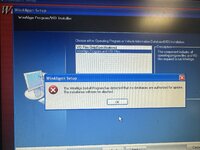
Just a random guess on my part: Maybe you need an "update" key installed in order to install the update?I get this error when trying to load winalign, any one have any ideas?
im trying to install a fresh copy, not update. I downloaded the version from the Korean site.Just a random guess on my part: Maybe you need an "update" key installed in order to install the update?
jdwilson44
Well-known member
im trying to install a fresh copy, not update. I downloaded the version from the Korean site.
How far into the install do you get before seeing the message - and what version are you trying to install?
I've downloaded everything I could find from the Korean site, I don't remember if I tried installing any of them though...........
I have a v9 dongle, so using the v9 iso. it gets pretty far id say, gets past the prompts saying that this will only work on the newer systems, recognizes the Hunter hub box, and all the keys that are installed. then it comes up with this error. Do you know if i need to install the year databases first? wouldnt think so.How far into the install do you get before seeing the message - and what version are you trying to install?
I've downloaded everything I could find from the Korean site, I don't remember if I tried installing any of them though...........
jdwilson44
Well-known member
I have a v9 dongle, so using the v9 iso. it gets pretty far id say, gets past the prompts saying that this will only work on the newer systems, recognizes the Hunter hub box, and all the keys that are installed. then it comes up with this error. Do you know if i need to install the year databases first? wouldnt think so.
Yeah - I don't know. From the message it sounds like maybe you need to have the Vehicle Information installed first? The only other thing that comes to mind is that maybe the installs on the Korean site are meant for upgrade purposes only - and there's something that Hunter does on the original install to differentiate between an original install - and an upgrade? I don't know.
I thought there was people here in this thread who said they had installed on fresh OS install PCs and not had a problem. But I'll have to go back and read the whole thing again.
well i got ahold of the actual disc to install. same error. so not sure whats going on. tried to load the vehicle info first and that really made the system mad, got even more errors. tried to load an earlier version also and that failed when it didnt detect the correct dongle.Yeah - I don't know. From the message it sounds like maybe you need to have the Vehicle Information installed first? The only other thing that comes to mind is that maybe the installs on the Korean site are meant for upgrade purposes only - and there's something that Hunter does on the original install to differentiate between an original install - and an upgrade? I don't know.
I thought there was people here in this thread who said they had installed on fresh OS install PCs and not had a problem. But I'll have to go back and read the whole thing again.
"video cards", does the R811 PC from Hunter have a dedicated video card? Asking because mine was trashed a year ago when it broke down. I didn't recall whether a dedicated graphics card was there or not. I'm using a Optiplex 755 running on XP; DSP 600, WinAlign v8 key and 2019 specs key. still couldn't successfully install winalign....Running it on a vm is far too tricky for my liking, as you're now finding out. It also doesnt provide any performance upgrade as the software itself is still "slow" compared to todays standards. Personally, i just cloned the HDD and had a spare one standing by. I had also ensured I had replacement ram, video cards, etc sitting in a bin just in case.
The only thing I didnt have a spare of is the mother board... but usually its the capacitors that would blow and those are easy enough to solder in new ones.
Ive since upgraded and sold my old Hunter alignment setup so I no longer have to worry about 30 yr. old tech
djbmw
Well-known member
I had a Hunter P811 and the video card would occasionally get so dusty that the video signal would start to change colours and scramble. A quicj clean with isopropal alcohol fixed it."video cards", does the R811 PC from Hunter have a dedicated video card? Asking because mine was trashed a year ago when it broke down. I didn't recall whether a dedicated graphics card was there or not. I'm using a Optiplex 755 running on XP; DSP 600, WinAlign v8 key and 2019 specs key. still couldn't successfully install winalign....
Ive since sold the hunter p811
Thanks for the prompt update. After some research, i believe graphics card may not be necessary, as long as the windows runs that DirectX.I had a Hunter P811 and the video card would occasionally get so dusty that the video signal would start to change colours and scramble. A quicj clean with isopropal alcohol fixed it.
Ive since sold the hunter p811
Wrench97
Well-known member
The motherboard graphics have to capable of running Direct X or you will need a video card.Thanks for the prompt update. After some research, i believe graphics card may not be necessary, as long as the windows runs that DirectX.
you are absolutely right. I realized it last night. Mine got the problem with Camera not communicating well with the PC; hence abort during winalign installation. i'll elaborate that later with updates and/or fix. thanksThe motherboard graphics have to capable of running Direct X or you will need a video card.
jyrah motors
New member
- Joined
- Dec 2, 2025
- Messages
- 3
s pudiste conseguirlo necesito la version 9.0 o anteriores 8 o 7 delTengo una máquina de alineación Hunter R811 que ha empezado a darme la temida pantalla azul de la muerte, así que pensé que probablemente debería reinstalar Windows XP, pero cuando compré la máquina, no venía con el DVD de WinAlign. ¿Alguien tiene una copia de WinAlign versión 9? He buscado en eBay, pero son versiones antiguas. También busqué en Google una imagen ISO para descargar, pero no tuve suerte. ¡Gracias!
Winalign
jyrah motors
New member
- Joined
- Dec 2, 2025
- Messages
- 3
hola me podrias enviar la version 9 0 algun drive para poder descargarloTengo winalign 9.3.2 en mi máquina virtual.
jyrah motors
New member
- Joined
- Dec 2, 2025
- Messages
- 3
¿Dónde puedo encontrar el número de serie de mi máquina Hunter WA130 para poder instalarla? Acabo de comprarla.
Can anybody help me. I recently was given a full hunter R811 with what I assume is everything needed to use the machine. It has:
Cabinet
Cpu
Monitor
Keyboard
Mouse
Printer
Hunter USB box
4 wheel sensors
Cables for the wheel sensors
New un-opened Windows xp home edition software cd
Some hunter cds
And a recovery hunter cd
When I fist stated up the system the cpu would not boot up with any mode available giving me a c:/windows root system32 hl.dl_ error. I looked up in the internet on how to fix this error but was unsuccessful. It kept telling me that I did not have permission to access anything.
I ended up formation and installing the new xp software that was in the cabinet. I was. After this xp was installed and when trying to install the winalign software v7 cd it gave me more errors.
I tried using the hunter recovery cd but it is asking me for a password that I do jot know what it is or how to access.
After messing with the softer some more it gave me the original message of c:/windows root system32 hl.dl_ error and would not boot up anymore. I am reinstalling xp again and hoping to further troubleshoot this issue.
I know nothing about this machine and only want it for my home vehicles.
Does anybody have some guidelines on how to install or get it going? Thank you.
Cabinet
Cpu
Monitor
Keyboard
Mouse
Printer
Hunter USB box
4 wheel sensors
Cables for the wheel sensors
New un-opened Windows xp home edition software cd
Some hunter cds
And a recovery hunter cd
When I fist stated up the system the cpu would not boot up with any mode available giving me a c:/windows root system32 hl.dl_ error. I looked up in the internet on how to fix this error but was unsuccessful. It kept telling me that I did not have permission to access anything.
I ended up formation and installing the new xp software that was in the cabinet. I was. After this xp was installed and when trying to install the winalign software v7 cd it gave me more errors.
I tried using the hunter recovery cd but it is asking me for a password that I do jot know what it is or how to access.
After messing with the softer some more it gave me the original message of c:/windows root system32 hl.dl_ error and would not boot up anymore. I am reinstalling xp again and hoping to further troubleshoot this issue.
I know nothing about this machine and only want it for my home vehicles.
Does anybody have some guidelines on how to install or get it going? Thank you.
djbmw
Well-known member
You might have pooched it since you've now wiped the license key to the software... but lets focus on getting the machine up.Can anybody help me. I recently was given a full hunter R811 with what I assume is everything needed to use the machine. It has:
Cabinet
Cpu
Monitor
Keyboard
Mouse
Printer
Hunter USB box
4 wheel sensors
Cables for the wheel sensors
New un-opened Windows xp home edition software cd
Some hunter cds
And a recovery hunter cd
When I fist stated up the system the cpu would not boot up with any mode available giving me a c:/windows root system32 hl.dl_ error. I looked up in the internet on how to fix this error but was unsuccessful. It kept telling me that I did not have permission to access anything.
I ended up formation and installing the new xp software that was in the cabinet. I was. After this xp was installed and when trying to install the winalign software v7 cd it gave me more errors.
I tried using the hunter recovery cd but it is asking me for a password that I do jot know what it is or how to access.
After messing with the softer some more it gave me the original message of c:/windows root system32 hl.dl_ error and would not boot up anymore. I am reinstalling xp again and hoping to further troubleshoot this issue.
I know nothing about this machine and only want it for my home vehicles.
Does anybody have some guidelines on how to install or get it going? Thank you.
Clearly you have a boot issue. Machines this old generally used IDE connected HDD. You need to first ensure the BIOS is able to connect to the hard drive.
You can get into the system BIOS (usually by pressing and holding the DEL button inmediately upon startup) and locate the Serial ATA or SATA configuration section (or sometimes is called On Chip Config) and change the mode from the AHCI (Advanced Host Controller Interface) to IDE or Compatibility and then your XP CD and the Recovery Console will see the hard drive just fine.
From there we can take additional steps - like attempting to use the recovery console to repair the boot file. I would also suggest running a chkdsk on the drive once you're setup in windows.
Last edited:
aladuke289
New member
- Joined
- Mar 27, 2026
- Messages
- 1
Password: servic (it is case sensitive, all lowercase)Does anybody know what the BIOS password is on the Hunter PCs? I added some more memory into the PC and I'm going to try adding a RAID card into the system - so I can mirror the OS drive and hopefully make the PC "safe" from ever dying on me.
But when I tried to get into the BIOS - it prompted for a password. I can get into the BIOS by just hitting the Enter key , but can't access any of the actual settings.
A RAID array isn't a backup. I'm sure whatever computer you are using can have a second drive added without one. The best solution is to image the HDD and store it in multiple places. Then you can easily create an exact clone of the drive when required.Does anybody know what the BIOS password is on the Hunter PCs? I added some more memory into the PC and I'm going to try adding a RAID card into the system - so I can mirror the OS drive and hopefully make the PC "safe" from ever dying on me.
But when I tried to get into the BIOS - it prompted for a password. I can get into the BIOS by just hitting the Enter key , but can't access any of the actual settings.
Puedes descargar la imagen ISO desde la página web de Hunter Korea.
Aquí encontrará instrucciones sobre cómo iniciar sesión en su portal y descargar el archivo.

헌터코리아 Global Leader in Automotive Service Equipment
헌터코리아 휠 얼라인먼트, 타이어 탈착기, 밸런서 는 주요차량제조사와 함께합니다.hunterkorea.com
También descargué la versión 9 desde allí, así como una actualización de la cámara. ¡Funcionó de maravilla!
Cómo actualizar la base de datos de winaling 9.x de forma manual
djbmw
Well-known member
You can manually enter camber/caster/toe specs and create custom car profiles.Cómo actualizar la base de datos de winaling 9.x de forma manual
If, however, you want to update the entire database... call a Hunter service rep and pay for the updated data.