To avoid these ads, REGISTER NOW!

Troubleshooting cat5e cable for my POE camera

Codyboy

Well-known member
Joined
Jan 31, 2019
Messages
1,638
Location
S.E. TEXAS
One of my security cameras had quit working. I finally got around to try and figure what the issue is.
This run is about 250ft in 3/4" conduit underground.
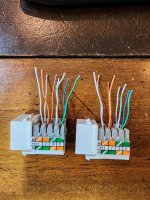
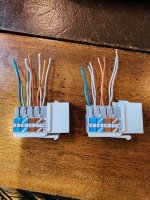
I connected a tester to the ends and it shows a miswire on two of the pairs. It has punchdown keystone jacks on the ends. I pulled the little caps and all seem to be terminated correctly.
This cable has been working for close to 10 years with no issue.
After inspecting the ends and found ok, the only thing to do was cut the ends off and replace them.
But before I replaced them , I twisted each pair together on one end and tested for continuity. Each pair has continuity and does not have any opens or shorts from one pair to the other pairs.
Seems to be a good cable.

I ended up putting new jacks on and still have the same issue "miswire" .
The original wiring scheme was a B type on both ends.
The new is type A because thats the picture on the package and I was too lazy to look up the type B
But that shouldn't matter on the colors , only that they're the same on each end. Right?

I did note that the tester did change which two pairs were showing "miswire" from the type A compared to the original type B wiring.

I'm going to redo them to type B later today and see if the miswire pairs change back.
 
To avoid these ads, REGISTER NOW!

cgrutt

Well-known member
Joined
Mar 4, 2016
Messages
8,188
Are you putting new keystones on ends of the long cable or rj45s? Are you using a short cable to plug between keystone and tester? If so did you test that cable? A or B doesn't matter so long as both sides are same configuration.

If error on pairs jumped after you changed from B to A it may be a damaged cable. Have to think some more about that.

ETA I think it could be damaged cable if you're getting same error on different pairs after rewiring from B to A. For example green/white is pin 1 under Type A but pin 3 under Type B. So if same error previously shown on pin 3 is now showing on pin 1 after rewiring from B to A, I believe problem is with the actual cable.
 
Last edited:

RiverRider

Well-known member
Joined
Mar 3, 2015
Messages
587
Location
DFW area
A couple of thoughts for you...first thought is that the cable is not going to rearrange itself after ten years of trouble-free operation. That's obvious, but when these strange things happen we sometimes have to eliminate doubts consciously...many years of working with electronics taught me that---several times! LOL. I would suggest testing that tester using another cat 5 cable. It could be that it's miswired internally or simply is exhibiting symptoms of a defect of its own.

It may be redundant to say so, but be sure you have both ends of the cable disconnected from the devices they normally are connected to.

Somewhat unrelated, but good to know: devices such as switches and routers equipped with electronics associated with the connection jacks that sense the presence of the cable itself. I always wondered why troubleshooting suggestions include disconnecting cables until I did a little research on the subject because I did not deal with ethernet as a professional in any way much different from ordinary consumers.

As I understand it, the difference between types A and B are just the colors of the wires and the pinouts are all the same.
 

rdoty

ALLIANCE MEMBER
Joined
Feb 7, 2018
Messages
637
Location
Massachusetts
First, the cable working for 10 years and the tester showing miswire aren't necessarily mutually exclusive. 10Mb and 100Mb Ethernet only use two pairs. Gigabit and above use four pairs. Thus a cable can work fine at 100Mb and fail at Gigabit. Network interfaces normally detect this and slow down to 100Mb when this happens. A miswire in one of the pairs that 100Mb uses will cause a complete failure.

Just to be sure, have you used the tester on other cables? Does it show that they are wired correctly? Can you provide more details on exactly what the tester is saying? Short, open, or cross connection? Which pins?

A vs. B makes no difference electrically - it is just a matter of which color of wire goes where. The wire pairs are still wired the same in the jack or plug. Problems arise when you have A at one end and B at the other.

Can you plug something like a laptop into the far end and see if it recognizes the network?
 
OP
C

Codyboy

Well-known member
Joined
Jan 31, 2019
Messages
1,638
Location
S.E. TEXAS
Are you putting new keystones on ends of the long cable or rj45s? Are you using a short cable to plug between keystone and tester? If so did you test that cable? A or B doesn't matter so long as both sides are same configuration.

If error on pairs jumped after you changed from B to A it may be a damaged cable. Have to think some more about that.

ETA I think it could be damaged cable if you're getting same error on different pairs after rewiring from B to A. For example green/white is pin 1 under Type A but pin 3 under Type B. So if same error previously shown on pin 3 is now showing on pin 1 after rewiring from B to A, I believe problem is with the actual cable.
Yes new keystone jacks.
Yes the tester has two short cables and I verified they are good.
Also verified tester is good on another run of cable that has rj45s.
 
OP
C

Codyboy

Well-known member
Joined
Jan 31, 2019
Messages
1,638
Location
S.E. TEXAS
A couple of thoughts for you...first thought is that the cable is not going to rearrange itself after ten years of trouble-free operation. That's obvious, but when these strange things happen we sometimes have to eliminate doubts consciously...many years of working with electronics taught me that---several times! LOL. I would suggest testing that tester using another cat 5 cable. It could be that it's miswired internally or simply is exhibiting symptoms of a defect of its own.

It may be redundant to say so, but be sure you have both ends of the cable disconnected from the devices they normally are connected to.

Somewhat unrelated, but good to know: devices such as switches and routers equipped with electronics associated with the connection jacks that sense the presence of the cable itself. I always wondered why troubleshooting suggestions include disconnecting cables until I did a little research on the subject because I did not deal with ethernet as a professional in any way much different from ordinary consumers.

As I understand it, the difference between types A and B are just the colors of the wires and the pinouts are all the same.
I have used this tester for several years and never had an issue with it.
The cable im testing is isolated and not connected to anything but the tester.
 

dcg9381

Well-known member
Joined
Jun 20, 2018
Messages
11,638
Location
Austin, TX
One of my security cameras had quit working. I finally got around to try and figure what the issue is.
This run is about 250ft in 3/4" conduit underground.
Pretty long run, it's in range and it was working... It's been there 10 years. Have you had any recent storms around the time that the camera died? I've had lightening take out my wire at least twice.. But it's usually at the end.
The new is type A because thats the picture on the package and I was too lazy to look up the type B
But that shouldn't matter on the colors , only that they're the same on each end. Right?
A gets A
B gets B

Technically you can use "whatever" pattern as long as it matches at the ends, but at 250' you want to use the right pattern A or B will work.

When you get one wire off pattern, it can lead to difficult to diagnose problems. It may have been miswired to begin with (and still worked).

If I wired the ends right and my tool was still indicating "miswire" I'd probably put sniffer (toner) on each wire and verify it all the way through.

Check the camera on a short run of PoE wire to eliminate that. If your PoE injector is 250' away, you could also try using an injector at the receiving end, just to eliminate PoE wattage problems.
 

kbuhagiar

Well-known member
Joined
Dec 27, 2005
Messages
1,736
Location
Escondido, CA
Is the camera on the wire run in question connected to the Internet? Or is it on a completely isolated network? If it has access to the Internet, is it possible that it recently received an automatic software or firmware update which caused the problem? As RiverRider mentioned, it seems unlikely that a wiring problem will manifest itself suddenly out of nowhere, unless there was recent activity (storm damage, digging, rodents, etc) or human intervention. Can you connect a known good camera to the wire to see if it works, or perhaps take the camera which stopped working and connect it directly to the equipment at the other end of the wire run?
 

dcg9381

Well-known member
Joined
Jun 20, 2018
Messages
11,638
Location
Austin, TX
New keystones, good tester, verified patch cable and same error jumping to new pairs after changing wiring from A to B... has to be a bad cable, no?
'Cept the cable is indicating that one wire "jumped" over to another (if setup right at the ends). That's odd. Tone each wire individually is how I'd approach that.

I suspect that this was originally miswired (best guess, not pointing fingers). I've seen network devices work just fine with a pair of wires in the wrong spot... At least for a while.
 

cgrutt

Well-known member
Joined
Mar 4, 2016
Messages
8,188
'Cept the cable is indicating that one wire "jumped" over to another (if setup right at the ends). That's odd. Tone each wire individually is how I'd approach that.

I suspect that this was originally miswired (best guess, not pointing fingers). I've seen network devices work just fine with a pair of wires in the wrong spot... At least for a while.
The way I read that (which could be wrong) is camera recently stopped working and he tested cable that showed a problem on one or more pairs. Rewired using new ends but changed configuration from B to A and is now getting the same error but on different pairs. I believe if cable was bad and meter showed problem on certain pairs it may show same problem on different pairs after changing the pin mapping from type b to type a.
 

dcg9381

Well-known member
Joined
Jun 20, 2018
Messages
11,638
Location
Austin, TX
The way I read that (which could be wrong) is camera recently stopped working and he tested cable that showed a problem on one or more pairs. Rewired using new ends but changed configuration from B to A and is now getting the same error but on different pairs. I believe if cable was bad and meter showed problem on certain pairs it may show same problem on different pairs after changing the pin mapping from type b to type a.
I think that's right. I've done over 100 ends and trust me, I can still get them wrong. It is totally possible that both the camera stopped working and there were two wires out of position on the original wiring and it still worked for years.. I'd test the camera on a short wire run. And if I was sure I did the punch downs correctly but my tester indicates out of order, that's when I'm gonna tone each wire.. It's odd that he's got wire continuity on all pairs - a toner should be unnecessary, but if there is some cross over, a toner would pick that up.
 

mm08822

Well-known member
Joined
Jan 13, 2012
Messages
5,872
Location
NJ
Sweeping the cable is a good idea but useless input if you dont have one. You could go buy one or consider the cost of new underground-use cable.

Is the current cable rated for underground use....wet environments? If not, get the right cable.
 
OP
C

Codyboy

Well-known member
Joined
Jan 31, 2019
Messages
1,638
Location
S.E. TEXAS
Cable is water logged, replace it
Unless the outer jacket was damaged I cant see it. The ends are inside an enclosure.

Sweeping the cable is a good idea but useless input if you dont have one. You could go buy one or consider the cost of new underground-use cable.

Is the current cable rated for underground use....wet environments? If not, get the right cable.
No it's just regular cable.
And to replace it would mean digging a new trench , even though its in conduit.
No way to pull it out and repull a new one because it's a shared conduit and it's tight.
When I did this job I only had one way to get it in the house.

(BRB putting flame suit on) OK here goes...

When I ran power 120v to my gate I put the cat5e and a coax in the same conduit as the power. The reasoning was that I had a stubout I had ran from the breaker panel (interior closet) to the outside when the slab was poured. I used that conduit stubout to get the wires inside the house. And yes the cat5e and coax all come into the breaker panel. The cat5e and coax just use the panel as a chase and then up into the attic.
And yes I know it's not the correct way to do it.
Is the camera on the wire run in question connected to the Internet? Or is it on a completely isolated network? If it has access to the Internet, is it possible that it recently received an automatic software or firmware update which caused the problem? As RiverRider mentioned, it seems unlikely that a wiring problem will manifest itself suddenly out of nowhere, unless there was recent activity (storm damage, digging, rodents, etc) or human intervention. Can you connect a known good camera to the wire to see if it works, or perhaps take the camera which stopped working and connect it directly to the equipment at the other end of the wire run?
We have lightning storms all the time around here. Not sure if a storm coincided when the camera stopped working.
I've looked at the trees around the area and do not see any that appear to have taken a lightning strike.

I plan to reterminate the cable to type B and note if the miswire pairs change.
I will also pull the camera down and test it on a known good cable.
 
To avoid these ads, REGISTER NOW!

dcg9381

Well-known member
Joined
Jun 20, 2018
Messages
11,638
Location
Austin, TX
Unless the outer jacket was damaged I cant see it. The ends are inside an enclosure.
I think they are suggesting it got water into it somewhere in the middle.
We have lightning storms all the time around here. Not sure if a storm coincided when the camera stopped working.
I've looked at the trees around the area and do not see any that appear to have taken a lightning strike.
It just takes a nearby strike, but I don't think this is the origin - the inductive hit shows up at the cable ends, never seen it happen in the middle.
I plan to reterminate the cable to type B and note if the miswire pairs change.
I will also pull the camera down and test it on a known good cable.
Yep, let's see if the problem follows the wires. Looks like it was terminated right to me.. Not a fan of the hard-to-tell colors. Worst case, if you've lost pairs, there are ways to make this work a single pair of wires, but at a slower rate and you'd need to inject POE at the end.
 

Bad Habit

Well-known member
Joined
Mar 19, 2014
Messages
1,980
Location
Chumstick WA
Underground conduits will always end up with water in them, either through cracks/openings or just condensation. The cable will get saturated, the jacketing will absorb the water and it will change the impedance of the twisted pairs. Continuity testing won't show faults, all but the highest end testers won't show the impedance mis-matches. This is why they have cable that is rated for outdoor/underground use.
 

cgrutt

Well-known member
Joined
Mar 4, 2016
Messages
8,188
Underground conduits will always end up with water in them, either through cracks/openings or just condensation. The cable will get saturated, the jacketing will absorb the water and it will change the impedance of the twisted pairs. Continuity testing won't show faults, all but the highest end testers won't show the impedance mis-matches. This is why they have cable that is rated for outdoor/underground use.
Plus frost heave/earth movements, weight of vehicles running over cables, etc can cause conduit to separate or crack/crush. Metal conduit can corrode. Water can enter from exposed ends... lots of reasons.
 

Chuckster in NJ

Well-known member
Joined
Jan 26, 2010
Messages
2,282
Location
Hunterdon County NJ
Underground conduits will always end up with water in them, either through cracks/openings or just condensation. The cable will get saturated, the jacketing will absorb the water and it will change the impedance of the twisted pairs. Continuity testing won't show faults, all but the highest end testers won't show the impedance mis-matches. This is why they have cable that is rated for outdoor/underground use.
THIS ^.…….. Not to mention inductive coupling.

BTW! I have never seen an underground conduit that hasn’t been filled with water or moisture.
 

dcg9381

Well-known member
Joined
Jun 20, 2018
Messages
11,638
Location
Austin, TX
So, assuming you are down a pair of wires, can't re-pull.. If you can find a single pair that are "good" (I'd do a resistance comparison), you can used VDSL2 "ethernet extender" to still push network down that pair. Won't do POE, so you'll have to inject. Transfer rates will drop, but this is how I deal with a 300'+ wire run down to the shop.
 

kbuhagiar

Well-known member
Joined
Dec 27, 2005
Messages
1,736
Location
Escondido, CA
We have lightning storms all the time around here. Not sure if a storm coincided when the camera stopped working.
I've looked at the trees around the area and do not see any that appear to have taken a lightning strike.
Lightning causes all sorts of fun problems. A few years ago at our other home we had a lightning strike close to our property. Although there were no visible signs of damage (smoke, burned spots, etc.) it bricked three out of six wifi wall switches and our well pump controller. That was one expensive lightning strike.
 

cgrutt

Well-known member
Joined
Mar 4, 2016
Messages
8,188
So, assuming you are down a pair of wires, can't re-pull.. If you can find a single pair that are "good" (I'd do a resistance comparison), you can used VDSL2 "ethernet extender" to still push network down that pair. Won't do POE, so you'll have to inject. Transfer rates will drop, but this is how I deal with a 300'+ wire run down to the shop.
Could also run it over the AC line if necessary. Would also need POE injector at remote site.

Screenshot_20260420_130430_Chrome.jpg
 

cgrutt

Well-known member
Joined
Mar 4, 2016
Messages
8,188
Lightning causes all sorts of fun problems. A few years ago at our other home we had a lightning strike close to our property. Although there were no visible signs of damage (smoke, burned spots, etc.) it bricked three out of six wifi wall switches and our well pump controller. That was one expensive lightning strike.
We think lightening took out a switch at a buddy's house. We installed inexpensive surge suppressors on all the lines that ran outside to cameras. Just installs in line and connect body to house ground. So far so good...
 

UserNameAttempt3

Well-known member
Joined
Jun 27, 2014
Messages
406
Location
Hardin County, KY
Also, the cable you originally pulled, is it full copper or copper clad aluminum wire? Some of the cheaper Copper/Aluminum will deteriorate faster, especially in outdoor uses, even under ground.

It shouldn't be impossible to tie on and pull a new run, but probably difficult
 

UserNameAttempt3

Well-known member
Joined
Jun 27, 2014
Messages
406
Location
Hardin County, KY
We think lightening took out a switch at a buddy's house. We installed inexpensive surge suppressors on all the lines that ran outside to cameras. Just installs in line and connect body to house ground. So far so good...
We do this to on outside AP's and cameras as well. Cheap security and easy installs, but closer to the device the better.
 

cgrutt

Well-known member
Joined
Mar 4, 2016
Messages
8,188
We do this to on outside AP's and cameras as well. Cheap security and easy installs, but closer to the device the better.
Yeah we just installed them at the rack and grounded to the service panel. The cameras were all over the yard one was on top of a flagpole wasn't climbing that haha.
 

mm08822

Well-known member
Joined
Jan 13, 2012
Messages
5,872
Location
NJ
Or re-pull all of it with new cables that have wet location rating and a 300V insulation rating. (The flame suit you are wearing didn't protect you from yourself. :unsure:)
 

wyliesdiesels

Well-known member
Joined
Aug 14, 2012
Messages
19,994
Location
Modesto, CA
As I understand it, the difference between types A and B are just the colors of the wires and the pinouts are all the same.

nope. the pinouts are different and each pair has a different rate of twist per inch. this is why when people say the color code doesnt matter as long as its the same on both ends (often ignoring 568A or B) is wrong..... the twists per inch differences matter and they must go on the correct pins...
 

wyliesdiesels

Well-known member
Joined
Aug 14, 2012
Messages
19,994
Location
Modesto, CA
First, the cable working for 10 years and the tester showing miswire aren't necessarily mutually exclusive. 10Mb and 100Mb Ethernet only use two pairs. Gigabit and above use four pairs. Thus a cable can work fine at 100Mb and fail at Gigabit. Network interfaces normally detect this and slow down to 100Mb when this happens. A miswire in one of the pairs that 100Mb uses will cause a complete failure.

very rare to have a camera with a gigabit nic.... in fact ive never seen one even on a quad lens cam.

Just to be sure, have you used the tester on other cables? Does it show that they are wired correctly? Can you provide more details on exactly what the tester is saying? Short, open, or cross connection? Which pins?

A vs. B makes no difference electrically - it is just a matter of which color of wire goes where. The wire pairs are still wired the same in the jack or plug. Problems arise when you have A at one end and B at the other.

Can you plug something like a laptop into the far end and see if it recognizes the network?

there actually is a difference because each pair has a different rate of twist per inch. this is to suppress noise and emi
 
Last edited:

wyliesdiesels

Well-known member
Joined
Aug 14, 2012
Messages
19,994
Location
Modesto, CA
Is the camera on the wire run in question connected to the Internet? Or is it on a completely isolated network? If it has access to the Internet, is it possible that it recently received an automatic software or firmware update which caused the problem?

That would not affect the cable in any way. that is impossible....

As RiverRider mentioned, it seems unlikely that a wiring problem will manifest itself suddenly out of nowhere, unless there was recent activity (storm damage, digging, rodents, etc) or human intervention. Can you connect a known good camera to the wire to see if it works, or perhaps take the camera which stopped working and connect it directly to the equipment at the other end of the wire run?

quite a few possibilities

rodents

nic in cable in underground conduit, water gets in, ground freezes, ice expands and ruins cable
 

wyliesdiesels

Well-known member
Joined
Aug 14, 2012
Messages
19,994
Location
Modesto, CA
Unless the outer jacket was damaged I cant see it. The ends are inside an enclosure.

its very possible to have a nic in the cable that you dont see until it fails. or lightning fried it

No it's just regular cable.

never run indoor rated cable in an underground conduit...

And to replace it would mean digging a new trench , even though its in conduit.
No way to pull it out and repull a new one because it's a shared conduit and it's tight.
When I did this job I only had one way to get it in the house.

(BRB putting flame suit on) OK here goes...

When I ran power 120v to my gate I put the cat5e and a coax in the same conduit as the power. The reasoning was that I had a stubout I had ran from the breaker panel (interior closet) to the outside when the slab was poured. I used that conduit stubout to get the wires inside the house. And yes the cat5e and coax all come into the breaker panel. The cat5e and coax just use the panel as a chase and then up into the attic.
And yes I know it's not the correct way to do it.

no bueno. the CAT5e and coax are not rated for 300v and should not be in the same conduit. this can cause all kinds of issues including surge inductance and lightning flashover from the electrical circuits to the low voltage

Time to run new cable....

The coax between buildings is a tricky once especially since it is very prone to surges and lightning strikes as it connects to the cable plant on power poles.....

i would run the coax in a separate conduit and make sure to use surge arrestor and properly bond it to GEC on both buildings along with fiber. otherwise you have created multiple pathways for surges and lightning induced currents to traverse the equipment in both of your buildings.

We have lightning storms all the time around here. Not sure if a storm coincided when the camera stopped working.
I've looked at the trees around the area and do not see any that appear to have taken a lightning strike.

even a nearby strike can induce surge currents in electrical systems and cause LV in shared conduits between buildings to get fried.... never run LV in the same conduit as electrical.

Furthermore, if you have lightning strikes, i would run fiber between the buildings as cheap insurance...

I plan to reterminate the cable to type B and note if the miswire pairs change.
I will also pull the camera down and test it on a known good cable.

the cable is most likely bad somewhere underground

the camera might be fried too so need to test that as well
 
Last edited:

wyliesdiesels

Well-known member
Joined
Aug 14, 2012
Messages
19,994
Location
Modesto, CA
Or re-pull all of it with new cables that have wet location rating and a 300V insulation rating. (The flame suit you are wearing didn't protect you from yourself. :unsure:)

with lightning strikes a possibility id run fiber...

the coax will be tricky though... coax is especially prone to lightning especially if its connected to the cable plant on the power poles...
 

dave*99

Well-known member
Joined
May 5, 2009
Messages
4,254
Location
Coastal NJ
What is the coax used for? Could it be eliminated? Lot's of places have little to no coax with most stuff on ethernet or WiFi.
 
Last edited:
To avoid these ads, REGISTER NOW!
Top Bottom