To avoid these ads, REGISTER NOW!

Dual 100A Panel (Fuses!) upgrade to single 200A service.

Denwood

Well-known member
Joined
Sep 22, 2014
Messages
4,305
Location
Thunder Bay, Ontario, Canada
The last two days have been incredibly long, 12-13 hours laboring away at a project long overdue. When we purchased our home it had a basement apartment. The home is well over 100 years old, but extensively retrofitted. However the two meter bases, and two 100 amp panel, (with fuses) have been there a long time.. Aside from the extra meter charge ($37/month) the two separate services/panels also conflict with future solar plans and were otherwise overdue for replacement. My brother in law is a sparky, and a great one at that. I handled tagging circuits and removing the old 100 watt panels while he tended to the new 200 amp service.

Power was disconnected to the house at 1 pm Tuesday. My brother in law focused on getting the new meter base and 200A service tied into the new panel. I tagged the existing circuits and removed the old 100A panels inside.

Wednesday the ESA inspector showed up and green lit the installation for reconnection to the grid… which was done by 1pm by the local utility. Then Mike turned his attention inside and worked his magic on the 200 amp panel.

Pretty much 14 hours later, it was done.

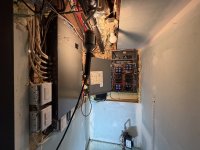
Before:

IMG_5106.jpeg

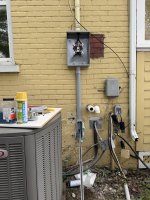
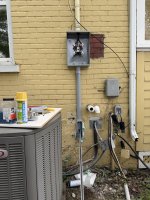
Dual 100 amp meter bases replaced with one 200A service. The good news is that the existing conductors in the stack were long enough as otherwise we have had to pretty much replace the entire 20 foot stack.
IMG_5108.jpeg

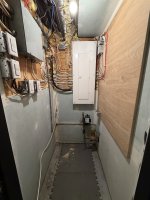
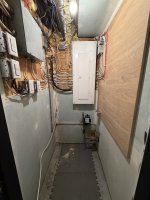
Both 100 amp panels out and the 200A ready to go. I tagged all the wires and circuits but man was it a mess.

IMG_5116.jpeg

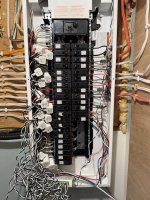
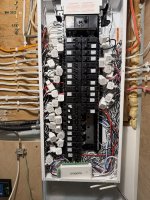
Out of the chaos came order. I think a good electrician has artistic skills blended right in. Where conductors from the 2nd panel would not reach into the new 200A, Mike installed junction boxes and made all connections/extensions in those.

Tomorrow I’ll install an Emporia Vue3 to monitor all of the circuits and clean up my disaster of a network cluster.
IMG_5122.jpeg

Looking great outside too.

IMG_5125.jpeg

And a quick YT Short:


Attachments

  • IMG_5107.jpeg
    IMG_5107.jpeg
    627.4 KB · Views: 14
  • IMG_5108.jpeg
    IMG_5108.jpeg
    1.2 MB · Views: 11
  • IMG_5117.jpeg
    IMG_5117.jpeg
    768.1 KB · Views: 12
  • IMG_5122.jpeg
    IMG_5122.jpeg
    641.3 KB · Views: 13
  • IMG_5125.jpeg
    IMG_5125.jpeg
    935.1 KB · Views: 19
Last edited:
To avoid these ads, REGISTER NOW!

theoldwizard1

Well-known member
Joined
Feb 22, 2011
Messages
43,587
Location
SE MI
I looks like you had to add several junction boxes in order to make longer leads to the new panel. Looks great !

I have 120A fused panel. I keep saying I am going to upgrade to a 200A breaker panel and install 240V to the garage. The older I get, the less likely this will happen !
 

Chuckster in NJ

Well-known member
Joined
Jan 26, 2010
Messages
2,383
Location
Hunterdon County NJ
I looks like you had to add several junction boxes in order to make longer leads to the new panel. Looks great !

I have 120A fused panel. I keep saying I am going to upgrade to a 200A breaker panel and install 240V to the garage. The older I get, the less likely this will happen !
Well then…….. Step away from the keyboard and "giter dun" because 120 volt fused services don’t upgrade themselves! :twak:

BTW! I hate to break the news to you but, you (and everyone else) are one day closer to the grave so never waste a second of time. :beer:
 
OP
D

Denwood

Well-known member
Joined
Sep 22, 2014
Messages
4,305
Location
Thunder Bay, Ontario, Canada
So much cleaner (y) good job!

I've been embarrased to open that utility space door since buying this place. That electrical room has only gotten worse over the last 20 years as I added network drops etc. I have a lot more motiviation to get that situation as ordered as the electrical. I figure another day or so to get the Emporia system in, and network cleaned up.

Good to get it all consolidated and eliminate the fuses. Getting rid of that extra service will save you money as well.

John

Yes, we'll save just under $500/year on the the meter charges. I honestly didn't mind the fuses, but I understand the dangers of someone over fusing a circuit...

I looks like you had to add several junction boxes in order to make longer leads to the new panel. Looks great !

I have 120A fused panel. I keep saying I am going to upgrade to a 200A breaker panel and install 240V to the garage. The older I get, the less likely this will happen !

Yes, we added in a larger 12x12 and two smaller boxes to keep things tidy.

Well then…….. Step away from the keyboard and "giter dun" because 120 volt fused services don’t upgrade themselves! :twak:

BTW! I hate to break the news to you but, you (and everyone else) are one day closer to the grave so never waste a second of time. :beer:

They were actually 240V 100A fused panels, now combined to the single 200A 240V panel :) Ya, life is too short...
 

bdbecker

ALLIANCE MEMBER
Joined
Nov 18, 2015
Messages
5,633
Location
Iowa
I know the feeling... we just had the old Pushmatic box replaced last week. As a part of the project, I had a generator tie-in installed, along with 240v drops in the garage and workshop added. We actually have spare slots in our panel... first time ever as a homeowner (panel at the last house was jam packed full as well).
 

cmandp

Well-known member
Joined
Dec 22, 2011
Messages
1,312
Location
New Jersey
Definitely looks good and is good motivation for me.

I absolutely need to do this to our main panel. It's a 100A fuse panel as well that has a slightly newer breaker panel fed by the same 100A Fuse block in the main panel. Lots of messy wiring from 70+ years of additions. I also need to remove the 2 old meter cans that no longer feed the garage (was a business) and disconnects now used as junction boxes or abandoned.
 

Stuart in MN

Well-known member
Joined
Sep 8, 2005
Messages
23,403
Location
Minneapolis
It's nice to read about a success story here for once. :) All too often electrical posts are about a disaster in progress.

Can you simplify your network wiring by using wifi instead of hard wiring? I was surprised at the range I have in my big old house, I can get a great signal everywhere inside and even out in the back yard and garage.
 

Chuckster in NJ

Well-known member
Joined
Jan 26, 2010
Messages
2,383
Location
Hunterdon County NJ
Nothing is wrong with fuses as long as they are properly sized to the wire they are protecting HOWEVER, "IF" you have a Federal Pacific panel I highly suggest that you get rid of (upgrade) that POS fire hazard Immediately…….. You will thank me later and so will your insurance company!

BTW! Some insurance companies will force you to get rid of that FPE panel or they will "drop you"
 

Norcal

Well-known member
Joined
Mar 16, 2008
Messages
13,792
I looks like you had to add several junction boxes in order to make longer leads to the new panel. Looks great !

I have 120A fused panel. I keep saying I am going to upgrade to a 200A breaker panel and install 240V to the garage. The older I get, the less likely this will happen !
120 A is not a standard rating, 110A or 125A is.
 

jblnut

ALLIANCE MEMBER
Joined
Jan 17, 2015
Messages
7,296
Location
In the Middle of MN
Looks good !! Whenever I see these upgrade threads I think back to the knob and tube wiring we had in our first house all over the thing. Sure don’t miss that and sure glad to have the opportunity to build new when we did and go all brand new Square D. My sparky asked why I wanted 3ph in the house and I said “who knows but I may want it some day so let’s do it !!”
 
OP
D

Denwood

Well-known member
Joined
Sep 22, 2014
Messages
4,305
Location
Thunder Bay, Ontario, Canada
I know the feeling... we just had the old Pushmatic box replaced last week. As a part of the project, I had a generator tie-in installed, along with 240v drops in the garage and workshop added. We actually have spare slots in our panel... first time ever as a homeowner (panel at the last house was jam packed full as well).

Tandem breakers are a thing I had never heard of but they sure free up space in the panel!

Nice!

How did you cope with the 24 hr outage while living in the house?

Battery backup on some critical circuits?

I’ve found just a 2000 watt inverter generator gets our critical stuff powered up. So some 12/2 extensions with triple plug ends and we were good. I shut it all down overnight. Strangely had a great sleep that night!

Definitely looks good and is good motivation for me.

I absolutely need to do this to our main panel. It's a 100A fuse panel as well that has a slightly newer breaker panel fed by the same 100A Fuse block in the main panel. Lots of messy wiring from 70+ years of additions. I also need to remove the 2 old meter cans that no longer feed the garage (was a business) and disconnects now used as junction boxes or abandoned.

Now that things are so clean there is no way I can stuff the 20 odd network drops and network gear back in there. I’ve had a patch panel waiting for some time in the shop..

It's nice to read about a success story here for once. :) All too often electrical posts are about a disaster in progress.

Can you simplify your network wiring by using wifi instead of hard wiring? I was surprised at the range I have in my big old house, I can get a great signal everywhere inside and even out in the back yard and garage.

I have about 20 network drops and likely another 10-15 WiFi devices but I do try to hardwire security stuff, automation hubs etc. it adds up very quickly.

Nothing is wrong with fuses as long as they are properly sized to the wire they are protecting HOWEVER, "IF" you have a Federal Pacific panel I highly suggest that you get rid of (upgrade) that POS fire hazard Immediately…….. You will thank me later and so will your insurance company!

BTW! Some insurance companies will force you to get rid of that FPE panel or they will "drop

Definitely have heard of those issues. My brother in law uses the Square D home line stuff for residential and really likes the system. It does make for a much neater panel as the neutral buses are right beside the breakers.

Looks good !! Whenever I see these upgrade threads I think back to the knob and tube wiring we had in our first house all over the thing. Sure don’t miss that and sure glad to have the opportunity to build new when we did and go all brand new Square D. My sparky asked why I wanted 3ph in the house and I said “who knows but I may want it some day so let’s do it !!”

Mike (sparky) has been using the Square D stuff for a long time and has never had issues. We do have a run of knob and tube still left buried in the first floor ceiling ( just a few lights) and one circuit upstairs with three receptacles with older wiring. There are two separate sets of standalone GFCI and AFCI devices in line after the panel breaker protecting those two circuits. The runs are in areas that we have never retrofitted.
 
OP
D

Denwood

Well-known member
Joined
Sep 22, 2014
Messages
4,305
Location
Thunder Bay, Ontario, Canada
Now if anyone has got tips for taming the mess introduced by the Emporia Vue system??. I have another base unit coming so I can monitor more than 16 current clamps. There are two clamps around the L1 and L2 legs before the 200A breaker plugged into the “master” Vue 3 and then each base unit hosts up to 16 of the smaller current clamps.

IMG_5136.jpeg
 
OP
D

Denwood

Well-known member
Joined
Sep 22, 2014
Messages
4,305
Location
Thunder Bay, Ontario, Canada
Ah, well good question. That panel is brand new out of the box like that. My brother in law is a master electrician with about 35 yrs experience… so I’m guessing he prefers that setup.
 
To avoid these ads, REGISTER NOW!
OP
D

Denwood

Well-known member
Joined
Sep 22, 2014
Messages
4,305
Location
Thunder Bay, Ontario, Canada
I’ll find out. I do seem to recall some bits along with the panel..but Mike evidently did not use them.

32 CTs and two Emporia Vue 3 installed. Already some surprises there on consumption…

IMG_5142.jpeg
 

dscheidt

Well-known member
Joined
Apr 26, 2017
Messages
2,953
strange. makes no sense. and ive never seen panels that come with ground bars. its always an extra item you have to buy

SE have part numbers for panels that come with ground bars. They're probably not stocked anywhere, but they exist.
 
OP
D

Denwood

Well-known member
Joined
Sep 22, 2014
Messages
4,305
Location
Thunder Bay, Ontario, Canada
The Siemens panels I buy have factory installed ground bars.

Multiple ground bars can be real nice on a change out. Better change of reaching it without adding a splice. The old wires are only so long.
It definitely makes for a much cleaner panel (before I stuffed all the CTs in there) to have the neutral and ground connection as close as possible to the knock-out for the conductors. I also get the convenience of the plug-on neutral for AFCI/GFCI breakers.
 
OP
D

Denwood

Well-known member
Joined
Sep 22, 2014
Messages
4,305
Location
Thunder Bay, Ontario, Canada
What's been the biggest surprise so far?
I went through a process about 7 years ago to reduce "parasitic" consumption and ended up reducing the house consumption overall by 40%.

Now with the live dashboard and stats of the Emporia system, I'm seeing that a lot of that crept back in as I added a few POE cameras, AirThings hubs, HUE hub, automation bits, Home Assistant, and several POE switches that cascade off the main LAN room switch. So for example, the garage network/automation stuff runs 24/7 at ~45 watts. The network and automation gear behind the main floor TV/entertainment unit runs 24/7 at another 52 watts. Then the items in the main LAN/electrical room run at 80 watts, again 24/7. Our home uses 300-400 watts, with everything off. That may not be fixable, other than looking at some plug in solar options to offset that.

We have two EVs that of course will eat 300 watts up in a heartbeat so maybe that 300-400 watts becomes immaterial.

For other surprises, I had never been able to measure what our ECM furnace is running, or the heat pump dryer. The ECM furnace running the fan at 350 CFM uses only 50 watts. The heat pump/ventless dryer uses as little as 1000 watts, which is pretty impressive. I need to run that ECM furnace fan when the family is home as our HRV dumps fresh air into the main living space with no furnace interconnect. The HRV I built is super lean, using only 35 watts at 75 CFM with two inline ECM fans, five temp sensors, and differential pressure sensors (so it actively balances) controlled by automation.
 
OP
D

Denwood

Well-known member
Joined
Sep 22, 2014
Messages
4,305
Location
Thunder Bay, Ontario, Canada
This is the final chapter in the electrical room upgrade.

The basement theater has been a disaster for a full week now during the panel upgrade and network reorganization as I've been using it as the workroom...

IMG_5158.jpeg

Previously, the LAN/network portion of the electrical room was just loose CAT5 runs to a switch on a wire shelf. Everything was just stacked on a few shelves. It was chaos.

Now, not so bad for a house well over 100 years old. I cut back all the LAN feeds and terminated them in a patch panel, then mounted everything up low profile on the 3/4" ply backing board. There is room to actually work in there if needed. The UPS feeds the two power bars, one with battery backup, the other just surge for non critical stuff.

IMG_5159.jpeg

IMG_5160.jpeg
 
OP
D

Denwood

Well-known member
Joined
Sep 22, 2014
Messages
4,305
Location
Thunder Bay, Ontario, Canada
2 comcast circuits?
One is a bridged SHAW cable/modem, the smaller one is actually a Reolink home hub. Reolink sent me some product to review on the YT channel so that hub, other than serving as a doorbell and backup NVR, provides RTSP access to the Reolink doorbell cam for the Frigate VM running off that little Dell PC. The Dell PC runs Proxmox so it also hosts a Home Assistant docker. Black box above it is the pFsense router.

I really should have taken a before pic...ha. Imagine the pic below less the 200A panel, but with 14 LAN drops hanging from the ceiling a couple 12" wire shelves piled with network bits and random junk. I had to turn sideways just to get in there for a water meter reading...


1787165720549.png
 
Last edited:

wyliesdiesels

Well-known member
Joined
Aug 14, 2012
Messages
20,241
Location
Modesto, CA
yeah i can imagine the spaghetti mess

Ive got reolink cams but am only using SD cards. if i dont use any home automation, is there any point to the reolink home hub?
 
OP
D

Denwood

Well-known member
Joined
Sep 22, 2014
Messages
4,305
Location
Thunder Bay, Ontario, Canada
The home hub has two SD card slots so any cameras attached to it would record there. Useful if someone steals/destroys a camera. It can also participate in the alarm system if that's something you're using on the cams. I have an alarm set on the back lane camera 2am-6am to discourage folks rifling cars, but don't hear it in the house as the camera is not attached to that hub. I have cards in the cameras, and record also to Frigate so don't really need the NVR feature. The hub does allow encrypting the recordings. The hub does serve as a chime for the Reolink doorbell. Other than that, the only reason you'd want one is to be able to access port 9000, or RTSP services etc. for the battery powered camera devices.

The irony is that if you do use the hub and monitor a battery powered Reolink cam via RTSP in an NVR program like Frigate, it keeps the camera awake and kills the battery. Go figure.
 

wyliesdiesels

Well-known member
Joined
Aug 14, 2012
Messages
20,241
Location
Modesto, CA
i dont use battery powered Reolink cams. I have a ring doorbell that was battery powered and it didnt work well so i switched to brick powered(dont have a regular doorbell or wiring). but the ring DB is getting ripped out as it ***** compared to the reolink

we dont have issues with camera theft here...
 
OP
D

Denwood

Well-known member
Joined
Sep 22, 2014
Messages
4,305
Location
Thunder Bay, Ontario, Canada
i dont use battery powered Reolink cams. I have a ring doorbell that was battery powered and it didnt work well so i switched to brick powered(dont have a regular doorbell or wiring). but the ring DB is getting ripped out as it ***** compared to the reolink

we dont have issues with camera theft here...
Reolink sent me the battery powered doorlink cam, but even wired with 24V, it limits charging via the rear terminals...so Frigate simply kills the battery. What does work is running USB-C to the camera as the firmware allows a faster charge rate via USB-C.
 
To avoid these ads, REGISTER NOW!
Top Bottom