To avoid these ads, REGISTER NOW!

For those of you who want a light for your Dewalt DWS782 miter saw...

kingsra

New member
Joined
Oct 30, 2015
Messages
2
Location
Louisiana
Hello all,

First time poster, but I’ve been lurking for a while. I used this site earlier this year to get great deals on the Dewalt DW745 portable table saw and the Dewalt DWS782 miter saw from Home Depot. Maybe I can now offer some payback.

I like many others here wanted to add the XPS cross cut light to the DWS782, but the cost was just too high. With shipping & tax I was looking at nearly $200 to purchase all the parts from ServiceNet (Dewalt’s parts division). Most of the parts were reasonably priced, but the light assembly by itself was over $120.

From time to time over the last 9 months, I’d check the current prices at ServiceNet to see if the cost of this conversion had gone down any. It FINALLY happened last week. The light assembly dropped $100. I placed an order on 10/27/15 and received it yesterday. Here’s what I ordered and the cost:

1 - Handle set - 624730-00 - $13.21
1 - Power supply - N078832 - $23.65
1 - Work Light - N030317 - $21.75
1 - Motor Cord - N114499 - $17.19

With tax & shipping it all came to $94.19. I could have saved a few dollars more by picking up the handle set & power supply on eBay. I also probably could have done without the motor cord as I only used some of the wiring it came with, but it did make it easier to tie into the existing wiring. The installation of the parts was straight forward. I have the XPS on another Dewalt miter saw and love it and now have it on the DWS782.

It was the price drop on the light that made all of this cost effective. I can’t tell you if the lower price is temporary, permanent, or maybe even a mistake. I personally believe the new price to be correct because after receiving it and looking at its construction, there is NO way the light should have ever been priced so high. All other suppliers on the interweb still show the high price, but if you Google the part number for the light, the first link that shows up is the lower price at ServiceNet.

I hope this helps anybody wanting to add the XPS light.
 
To avoid these ads, REGISTER NOW!

cagullett1

Well-known member
Joined
Sep 29, 2013
Messages
2,203
Location
North Texas
Excellent first post! I've got a DW715 and would love to add this setup! I wonder if I would use all of these same parts to add the light to my saw.
 

morgantm

Well-known member
Joined
Jul 22, 2014
Messages
295
Location
Durham, NC
Awesome, thanks for posting. I had started this last year when I got the 782 trying to use the Dewalt kit that worked for the Type 1 and 2 782 but didn't want to have to cut into the saw. Just purchased the light and power supply as I already had the handle.

www.1800toolrepair.com had a little cheaper shipping with the same price on the 2 items, saved $6.
 

cagullett1

Well-known member
Joined
Sep 29, 2013
Messages
2,203
Location
North Texas
Awesome, thanks for posting. I had started this last year when I got the 782 trying to use the Dewalt kit that worked for the Type 1 and 2 782 but didn't want to have to cut into the saw. Just purchased the light and power supply as I already had the handle.

www.1800toolrepair.com had a little cheaper shipping with the same price on the 2 items, saved $6.

Will you not be needing the motor cord?

OP, how much of the motor cord wiring did you actually end up using?
 
OP
K

kingsra

New member
Joined
Oct 30, 2015
Messages
2
Location
Louisiana
The cord came with 4 wires:

Red, yellow, black, white.

I didn't need the red or yellow, I used the existing wiring in the handle. These 2 go from the trigger switch to the motor, no need to modify them.

The white wire came with a couple of connectors which minimized the "splicing" I had to do.

I used the black wire to lengthen the lead from the XPS power supply.

I'm by no means an electrician, but now that I've done it, I could have gotten by without the cord. If I had to do it all over, I would just snip the connection on the 2 wires (black & white) that come attached to the power supply and splice them into the existing wiring. Then just plug the light into the power supply and be done.
 

dbug

New member
Joined
Nov 18, 2015
Messages
1
Hello all,

First time poster, but I’ve been lurking for a while. I used this site earlier this year to get great deals on the Dewalt DW745 portable table saw and the Dewalt DWS782 miter saw from Home Depot. Maybe I can now offer some payback.

I like many others here wanted to add the XPS cross cut light to the DWS782, but the cost was just too high. With shipping & tax I was looking at nearly $200 to purchase all the parts from ServiceNet (Dewalt’s parts division). Most of the parts were reasonably priced, but the light assembly by itself was over $120.

From time to time over the last 9 months, I’d check the current prices at ServiceNet to see if the cost of this conversion had gone down any. It FINALLY happened last week. The light assembly dropped $100. I placed an order on 10/27/15 and received it yesterday. Here’s what I ordered and the cost:

1 - Handle set - 624730-00 - $13.21
1 - Power supply - N078832 - $23.65
1 - Work Light - N030317 - $21.75
1 - Motor Cord - N114499 - $17.19

With tax & shipping it all came to $94.19. I could have saved a few dollars more by picking up the handle set & power supply on eBay. I also probably could have done without the motor cord as I only used some of the wiring it came with, but it did make it easier to tie into the existing wiring. The installation of the parts was straight forward. I have the XPS on another Dewalt miter saw and love it and now have it on the DWS782.

It was the price drop on the light that made all of this cost effective. I can’t tell you if the lower price is temporary, permanent, or maybe even a mistake. I personally believe the new price to be correct because after receiving it and looking at its construction, there is NO way the light should have ever been priced so high. All other suppliers on the interweb still show the high price, but if you Google the part number for the light, the first link that shows up is the lower price at ServiceNet.

I hope this helps anybody wanting to add the XPS light.

You are like me...
I too bought it thinking that I will be able to add the LED light. And so I got the 782. But the LED price was so high I called DeWalt to find out why it so high and who ever answered it had no idea. Now I noticed that the LED light price has come down. And here I am back on my quest to get XPS. What threw me off was the connector from the power supply. Your post really boosted my confidence in splicing it. Can you please do a favor of posting a picture of the wiring. I do get what you mean but a picture will really help.
Also I figured that if you order the parts to a service center and pick it up you can save the shipping charge to your home. I got the power supply from ebay and now have ordered the handle and LED
 

BigSteve63

Well-known member
Joined
Mar 19, 2010
Messages
402
Location
SW Missouri
Just ordered the power supply, handle, and light from 1800toolrepair.com Immediately saw the power supply on eBay for 12.99 and free shipping :rolleyes:

Will be upgrading the DWS779 I bought at HD.
 

Slupie

Well-known member
Joined
Dec 19, 2010
Messages
162
Location
Bartlett, IL
I just received my power supply (ebay) and if you want to make the wiring from the switch/saw wiring to power supply in the same fashion Dewalt did it on the DWS780 you will need the following. No splicing or cutting needed of the power connector from the power supply.

1X Molex - 39-01-3023 - Mini-Fit Jr.™ Plug Housing, Dual Row, 2 Circuits, UL 94V-2, without Panel Mounting Ears, Natural

2X Molex - 39-00-0041 - Mini-Fit® Male Crimp Terminal, Tin (Sn) over Copper (Cu) Plated Brass Contact, 18-24 AWG, bag

I just ordered samples from Molex on 01/14/2017 and hoping that they will send them to me if not I'll have to order the parts from Mouser, DigiKey or Newark.

You will also need some 18ga white and black wire, 1 ft of each should be more than enough, 1 crimp on piggy back and on crimp on eyelet.

I'm still waiting for the Led light and new handle to arrive.
 

tool_scrounge

Well-known member
Joined
Jul 20, 2010
Messages
4,169
Location
Southern California
I just received my power supply (ebay) and if you want to make the wiring from the switch/saw wiring to power supply in the same fashion Dewalt did it on the DWS780 you will need the following. No splicing or cutting needed of the power connector from the power supply.

1X Molex - 39-01-3023 - Mini-Fit Jr.™ Plug Housing, Dual Row, 2 Circuits, UL 94V-2, without Panel Mounting Ears, Natural

2X Molex - 39-00-0041 - Mini-Fit® Male Crimp Terminal, Tin (Sn) over Copper (Cu) Plated Brass Contact, 18-24 AWG, bag

I just ordered samples from Molex on 01/14/2017 and hoping that they will send them to me if not I'll have to order the parts from Mouser, DigiKey or Newark.

You will also need some 18ga white and black wire, 1 ft of each should be more than enough, 1 crimp on piggy back and on crimp on eyelet.

I'm still waiting for the Led light and new handle to arrive.

If you did not already know, if you mail an order prepaid by check or money order, digikey will pay for the shipping (mo minimum order amount).
 
To avoid these ads, REGISTER NOW!

Slupie

Well-known member
Joined
Dec 19, 2010
Messages
162
Location
Bartlett, IL
I just received my power supply (ebay) and if you want to make the wiring from the switch/saw wiring to power supply in the same fashion Dewalt did it on the DWS780 you will need the following. No splicing or cutting needed of the power connector from the power supply.

1X Molex - 39-01-3023 - Mini-Fit Jr.™ Plug Housing, Dual Row, 2 Circuits, UL 94V-2, without Panel Mounting Ears, Natural

2X Molex - 39-00-0041 - Mini-Fit® Male Crimp Terminal, Tin (Sn) over Copper (Cu) Plated Brass Contact, 18-24 AWG, bag

I just ordered samples from Molex on 01/14/2017 and hoping that they will send them to me if not I'll have to order the parts from Mouser, DigiKey or Newark.

You will also need some 18ga white and black wire, 1 ft of each should be more than enough, 1 crimp on piggy back and on crimp on eyelet.

I'm still waiting for the Led light and new handle to arrive.

Molex came through and send me a sample connector and 8 pins that I requested. Everything is wired in and now I have the DWS780 for a fraction of the cost.
 

cpac_CNC

New member
Joined
Jan 30, 2017
Messages
1
Just ordered one from:
https://www.aiwdirect.com/p/DEWALT-DWS7085-Miter-Saw-L-E-D-Worklight-System-I8HH7D41SCBE

For $35.62. The price went up $20 when I created an account, but held when checking out as a guest. Odd.

It's for a DW717 we just bought. I was surprised that it was not part of the saw, as we have the 12" version with the light included.

Thought someone might find this useful. Hopefully it really is in stock and not just ghost inventory.

B
 

Slupie

Well-known member
Joined
Dec 19, 2010
Messages
162
Location
Bartlett, IL
Just ordered one from:
https://www.aiwdirect.com/p/DEWALT-DWS7085-Miter-Saw-L-E-D-Worklight-System-I8HH7D41SCBE

For $35.62. The price went up $20 when I created an account, but held when checking out as a guest. Odd.

It's for a DW717 we just bought. I was surprised that it was not part of the saw, as we have the 12" version with the light included.

Thought someone might find this useful. Hopefully it really is in stock and not just ghost inventory.

B

The light you just ordered will not work with the DWS782. It seems that it is the older design and will not fit on the newer miter saws. The old saws had really wide guard where the new saws have very narrow one.
 

MustardTiger

New member
Joined
Apr 17, 2017
Messages
2
has anyone else had luck doing this ?

I just completed adding the XPS system to my DeWalt DWS779. I think the 779 is the same as the DWS782. I ordered the exact parts that kingsra stated in the original post and had no trouble at all. It works perfect. The only thing that I did different is I skipped the wiring harness and just bought 1 foot of black and 1 foot of white 14 gauge stranded wire. I think 16 gauge would be a better choice but I did fine with the 14 gauge. You will also need a AMP female disconnect and a AMP ring terminal. the ring terminal goes on the black wire and attaches to the same terminal as the top black wire on the saw trigger switch. The white wire in the handle has an AMP Female Disconnect already connected to it. Cut off the existing Female Disconnect and feed the white wire that you cut from the old terminal along with one end of your new white wire into the new AMP Female Disconnect. So you should have both white wires connected to the same AMP Female Disconnect fitting. Plug the new AMP Female Disconnect into the connector that the original one was plugged into. The white wire will connect to the white wire on the XPS switch and the black wire will connect to the black wire on the XPS switch. The AMP Female Disconnect and AMP Ring Terminal should be easy to find locally. I got mine at Home Depot.

Its a simple upgrade.
 

KMdef9

Well-known member
Joined
May 2, 2016
Messages
713
Location
The Motorcity
I just completed adding the XPS system to my DeWalt DWS779. I think the 779 is the same as the DWS782. I ordered the exact parts that kingsra stated in the original post and had no trouble at all. It works perfect. The only thing that I did different is I skipped the wiring harness and just bought 1 foot of black and 1 foot of white 14 gauge stranded wire. I think 16 gauge would be a better choice but I did fine with the 14 gauge. You will also need a AMP female disconnect and a AMP ring terminal. the ring terminal goes on the black wire and attaches to the same terminal as the top black wire on the saw trigger switch. The white wire in the handle has an AMP Female Disconnect already connected to it. Cut off the existing Female Disconnect and feed the white wire that you cut from the old terminal along with one end of your new white wire into the new AMP Female Disconnect. So you should have both white wires connected to the same AMP Female Disconnect fitting. Plug the new AMP Female Disconnect into the connector that the original one was plugged into. The white wire will connect to the white wire on the XPS switch and the black wire will connect to the black wire on the XPS switch. The AMP Female Disconnect and AMP Ring Terminal should be easy to find locally. I got mine at Home Depot.

Its a simple upgrade.

Pics of finish?
 

gamp945

Well-known member
Joined
Jun 4, 2014
Messages
1,540
The OP prompted me to see if I could do this modification for my DW715.

I have the current version of the DW715 (type 3). There is an accessory light kit DWS7085 that includes both the LED and switch. This accessory kit will not fit the current version (type 3), only the old versions (type 1 and 2, not produced for many years now).

The problem with the type 3 and the accessory light kit (DWS7085) appears to be twofold. First, the handle does not allow the installation of the switch. Second, the guard is too narrow to allow the LED assembly to fit inside.

I have reviewed the schematics and it appears that it is possible to modify the handle for the DW715, similar to what is specified by the OP for the DWS782 (different part numbers though). This would allow a switch to fit inside the current DW715 (type 3) handle.

However, the guard area is more problematic. The guard is too narrow to allow the accessory kit LED to fit. Can anybody help me figure out: will the "new" LED light N030317 (listed in the OP) fit in the guard area of the DW715? I can't tell from looking at photos online, and my saw is in storage right now. Maybe the "new" style LED light is a direct bolt-on for the DW715, or maybe it can be "hacked" into place. Any help?

If possible, this modification would cost approximately $80.

EDIT: After retrieving my saw from storage, I see that the light upgrade will not be possible on the DW715 type 3. Not only are the parts noted in this post (and the OP) needed, the blade housing itself does not allow for the installation of a light. There are no mounting points nor recess in the blade housing for the wiring to run to the handle.
 
Last edited:

MustardTiger

New member
Joined
Apr 17, 2017
Messages
2
Pics of finish?

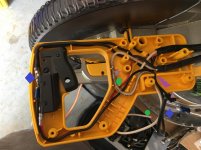
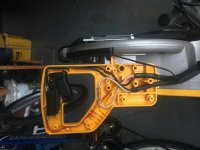
I assume you are asking for pics of the wiring so here are some.

The first pic is of the original wiring before I made any changes.


The second photo shows the wiring changes necessary for the XPS system. I added some colored symbols on to the photo which I will reference here to explain the modifications.

The blue diamond shows both ends of the new black power wire. On one end (left side of the pic) is the AMP Ring Terminal crimped onto the black wire and connected to the saw trigger switch. In the photo you can make out that it is the top screw on the upper part of the switch. There is already a black wire connected and you will leave the original black wire in place and add the new black wire to it so you will have two wires connected to this post.

The green circle shows both ends of the *********** wire.

The gray star is the AMP Female Terminator that needs to be cut off and replaced with a new one with both the original white wire and the new white wire crimped to it. It is a little hard to tell in the picture but there is one white wire coming down from the top to the male connector and from the female connector there are two white wires coming down.

The gray triangle is the cable from the light which comes as part of the light assembly.

The purple lightning bolt shows a slit in the handle where the wires need to be pushed into so that they exit the main part of the handle properly and enter the cavity that houses the XPS light switch\power supply. A narrower gauge wire than what I used (I used 14 gauge) will feed through this slit a bit easier.


The 3rd pic shows the new handle cover installed (you only need the top cover as the bottom is the same). You can see the cut out for where the XPS switch is to be installed\screwed into the handle. Also shown is the black and *********** wires hanging out and the cable with plug from the XPS light. You can use screw nuts to connect the power wires to the XPS power switch or the proper Molex connector (I went with small wire nuts).

Hopefully that helps.
 

Attachments

  • 799HandleOriginal.jpg
    799HandleOriginal.jpg
    132.2 KB · Views: 311
  • 799Handle1.jpg
    799Handle1.jpg
    136.7 KB · Views: 337
  • 799HandleNewCover.jpg
    799HandleNewCover.jpg
    124.3 KB · Views: 300

DynaGlide

Well-known member
Joined
Jan 27, 2013
Messages
67
So I did this modification late last night and had some things to add:

1) Don't bother with the Molex pins/connector. They only work with 22ga wiring. If you try to use 22ga wiring to piggy back into an AMP Female Disconnect that will accept the cut off white wire it won't work. The white wire appears to be 14ga. AMP Female Disconnects aren't designed to have two wires inserted into them prior to crimping. I ended up using an AMP Female Disconnect designed for 10-12ga from Home Depot, and 16ga wire for running to the power switch for the light. They sell the disconnects in 10-12ga, 14-16ga, and 18-22ga. The 14-16ga just fit the stock white wire and wouldn't allow for an additional wire to fit. This connection was the hardest part of the whole job since I had to go back to the store to get more stuff once I realized my 22ga wiring wasn't going to cut it.

2) Making the connection to the power switch for the light there isn't a whole lot of room to stash the wiring. I ended up using some Posi-Tap's and really cramming them in there. Could probably do like above and use some small wiring nuts I just didn't feel like cutting the plug off.

You'll need various Torx bits to remove the bolts securing various parts together. T15, T20, and one larger for the handle but I used a flathead screwdriver on that one. They were all fairly tight and some wouldn't break free even with my laser tipped Wera set, hence the need for the Torx bits. I already had them but you may not.

Haven't made a cut yet but verified it all works and 100% think this is worth the upgrade. I got the saw for $250 on the deal a few years back and was undecided about selling it some day but after this I don't plan on it. Also adding a zero clearance insert from Infinity Tools.
 

Cybear_Dad

New member
Joined
Nov 15, 2017
Messages
1
I assume you are asking for pics of the wiring so here are some.
...
Hopefully that helps.

Awesome, MustardTiger! Thanks for sharing the pics and write-up.

Cheers to DynaGlide, too.

Thanks to kingsra & all who contributed! This upgrade really makes it.
 
Last edited:

Overboost

New member
Joined
Apr 4, 2011
Messages
2
In some of the original posts they mentioned ordering the motor cord from the 780. Does it come with the correct connector to make it a true plug and play install? I just got a 779 for Christmas and ordered the parts to add the light, but I don't see any clarification on the cord point.

EDIT: Re-reading MustardTiger's post cleared up the confusion I had on the cord. It cost me $61 for the parts. Can't beat that!
 
Last edited:
To avoid these ads, REGISTER NOW!
Top Bottom