To avoid these ads, REGISTER NOW!

How many cameras for my house and shop

penright

ALLIANCE MEMBER
Joined
Dec 27, 2016
Messages
618
Location
SW of Mustang, OK
How many cameras and alarm panels for my house and shop.

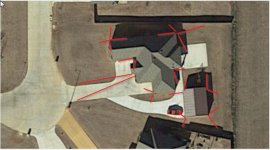
GEO vision is going to be more expensive than HIK vision most likely. I would start a new thread if I were you and you'll get plenty of response. If i get a few minutes today I will mark up the aerial shot of your property with what I would do for cameras.

Thanks, I will take your advice. I was not sure if proper etiquette is to link or copy my post. I felt it was better to copy here, so comenters would not have to switch back and forth, then link the old here. Hope this is right. :)


Just starting my search for cameras.
Trying to get a budget. If I post few pictures, can someone ballpark how many I will need? I would like to protect the shop. I have several cat6 pulled to the shop from inside the house. The Cameras can have their own band width.

HouseSatView_zpstr4kgtdx.jpg


20180321_172115_zpsntzhbvfy.jpg


This picture of the back was taken before the shop was built. The previous owners had a fence that was not down the property line. I think they wanted a square backyard. The lot is pie shaped, as you can see from the satellite picture. I took it down so I could have the room for the shop. The house part has not changed.

GetMedia%2026_zpsui2zplj0.jpg


Its amazing how many different systems as well as VMS programs there are.

We install geo vision cams and systems, myrisis spotter VMS/NVRs with Bosch cameras, Bosch NVRs with Bosch cams and pelco and ever focus cams with Pelco NVRs/DVRs. The choice of equipment all depends on the customer's camera needs, budget and requirements.

How does the geo vision price match HKI Vision?
Also, I think I saw where you do alarms. Can I pick your brain about some Honeywell panels? If yes, I will start a new thread. :)
 
Last edited:
To avoid these ads, REGISTER NOW!

Tmart86

Well-known member
Joined
Jul 12, 2017
Messages
151
Location
Cedar Rapids Iowa
E66BB79E-BBA9-4AB8-9917-7C1B434B5545_zps0shtcakn.jpg


Sorry for the quickly thrown together idea. Without seeing the property this is what I would suggest for a basic camera coverage for the property without getting carried away. I saw in your build log you have windows in the shop and i would just secure those with some kind of physical deterrent vs spending money for cameras.

Camera specs i would look at 2mp aka 1080p or better (remember more mega pixel isnt always better)

Lens in the 2.8mm-3.5mm range this allows a view angle of around 90* and i find that works well for homes.
 

nh_yota

Well-known member
Joined
Mar 10, 2015
Messages
4,068
Location
Seacoast New Hampshire
You can put the shop cameras on their own switch that backhauls to the house over one of the Cat6 cables instead of using a cable for every camera. Depending on the length of the run you may want to do this anyway if you're going to use POE.
 
OP
P

penright

ALLIANCE MEMBER
Joined
Dec 27, 2016
Messages
618
Location
SW of Mustang, OK
You can put the shop cameras on their own switch that backhauls to the house over one of the Cat6 cables instead of using a cable for every camera. Depending on the length of the run you may want to do this anyway if you're going to use POE.

Thanks. Yes, the plan was to use one for cameras. A different one for internet. That way they would not be clashing with each other. The other two are for security sensors and alarm keypad. That gives me 8 pair. The last two is for spare and whatever else I forgot.

I need to start a thread on alarm panel discussion.
 

Tmart86

Well-known member
Joined
Jul 12, 2017
Messages
151
Location
Cedar Rapids Iowa
Just use one of the Cat 6 runs as a data line for the alarm from the main panel to a expansion panel in the garage instead of trying to run all the sensors back to the house. This will allow for key pads, siren, sensors and power for sensors if needed.
 
OP
P

penright

ALLIANCE MEMBER
Joined
Dec 27, 2016
Messages
618
Location
SW of Mustang, OK
Sorry for the quickly thrown together idea
No, this is great. I needed something to start discussing. Thank you so much.


Camera specs i would look at 2mp aka 1080p or better (remember more mega pixel isnt always better)

Lens in the 2.8mm-3.5mm range this allows a view angle of around 90* and i find that works well for homes.
Thanks for the spec. I was wondering how Lens size fit into the discussion.
Seems like the 2.8 is a poplar size.

Without seeing the property this is what I would suggest for a basic camera coverage for the property without getting carried away.
Thanks for trying. I knew it would be hard, but this is helpful. Couple of clarification questions. The airel picture is correct for compass (North top).
First, I am not too worried about anyone coming from the north. Besides having their own security measures, they have a really great one. German shepherd mixed. He is really gentle to HIS FAMILY and very, very, very protective of them. No one is coming from that back yard.
The camera on the back of the house (blue) facing east, covers a lot of the back yard. Could it be moved to the northwest corner, just around from the yellow, get the whole back of the house and some of the back fence? The main reason, the wire would be easier to pull. This is where a person suffers from not seeing the physical house. Where that camera would be mounted, the eve will be a tight fit to reach into from the attic. If that is the best option, then hopefully there is not any blockage, and a fish tape push up would flow to an area where the cable could be attached to it.


I saw in your build log you have windows in the shop and i would just secure those with some kind of physical deterrent vs spending money for cameras.
What about a fifth camera on the southeast corner of the shop. Can it get little more than 90 degrees? That would get the southside and fill in some of the hole from what the shop causes to the back house camera.
Is this where a 3.8mm would be better?
OR
The shop will have security, maybe camera on the inside, focus more on the south and east wall? Are inside camera cheaper?


this is what I would suggest for a basic camera coverage for the property without getting carried away.
A person always has to get carried away a little bit. At least until he sees the cost. :) Here's the question, the driveway facing the west, is line up perfectly with the road. In googling I read something about LPR cameras. Not the kind that reads the number, these are special somehow that allows the camera to focus and the shutter speed is such to get a clearer snapshot of the license plate. Don't know anything other than that and they do cost more. If I had that shot, there is no one who could leave (OK only has plates on the rear of cars) the neighborhood without getting the plate.
 

Tmart86

Well-known member
Joined
Jul 12, 2017
Messages
151
Location
Cedar Rapids Iowa
Thanks for trying. I knew it would be hard, but this is helpful. Couple of clarification questions. The airel picture is correct for compass (North top).
First, I am not too worried about anyone coming from the north. Besides having their own security measures, they have a really great one. German shepherd mixed. He is really gentle to HIS FAMILY and very, very, very protective of them. No one is coming from that back yard.
The camera on the back of the house (blue) facing east, covers a lot of the back yard. Could it be moved to the northwest corner, just around from the yellow, get the whole back of the house and some of the back fence? The main reason, the wire would be easier to pull. This is where a person suffers from not seeing the physical house. Where that camera would be mounted, the eve will be a tight fit to reach into from the attic. If that is the best option, then hopefully there is not any blockage, and a fish tape push up would flow to an area where the cable could be attached to it.

Thought process behind the blue camera was to cover the back entrance to the house, the back yard and the side of the garage. moving it would be fine eves are fun the fish cable. moving it based on what you want to cover and ease of placement is always a good reason to consider moving the camera.


What about a fifth camera on the southeast corner of the shop. Can it get little more than 90 degrees? That would get the southside and fill in some of the hole from what the shop causes to the back house camera.
Is this where a 3.8mm would be better?
OR
The shop will have security, maybe camera on the inside, focus more on the south and east wall? Are inside camera cheaper?

Indoor cameras do save a little bit of money because they do not have to have weathertight housings and sometimes built in heaters.

as for lenses:
1.8mm field of view of around 150*
2.4mm field of view of around 130*
3mm field of view of around 95*
3.4mm field of view of around 85*
4mm field of view of around 80*

these are decent general guide lines for a over all coverage camera selection. if you are trying to get faces or license plates etc you have to consider alot more about the "scene" you are trying to capture and how many pixels you need in that scene to effectively capture what you want.


A person always has to get carried away a little bit. At least until he sees the cost. :) Here's the question, the driveway facing the west, is line up perfectly with the road. In googling I read something about LPR cameras. Not the kind that reads the number, these are special somehow that allows the camera to focus and the shutter speed is such to get a clearer snapshot of the license plate. Don't know anything other than that and they do cost more. If I had that shot, there is no one who could leave (OK only has plates on the rear of cars) the neighborhood without getting the plate.

LPR cameras are fun and require a nice camera with good IR to allow for fast shutter speeds at night. you can look into OPEN LPR if you really want something set up that would log plate numbers automatically
 
OP
P

penright

ALLIANCE MEMBER
Joined
Dec 27, 2016
Messages
618
Location
SW of Mustang, OK
Just use one of the Cat 6 runs as a data line for the alarm from the main panel to a expansion panel in the garage instead of trying to run all the sensors back to the house. This will allow for key pads, siren, sensors and power for sensors if needed.

Does any know how to change the thread name, I should add ... and alarm panels. :)

I do want two partitions. One for the house and one for the shop. After some more googling. I was looking at Vista 20 panel. There was no provisions when this house was built for and sensors or keypad wires. Some will not be able to be installed without using wireless. So I will need some way of connecting the wireless to the panel.
I am looking at 2 keypads in the house. One for the front door and one for the garage door (inside two car).
To tie into home automation, I was looking at AlarmDecoder, it emulates a keypad. So that is three keypads.

This expander, how does it tie into home panel? Would it give me the two partitions I am looking for? Are they expensive? Does it look like a keypad, kind of like the AlarmDecoder?

I have the wire and extra one if needed. Can power be shared?


Here is the door that maybe a challenge for wired sensor.
The top plate on that wall is 10 Feet. The wood for the wood for the lights is L shaped. The wire for the lights come through the top plate, which is hidden by the wood turning up. I think I can get a hardwired keypad there. For the door sensor... It opens from the left side, I am guessing from the top of the door up to where it would come out is about 4 or 5 feet more. I need to check out is the back side. Maybe that wall above the door is studs and they are open on the back side. The porch is gabled, I might be able to see the top plate from the other side.
20180412_181714_zpsbwdqj7gz.jpg
 
OP
P

penright

ALLIANCE MEMBER
Joined
Dec 27, 2016
Messages
618
Location
SW of Mustang, OK
It's probably easier to mount the sensor lower on the door and run the wiring behind the door/floor trim into a more convenient stud bay.
That's, a thought. It scares me to pull the trim off, but I did it at the old house to get cable to an area where you could not get to that top plate.
Looking at the trim on the door, maybe a possibility take it down the left side.
I will get into the attic tonight and look closer.
 

JackAndy

Well-known member
Joined
Apr 4, 2017
Messages
130
Location
Minneapolis
My suggestion is to get a 16 camera system. The Samsung 16 channel security DVR models come with 10 or 12 cameras for a decent price. Then you buy the last 4 cameras yourself. This is a good option because you'll want most of the cameras to be the standard wide angle types that come with the system but you'll want a few that are more narrow angle to see down the driveway and approach to the garage.

Basically you'll want to cover all the blind spots. Your house isn't exactly square so you're going to need a lot of cameras.

Assuming the top of the first picture is North, you'll want a camera on the northwest corner of the house facing south. That's going to catch anyone going around the house from the attached garage and it covers both west windows. That one will go on the soffet or overhand from the roof. Then you'll want another camera on the corner facing east and that will cover the whole east side of the house. You might make this one of the more narrow view angle cameras.

On the northeast side, you'll want one camera facing west and another southeast.

I should just draw a picture. I have a tiny little house with one detached garage and 8 cameras are just enough to cover most of the blind spots for the house itself. A lot of the times, its useful to have multiple view points because depending on which direction a car comes from or if they're parked on the street vs driveway, I might not catch a license plate.
 

JackAndy

Well-known member
Joined
Apr 4, 2017
Messages
130
Location
Minneapolis
Here's a very basic sketch I did. You won't really have it figured out completely until you start installing the cameras, aiming them, figure out which ones are good etc.

Basically you need to cover all of the blind spots which you can do by overlapping the cameras field of view or just capture all of the approach angles. So on the house you can see that the cameras on the north overlap and watch eachother. Nobody could sneak up and smash a camera on the northwest or northeast without being caught on another camera. On the shop or detached garage, I just sketched up the cameras on each corner. Even if you don't have windows on every side of the shop, you don't want to create a blind spot someone could approach through. The field behind your house is a perfect blind spot. If I were a burglar who wanted to rob you, I'd go through the field because I anticipate you'd have more lights and security on the front of the house than the back.

I wouldn't bother trying to go with fewer, higher quality cameras or IP cameras. My Samsung 8 channel system was $300 and it works wonderfully. The software connects almost immediately and when I'm watching, the delay is sometimes less than a second. Its very customizable as recording zones, motion activation etc. Each cable is 60'. So for the shop, you'd have to get a separate power brick for the cameras in there and run some coax through your conduit to the house and up to the DVR. The rest of the cables should work as they come out of the box. Then you just setup the DVR and router on a UPS. Then even if the power goes out, you can watch the cameras on wifi.

attachment.php
 

Attachments

  • 2018-04-17 09_43_56-How many cameras for my house and shop - The Garage Journal Board.jpg
    2018-04-17 09_43_56-How many cameras for my house and shop - The Garage Journal Board.jpg
    40.1 KB · Views: 523
OP
P

penright

ALLIANCE MEMBER
Joined
Dec 27, 2016
Messages
618
Location
SW of Mustang, OK
Did some attic crawling. Actually, that is one nice thing about this house, it was more walking. I stayed pretty much on the planks laid down for the heater maintenance.

Look below for the back porch.

The attic view. It kind of hard so see the rafters, I did not crawl all the way, but it looks like if I drill a hole and push the fish tape, and get lucky that it falls the right way... May not be as bad as I thought.
20180416_180107_zpspnpfu0y6.jpg

It kind of dark, I tried to highlight the rafters. You can kind of make out the hip part of the roof.


I was right about the front door. Here is a shot from the front of the house.
GetMedia%201_zpspeooabx0.jpg

Here is the attic. I bet if I angle the bit, I would miss the front of the box that makes the arch. If not, I can still use the wireless, it would hide the hole.
20180416_175648_zpskpucsydm.jpg

The top arrow show the back of the box and bottom shows the top plate.


Having said all that, still might use the wireless. I wonder if the joist they use for the soffit would hold me. I think if I went around to the other side, I would have the top plate of the room to the right looking at the front.
 

Tmart86

Well-known member
Joined
Jul 12, 2017
Messages
151
Location
Cedar Rapids Iowa
Here's a very basic sketch I did. You won't really have it figured out completely until you start installing the cameras, aiming them, figure out which ones are good etc.

Basically you need to cover all of the blind spots which you can do by overlapping the cameras field of view or just capture all of the approach angles. So on the house you can see that the cameras on the north overlap and watch eachother. Nobody could sneak up and smash a camera on the northwest or northeast without being caught on another camera. On the shop or detached garage, I just sketched up the cameras on each corner. Even if you don't have windows on every side of the shop, you don't want to create a blind spot someone could approach through. The field behind your house is a perfect blind spot. If I were a burglar who wanted to rob you, I'd go through the field because I anticipate you'd have more lights and security on the front of the house than the back.

I wouldn't bother trying to go with fewer, higher quality cameras or IP cameras. My Samsung 8 channel system was $300 and it works wonderfully. The software connects almost immediately and when I'm watching, the delay is sometimes less than a second. Its very customizable as recording zones, motion activation etc. Each cable is 60'. So for the shop, you'd have to get a separate power brick for the cameras in there and run some coax through your conduit to the house and up to the DVR. The rest of the cables should work as they come out of the box. Then you just setup the DVR and router on a UPS. Then even if the power goes out, you can watch the cameras on wifi.

attachment.php

I highly discourage Cheap cameras and the more is better idea.I dont want my house to have 2 cameras on every corner but maybe thats just me. A properly planed and installed system can look good and perform way better than the cheap 12 camera systems.

See post #24 and #25 for a comparison between "Cheap" cameras and real cameras
https://www.garagejournal.com/forum/showthread.php?t=365564&page=2
 

Astross89

Well-known member
Joined
Apr 7, 2018
Messages
153
Let's put it this way. I have just a 1600 square foot home and I have a 8 camera system up. I'm debating on pulling out the 8 channel system and upgrading to a 16 channel. More the merrier. Also I would not install anything under 4 MP camera. And make sure they are P.O.E
 

Tmart86

Well-known member
Joined
Jul 12, 2017
Messages
151
Location
Cedar Rapids Iowa
That looks like a decent plan. maybe just add one looking west down the driveway from the shop. and you keep your camera count to a reasonable number.
 
To avoid these ads, REGISTER NOW!
OP
P

penright

ALLIANCE MEMBER
Joined
Dec 27, 2016
Messages
618
Location
SW of Mustang, OK
First, thanks to everyone who helped. My goal was not as much desigen the final product, as more to educate myself on how it is done. That way when I talk to a professional, I have some idea. After all this, I am starting to feel this is a DYI. Talking to a friend last night, he has a couple of cameras laying around that I can borrow for some test fitting.

My next step is understanding NVR and this cameras I found.
https://www.unixcctv.com/product/ir-dome-ip-2mp-12-8in-cmos-4mm-100ft-ir-dwdr-3ddnr-blc-icr-ip66-dc-12vpoe-vandalproof/?print-products=pdf

Some features, I can guess by the name, but how does it work?
Some examples are:
• alarm
• Support smart function: Intrusion detection and line crossing detection
Can I tie this into Alarm functions and maybe home automation alerts? Turn on lights?

•Support VCA • which is compatible with NVR for the second time of video searching and analyzing
This sounds cool. Is this like what Abby with NCIS uses? :)

• capture motion video without incised margin
Don't have a clue yet.

• IR cut filter with auto switch
• ROI (region of interest) encoding
• Progressive scan CMOS
•Support dual stream • and the sub-stream for mobile surveillance
• mirror
Again, sounds cool, what is it?

• reset button
Is this good to have on a camera? Must not be the "reset" I am thinking of.
 

JackAndy

Well-known member
Joined
Apr 4, 2017
Messages
130
Location
Minneapolis
Some features, I can guess by the name, but how does it work?
Some examples are:
• alarm
• Support smart function: Intrusion detection and line crossing detection
Can I tie this into Alarm functions and maybe home automation alerts? Turn on lights?

•Support VCA • which is compatible with NVR for the second time of video searching and analyzing
This sounds cool. Is this like what Abby with NCIS uses? :)

• capture motion video without incised margin
Don't have a clue yet.

• IR cut filter with auto switch
• ROI (region of interest) encoding
• Progressive scan CMOS
•Support dual stream • and the sub-stream for mobile surveillance
• mirror
Again, sounds cool, what is it?

• reset button
Is this good to have on a camera? Must not be the "reset" I am thinking of.

The features it describes are software features. I'm not sure if these are built into the camera or if this is software you have to install somewhere.

The alarm features are basically motion detection. You can setup fields of interest. My Samsung screen basically has a screen that looks like minesweeper and you setup what zones will be watched for motion. You can set the camera to record on timer or 'arm' (motion) only or both. And when it alarms it can send you an email. I'm sure you can set that up to also send a text through an email to text service. If your home automation supports IFTTT and IFTTT can use emails as a trigger, I'm sure you could make it trigger lights but the response wouldn't be milliseconds.

Dual stream means you get one screen at low quality for thumbnail viewing and one high quality for recording or full screen viewing. I don't know what software this is but with Samsung Wiseview I can just pull it up on my phone and have various split screens with 4,6,8 cameras etc in different arrangements.

Again I hope this is centralized software on your NAS or server and not per camera because you want to be able to login to one place and view all of the cameras at once.
 

Tmart86

Well-known member
Joined
Jul 12, 2017
Messages
151
Location
Cedar Rapids Iowa

NVR is just a Network Video recorder. youll have a few options. a premade NVR from the camera manufacture is the simple solution. The next step is a cliet/server pc running a Video management software of your choice. For example Blue iris, milestone etc.

Some features, I can guess by the name, but how does it work?
Some examples are:
• alarm
• Support smart function: Intrusion detection and line crossing detection
Can I tie this into Alarm functions and maybe home automation alerts? Turn on lights?
I dont see mention of any relay style connections on the cameras so most likely this camera just supports software based alarm. (some cameras have relays in the camera them self.) it would send a motion alert etc to the NVR and then some NVR's have Input/output that can be used to trigger other systems based on rules setup in the nvr

•Support VCA • which is compatible with NVR for the second time of video searching and analyzing
This sounds cool. Is this like what Abby with NCIS uses? :)

Not familiar with this term. But their is no such thing as zoom and enhance. the resolution of your camera doesnt change. most systems provide you with Digital zoom to zoom in on areas of a frame. a good example would be you have a monitor that displays at 1920 x 1080p and the image size is 4mp or 2560 x 1440 you can resize an area to fit your display but you wont enhance an image that has a low pixel count

• capture motion video without incised margin
Don't have a clue yet.

• IR cut filter with auto switch
• ROI (region of interest) encoding
• Progressive scan CMOS
•Support dual stream • and the sub-stream for mobile surveillance
• mirror
Again, sounds cool, what is it?
IR cut filter removes the IR light spectrum during the day and the auto switch remove it from the image sensor at night to allow the use of IR for night vision

region of interest sounds like a process used by a lot of manufactures to reduce storage requirements. this is part of the video encoding process. They change how many P and B frames are stored for every I frame. The Iframe is the initial image followed by P and B frames that recorded changes in the image in reference to the original I frame. If no changes are need or only a few changes are needed they only record those so that they can reduce the total storage needed for recording but you will never notice. The version of this I am familiar with is Axis Zip stream https://www.axis.com/en-us/technologies/zipstream Ive tried to keep product recomendations out of this thread because they are so many options and I am biased towards axis


• reset button
Is this good to have on a camera? Must not be the "reset" I am thinking of.

Reset button will not be accessible when the camera is installed. it is normally used for things like factory resets etc.
 

Fixin'Stuff

Well-known member
Joined
Jun 14, 2016
Messages
584
Location
HotterNHellHouston
Poor quality cameras are a waste of money. Have a look at the video in the news story below. The guy pulls right into the driveway at one house, but you can't read the license plate due to the graininess. Some shots are from video doorbells that are mounted incorrectly so you're looking up the guys nose. He's been on the news for over a week now and the only thing that security cameras have provided is to let owners see that a black guy, driving a 4-door silver Mercedes with 5-spoke wheels burglarized their house. :(

https://www.click2houston.com/news/...this-is-what-authorities-say-he-does-to-homes

Cameras don't seem to deter crime very much either, at least around Houston. They show plenty of security video on the news here of burglars walking around in someones house with their faces covered. :(
 

JackAndy

Well-known member
Joined
Apr 4, 2017
Messages
130
Location
Minneapolis
I think they blurred out his plate because that recording looks pretty sharp. Once you export it though, it starts getting recompressed. It might've been a lot better originally. Another problem you're going to find is that if someone parks on the street, you'll never see the license plate. You'd need a camera mounted on the curb basically in order to catch license plates off the street. I'm not particularly motivated to run conduit or bury cable. If you had a lamp post in the yard, I'd think you could put a camera on that and run the signal with wifi though.
 

Tmart86

Well-known member
Joined
Jul 12, 2017
Messages
151
Location
Cedar Rapids Iowa
I bet the front plate is still 30' from the camera not knowing the camera type if you assume normal lens options and a 1080p camera you are under 50 pixel per foot so identification of a plate is still going to be extremely difficult. most software based LPR software is going to require greater than 75 pixels per foot and for user identification you want to be around 100 pixels per foot for a good read on a license plate.
 

slodat

ALLIANCE MEMBER
Joined
Feb 6, 2010
Messages
3,679
Location
Central-ish, WA
I went through this a while back on my shop. I ended up with Dahua starlight (ultra low light) cameras ordered direct from a guy in China, using Blue Iris as a PC based NVR. It is, in the opinion of many, the best solution under a very high price ceiling. I have full color (even at night because of outdoor lighting), with audio on every entry point to my building. The cameras are ~$160 ea shipped, Blue Iris is <$100. I'm very happy with the system. I have the cameras setup for ID of the person. I have nearly full frame height on them and there's no way to avoid looking at the cameras once they see them.. Food for thought. I learned what I know from ipcamtalk
 
OP
P

penright

ALLIANCE MEMBER
Joined
Dec 27, 2016
Messages
618
Location
SW of Mustang, OK
50 pixel per foot so identification of a plate is still going to be extremely difficult. most software based LPR software is going to require greater than 75 pixels per foot and for user identification you want to be around 100 pixels per foot for a good read on a license plate.

The 75 and 100 pixels per foot, good baseline value to know.

After some googling, pixels per foot. This youtube video made it pretty clear. There are ton of right angle calculators out there. It was kind of cool how the link that @penulisa posted worked it all out using google maps. Link again for reference.
I think I am getting real close, if not there, being able to pick out my specs. :)
 

JackAndy

Well-known member
Joined
Apr 4, 2017
Messages
130
Location
Minneapolis
Thanks for the camera suggestion slodat. What do you think of Dahua HAC-HFW2231S (ebay item# 323164225156) as a direct upgrade to a Samsung SDC-9443BC? These are similar style and I'd like to just swap it out.

Dahua Starlight
Code:
Image Sensor

1/2.8" CMOS

Effective Pixels

1937(H)×1097(V), 2.1MP

Scanning System

Progressive

Electronic Shutter Speed

PAL: 1/4s~1/100000s

NTSC: 1/3s~1/100000s

Minimum Illumination

0.005Lux/F1.6, 30IRE, 0Lux IR on

S/N Ratio

More than 65dB

IR Distance

Up to 30m (98feet)

IR On/Off Control

Auto / Manual

IR LEDs

18

Samsung
Code:
VIDEO
Imaging Device 2M CMOS (1/2.7")
Effective Pixels 1,920(H) x 1,080(V)
Scanning System Progressive, 30fps (NTSC) / 25fps(PAL)
Synchronization Internal
Horizontal Resolution 1080p
Min. Illumination 0 Lux (IR LED On)
Camera Output BNC
LENS
Focal Length 3.6mm
Max. Aperture Ratio F2.1
Angular Field of View D:105° / H:88° / V:46°
 

Tmart86

Well-known member
Joined
Jul 12, 2017
Messages
151
Location
Cedar Rapids Iowa
Thanks for the camera suggestion slodat. What do you think of Dahua HAC-HFW2231S (ebay item# 323164225156) as a direct upgrade to a Samsung SDC-9443BC? These are similar style and I'd like to just swap it out.

Dahua Starlight
Code:
Image Sensor

1/2.8" CMOS

Effective Pixels

1937(H)×1097(V), 2.1MP

Scanning System

Progressive

Electronic Shutter Speed

PAL: 1/4s~1/100000s

NTSC: 1/3s~1/100000s

Minimum Illumination

0.005Lux/F1.6, 30IRE, 0Lux IR on

S/N Ratio

More than 65dB

IR Distance

Up to 30m (98feet)

IR On/Off Control

Auto / Manual

IR LEDs

18

Samsung
Code:
VIDEO
Imaging Device 2M CMOS (1/2.7")
Effective Pixels 1,920(H) x 1,080(V)
Scanning System Progressive, 30fps (NTSC) / 25fps(PAL)
Synchronization Internal
Horizontal Resolution 1080p
Min. Illumination 0 Lux (IR LED On)
Camera Output BNC
LENS
Focal Length 3.6mm
Max. Aperture Ratio F2.1
Angular Field of View D:105° / H:88° / V:46°


Won’t work. The samsungs are using one of the HD over coax versions and also your recorder probably doesn’t support onvif ip streams
 

youwish2bme

Well-known member
Joined
Jan 19, 2014
Messages
164
Location
Clayton, NC
Check out CCTVImports.com I'm on my second system in the last 10 years. For your house I would be looking at 14-16 cameras with a high quality system. It would be between $2,500 to $3,000 if you did the installation yourself. Their Customer Support has always been great. I can see all the cameras from my phone, laptop or from the DVR...

HITCH
 

roguegts

Well-known member
Joined
Aug 1, 2013
Messages
189
Ugh, this thread is going to cost me a lot of $$$.

Sent from my SAMSUNG-SM-G920A using Tapatalk
 

JackAndy

Well-known member
Joined
Apr 4, 2017
Messages
130
Location
Minneapolis
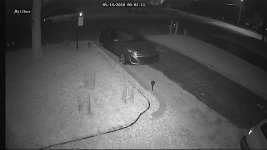
In regards to the comments about the cost, I don't think you have to go with a high cost system to get high quality. I just replaced one of my Samsung cameras with a higher end camera and the night vision is slightly better but I have to say that overall the image quality during the day time isn't any better.

Before
attachment.php

Samsung Camera F2.1

After
attachment.php

Dripstone Camera F1.2

The Dripstone camera isn't that expensive of an upgrade either. It's $65 right now but still seems to be a big improvement for night vision. Its a lot bigger and heavier than the Samsung cameras which is good and bad. The Samsung cameras are very small and light so they're easy to mount even on a soffit and they're inconspicuous and polite looking imo.

I'd still rather have more cameras in the right places than fewer higher quality cameras however unless we're talking about ones that move and have AI etc. Nothing beats getting the right shot and multiple angles helps a ton.
 

Attachments

  • 2018_05_15_10_57_34_141_4.jpg
    2018_05_15_10_57_34_141_4.jpg
    77.5 KB · Views: 117
  • 2018_05_15_10_57_58_887_4.jpg
    2018_05_15_10_57_58_887_4.jpg
    126.4 KB · Views: 118

TerryH

Well-known member
Joined
Dec 8, 2012
Messages
2,248
Location
Springdale, AR
You guys are way more versed in the equipment than I so take this for whatever it's worth....

I just went through this process on my house and shop as well as my mother's house. Local guy did the install. Have all Samsung equipment and all hard wired even though it was a little pricey to run the cat cables out to my shop. 7 cameras plus a SkyBell HD door bell system.

What he suggested was overviews all around and specific close views of entrances and windows. He told me that every time he has been involved with the PD on break ins or whatever, they are looking for good pics of the perp which are rarely clear enough in general views. I have the general views positioned to hopefully capture licence plates on vehicles. Easier said than done in our state that does not require front plates.

I've already spotted a couple places that I'm going to add more. I bought a 16 spot DVR just for such.

 
Last edited:

bczygan

Well-known member
Joined
Nov 4, 2009
Messages
22,002
Location
DETROIT! Arsenal of Scrappers
At least 8. Maybe 12. Maybe 16.

In the yard, looking out.

In the yard, looking at the buildings.

On the buildings looking out.

In the buildings for closeups.

Bill
 
Last edited:

JackAndy

Well-known member
Joined
Apr 4, 2017
Messages
130
Location
Minneapolis
You guys are way more versed in the equipment than I so take this for whatever it's worth....

I just wen Have all Samsung equipment and all hard wired even though it was a little pricey to run the cat cables out to my shop.

How did you run that camera cable out to the garage? It looks like at least a 160 foot run. I was thinking for something like that I'd need a separate power supply in the garage and RG-59 or even RG-6. A seller of these cables on Amazon was saying for more than 180 feet, RG-59 is recommended and for over 800 feet, they recommend RG-6.

If I were you, I'd aim cameras 1-6 lower to the ground. You don't want to be recording the sky or roof and miss something in your field of view.
 

TerryH

Well-known member
Joined
Dec 8, 2012
Messages
2,248
Location
Springdale, AR
How did you run that camera cable out to the garage? It looks like at least a 160 foot run. I was thinking for something like that I'd need a separate power supply in the garage and RG-59 or even RG-6. A seller of these cables on Amazon was saying for more than 180 feet, RG-59 is recommended and for over 800 feet, they recommend RG-6.

If I were you, I'd aim cameras 1-6 lower to the ground. You don't want to be recording the sky or roof and miss something in your field of view.

Agree on re-aiming some of those cameras.The Samsung camera mounts have toothed flanges. There are a couple of them are too low for my liking at the next tooth lower.

Sorry, I mostly just wrote the check. This is the extent of my knowledge.

The run is 150 ft or so. Comes out the house and then into the landscaping on the west side of the property and then into the edge of the garden landscaping. 5 direct burial Cat 6 cables. I wanted a dedicated data line in the shop and allow for more cameras in the future.


JackAndy

Well-known member
Joined
Apr 4, 2017
Messages
130
Location
Minneapolis
5 direct burial Cat 6 cables. I wanted a dedicated data line in the shop and allow for more cameras in the future.

Cat 6? Which Samsung unit do you have? I have the AHD one and its all analog. That being said, I know a CAT5 can run 100 meters between repeaters. I'm not sure about CAT6.

Is there conduit underground the whole way or were the wires just laid in a trench with a conduit at either end?
 
To avoid these ads, REGISTER NOW!
Top Bottom