To avoid these ads, REGISTER NOW!

Illustrated How To: Picture Hosting & Embedding in Posts

Talus

Well-known member
Joined
Apr 15, 2012
Messages
114
Location
Southside CT
Looked for a general section to post this thread but didn't see one, so my apologies if it's in the wrong place.

Had a question about embedding photos vs. attaching them. This is a quick instructional on how to embed photos. 6 Easy steps.

Step 1:

Have your picture(s) ready. Whatever you plan on uploading.

If you want to upload a bunch of pictures I would recommend gathering your pics in one folder on the desktop. I usually right click>new folder> and name it "uploads" or something easy. Either copy & paste them into a folder on your desktop, drag them in.


Step1.png


Step1B-1.png


Now you have your awesome pics ready for uploading! :rocker:

Step 2:

Go to your Photobucket account. If you don't have one, open one up.

Click the green "Upload" button.


Screenshot2012-05-01at13450PM.png


Go to the "customize your upload options" screen.
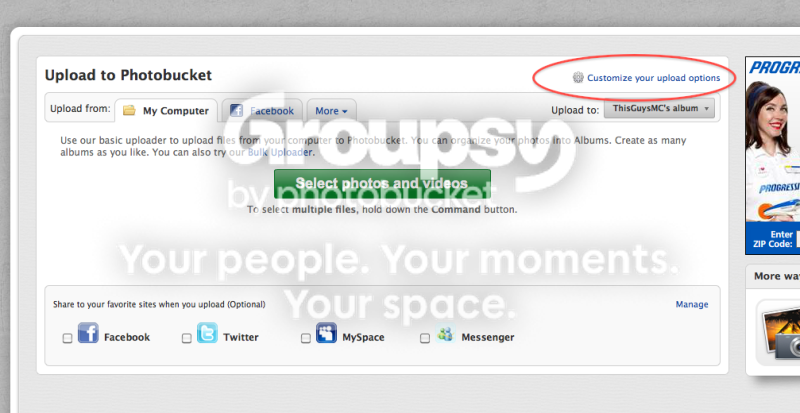
Step2.png


NOTE: You will only have to set this once. Check the 800x600 option. Click "Save" That size fits perfectly for this forum within the white section. Click "Save"

Step2B.png


Step 3:

"Select "Photos and Videos".

Step3.png


For one picture, just navigate and find it. For multiple pics, go to your desktop (see how handy this will be) and open the folder you made. Hold SHIFT, click the top one, and use the down arrow to highlight all of the pictures. Easy! Click "Open" and watch the magic.

Screenshot2012-05-01at12937PM.png


Screenshot2012-05-01at12952PM.png


Step 4:

Once the pictures are uploaded, click the "View Album Button"

Step4.png


Step 5:

Hover the mouse over the picture you want to upload and a box will appear with sharing methods. Click the bottom one: "IMG Code" That one click will automatically copy the code.

Step5-1.png


Step 6:

Go to your GJ post and paste the code into the forum reply box/thread text box. Paste by holding the Control key and typing "V" or right click and select "Paste." Notice that there is the URL address with the two tags on either end. [/COLOR]

[IMG]http://i970.photobucket.com/albums/ae184/ThisGuysMC/Step6.png

Preview or add words and...you're done! Go grab a beer! You're now a pro!

Another hint, I keep a link to Photobucket in my browser's bookmarked toolbar. I can open a new tab and open up Photobucket. With one click I can get right into my album and start uploading.


Hint.png


Happy Posting! :beer:
 
Last edited:
To avoid these ads, REGISTER NOW!

Kevin54

MEMBER EMERITUS
Joined
Jan 12, 2005
Messages
29,341
Location
Urbana, Ohio
That's not really six easy steps. Everyone want to upload to Photobucket ut when bandwidth gets exceeded then the pics don't show up. It's way easier to save the pictures to your own computer and upload them from there.
 
OP
T

Talus

Well-known member
Joined
Apr 15, 2012
Messages
114
Location
Southside CT
That's not really six easy steps. Everyone want to upload to Photobucket ut when bandwidth gets exceeded then the pics don't show up. It's way easier to save the pictures to your own computer and upload them from there.

It is easier to attach pics, but someone asked about embedding pics, so that's why I made this thread. It may not be six easy steps to you, but it's not rocket science.

I have been doing it this way for at least 5 or 6 years and never had any issues with bandwith being exceeded. Maybe I'm just on low traffic forums, but so far its worked fine for me.
 

KPSquared

Well-known member
Joined
Aug 18, 2010
Messages
2,750
Location
Wetaskiwin, Alberta, Canada
This is the way to do it. Then you can see full size pics in the thread and not have to click on the damn thumbnails. It's seriously easy.

Also can use photobucket mobile app. Then you can post pics straight from your phone to the forum.

4 steps I can see: upload, copy link, paste on forum, post. That's it, that's all.
 

Busted_Knuckles

Well-known member
Joined
Oct 9, 2009
Messages
2,613
Location
Northwest Illinois
Great post for those that don't know they can or how to, but how about some suggestions of hosting sites other than Photobucket ?

I had 3 accounts going, because I keep exceeding my bandwidth, and even with 3 I still exceed my bandwidth, so I went in and deleted everything, and walked away from Photobucket. And all those images are missing from lots-o-different threads/posts. Somewhat of a dis-service to those that are looking at the posts.

And about the only reason I deleted everything, is that photobucket "exceeded bandwidth" logo disappears from all the posts. I figure if you not going to host the picture, why should I have your advertising in the posts ? Also makes the posts/threads shorter/easier to sort through, when you dont have 25 photobucket notices stacked on top of each other saying the same thing "bandwidth exceeded"
 
OP
T

Talus

Well-known member
Joined
Apr 15, 2012
Messages
114
Location
Southside CT
Great post for those that don't know they can or how to, but how about some suggestions of hosting sites other than Photobucket ?

I had 3 accounts going, because I keep exceeding my bandwidth, and even with 3 I still exceed my bandwidth, so I went in and deleted everything, and walked away from Photobucket. And all those images are missing from lots-o-different threads/posts. Somewhat of a dis-service to those that are looking at the posts.

And about the only reason I deleted everything, is that photobucket "exceeded bandwidth" logo disappears from all the posts. I figure if you not going to host the picture, why should I have your advertising in the posts ? Also makes the posts/threads shorter/easier to sort through, when you dont have 25 photobucket notices stacked on top of each other saying the same thing "bandwidth exceeded"

I definitely see your point about bandwith. I've personally never had any bandwith issues, probably because I don't post photos very often. So what did you end up doing? Switch back to attaching pics?

I've used Flickr and Photobucket to host pics. Of the two, I find that Photobucket is the easiest to use.
 

Busted_Knuckles

Well-known member
Joined
Oct 9, 2009
Messages
2,613
Location
Northwest Illinois
I definitely see your point about bandwith. I've personally never had any bandwith issues, probably because I don't post photos very often. So what did you end up doing? Switch back to attaching pics?

I've used Flickr and Photobucket to host pics. Of the two, I find that Photobucket is the easiest to use.

Ive stopped embedding my pics, and just use the sites "attachment" option. The other forums Im on, their software wont accept my minimum sized images, so I just dont post pics anymore.
 

Stuart in MN

Well-known member
Joined
Sep 8, 2005
Messages
23,052
Location
Minneapolis
So how do people take an attached thumnail and blow it up? I see it often, any ideas.

If it's a picture you've uploaded directly to this site, here's how I do it. Once the picture is uploaded and I've typed what I want to type, I go to the 'preview post' mode. There, click on the thumbnail so it opens up in a separate window, copy the URL, and then use the 'insert image' button to paste it into the body of the message. Finally, click on 'submit reply'.

Another way you can do it is to add photos to your album, and then link them to your post from there. You can get to your album by clicking on the 'user CP' button at the top of the page.
 
Last edited:
OP
T

Talus

Well-known member
Joined
Apr 15, 2012
Messages
114
Location
Southside CT
If it's a picture you've uploaded directly to this site, here's how I do it. Once the picture is uploaded and I've typed what I want to type, I go to the 'preview post' mode. There, click on the thumbnail so it opens up in a separate window, copy the URL, and then use the 'insert image' button to paste it into the body of the message. Finally, click on 'submit reply'.

Another way you can do it is to add photos to your album, and then link them to your post from there. You can get to your album by clicking on the 'user CP' button at the top of the page.


Clever! :beer:
 

KPSquared

Well-known member
Joined
Aug 18, 2010
Messages
2,750
Location
Wetaskiwin, Alberta, Canada
The thing I don't understand about this is that having to click on the little thumnails *****. Why not just have a link to decent size pics that show up on the page? Why is everyone so hung up on the damn thumb nails? Everytime I want to see a pic, I have to click, wait, then scroll through them. It's so irritating. If someone just embeds a pic from photobucket, it's there, it's decent size and I can view the entire thread in detail using only the scroll wheel on my mouse (or my 2 fingers if I'm on my Mac Book. . .)
 
To avoid these ads, REGISTER NOW!

E.rodz

Well-known member
Joined
Nov 11, 2009
Messages
2,434
Location
st.paul MN.
Thanks for taking the time to share . now show us how to imbed a you tube video.I still can't figure this one out.????????/
 

Outlawmws

Well-known member
Joined
Aug 9, 2011
Messages
39,156
Location
The Badlands
Load the pic as below (no image host to mess with), and then after step 5 paste it into the image icon window.


attachment.php
 

Attachments

  • image how to.jpg
    image how to.jpg
    125 KB · Views: 182

djkeev

Well-known member
Joined
Feb 8, 2012
Messages
1,223
Location
North Western New Jersey
I just got an email fom photobucket telling me that I am very close to my 10gig monthly free limit! They want me to pay $25 for a year of hosting......let me think for a minute......ummmmm.......NO!

Dave
 

Busted_Knuckles

Well-known member
Joined
Oct 9, 2009
Messages
2,613
Location
Northwest Illinois
I use Googles Picasa Web Albums to embed and host my photos.

I use to use many google products, after their recent TOS, and a bunch of other **** they have been pulling lately (if you read any news, its all over), I will no longer use anything that is affiliated with google, including their search engine. Which is really a bummer, cause I liked everything they had.
 

Busted_Knuckles

Well-known member
Joined
Oct 9, 2009
Messages
2,613
Location
Northwest Illinois
I just got an email fom photobucket telling me that I am very close to my 10gig monthly free limit! They want me to pay $25 for a year of hosting......let me think for a minute......ummmmm.......NO!

Dave

Id pay a reasonable fee for picture hosting, but it would have to be a much easier and more controllable product than photobucket. I was almost happy when I cut the cord with them. Was tired of the videos playing and all the uploads that didnt take, and the confusing layout, and the lack of control over who can see what. Oh, and I forget about how many times the site has been compromised.
 

RobSmith

Banned
Joined
Feb 5, 2009
Messages
562
Location
NSW Australia
How many forums and websites do I see with little boxes saying photobucket, etc... 'picture expired' or something like that....there's just a blank spot. It's like they own your pics and you can't leave them on a site unless you pay. no thanks.
 

Charles (in GA)

Well-known member
Joined
Jan 11, 2006
Messages
12,489
Location
50 mi south of Atlanta
Moderator Bull created "Sticky for Stickys" for each forum. In the Questions and Suggestions S f S there are several threads on pic resizing, posting large pics, etc.

You might PM Bull and ask him to include this thread in that S f S.

Charles
 

albaran

Well-known member
Joined
Jun 20, 2011
Messages
211
Location
Stratford, Ct.
I would prefer that posters go drect from their computers in jpeg. Al of the flicker and photobucket posts show up blank for me.
 
To avoid these ads, REGISTER NOW!
Top Bottom