To avoid these ads, REGISTER NOW!

Does anyone want a FREE template for CIRCUIT BREAKER LABELS?

shopnut

Well-known member
Joined
Feb 22, 2006
Messages
4,237
Location
Florida
I’M SHARING MINE WITH THE FINE FOLKS ON GJ…

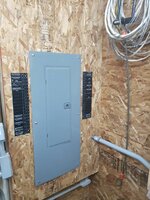
I created these labels after getting frustrated using the difficult-to-read schedule listed on the backside of my main panel door. I found it handy to have the label right next to the breaker so you don’t have to look at the door label and then figure out which breaker it is.

There is an MicroSoft-EXCEL file available for download. You WILL need to do some editing to match your own panel, of course, but I’m not going to do EVERYTHING for you! :)
Thanks goes to forum member mpire for putting my file on his server for all to download.

Here’s what they look like installed and a closeup of my printout (click images to enlarge):
852-266-Back Wall.JPG 853-Electrical-Labels-01.JPG

This link takes you over to my Asylum build thread where all details can be found and future updates will be made:
Label Download Instructions (Asylum thread reply #757)

Good Luck and I hope you find them useful!

(I have not checked the NEC for any violations this may cause so to the electrical professionals out there - if you see something that doesn’t look right, please speak up and I will get it changed)
 
Last edited:
To avoid these ads, REGISTER NOW!

Charles (in GA)

Well-known member
Joined
Jan 11, 2006
Messages
12,489
Location
50 mi south of Atlanta
What brand panel is that? Square D QO has 3/4" wide breakers, so does Cutler-Hammer CH panels. Most all others, Square D Homeline, Siemens, Murray, C-H BR, GE, etc., use 1" wide breakers, makes a big difference, to know which this was set up for.

Looks like a Square D panel

Charles
 
OP
S

shopnut

Well-known member
Joined
Feb 22, 2006
Messages
4,237
Location
Florida
I gave all the details over in the other thread, but I have a GE Power Mark Gold Load Center with 1/2" high breakers.

This is a fully editable EXCEL file and if you have any experience with the software, it's very easy to change the specific label sizes to match your breakers.
 

Charles (in GA)

Well-known member
Joined
Jan 11, 2006
Messages
12,489
Location
50 mi south of Atlanta
Unless that panel is pretty strange, you have the colors in the middle for the left and right bus's wrong. 1 (both A and B) and 2 (both A and B) should be the same color, they share the same stab (left, #1, or A bus), 3 and 4 share a stab (on the right, #2, or B bus), 5 and 6 share one on A, etc.

That would be a GE 20/40 panel. It has 20 full size breaker positions, and is allowed up to 40 circuits (by using half sized breakers).

Charles
 
OP
S

shopnut

Well-known member
Joined
Feb 22, 2006
Messages
4,237
Location
Florida
Unless that panel is pretty strange, you have the colors in the middle for the left and right bus's wrong. 1 (both A and B) and 2 (both A and B) should be the same color, they share the same stab (left, #1, or A bus), 3 and 4 share a stab (on the right, #2, or B bus), 5 and 6 share one on A, etc.

That would be a GE 20/40 panel. It has 20 full size breaker positions, and is allowed up to 40 circuits (by using half sized breakers).

Charles
Thanks for your additional input Charles.

No, the panel isn't strange, it's just me :D (although noting the name of the shop I work in may explain the zig-zag pattern I initially used :willy_nil :))

I read you loud and clear, and hopefully this straightens it out:
Electrical-Breaker-Labels-Rev1.JPG

I found this detail of an example GE inner panel to better explain to the rest of you what Charles is saying. I tried to shade it with red and blue to match the colors on my label. This shows slots 1 through 8 only, for a smaller panel than mine.
GE-Main-Panel-Detail.JPG

If there are any other changes I should make, speak up now because I'm getting a new file ready for mpire to upload to his server.

The bottom line is this: Anyone using these labels should make them match the panel they have and if it is questionable, remove the colors in the middle so you or your electrician won't be confused by it later.
 
Last edited:

TWX

Well-known member
Joined
Apr 1, 2010
Messages
817
Location
Phoenix
Personally, I just used my label maker and stuck new labels on everything. I also went through the house, testing and labelling every switch and outlet with a breaker position. Almost all of my 120V breakers are double units, so there's a lot of "23-A" and "19-B" kind of labelling.

It took about four and a half hours to do the whole house, but I've had to work on the power several times when changing out regular outlets for GFCI, or installing automatic shutoff timer switches for bathroom vent fans, so it's been well worth it.
 
OP
S

shopnut

Well-known member
Joined
Feb 22, 2006
Messages
4,237
Location
Florida
Personally, I just used my label maker and stuck new labels on everything. I also went through the house, testing and labelling every switch and outlet with a breaker position. Almost all of my 120V breakers are double units, so there's a lot of "23-A" and "19-B" kind of labelling.

It took about four and a half hours to do the whole house, but I've had to work on the power several times when changing out regular outlets for GFCI, or installing automatic shutoff timer switches for bathroom vent fans, so it's been well worth it.
Post up some pictures of your handywork TWX. You've been on this forum long enough to know everyone loves to scroll down through 300 pictures to get ideas, then pick the one that best suits them.

I often thought of spending the time to label the receptacles throughout the building like you did but my shop is zoned such that it really isn't necessary. East wall is one circuit, north wall is another, etc. It probably wouldn't hurt, however. I've also seen people do different color outlets to signify different circuits, which is pretty clever.
 

Falcon67

Well-known member
Joined
Jun 11, 2009
Messages
18,371
Location
Merkel, TX
Thanks for that Excel pattern - will for sure use it!

Personally, I just used my label maker and stuck new labels on everything. I also went through the house, testing and labelling every switch and outlet with a breaker position. Almost all of my 120V breakers are double units, so there's a lot of "23-A" and "19-B" kind of labelling.

It took about four and a half hours to do the whole house, but I've had to work on the power several times when changing out regular outlets for GFCI, or installing automatic shutoff timer switches for bathroom vent fans, so it's been well worth it.

Good work. I did a map when I rewired our old house, that really helped with rework later.
 
OP
S

shopnut

Well-known member
Joined
Feb 22, 2006
Messages
4,237
Location
Florida
Thanks for that Excel pattern - will for sure use it!

Thanks I will use this for sure

You are welcome guys - just trying to give something back to GJ.

Thanks but my Excel (Excel 2000) reports that it is a unrecognizable format. Went here:

http://www.microsoft.com/download/en/details.aspx?displaylang=en&id=3

for converter
I might try saving my Excel 2007 file to an earlier version to see if anything is lost in the file. If not, it might make sense to just post up the earlier version for all to use. In the meantime, those of you that have the old version should use the converter that The_Tango kindly offered. Thanks TT.
 

Charles (in GA)

Well-known member
Joined
Jan 11, 2006
Messages
12,489
Location
50 mi south of Atlanta
attachment.php

That is a very good way to show the bus setup where people can see what you mean. We had this issue a couple or three weeks ago in a discussion.

This panel has 4 stabs, thus, accommodates 8 standard 1" breakers. It also has the special clips welded to the sides of the stabs for the loose GE 1/2" breakers to clip onto, for a total of 16 circuits jammed into one tiny panel.

Always use the largest (physically) panel housing you can get, it makes it much easier running wires in the panel.

Charles
 
Last edited:
OP
S

shopnut

Well-known member
Joined
Feb 22, 2006
Messages
4,237
Location
Florida
Feel free to use that image in other future discussions on the forum if it helps, Charles.

I'm just glad that GE panel was able to accept the 1/2" breakers - I'm down to a mere 2 spares for future expansion! The good thing is, I'm nearly done wiring the shop now, so it should be fine. The panel is a model TLM2020CCU and it seems to be easy to work in, although I really only have been in a few others (I'm not an electrician by trade). I tend to be pretty "neat" with my wiring so that probably helps fit it all in there.

To be honest, I didn't even know this panel was designed to accomodate the 1" breakers as well. Now I know, thanks to this forum. I'm really not sure why anyone would use the bigger ones, however. Surely the 1/2" and 1" must both be acceptable for their rated amps. Do the bigger breakers just last longer or something? :headscrat
 

fergie_1977

Active member
Joined
Mar 14, 2010
Messages
31
Location
Petawawa, ON. Canada
ShopNut, you just saved me a pile of work and searching for exactly what I had planned on creating! I have done a ton of re-wiring in my main 200AMP panel, installed a new 125AMP panel in my garage and a 60AMP ponypanel on the other end of my basement for a future small addition.
These labels just free'd up my Sunday for garage insulating!!
Thanks a ton!
Fergie
 
To avoid these ads, REGISTER NOW!

GMAN62465

New member
Joined
May 16, 2013
Messages
1
Hey there guys!!

new to the forum and just searching around and I cannot seem to download the template that was posted up by ShopNut.

I have just installed a SquareD Homeline 200 Amp panel and would love to make it look pretty.

Thanks in advance!

GMAN
 

Garageguy65

Well-known member
Joined
Apr 30, 2013
Messages
270
Location
Spokane WA
Shopnut & Aussue dan.. Thanks for posting the panel template! That is awsome.. Will come in handy..

Gman.. Look at post #7 in this thread.. There is a link where you can download the template in a excell file and edit for your needs..
 

rxbert

Member
Joined
Feb 5, 2013
Messages
13
Location
Raleigh, NC
Hey there, fellow Garage Journalers! I also want to add my thanks to Shopnut and AussieDan for the label spreadsheet so I might clean up my fusebox at home. I also plan to use it in a rent house that we have that just came open and we are going to put up for sale. I think having it's fusebox nicely labeled will help with the way the house presents itself. (if a house presenting itself seems a bit discombobulated, sorry).
 

matt151617

Well-known member
Joined
Dec 17, 2011
Messages
488
Location
New Jersey
Another option is to print out individual labels on address labels. They're self-adhesive, and easily removed or overlapped when circuits change.
 

Al Adams

New member
Joined
Jan 4, 2016
Messages
2
Recently while watching This Old House, Scott Caron was Talking to Kevin O'Conner about “Safe” Electrical Testers and Circuit Breaker Finders, He Showed a Simple Electric Outlet Correct Wiring Checker, I Use a Extech CB10 for Lite Home Owner Use, This Unit has Many Advantages, It Doubles as a CFCI (Outlet) Tester, and Simple Electric Outlet Correct Wiring Checker, as Well as a Circuit Breaker Finder/Locator Transmitter for USE with the Receiver, the Larger Part of the Extech CB10, for a Particular Outlet, or Lamp Circuit with the Use of a Lamp Base Screw in Outlet/Socket for Wired Ceiling Lamps etc. See Pictures …
XZFgqGYlaeUIVZ6EYCYHraXwZvUXOtEqHfGBnwBCdoy
,

https://www.amazon.com/clouddrive/s...Jo7iINEEV17?v=grid&ref_=cd_ph_share_link_copy
 
Last edited:

cassianohc

New member
Joined
Mar 6, 2017
Messages
1
Hello to everyone, I am new in this forum and happy to join. After to look for QO labels in Schneider-Electric sites, I found this and I appreciate you have shared it. I am working in a little project with a 30 poles load center and it will be very useful for me. I hope to share something later. Thank you very much and best regards.
 

James-W

Well-known member
Joined
Feb 3, 2013
Messages
12,432
Location
Southeastern Wisconsin
Hello to everyone, I am new in this forum and happy to join. After to look for QO labels in Schneider-Electric sites, I found this and I appreciate you have shared it. I am working in a little project with a 30 poles load center and it will be very useful for me. I hope to share something later. Thank you very much and best regards.
Welcome to the forum. When you a minute, put your location under your login name because it helps when you ask questions.
 

davetulk

Well-known member
Joined
Feb 2, 2009
Messages
101
Location
Mid Florida
The red and blue highlighting the amperage are illustrating which leg is providing the power to that slot. Line 1 or Line 2. not meant to correspond to level of amps
 

nkachur

Well-known member
Joined
Jun 29, 2008
Messages
797
Location
Manitoba Canada
Shopnut, I don't know if you saw my adaptation. I took the excel file to a local engraving shop and had the engrave it on plastic. Was tired of paper that didn't want to stay stuck with spay adhesive. The panels are now screwed in place. 66c9216e1ae10dd034d833b3e8920836.jpgd0ef051c4bd80873add8a772bbab6296.jpg

Sent from my SM-G903W using Tapatalk
 

Attachments

  • 66c9216e1ae10dd034d833b3e8920836.jpg
    66c9216e1ae10dd034d833b3e8920836.jpg
    124.9 KB · Views: 136
  • d0ef051c4bd80873add8a772bbab6296.jpg
    d0ef051c4bd80873add8a772bbab6296.jpg
    81.1 KB · Views: 180
To avoid these ads, REGISTER NOW!
Top Bottom