To avoid these ads, REGISTER NOW!

Momentary switch to control Liftmaster 3800

pattenp

Well-known member
Joined
Jun 4, 2008
Messages
10,175
Location
Virginia - USA
I’m getting a Liftmaster 3800 garage door opener. The instruction manual says only one wired control unit can be hooked to the motor and additional controls need to be wireless. My current opener allows for a momentary switch to be connected to open and close the door. I used this feature to hard wire a momentary contact from my home security system where I can use my home security key fob to open and close my garage door. This way I only need to use the one key fob. I don’t see that I can do this with the Liftmaster 3800. Would providing a momentary contact across the two terminals that the wired control unit hooks to trigger the opener to open and close. I don’t want to try this not knowing if it will damage the opener or the door control. Help!:confused:
 
To avoid these ads, REGISTER NOW!

nova65ss

Well-known member
Joined
Sep 20, 2005
Messages
1,556
Location
Raleigh, NC
It may, you can't run two wired wall controls with the 3800 if you are using the deluxe time/temp wall control. One way around it would be using a standard door bell button. You will lose the extra features like the light and lock but it will not hurt the opener to have two with a doorbell style button.
 

pcmeiners

Well-known member
Joined
Aug 13, 2009
Messages
7,892
Location
In the only town in Pennsylvania, Bloomsburg.
I do not have a liftmaster, but well versed in control wiring...
I looked at control in a PDF of the 3800, only two wire, so it appears to feed power and a modulated signal over them, or the unit transmits a signal in which case the two wires are only a power feed. If this is the case, without going too crazy, you would need to open up the switch and attach wires from the switch contact on the control's PCB board to a remote switch/relay control, if you can open the control without breaking; possibility the switch has many contacts, making it impractical.
The two wires are power feeds in any case, placing a momentary between the two wires parallel) will cause a short ,NOT a good idea. Switch in series, can't see it causing the system to function properly, can't see it causing damage but you might have to reprogram the unit as the programming might reside in volatile memory.
 
To avoid these ads, REGISTER NOW!
OP
P

pattenp

Well-known member
Joined
Jun 4, 2008
Messages
10,175
Location
Virginia - USA
Thanks for the input. I'll look at the guts of the control unit to see if there's a way to come off of it with a momentary contact. As far as using two doorbell style buttons, I believe the one wired control unit is required to program the wireless remotes. If there's a way to do this I'll figure it out.
 

pcmeiners

Well-known member
Joined
Aug 13, 2009
Messages
7,892
Location
In the only town in Pennsylvania, Bloomsburg.
I see the the top button is the up/down activation, so there is a toggle flip/flop circuit,If your lucky the the switch is just a simple single pole switch, solder a two wire bell wire cable to switch on the back of the PCB board, that is if your lucky. Not sure of the momentary switch type, could be as simple as a door bell or one made by Siemens, Furnas or Cutler, they look fancy but cost...look on Ebay
Good luck
 
OP
P

pattenp

Well-known member
Joined
Jun 4, 2008
Messages
10,175
Location
Virginia - USA
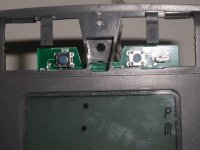
It was easy to wire in a momentary switch on the Liftmaster wired control. The Liftmaster wired control push button has two momentary switches and pushing either one of them activates the open and close. I assume the Liftmaster push button has two switches because of the wide push button guaranteeing if you push the button on either end the door will open or close. So it doesn’t matter which switch you connect to. By wiring this into my home security system I can now open and close the garage door using my home security key fob which means one less remote I have to deal with.

I just picked the S10 switch to wire to.
 

Attachments

  • P1010079.JPG
    P1010079.JPG
    62.7 KB · Views: 146
  • P1010080.JPG
    P1010080.JPG
    61.7 KB · Views: 127
To avoid these ads, REGISTER NOW!
Top Bottom