To avoid these ads, REGISTER NOW!

Google Sketchup help

GarageEnvy

Well-known member
Joined
Nov 17, 2009
Messages
1,282
Location
Fresno
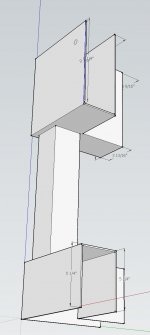
OK I admit I am new and frustrated with this. I can't figure out how to position a hole on a plane at a specific dimension. In the part I'm drawing, how do I position that hole? I can't seem to make the dimension to an edge stay visible. Also can I push the hole all the way through both sides of the saddle somehow?

Second. How would I align the post in the center of the top and bottom of the saddle?

Third. How do I place several of these components along a plane?

For reference, these are brackets for a boat dock I'll be building. I want to place a beam in the saddle and then the non-corner saddle/post components along the beam.
 

Attachments
  • dock bracket.jpg
    dock bracket.jpg
    65.2 KB · Views: 43
Last edited:
To avoid these ads, REGISTER NOW!

PCMusicGuy

Well-known member
Joined
Feb 15, 2009
Messages
851
Location
Houston, TX
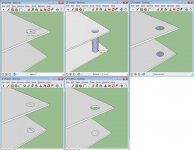
Yes, sketchup has a few quirks that are a pain, especially coming from something like AutoCAD. What I find easiest to do, is to use the line tool and make guidelines. Please forgive the very crude following instructions.

So if I want a circle centered 5" from the top and 7" from the left, I draw 2 lines, a 5" one along an edge, and 7" along the other. From there I draw two more lines out from those points that intersect. At the intersection, I draw the circle size that I need.

For pushing something through multiple pieces, delete the guidelines inside and outside the circle, then use the push tool to push it down until it hits the face of the other object. Then you can delete the cylinder it creates. Reconnect your circles by using a line across them and then delete the line. Then you can push the side of the circle to the opposite face and then you repeat the same process for the additional saddles/posts. It is not the quickest method I'm sure but I've gotten pretty quick at getting things done with proper alignment.

Another thing that may help if you haven't noticed is that you can begin to draw a line whatever direction, type the number in on the keyboard followed by 'enter' and it will draw the line that dimension in the direction you were moving. It works similarly with most of the tools.
 

Attachments

  • Untitled.jpg
    Untitled.jpg
    132.4 KB · Views: 48

onewaydave

Well-known member
Joined
Sep 28, 2009
Messages
961
Location
Down the road from Dorothy and Toto
I may be missunderstanding, but...

If by saddle, you mean the brackets on the end, the push pull only works on a solid object, I think. So each tab would require a pushpull. Or push pull before you trim down to the 2 tabs. If course, if this isn't what you asked, please ignore.

I have to position a surface/plane dead on in view to get circular objects and angles to fit right.

I have to search quite a bit to find answers in the SU docs, but eventually find it or a work around.

There is also a site called sketucation, http://sketchucation.com/

They seem to be more responsive to SU functional questions than installation questions.

Dave.
 
To avoid these ads, REGISTER NOW!
OP
G

GarageEnvy

Well-known member
Joined
Nov 17, 2009
Messages
1,282
Location
Fresno
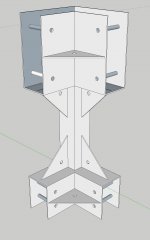
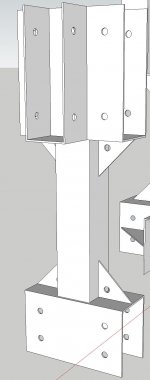
I checked out a few videos. I hadn't heard of the sketchucation site. I'll check it out. Thanks. I muddled my way through the holes and eventually just made individual holes on each side. For some reason I couldn't get the cylinder to erase without totally wiping out the holes. I can build off what I've got so it's not a big deal. I did have a problem dimensioning from an edge to a hole. Maybe there's better ways of doing it but I ended up just putting a line on the edge and that way I could dimension to an endpoint.
 

Attachments

  • Dock corner bracket.jpg
    Dock corner bracket.jpg
    98.3 KB · Views: 22
  • dock bracket.jpg
    dock bracket.jpg
    70.1 KB · Views: 10
Last edited:

GirlnAgarage

Well-known member
Joined
Jan 21, 2011
Messages
4,668
Location
Texas
I checked out a few videos. I hadn't heard of the sketchucation site. I'll check it out. Thanks. I muddled my way through the holes and eventually just made individual holes on each side. For some reason I couldn't get the cylinder to erase without totally wiping out the holes. I can build off what I've got so it's not a big deal. I did have a problem dimensioning from an edge to a hole. Maybe there's better ways of doing it but I ended up just putting a line on the edge and that way I could dimension to an endpoint.


You have to close off the area. It deletes the holes because there are open edges in your piece. I know I'm not describing that very well but this is what I run into when I have trouble. It comes up after pushing/pulling pieces.
 

machine_punk

Well-known member
Joined
May 14, 2011
Messages
2,540
Location
Napa Valley, California
I cannot help you with Sketchup specifically, since I use Alibre 3D Design.

I can feel for you, though...3D modeling has a STEEP learning curve. I finally got the basics down and try to figure out something new every couple of weeks. There is a lot to learn about designing in 3D and most of it, like riding a motorcycle, is NOT very intuitive. Sometimes a couple of days off from trying helped too.

Help files really helped me, when I got stuck. I'm not sure if Sketchup has help files.

Sorry I cannot help with Sketchup, but pleased to see you trying something new.

M_P
 
To avoid these ads, REGISTER NOW!
Top Bottom