To avoid these ads, REGISTER NOW!

My garage plans

unkamort

Member
Joined
Dec 10, 2009
Messages
17
Location
West Tennessee
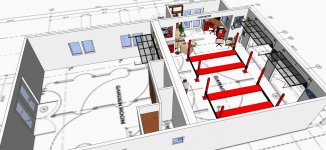
Howdy! I'm still a newbe here, but I thought I might come over and ask for input on my, rather crude, Skeck-up renderings of a shop/home I hope to have built this year. The over all foot print, not counting exterior porch/over hang. would be 60'x80'. There are very general, and not correctly dimensioned. Just seeking a little input on the general design.

Plan B... seems it won't let me upload the skech-up files, any one know a work around?
 
To avoid these ads, REGISTER NOW!

Kevin54

MEMBER EMERITUS
Joined
Jan 12, 2005
Messages
29,341
Location
Urbana, Ohio
Howdy! I'm still a newbe here, but I thought I might come over and ask for input on my, rather crude, Skeck-up renderings of a shop/home I hope to have built this year. The over all foot print, not counting exterior porch/over hang. would be 60'x80'. There are very general, and not correctly dimensioned. Just seeking a little input on the general design.

Plan B... seems it won't let me upload the skech-up files, any one know a work around?

You can do a "Print Screen" and save it to your computer somewhere, then upload it from the computer by going to the "Go Advanced" button underneath the reply box, then to the "Manage Attachments"
 
To avoid these ads, REGISTER NOW!

ODIS

Well-known member
Joined
Apr 30, 2012
Messages
2,110
Location
Pacific Northwest
In Sketch Up, find the best view of your rendering. Then go to: File - Export - 2D Graphic and then name your rendering and then save it to folder of your choice. Should convert to a jpeg file. Then you can use the "manage attachments" in Garage Journal or use an ancillary picture hosting to load your file to GJ.

Example:
 

Attachments

  • VIEW ALL.jpg
    VIEW ALL.jpg
    152.7 KB · Views: 70
To avoid these ads, REGISTER NOW!
Top Bottom