
You are using an out of date browser. It may not display this or other websites correctly.
You should upgrade or use an alternative browser.
You should upgrade or use an alternative browser.
Between 265 & 485 SQ/FT Woody's Works Garage
- Thread starter Denwood
- Start date
Workspaces sized between 265 and 485 squarefeet.
Not sure the girls even noticed..ha. At least the ice cubes stay frozen now.
I've been wanting to figure out a way to get differential air pressure readings into the house automation system so I could actively balance my HRV. I've modifed the HRV so instead of an old AC fan internally, there are now two ECM inline fans (one for fresh air, one for stale). I figure the "ultimate" method of varying CFM according to the air quality settings would be to continually ramp up or down on the fresh air CFM (based on what the home actually needs based on air quality), and then actively balance the stale air fan settings so air in precisely matches air out. This is what more expensive ERVs do, but they do it based on current sensing on the ECM fans...not actual pressure sensors!
So, using Home Assistant's "ESPHome" integration, two $9 ESP32 boards, and two Sensiron pressure sensors we get this. It definitely confirms that my ECM fan programming based on manual pressure testing (the HRV has balance ports to do this) was pretty darn close! Next step is to dynamically adjust the ECM fan motors (they are controlled by 0-10V) so the unit dynamically balances itself...
So these tiny sensors, the Sensirion SDP810-125Pa, (one for stale, and one for fresh air) are not cheap at around $40 each. 1/8" tubes go out to the HRV balancing ports.
Each sensor is connected to one of these tiny ESP32 boards (about $9) with four wires.
..and that tiny board hosts the pressure sensor and talks to my Home Assitant box via WIFI.
The ESP Home integration in Home Assistant lets you custom program these ESP32 devices to host all kinds of sensors for temp, humidity, lidar, pressure etc. Super COOL!
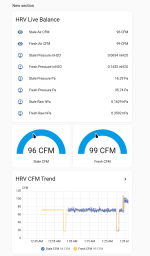
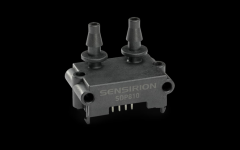

Cleaned up the HRV CFM project with a project box, magnetically attached to the HRV door so it's easy to remove...

Stacked the two ESP32 boards on standoffs, and mounted the pressure sensors as well. Power buck is upside down (LED display) so I'm wondering about any OCD tendencies...ha.

manwithtools
ALLIANCE MEMBER
Nice work. Are you avoiding the fires? I sincerely hope so.
I'd say our camp is 100% touch and go right now, but otherwise, just a ton of smoke and falling ash at times here in town. The yellow circle is our site. Winds today NW at 20-40 so not sure how it's not already burnt....
Friends who were out there last night were raised from their beds at 1 am by the resort owner and were lucky to get out as the only access road was burning shortly after.

Friends who were out there last night were raised from their beds at 1 am by the resort owner and were lucky to get out as the only access road was burning shortly after.
manwithtools
ALLIANCE MEMBER
Scary stuff. When we lived in SoCal we had only one way out of our development . A narrow winding road for about three miles. Fire was our biggest fear.
It looks like the entire area burned up yesterday. Now they're advising residents of Thunder Bay (about 140K people in the area) to prepare a 72 hour evacuation kit. That's a situation we have never been faced with. With NW winds forecast 20-40 km/h, today will be, uh, interesting.
Last night via my drone. It was pretty dark at 5pm (car headlights and motion lights all thinking it's night), with sunset at around 10:30pm.

I'm guessing these fires will coalesce somewhat with strong movement SE today on the NW 20-40 wind projections. Zero rain forecast.
The closest fire is about 100km away, 60 miles as of this moment according to NASA FIRMS.

I'm guessing these fires will coalesce somewhat with strong movement SE today on the NW 20-40 wind projections. Zero rain forecast.
Last night via my drone. It was pretty dark at 5pm (car headlights and motion lights all thinking it's night), with sunset at around 10:30pm.
I'm guessing these fires will coalesce somewhat with strong movement SE today on the NW 20-40 wind projections. Zero rain forecast.
The closest fire is about 100km away, 60 miles as of this moment according to NASA FIRMS.
I'm guessing these fires will coalesce somewhat with strong movement SE today on the NW 20-40 wind projections. Zero rain forecast.
drivesitfar
Well-known member
Praying for you and sorry for your loss. Stay safe!!!
We just got news that about half of our "resort" burned to the ground, but the section where we and immediate family are, survived somehow. Kind of in limbo though I'm sure as power and water are likely going to be offline for a long time.
With regard to the city, it's thick smoke outside. Not good.
With regard to the city, it's thick smoke outside. Not good.
drivesitfar
Well-known member
Hopefully that news is true so you can get back there and maybe have a base to help some of the others.
Good luck!!!!!!!!
Good luck!!!!!!!!
manwithtools
ALLIANCE MEMBER
Stay alert, leave early if you have to. Don't get caught in the inevitable traffic snarls when everyone tries to leave at once.With regard to the city, it's thick smoke outside. Not good.
Swapped out the carbon canister today. The first one lasted about 3 years, but with today's heavy smoke I was faintly detecting smoke smell inside. With the new carbon canister, no smell at all. PM2.5 outside was 113 ug/m3 and inside, just 5 ug/m3. You can see in the video (1 minute long) how intense the smoke is right now.
slim_grim
Well-known member
Brilliant. Wishing you and your community all the best.Swapped out the carbon canister today. The first one lasted about 3 years, but with today's heavy smoke I was faintly detecting smoke smell inside. With the new carbon canister, no smell at all. PM2.5 outside was 113 ug/m3 and inside, just 5 ug/m3. You can see in the video (1 minute long) how intense the smoke is right now.
Thanks @slim_grim . If we have to evacuate it will the largest in Canadian history. Fort Mcmurry in 2016 evacuated 88 000, while the fire destroyed 2400 homes. All of this is quite unprecedented.
nicholam77
Well-known member
Wow, Dennis, crazy with the fires!! Glad your campsite (sorta) survived, hopefully it’s not a total loss even though I’m sure the surrounding area is destroyed.
Stay safe with the smoke! I went for a 40min walk last night and regretted it… air quality in Minneapolis is pretty awful right now, too.


Nice job with the carbon filter and your fancy HRV system.
Love all the ESP32 automation bits. I really gotta try that sometime, I’ve just been swamped lately, and don’t have any experience with electronics, soldering, or development boards so it’s always seemed like an in depth project, but maybe it’s easier than I think. And yeah, do a video! Seems like it really unlocks some unique ideas, and cost effective. I’ve been curious about those ultrasonic distance sensors because some people use them for water softener salt tank levels, which is a problem I struggle with haha. The parking light is a great idea, too.
Anyways, stay safe up there!
Stay safe with the smoke! I went for a 40min walk last night and regretted it… air quality in Minneapolis is pretty awful right now, too.
Nice job with the carbon filter and your fancy HRV system.
Love all the ESP32 automation bits. I really gotta try that sometime, I’ve just been swamped lately, and don’t have any experience with electronics, soldering, or development boards so it’s always seemed like an in depth project, but maybe it’s easier than I think. And yeah, do a video! Seems like it really unlocks some unique ideas, and cost effective. I’ve been curious about those ultrasonic distance sensors because some people use them for water softener salt tank levels, which is a problem I struggle with haha. The parking light is a great idea, too.
Anyways, stay safe up there!
326 ug/m3 is insane. You'll get some relief as the winds clock south. firesmoke.ca models your area too and is quite good at predicting smoke levels, animated over 48 hours.
On the ESP32 side, I am not a dev board kind of guy at all. But ESPHome in HA combined with ChatGPT makes it almost elementary. No soldering required. I just ordered up a set of wires like these to do all the connections: https://www.amazon.ca/dp/B0BTT48V7P?th=1
This stand off kit to mount all the boards: https://www.amazon.ca/dp/B07B4BH5VK
The basic process:
1. Plug in the ESP32 boards via USB to your PC or the HA machine directly. These work for me: https://www.amazon.ca/dp/B0D8SXGL9C). This site provides the pin outs, names and specs for those boards: https://www.espboards.dev/esp32/esp32doit-devkit-v1/
2. Then create and upload the "firmware" to them using ESPHome in HA. The firmware includes some YAML code, again have ChatGPT write it for you. You can just power the boards via a USB wall wart. ESPHome creates the firmware upload, and guides you through the process to write it to the ESP32 board.
3. The sensors usually require 3-4 wires connected, again easy if you're using ChatGPT with respect to which wires to connect where.
4. After programming, the boards reboot to your WIFI network, with sensors feeding data to HA. It's relatively simple actually.
This is the code used by ESPHome for the ultrasonic distance sensor (https://www.amazon.ca/dp/B0F19BJDQF) which includes the pins to connect
On the ESP32 side, I am not a dev board kind of guy at all. But ESPHome in HA combined with ChatGPT makes it almost elementary. No soldering required. I just ordered up a set of wires like these to do all the connections: https://www.amazon.ca/dp/B0BTT48V7P?th=1
This stand off kit to mount all the boards: https://www.amazon.ca/dp/B07B4BH5VK
The basic process:
1. Plug in the ESP32 boards via USB to your PC or the HA machine directly. These work for me: https://www.amazon.ca/dp/B0D8SXGL9C). This site provides the pin outs, names and specs for those boards: https://www.espboards.dev/esp32/esp32doit-devkit-v1/
2. Then create and upload the "firmware" to them using ESPHome in HA. The firmware includes some YAML code, again have ChatGPT write it for you. You can just power the boards via a USB wall wart. ESPHome creates the firmware upload, and guides you through the process to write it to the ESP32 board.
3. The sensors usually require 3-4 wires connected, again easy if you're using ChatGPT with respect to which wires to connect where.
4. After programming, the boards reboot to your WIFI network, with sensors feeding data to HA. It's relatively simple actually.
This is the code used by ESPHome for the ultrasonic distance sensor (https://www.amazon.ca/dp/B0F19BJDQF) which includes the pins to connect
Code:
# Board: DOIT ESP32 DEVKIT V1
# Distance sensor: A02YYUW UART
#
# Wiring:
# Sensor red    -> ESP32 VIN / 5V
# Sensor black  -> ESP32 GND
# Sensor white  -> ESP32 RX2 / GPIO16
# Sensor yellow -> Not connected

esphome:
  name: garage-distance-sensor-rear
  friendly_name: Garage Distance Sensor Rear

esp32:
  board: esp32doit-devkit-v1
  framework:
    type: esp-idf

logger:
  level: INFO

api:
  encryption:
    key: "Your OWN API key HERE"

ota:
  - platform: esphome

wifi:
  ssid: !secret wifi_ssid
  password: !secret wifi_password
  power_save_mode: none

  ap:
    ssid: "Garage Distance Fallback Hotspot"
    password: "**********"

captive_portal:

uart:
  id: distance_sensor_uart
  rx_pin: GPIO16
  baud_rate: 9600
  data_bits: 8
  parity: NONE
  stop_bits: 1

sensor:
  - platform: a02yyuw
    id: garage_rear_distance
    name: "Rear Garage Distance"
    uart_id: distance_sensor_uart
    unit_of_measurement: "cm"
    accuracy_decimals: 1
    device_class: distance
    state_class: measurement
    filters:
      - multiply: 0.1
      - median:
          window_size: 5
          send_every: 3
          send_first_at: 1

  - platform: wifi_signal
    name: "Wi-Fi Signal"
    update_interval: 60s

  - platform: uptime
    name: "Uptime"

button:
  - platform: restart
    name: "Restart"
Last edited:
drivesitfar
Well-known member
Still praying and crossing fingers and toes that both your places especially your home survive this.
Good luck too!!
Nice tech stuff
Just curious if you can recommend a good quality router that has updates regularly to avoid the idiots dirty stuff?
Good luck too!!
Nice tech stuff
Just curious if you can recommend a good quality router that has updates regularly to avoid the idiots dirty stuff?
Some rain today...thank goodness. It won't put anything out, but it will slow things down. On the router question @drivesitfar , that is a good one as I build up "roll your own" routers using pfsense. I think trying to block things at the router may not be the best bet. I would try first setting up DNS to point to CloudFlare family (1.1.1.3 and 1.0.0.3). You can set this up on your existing router in the DHCP section. Try that first.
drivesitfar
Well-known member
I don’t totally understand what your tech talk said or how to do that but I’ll do some research and see what I can figure out. Thanks for the tech help.
Seriously hope this fire stuff leaves you and your friends and family alone do best of luck with that. We just had a day of huge thunderstorms and rains here yesterday that might also be heading your way.
Good luck!!
Seriously hope this fire stuff leaves you and your friends and family alone do best of luck with that. We just had a day of huge thunderstorms and rains here yesterday that might also be heading your way.
Good luck!!
Whoah. This is great. Thanks!I would try first setting up DNS to point to CloudFlare family (1.1.1.3 and 1.0.0.3).
For those following along:
- 1.1.1.1 DNS resolver (results of a privacy audit of this service) - for general DNS resolution, privacy-focused
- 1.1.1.1 for Families - Two flavors extending 1.1.1.1, one (1.1.1.2) blocks malware, the other (1.1.1.3) blocks both malware & adult content
drivesitfar
Well-known member
Just letting you both know I’m still not positive what the numbers mean but with some research I’m guessing you have headed me (us) in the right direction.
Thanks for that! From CloudFlare's site, some more information:Whoah. This is great. Thanks!
For those following along:
- 1.1.1.1 DNS resolver (results of a privacy audit of this service) - for general DNS resolution, privacy-focused
- 1.1.1.1 for Families - Two flavors extending 1.1.1.1, one (1.1.1.2) blocks malware, the other (1.1.1.3) blocks both malware & adult content
Malware Blocking Only
Primary DNS: 1.1.1.2
Secondary DNS: 1.0.0.2
Malware and Adult Content
Primary DNS: 1.1.1.3
Secondary DNS: 1.0.0.3
For IPv6 use:
Malware Blocking Only
Primary DNS: 2606:4700:4700::1112
Secondary DNS: 2606:4700:4700::1002
Malware and Adult Content
Primary DNS: 2606:4700:4700::1113
Secondary DNS: 2606:4700:4700::1003
Your router will have DHCP server settings (which gives out IP addresses to your phone, computers etc.) In those DHCP server settings you will see a few fields for DNS. In one of them enter 1.1.1.3 and in the other, 1.0.0.3 You'll need to enter your router's IP address into a browser and log into it to change these settings.Just letting you both know I’m still not positive what the numbers mean but with some research I’m guessing you have headed me (us) in the right direction.
You can google "DHCP settings" for your brand of router to lead you in the right direction.
nicholam77
Well-known member
@drivesitfar DNS stands for Domain Name Server — it's a part of the internet. Basically it's a server (computer) somewhere that helps look up the websites you are requesting. So when you type in a human-readable URL like www.google.com, your router sends a request to a DNS server to figure out what the IP address of the website you are requesting is. Because computers and websites are identified by IP addresses (the string numbers that looks like 192.62.346.34).
But really when you enter a URL, the request doesn't immediately get looked up as the website IP itself, rather it goes through a chain of DNS servers to find the correct IP and serve you the website. All of this happens in milliseconds.
And... this doesn't just happen when YOU type something in the search bar. Any internet-connected device in your home is likely making many external web requests per day. And they all go through DNS.
Your ISP (internet service provider) likely has their own DNS servers they gave you. But there are many public DNS servers available across the internet. Many people don't know that they can choose which DNS server they'd like to use. Google, for example, provides public DNS servers. Why might you want to choose your own? Some companies are more committed to running secure servers, not selling your data, not serving you targeted ads, etc. And like the ones @Denwood and @zanyad mentioned, some DNS servers can also provide a filtering function for privacy or blocking types of content. For example, let's say you search a certain website, and the DNS server blocks the request. This can be true for ads... or other nefarious sites and content.
I was not aware of the Cloudflare specialty servers, but that tracks.
Again, there are many out there.
Personally, I run an Adguard Plus extension on my Home Assistant installation. So I enter my Home Assistant local IP as my DNS in my router, and all local traffic goes through that Home Assistant machine, which then reaches out to a special Adguard DNS server that has some built-in protections. I've also enabled a number of blacklists to block malware and ads. It's great because I don't have to install any clunky ad-blocking software on my client devices, but the Home Assistant computer "checks" all the traffic.
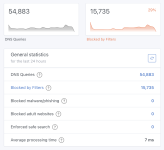
Just to give you an idea of how many external web requests are happing in my house, today it's been 54,883 requests, with around 30% of those requests being blocked and never being resolved. I presume the blocked traffic is mostly ads.
But really when you enter a URL, the request doesn't immediately get looked up as the website IP itself, rather it goes through a chain of DNS servers to find the correct IP and serve you the website. All of this happens in milliseconds.
And... this doesn't just happen when YOU type something in the search bar. Any internet-connected device in your home is likely making many external web requests per day. And they all go through DNS.
Your ISP (internet service provider) likely has their own DNS servers they gave you. But there are many public DNS servers available across the internet. Many people don't know that they can choose which DNS server they'd like to use. Google, for example, provides public DNS servers. Why might you want to choose your own? Some companies are more committed to running secure servers, not selling your data, not serving you targeted ads, etc. And like the ones @Denwood and @zanyad mentioned, some DNS servers can also provide a filtering function for privacy or blocking types of content. For example, let's say you search a certain website, and the DNS server blocks the request. This can be true for ads... or other nefarious sites and content.
I was not aware of the Cloudflare specialty servers, but that tracks.
Again, there are many out there.
Personally, I run an Adguard Plus extension on my Home Assistant installation. So I enter my Home Assistant local IP as my DNS in my router, and all local traffic goes through that Home Assistant machine, which then reaches out to a special Adguard DNS server that has some built-in protections. I've also enabled a number of blacklists to block malware and ads. It's great because I don't have to install any clunky ad-blocking software on my client devices, but the Home Assistant computer "checks" all the traffic.
Just to give you an idea of how many external web requests are happing in my house, today it's been 54,883 requests, with around 30% of those requests being blocked and never being resolved. I presume the blocked traffic is mostly ads.
drivesitfar
Well-known member
Thank you Woody!! When I was in high school I wrote computer programs that would take a month to get results back. I probably should have stayed with it but I decided to learn just enough how to use computers and technology the last 50+ years since.
It will probably be winter before I do a deep dive on our router, tv, iPhone and such but I think I need to spend the time and learn.
Thanks for explaining what you know and Z too and maybe this will get me started on the right track.
I hope we save you lots of rain. Did we and have the fires died down or taken a different path away from you?
It will probably be winter before I do a deep dive on our router, tv, iPhone and such but I think I need to spend the time and learn.
Thanks for explaining what you know and Z too and maybe this will get me started on the right track.
I hope we save you lots of rain. Did we and have the fires died down or taken a different path away from you?