To avoid these ads, REGISTER NOW!

Between 265 & 485 SQ/FT Nick's Two-Car Detached Vdub Garage

Workspaces sized between 265 and 485 squarefeet.
OP
N

nicholam77

Well-known member
Joined
Dec 18, 2016
Messages
2,673
Location
Minneapolis, MN
XMAS Tree Automations

Got the XMAS tree decorated just after Thanksgiving.

IMG-3900.jpg
IMG-3884.jpg
IMG-3960.jpg

And of course I automated it 😁

It's on a TP-Link Kasa smart plug I picked up on Black Friday. This allows it to be turned off and on with an app, and scheduled, but I added some more advanced logic on my smart home platforms.

— it turns on at 30min to sunset, but only if someone is home
— if it's after sunset and we arrive home, it turns on
— if the living room lights turn on between 6am-9am, it turns on (living room lights are normally triggered by motion)
— if my Goodbye or Goodnight scripts are called, the tree turns off
— if the auxiliary button on my living room Inovelli Zwave switch gets pushed, it toggles the state of the tree

And the really fun one...

— whenever the tree turns on (by whatever method), the living room Sonos speakers play one of three .mp3 XMAS song snippets at random
— if the Sonos is currently playing a stream, i.e. internet radio, the .mp3's are 'announced', meaning the current stream is ducked and the .mp3's are mixed in with the current audio, so no streams are broken and no speakers are ungrouped or paused etc

This can be seen in the below YouTube video I uploaded, showing the Inovelli toggle control, and the .mp3 SFX in action:


The .mp3 part took some custom YAML code in Home Assistant, so I'm pretty stoked about getting it to work. And the kids love it.


Sticking with the winter theme, we had another light snow recently and I picked up some new snow shovels.

A 30" Snow Plow:

IMG-3964.jpg

And a very light weight 'ergonomic' shovel:

IMG-3968.jpg

Both worked well. After being good for quite a few months, I've had a set back with my back injury, and I'm trying to do everything I can to not overdo it these days. I'm hoping these shovels will let me clear a light snow faster, and with less injury. So far they seem to do the job.

IMG-3969.jpg
 
To avoid these ads, REGISTER NOW!
OP
N

nicholam77

Well-known member
Joined
Dec 18, 2016
Messages
2,673
Location
Minneapolis, MN
Nick,
All clever stuff, sounds like fun. Good work.
Your room is looking very cool, I know you put some work into it.
Snow, ****** that, we get four days worth a year, sometimes, and that’s enough for me.
Take care mate

Steve 🍻
LOVE the automation! That's really fun, especially for the kids.
What an inviting, and calming room you have put together. It's a great space.

Thanks, guys.

@sawduststeve we've had a pretty mild November and December so the snows melt the next day. The real fun stuff will be post-XMAS.

The living room was a big transformation. Pretty sure I've posted before, but these are listing pics (with PO's furniture) from when we moved in:

Zv8y-W-GKLU6-E0-Lf-Ng0-Hm-ZQ.jpg
EP-0-BUY-Rk-v-FL-YBnz2vg.jpg

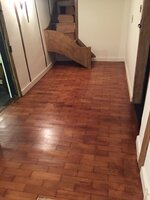
Removing the parquet flooring under the carpet was one of the stupidest and best things I've done with this place. Stupidest because it was really hard and could easily have been a disaster.

80983.jpg

Post-kids I don't have energy for that kind of **** anymore :ROFLMAO:
 

Xti04

Well-known member
Joined
Nov 11, 2016
Messages
2,340
Nick, my wife has our tree automated on a kasa plug as well. Turns on @0630 and back off @ 2200. She does it so we dont have to fight around the tree to unplug the lights everytime we want to light it up. She also has the tree on a spinning stand so I cant get away with just decorating the part you can see.
 

sawduststeve

Well-known member
Joined
Oct 7, 2016
Messages
2,139
Location
Havering-Atte-Bower,London/Essex boarders, England
Nick, that’s a lot of work, taking the floor up.
Was it beyond saving ?
I think my wife might have bought it.
IMG_1381.jpeg
This turned up in black bin bags. It was a load of work. Every piece, taking the glue of the back and sanding. I was putting it down though not taking up.
As you say, not something I’m doing again

Steve 🍻
 
OP
N

nicholam77

Well-known member
Joined
Dec 18, 2016
Messages
2,673
Location
Minneapolis, MN
Reolink Smart Doorbell

Because I can't leave good enough alone, I decided to swap out my video doorbell. I was rocking the OG Nest Hello doorbell, from before Google acquired Nest.

It was a premium product with a slick app and a good user experience. After Google bought Nest, they cheapened all the products, and have been trying to force users to the Google Home app for years, as well as use a Google account to authenticate. All the while I feel like app performance has gotten worse.

This November the subscription prices went up (Nest/Google requires a monthly subscription to unlock certain features and to save video recordings). With no new features or improvements. Just a price gouge.

When I ditched Smarthings for Hubitat, I did a house cleaning of my smart home stuff, and one goal of mine was to move to local control products (no cloud), and no voice assistants. I've been mostly successful with that, but Nest was a hold out in my home. It sends 24/7 video through Google servers for AI processing (over WiFi!!!), and then back down to your phone to view or get notifications. This is a huge bandwidth ****, WiFi ****, latency issue, and if you're paranoid is a security / privacy concern.

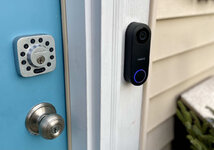
Enter: the Reolink PoE video doorbell. Power over ethernet. Records on onboard SD card. On-device AI person detection. RTSP and ONVIF enabled. Two Way Audio. RF chime included. Decent iOS app. And... powerful local Home Assistant integration.

Got it on sale and decided it was time to cut ties with Nest. Only one problem. Nest uses traditional low voltage doorbell wiring, and a physical chime. I did not have ethernet run to that location.

There is no way for me to run a new line up from my finished basement, but I do have a few ethernet cables going up to our bedroom. So my plan was to extend one of those through the attic and down to the front door.

First up was to figure out which port in in the bedroom matched with with end in the switch closet.

IMG-3783.jpg
IMG-3782.jpg


This is because I'll need to plug it into the new PoE switch I got.

Next I snipped the end up in the bedroom with the jack on it, and re-terminated it with an RJ45 end. That got connected to a new cat6 cable which I ran through the closet wall, into the attic, and to the front of the house, drilled down through the wall.

This was a miserable experience, rolling around in the fiberglass insulation shards in the pitch black.

And... to catch the new cable run I had to open a giant hole in the all by the front door.

IMG-3788.jpg
IMG-3791.jpg

Here's the Nest from before I took it off. The coating on the face was getting a bit flaky.

IMG-3794.jpg

Fished the cat6 to the outside and put a new end on, they plugged in the tester and plugged it into the PoE switch on the other end in the basement.

IMG-3798.jpg
IMG-3799.jpg

In total I had to crimp 4x new ends, so I was relieved to see everything pinned out correctly with signal.

Then installed the Reolink mounting plate, popped in an SD card, and snapped it in place:

IMG-3804.jpg

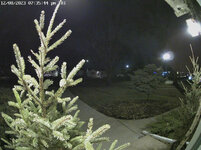
Compared to the image quality of the Nest, the Reolink picture has very good resolution, bitrate, FPS, etc, but does not have HDR like the Nest did so the exposure is less balanced. Some comparisons:

NEST:

88006.jpg
88008.jpg

REOLINK:

IMG-3914.jpg
IMG-3879.jpg
IMG-4001.jpg

I was pleased to see I can get away with full color at night and not run the IR blasters since those attract bugs.

The Reolink app is not quite as pretty or slick as Nest, but it does the job and is not bad. As mentioned, no HDR with the Reolink. And no package, animal, or vehicle detection.

But I'm willing to trade that for:

- no monthly subscription
- completely local and private
- better resolution, higher quality stream that plays at a constant 20 FPS (Nest would jump and fluctuate sometimes)
- stream connects immediately and reliably (Nest would sometimes take 5+ seconds which was annoying)
- ethernet instead of WiFi
- on board recording instead of cloud
- Home Assistant integration (more on that later!)

While I was up rolling around in the attic I was started to question if it was worth the switch, but I've been running it for a few weeks now and I'm pretty happy with the decision. Now I just need to patch the huge whole in the wall!

IMG-3995.jpg

🍻
 

Bob Heine

ALLIANCE MEMBER
Joined
Oct 24, 2009
Messages
10,707
Location
Boca Raton, Florida
Nick, I'm with you on the local control. Also with you on the subscription thing. I got rid of my mortgage decades ago and these subscriptions feel like another ripoff. Much as I love Microsoft, I am sticking with Windows 10 so I don't have those benevolent masters controlling me through Windows 11.

I've disconnected Alexa and whoever Google sent to watch me. I also swapped out the main switch in the office to a PoE so I can keep stuff private. and 99% of my stuff is hard wired.
 

Xti04

Well-known member
Joined
Nov 11, 2016
Messages
2,340
We went all Reolink when I added cams to our house. We use Reolink wireless cams with sd cards for the kids rooms as monitors. The rest of our stuff is Ring, the only reason we went with Ring was because the wife wanted a security system and I wanted one I could install myself since I was working nights. My biggest issue with Reolink is somrtimes I have to reinitialize the cams. And I bought some newer cams that didnt work with my NVR. Other than those issues its been great.
 

MadeByMiller

Well-known member
Joined
Dec 29, 2018
Messages
1,230
Location
Rapid City, SD
That beautiful living room looks so picturesque and cozy with the Christmas decor! I very much would like to get into the home networking/automation/security stuff like you have. We currently have Ring and it works fine, but subscriptions do feel gross to me all the same - like I don't have full ownership of the products I bought.
 
OP
N

nicholam77

Well-known member
Joined
Dec 18, 2016
Messages
2,673
Location
Minneapolis, MN
Nick, my wife has our tree automated on a kasa plug as well. Turns on @0630 and back off @ 2200. She does it so we dont have to fight around the tree to unplug the lights everytime we want to light it up. She also has the tree on a spinning stand so I cant get away with just decorating the part you can see.

Nice... automation is all about making things a little bit easier!

Nick, that’s a lot of work, taking the floor up.
Was it beyond saving ?
I think my wife might have bought it.

A lot of the parquet strips were destroyed when I was done with them. Some came off cleanly, some splintered. They were glued down and also tore out many chunks from the white oak underneath.


IMG_1381.jpeg

This turned up in black bin bags. It was a load of work. Every piece, taking the glue of the back and sanding. I was putting it down though not taking up.

Wow, yeah that sounds like a ton of work. While I'm all for reusing and recycling, I don't think you would have wanted mine. Each tile was 4x small strips... I remember I calculated there were more than 7,000 individual strips I chiseled up. :oops:

P.S. I like your staircase

Nick, I'm with you on the local control. Also with you on the subscription thing. I got rid of my mortgage decades ago and these subscriptions feel like another ripoff. Much as I love Microsoft, I am sticking with Windows 10 so I don't have those benevolent masters controlling me through Windows 11.

I've disconnected Alexa and whoever Google sent to watch me. I also swapped out the main switch in the office to a PoE so I can keep stuff private. and 99% of my stuff is hard wired.

Subscriptions have always pissed me off. I do get why they exist, but if there's a good enough solution to get around it, I'm all for that.

I have to confess I am out of touch with Windows... does Windows 11 require a subscription these days?

Same as you, I used to have an Alexa (Echo dot) and Google Assistant (on Sonos). I realized I just really hate talking to my smart home. It's a novelty, but it never felt natural to me. And a lot of times for a successful result you need to remember the appropriate 'syntax' of the request. I'm sure AI will change that a lot, but there is still the creepy factor of Jeff Bezos listening in on your farts 24/7 :ROFLMAO:. So I ditched them as well and focused on creating a 'dashboard' on my phone which I'll probably share at some point.

I'm not 99% hardwired, but maybe 85%. As much as I can be.

We went all Reolink when I added cams to our house. We use Reolink wireless cams with sd cards for the kids rooms as monitors. The rest of our stuff is Ring, the only reason we went with Ring was because the wife wanted a security system and I wanted one I could install myself since I was working nights. My biggest issue with Reolink is somrtimes I have to reinitialize the cams. And I bought some newer cams that didnt work with my NVR. Other than those issues its been great.

Nice, that's good to hear. I don't anticipate getting any more cams but I do have an old Amcrest IP cam and NVR. If I wanted to I could probably tie the Reolink into that and record to it as a backup.

In a post soon I'll go over the Reolink Home Assistant integration and a few things I've done... might give you some ideas!

That beautiful living room looks so picturesque and cozy with the Christmas decor! I very much would like to get into the home networking/automation/security stuff like you have. We currently have Ring and it works fine, but subscriptions do feel gross to me all the same - like I don't have full ownership of the products I bought.

Thank you, Austin!

I don't do any fancy networking. I probably should learn about it more. Mostly I've just made an effort to hardwire what I can, which means a lot of unmanaged switches daisy chained around the house.

On the automation, it's a hobby. I truly do think there is utility in it, but to get to that point you need to invest in a lot of devices depending on your goals, and a fair amount of time. Just an example on the devices... I have a 'Goodbye' routine that turns off all my main floor lights, amongst other things, when we leave the house. But my kid's bedrooms don't have any smart lights in them, so if those are on I still have to walk around and manually turn them off. Which defeats the purpose of the automation. So it's one of those things that a few smart bulbs might not really make a difference. You could always dip your toes in with a singular room like your office and see if it's worth it to you.
 

Xti04

Well-known member
Joined
Nov 11, 2016
Messages
2,340
We installed Kasa smart switches for all the upstairs lights so we could turn them on and off once the boys leave for school. They also turn on @0600 to help them wake up. I went with motion switches for their closets to keep them from leaving closet lights on. I just install them and sync the switches to my wifes app. I have 0 interest in the smart home stuff because it makes me feel like I am being watched and listened to. My one guilty pleasure of the smart stuff is I put a Kasa smart switch in the detached garage to turn on the outside lights on the garage at night. It has a schedule which seems to work about half the time. I could do a photo cell to turn it on but we had these already so it was the easier option at the time.
 
OP
N

nicholam77

Well-known member
Joined
Dec 18, 2016
Messages
2,673
Location
Minneapolis, MN
We installed Kasa smart switches for all the upstairs lights so we could turn them on and off once the boys leave for school. They also turn on @0600 to help them wake up. I went with motion switches for their closets to keep them from leaving closet lights on.

I pretty much do the same except with motion sensors. I have one of the Kasa motion dimmers in our main floor bathroom doing it's own thing... but I really wish the motion sensor was exposed to other platforms. Closets and bathrooms always get lights left on — having it set up like that is super efficient.

Here's a random graph of our main floor bathroom light, which my wife and kids used to leave on ALL. THE. TIME.

IMG-1646.jpg

I took it a step further with the separate motion sensors, so the closet and bathroom lights come on for different durations and brightnesses depending on the time of day (i.e. for shorter and dimmer at night).

I just install them and sync the switches to my wifes app. I have 0 interest in the smart home stuff because it makes me feel like I am being watched and listened to.

I worry about it less with light switches vs. cameras or voice assistants, but I know what you mean. That's why I'm trying to go local with as much as possible.

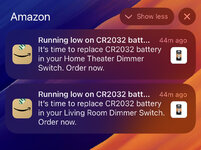
Case in point: Amazon reminded me to change the battery in my Hue Dimmer Switches recently... but I factory reset and gave my only Echo Dot to my father-in-law a year ago. 🤔

IMG-3993-2.jpg

How does she know?!?

And she's not wrong, either!

The funny thing is that's not the right type of battery, though!

My one guilty pleasure of the smart stuff is I put a Kasa smart switch in the detached garage to turn on the outside lights on the garage at night. It has a schedule which seems to work about half the time. I could do a photo cell to turn it on but we had these already so it was the easier option at the time.

I wonder if it's a WiFi range issue unless you have solid WiFi out there?

If you have a neutral wire out there, I swear by these Honeywell Solar Programmable switches. Or their cheaper cousins. I have both versions, and both work flawlessly for exterior lighting.
 

The J

Well-known member
Joined
Mar 4, 2010
Messages
152
Can you share a good resource to get started in home automation? Are there good books on the subject, or are they out of date as soon as they're published?

I'm really liking your doorbell solution, and have the same feelings about talking to a speaker and not controlling the data on a Ring/Nest device. The hard wiring effort was certainly worth it.
 
OP
N

nicholam77

Well-known member
Joined
Dec 18, 2016
Messages
2,673
Location
Minneapolis, MN
Can you share a good resource to get started in home automation? Are there good books on the subject, or are they out of date as soon as they're published?

Probably not a book. Exactly like you said, a book would unlikely go over specifics or be up to date. Some places I look for information are the community forums for various platforms such as Home Assistant, Hubitat, WebCoRE, SmartThings, etc. Obviously these are going to pertain to each individual platform, but they also usually have 'general' sections for automation ideas, troubleshooting, hardware questions, etc. Also a great place to learn more about each offering and see first hand the advantage of a community-based platform.

I also read on Reddit. Subreddits like r/homeassistant, r/homeautomation, r/homekit, r/Hubitat, etc, are not as prolific as the community forums, but might be less intimidating to browse, and often have general or beginner questions posed, as well as people showing of things they've automated or created.

And then of course YouTube. Sometimes the hardest part is just thinking of automations, so I'm going to recommend the channel Smart Home Solver, because Reed regularly has excellent automation idea videos. And platform comparisons. It's not a technical channel at all, but great ideas and information. Good place to start.


Aside from that, I'll give you my advice.

It's still a really fractured space. And it's a complicated space. This video puts it well. In my opinion there is no 'perfect' home automation platform. That's why I personally use three (Hubitat, Home Assistant, and HomeKit). But to pick one to start out, you should evaluate your goals and priorities. What type of devices do you want to connect? What do you want to be able to do with them? Do you value local control and privacy more? Do you value ease-of-use more? Do you need to control you stuff outside the home?

You stated wanting to get started in home automation, which to me is very different from just installing smart devices that can be controlled with an app or voice. Home automation is all about the rules engine, and none of the big tech companies are going to give you a very good one. Apple, Google, Amazon, other 1st part apps like Kasa, even HUE... they all ****. Beyond the basics anyways. Once you get over the novelty of turning a smart bulb on with your phone, you're going to want more out of it. That's where a hub comes in.

I'm just going off what I know, but Home Assistant and Hubitat are certainly two of the more popular, and they both have very good rules engines. Home Assistant has a built-in UI rules engine, and you can also install Node Red as an add-on. Hubitat has a built-in rules engine called Rule Machine, and you can install WebCoRE as an add-on. Personally, I think WebCoRE strikes the right balance between friendly and powerful, but with some learning, any of them will let you automate pretty much anything you can think up.

I would check out this recent Smart Home Solver video on choosing a hub / platform. I agree with his recommendation, except I think you *could* swap Hubitat as the main hub.

The next thing to consider is devices and the protocols they use to communicate. Smart home devices talk to a hub wirelessly, over one of many protocols. The main ones are Zwave, Zigbee, WiFi / LAN, Thread, and RF. To connect a device to a hub, it needs to have a radio for that protocol. Not all hubs can do all protocols. So in considering which hub to go with, and which devices to go with, you need to decide which protocol(s) you want to use.

ZWave = mesh network, reliable, 908 MhZ frequency (no interference with WiFi), less device selection, more expensive
Zigbee = mesh network, less reliable than ZWave, 2.4 GhZ so WiFi interference possible, huge device selection, cheap, quality varies
WiFi = reliable, likely already present in the home, but many devices can clog WiFi bandwidth, often relies on manufacturer cloud
Thread = similar to Zigbee but doesn't require a hub
RF = least likely to be used, but maybe for TV's, air conditioners, fireplaces, etc

One issue with anything that uses a cloud is you run the risk of it being shut down. My handful of Kasa devices are controlled locally, but authenticate with the hub through the cloud. I don't lose sleep over it because it's not my whole system, they were cheap, and TP-Link is a big company. I would not build your whole system from cheap WiFi devices, though.

Confused yet?

My own setup and approach is:
- Hubitat + Home Assistant handle the automations in the background. The devices are connected to one or both of these hubs.
- HomeKit (Apple Home app) is the 'front end' to control stuff with phone
- Philips HUE for smart bulbs
- ZWave for hardwired light switches
- Zigbee for battery powered sensors like contact sensors and some motion sensors
- handful of WiFi (Kasa) plus and switches for less critical use cases or when I feel like being cheap

I could go on and on about the pros and cons of different hubs and devices and protocols, but like I said at the beginning, anyone who wants to get into this beyond a surface-level application, needs to first figure out what they want out of it. If you're serious about it and want specific recommendations for YOU, I am happy to help with that. Also @Denwood has a lot of experience and I think similar views as mine and I'm sure could be a resource as well.

Also, if anyone has a specific question I'm happy to try an answer on here or in a PM.

🍻
 

Denwood

Well-known member
Joined
Sep 22, 2014
Messages
4,192
Location
Thunder Bay, Ontario, Canada
That summary was about spot on Nick :) One thing I'd add, if you're looking at automation to save power. All of these devices (when powered by AC) use a little bit of power, to keep the wireless bits alive to route messages, respond to commands, etc. At least one study I looked at suggested that given how efficient LED lights have become, that it may not make a huge difference in power use to automate, when accounting for that parasitic power. So discipline and a good old off switch may still rule supreme. That said, I find the technology far more interesting on the HVAC side, where I do believe a lot power can be saved by optimising air exchange, a potentially energy intensive money pit. It's also a very powerful way to get to excellent indoor air quality, while minimising the energy expense in doing so.

I think my favourite use of the tech is the full automation of the kitchen exhaust fan which varies speed based on the induction cook top power use. PM2.5 levels normally spike when cooking (the stuff you don't want to breath), however this system has almost completely resolved this challenge. Make up air via the HRV is pretty cool too.

Now, Christmas lights... Most of us have various indoor bits, trees etc. as well as outdoor lights etc. I have a number of plug in dongles, indoor and out designated for the landscape lighting and Christmas stuff. Automation makes it super trivial to have all of these devices working together to come on at sunset, off at midnight, on before sunrise, and off again at dawn. I've also added a manual button (Ikea Tradfri remote/dimmer) so the boss can turn these on and off whenever she likes. Btw, Nick, not sure if you're using any of the IKEA wireless buttons, but Hubitat has added the ability to update firmware on these with new drivers, so they are now quite usable (as in not eating batteries) and stable on the platform. Updating the firmware was a PITA, but the end result...awesome and inexpensive wireless switches with up to two years battery life.
 
OP
N

nicholam77

Well-known member
Joined
Dec 18, 2016
Messages
2,673
Location
Minneapolis, MN
At least one study I looked at suggested that given how efficient LED lights have become, that it may not make a huge difference in power use to automate, when accounting for that parasitic power. So discipline and a good old off switch may still rule supreme.

Interesting. Even if that is the case, my brain is still wired to want the lights off when not in use. So whether it saves power or not, it makes me feel better! Plus, the sensation of having lights auto-on when you walk into a room is fun!

I've also added a manual button (Ikea Tradfri remote/dimmer) so the boss can turn these on and off whenever she likes. Btw, Nick, not sure if you're using any of the IKEA wireless buttons, but Hubitat has added the ability to update firmware on these with new drivers, so they are now quite usable (as in not eating batteries) and stable on the platform. Updating the firmware was a PITA, but the end result...awesome and inexpensive wireless switches with up to two years battery life.

Oooh, interesting. I am not using any IKEA stuff. Questions:

- which IKEA buttons are you using? I'd be interested in something simple like this one
- do you need an IKEA hub, or are you pairing directly with Hubitat Zigbee radio?
- how does one update the firmware via Hubitat? (got a link or anything?)

I see they also have a new AAA battery button!
 

Denwood

Well-known member
Joined
Sep 22, 2014
Messages
4,192
Location
Thunder Bay, Ontario, Canada
I've got a few of the older Tradfri dimming/on/off remotes that they include here : https://www.ikea.com/us/en/p/tradfri-dimmer-kit-smart-wireless-dimmable-warm-white-90435932/

You'll find your simple shortcut button on this list too: https://community.hubitat.com/t/release-ikea-zigbee-drivers/123853

Drivers can be installed using the Hubitat Package Manager, same author as above thread:
  • Using HPM: Search for the package name IKEA Zigbee drivers (by Dan Danache). When installing the package, you can select from the list only the drivers that you need. Later, (after a trip to IKEA) you can add/remove drivers in the list using the "Modify" option in HPM.

Once you pair the device and set the driver to one of the above, you'll see an "Update Firmware" button in the device properties in Hubitat. Firmware is looked up and loaded to the hub from Hubitat once you click update. For the various buttons you need to wake them up with a button press right before clicking the update firmware option from Hubitat. Load up live logs and watch as you update :)

I don't use any of the Ikea hubs..all of my Tradfri bulbs, LED drivers and buttons are paired directly to the Hubitat hub.
 

Snapped-off

Well-known member
Joined
Feb 22, 2012
Messages
4,808
Location
Indiana
XMAS Tree Automations

Got the XMAS tree decorated just after Thanksgiving.

IMG-3900.jpg
IMG-3884.jpg
IMG-3960.jpg

And of course I automated it 😁

It's on a TP-Link Kasa smart plug I picked up on Black Friday. This allows it to be turned off and on with an app, and scheduled, but I added some more advanced logic on my smart home platforms.

— it turns on at 30min to sunset, but only if someone is home
— if it's after sunset and we arrive home, it turns on
— if the living room lights turn on between 6am-9am, it turns on (living room lights are normally triggered by motion)
— if my Goodbye or Goodnight scripts are called, the tree turns off
— if the auxiliary button on my living room Inovelli Zwave switch gets pushed, it toggles the state of the tree

And the really fun one...

— whenever the tree turns on (by whatever method), the living room Sonos speakers play one of three .mp3 XMAS song snippets at random
— if the Sonos is currently playing a stream, i.e. internet radio, the .mp3's are 'announced', meaning the current stream is ducked and the .mp3's are mixed in with the current audio, so no streams are broken and no speakers are ungrouped or paused etc

This can be seen in the below YouTube video I uploaded, showing the Inovelli toggle control, and the .mp3 SFX in action:


The .mp3 part took some custom YAML code in Home Assistant, so I'm pretty stoked about getting it to work. And the kids love it.


Sticking with the winter theme, we had another light snow recently and I picked up some new snow shovels.

A 30" Snow Plow:
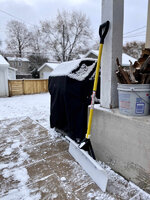
IMG-3964.jpg

And a very light weight 'ergonomic' shovel:

IMG-3968.jpg

Both worked well. After being good for quite a few months, I've had a set back with my back injury, and I'm trying to do everything I can to not overdo it these days. I'm hoping these shovels will let me clear a light snow faster, and with less injury. So far they seem to do the job.
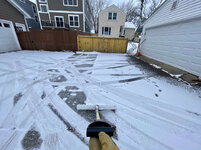
IMG-3969.jpg
I bought the 36" snowpusher last winter. My only complaint is I didn't buy the 48"! It's a badass tool for a smooth driveway.
 
OP
N

nicholam77

Well-known member
Joined
Dec 18, 2016
Messages
2,673
Location
Minneapolis, MN
Drivers can be installed using the Hubitat Package Manager, same author as above thread:
  • Using HPM: Search for the package name IKEA Zigbee drivers (by Dan Danache). When installing the package, you can select from the list only the drivers that you need. Later, (after a trip to IKEA) you can add/remove drivers in the list using the "Modify" option in HPM.

That's awesome, Dennis! Thanks for the heads up. The 'shortcut' buttons are on sale for 7 bucks a piece right now so I may pick up a couple to try out.

I bought the 36" snowpusher last winter. My only complaint is I didn't buy the 48"! It's a badass tool for a smooth driveway.

Yeah, I've noticed it likes to catch on uneven surfaces. I think I went only 30" but I wanted to be able to use it on my front sidewalks, too. I figured it would be fine given my small property.
 
To avoid these ads, REGISTER NOW!
OP
N

nicholam77

Well-known member
Joined
Dec 18, 2016
Messages
2,673
Location
Minneapolis, MN
MERRY XMAS AND HAPPY HOLIDAYS!

I hope everyone that celebrates has a great holiday and new year!

I've had a significant re-injury / set'back' (pun intended) with my lower back that is causing me a lot of discomfort over the past month, so I haven't been up to much other than getting ready for the holidays. Already started physical therapy, though, and have an MRI scheduled in two weeks, as I feel like it might be a disc issue and want some sort of confirmation as to what the heck is going on.

Anyways, did some patching of the front doorbell hole.

IMG-3998.jpg


And painting.

IMG-4087.jpg

Made Xmas cookies. In the shape of 3d-printed unicorns.

IMG-3915.jpg

Speaking of, the printer has been running again on various projects. More details later.

IMG-4082.jpg

Went to a holiday light show.

IMG-4095.jpg

For the winter solstice we have a tradition of turning off *most* of the lights in the house and lighting candles for the evening. The kids like it, but don't tolerate the full dark for very long, so I did keep the living room lights on dim.

I recently picked up these 'Raspberry' votives on eBay, designed by Anne Nilsson for Orrefors / Kosta Boda Sweden in the 90's.

IMG-3928.jpg

With a tea light candle they shine a neat pattern on the surface they are sitting on. It was perfect for the solstice.

IMG-4136.jpg
IMG-4140.jpg
IMG-4144.jpg
IMG-4149.jpg


Santa's elf (me) wrapping presents. Good thing Santa's elf has a Bora Centipede — it was truly a back saver.

IMG-4157.jpg

I'll probably be quiet for the next few days as we enjoy family time, but I sincerely hope everyone reading along here has a great end to the year!

🍻
 

Finallygotit

ALLIANCE MEMBER
Joined
Jul 6, 2013
Messages
4,090
Location
Tucson, AZ
Merry Christmas Nick. I sincerely hope your back issues subside. Back pain is a *****! I know!

I am not a doctor nor do I pretend to be ( I have not stayed at a Holiday Inn either) but you might want to look up TENS device for some intermediate relief. I have used mine and it does help. Thankfully my back pain is pretty much gone thanks to sessions with a massage therapist. Again, I am NOT a doctor. You could also talk to your doctor about the device.

YMMV

:beer:
 

patlun

Well-known member
Joined
Apr 12, 2015
Messages
242
Location
Värmland, Sweden
God Jul och Gott Nytt År!

Merry Christmas and Happy New Year!

An ache in the back is really something that makes you move slowly. Hopefully you soon know what the problem is. Physical therapy seems to help in most cases, even if it takes time. I like Anne Nilsson Raspberry a lot, beside the votives, I like the bowl. Another beautiful design from Orrefors is this Carat votive by Lena Bergström,

A third classical design is Snowball from Kosta Boda, designed by Ann Wolff
 

Mr. Roboto

Well-known member
Joined
Dec 11, 2012
Messages
2,160
Location
New Hampshire
Merry (belated) Christmas Nick and a happy new year to you and your family!!

Hope you get some answers and your back heals up soon. I've had my share of on and off again back issues over the years, and I know how frustrating it can be. I also can't sit still, so I am an awful patient haha.
 

jonshonda

Well-known member
Joined
Jul 17, 2017
Messages
4,747
Location
Wisconsin
That's awesome, Dennis! Thanks for the heads up. The 'shortcut' buttons are on sale for 7 bucks a piece right now so I may pick up a couple to try out.


Yeah, I've noticed it likes to catch on uneven surfaces. I think I went only 30" but I wanted to be able to use it on my front sidewalks, too. I figured it would be fine given my small property.

I finally found a shovel that actually works really well to push snow, vs something like the shovel you referenced. The biggest issue I've found with traditional shovels is the angle of the handle and blade relative to the ground. Very few shovels make good pushers as the angle at which force is applied isn't ideal for pushing. The blade material also seems to usually be so rigid that it just catches on everything.

This fella is perfect for pushing snow, as the angle of the blade is very similar to a snowplow on a truck, and is flexible enough to not catch on imperfections. But even at 36" and me being a healthy 6'2" tall 250lb male, anything more then 4-5" of lighter snow is a bit much for this to handle. It also is terrible at scooping. So I usually employ a two shovel setup for heavier snow falls. The pusher, and a scooper.
 

cccoltsicehockey

Well-known member
Joined
Apr 3, 2014
Messages
1,416
Location
Charlotte, NC
Reolink Smart Doorbell

Because I can't leave good enough alone, I decided to swap out my video doorbell. I was rocking the OG Nest Hello doorbell, from before Google acquired Nest.

It was a premium product with a slick app and a good user experience. After Google bought Nest, they cheapened all the products, and have been trying to force users to the Google Home app for years, as well as use a Google account to authenticate. All the while I feel like app performance has gotten worse.

This November the subscription prices went up (Nest/Google requires a monthly subscription to unlock certain features and to save video recordings). With no new features or improvements. Just a price gouge.

When I ditched Smarthings for Hubitat, I did a house cleaning of my smart home stuff, and one goal of mine was to move to local control products (no cloud), and no voice assistants. I've been mostly successful with that, but Nest was a hold out in my home. It sends 24/7 video through Google servers for AI processing (over WiFi!!!), and then back down to your phone to view or get notifications. This is a huge bandwidth ****, WiFi ****, latency issue, and if you're paranoid is a security / privacy concern.

Enter: the Reolink PoE video doorbell. Power over ethernet. Records on onboard SD card. On-device AI person detection. RTSP and ONVIF enabled. Two Way Audio. RF chime included. Decent iOS app. And... powerful local Home Assistant integration.

Got it on sale and decided it was time to cut ties with Nest. Only one problem. Nest uses traditional low voltage doorbell wiring, and a physical chime. I did not have ethernet run to that location.

There is no way for me to run a new line up from my finished basement, but I do have a few ethernet cables going up to our bedroom. So my plan was to extend one of those through the attic and down to the front door.

First up was to figure out which port in in the bedroom matched with with end in the switch closet.

IMG-3783.jpg
IMG-3782.jpg


This is because I'll need to plug it into the new PoE switch I got.

Next I snipped the end up in the bedroom with the jack on it, and re-terminated it with an RJ45 end. That got connected to a new cat6 cable which I ran through the closet wall, into the attic, and to the front of the house, drilled down through the wall.

This was a miserable experience, rolling around in the fiberglass insulation shards in the pitch black.

And... to catch the new cable run I had to open a giant hole in the all by the front door.

IMG-3788.jpg
IMG-3791.jpg

Here's the Nest from before I took it off. The coating on the face was getting a bit flaky.

IMG-3794.jpg

Fished the cat6 to the outside and put a new end on, they plugged in the tester and plugged it into the PoE switch on the other end in the basement.

IMG-3798.jpg
IMG-3799.jpg

In total I had to crimp 4x new ends, so I was relieved to see everything pinned out correctly with signal.

Then installed the Reolink mounting plate, popped in an SD card, and snapped it in place:

IMG-3804.jpg

Compared to the image quality of the Nest, the Reolink picture has very good resolution, bitrate, FPS, etc, but does not have HDR like the Nest did so the exposure is less balanced. Some comparisons:

NEST:

88006.jpg
88008.jpg

REOLINK:

IMG-3914.jpg
IMG-3879.jpg
IMG-4001.jpg

I was pleased to see I can get away with full color at night and not run the IR blasters since those attract bugs.

The Reolink app is not quite as pretty or slick as Nest, but it does the job and is not bad. As mentioned, no HDR with the Reolink. And no package, animal, or vehicle detection.

But I'm willing to trade that for:

- no monthly subscription
- completely local and private
- better resolution, higher quality stream that plays at a constant 20 FPS (Nest would jump and fluctuate sometimes)
- stream connects immediately and reliably (Nest would sometimes take 5+ seconds which was annoying)
- ethernet instead of WiFi
- on board recording instead of cloud
- Home Assistant integration (more on that later!)

While I was up rolling around in the attic I was started to question if it was worth the switch, but I've been running it for a few weeks now and I'm pretty happy with the decision. Now I just need to patch the huge whole in the wall!

IMG-3995.jpg

🍻
Love the camera replacement and switch to local storage. Been slowly doing the same thing. Been getting away from Arlo because of the subscription fee for all their cameras. I had considered the Reolink cameras as a well as a couple other before I went with UniFi Protect though as I already had the UniFi network gear in the house. I love that it can also interface locally with my home assistant instance.

I have a couple of your other more detailed home automation posts saved I need to finish reading through later as it has been a huge push of mine as of late.
 
OP
N

nicholam77

Well-known member
Joined
Dec 18, 2016
Messages
2,673
Location
Minneapolis, MN
Merry Christmas Nick. I sincerely hope your back issues subside. Back pain is a *****! I know!

I am not a doctor nor do I pretend to be ( I have not stayed at a Holiday Inn either) but you might want to look up TENS device for some intermediate relief. I have used mine and it does help. Thankfully my back pain is pretty much gone thanks to sessions with a massage therapist. Again, I am NOT a doctor. You could also talk to your doctor about the device.

YMMV

:beer:

Merry (belated) Christmas, Dan. Thank you on the back pain, I will look into the TENS device. That's great you got through your back issues. My dad has struggled with it most of his life due to an accident with a city bus in college, and I do not want that in any capacity. I'm sure I'll overcome it, it's just a setback.

Nick, best wishes and heal well and congrats on the projects and progress.

Thanks, Jake! In my downtime from 'real' projects, I might have to keep the 3d printer fired up. Perhaps finally give Gridfinity a try.

God Jul och Gott Nytt År!

Merry Christmas and Happy New Year!

An ache in the back is really something that makes you move slowly. Hopefully you soon know what the problem is. Physical therapy seems to help in most cases, even if it takes time. I like Anne Nilsson Raspberry a lot, beside the votives, I like the bowl. Another beautiful design from Orrefors is this Carat votive by Lena Bergström,

A third classical design is Snowball from Kosta Boda, designed by Ann Wolff

Merry Christmas, Patrik! I was secretly hoping you might see that post. I assume it's a fairly popular design, but I didn't know if it's ubiquitous in Sweden or still more of an art object most people haven't heard of. The reason I know of them is my parents have a glassware collection, a lot from Kosta Boda, as well as iitalla, etc. Pretty sure they have some Snowballs.

I really like the votives, they are so neat when lit up. I maybe have to get more. 😬

We celebrate Winter solstice but for different reasons, it’s my birthday, if we do sit in the dark it’s ‘cos I’m to mean to turn the lights on.
Nice to think the days are getting longer though.

Happy Xmas.

:ROFLMAO: Well happy belated birthday and once again happy Xmas, Steve !

Merry (belated) Christmas Nick and a happy new year to you and your family!!

Hope you get some answers and your back heals up soon. I've had my share of on and off again back issues over the years, and I know how frustrating it can be. I also can't sit still, so I am an awful patient haha.

Thanks — hope you had a great holiday with the family, too!

I'm feeling confident it's a lumbar disc bulge, but hoping to get imaging this week. Probably the biggest frustration is on the exercise part. This summer I was walking / jogging 8 miles a day most days, lifting weights almost every other day. Now I can't walk more than .5 mile at a slow pace without triggering sciatic issues in my right leg. I was all prepared to keep up my walks throughout the winter. This will likely by a 3 month setback at best, so it's a bummer for sure but all I can do now is be careful and focus on getting past it.

Love the camera replacement and switch to local storage. Been slowly doing the same thing. Been getting away from Arlo because of the subscription fee for all their cameras. I had considered the Reolink cameras as a well as a couple other before I went with UniFi Protect though as I already had the UniFi network gear in the house. I love that it can also interface locally with my home assistant instance.

I have a couple of your other more detailed home automation posts saved I need to finish reading through later as it has been a huge push of mine as of late.

Thanks! I assume my home automation content is pretty hit or miss, but I hope a *few* people like yourself are interested.

Everyone seems to like UniFi. I don't have any of their stuff, and am not really trying to build out a bunch of cameras, so the Reolink doorbell made sense for me. Anyone in the UniFi system I'm sure their cameras are attractive, if expensive.

Probably similar to UniFi + Home Assistant, the Reolink Home Assistant integration has many sensors, including binary sensors for "person detected" and "doorbell pressed". I have automations set up that play a chime followed by a pre-recorded TTS message that announce "Someone has been detected at the front door" or "Someone rang the doorbell" over our Sonos speakers. The chime/TTS is an mp3 file I'm serving up locally from my Synology. It works surprisingly well. No need for the Reolink chime. With this method I got to control the chime sound (not obnoxious!) and the hours it rings, what volume, etc.

Stay tuned, I have a backlog of a few more home automation posts to write up soon! Also feel free to share any critiques or ideas you have!

I finally found a shovel that actually works really well to push snow, vs something like the shovel you referenced. The biggest issue I've found with traditional shovels is the angle of the handle and blade relative to the ground. Very few shovels make good pushers as the angle at which force is applied isn't ideal for pushing. The blade material also seems to usually be so rigid that it just catches on everything.

This fella is perfect for pushing snow, as the angle of the blade is very similar to a snowplow on a truck, and is flexible enough to not catch on imperfections. But even at 36" and me being a healthy 6'2" tall 250lb male, anything more then 4-5" of lighter snow is a bit much for this to handle. It also is terrible at scooping. So I usually employ a two shovel setup for heavier snow falls. The pusher, and a scooper.

Nice, that looks great. Somewhat similar to the Snow Plow but different angle and material. I'm employing the two shovel setup as well, and have the snow blower for heavy snows. I'd have considered the one you linked but I already bought the others. And with my back I'll be delegating snow shoveling to my wife for the time being anyways, so I'm off the hook!
 
Last edited:
OP
N

nicholam77

Well-known member
Joined
Dec 18, 2016
Messages
2,673
Location
Minneapolis, MN
WARNING: This is a tool-heavy post!

I have a confession. I don't know if it's because of my back, extra screen time, the need for a pick-me-up, lack of willpower, the kids being home from daycare all week and driving me a bit crazy, other Garage Journalers, general burn out, or all of the above — but I've gone on a bit of a hand tool buying binge the past week. 😬

It started with putting a few Knipex and the Wera Tool Check Plus Metric on my Xmas list, both of which I was generously gifted. But in the meantime @jake28 was asking in his thread about tool totes and essential tools for around the house DIY repairs, and it sent me down a YouTube rabbit hole of contractor EDC "fit outs".

Example.

I watched probably 20+ of these. It got me thinking about my own set of "house tools".

I have a kit of sorts put together, but these videos gave me some ideas, and I'm more inclined to keep nicer tools inside the house than in the garage due to rust and less abuse.

Here are a few of the things I picked up.

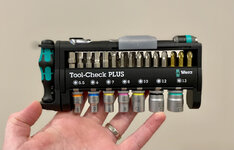
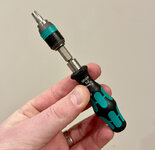
The aforementioned Wera Tool Check Plus Metric (Xmas gift):

IMG-4308.jpg


When I opened it I was immediately shocked at how tiny it is. Especially the ratchet and bit driver. At first I thought it looked weak sauce, but after playing with it and trying it out, I'm in love. The size is a huge bonus to me — such a compact, light kit, and so complete. The mini ratchet and driver are probably enough for *most* things you'd do in the house like tighten furniture, cabinet knobs, remove electrical faceplates, etc.

It packs a very complete bit set including Torx, security Torx, hex, Philips, slotted, etc. And a nice set of smaller sized metric sockets.

And the way everything is so accessible is brilliant. A lot of bit holding cases are frustrating to open (especially drill bits come to mind). This is easy to use.

IMG-4309.jpg

I love the modularity of it. The 'Rapidaptor chuck' is an excellent little bit chuck that can be used in the driver or the ratchet, and holds the bits very well. The driver is also strongly magnetized. The Rapidaptor chuck sleeve spins free, so you can hold it as a stabilization point while you spin the driver with the other hand... almost as good as a ratcheting driver.

IMG-4310.jpg

The sockets can be used in the ratchet, or in the driver as a nut driver. Very versatile.

IMG-4311.jpg

This kit is perfect for house duty and I love it.

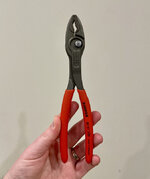
KNIPEX Twin-Grip 82 01 200 (Xmas gift)

I can blame this one on @Bob Heine :ROFLMAO: , thanks Bob

IMG-4302.jpg

Probably my new general purpose pliers.

KNIPEX Needle Nose 26 11 200 (Xmas gift)

IMG-4303.jpg

Nice and thin.

Moving onto stuff I bought myself.

KNIPEX Cobra Water Pump Pliers 87 01 250

IMG-4307.jpg

I'm on a KNIPEX kick, what can I say. It dropped down to $30 on Amazon so I pulled the trigger. Been watching it for a time. This one was a bit of a reach... I'm sure I'll use them at some point, but far from a necessity. Unsure about the 10" size as of now. Like the adjustability system, though. I have a Channellocks of the same size and I can stand the adjustment on them.

Wera Kraftform 810/1

IMG-4304.jpg

Only $13. This is a big boy. Got it to complement the teeny tiny boy that came with the Tool Check Plus. Can accept everything in the kit.

Wera Kraftform Plus 334/6 Screwdriver Set

IMG-4297.jpg

I have a set of Craftsman I keep in the garage. These might be for house duty... not sure yet. Either way they were on sale for $29... really not bad. My .02 so far is they are comfortable and very well designed. All of the features work like they should (rubberized grips, hex shaft to prevent roll, laser-engraved tips).

I love the clear markings of the sizes and the laser tips really work well.

IMG-4298.jpg
IMG-4299.jpg

Klein 32581 Precision Screwdriver 4-in-1

IMG-4306.jpg

For smaller screws, electronics, sunglasses, etc. Reversible shaft with 4 tips total. End of handle spins like Vessel style drivers.

And lastly...

Duratech 90-tooth 1/4" Ratchet:

IMG-4296.jpg

I don't know why I got this other than it was 10 bucks and it's cute and I don't have a 1/4" ratchet. I've always just used an adapter on my 3/8" but maybe this will be handy one day in a tight space. Hard to believe for not much more than the price of a latte you can get a tool like this which should probably last forever.

This isn't my full kit, but all of this stuff and some other items (except the Tool Check) fit in this little organizer pouch I got a long time ago.

IMG-4301.jpg

I keep this pouch, plus other larger items, in a Systainer Toolbox 1 tote.

So yeah, that's my new first line of defense around the house. All of these tools were relatively cheap on their own ($15-35) except the Tool Check, at least at current Amazon prices (some were on sale and some I waited for favorable price fluctuations).

I still have a lot of things on my list I'd like to add, and better organization needed of specific kits for electrical, picture hanging, drywall, painting, etc.

And conversely there are some pieces of my kit that are old and beat up and I'll never replace, since they were given to me by my dad. My Stanley 99E utility knife and one of his old flat head Craftsman drivers come to mind.

Ok, back to regular programming :)

🍻
 

patlun

Well-known member
Joined
Apr 12, 2015
Messages
242
Location
Värmland, Sweden
I was secretly hoping you might see that post. I assume it's a fairly popular design, but I didn't know if it's ubiquitous in Sweden or still more of an art object most people haven't heard of. The reason I know of them is my parents have a glassware collection, a lot from Kosta Boda, as well as iitalla, etc. Pretty sure they have some Snowballs.

I really like the votives, they are so neat when lit up. I maybe have to get more. 😬

The Raspberry votives are or at least was very popular as gifts. I get both of mine many years ago. They are really beautiful when lighted in a dark room. I have not been in the shops before Christmas for some years, but they was often on a sale before Christmas. I have a couple of vases designed by Alvar Aalto (Itttala) thatat I like, but they are in storage at the moment. I am not a collector of glassware, it is more that you get such things as gifts when people don't have better ideas, that said I like that kind of gifts.

Thanks! I assume my home automation content is pretty hit or miss, but I hope a *few* people like yourself are interested.

I like to see what is possible with home automation, I tired of it some years ago. Nowadays I only have some lights that turn on when the sun goes down or some time before it using my Animus heart. The only thing left from my old homegrown system is a dashboard showing temperature and humidity for some places indoors and outdoors. My next related project is to get a couple of cameras, mostly to get notifications when I get visitors, I am looking into a standard system from Eufy that i found out about yesterday. The main thing is that the base station for the system is storing all data locally.
 

cccoltsicehockey

Well-known member
Joined
Apr 3, 2014
Messages
1,416
Location
Charlotte, NC
Thanks! I assume my home automation content is pretty hit or miss, but I hope a *few* people like yourself are interested.

Everyone seems to like UniFi. I don't have any of their stuff, and am not really trying to build out a bunch of cameras, so the Reolink doorbell made sense for me. Anyone in the UniFi system I'm sure their cameras are attractive, if expensive.

Probably similar to UniFi + Home Assistant, the Reolink Home Assistant integration has many sensors, including binary sensors for "person detected" and "doorbell pressed". I have automations set up that play a chime followed by a pre-recorded TTS message that announce "Someone has been detected at the front door" or "Someone rang the doorbell" over our Sonos speakers. The chime/TTS is an mp3 file I'm serving up locally from my Synology. It works surprisingly well. No need for the Reolink chime. With this method I got to control the chime sound (not obnoxious!) and the hours it rings, what volume, etc.

Stay tuned, I have a backlog of a few more home automation posts to write up soon! Also feel free to share any critiques or ideas you have!
I enjoy the home automation content for sure. I started with SmartThings so most of my stuff is still there. Funny you mention the doorbell announce feature. That is actually the reason I have a HomeAssistant instance in the first place. I set that up to announce on all my Google Home speakers throughout the house. Such a great feature. Really excited to have that ability since I won't have a chime for the actual doorbell at all in the new garage. Missing some doorbells cause I was on the back porch was my initial reason for setting it up.
 

Trapps

ALLIANCE MEMBER
Joined
Feb 10, 2017
Messages
2,003
Location
The Detroit Zoo
Quite the tool acquisition run! The Wera Tool Check is great stuff. I really like their products. Knipex is, well, Knipex.

I have a ton of back experience, including laminectomy and fusion with instrumentation. I've done it all and I do feel your pain.

All the best to you and your family for 2024!
 
OP
N

nicholam77

Well-known member
Joined
Dec 18, 2016
Messages
2,673
Location
Minneapolis, MN
The Raspberry votives are or at least was very popular as gifts. I get both of mine many years ago. They are really beautiful when lighted in a dark room. I have not been in the shops before Christmas for some years, but they was often on a sale before Christmas. I have a couple of vases designed by Alvar Aalto (Itttala) thatat I like, but they are in storage at the moment. I am not a collector of glassware, it is more that you get such things as gifts when people don't have better ideas, that said I like that kind of gifts.

Thanks, that's interesting to know. Those are some nice gifts if you ask me... I wish someone would gift me an Aalto vase! :ROFLMAO: My dad has the classic size in the green glass, as well as a few of the smaller dishes and whatnot. It's on my list of collectibles to own. Also, I am a fan of Alvar Aalto's bentwood furniture and homes he designed. I've just recently been contemplating a way to make my own replica Stool 60 as it's hard to stomach the $350 price tag.

I like to see what is possible with home automation, I tired of it some years ago. Nowadays I only have some lights that turn on when the sun goes down or some time before it using my Animus heart. The only thing left from my old homegrown system is a dashboard showing temperature and humidity for some places indoors and outdoors. My next related project is to get a couple of cameras, mostly to get notifications when I get visitors, I am looking into a standard system from Eufy that i found out about yesterday. The main thing is that the base station for the system is storing all data locally.

Cool! Animus isn't available here but looks neat. Local data is the way to go!

I enjoy the home automation content for sure. I started with SmartThings so most of my stuff is still there. Funny you mention the doorbell announce feature. That is actually the reason I have a HomeAssistant instance in the first place. I set that up to announce on all my Google Home speakers throughout the house. Such a great feature. Really excited to have that ability since I won't have a chime for the actual doorbell at all in the new garage. Missing some doorbells cause I was on the back porch was my initial reason for setting it up.

Good! I came from SmartThings as well, used it for well over 5 years. How are things with ST now that Groovy has been sunsetted? I ditched it around that time since I was going to lose webCoRE and that's where 95% of my automations were, and at the time the new iPhone app was hot garbage. Fwiw, Habitat is an amazing SmartThings replacement, aside from the lack of a pretty front end app.

I'm using Home Assistant similarly... to fill in the gaps. When I left SmartThings I was really determined to have a singular platform, and now here I am with Hubitat, Home Assistant, and HomeKit. :ROFLMAO: It all works surprisedly well. There just isn't one perfect solution.

Quite the tool acquisition run! The Wera Tool Check is great stuff. I really like their products. Knipex is, well, Knipex.

I have a ton of back experience, including laminectomy and fusion with instrumentation. I've done it all and I do feel your pain.

All the best to you and your family for 2024!

Yeah, the Took Check will probably be the most-used out of the bunch!

Thanks for the PM on the back pain and hopefully I'll get straightened out soon. Wishing you a great start to 2024 as well!
 

cccoltsicehockey

Well-known member
Joined
Apr 3, 2014
Messages
1,416
Location
Charlotte, NC
Good! I came from SmartThings as well, used it for well over 5 years. How are things with ST now that Groovy has been sunsetted? I ditched it around that time since I was going to lose webCoRE and that's where 95% of my automations were, and at the time the new iPhone app was hot garbage. Fwiw, Habitat is an amazing SmartThings replacement, aside from the lack of a pretty front end app.

I'm using Home Assistant similarly... to fill in the gaps. When I left SmartThings I was really determined to have a singular platform, and now here I am with Hubitat, Home Assistant, and HomeKit. :ROFLMAO: It all works surprisedly well. There just isn't one perfect solution.
SmartThings still is not all that bad. And actually the last 6 months it has been oddly stable. I likely just jinxed myself with that though. I never had gotten into webCoRE so I wasn't losing that. Many of the things I was using were things other people had created or were just to add voice control to a lot of stuff.

I have likely created more automations in HomeAssistant in bit over a year it has been running than I ever did in SmartThings. I looked to ditch the cloud with HomeAssistant besides having it tied into other cloud services in addition to hopefully getting one platform. I like that if we lose internet I can execute routines locally from my phone for the few devices that are directly connected to it.

Like you I don't think I will be able to get there with a single platform. I have things in Harmony Hub that I just have not wanted to go down the rabbit hole of creating myself as a local tool.
 
OP
N

nicholam77

Well-known member
Joined
Dec 18, 2016
Messages
2,673
Location
Minneapolis, MN
Home Automation — Bedroom Lamps

@cccoltsicehockey + others, I thought I would showcase a few more things I've set up. One trickier scenario for me was our bedroom lamps and accessories.

I have three lamps in the bedroom, two on the nightstands and one on the dresser.

IMG-2461.jpg
IMG-2463.jpg

There is one overhead light that is 3-way switched from the stairs (not smart), but it doesn't give much light and I prefer the lamps. I got tired of having to switch all three lamps on or off, especially if just running upstairs to get something for 2 minutes.

Additionally, my wife has a nightstand fan, and white noise machine under the bed, that need manual switching.

I did not want to use smart bulbs in the lamps, because I use these special Bedtime Bulbs. They are quite expensive, but they are my favorite bulb for evening that I've come across. I have them here and in the kids' bedroom lamps. They are high CRI, low blue, extra warm color temp, and give the closest approximation to a dimmed incandescent that I know of.

So I resorted to smart plugs. I wanted cheap and reliable, and ended up testing some Kasa WiFi plugs, and some ThirdReality ZigBee plugs.

IMG-2314.jpg

The Kasa won, because they were 100% reliable to fire, and when commanded as a group they all turned on at the same time. They also have a configurable setting to turn off the power indicator LED, whereas the ThirdReality and some other smart plugs do not. I find those little LED's really annoying at night so I was happy to turn them off with the Kasa.

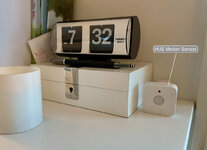
For the bulk of the lighting automation, I'm using a HUE motion sensor. These things are the best motion sensors I know of. Fast, reliable, and use AAA batteries that last forever.

IMG-2466.jpg

Getting the HUE sensors into Hubitat (and thus webCoRE) is a bit of a challenge. First I configured it in the HUE app, but set all the triggers to "Do Nothing". Then it gets brought into Home Assistant via the LAN Hue Bridge integration. Then it gets passed to Hubitat through the Home Assistant Device Bridge integration. Surprisingly, this is all fine, and Hubitat sees all the sensors, and motion detection is immediate.


MOTION LIGHTING

The obvious automation rule is: When motion is detected, turn lamps on. When motion is no longer detected, turn lamps off after 10 minutes.

Instantly, this poses issues. For one — the motion sensor is not pointed at the bed, so if you are watching TV in bed at night for example, the lights will turn off on you. Secondly, it doesn't account for night time, so if someone gets up in the middle of the night, it will turn on all the lights.

Time restricting it would help (only turn on during X hours, etc), but our go-to-bed and wake up times are variable, and there are two people's schedules to account for. With time restriction only, someone would inevitably get blasted with light at the wrong time and get annoyed.

I solved it with two boolean (True/False) variables. One is called @everyoneUp, and the other is called @bedroomLampsTriggeredEvening. Each of these has their own True/False state.

If the motion sensor detects motion, and the time is after 7:00 PM, then @bedroomLampsTriggeredEvening changes to True. It resets to False at midnight.

I use this state as a restriction for the motion lighting — if it's False, the motion lighting will occur, if it's True, the motion lighting will stop.

The end effect is the first time someone enters the bedroom after 7:00 PM, the lights will still turn on. But after that, they won't auto-turn-off. That way they won't go out if someone is up there in the evening reading or watching TV.

Ok, the 2nd variable — @everyoneUp. This is set to True when both of our phones come off the charger in the morning. That's the best method I've found to ensure both people are out of bed, or ready to be out of bed (don't mind if the lights come on). It resets to False at midnight.

The end effect is motion lighting won't resume in the morning until both phones are off the charger.


NIGHT STAND REMOTES

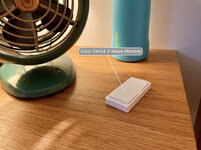
Ok, but what if we do want to control the lamps manually? Reaching under the bed for one of 4x smart plugs is way worse than just flipping the lamp switch. So I ended up getting these Zwave remotes that live on the night stands:

IMG-2465.jpg

They look like a Decora toggle, and support push, hold, double-tap, triple-tap, and more.

I configured my wife's single-push options to toggle her bedside lamp, and toggle her nightside fan. Using a toggle action eliminates buttons and things to remember. One side of the switch operates the lamp, the other side operates the fan. For advanced control, holding the top button turns all three lamps. And holding the bottom button turns off all three lamps, and additionally, if it's after 9:00 PM, turns on her fan and white noise machine (making the assumption she's going to bed).

Mine is set up similarly with toggles for the lamps and fans, except my 'hold bottom button after 9:00 PM' runs my Goodnight Routine, which turns off all the lights in the house, pauses Sonos, and sets the thermostat.


ADDITIONAL AUTOMATIONS

That's right, I'm not done yet!

We have a bedroom Roku TV, that catches some glare from my bedside lamp at night. I set up an automation in Home Assistant so when the TV starts playing content, it turns my lamp off, automatically.

On top of that, I don't like the fan, so I have it set up to automatically turn off when my wife gets up for the day. That way if I'm still in bed I don't need to have it on. And I'm using the @everyoneUp variable to turn off the white noise machine when the last person gets up for the morning.


Long post, I know. Hopefully a few of you enjoyed that or got some ideas. It's super granular, but that's what I love about this stuff. I no longer have to touch any of the switches or devices, they just do and predict what I want, in pretty much every scenario.

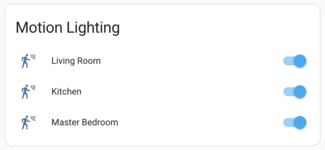
And if I do need to hard bypass the motion lighting temporarily, I have virtual toggles that let me do that.

motion-lighting-toggles.png
 

Denwood

Well-known member
Joined
Sep 22, 2014
Messages
4,192
Location
Thunder Bay, Ontario, Canada
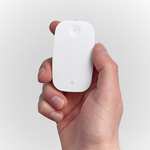
Adding in the wall remotes, like the Tradfri E1743, or the one I just ordered (Tradfir Rodret) really adds to the WAF when doing any automation. I also have one of the HUE remotes in the theatre mounted next to the old school manual switch. As with all things HUE, it's bulletproof, but expensive.

Hue wall remote: $29

1704230147765.png

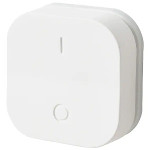
Ikea Rodret, $8 Nice thing on these is that they use AAA, do on/off/dim and come with a magnetic wall mount. I just ordered one of these and a few GU10 Tradfri for the library.

1704230341317.png

And these Tradfri E1743 discontinued, which of course now finally work with Hubitat:

1704230451763.png
 
To avoid these ads, REGISTER NOW!
Top Bottom