To avoid these ads, REGISTER NOW!

Trying Sketchup to redesign my garage

carhunter

Well-known member
Joined
Nov 8, 2010
Messages
793
Location
southern Ohio
So you guys got me hooked on Sketchup :mad:
I used to hand draw all my ideas on graph paper...a lot of work if you can't make up your mind and end up doing 5 different designs

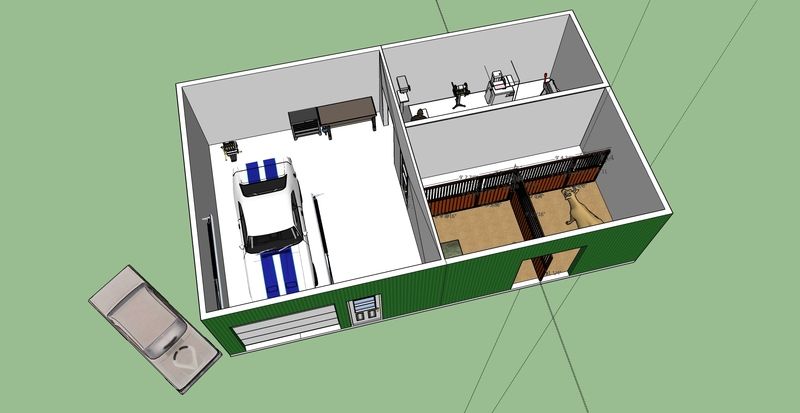
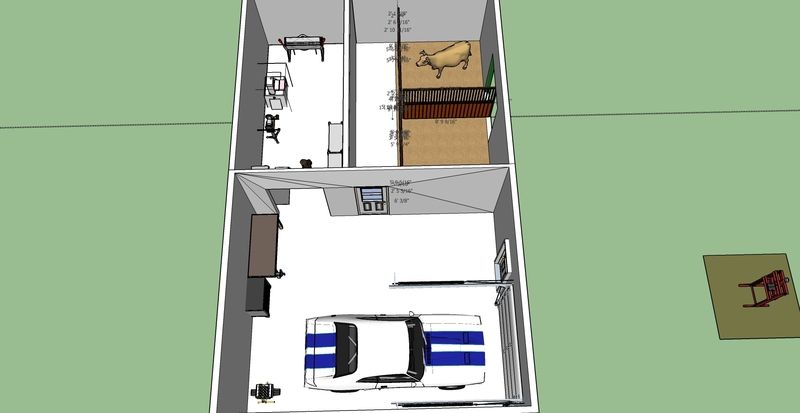
We have 2-2 car garages, 24 and 22' x 30. One was attached to the other after the fact by the previous owner, so they share a common wall.

For 3 years now they've been used as a mini-warehouse for all my ebay stuff, a few cars, etc. Every now and then I park a car inside and work on it :eek:

So, after about 14 hours of work, starting from scratch and learning the program, here's what I came up with. Its certainly not perfect, lots of stray lines, etc, but the dimensions are accurate.

None of the 3d models matched my existing shelving exactly, so I build them from scratch, saved as components, and cut/paste into the template.
For fun I built copies of my 26" craftsman tool boxes, the Mig welder, the old Lincoln arc welder, my Panelspotter, and a stainless topped rolling workbench that will act as a mobile packing cart.

the shelf layout is to maximize space for all the storage totes we use for inventory, plus room for larger parts and whatever comes off a car as I'm working

The chevelle came from the 3D warehouse, and somehow lost its wheels when I imported it :wtf:

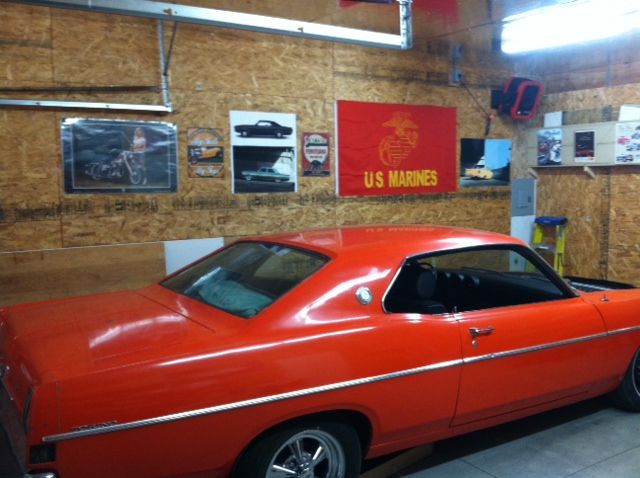
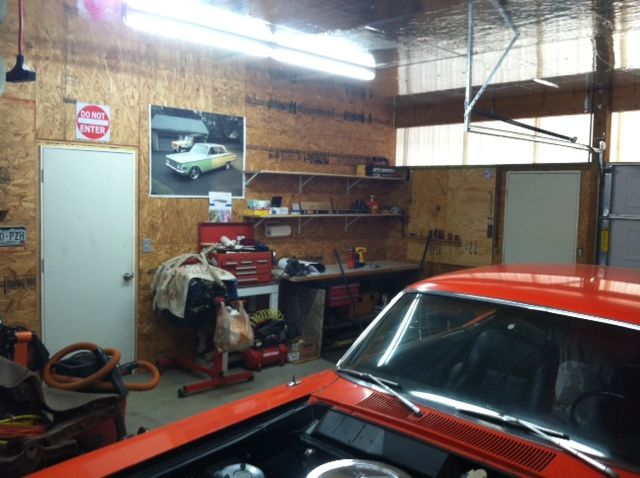
Now I'm working on making it look like the pictures.
 

Attachments

  • cap3.JPG
    cap3.JPG
    101 KB · Views: 171
  • cap1.JPG
    cap1.JPG
    142.3 KB · Views: 236
  • cap4.JPG
    cap4.JPG
    75.7 KB · Views: 179
  • cap5.JPG
    cap5.JPG
    120.7 KB · Views: 207
To avoid these ads, REGISTER NOW!
OP
C

carhunter

Well-known member
Joined
Nov 8, 2010
Messages
793
Location
southern Ohio
BTW here are the shelves that my models are based on - scotch rack light duty pallet rack/warehouse shelving, and these reinforced-OSB backroom shelves
(identical to what you'd see behind the counter at Oreilly or AutoZone)


ScotchRack%20010.jpg


bacdk-r1.jpg
 

Jimmy_B

Well-known member
Joined
Dec 24, 2011
Messages
381
Location
..........
I like what you've done. Especially if you've never used modeling software before. I've never used Sketchup, but hopefully you got to spend more time playing with the models and layout than learning the tool. I like all the shelving. Sounds like you're done warehousing things and are going to make a shop of it?

Don't take it too hard if people just lurk without commenting. I wasn't going to comment either but I love looking at these kinds of things and ideas others might have for me to steal. Once you're done, put up an actual picture from one of your model viewpoints and we can compare the two.

I use Inventor and did a little of what you did, just not nearly to that detail. I mostly wanted to fit a MH, truck and trailer into a garage and lay out some doors. This was done very quickly and crudely.....
36X56BUILDING.jpg


36X56BUILDING-1.jpg


100_0114.jpg
 

JCQuick

Well-known member
Joined
Nov 29, 2008
Messages
4,933
Location
Apopka Fla.
I like what you did with it. I can find all these cool shop things you guys find to put in these scketchups. What am I doing wrong?
 

Nowater

Well-known member
Joined
Nov 29, 2011
Messages
744
Location
Southwest Florida
No comment becasue I have just started with Sketchup, but your drawings look good enough to get a feel for the space. Isn't that your goal?
 

dare23

Well-known member
Joined
Jun 15, 2011
Messages
199
Location
Oakville
Great work! If you need that much shelving, you have too much stuff ;o)
Nice Chevelle
 

clarkebd

Well-known member
Joined
Mar 21, 2012
Messages
183
That does seem like a crazy amount of shelves for that space. If you really do need that, consider closing it off to keep it cleaner when you are sanding, cutting, etc. in the garage.

I know my shelves get really messy sometimes after a project and I'm glad I don't have that many.

I'm in the very beginning stages of learning SketchUp.

Is it best to just go through the video tutorials they include in the HELP section?

I'm trying to design a greenhouse for my brother-in-law. He's got 46 windows - all different shapes (all were scrap) that he wants to incorporate. Only way I can think is to draw them all out, fit them like a puzzle and build the frame around when I have them in the basic shape of a building. :)
 
OP
C

carhunter

Well-known member
Joined
Nov 8, 2010
Messages
793
Location
southern Ohio
That does seem like a crazy amount of shelves for that space. If you really do need that, consider closing it off to keep it cleaner when you are sanding, cutting, etc. in the garage.

I know my shelves get really messy sometimes after a project and I'm glad I don't have that many.

I'm in the very beginning stages of learning SketchUp.

Is it best to just go through the video tutorials they include in the HELP section?

I'm trying to design a greenhouse for my brother-in-law. He's got 46 windows - all different shapes (all were scrap) that he wants to incorporate. Only way I can think is to draw them all out, fit them like a puzzle and build the frame around when I have them in the basic shape of a building. :)

Thanks Guys, I'll follow up with some in progress shots, the clutter is a bit embarrassing at the moment. Just so easy to get a little out of sorts, then its a downhilll slide from there. :)


I don't plan on doing any bodywork there at the moment, its mainly warehouse/packing space plus a work area if I'm parting out a car or something. In the meantime my Cosworth Vega will probably sit where the Chevelle is in the pics, and pushed in/out when necessary.


The turorials were very helpful...I watched the first 3 and it was enough to learn the basics. One of the best hints I could give would be to create your item - shelf, bench, whatever - on a blank sheet. Then highlight it and save as a component. Then you can copy and paste it into another drawing and move it around without altering dimensions.

Also, try to move things by dragging from an endpoint, and put it directly on another endpoint or guide point. It keeps the component in the proper perspective.
 
Last edited:
OP
C

carhunter

Well-known member
Joined
Nov 8, 2010
Messages
793
Location
southern Ohio
I like what you've done. Especially if you've never used modeling software before. I've never used Sketchup, but hopefully you got to spend more time playing with the models and layout than learning the tool. I like all the shelving. Sounds like you're done warehousing things and are going to make a shop of it?

Don't take it too hard if people just lurk without commenting. I wasn't going to comment either but I love looking at these kinds of things and ideas others might have for me to steal. Once you're done, put up an actual picture from one of your model viewpoints and we can compare the two.

I use Inventor and did a little of what you did, just not nearly to that detail. I mostly wanted to fit a MH, truck and trailer into a garage and lay out some doors. This was done very quickly and crudely.....
36X56BUILDING.jpg


36X56BUILDING-1.jpg


100_0114.jpg


Thanks! Guess i was eager to share my work LOL.
Great barn, its close to mine in color and design but I don't have the windows or cool wainscot.

The problem I have with layouts is once I'm standing in the space, things seem different, or there's always some little dimension that throws everything else off.
Already I'm moving the toolboxes to the other side of the room, deleting one shelf and adding another...
 

AHotRod

Well-known member
Joined
Jun 28, 2006
Messages
136
Location
Weeki Wachee, Florida
I think what you have done looks real good


So you guys got me hooked on Sketchup :mad:
I used to hand draw all my ideas on graph paper...a lot of work if you can't make up your mind and end up doing 5 different designs

We have 2-2 car garages, 24 and 22' x 30. One was attached to the other after the fact by the previous owner, so they share a common wall.

For 3 years now they've been used as a mini-warehouse for all my ebay stuff, a few cars, etc. Every now and then I park a car inside and work on it :eek:

So, after about 14 hours of work, starting from scratch and learning the program, here's what I came up with. Its certainly not perfect, lots of stray lines, etc, but the dimensions are accurate.

None of the 3d models matched my existing shelving exactly, so I build them from scratch, saved as components, and cut/paste into the template.
For fun I built copies of my 26" craftsman tool boxes, the Mig welder, the old Lincoln arc welder, my Panelspotter, and a stainless topped rolling workbench that will act as a mobile packing cart.

the shelf layout is to maximize space for all the storage totes we use for inventory, plus room for larger parts and whatever comes off a car as I'm working

The chevelle came from the 3D warehouse, and somehow lost its wheels when I imported it :wtf:

Now I'm working on making it look like the pictures.
 
To avoid these ads, REGISTER NOW!

m_hatcher

Well-known member
Joined
Jan 22, 2012
Messages
473
I like the idea of all those shelves especially since you are just using the space more or less as a warehouse. Sketchup can be finicky sometimes, but you seem to have the hang of it. My first model most certainly did not look that good.
 

jarhead

Well-known member
Joined
Jul 9, 2006
Messages
705
Location
Colorado, near Morrison
I started learning it yesterday.

Trying to figure out my shop layout with the Fairline in the shop, and all the equipment surrounding it.

Made it this far, lol

shop%20with%20Fairlane_zpsjlllt5bj.jpg
 

Fastowl

Member
Joined
Jul 20, 2014
Messages
13
First of all I commend your start at using the program. I'm an engineer by background; program in many languages; used to teach programming back in college back in the days of punch cards. I typically just start learning a new program by diving in and coding (or in this case drawing). Tried it a few years ago on sketchup and failed. Last year I bit the bullet and went through the tutorials. Piece of cake now.

Now I assume you have found that there is a library of pre done sketches you can use. Also do a search and there is lots of stuff already out there on the net that you use and avoid having to recreate the world. So far I can tell you that u are making great progress, the more you use it the faster and easier it will be. Best of luck!
 

BIG-BRO

Well-known member
Joined
Jul 1, 2014
Messages
88
Location
New Hampshire
Here's my first pass at using Sketchup for my soon-to-be garage. Pulling in specific cars and shop equipment, etc is really neat
 

Attachments

  • image.jpg
    image.jpg
    19.4 KB · Views: 36

Screwdriver

Well-known member
Joined
May 30, 2008
Messages
117
Location
UK London
I do everything in Sketchup.

IMB0r9v.png


bajjK6w.png


Built the shed using it. Designed and built most of the benches and storages with it, I even reorganise the shed using it. Amazingly useful bit of software.

Here's the whole thing.

30Y0qEa.png


I used Sketchup to build a little outside cabin for the compressor and to layout the plumbing. It helped me organise and partition off the grinder/belt sanding area. Indispensable tool imho.

S.
 

bczygan

Well-known member
Joined
Nov 4, 2009
Messages
22,002
Location
DETROIT! Arsenal of Scrappers
I do everything in Sketchup.

IMB0r9v.png


bajjK6w.png


Built the shed using it. Designed and built most of the benches and storages with it, I even reorganise the shed using it. Amazingly useful bit of software.

Here's the whole thing.

30Y0qEa.png


I used Sketchup to build a little outside cabin for the compressor and to layout the plumbing. It helped me organise and partition off the grinder/belt sanding area. Indispensable tool imho.

S.

That's a really good example of using it to visualize things. It shows how the visualization and the reality closely match.

I don't use CAD anymore. I don't even hand draw things. After years of designing, I can sit here and visualize everything in my mind. I go directly to making a material list in Excel.

For the OP. If you cover the front of all those shelves with curtains, it will keep the dust off stuff better, and cut the visual clutter.

Bill
 

bottom feeder

Well-known member
Joined
Dec 10, 2012
Messages
331
Location
Utah
As has been mentioned, one great thing about Sketchup is the free 3D library of items you can download to add to your design. The bad thing is sometimes "you get what you pay for" with the free downloads. Some items look good but are drawn way out of scale, or are just poorly created. One of the best tools to learn how to use is the tape measure so you can sanity check items that you didn't create yourself. Another good thing is to learn how to modify the models you download to fix their flaws or to customize them.
 
To avoid these ads, REGISTER NOW!
Top Bottom