To avoid these ads, REGISTER NOW!

Tracing system for funky shaped object.

Nor'Easter

Well-known member
Joined
Nov 30, 2012
Messages
718
Location
Maine
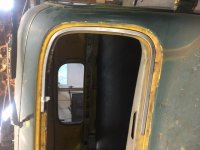
I am building a windshield frame from scratch and need some 1/8" plate cut to cap it off as trim. The windshield opening is straight on the bottom, with 4 tight radius corners that flow into radius'd sides and top.

Is there any affordable system I can get so as to trace it and then import the shape into autocad? My only other solution is to just send a wood template to a plasma cutter.
 
To avoid these ads, REGISTER NOW!

Gotcha640

Well-known member
Joined
Jan 27, 2015
Messages
948
Location
Houston TX
I would pattern with card stock, trace to metal, and bandsaw. I assume this isn't the only fab you're doing, if you have a vehicle in need of a custom windshield frame.
 

CooperS7777

Well-known member
Joined
Apr 14, 2010
Messages
120
Location
Lakes Region, NH
Could you wrap the windshield in body film (or even saran wrap) and make a paper mache template of the cap? You should be able to trim it down to your liking after it dries, and you should be able to get decent measurements as well.

I cant quite picture what your describing in my head, but Im thinking this is going to be a 3 sided cap that runs the length of the windshield, as in something that may go on an open top vehicle. Is that correct?
 
OP
N

Nor'Easter

Well-known member
Joined
Nov 30, 2012
Messages
718
Location
Maine
I'm building a frame to replace a rusted out one. 1957 Power Wagon. Rust free frames can be anywhere from 400-800, if God graces you with such a find. I want something stronger and better at sealing out water. The OEM design *****, to be blunt.

The square tube will run the perimeter of the opening. The inside facing plane will be milled out to accept the glass. I'm capping it with 1/8" flatstock just to give it a bordered look. I'm going to try and freehand it tonight, but would want to have a file ready with the piece should I ever do a production run and need a bunch cut on a plasma.
 

Attachments

  • IMG_0605.JPG
    IMG_0605.JPG
    97.8 KB · Views: 117

ilovevocs

Well-known member
Joined
Jun 26, 2009
Messages
1,966
Location
Toledo, Ohio
What's stopping you from tracing it on card stock and scan it. Trace the profile in ACAD and print 1:1. Cut it out and confirm accuracy.
 

zhaddock

Well-known member
Joined
Jul 22, 2014
Messages
247
Location
Kansas City
If the window is flat, place something of a know dimension (like a 8.5x11 sheet of paper) inside the frame area. Take a digital pic of the frame and the paper. Then place the image in your cad software and trace over the frame and the perimeter of the paper. Then measure the drawing you made of the paper and use that dimension against the known 8.5x11 to scale everything.

I've used this method a lot and it works surprisingly well for 2D shapes.
 

motobilt

Well-known member
Joined
Jul 24, 2013
Messages
371
Location
Dothan, AL
I do large objects often with a camera. I tape the template to the wall. I draw a scale on the template in two directions so I can measure the image on the computer later. Two directions so I can correct for the curvature of the camera lens.

Once the image is taped to the wall take the camera and tripod to the image and adjust my camera to center mass. I then go a pretty good distance back from the image and set up. You do not want to be close because of the curvature of the lens. Depending on the size of the object 15-20 feet back works well. Zoom into the image and take the pic. You must do this from a tripod. You do not want any shake in the camera.

Once on the computer I scale to the image to actual size using the scale drawn on the image. Once scaled correctly I take the image into Solidworks. In Solidworks you need to make certain the image is set to the scale you had it in Photoshop (pixel dims). From there I trace the image.

FYI... Once scaled you can also make a DXF in Adobe Illustrator and cut from that file. Some CAM programs don't like splines so keep that in mind if you are cutting DXF files from Illustrator.

I hope that helps.
 
To avoid these ads, REGISTER NOW!

motobilt

Well-known member
Joined
Jul 24, 2013
Messages
371
Location
Dothan, AL
Let me know if you guys want me to post some examples. I guess I could write an article of how to do this.
 

motobilt

Well-known member
Joined
Jul 24, 2013
Messages
371
Location
Dothan, AL
Another thing that works very well for making templates is masking for making vinyl stickers. I keep a 24 inch roll of it around. You can stick it across open spaces. Draw on it and so on. If you want to transfer it to chip board (card board) it sticks right to it.

Dan
 

kkroger

Well-known member
Joined
Apr 21, 2013
Messages
1,143
I have a 5x5 Optical Scanner if you can make a template from cardboard or Masonite or even the old rusted frame I could scan it and cut it directly from the scanned path. OR even correcting issues such as rusted out places etc... in CAD then cut it directly...
I've done this sort of thing a lot for folks...
 
OP
N

Nor'Easter

Well-known member
Joined
Nov 30, 2012
Messages
718
Location
Maine
Thanks guys.

I was really looking for a way to use a system much like a DRO does for a mill, where you can use a feeler and bump the edges to find an infinite amount of X/Y points.

I guess I will make one by hand first, then it can be removed and put on a mill.
 

macgyver37

Well-known member
Joined
Mar 7, 2013
Messages
613
Location
Pittsburg, Kansas
One of my customer has a Faro arm, it is a portable unit that is used to do exactly what you want to do. He charges $250 per hour to digitize something and gives you a file ready to use to design off of or cut from.

I imagine there is a shop with one within a couple hours of you that could do it, or maybe a college/university.

That is the best but expensive way to do it.
 

kkroger

Well-known member
Joined
Apr 21, 2013
Messages
1,143
Thanks guys.

I was really looking for a way to use a system much like a DRO does for a mill, where you can use a feeler and bump the edges to find an infinite amount of X/Y points.

I guess I will make one by hand first, then it can be removed and put on a mill.

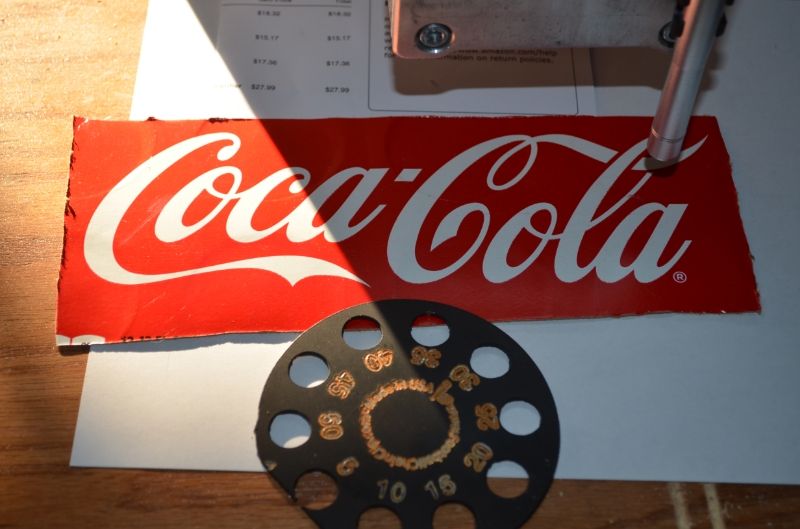
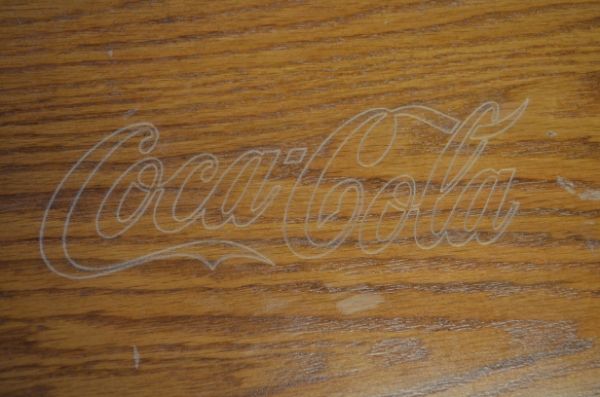
What you want is like a CMM my system can not only optically scan the thing but also cut it from the resultant scan or it can even be modified in CAD...
scan coke carton
DSC_0374_zpsc8d57474.jpg

scan open in cad
Untitled_zpsc1e42ee9.jpg

router cut path....
DSC_0380_zps824d620a.jpg
 
OP
N

Nor'Easter

Well-known member
Joined
Nov 30, 2012
Messages
718
Location
Maine
One of my customer has a Faro arm, it is a portable unit that is used to do exactly what you want to do. He charges $250 per hour to digitize something and gives you a file ready to use to design off of or cut from.

I imagine there is a shop with one within a couple hours of you that could do it, or maybe a college/university.

That is the best but expensive way to do it.

I'll look around, that's exactly what I was thinking. Thanks! :beer:
 

Kevin54

MEMBER EMERITUS
Joined
Jan 12, 2005
Messages
29,341
Location
Urbana, Ohio
If you know someone with a CMM (Coord Measuring Machine) have them set it up and get all of your points laid out then plug those dimensions into autocad.
 

ilovevocs

Well-known member
Joined
Jun 26, 2009
Messages
1,966
Location
Toledo, Ohio
I don't have a 2'x4' scanner.


You can overcome this two ways.

Outsource scanning. It's cheap. Kinkos near me has a 4 wide scanner.

Secondly tape standard sheets together and draw lines to index them. Scan them and compile them together in Photoshop.
 
To avoid these ads, REGISTER NOW!
Top Bottom