To avoid these ads, REGISTER NOW!

Ubiquiti Gurus - Need Wi-Fi/Cell Phone Extension Advice

DC73

Well-known member
Joined
Dec 27, 2014
Messages
1,627
Location
Lubbock TX
I've been reading most of the threads on Wi-Fi extension and have pretty much settled on Ubiquiti products to extend Wi-Fi to my shop. I noticed there are Wi-Fi threads in most every forum with no consensus as to where they would normally go so I am posting here.

My shop is fairly close to the house but the existing Wi-Fi signal extends only to just inside the walk-in door and is basically useless anywhere else in the shop. Cell phone service is weak inside the shop as well.

For the Wi-Fi issue, I'm thinking of installing a Ubiquiti UniFi UAP‑AC‑PRO: https://www.ubnt.com/unifi/unifi-ap-ac-pro/

This is an outdoor rated unit that would be installed under the eave of the house closest to the shop. It claims to have a 400 foot range and so should be enough to blanket the shop and adjacent patio with a decent Wi-Fi signal. Just inside the door of the shop is approximately 17' from the location I plan to install the AP. The furthest corner of the shop would be about 40' from the AP location.

This seems like the best solution as I don't have a good place to mount a unit inside the house and also near the shop.

Also, I live in a cell phone weak spot between two stronger zones. In my house I have a Sprint Airave connected to my router. The Airave is basically a mini cell tower that is connected to the internet and works well anywhere in my home. However, this signal is also too weak to penetrate into the shop. So, I am also looking for solutions to extend the cell phone service. I do have a second Airave I could connect inside the shop but I am not sure how to pull that off.

Hard wiring is not a consideration as I would have to tear up the patio to get conduit underground from the house to the shop.

Questions:

1) The shop is wood framed and bricked construction but I installed mineral wool insulation. Any reason to believe the mineral wool will block or significantly degrade the signal from the AP listed above?

2) I'm thinking of setting up the second Airave inside the shop. Can I pickup a second UniFi AP from Ubiquiti, link it to the outdoor AP mounted on the house and then plug the Airave into the second AP? The Airave requires a broadband connection and these UniFi APs from Ubiquiti come with a secondary ethernet port. An indoor only model should be fine for this second UniFi AP if the outdoor AP signal can penetrate the shop.

3) I'd like the outdoor AP to rebroadcast my existing SSID so I can have good coverage on the patio. If I link the second AP to the outdoor AP and connect the second Airave inside the shop, can the outdoor AP do both? That is, can it still be an access point if it is linked to the second AP that would be inside the shop? Same question for the second AP. Can it still be an AP if it is linked to the outdoor AP and is also providing a broadband connection for the Airave?

I generally build my own PCs when I need a new one so I am fairly computer savvy but I've not had much experience with networking or wireless products. Any assistance is much appreciated.

Thanks,

DC
 
To avoid these ads, REGISTER NOW!

txbruno

Member
Joined
Sep 8, 2016
Messages
18
Location
Southeast Texas
Hello fellow Texan, I recently installed 4 Ubiquiti APs into a 60,000 sq ft building for a client. Two inside the offices and 2 on the wall of the shop. Coverage is exceptional. When you register the devices on the Ubiquiti web site it will show you a coverage map, you can upload a drawing of your floor plan and add the locations of the devices. If you have an existing wi-fi access point I would disable and only use the Ubiquiti APs as you can walk around with a device and it will automatically keep you connected to the Ubiquiti SSID network.

To answer your questions;
1. I think you might see some signal loss but it is hard to tell without actually placing the devices.
2. You mentioned that you could not run cable to the shop. I am not sure if Ubiquiti makes a signal or range extender which is what you are referring to here. All of the access points I have installed have been hard wired back to a network switch.
3. Use all Ubiquiti devices and the connection will follow you throughout the property. As an IT pro I prefer to maintain a single type of equipment as it makes troubleshooting easier.

I like the Ubiquiti devices and have had good experiences deploying them at my client sites.
 

Ed Devinney

Well-known member
Joined
Nov 29, 2006
Messages
68
I've been pleased with a Wilson/Weboost cell repeater. You'll need a short mast to put up the directional antenna, (currently using some 1" PVC zip-tied to a siding cornera) and it does quite well. If you're getting wifi in the shop you can just get a voice repeater, too, which isn't very expensive.
 

Geobound

Well-known member
Joined
Aug 14, 2016
Messages
95
Location
Ontario
I looked at getting the Wilson/Weboost for my house as well as a Uniden model last winter, and thought that I would wait for the spring before I bought one.

In the meantime I picked up two D-Link range extenders, and am quite surprised at how well they work.

I have a problem with my cell phone reception as well, as I live in a valley and I am just over 6Km (as the crow flies) in any direction to the nearest tower, so I know your pain of cell reception.

I was mucking round with my iPhone earlier this year and noticed that I had the ability to tie my phone to my wifi.

Now I can say that it has improved my cell reception greatly, but I still run into the occasional dropped call.

I don't know if you want to try the range extender route first and see how that goes (you can always return them if they don't work), but it might be worth a shot?

Good luck
 
OP
D

DC73

Well-known member
Joined
Dec 27, 2014
Messages
1,627
Location
Lubbock TX
3. Use all Ubiquiti devices and the connection will follow you throughout the property. As an IT pro I prefer to maintain a single type of equipment as it makes troubleshooting easier.

Good advice and was my plan.

So, you've not used the Ubiquity products in a bridge arrangement?

I've been told that with the right equipment, I can set up both a wireless bridge from the house to the shop and use the equipment as APs at the same time. Just don't know enough about it or about Ubiquity to know for sure what will work.

If nothing else works, I know I can use two Ubiquity devices in a bridge arrangement from the house to the shop and then connect a second router inside the shop. But, I was hoping to avoid the 2nd router if possible and I want good Wi-Fi access on the patio which would be best obtained with the AP I intend to install under the eave of the house.

DC
 
OP
D

DC73

Well-known member
Joined
Dec 27, 2014
Messages
1,627
Location
Lubbock TX
I've been pleased with a Wilson/Weboost cell repeater.

I hope to not need a cell repeater but I'll keep this suggestion in mind.

Since I already have a second Airave, I just need an ethernet connection in the shop unless there is some reason two Airaves won't play well together on the same network.

DC
 

bowhuntr311

Well-known member
Joined
Aug 3, 2016
Messages
135
Location
North Central Minnesota
You'll have to look at doing a wireless bridge if you wanna run a second Airave in the shop. You'll probably need another wifi router in your if you do the wireless bridge so you have access to Ethernet ports to feed the Airave.

I would start with your original plan of just 1 on the eve and see how the coverage is inside the shop. Maybe look into WIFI calling on your phone? You may need to call your provider to have that feature enabled on your device.
 
OP
D

DC73

Well-known member
Joined
Dec 27, 2014
Messages
1,627
Location
Lubbock TX
You'll have to look at doing a wireless bridge if you wanna run a second Airave in the shop. You'll probably need another wifi router in your if you do the wireless bridge so you have access to Ethernet ports to feed the Airave.

I would start with your original plan of just 1 on the eve and see how the coverage is inside the shop. Maybe look into WIFI calling on your phone? You may need to call your provider to have that feature enabled on your device.

The Ubiquiti UniFi products have a secondary ethernet port which I presume I can use to feed the Airave. Would like to confirm that before hand. Also trying to determine if I do the bridge, if I can use the UniFi UAPs as an AP at the same time.

Wi-Fi calling is not an option for me at this time.

DC
 
OP
D

DC73

Well-known member
Joined
Dec 27, 2014
Messages
1,627
Location
Lubbock TX
Certain UniFis will do the bridge mode but u will loose more than 50% bandwidth on the AP.

Better to do 2 nano stations as a wireless bridge- no loss of throughput and if u have line of sight over a short distance u can get 100Mbps full duplex.


Thanks. When you say I will lose 50% bandwidth, are you talking about being connected to the first device mounted on the house or the second mounted in or on the shop or both?

I had it in my head that the Nanostations were more for longer distances. I only have about 17' from the edge of the house where the outdoor AP will be mounted to the shop wall. I also don't have a great way to mount anything on the outside of the shop.

My goals are this:

1) Extend Wi-Fi to patio that is both between and adjacent to the house and shop. General use for light internet activity. Maybe music streaming (Pandora) but not likely for video streaming.
2) Extend Wi-Fi into the shop. Wi-Fi will be used primarily for a Wi-Fi thermostat, cell phone internet use, eventually a desktop computer for light internet access and possibly music streaming via Pandora.
3) Connect my second Airave inside the shop to get better cell access.

Questions if I go with your Nanostation solution:

1) Do I have to have a router inside the shop or can I make this work by connecting the Airave to the secondary ethernet port on the Nanostation?

2) How would be the best way to get Wi-Fi to the patio? A third device functioning as an AP? Possibly plugged into the secondary ethernet port for the first Nanostation?

3) Would the second Nanostation work being mounted inside the shop or does it absolutely need direct line of sight? I have several easy ways to mount an AP inside the shop but the shop has a low profile attic with hip roof and it will be very difficult to run wires to outside the shop. Wish I had thought of this when building.

Sorry for all the questions but even though I have an engineering background, I'm a complete noob at networking and wireless solutions.

DC
 
Last edited:

Ray916MN

Well-known member
Joined
Apr 15, 2012
Messages
1,066
Location
Orono, MN
A totally different approach to getting "cell" phone coverage in the shop is to use a bluetooth hub to connect your cell phone via bluetooth to the traditional telephone wiring in your home/shop. This approach will allow you to use common relatively inexpensive wireless phones to extend service into your shop or even a traditional wired phone in the shop if your wired for it. Many wireless phones on the market today incorporate the bluetooth hub functionality into the base for the wireless phones, which makes this arrangement simple and inexpensive.
 

sands35

Well-known member
Joined
May 29, 2012
Messages
936
Location
St. Joseph, MI
I'd just run buried ethernet to the garage and put in an AP and 2nd Airave. Then you can put in a fixed computer for a juke-box and internet access rather than use a cell phone. Ubiquiti makes good stuff, but it will never be as good as a wired connection for speed or up-time.

Yes, multiple APs can share the same SSID provided the AP is setup as a DHCP forwarder from the main router.

I have two APs and one main router, all on dd-wrt, all on the same SSID. WiFi is seamless through the house, backyard and garage. My house is rather long, so the main router and one AP is in the house, and one AP is in the garage ~90 feet away.
 

stelthy77

Well-known member
Joined
Nov 1, 2015
Messages
56
Location
Toledo, Ohio
Another IT Pro here, and I second all of this (word for word) :beer::

Hello fellow Texan, I recently installed 4 Ubiquiti APs into a 60,000 sq ft building for a client. Two inside the offices and 2 on the wall of the shop. Coverage is exceptional. When you register the devices on the Ubiquiti web site it will show you a coverage map, you can upload a drawing of your floor plan and add the locations of the devices. If you have an existing wi-fi access point I would disable and only use the Ubiquiti APs as you can walk around with a device and it will automatically keep you connected to the Ubiquiti SSID network.

To answer your questions;
1. I think you might see some signal loss but it is hard to tell without actually placing the devices.
2. You mentioned that you could not run cable to the shop. I am not sure if Ubiquiti makes a signal or range extender which is what you are referring to here. All of the access points I have installed have been hard wired back to a network switch.
3. Use all Ubiquiti devices and the connection will follow you throughout the property. As an IT pro I prefer to maintain a single type of equipment as it makes troubleshooting easier.

I like the Ubiquiti devices and have had good experiences deploying them at my client sites.
 
To avoid these ads, REGISTER NOW!
OP
D

DC73

Well-known member
Joined
Dec 27, 2014
Messages
1,627
Location
Lubbock TX
I'd just run buried ethernet to the garage and put in an AP and 2nd Airave.

Another IT Pro here, and I second all of this (word for word) :

I originally said hard wiring was not an option (post 1) because of having to cut through the patio to get cable into the shop. But, I could take the long way home so to speak and route around the patio from the other side of the house which would mean a total run of at least 200'. Is there a practical limit to the length of an ethernet run?

Is there such a thing as direct burial ethernet cable? My landscaping has quite a bit of xeriscaping and one option might be to just lay cable under the 3" or so of gravel we've used for the ground cover. But, I'd need a cable that would be rated for that type of installation and it would have to be able to be in close proximity to low voltage landscape lighting cable.

Another potential problem with hard wiring (and one of the reasons I was leaning toward wireless in the first place) is that the shop is essentially a separate electric system. Tying the house system to the shop system with ethernet cable sets up a potential ground loop issue. When lightning strikes nearby, a potential difference will be established between the ground rod of the shop and the ground rod of the house resulting in current flowing over the ethernet cable (assuming there is no better path) and frying equipment . The solution would be to connect the two ground rods but at the expense of a 150' or so of copper wire of sufficient size.

DC
 
Last edited:

sands35

Well-known member
Joined
May 29, 2012
Messages
936
Location
St. Joseph, MI
Yes, Cat 6 can go 100m between repeaters. Worst case it isn't Giga, but goes to 100 mbit or 10 mbit speed. If you really wanted gigabit, you can do optical.

Yes, there is direct burial Cat6. Although I would still put in conduit to make additions or to guard against the need for replacing the wire in 10 years. You are going to have to dig anyway. Conduit will protect against the errant shovel as well. Just don't run the ethernet close to and parallel to existing power lines. Run it at 90* or away from the existing lines. I can't imagine low voltage landscape lights providing enough EMI to mess with ethernet though.

Cat6 is low voltage, so you don't have to worry about the separate electrical systems. You can get surge protectors for ethernet.

The thing is that you likely won't save any money to going hard wire - but you get better up-time and likely better speeds.

Ubiquiti ETH-SP for the ESD protection. Worst case, the router fries. Put a $25 5 port switch at each end to sacrifice.
 
OP
D

DC73

Well-known member
Joined
Dec 27, 2014
Messages
1,627
Location
Lubbock TX
I contacted Ubiquiti about this and sent them dimensions and construction details about the house and shop.

They believe the UniFi UAP‑AC‑PRO (linked to in my first post) mounted under the eave of the house at the corner nearest the shop will penetrate well into the shop and will provide reliable Wi-Fi for both the shop and patio.

I am now waiting on their recommendation for a secondary device to mount inside the shop to communicate with the UniFi UAP‑AC‑PRO and to provide a secondary ethernet port for connecting the Sprint Airave.

Does anyone else have a recommendation for this second device? See any issues?

One possible issue with this approach is that devices that connect to the Wi-Fi in the shop may not be powerful enough to get a signal back to the AP through the outside wall of the shop. In that case, I wonder if the second device in the shop could also be an AP while providing the necessary ethernet port for the Airave?

Thanks,

DC
 
Last edited:
OP
D

DC73

Well-known member
Joined
Dec 27, 2014
Messages
1,627
Location
Lubbock TX
Ubiquiti has been responsive to my questions but I think there must be a bit of a language barrier. Either that or they just don't have the time to provide a detailed response.

To connect the Airave, they first recommended two Locostation M2 devices. One connected to the secondary port of the UAP‑AC‑PRO (which will be mounted under the eave of the house), and the second mounted on or in the shop with the Airave connected to its secondary port. The problem with this approach is that the UAP‑AC‑PRO does not pass PoE through to its secondary port so I'd have to run two cables to the location under the eave of the house (unless there are PoE splitters exist).

After I questioned this, they said I could use just one Nanostation M5 (NSM5) at the shop and could connect the Airave to its secondary port. It would communicate directly with the UAP‑AC‑PRO. However, they cautioned that I would need direct line of sight between the UAP‑AC‑PRO and the NSM5. That doesn't make sense to me. If the signal from the UAP‑AC‑PRO can penetrate into the shop, why would the two devices need direct line of sight? It will be a major pain to install any device on the outside of the shop but very easy to install it inside the shop on a wall facing the house which will put it just about 20' from the UAP‑AC‑PRO with one exterior wall between the two devices.

I'm still unsure as to what configurations result in a 50% loss of bandwidth and which do not.

I may just pick up and install the UAP‑AC‑PRO and test the signal strength throughout the shop and patio before committing to the second device.

DC
 

jblnut

ALLIANCE MEMBER
Joined
Jan 17, 2015
Messages
7,041
Location
In the Middle of MN
The fact that the UAP-AC-PRO doesn't pass POE out through the secondary port doesn't do you any good anyway for powering anything in the NanoStation line because the voltages are not the same. The UAP is 48v and the Nano's are 24v. I have a number of NanoStation NSM2's using the secondary port with POE enabled to power a Ubiquiti camera and send the data wirelessly back to a central antenna on site.

I have also setup a fair number of NanoStation's as WiFi AP's with great success. They are designed as a directional antenna and not an omni antenna so there will be very limited coverage behind the antenna but it might work to get WiFi into the shop.

The easiest would be to buy the UAP-AC-PRO and put it on the house and buy a NanoSation LocoM2 and put it inside the shop pointed at the UAP. Connect the NanoLoco wirelessly to the UAP and configure it as a station, connect your cell booster to the LAN side of the NanoLoco power brick and away you go. The UAP should easily get you WiFi everywhere you want and the NanoLoco as a station will get you a hardwired LAN port in the shop for your booster.

It makes sense in my head but if it is clear as mud to you let me know.
 
Last edited:

Radix2

Well-known member
Joined
May 28, 2014
Messages
1,853
Location
the thumb!, MI
I will throw out another option. Use a power line Ethernet set to get your connection to the shop for the ap and airrave. Keeps your wifi bandwidth free and is plenty fast for any internet use.

With the straight shot you have for you power, you should be getting pretty good performance on one of the gigabit versions and they are cheap and super simple.
 

Denwood

Well-known member
Joined
Sep 22, 2014
Messages
4,191
Location
Thunder Bay, Ontario, Canada
I experimented with powerline, wifi bridging, and yep..ended up using buried ethernet with an AP in the shop. Any new smartphone these days will likely support AC wireless, it makes sense to install an AC capable access point, and make sure it can move 1000Mbs of data. This is pretty much gigabit + AC capable access point.

My background is IT...which just means the speed/reliability problems of the other solutions tended to move me quicker to just terminate and route the cat5 ethernet I had already buried and run to the shop. I'm using two EX7000 extenders (but configured only as access points which are about $139 each right now. I'm getting a reliable 280 Mbps from these APs on our iOS devices.

I fired up a thread: http://www.garagejournal.com/forum/showthread.php?t=312373

Tim over at smallnetbuilder does a great job on gear reviews, and I see this article is only a few weeks old: http://www.smallnetbuilder.com/wire...r-or-add-an-access-point-here-s-how-to-decide

Devices like Google Wifi (coming this month?) and Netgear's Orbi will likely change the scenario for many. I've tested the EX7000 in an extender configuration (with a dedicated backhaul band) and the results were good. Not as good as wired ethernet, but for some it would be adequate. These devices eliminate the typical 50% drop in bandwidth for an extended wifi network.
 
Last edited:
OP
D

DC73

Well-known member
Joined
Dec 27, 2014
Messages
1,627
Location
Lubbock TX
Forgot to update this thread. I decided to test the waters by first installing the UAP‑AC‑PRO on the outside of the house. As it turned out, the signal (both 5G and 2.4G) in the shop was so good, I didn't need to do anything else.

I bought a very good Asus Wi-Fi card for my shop computer, set it up to connect at 5G and didn't look back. Speed tests on the shop PC are the same as the hardwired PC in the house.

The Wi-Fi thermostat connects fine at 2.4G. I was a bit worried about the thermostat because it is in a location that has the signal from the UAP-AC-PRO blocked by metal cabinets but there are no issues.

I even got the Sprint Airave working well using this product:

https://www.amazon.com/dp/B004UAKCS6/?tag=atomicindus08-20

All in all, the UAP-AC-PRO was a great choice.

DC
 

vtsoundman

Well-known member
Joined
Mar 1, 2016
Messages
69
Location
NorCal
Whatever soln you choose, make sure you get units that allow external antennas..namely for connection to directional antennas.

People always neglect the antennas and rely on the omni directional stubbies that comes with equipment. This behavior would never work in RF, Radio, HAM land, but for some reason neglecting the actual radiator is pervasive in WiFi land.

For the wireless bridge, a decent Yagi or directional array antenna pointed at each other will do wonders. They are usually cheap and easily sourced via eBay or your favorite online wireless sources. Folks make the mistake of using an omnidirectional antenna/router/extender in the hopes it will work as a bridge in apps like this.

We use Yagis all the time on utility scale solar PVplants and beam wifi line of sight hundreds or sometimes thousands of feet. Granted, the thousands of feet use expensive commercial gear, but the IT pros will use garden variety bridges and cheap directionals for bridging wifi to nearby construction trailers or data aggregation locations.

via pyramid energy waves.
 

vtsoundman

Well-known member
Joined
Mar 1, 2016
Messages
69
Location
NorCal
Whoops... missed your last post. Glad you found a solution that worked for you.

via pyramid energy waves.
 

jblnut

ALLIANCE MEMBER
Joined
Jan 17, 2015
Messages
7,041
Location
In the Middle of MN
All in all, the UAP-AC-PRO was a great choice.
Glad to hear the UAP-AC-PRO is doing what you need, I sure like mine at home !! Download a wifi meter app on your personal communication device and wander around your neighborhood, I bet you'll be surprised how far away you will still get a signal.


We use Yagis all the time on utility scale solar PVplants and beam wifi line of sight hundreds or sometimes thousands of feet. Granted, the thousands of feet use expensive commercial gear, but the IT pros will use garden variety bridges and cheap directionals for bridging wifi to nearby construction trailers or data aggregation locations.

I'm pretty sure I know what you consider garden variety equipment vs. expensive commercial gear but I personally have a pair of NanoStation NSM5's mounted 4 miles apart transmitting the data from 3 Ubiquiti Gen3 1080p cams and 4 Ubiquiti Gen2 720p cams recording nonstop and haven't had a hiccup in well over a year. The Nano's themselves are both on UPS's and have 440 days of continuous uptime. That is roughly 20 thousands of feet for hardware that cost a total of less than $200 :D
 

vtsoundman

Well-known member
Joined
Mar 1, 2016
Messages
69
Location
NorCal
I'm pretty sure I know what you consider garden variety equipment vs. expensive commercial gear but I personally have a pair of NanoStation NSM5's mounted 4 miles apart transmitting the data from 3 Ubiquiti Gen3 1080p cams and 4 Ubiquiti Gen2 720p cams recording nonstop and haven't had a hiccup in well over a year. The Nano's themselves are both on UPS's and have 440 days of continuous uptime. That is roughly 20 thousands of feet for hardware that cost a total of less than $200 :D

You interperted right! Thx for reading between the the lines.

In my applications, we need 100% reliable, secure, communications protocols that may contain deterministic industrial Ethernet, RS485, TCP/IP, etc between substations, MW class inverters, control hardware, etc (read expensive). So it is overkill for typical wifi usage.

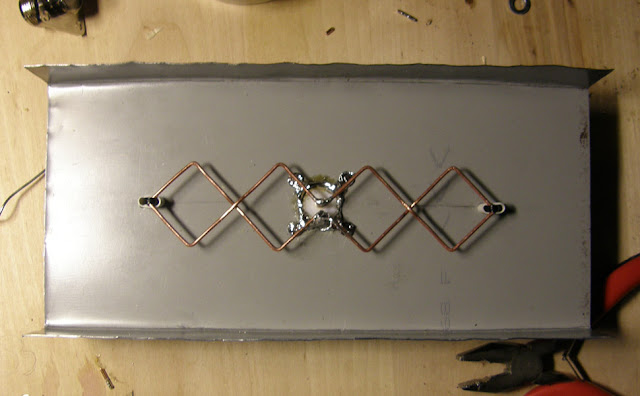
You've got great gear - inexpensive doesn't mean garbage. These contain a directional plane antenna - in this case, it has strong performance +/- 60degC from center. If you're really trying to throw, at >60deg off axis, and you may be pushing it. The Nano's NSM5 radiation pattern looks like a biquad plane style antenna:
http://dl.ubnt.com/datasheets/nanostationm/nsm_ds_web.pdf

I'd hazard a guess Your Nano's radiation pattern basically looks like this:
Yagi9.gif


Given the shape of Nano (and not reading) it prolly contains some sort of biquad antenna.
P1200036.JPG


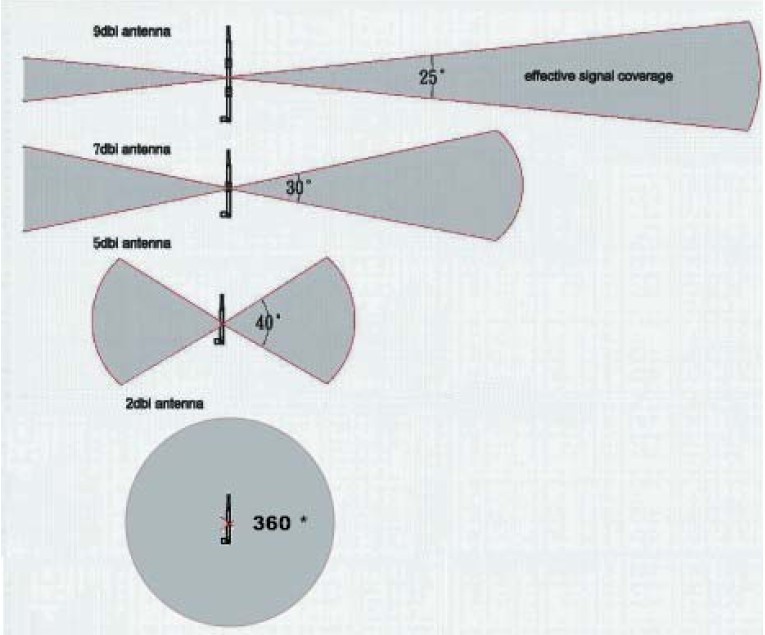
One of the best most concise posts on the web about WiFi antennas and range :
http://blog.serverfault.com/2011/12/12/a-studied-approach-at-wifi-part-1/

You can usually tell by the gain (+8dbi) of an antenna (how narrow/wide its radiation pattern will be). For a single pole antenna, +8dbi will have a radiation pattern that is narrow (like a focused flashlight). Get outside of that beam, and you will have degraded performance.
antennas-range-patterns.jpg
 
Last edited:
To avoid these ads, REGISTER NOW!
Top Bottom