To avoid these ads, REGISTER NOW!

Wifi to the garage

WProbst27

Member
Joined
Aug 11, 2017
Messages
24
Location
Medford,NY
Hey everyone new to GJ and cant believe some of the projects you guys have built! Have a question regarding getting wifi to your garage. My garage 24x24 is approximately 50 ft from my router in my house yet I get no signal. Are you guys running a strong router or a wifi extender of some sort? Thanks in advance for the input!
 
To avoid these ads, REGISTER NOW!

cybrdyke

Well-known member
Joined
Sep 9, 2014
Messages
3,447
Location
USA
Sounds exactly like my situation. I tried the Netgear wifi extenders and they didn't work. I ended up using a powerline set up. Much better.
Good luck,
CD
 

MrBalll

Well-known member
Joined
Mar 8, 2016
Messages
318
Location
West Texas
Over 100 similar topics on this. Read through some and figure out what you like and what can work best for you.

I ran a Cat6 cable from my home router to another router in the shop and used it as an AP.
 

blackgold

Well-known member
Joined
Dec 27, 2011
Messages
234
Can you run a network cable to the garage? Your best bet would be to run a network cable then run an Access point in your garage. If you have any tech skills at all, I highly recomend a Microtik router they are cheap and pretty awesome and a dedicated AP like a Ubiquiti unifi long range AP. That may give you enough oomph. They also have wireless repeaters I think. I don't know how this would work in that scenario.. https://inwall.ubnt.com/
I've got this setup and LOVE it. my old high dollar router had to be restarted multiple times a week. The only time this gets restarted is when my power goes out!

Brian
 
OP
W

WProbst27

Member
Joined
Aug 11, 2017
Messages
24
Location
Medford,NY
Sounds exactly like my situation. I tried the Netgear wifi extenders and they didn't work. I ended up using a powerline set up. Much better.
Good luck,
CD

To be honest I have no idea who even makes it. My cable company gave it to me with the modem install.

Blackgold that would without a doubt be my best option and also what I plan to do when I upgrade the panel. Looking for something to hold me over in the mean time.
 

ard

Well-known member
Joined
Feb 16, 2015
Messages
4,391
Location
Sierra Foothills... California
To be honest I have no idea who even makes it. My cable company gave it to me with the modem install.

Blackgold that would without a doubt be my best option and also what I plan to do when I upgrade the panel. Looking for something to hold me over in the mean time.

Buy a real wifi router, PLUG IT INTO the cable company box- turn off the cable company wifi.

Should be fine for your garage 50 feet away
 

jayfrank5074

Well-known member
Joined
Dec 1, 2013
Messages
100
I bought an $18 refurb extender. Work Great. My router is about 80ft from the shop, the extender is 25 or so.

I made them have the same ssid, works good for me.

Shop is tin roof, tin sides, tin ceiling, metal door, metal roll up door.
 

poriggity

Well-known member
Joined
Jul 12, 2017
Messages
142
Location
Reno, NV
Buy a real wifi router, PLUG IT INTO the cable company box- turn off the cable company wifi.

Should be fine for your garage 50 feet away
This. We just signed up for charter cable with Wi-Fi in my new home. As soon as the technician left after the install, I unplugged their "router", plugged in my good router and I have no issues with Wi-Fi.

Sent from my LG-H810 using Tapatalk
 

radio2000

Well-known member
Joined
Aug 31, 2017
Messages
132
Buy a real wifi router, PLUG IT INTO the cable company box- turn off the cable company wifi.


Should be fine for your garage 50 feet away


Agreed... This


Sent from my iPhone using Tapatalk
 

wyliesdiesels

Well-known member
Joined
Aug 14, 2012
Messages
20,022
Location
Modesto, CA
To be honest I have no idea who even makes it. My cable company gave it to me with the modem install.

Blackgold that would without a doubt be my best option and also what I plan to do when I upgrade the panel. Looking for something to hold me over in the mean time.

Most equipment provided by carriers has poor signal output on the wireless ap radio mainly fue to internal antennas/no external antennas...

As said above, buy a mid grade or high end wireless router such as a nighthawk r7000 or better (netgear has several high end nighthawk models).

If your cable company gave you an all in one unit, you should switch the wireless rputer to access point only mode.

And yes theres a quite a few threads on this.
 
Last edited:

Bigbandguy

Well-known member
Joined
Oct 18, 2014
Messages
1,169
Location
North Carolina
Using a decent router is a good first step. My workshop is 75 feet from the house. I used a usb Wifi dongle punched into the back third of a pringles can and secured with a little hot glue. It sits in the window of the workshop pointed at the window in the house where the router is. Works great and is about as cheap a solution as one could find.
 
OP
W

WProbst27

Member
Joined
Aug 11, 2017
Messages
24
Location
Medford,NY
Most equipment provided by carriers has poor has poor signal output on the wireless ap radio.

As said above, buy a mid grade or high end wireless router such as a nighthawk r7000 or better (netgear has several hogh end nighthawk models).

If your cable company gave you an all in one unit, you should switch the wireless rputer to access point only mode.

And yes theres a quite a few threads on this.

This answers my question lol. Im not a big computer tech guy at all. Was looking for someone to point me in the right direction on what to buy. I'll be ordering one this weekend. Thanks
 

wrench409

Well-known member
Joined
Oct 14, 2006
Messages
2,559
Location
Over here....
I used a simple cable (ebay) from my PC wireless card and mounted the antenna to the outside wall of the garage. I get plenty of signal for the PC.
 

ard

Well-known member
Joined
Feb 16, 2015
Messages
4,391
Location
Sierra Foothills... California
I have an ASUS wifi router, RT-N66U, Very impressive

It has three antennas, by using electronic 'beam steering', the unit 'knows' were the differnt clients are, and can project the signal in that direction. I have coverage at the pool, which is easy 200 ft away. Through walls with radiant barrier.

I would wholeheartedly recommend it, or the latest version...
 
To avoid these ads, REGISTER NOW!

Sledgehammer

Active member
Joined
Oct 25, 2007
Messages
27
Location
Maryland
Over 100 similar topics on this. Read through some and figure out what you like and what can work best for you.

I ran a Cat6 cable from my home router to another router in the shop and used it as an AP.

I did mine years ago with CAT5 cable....and set up an AP in the shop.
 

tmcquinn

Well-known member
Joined
Oct 3, 2014
Messages
187
Location
Cincinnati
If it was mine:

1) Cat 6 cable to a cheap router in the garage (with DHCP turned off).

2) Powerline adapter.

3) Cheap repeater and an external antenna for the garage unit.
 

DC73

Well-known member
Joined
Dec 27, 2014
Messages
1,627
Location
Lubbock TX
Hey everyone new to GJ and cant believe some of the projects you guys have built! Have a question regarding getting wifi to your garage. My garage 24x24 is approximately 50 ft from my router in my house yet I get no signal. Are you guys running a strong router or a wifi extender of some sort? Thanks in advance for the input!

I have an ASUS wifi router, RT-N66U, Very impressive

I was in similar situation as the OP with my workshop. I did have the Asus router referenced above but it still provided a marginal signal in the shop.

I purchased a Ubiquiti outdoor rated access point, mounted it under the eave of the house nearest the workshop, ran an ethernet cable back to the router and to a POE adapter for power and I now have a very strong reliable signal in the workshop and adjacent patio.

Here's a link to the thread I started about this: https://www.garagejournal.com/forum/showthread.php?t=339565

Good luck,

DC
 

ard

Well-known member
Joined
Feb 16, 2015
Messages
4,391
Location
Sierra Foothills... California
I was in similar situation as the OP with my workshop. I did have the Asus router referenced above but it still provided a marginal signal in the shop.

I purchased a Ubiquiti outdoor rated access point, mounted it under the eave of the house nearest the workshop, ran an ethernet cable back to the router and to a POE adapter for power and I now have a very strong reliable signal in the workshop and adjacent patio.

Here's a link to the thread I started about this: https://www.garagejournal.com/forum/showthread.php?t=339565

Good luck,

DC

Out of curiosity, any metal in your walls? And to help OP evaluate, what distances we're you dealing with?

In OPs case, he has a POS cable company router. I was thinking he probably needs that to be upgrades to the current state of the (residential) art. If that still doesn't cut it, I am a Ubiquiti fan (run 7 pieces on a wifi link)
 

Crazyjake8493

Well-known member
Joined
Sep 26, 2014
Messages
3,968
Location
Upstate NY
With a decent router you should be able to get 50 feet, unless you're garage is a steel building, as mentioned. My Apple Airport Extreme goes through 4 wood framed walls and about 70 feet to the garage. I still ran Cat6 out to the garage and put an Ubiquiti Unifi AP in the garage attic. Now I can get Wifi all the way back to the woods about 450 feet away so I don't use any data while mowing the lawn.

You could use a decent quality router, or put a good access point right by your router, and use that for the wireless connections. Also, try putting it up higher an in an unobstructed position if possible.
 

DC73

Well-known member
Joined
Dec 27, 2014
Messages
1,627
Location
Lubbock TX
Out of curiosity, any metal in your walls? And to help OP evaluate, what distances we're you dealing with?

In OPs case, he has a POS cable company router. I was thinking he probably needs that to be upgrades to the current state of the (residential) art. If that still doesn't cut it, I am a Ubiquiti fan (run 7 pieces on a wifi link)

The Asus router was about 50' to the near wall of my workshop and about 75' to the furthest spot in the shop. The signal has to penetrate two interior walls and two exterior brick walls. The metal door on the shop is in the direct path of the signal and the shop is insulated with mineral wool. I could actually get a signal in the shop just inside the walk-in door but it wasn't reliable when I moved away from the door.

Don't get me wrong, I'm not blaming the Asus router. It's the best router I've ever owned and I always recommend it to others. It also completely covers my house with no issues. Just wasn't quite enough to get into the shop and out to the back patio with a reliable signal.

And I agree the OP should upgrade his router first before heading down the Ubiquiti road.

DC
 

wyliesdiesels

Well-known member
Joined
Aug 14, 2012
Messages
20,022
Location
Modesto, CA
Out of curiosity, any metal in your walls? And to help OP evaluate, what distances we're you dealing with?

In OPs case, he has a POS cable company router. I was thinking he probably needs that to be upgrades to the current state of the (residential) art. If that still doesn't cut it, I am a Ubiquiti fan (run 7 pieces on a wifi link)

Yes almost all carrier gateways and wifi APs ****.

One can get a high end nighthawk at costco for mid $200s...

But if there is metal and radio interference, signal will be **** no matter how good the radio and antennas in the AP are.

In that case, run a direct burial CAT5e cable to the garage and hook up the high end AP on the end. Make sure to turn off DHCP and plug the ethernet cable into one of the switch ports NOT the internet/wan port.

Pro Tip: There is an android app called "WiFi analyzer" that i use for analysis, on client WLANs, to check signal level, interference, and spectrum usage.
 
Last edited:

Falcon67

Well-known member
Joined
Jun 11, 2009
Messages
18,371
Location
Merkel, TX
And only on Android because Apple kicked all the wifi sniffers off iTunes. There are several wifi apps on Play Store, some better than others. I tend to use Wifi Analyzer by Webprovider for detailed views.
 

wyliesdiesels

Well-known member
Joined
Aug 14, 2012
Messages
20,022
Location
Modesto, CA
And only on Android because Apple kicked all the wifi sniffers off iTunes. There are several wifi apps on Play Store, some better than others. I tend to use Wifi Analyzer by Webprovider for detailed views.

It wasnt so much that they kicked the apps off the store.

Apple actually locked the wireless radios in all their devices for security reasons.

If you jailbreak your iOS device then you can install an analyzer.
 

jeff_gates

Well-known member
Joined
Feb 11, 2014
Messages
149
Location
Olalla, WA
Check out Orbi from netgear, I have the base router in my house and a Satellite in the shop. They are about 100' from each other.
 

tmcquinn

Well-known member
Joined
Oct 3, 2014
Messages
187
Location
Cincinnati
I don't know if a wifi extender is what you want. You can connect a second router to a powerline extender. You turn off DHCP, give it the same SSID, configure it with the same security and password, and you can walk from one to the other with a laptop, tablet, etc., seamlessly.
 
OP
W

WProbst27

Member
Joined
Aug 11, 2017
Messages
24
Location
Medford,NY
I plan to get a router this week and seems a higher end router will work for my needs from what you guys are saying. There is minimal obstruction in my case as it only has to go through a standard exterior wall (wood construction) and the same on the garage end. Should be more than enough from what you guys are saying. I have zero cell service in the garage that's the major need for the wifi.
 

tmcquinn

Well-known member
Joined
Oct 3, 2014
Messages
187
Location
Cincinnati
If it doesn't quite work, I've had great results from using an aftermarket antenna, though it's easy for me to spend your money for you. :)
 

Falcon67

Well-known member
Joined
Jun 11, 2009
Messages
18,371
Location
Merkel, TX
If you buy from Amazon or Best Buy, they have good return policies so if it doesn't do well you can try something else. Hopefully, it'll get 'er done and you can go on to other things.

>If you jailbreak your iOS device then you can install an analyzer.
I personally won't own an Apple device. I have to work with their equipment at work, and by-and-large their equipment ***** in a "corporate" environment. Fine in the house if that's your thing.
 

apollo11

Banned
Joined
Aug 19, 2017
Messages
1,226
Location
State Of Reality
I don't know if a wifi extender is what you want. You can connect a second router to a powerline extender. You turn off DHCP, give it the same SSID, configure it with the same security and password, and you can walk from one to the other with a laptop, tablet, etc., seamlessly.
Yeah, I rear about that. I was just trying to use what I have.
I guess I'll see. I ordered the powerline adapters.
https://www.amazon.com/gp/product/B0136Q9QJK/?tag=atomicindus08-20
 

larry4406

Well-known member
Joined
Jan 27, 2006
Messages
19,292
Location
Northern Virginia
Educate me on these Powerline Adapters please.

So if my detached shop is a sub panel off my house, and the house has Comcast router, I can use this to feed me shop? Line loss limitations? My shop will be around 250' of power cable from the house.
 

apollo11

Banned
Joined
Aug 19, 2017
Messages
1,226
Location
State Of Reality
Educate me on these Powerline Adapters please.

So if my detached shop is a sub panel off my house, and the house has Comcast router, I can use this to feed me shop? Line loss limitations? My shop will be around 250' of power cable from the house.

I googled a bit. I have a box on both buildings.
The garage was built first and feeds the house.
My router is in the house.
It didn't sound promising though.
I'm going to experiment in a few days when they arrive.
 

wyliesdiesels

Well-known member
Joined
Aug 14, 2012
Messages
20,022
Location
Modesto, CA
Can you connect a wifi extender to a powerline setup?
I'm trying to go from end to end on the house and then to an outbuilding.
I can't find anything on doing this.

NO unless the wifi extender has an ethernet port and can be configured to act as an access point instead of an extender.

I wouldnt get an extender.

Best route is underground rated CAT5e or CAT6 ran from router to garage. Buy a second wireless router or access point and plug the ethernet cable into the new unit being sure to turn off the DHCP server otherwise you will have conflicts.

A wifi extender takes an existing wifi signal and repeats it. Extender is not a good name. They should be called repeaters.

Any who, if the signal in the garage is already poor, then the wifi extender wont work.

If you need more help, just ask away. I do this stuff daily as i am a low voltage contractor.

I don't know if a wifi extender is what you want. You can connect a second router to a powerline extender. You turn off DHCP, give it the same SSID, configure it with the same security and password, and you can walk from one to the other with a laptop, tablet, etc., seamlessly.

:+1:

Though whether it will be seamless depends on the host and access points.

If you buy from Amazon or Best Buy, they have good return policies so if it doesn't do well you can try something else. Hopefully, it'll get 'er done and you can go on to other things.

>If you jailbreak your iOS device then you can install an analyzer.
I personally won't own an Apple device. I have to work with their equipment at work, and by-and-large their equipment ***** in a "corporate" environment. Fine in the house if that's your thing.

Amazon is only 30 days and best buy out here is 15 so I dont know about that.

So whats better for corporate environments? Android? I know many corporate environments that use apple.

Educate me on these Powerline Adapters please.

So if my detached shop is a sub panel off my house, and the house has Comcast router, I can use this to feed me shop? Line loss limitations? My shop will be around 250' of power cable from the house.

I would avoid Powerline ethernet adapters.

Their performance usually ends up being piss poor.

You have to make sure they are plugged into the same phase.

And ive never been able to find a hard rule about max distance. I suspect you may have issues @ 250' going through several breakers.

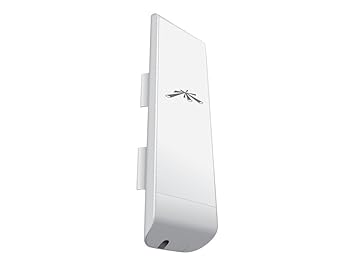
DO you have a clear line or sight shot from your house to your shop? If so you could do a wireless bridge for a fraction of the cost and labor of burying an ethernet cable.

I use ubiquiti equipment for this.

buy 2 nano stations: https://www.amazon.com/dp/B00HXT8KJ4/?tag=atomicindus08-20

41175cQVWOL._SX355_.jpg
 
To avoid these ads, REGISTER NOW!
Top Bottom