To avoid these ads, REGISTER NOW!

Wifi to the garage

larry4406

Well-known member
Joined
Jan 27, 2006
Messages
19,283
Location
Northern Virginia
DO you have a clear line or sight shot from your house to your shop? If so you could do a wireless bridge for a fraction of the cost and labor of burying an ethernet cable.

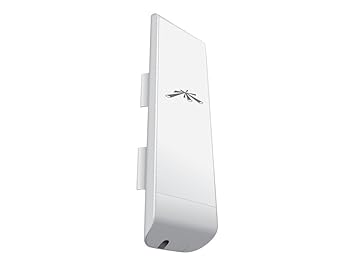
I use ubiquiti equipment for this.

buy 2 nano stations: https://www.amazon.com/dp/B00HXT8KJ4/?tag=atomicindus08-20

41175cQVWOL._SX355_.jpg

I do have clear line of site to the shop. I also still need to run power and water to the shop so I do have an option to run a proper cable out there. I understand there are grounding/lightning issues with having tech wire and line voltage wire feeding same outbuilding. I am not super tech savy with computers, routers, etc., so still learning.
 
To avoid these ads, REGISTER NOW!

apollo11

Banned
Joined
Aug 19, 2017
Messages
1,226
Location
State Of Reality
A wifi extender takes an existing wifi signal and repeats it. Extender is not a good name. They should be called repeaters.

Any who, if the signal in the garage is already poor, then the wifi extender wont work.


I would avoid Powerline ethernet adapters.

Their performance usually ends up being piss poor.

You have to make sure they are plugged into the same phase.
I had no wifi signal.
I put the extender/repeater in a room closest to the garage and voila', I had wifi.


I installed powerline adapters and my speed is now 100mbs.
Is that poor when my normal wired connection is 100mbs?
 

wyliesdiesels

Well-known member
Joined
Aug 14, 2012
Messages
20,021
Location
Modesto, CA
I had no wifi signal.
I put the extender/repeater in a room closest to the garage and voila', I had wifi.


I installed powerline adapters and my speed is now 100mbs.
Is that poor when my normal wired connection is 100mbs?

So then the extender picked up signal from your existing wifi in that closet.

If the extender sees good signal then it will work.

100Mbps isnt poor per se. It all depends on what and how much data youre transferring.

But todays standard is gigabit so if youre comparing to that, then youre 10x slower.

Again though, depends on data being transmitted.
 
Last edited:

apollo11

Banned
Joined
Aug 19, 2017
Messages
1,226
Location
State Of Reality
So then the extender picked up signal from your existing wifi in that closet.

If the extender sees good signal then it will work.

100Mbps isnt poor per se. It all depends on what and how muxh data youre transferring.

But todays standard is gigabit so if youre comparing to that, then youre 10x slower.

Again though, depends on data being transmitted.
it works fine

100mbs is all that is available and is seems to be working just fine.
 
Last edited:

ard

Well-known member
Joined
Feb 16, 2015
Messages
4,391
Location
Sierra Foothills... California
it works fine

100mb is all that is available and is seems to be working just fine.

So your wired connection at the router that is connected directly to your WAN (ie internet) sees 100MB/sec when measuring throughput to an internet site (aka speedtest.net)?

An you see that same 100MB/sec throughput to the web but now out at the wifi that is using a repeater?

When you toss around '100mbs' it is useful to define what it is that you are citing....
 

apollo11

Banned
Joined
Aug 19, 2017
Messages
1,226
Location
State Of Reality
From the router directly to my desktop is 100mbs.
In another room 60'+ ft away through the powerline adapter to my laptop it is 100mb.
No WiFi.
Cat 5 from adapter to laptop.
It's the same as far as I can tell using speedtest.net .
I hope this clarifies it.
 
Last edited:

apollo11

Banned
Joined
Aug 19, 2017
Messages
1,226
Location
State Of Reality
I am using a wifi repeater in another room to extend wifi to my garage.
Repeater distance is about 60+ ft. but on the other side of the house.
It's about 25mbs.
 
Last edited:

Fordman7795

Well-known member
Joined
Mar 31, 2011
Messages
2,370
Location
Bay City, MI
My barn is about 60 feet from the cable company supplied router. I was getting 3 sometimes 2 bars (it would then cut out). I switched to a nighthawk router and now get 3 sometimes 4 bars (out of 5, no cutting out now). Pulling 12-15 mbps.
 

T_R

Well-known member
Joined
Jul 2, 2015
Messages
902
Location
Maine
I'm working on this now. From house to the outbuilding I need wifi in is 125 feet. Router is the TWC suppplied Ubee DDW3611. Where the router is now in the middle of the house, it can barely get a signal, 1 bar and it cuts out. What I tried yesterday was putting the router in a window with a line of sight to the building and aiming both antennas at it. That got 2 bars and signal was good enough to watch videos without buffering.

Is that a reasonable distance for it to keep working? Like if there is bad weather am I going to lose signal? I would have to move the cable wire from where it enters to another room for this to work permanently without wires running everywhere.

I can't figure out the admin password for the router to be sure the radio power is 100%. I can get normal user access. Would 20 or 40 Mhz be better and if 40 upper or lower? I'm in the middle of nowhere, no other networks to worry about interference.

If not maybe a wireless bridge?

Powerline adapters might or might not work. Building is on a separate meter, but both meters wiring joins before the transformer on the second pole to the road. Maybe 250 feet of wire and several breakers too.
 
Last edited:

dogdog

Well-known member
Joined
Nov 15, 2011
Messages
12,711
I just upgrade from Asus RT-N66U to Aus AC-5300 , the range is amazing. double of the N66U. I get coverage in the garage about 150' from the access point, plus other features.
but price is pretty expensive. If you can pull a cat5E or 6 to the garage then setup another access point there it would be best route..
 

wyliesdiesels

Well-known member
Joined
Aug 14, 2012
Messages
20,021
Location
Modesto, CA
it works fine

100mb is all that is available and is seems to be working just fine.

You mean 100Mbps???


Speeds are measured in mega BitsPerSecond.

ISPs sell internet speeds based on Mbps speeds.

there is 8 bits in a byte.

MB = megabyte

so 100MBs would be 800,000,000Mbps. If you got those kinds of speeds it would mean you have fiber internet such as ATT Gigapower or google fiber or Verizon FIoS. It is not physically possible for a copper wire to carry those kinds of speeds.

So your wired connection at the router that is connected directly to your WAN (ie internet) sees 100MB/sec when measuring throughput to an internet site (aka speedtest.net)?

An you see that same 100MB/sec throughput to the web but now out at the wifi that is using a repeater?

When you toss around '100mbs' it is useful to define what it is that you are citing....

see above

Also, speedtest.net gives results in Mbps NOT MBs.

From the router directly to my desktop is 100mb.
In another room 60'+ ft away through the powerline adapter to my laptop it is 100mb.
No WiFi.
Cat 5 from adapter to laptop.
It's the same as far as I can tell using speedtest.net .
I hope this clarifies it.

see above about Mbps vs. MBs...

I am using a wifi repeater in another room to extend wifi to my garage.
Repeater distance is about 60+ ft. but on the other side of the house.
It's about 25mb.

Thats because the signal is degrading.

What brand and model wireless router do you have?

My barn is about 60 feet from the cable company supplied router. I was getting 3 sometimes 2 bars (it would then cut out). I switched to a nighthawk router and now get 3 sometimes 4 bars (out of 5, no cutting out now). Pulling 12-15 mbps.

Which model nighthawk?

What speed package do you have?

You should be getting more than 12Mbps with a nighthawk unless you have slow internet.

I'm working on this now. From house to the outbuilding I need wifi in is 125 feet. Router is the TWC supplied Ubee DDW3611. Where the router is now in the middle of the house, it can barely get a signal, 1 bar and it cuts out. What I tried yesterday was putting the router in a window with a line of sight to the building and aiming both antennas at it. That got 2 bars and signal was good enough to watch videos without buffering.

Thats because most ISP supplied routers and wireless access points are garbage and have poor performance.

Buy your own wireless router or AP and piggyback it off of the TWC unit. You will get way better performance.

Is that a reasonable distance for it to keep working? Like if there is bad weather am I going to lose signal? I would have to move the cable wire from where it enters to another room for this to work permanently without wires running everywhere.

No one can answer that because there is so many variables and no two sites are the same.

I can't figure out the admin password for the router to be sure the radio power is 100%. I can get normal user access. Would 20 or 40 Mhz be better and if 40 upper or lower? I'm in the middle of nowhere, no other networks to worry about interference.

Most ISPs wont give you the password to their equipment. This is why its best to not use the ISP provided equipment.

Buy a nighthawk, set it up and turn off the wifi on the TWC unit.

If not maybe a wireless bridge?

Powerline adapters might or might not work. Building is on a separate meter, but both meters wiring joins before the transformer on the second pole to the road. Maybe 250 feet of wire and several breakers too.

A wireless bridge is a great option.

My company installs several per week for clients.

I recommend ubiquiti products.

Th powerline adapters wont work because they need to be on the same service.
 
Last edited:

MrQuinn

Well-known member
Joined
Dec 17, 2014
Messages
86
Location
Coeur d'Alene, ID
Can you run a network cable to the garage? Your best bet would be to run a network cable then run an Access point in your garage. If you have any tech skills at all, I highly recomend a Microtik router they are cheap and pretty awesome and a dedicated AP like a Ubiquiti unifi long range AP. That may give you enough oomph. They also have wireless repeaters I think. I don't know how this would work in that scenario.. https://inwall.ubnt.com/
I've got this setup and LOVE it. my old high dollar router had to be restarted multiple times a week. The only time this gets restarted is when my power goes out!

Brian

As luck would have it, I upgraded from an older Mikrotik 2 port AP to a newer 24 port Mikrotikand moved the smaller 2 port to the shop. I ran CAT6 in 1/2' PVC (I put it in when I did the AC ditch) to the shop and plugged the old one in and life is good. I like the Mikrotik AP's and they update the OS regularly. Not like Consumer Grade Linksys or D-Link stuff... You can go with a Ubiquiti device on each end too. That is a bit more spendy with the same result being connectivity to the shop. I have used Mikrotik routers and AP's for many years...
 
Last edited:

Fordman7795

Well-known member
Joined
Mar 31, 2011
Messages
2,370
Location
Bay City, MI
Which model nighthawk?

What speed package do you have?

You should be getting more than 12Mbps with a nighthawk unless you have slow internet.

It is the AC1900 R7000 model. We have charter internet that is rated for 60 mbps. I can get 20 mbps on my phone standing right next to the router. The wired in computer pulls about the same.
 

apollo11

Banned
Joined
Aug 19, 2017
Messages
1,226
Location
State Of Reality
You mean 100Mbps???
Sorry for the typo. Oh my !!!!!!!

Speeds are measured inn mega BitsPerSecond.

ISPs sell internet speeds based on Mbps speeds.

there is 8 bits in a byte.

MB = megabyte

so 100MBs would be 800,000,000Mbps. If you got those kinds of speeds it would mean you have fiber internet such as ATT Gigapower or google fiber.


see above

Also, speedtest.net gives results in Mbps NOT MBs.


see above about Mbps vs. MBs...


Thats because the signal is degrading.

What brand and model wireless router do you have?


Which model nighthawk?

What speed package do you have?

You should be getting more than 12Mbps with a nighthawk unless you have slow internet.


Thats because most ISP supplied routers and wireless access points are garbage and have poor performance.

Buy your own wireless router or AP and piggyback it off of the TWC unit. You will get way better performance.


No one can answer that because there is so many variables and no two sites are the same.


Most ISPs wont give you the password to their equipment. This is why its best to not use the ISP provided equipment.

Buy a nighthawk, set it up and turn off the wifi on the TWC unit.


A wireless bridge is a great option.

My company installs several per week for clients.

I recommend ubiquiti products.

Th powerline adapters wont work because they need to be on the same service.
wow, I guess I'm just unable to communicate EFFECTIVELY.
 
Last edited:

wyliesdiesels

Well-known member
Joined
Aug 14, 2012
Messages
20,021
Location
Modesto, CA
It is the AC1900 R7000 model. We have charter internet that is rated for 60 mbps. I can get 20 mbps on my phone standing right next to the router. The wired in computer pulls about the same.

I have the exact same router. I can get a 150Mbps throughput to my iphone 5s on 5G 802.11n (1x1 MiMo stream) signal or hardwired computer using a speedtest.net.

Now throughput is ACTUAL speed passing through. Connected speed is gonna be higher. On 802.11n my iPhone will connect at 450Mbps to the R7000.

My laptop with 802.11ac capable WiFi card (2x2 MiMo stream) will connect at 900Mbps and i get the same 150Mbps throughput because thats what my internet is maxed at.

If youre only getting 20Mbps on a wired connection with a 60Mbps service, something is definitely wrong. My guess is its charter (as usual). A lot of times the ISPs have issues on their network that limit your speed below what you are paying for.

What type of phone do you have and are you using 5G or 2G(2.4Ghz) wifi? 2G on 802.11G mode is max 54Mbps theoretical connected. Actual throughput is lower.

802.11n on 2.4Ghz (theres also 5Ghz 802.11n) is about 72Mbps connected, max throughput of 35Mbps.

What charter equipment do you have? Just A modem or a gateway?

If just a modem i would try doing a speedtest with your hardwired computer plugged directly into the modem. You may need to staticly assign an IP address to your computer. This will be the case if the modem doesnt hand out DHCP addresses.

If on the other hand you have a gateway(modem and wireless router), plug computer directly into that and do a speedtest.

If you get the same 20Mbps results, then theres an issue with your service and I would definitely be barking up Charter's tree!!
 
Last edited:

wyliesdiesels

Well-known member
Joined
Aug 14, 2012
Messages
20,021
Location
Modesto, CA
wow, I guess I'm just unable to communicate EFFECTIVELY.

No need to apoligize.

I do this for a living.

Many dont know these things.

Part of my business is educating customers.

Theres a big difference between 100Mbps and 100MBpbs

Little b vs big B.

The difference DEFINITELY changes the situation.
 
To avoid these ads, REGISTER NOW!

Tmart86

Well-known member
Joined
Jul 12, 2017
Messages
151
Location
Cedar Rapids Iowa
I have the exact same router. I can get a 150Mbps throughput to my iphone 5s on 5G 802.11a (1x1 MiMo stream) signal or hardwired computer using a speedtest.net.

Now throughput is ACTUAL speed passing through. Connected speed is gonna be higher. On 802.11a my iPhone will connect at 450Mbps to the R7000.

How are you pulling 150Mbps on 802.11a it only supports 54Mbps. So much for good information.

The only 802.11 protocols that support the kind of speeds you are talking about are mimo 802.11n, 802.11ac and 802.11ad
 

wyliesdiesels

Well-known member
Joined
Aug 14, 2012
Messages
20,021
Location
Modesto, CA
How are you pulling 150Mbps on 802.11a it only supports 54Mbps. So much for good information.

The only 802.11 protocols that support the kind of speeds you are talking about are mimo 802.11n, 802.11ac and 802.11ad

Yeah whoops.

I meant N and had a brain fart and wrote a.

Have a lot on my mind right now.

Thx for pointing it out.

I will go back and fix it.
 

country83

Well-known member
Joined
May 28, 2009
Messages
504
How are you pulling 150Mbps on 802.11a it only supports 54Mbps. So much for good information.

The only 802.11 protocols that support the kind of speeds you are talking about are mimo 802.11n, 802.11ac and 802.11ad

Actually, IIRC 802.11a only is good for about 10Mbps. G, however, is good for 54Mbps.

Just had to, you know, keep it interesting.:lol_hitti
 

Tmart86

Well-known member
Joined
Jul 12, 2017
Messages
151
Location
Cedar Rapids Iowa
Actually, IIRC 802.11a only is good for about 10Mbps. G, however, is good for 54Mbps.

Just had to, you know, keep it interesting.:lol_hitti

802.11a is good for 54mbps per spec you just never reach that because of the wave form used etc. as with the poster above this stuff is my job. :willy_nil but i also havent messed with 802.11a in 15+ years
 

ttpete

Well-known member
Joined
Mar 8, 2011
Messages
6,737
Location
Dearborn, MI
Check out Orbi from netgear, I have the base router in my house and a Satellite in the shop. They are about 100' from each other.

Orbi is great. The package contains a master router and a slave, which is like another router power wise. You can also build a network of additional slaves for more coverage. It's easy to set up. Once the master is configured, the slave automatically detects it and configures itself.
 

Denwood

Well-known member
Joined
Sep 22, 2014
Messages
4,191
Location
Thunder Bay, Ontario, Canada
I have the exact same router. I can get a 150Mbps throughput to my iphone 5s on 5G 802.11n (1x1 MiMo stream) signal or hardwired computer using a speedtest.net.

Now throughput is ACTUAL speed passing through. Connected speed is gonna be higher. On 802.11n my iPhone will connect at 450Mbps to the R7000.

My laptop with 802.11ac capable WiFi card (2x2 MiMo stream) will connect at 900Mbps and i get the same 150Mbps throughput because thats what my internet is maxed at.

If youre only getting 20Mbps on a wired connection with a 60Mbps service, something is definitely wrong. My guess is its charter (as usual). A lot of times the ISPs have issues on their network that limit your speed below what you are paying for.

What type of phone do you have and are you using 5G or 2G(2.4Ghz) wifi? 2G on 802.11G mode is max 54Mbps theoretical connected. Actual throughput is lower.

802.11n on 2.4Ghz (theres also 5Ghz 802.11n) is about 72Mbps connected, max throughput of 35Mbps.

What charter equipment do you have? Just A modem or a gateway?

If just a modem i would try doing a speedtest with your hardwired computer plugged directly into the modem. You may need to staticly assign an IP address to your computer. This will be the case if the modem doesnt hand out DHCP addresses.

If on the other hand you have a gateway(modem and wireless router), plug computer directly into that and do a speedtest.

If you get the same 20Mbps results, then theres an issue with your service and I would definitely be barking up Charter's tree!!

If you like the r7000, check out the EX7000. It's advertised as an extender (and you can use it like that), however I use them as wired access points in my garage and house. Because they have 5 gigabit ports, I use them as switches (house version connects our multimedia rack components, similar in garage) cascaded into the main house 16 port switch. They are a less expensive way to see 500Mbps to iOS :)
 

wyliesdiesels

Well-known member
Joined
Aug 14, 2012
Messages
20,021
Location
Modesto, CA
If you like the r7000, check out the EX7000. It's advertised as an extender (and you can use it like that), however I use them as wired access points in my garage and house. Because they have 5 gigabit ports, I use them as switches (house version connects our multimedia rack components, similar in garage) cascaded into the main house 16 port switch. They are a less expensive way to see 500Mbps to iOS :)

Im way beyond range extenders like that.

I install corporate WiFI and usually deploy UniFi equipment which knocks any range extender out of this world.... My UniFi WAPs beat any extender setup in wired AP mode.
 

Patrobot

Active member
Joined
Mar 21, 2017
Messages
36
Location
CT
Unless there is a leach field in the way, dig a tiny trench and run a network cable. Totally reliable, no dubious EMF and lightning fast.
 

amateurwheels

Member
Joined
Nov 17, 2016
Messages
23
I just did this using Unifi NanoBeam AC units. Getting a good good signal and throughout of 655Mbps

Sent from my iPhone using Tapatalk
 
Last edited:

apollo11

Banned
Joined
Aug 19, 2017
Messages
1,226
Location
State Of Reality
wyliesdiesels

I wonder if I can connect a router to my zyxel PLA5206 adapters to increase my wifi signal to my detached garage?
I have a couple of them from my last place. I need to dig them out of some boxes to see exactly what I'm working with.
Maybe that would get me a better signal than my wifi extenders?

I'm just trying to use what I have rather than spending a bunch .
Running a wire would be a pain due to cement and septic issues.
 

Tmart86

Well-known member
Joined
Jul 12, 2017
Messages
151
Location
Cedar Rapids Iowa
wyliesdiesels

I wonder if I can connect a router to my zyxel PLA5206 adapters to increase my wifi signal to my detached garage?
I have a couple of them from my last place. I need to dig them out of some boxes to see exactly what I'm working with.
Maybe that would get me a better signal than my wifi extenders?

I'm just trying to use what I have rather than spending a bunch .
Running a wire would be a pain due to cement and septic issues.

Power line Ethernet adapters should work just fine as long as the wire length between adapters isnt crazy long less than 200' or so and you aren't dealing with a ton of noise created by other devices on your electrical service.
 

apollo11

Banned
Joined
Aug 19, 2017
Messages
1,226
Location
State Of Reality
I'm already up and running with the PLAs

I was just wondering if I can add a router to the EXT to get even better wifi in my detached garage
 

TorqueWrench

Well-known member
Joined
Jul 24, 2006
Messages
51
Location
KC, MO
I bought 2 $20 TPLink router last year once I found out it was bridgeable. I watched a couple youtube videos on bridging routers and I was able to bridge my $20 TPLink to my crappy Centurytel modem/wifi router. My devices connect in between my 2 houses that are next door to each other with 50ft in between. So total distance might be 150ft with plaster walls in between. It was a cheap fix and solved the problem I was having with the crappy apple devices not able to stream video across my network.
I have another of the same routers I plan to bridge it out to my shop as well. As was mentioned above DHCP is off and I manage the IPs.
 

wyliesdiesels

Well-known member
Joined
Aug 14, 2012
Messages
20,021
Location
Modesto, CA
wyliesdiesels

I wonder if I can connect a router to my zyxel PLA5206 adapters to increase my wifi signal to my detached garage?
I have a couple of them from my last place. I need to dig them out of some boxes to see exactly what I'm working with.
Maybe that would get me a better signal than my wifi extenders?

I'm just trying to use what I have rather than spending a bunch .
Running a wire would be a pain due to cement and septic issues.

yes you can use those however, they dont broadcast a wifi signal. You would need to plug a wireless access point into one of them.

I'm already up and running with the PLAs

I was just wondering if I can add a router to the EXT to get even better wifi in my detached garage

yes.

Make sure to turn DHCP off IF you arent connected to the router on the WAN port.
 

IMStuner

Well-known member
Joined
Nov 6, 2012
Messages
483
Location
MA
Why can you run a cat5e/6 and add a access point in there?


Sent from my iPad using Tapatalk
 

IMStuner

Well-known member
Joined
Nov 6, 2012
Messages
483
Location
MA
e7f0ef66bbe13351fbe3e81946289289.jpg


Sent from my iPad using Tapatalk
 

Attachments

  • e7f0ef66bbe13351fbe3e81946289289.jpg
    e7f0ef66bbe13351fbe3e81946289289.jpg
    221.2 KB · Views: 0
To avoid these ads, REGISTER NOW!
Top Bottom