To avoid these ads, REGISTER NOW!

Between 265 & 485 SQ/FT Woody's Works Garage

Workspaces sized between 265 and 485 squarefeet.
OP
D

Denwood

Well-known member
Joined
Sep 22, 2014
Messages
4,207
Location
Thunder Bay, Ontario, Canada
Johnnie, I have great confidence in your hack ablity :)

Boiler, you won't be disappointed. I am still cringing a bit from the purchase of six GU10 HUE color bulbs..but my kids are already dancing down there.

Drives, pretty sure my family thinks I'm slightly nuts..but that's ok :)

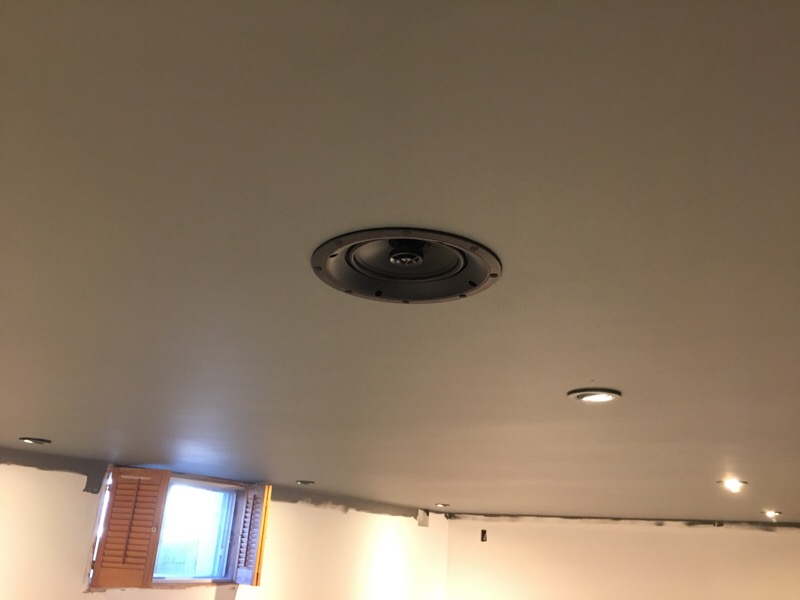
I did what you're never supposed to do in a theater...fire up some gear before completion. Needless to say, the Paradigm ceiling speakers (just 2, for ATMOS height effect) sound very nice all by themselves in their backer boxes, now properly stuffed and fully dampened in the ceiling. Noise transmission to the floor above is very low. Without the dampened backer boxes, I suspect it would have been pretty loud upstairs just from these two speakers.

All you see of the rather large backer boxes..

backerbox7.jpg


Is this:

ceilspeak1.jpg


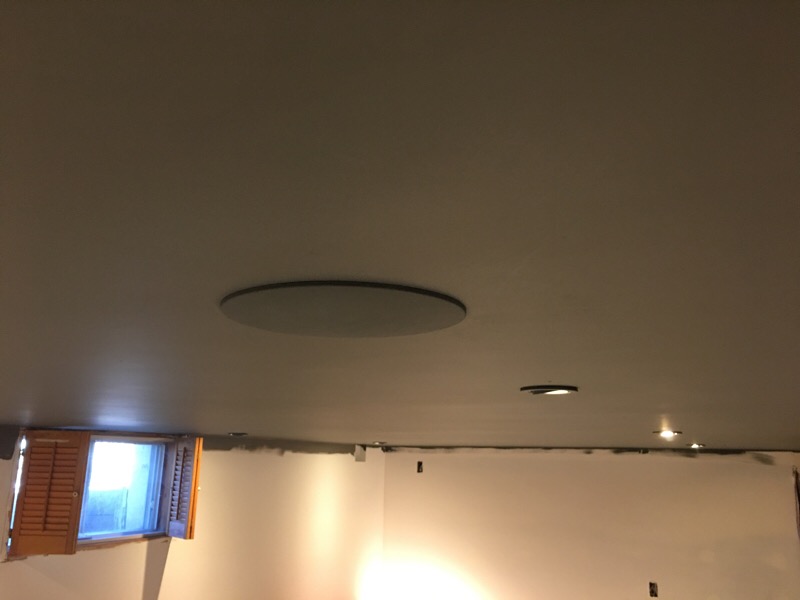
and color matched magnetic grills:

ceilspeak2.jpg


All the HUE lights are installed, and the theater ceiling is done with coat 2, which looks a lot better. Keeping a wet edge with the matte paint is key.

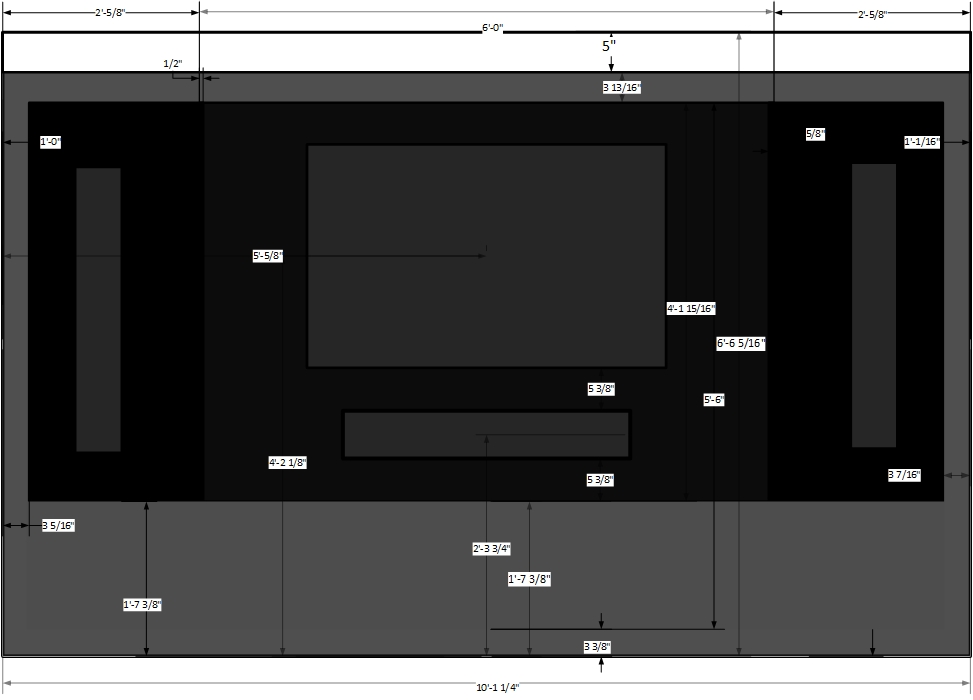
This is the theater wall plan. It's about 10 ft across. The black area will be acoustic fabric, with about 7" behind for acoustic treatments, and speakers. The lower area will be storage. You can see the TV and speakers in grey..only the TV will be visible.

The top valence area will hide the projection screen. Curious to hear your collective thoughts? I'm going for a clean/crisp look.
ceilspeak3.jpg


The back wall will be a smaller version of this, no storage, but speakers and acoustic treatments hidden behind black acoustic fabric.
 
Last edited:
To avoid these ads, REGISTER NOW!

drivesitfar

Well-known member
Joined
Oct 23, 2013
Messages
36,060
Location
Pacific Northwest
Woody: everything looks like it's coming along nicely. i really don't have much to add here cause i'm watching and learning, but i've been in a few home theaters and just curious if you might want to lower the screen so you can view the screen without having to look up?

only reason i mention that is sometimes you can get a sore neck from not having your head in a good position.

keep up the great progress!!

did you find any good CYBER MONDAY DEALS??

cheers
 
OP
D

Denwood

Well-known member
Joined
Sep 22, 2014
Messages
4,207
Location
Thunder Bay, Ontario, Canada
Drives, you're right..ideal screen height is about 44" at center. This corresponds to average eye height of a seated adult. I'm a bit higher at 60", but viewing distance is about 14 feet..so no problem. That said, I have a very heavy duty screen mount (just installed) which will allow dropping to 44". What I'm trying to do is make sure the center channel (hidden under the TV) will have enough clearance top/bottom to avoid any acoustic effects from the storage unit below, and TV above.

This wall is only 6'6" high, so proportion is not what you'd expect.

The projection screen drops to about 18" off the floor so that will be perfect. It's pretty much 10ft wide, so will cover the entire wall. It's an acoustically transparent screen.
 

bj383ss

Well-known member
Joined
Sep 29, 2011
Messages
3,166
Location
TX
Dennis sounds like you are getting close to the end. Can't wait to see your finished pictures.

Bret
 
OP
D

Denwood

Well-known member
Joined
Sep 22, 2014
Messages
4,207
Location
Thunder Bay, Ontario, Canada
Bret, yep, I smell the finish line...after a year poking around on the basement projects :)

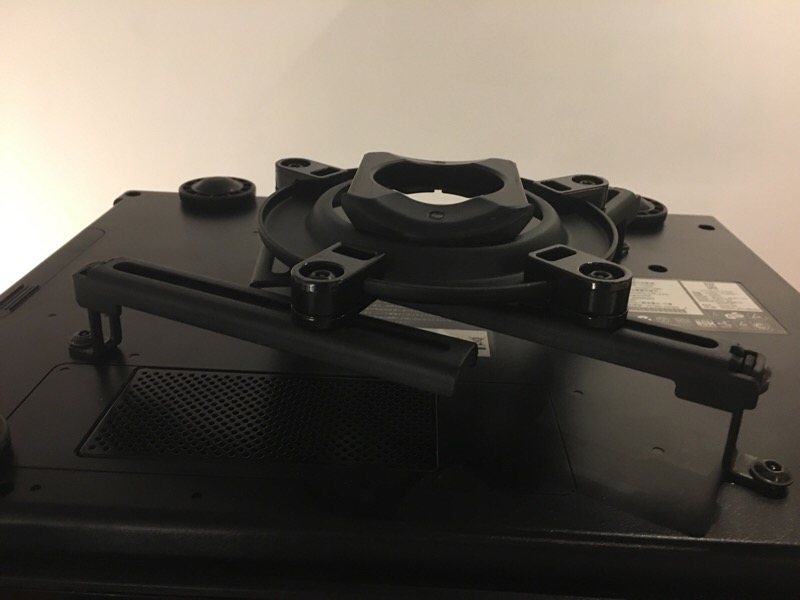
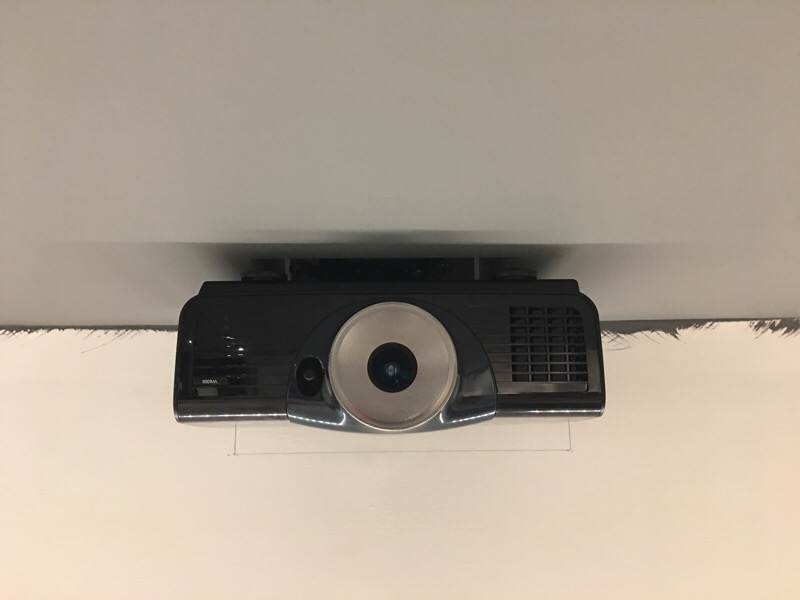
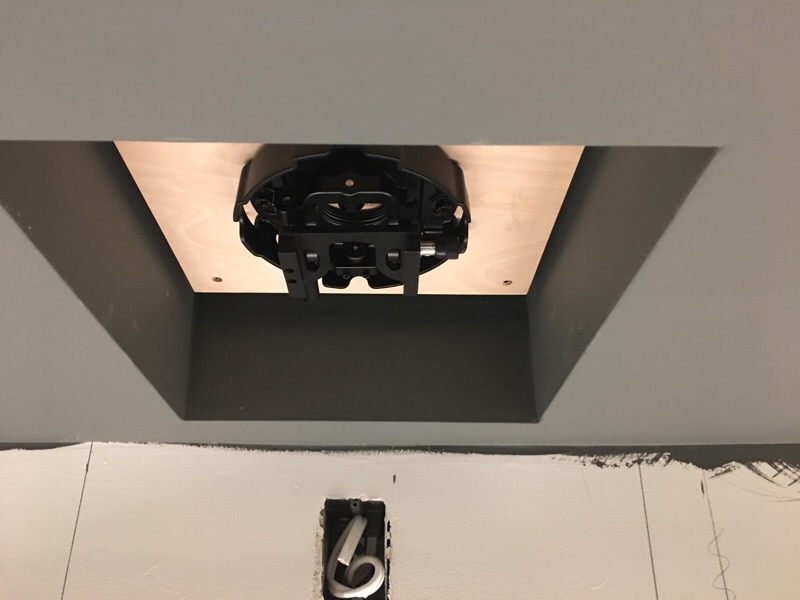
I needed to install the TV and projector mounts to ensure clearance on the front and back screen false walls. Some of you recalled that I dropped a beam and replaced with a "flush" install a few pages back. The end goal (aside from cleaning up the look) was to get the projector as high as possible over seating...the beam would have forced the projector about a foot lower. To this end I framed in a ceiling well (could only go 14 1/2" wide due to floor trusses) and ordered up a low profile projector mount : https://www.amazon.ca/dp/B000TXNS6G/?tag=atomicindus04-20

Needless to say, I'm quite happy with how it turned out. Can't get much tighter to the ceiling than this.

Needed to add some material as my well was too deep...
nov2017projec1.jpg


nov2017projec2.jpg


nov2017projec3.jpg


nov2017projec4.jpg


Once the false walls are done front and back, the painting will be completed...
 
Last edited:
slimpickins

Well-known member
Joined
Mar 27, 2011
Messages
2,404
Location
Canada
Dennis, I've been poking in here on and off and I also hope to set up a theatre room someday ...
In regard to the Smart Things and other automation devices, I've dabbled in (ancient) X10 devices, and then went the Insteon route for a while, and I've have numerous devices fried by power surges even though I have a whole house surge protector in place. It gets rather expensive when a lighting surge fries a half dozen $70 switches and I've questioned whether to even start down yet another rabbit hole....
What has been your experience with these devices' resilience to power fluctuations/surges? And have you done anything to remediate potential damage.

I live in a rural area and the power fluctuates quite a bit even when there are no storms in the area. Maybe I'm just doomed. :dunno:

Thanks for posting all the info on this stuff.

P.S. FWIW, my family thinks I'm more than slightly nuts with all the stuff I've tried. :lol:
 
OP
D

Denwood

Well-known member
Joined
Sep 22, 2014
Messages
4,207
Location
Thunder Bay, Ontario, Canada
Slim, thanks for posting. That's a very good question.

Interestingly enough, my last experience with a direct(ish) lightening strike resulted in damaged x10 stuff. That was a suitable end to those devices :) In that strike, there must have been voltage doing strange things as one panel (we have two) had damage to connected devices, and the other had none. Additionally, no fuses were blown, but several power strips were cooked...literally. The cheap power strips (and anything connected) were done, but on the same circuit a few APC PER7t power strips were fine.

My approach at home/business has been to have anything critical connected to a UPS. I'm using a wide range of them. Manufacturers have come up with smaller units now targeted to home wiring closets..and I have several. Once you realise that replacement batteries are $20 these become a lot more affordable long term.

I also use "green" power strips wherever possible so most devices are physically disconnected from power. I'm using the Tripplite TLP1210SATG for the theater and Triplight Ultrablock (2 outlet) for the projector, screen and TV. The Ultrablocks protect ground/neutral/hot, have a 15 amp breaker built in, RFI/EMI filtering, and a clamping voltage of 140V. If you shop carefully, some Zigbee smart switches offer surge and over-current protection. Aotec's Smart Switch 6 is one example.

Those "smart" power bars are also part of my strategy to reduce parasitic power use..and they work.

Finally, having manual light switches and smart bulbs means turning off the switch may protect them. You can't of course do this if you're away, so there is potential there for damage if a strike occurs. A quick google search will bring up stories of house wide damaged automation bits as in a lightning strike all bets are off.

Final protection..house insurance :-(
 
Last edited:

JohnnieMo

Well-known member
Joined
Nov 25, 2014
Messages
1,175
Location
Calgary, Alberta
I have Cat5 out to the garage. Actually two runs, one is ethernet and the other is phone, and it's in 3/4" conduit. My garage is only 40' from the house so one of my 5G WiFi points covers the garage. I have 500Mbps broadband service too. My Asus router yields faster speeds than the 5G built in to service provider's box, but in the garage from that AP I still get 240-300Mbps on most days. Good enough for streaming Spotify to a BT speaker.

All of my Cat5 is terminated the same so I could make either run the phone, but I differentiated the two with different colors, both on the cable and on the jacks. I used a 66 punch down block for the phone because it allowed me to have up to four phones lines and over 15 jacks. In 2000 my house was state of the art WRT to ethernet and phone wiring. When I had a home office I had 3 phone lines. One for the house, one for the home office, and a dedicated fax line. Funny how quickly that became obsolete. We still have the land line and I still have my 2-line phone out in the garage. My wife won't give up the land line. I laugh because it's through the broadband now so when we lose power we lose the land line... no point to having it, but she won't let it go. :headscrat

Now when I move and I finally get to build my barn shop with the entertainment room above it, I will pull fiber in conduit to the upstairs of the shop, then add a switch to run a few WiFi points throughout both levels.

Boiler: I'm going back a month here, but how did you verify the speed of your 5GHz wifi network? My house is full of ancient CAT5, which is 100Mb max. The wire I ran to the garage is 5E or 6.... I think. My switch is gigabit. I'm trying to determine if 5Ghz Wifi is as fast as the cables I've got now. I noticed that transferring data from the old PC (wired) to the new PC (5GHz) was painfully slow and I'd like to remedy. I can start running CAT6 if that will help, but from what I gather, the 5GHz Wifi is just as good as gigabit.

Thoughts?

Edit: Woody, sorry for the derail. I actually thought I was reading my own thread when I typed this out.
 
OP
D

Denwood

Well-known member
Joined
Sep 22, 2014
Messages
4,207
Location
Thunder Bay, Ontario, Canada
Johnnie, one tool I've used on iOS is "Wifi Sweetspots". It measures speeds between the phone and access point...not internet speed. You can wander around the house and see how the speed drops as you move away from the access point. It's a great way to position your access points antenna as well as speed will change noticeably as you rotate the access point. iPhone6 and up have 802.11ac wifi chips.

I get about 500 Mbps when 8 ft from our EX7000 access points (AC 1900 class) which drops quickly as you move away. Basement speeds are about 100 Mbps (more or less underneath the access point location on 1st floor)...and this speed will drop depending on how many connected devices there are. My house is old, therefore a lot of extra mass over new construction.

If you are running any distance, your old CAT5 likely still performs better.

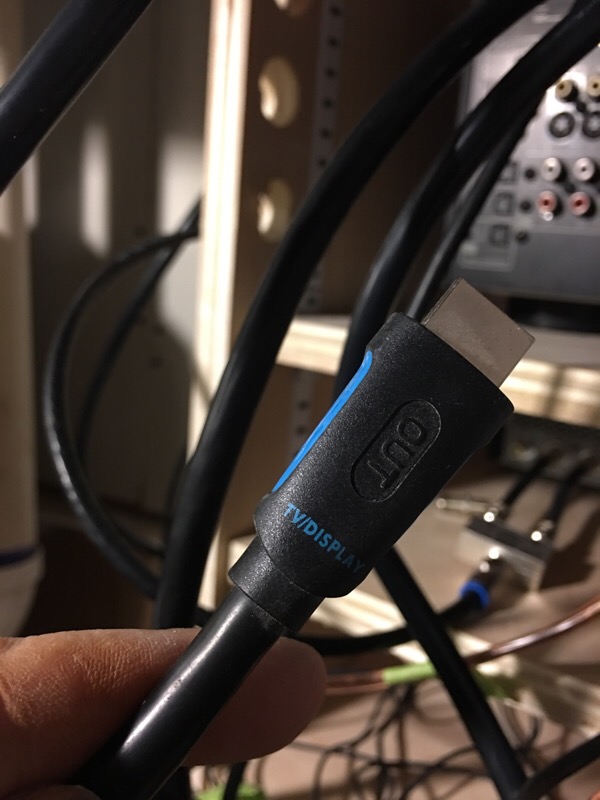
Fired up the projector and mounted the screen last night. Pictured below is the expensive 25ft 4K HDMI cable now buried in my theater ceiling. The picture is taken in the equipment closet. What's wrong with this picture? &^%$# !! The wisdom of sistering empty conduit to both ends of the theater suddenly became apparent last night...

oops2017.jpg


Having access to the back of the equipment rack from the furnace room is the best thing ever. This is easily my favorite feature so far.

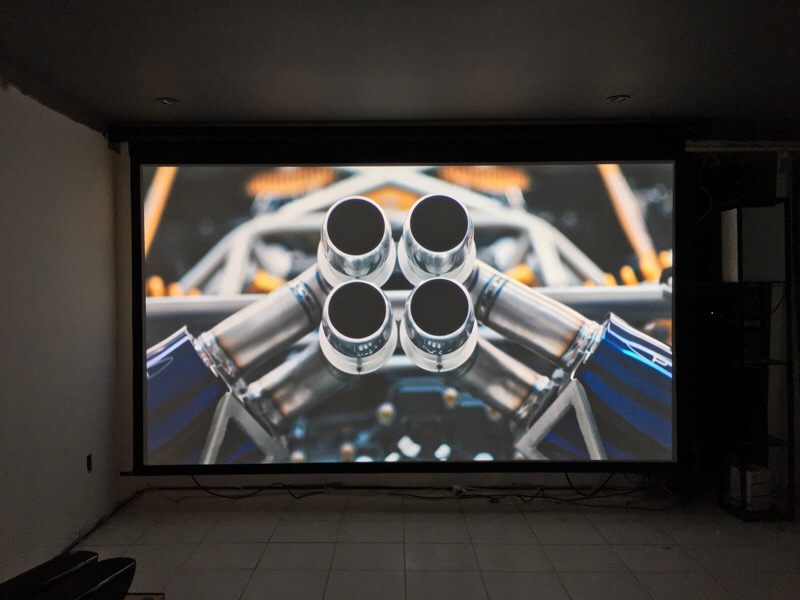
The motorized screen drops down in front of the entire media wall. Being that this is the garagejournal, I present some Bugatti Exhaust for your viewing pleasure. It's about 4ft high on the wall (From "Apex" on netflix).

bugatti2017.jpg


Hooking up gear before completion is a theater kiss of death, but my wife and kids approval factor just went up about 100% :)
 
Last edited:

sublime68charger

Well-known member
Joined
Sep 9, 2014
Messages
5,415
Location
SW Wisconsin
wife/kids approval trumps hooking up stuff before its all ready!

nice work and let me know when your free and willing to stop over and improve my Home theater system!
 

drivesitfar

Well-known member
Joined
Oct 23, 2013
Messages
36,060
Location
Pacific Northwest
Woody: great looking picture quality and size of screen is AWESOME. i'm not surprised your bride and girls loved it and i'm thinking you did too. yes??

Nicely done insetting the projectors hanging hardware and is that hanging hardware something you made at your company or did it come with the projector?

i'm guessing you put the cable in backwards? did you have to pull it out and put it back in the right direction and i'm guessing the pipe had plenty of room so it wasn't too hard or do tell?

cheers and congrats on the PREVIEW SCREENING!!
 

JohnnieMo

Well-known member
Joined
Nov 25, 2014
Messages
1,175
Location
Calgary, Alberta
Nice work on the cable run! You’ve clearly been watching my examples. I didn’t realize HMDI would work for 4K. Nor did I think it was directional. I’m kinda lost actually. However that screen is legit. I’m looking forward to seeing the seating too. Pretty cool how the screen is acoustically transparent.

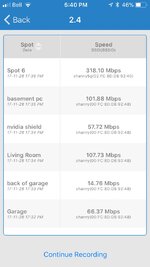
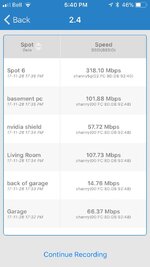
As for my other inquiry that Wi-Fi app is super cool. I was running around the property tonight testing. Router lives in the kitchen on the top of the upper cabinets. It has a nice view of the garage from there.

2.4GHz

ae698f28eb9b940c43b7928574ca919f.jpg

5 GHz

1944943f4c9966112e8ee07a6ddf3d71.jpg

Major finding was that having the computer in the basement (almost directly under the router) has about twice the bandwidth when situated on the top of the desk as opposed to the bottom. That in itself was pretty crazy.

Thanks again. This thread should just be called “Ask Woody”.
 

Attachments

  • ae698f28eb9b940c43b7928574ca919f.jpg
    ae698f28eb9b940c43b7928574ca919f.jpg
    61.8 KB · Views: 1
  • 1944943f4c9966112e8ee07a6ddf3d71.jpg
    1944943f4c9966112e8ee07a6ddf3d71.jpg
    101.1 KB · Views: 2
OP
D

Denwood

Well-known member
Joined
Sep 22, 2014
Messages
4,207
Location
Thunder Bay, Ontario, Canada
Sub, I’ll be right over :)

Drives, the projector mount is a Peerless low profile model. They are fairly universal, however getting the projector right against the ceiling is pretty much impossible unless you build a well for the mount to hide in. The image looks amazing, and the sound (spent last night terminating cables) even better. At conservative volumes, no complaints upstairs either which is great. The sub will shake the entire house, so some restraint will be needed for night viewing :). The reversed HdMi cable is permanently entombed in the ceiling until the next reno...thank goodness I had the empty conduit.

Johnnie, that app is a handy one indeed particularly to tune router or WI-FI access point locations in your home. Your posts show how easily Wi-Fi signal degrades..and that’s likely with zero load. All of the devices in the new equipment rack downstairs are hard wired, although the amp and 4K Blu-ray all have Wi-Fi options. Terminating CAT5e runs are testing my eyesight these days...
I’ve seen both directional and non in 4K spec HDMI as you get into longer lengths. Needless to say, that projector HDMi is pretty useless thanks to my error. The new HDMI is 4K capable, but non-directional at 25ft.

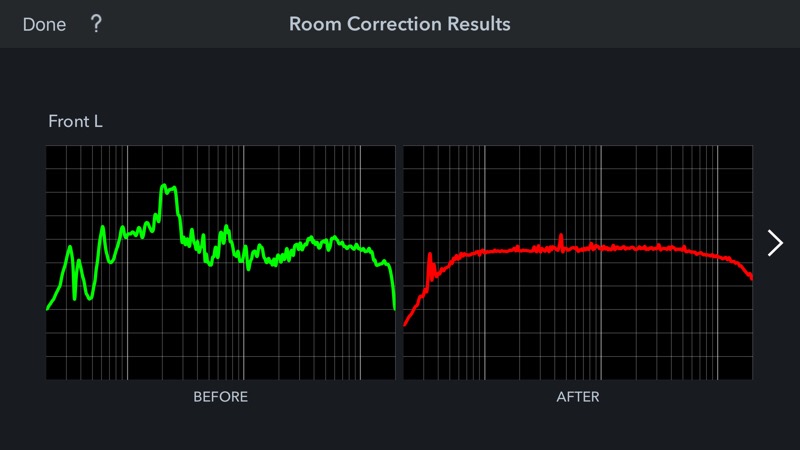
Part of my learning curve on the theater room has been room acoustic treatments, and room tuning. The AVR (amp) I’m using integrates “Audyssey MULTEQ XT32” which is a pretty amazing room tuning tool. It includes a setup mic that you plug into the app, then runs through 8 test locations. Each test runs all the speakers through a frequency sweep, then builds a fairly complex set of FIR filters for the room. For an extra few bucks you can purchase the app, and modify these filters further right down to each speaker, and subwoofer(s). The app also lets you observe before / after results like the one below. I’ll run these again after the room treatments are done.

I’m completely impressed by how effective the tools are. The room sounds simply amazing..and it’s still bare. It will only get better. Below are the results for the front left speaker. You can see from the before that the room needs work acoustically.

multieq2017.jpg
 
Last edited:

BoilermakerFan

Well-known member
Joined
Apr 17, 2006
Messages
2,188
Location
Indianapolis, Indiana
Boiler: I'm going back a month here, but how did you verify the speed of your 5GHz wifi network? My house is full of ancient CAT5, which is 100Mb max. The wire I ran to the garage is 5E or 6.... I think. My switch is gigabit. I'm trying to determine if 5Ghz Wifi is as fast as the cables I've got now. I noticed that transferring data from the old PC (wired) to the new PC (5GHz) was painfully slow and I'd like to remedy. I can start running CAT6 if that will help, but from what I gather, the 5GHz Wifi is just as good as gigabit.

Thoughts?

Edit: Woody, sorry for the derail. I actually thought I was reading my own thread when I typed this out.

Sorry JM, I'm just catching up on GJ... been out for a couple weeks with family stuff and work. I used the Speedtest app on my GS7. I have an Asus router running 5G that is homerunned to my broadband router/modem. They are about 30' apart wire run wise, but it's still on a CAT5 hardwire connection. You can get faster speeds through CAT5 if your wiring connections are all solid. My Asus 5G is faster than the 5G WiFi right out of my cable modem by 30-40Mbs too. I have some CAT6 plenum wire that I use for speaker wire that I'm planning to rewire the run to my Asus WiFi from the cable modem after Christmas. On a side note, when I go to move data between PCs, I just pull the HDD and put it in a portable case, then copy the files over FireWire or USB3.0.
 

drivesitfar

Well-known member
Joined
Oct 23, 2013
Messages
36,060
Location
Pacific Northwest
Woody: once the theater is finished maybe a GRAND OPENING sort of viewing for your good neighbors so they'll understand why the neighborhood is ROCKING ON when you are playing a concert live in your new space?

looks great and sounds like only the one technical issue that was resolved with good thinking ahead planning so hoping the rest goes as planned.

cheers
 

Jonnynel

Member
Joined
Sep 27, 2007
Messages
19
Location
Huntsville, Al
Woody or Johnnie
"As for my other inquiry that Wi-Fi app is super cool. I was running around the property tonight testing. Router lives in the kitchen on the top of the upper cabinets. It has a nice view of the garage from there."

What app is this you are using for testing the wifi? Tried to search through the thread but haven't been able to find it. Thanks
 

memphisnate

Well-known member
Joined
Jan 8, 2010
Messages
398
Location
Memphis, TN
Woody or Johnnie
"As for my other inquiry that Wi-Fi app is super cool. I was running around the property tonight testing. Router lives in the kitchen on the top of the upper cabinets. It has a nice view of the garage from there."

What app is this you are using for testing the wifi? Tried to search through the thread but haven't been able to find it. Thanks

Post 1809:

"One tool I've used on iOS is "Wifi Sweetspots".
 
OP
D

Denwood

Well-known member
Joined
Sep 22, 2014
Messages
4,207
Location
Thunder Bay, Ontario, Canada
Boiler, thank you sir :)

Drives, some kind of party will definitely be called for. There's a rather crazy number of hours invested so far. I've been wanting to do a proper theatre since my 20s, so being able to swing this (despite the rather low basement) is a bucket list item for me.

Jonnynel, Memphisnate has you covered. Wifi Sweetspots is the one:
Observe how Wi-Fi connection speed fluctuates over time, and locate the fastest and slowest Wi-Fi spots in your room! Discover the perfect spot for your wireless router, access point, or wireless gaming console by using Wi-Fi SweetSpots! Available on iPhone with a simple, easy-to-use design.

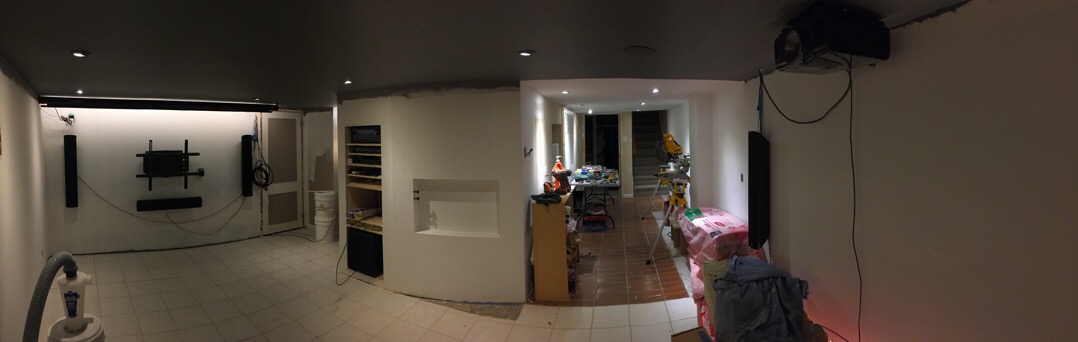
It's been a busy few days wiring, testing and experimenting a bit with the speaker placement. The equipment on the screen wall will all be hidden behind acoustically transparent speaker grill cloth. There are no less than seven speakers and two powered subwoofers, a 10" and 12". The amp I'm using can has two sub outputs, and both are fully managed by the fancy pants Audyssey MultEQ XT. It sounds simply awesome :)

theaternov2017.jpg


Once I'm happy with the speaker placement, making things pretty shouldn't take too long.

We're going to use loose lay vinyl plank, so the rather nasty ceramic tile variations will be hidden with a waterproof (and much warmer on the feet) floor surface..just in case we have a burst washer hose or similar. I'm using several Smarthings water sensors in the basement so if water ever shows up, we'll all get notifications on our iOS devices.
 
Last edited:

nicholam77

Well-known member
Joined
Dec 18, 2016
Messages
2,675
Location
Minneapolis, MN
We're going to use loose lay vinyl plank, so the rather nasty ceramic tile variations will be hidden with a waterproof (and much warmer on the feet) floor surface..just in case we have a burst washer hose or similar. I'm using several Smarthings water sensors in the basement so if water ever shows up, we'll all get notifications on our iOS devices.

This is a good idea. I just had water back up from the floor drain of my laundry room onto carpet yesterday. Getting the main drain line for the house cleaned out today. My parents had this happen twice in their house, and after two carpet installations were ruined, they laid vinyl flooring in the basement in case it ever happens again. Not only will it look nice but much easier to clean up if needed.
 
To avoid these ads, REGISTER NOW!

JohnnieMo

Well-known member
Joined
Nov 25, 2014
Messages
1,175
Location
Calgary, Alberta
Woody - why are you running dissimilar subwoofers? Are they each serving a different frequency range? You likely already know this, but subwoofers (or speakers in general) should match when playing the same frequencies.
 

drivesitfar

Well-known member
Joined
Oct 23, 2013
Messages
36,060
Location
Pacific Northwest
Woody: you might have a long BUCKET LIST, but this one item will make your entire family happy and probably a few of your good neighbors and friends too.

looking good and loving the idea of a new floor with water sensors as well as all this SMART TALK STUFF. i just picked up an Iphone 8 last night so i'll be able to take much better pictures and hopefully come a bit more into the 21st century.

cheers
 
OP
D

Denwood

Well-known member
Joined
Sep 22, 2014
Messages
4,207
Location
Thunder Bay, Ontario, Canada
Nich, if the tile didn't look so bad, we'd just keep it as is. Hard to beat ceramic for clean up. Loose lay vinyl plank and a few area rugs and we'll be set :)

Johnnie, I'm running a 12" and 10" just because I have them. The Audyssey MultiEQ XT32 system sets up timing and FIR filters for both subs, so basically makes the room sound awesome regardless. I've tried it with the Paradigm sub only (12") and then threw in the older 10" yesterday. I'm definitely sticking with two as the room sounds a lot smoother with respect to low frequencies. It will only get better as I add the acoustic treatments. There's a definite peak at 150Hz or so...which is expected for these room dimensions. You are correct though in that Audyssey does recommend identical subs. Did I mention that the Audyssey system is awesome? The ability to apply individualised DSP to both subs simultaneously is pretty cool indeed. MulitEQ XT32 applies more than ten thousand control points. From their web site:

MultEQ uses Finite Impulse Response (FIR) filters for equalization that use several hundred coefficients (edit: XT32, has 10 000 +) to achieve much higher resolution in the frequency domain than parametric bands. Furthermore, by their nature, FIR filters simultaneously provide correction in the frequency and time domains. FIR filters had been considered to require too many computational resources. But Audyssey solved this problem by using a special frequency scale that allocates more power to the lower frequencies where it is needed the most.

Given that both subs are tested separately, then together..and FIR filters are applied separately by the Audyssey DSP, I wonder if two different subs are actually a good thing with MultiEQ XT32 ? If my ears are any indication, I'd say yes, however blind testing in situations like this is very much called for.

Drives, I'm quite the Luddite with my iphone 6s plus, ha. I won't upgrade until I'm forced to. I'm sure you'll enjoy the 8 :) The SmartThings water sensors need an occasional reset (not cool at all!!) but they do report water within a few seconds to all of our iOS devices. These needing a reset is a surprising as someone not checking sensor status from time to time could have a flood and never know it. I have the one water sensor in the furnace room (in case condensate system from furnace fails) and one under washer. I have a third in the sump, but it's just an audio warning...no smarts there. The sump only runs in spring for a month or so.
 
Last edited:

JohnnieMo

Well-known member
Joined
Nov 25, 2014
Messages
1,175
Location
Calgary, Alberta
Johnnie, I'm running a 12" and 10" just because I have them. The Audyssey MultiEQ XT32 system sets up timing and FIR filters for both subs, so basically makes the room sound awesome regardless. I've tried it with the Paradigm sub only (12") and then threw in the older 10" yesterday. I'm definitely sticking with two as the room sounds a lot smoother with respect to low frequencies. It will only get better as I add the acoustic treatments. There's a definite peak at 150Hz or so...which is expected for these room dimensions. You are correct though in that Audyssey does recommend identical subs. Did I mention that the Audyssey system is awesome? The ability to apply individualised DSP to both subs simultaneously is pretty cool indeed. MulitEQ XT32 applies more than ten thousand control points. From their web site:

Woody: I am indeed curious how these DSP filters affect the "common knowledge" of yesteryear in this regard. I have seen many car stereos completely fall on their face due to mixed subwoofer matching, dissimilar cabinets, or phase cancellation. In theory tuning the DSP algorithms will balance the output level at each frequency, but it may not take into account responsiveness (i.e. one subwoofer will react faster than the other, hence creating a very minor phase variance). To be honest, its an area I don't fully understand.

My old Denon 3808 had a microphone you would move around the room to tune the various crossovers. It seemed to work pretty well, but there was no graphical output that you described. That is very cool.

At the end of the day so long as your ear is happy, then its perfect.

I'm just happy these days when the children are asleep and I can actually watch a television. Phase variance be damned!
 
Last edited:
OP
D

Denwood

Well-known member
Joined
Sep 22, 2014
Messages
4,207
Location
Thunder Bay, Ontario, Canada
Johnny, good question. I posted this over at AVSforum so we’ll see if the experts will chime in:

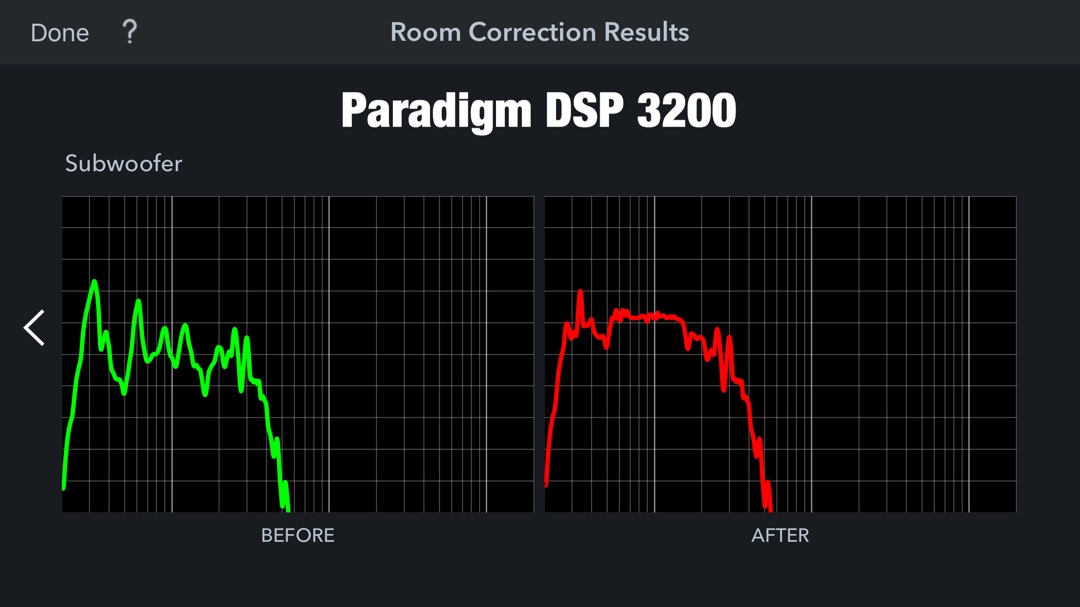
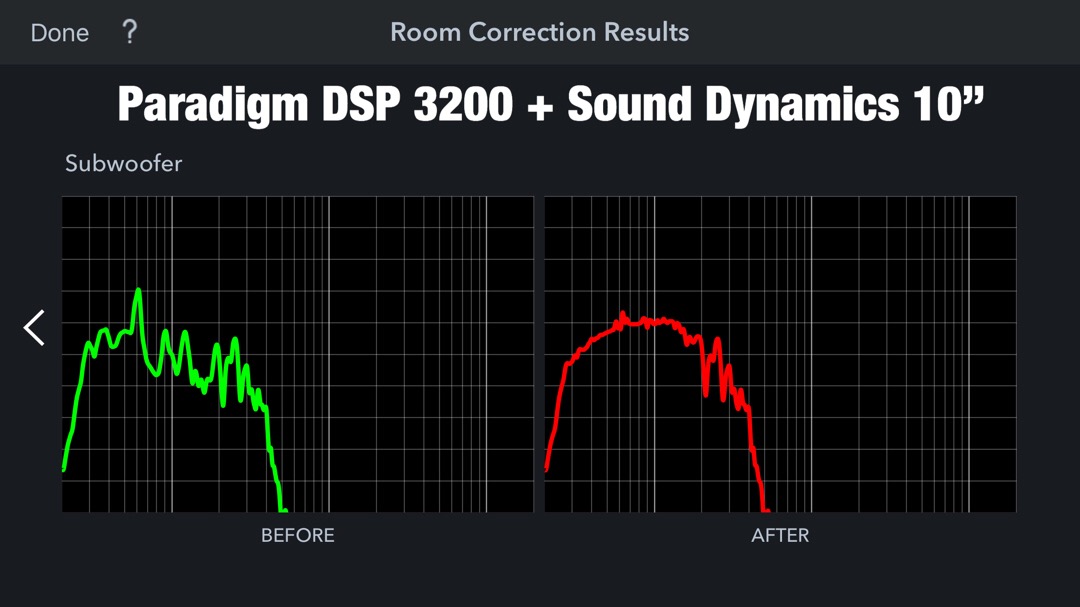
I’ve been reading now for hours on the topic of dual sub tuning, DSP, and dual subs. Using a single sub vs dual sub scenario, and the Audyssey app, I’ve included images of both before/after curves. The amp is the Denon AVR-X3400H with dual (independent) sub outputs and Audyssey MultEQ XT32.

I also realize that pairing dissimilar subs is not a great idea. That said, the results correlate with what I’m hearing, smoother bass at the MLP.

Sub 1 is a Paradigm DSP-3200, 12”, dual front ported
Sub 2 is an old Sound Dynamics 10”, single front port.

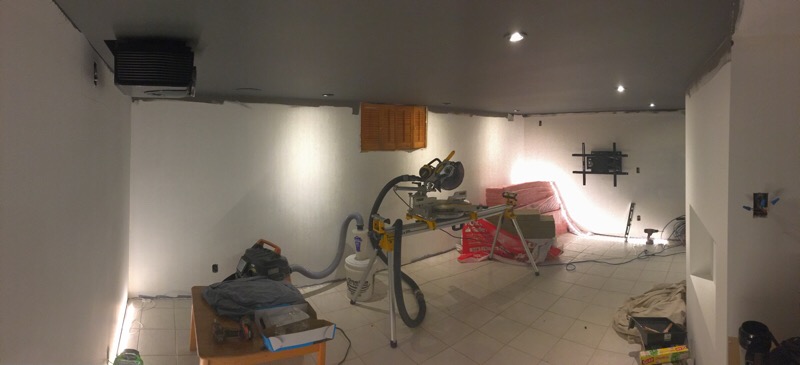
The room is about 11x19, the 12” DSP-3200 is mid room (under the media rack) and sub 2 (10”) is just hiding in the foreground lower right corner of the panoramic image. This theater is very much under construction so I’m dialing in speaker location only right now. There are zero acoustic treatments now, but the room will get a lot of attention in this regard.

My one question: Can MultiEq XT32 competently manage subs like this? Comments on the curves?

singlesub.jpg


dualsub.jpg


theaternov2017.jpg
 
Last edited:

JohnnieMo

Well-known member
Joined
Nov 25, 2014
Messages
1,175
Location
Calgary, Alberta
I'm afraid you are getting in over my head now. I've never played with a device like your multiHQ. In theory you want sound waves to add together on their way to your ear. That generally means you want them all starting at the same place (i.e. a single speaker) for the same channel. Obviously there is no one magic speaker so we use crossovers to split up the frequencies. So long as the speakers for each channel are co located and balanced it works great.

In your case you are not only running different types of speakers for the same channel but also putting them in different locations. I would think your little EQ would be doing a lot of work to compensate for all that. It stands to reason that every seating position would experience different volumes.

Ultimately your ear is all that matters. Try it with one and try it with both. Pick your favourite. What is the power output on those two subs?
 
Last edited:
OP
D

Denwood

Well-known member
Joined
Sep 22, 2014
Messages
4,207
Location
Thunder Bay, Ontario, Canada
Johnnie, the audio thing is quite a rabbit hole :)

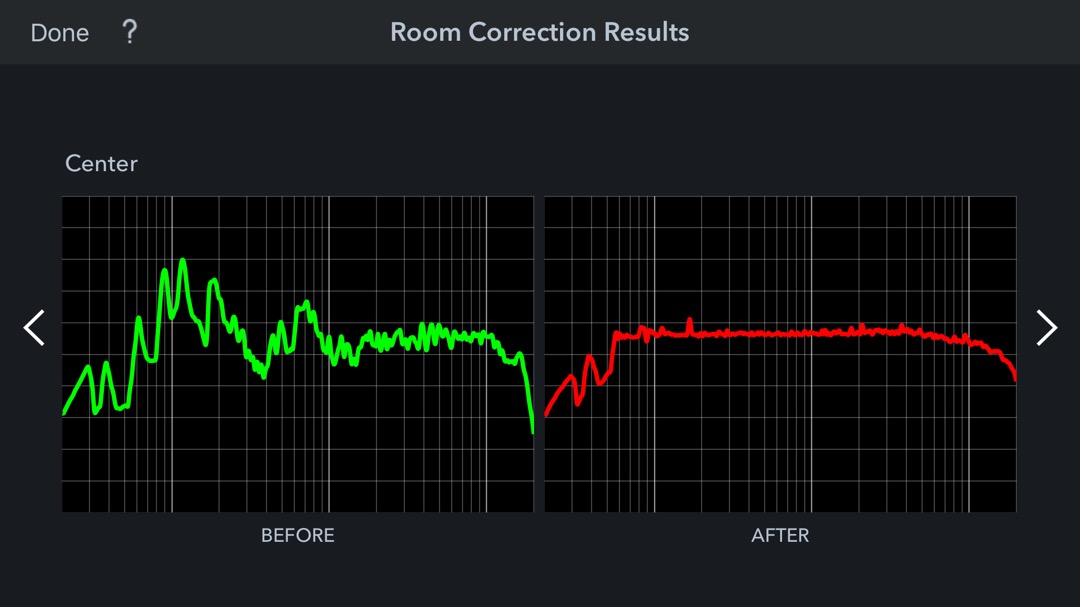
Audyssey creates FIR filters, which are loaded into the amp and processed using DSP. FIR filters have a temporal component which means the filter "treatments" settle to zero in a finite length of time. The higher end MultiEQ XT32 apparently has over 10 000 control points...applied to each speaker individually. So it's much more powerful than a simple EQ as distance, time and phase are part of the filter treatment. Evidently some processing power is required to apply these filters real-time. This is what the center channel looked like before/after treatment.

audcenternov2017.jpg


With dual subs, it calculates the sub distances, sets levels and apparently creates one set of FIR filters which are applied to both subs based on the microphone testing results. From one of the AVS forum gurus (MLP = master listening position..the prime seating location):

As you say the documentation is unclear, and some of that may be deliberate marketing obfuscation, but Audyssey in all versions, EQ's all subs as one, setting one group of control points for all the subs in a system. What it does do, with SubEQ, is to set distances (timing) and levels separately for two subs. When two subs with different frequency responses are EQed together, Audyssey simply stops setting control points where the combined sound of the subs is down by 3db. So, the roll-off point of the weaker sub determines how low the EQ goes. Audyssey does the same thing for the regular channels. It stops EQing at the F3 point of the speaker.

Your best bet when trying to pair a weaker sub with a stronger one is to locate the weaker sub closer to the MLP. That will at least give it a slight SPL advantage with respect to the stronger sub. Whether that will help it to roll-off just a little lower is a question that you can only answer through experimentation. But, if nothing else, it might sound better that way.

In any case, the audio testing geek out session must end for now. The results will dictate the rest of construction. Target is two weeks for completion. Ha.
 
Last edited:

drivesitfar

Well-known member
Joined
Oct 23, 2013
Messages
36,060
Location
Pacific Northwest
Woody: is Christmas your MEDIA ROOM COMPLETION DAY so you can give the gift that keeps on giving to the family that really was a gift to yourself?

great project and even though you might be tired of all the tech talk i bet others like myself will be enjoying these posts for a while until new technology maybe gets even better.

yep having an IPhone i actually called my son in California and did face time with him today. i've seen my wife use this a few times and my kids, but my first FACE TIME CALL. pretty cool if you ask me.

cheers and best of luck on the final things you have to do.
 
OP
D

Denwood

Well-known member
Joined
Sep 22, 2014
Messages
4,207
Location
Thunder Bay, Ontario, Canada
Drives, this project is interesting in that the construction of the room to some degree is now dictated by the results of calibration and some careful listening. My daughter came down last night and watched 30 minutes of Elf. She immediately picked up the Harmony remote, made her choice (Netflix- Projector) and the automation system:

1. Powered up the amp, projector, and media streamer.
2. Set all the correct inputs for above and fired up Netflix app on Bluray.
3. Lowered the screen.
4. Killed the house lights, leaving rear LEDs at 20%, blue.
5. Put the house in “Theater mode” so basement motion sensors are ignored.

Pressing power off on the remote basically reverses the above steps.

If a nine year old can use it with no training, I figure we’re good.

Drives, FaceTime and family go together rather nicely. I suspect you will thoroughly enjoy the extra face to face contact :)

Johnny, the 12” sub is 300 Watts RMS, peak 900. Smaller sub is 100 Watts RMS, peak 400. The AVR is rated at 105 watts/channel RMS...which as we know is actually rated with only two channels driven. You could say we have about 650 watts of “clean” power in the room.
 
Last edited:

drivesitfar

Well-known member
Joined
Oct 23, 2013
Messages
36,060
Location
Pacific Northwest
Woody: very cool that your "little" girl is already up to speed on how to run the Home Theater room. also looks like all your great PREP WORK is paying off and even that extra vacant PVC pipe to account for the wire you put in backwards was great. best of luck on finishing the painting and floor and setting up the furniture cause i know you'll love it.

yep i try to post up on GJ with questions instead of emailing, PMing or calling members so hopefully if GJ is around for years to come somebody (or even myself) can find information that isn't easily found or known and i think you do the same and thanks for that.

cheers and you are doing GREAT!!
 

JohnnieMo

Well-known member
Joined
Nov 25, 2014
Messages
1,175
Location
Calgary, Alberta
Johnny, the 12” sub is 300 Watts RMS, peak 900. Smaller sub is 100 Watts RMS, peak 400. The AVR is rated at 105 watts/channel RMS...which as we know is actually rated with only two channels driven. You could say we have about 650 watts of “clean” power in the room.

Those FIR filters sound pretty sweet. I've never played with them, but they are doing about what I thought they would be. All they can really do is change amplitude, timing and phase. How they do it is the magic. I always thought it was neat how in a digital filter, all you need to do is swap a number (i.e. a 5 to a 6) and then you create more loud. Eventually all your sound could just be made up by a computer.

This is all good for your MLP, but with differing subs, you will create odd effects for other listeners. Of course we're not too concerned about them, are we :) And let's face it, we're dealing with levels of perfection here. No commoner will ever tell the difference. 650 watticles will be crazy good. My system has a 500 watt RMS DSP controlled 12" (*made by Axiom in Ontario). I think I run it at about 10% so my son and I can play Super Mario Maker and watch cat videos.
 
OP
D

Denwood

Well-known member
Joined
Sep 22, 2014
Messages
4,207
Location
Thunder Bay, Ontario, Canada
Johnnie, I just discovered the volume limit option on the Denon and enabled it. Spotify will let you manage amp volume via the iOS app which responds much quicker. Needless to say I thought I was going to pop an eardrum during a streaming mishap. The amp is now volume limited to 0db which ends up at reference levels for movie playing. Reference levels are too high for extended listening IMHO.

I had to pick up a small replacement compressor for the office yesterday. Ended up picking up a Ridgid 200psi “quiet” compressor from HD. It is indeed quieter than you would expect from a small compressor but still manages 5cfm@90. For $350, not only is it surprisingly quiet, but has a very nice quality regulator with a lock onboard as well as two quick release air connects already installed. I was impressed.
 

Attachments

  • 18156B98-D3A4-43D1-B505-E5A7851C65D0.jpg
    18156B98-D3A4-43D1-B505-E5A7851C65D0.jpg
    9.5 KB · Views: 35
Last edited:
OP
D

Denwood

Well-known member
Joined
Sep 22, 2014
Messages
4,207
Location
Thunder Bay, Ontario, Canada
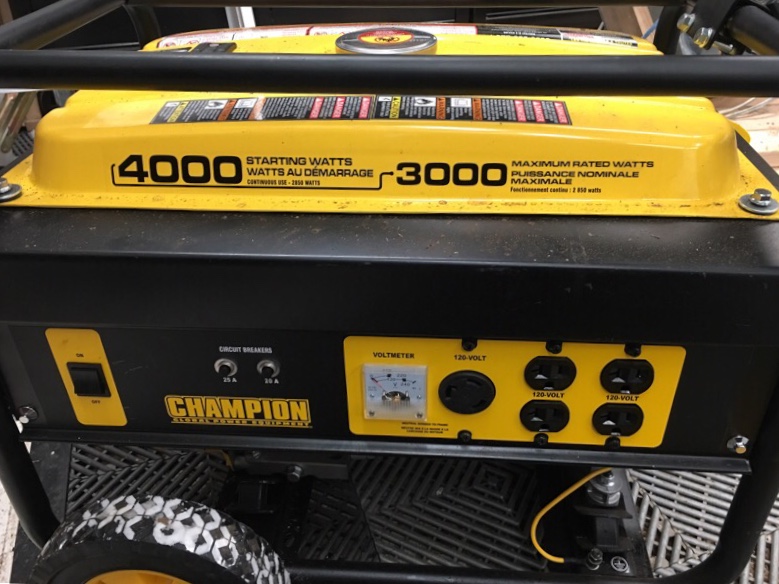
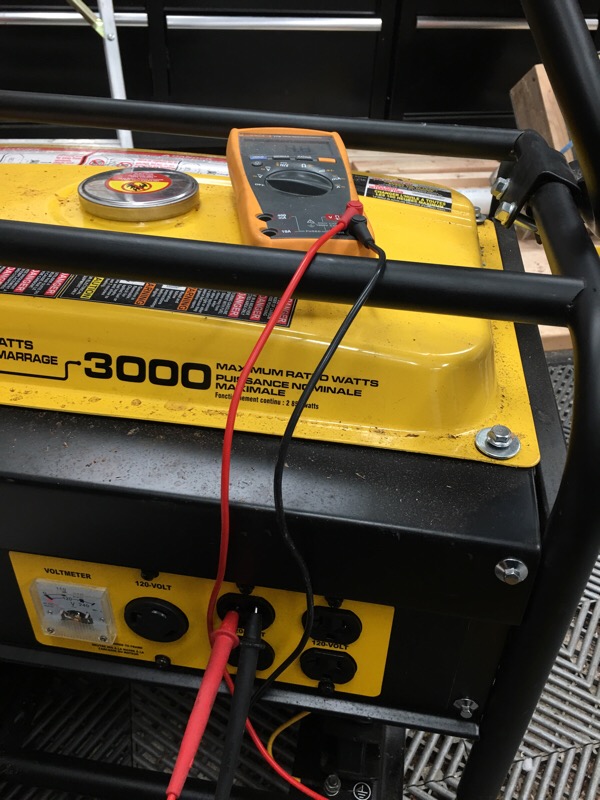
We had a pretty intense winter storm yesterday that knocked power out for 10hrs or so. I fired up our emergency generator which has not been used for much more than an hour or so previous. I plug this in via the garage to feed the house.

I noticed a few of the Zwave switches were cycling on/off and three UPS’s in the house were cycling on and off battery. Interestingly, it appears the Zwave switches may offer overcurrent protection to attached devices. On looking at one of the UPS software, I could see the voltage was a bit high at 125 to 126V. The bigger issue though was likely frequency as the UPS was reporting dirty power.

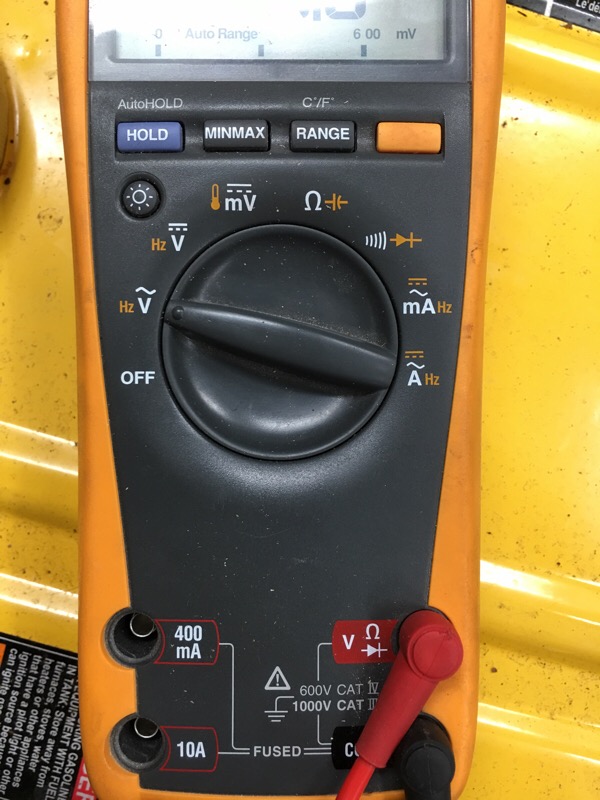
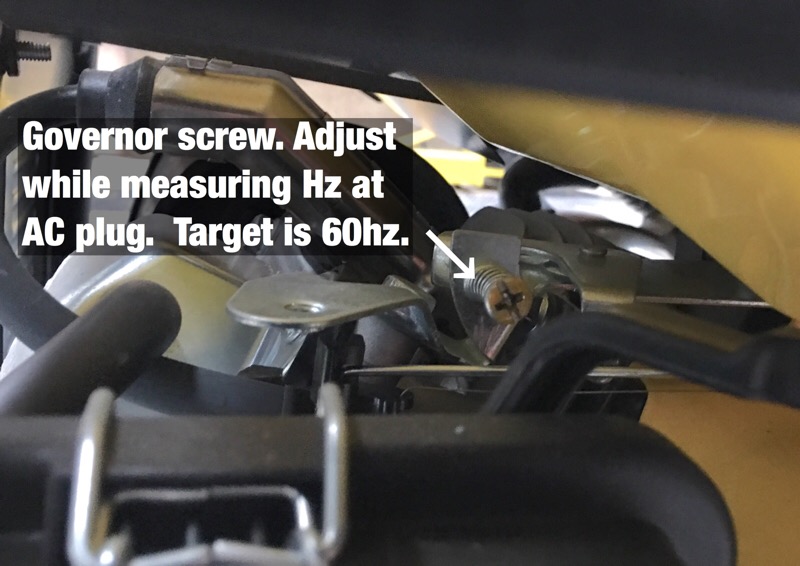
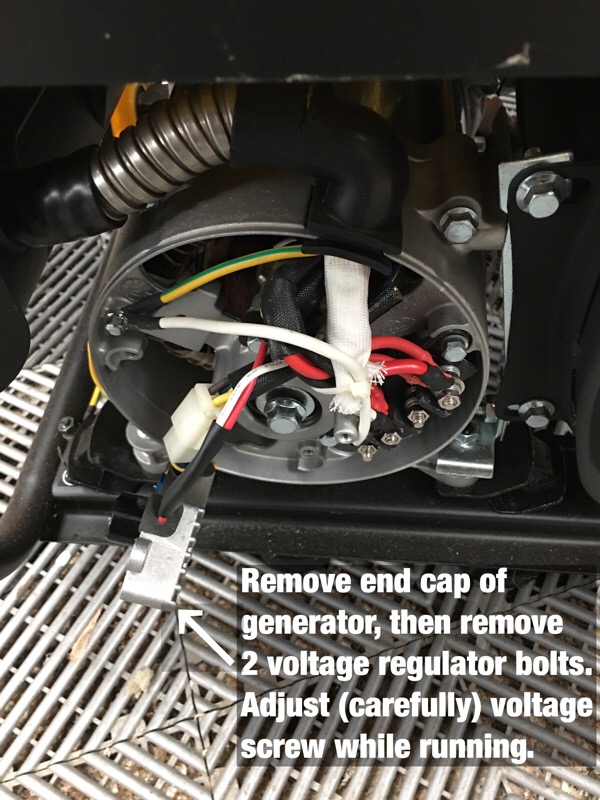
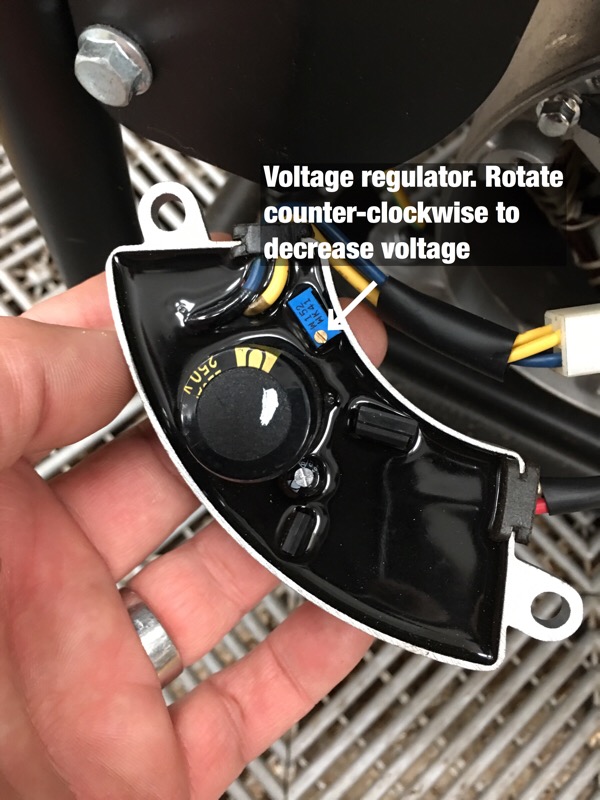
What I learned was that RPM on the generator correlates to frequency, and that voltage can be adjusted via the voltage regulator. Using a 10 amp load (heat gun) I adjusted the generator governor slightly to reduce RPM so that AC frequency was 59-60 Hz. A turn or two of the tiny voltage adjustment screw and voltage was reduced to 124V. The UPS’s are happy now. Lesson learned with respect to assuming a brand new generator is delivering “safe” power. These adjustments were not in the user manual...

generator1.jpg


generator2.jpg


The Fluke multi measures both frequency and voltage which made adjustment easy...

generator3.jpg


generator4.jpg


generator5.jpg


generator6.jpg
 
Last edited:

twowheels

Well-known member
Joined
Nov 26, 2013
Messages
46
Location
Sammamish, WA
Look what you've done!

Dennis,

It took me a while, but I finally got the Makita Track saw! Santa came a little early to the twowheels household. It looks like a very well put together tool. I am sooooo excited to give it a whirl this weekend. I've got some melamine to cut up and make a storage shelf for my wife for Christmas.

Thanks for your excellent review and inspiration!

Best-Tim
 

Attachments

  • Makita_Track_Saw_120617.jpg
    Makita_Track_Saw_120617.jpg
    145.8 KB · Views: 32
OP
D

Denwood

Well-known member
Joined
Sep 22, 2014
Messages
4,207
Location
Thunder Bay, Ontario, Canada
Tim, I'm sure you'll find the track saw is a great addition to the compliment :) Just run through the blade checks and tweak that base if required. With a vacuum attached to the dust port, you'll likely find it's the "cleanest" tool in your shop too.
 

drivesitfar

Well-known member
Joined
Oct 23, 2013
Messages
36,060
Location
Pacific Northwest
Woody: happy you like your Rigid compressor from Home Depot. i bought a small Porter Cable pancake compressor with a couple nailers from HD maybe 20+ years ago and it fires up and works great every time i need it which isn't all that often. i just remember to drain the air and any water out of the tank after each use and it's good to go the next time.

your new room sounds AMAZING and just watching and learning cause it's been on my BUCKET LIST TOO for maybe 30 years.

good luck
 

drivesitfar

Well-known member
Joined
Oct 23, 2013
Messages
36,060
Location
Pacific Northwest
TIM (& ALL): just make sure to wear a good mask if you are cutting MDF cause i hear the dust is toxic. i'm usually coughing for a week or two if i forget to wear mine (BAD HABITS DIE HARD) when doing woodwork.

WOODY: i'm sure i'm going to buy a track saw in the near future and ditch the table saw after watching how nicely it works for you and it will save a lot of space which i don't have a lot of.

cheers
 

JohnnieMo

Well-known member
Joined
Nov 25, 2014
Messages
1,175
Location
Calgary, Alberta
Good stuff Woody. I would never have thought to inspect a generator voltage, but now I will. I just inherited one with the new RV, so that will be the first thing I check in the new year.

I was super in to car audio in high school. I put 3 12" subs in to a sedan. Today my hearing is not very good, and I think I know why. Good call on the Denon.
 
To avoid these ads, REGISTER NOW!
Top Bottom