To avoid these ads, REGISTER NOW!

Data/low voltage cables into pole building?

bullnerd

Well-known member
Joined
Sep 17, 2012
Messages
5,690
Location
Jersey
Anyone have any pics of how they brought low voltage and data cables into their building? (underground conduit through exterior wall, not through slab)

Doesn't have to be pole barn, but metal interior would help.

Conduit through wall but then what?

I tried searching and know I have seen it here before but cant find anything now.
 
Last edited:
To avoid these ads, REGISTER NOW!

pgray007

Well-known member
Joined
Jul 25, 2007
Messages
573
Location
Charlotte, NC area
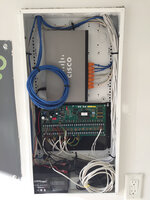
I did conduit into a low voltage panel, where I connect to a network switch and alarm expansion panel. Once cleaned up, it looks like is (hole from the conduit is in the lower left, and goes out through the exterior wall and back to our main building:

b850f791b0c850dbd5286ee7b1a3d3b9.jpg

If you want more details give me a shout, it it's pretty straight forward, just run double what you think you need.


Sent from my iPad using Tapatalk
 

Attachments

  • b850f791b0c850dbd5286ee7b1a3d3b9.jpg
    b850f791b0c850dbd5286ee7b1a3d3b9.jpg
    668.8 KB · Views: 2

Jim_No_Garage

Well-known member
Joined
Jan 15, 2011
Messages
3,322
Location
Millington NJ
I did conduit into a low voltage panel, where I connect to a network switch and alarm expansion panel. Once cleaned up, it looks like is (hole from the conduit is in the lower left, and goes out through the exterior wall and back to our main building:

b850f791b0c850dbd5286ee7b1a3d3b9.jpg

If you want more details give me a shout, it it's pretty straight forward, just run double what you think you need.


Sent from my iPad using Tapatalk

PGray:

Could you please share some details on how you terminated what appear to be CAT-5/6 cables into what appears to be a Cisco router/switch? The orange pluggy things . . .

I have a patch panel and patch cables - and I hate it - so I'm looking for options . . .

Jim
 

jeffmoss26

Well-known member
Joined
May 25, 2011
Messages
12,862
Location
Cleveland, Ohio
Looks like he just put plugs and boots right onto the cables.
I always use patch panels (or in a small install, a surface mount box with jacks) and then premade cords to the devices. Not a fan of those media panels but the one above is fairly clean.
 

pgray007

Well-known member
Joined
Jul 25, 2007
Messages
573
Location
Charlotte, NC area
PGray:

Could you please share some details on how you terminated what appear to be CAT-5/6 cables into what appears to be a Cisco router/switch? The orange pluggy things . . .

I have a patch panel and patch cables - and I hate it - so I'm looking for options . . .

Jim

Sure, nothing too magical here. I got a big old bag of CAT5/6 boots from Monoprice. Orange was the cheapest. The only real challenge is that you have to remember to put the boots on before you put on the connector.

The can is Elk-branded. Look them up (they make alarms) and they're cheaper than the Leviton "structured wiring cans" but seem to have the same functionality. The only odd thing is they stick out of a stud bay a bit more than some of the others but it ultimately looks OK.

In terms of patch panel, I've used them in the past and also didn't like them in a residential environment, so all the cables you see go to the end devices. One goes back to the main house where it connects to the "core" switch, and the rest go to various devices (primarily IP cameras/telephones) or network jacks that are scattered around the shop.

There's a similar setup in the room above, with a larger switch that goes back to the main house, and then CAT5E that runs directly to wall outlets or devices.

The "Cisco router/switch" is a Cisco switch in the SG300 series. If memory serves its a 10 port PoE managed switch that sits in a sweet spot between "real" Cisco gear and the linksys-grade **** they used to sell in their small business line, and this particular model is fanless so you don't have a howler in the shop. I've been pretty happy with it and it's lasted through a couple of summers of 100+ SC weather. I'm "switching" to Unifi in most of my new/upgraded switches since the management is much easier along with Unifi access points, but they don't have a lifetime warranty like the Cisco unit that's pictured.
 
OP
B

bullnerd

Well-known member
Joined
Sep 17, 2012
Messages
5,690
Location
Jersey
Thanks, didn't even know those boxes existed.

"surface mount box with jacks" Pics of this would be cool if you have any.

I will have metal interior so whatever I use will be surface mounted.
 

Roobaix

Well-known member
Joined
Mar 3, 2016
Messages
255
Location
White Plains, NY
What is the cabling for and how many cables?

Me? I'd mount plywood to the wall and then:
A) Mount a patch panel to the plywood, terminate all of my cables there, and run patch cables
B) Mount a small rack or cabinet to the plywood and mount a patch panel inside of it. Then do as above in A.
 
OP
B

bullnerd

Well-known member
Joined
Sep 17, 2012
Messages
5,690
Location
Jersey
What is the cabling for and how many cables?

Me? I'd mount plywood to the wall and then:
A) Mount a patch panel to the plywood, terminate all of my cables there, and run patch cables
B) Mount a small rack or cabinet to the plywood and mount a patch panel inside of it. Then do as above in A.

Whatever is needed to run a computer, tv, wireless router for phone.

See, I don't know what these things are your talking about.

"patch panel" "patch cables"

Pictures man! :lol_hitti
 

wyliesdiesels

Well-known member
Joined
Aug 14, 2012
Messages
20,074
Location
Modesto, CA
Google is your friend!

Mini Patch panel

72991.jpg


Molded Patch cables

Paladi8.jpg


plywood backerboard

836b4c25168497.5604ba6f324fd.JPG
 
Last edited:

jeffmoss26

Well-known member
Joined
May 25, 2011
Messages
12,862
Location
Cleveland, Ohio
Bullnerd, here is a surface box with plate/jacks:

If the job is 6 drops or less, I will use one of those instead of a patch panel...much cheaper.
 
OP
B

bullnerd

Well-known member
Joined
Sep 17, 2012
Messages
5,690
Location
Jersey
Sooo..I finally! got a chance to run a single 1" conduit to my pole building! WooHoo!

Now, what do I put in it? LOL!

Looking to run a computer, TV and Wi-Fi for phone.

I have an old router from my house, can I throw that in there?

How do I hook it to my house router?

Cable straight from splitter in house for TV.

I thought I knew how I was going to do this, but my head hurts and I cant remember what it was now that its time to do it!
 

matt_i

Well-known member
Joined
Mar 14, 2008
Messages
10,752
Location
SE Michigan
I have an old router from my house, can I throw that in there?

How do I hook it to my house router?

You can use your old router.

You have to dig into settings.

I did this once (surprised myself as I'm a network dummy), basically you have to reserve an IP address like 192.168.1.2 for the remote router. Then you have to alter the DHCP range on the main router to only allow access to 192.168.1.3 to 192.168.1.255. Have to disable DHCP for the remote router and assign it a static IP that you reserved...which is the .2 address.

I believe the type of security has to be identical and a good idea to set the passphrase/password to be identical as well.

The strange thing in hardwiring is that the connection cable plugs into one of the "output" ports on the main router and also into one of the "output" ports on the remote router.

There is probably other hacking and mystery settings that will test your patience but I have been running like this for around 9 months now.
 
To avoid these ads, REGISTER NOW!

pgray007

Well-known member
Joined
Jul 25, 2007
Messages
573
Location
Charlotte, NC area
All depends on what you want to do, but these days I’d just run at least two Cat 5e/6 cables. Put a network switch in your barn and hang your WiFi, computers, and TV (use something like Roku or Apple TV) off that.

This is the simple version. You can get exponentially more complex with fiber runs and complex configurations but this should work for you without a ton of hassle.

I’d avoid puting another router in your barn since a router behind another router can cause some problems.

If all else fails, find the “geek” in your family and give them a sixer of soda or beer and your budget and they should be able to set you up.


Sent from my iPhone using Tapatalk
 
OP
B

bullnerd

Well-known member
Joined
Sep 17, 2012
Messages
5,690
Location
Jersey
OK, so skip the router.

How does wifi work without a router?

If I run cat5 do I still need to run a cable to run a TV?

Unfortunately no geeks in the family. That can help anyway. BIL is an IT guy for NJ manufacturers insurance, but I don't think he'd understand what I'm trying to do.
 

wyliesdiesels

Well-known member
Joined
Aug 14, 2012
Messages
20,074
Location
Modesto, CA
OK, so skip the router.

How does wifi work without a router?

If I run cat5 do I still need to run a cable to run a TV?

Unfortunately no geeks in the family. That can help anyway. BIL is an IT guy for NJ manufacturers insurance, but I don't think he'd understand what I'm trying to do.

Only need 1 router per network for simple networks.

A wireless router is actually 2 devices in one- router and access point.

You can get access points that dont have router functions/capabilities.
 
OP
B

bullnerd

Well-known member
Joined
Sep 17, 2012
Messages
5,690
Location
Jersey
Only need 1 router per network for simple networks.

A wireless router is actually 2 devices in one- router and access point.

You can get access points that dont have router functions/capabilities.[/QUOTE

Ahhh. How do I create an access point in the shop?

Is that what a network switch is that pgray mentioned?

Someone needs to REALLY dumb this down for me! :shocking:
 

wyliesdiesels

Well-known member
Joined
Aug 14, 2012
Messages
20,074
Location
Modesto, CA
Ahhh. How do I create an access point in the shop?

Is that what a network switch is that pgray mentioned?

Someone needs to REALLY dumb this down for me! :shocking:

You buy one, install it and configure it.

Theres many options.

Heres one:

https://www.amazon.com/dp/B00O4UJHCO/?tag=atomicindus08-20

I use unifi enterprise wifi hardware for the most part.

No a network switch is not an access point. It doesnt have any radios.
 
OP
B

bullnerd

Well-known member
Joined
Sep 17, 2012
Messages
5,690
Location
Jersey
Thanks Wylie, didn't even know that thing was a thing! lol!

So, what cable do I run to the building? Just cat5, like mentioned? Or do I still need rg6 or whatever its called?

The access point is connected to the house router with the cat5?
 

pgray007

Well-known member
Joined
Jul 25, 2007
Messages
573
Location
Charlotte, NC area
I too love the unifi stuff. It’s about as “simple” as commercial stuff get (vs a Cisco or similar) but still going to be complex if you’re not savvy. Another option would be to get one of the new “matrix WiFi” systems. They give you a few boxes you put around your property and take all the co figuration out of the equation for you.


Sent from my iPhone using Tapatalk
 

b-boy

Well-known member
Joined
Oct 2, 2013
Messages
2,155
Location
Buffalo NY
Another option would be to get one of the new “matrix WiFi” systems. They give you a few boxes you put around your property and take all the co figuration out of the equation for you.


Sent from my iPhone using Tapatalk

I went this route. I've had nothing but headaches.

It 'sort of works' most of the time.

I have a few devices that still connect to my router because they refuse to connect to the new boxes. I also have issues when I get between nodes. My wifi will drop and reconnect over and over.

It's a pain. Because they are setup to be so simple, there's no way to confgure them. I've made many calls to cutomer service without a resolution. At this point I've just given up.
 

Tmart86

Well-known member
Joined
Jul 12, 2017
Messages
151
Location
Cedar Rapids Iowa
Doh! More stuff!

lol, I'll go google that too!

Doesn’t have to be anything crazy. I’ve had plenty of people just grab name brand surge protectors for $20-30 each and it covers data, phone(if needed), coax and power.

Just like to remind people about it. Had a family friend lose a network switch and a Ip camera because the phone guy took off the apc ethernet surge protector that was on our line from one shop to another.
 
To avoid these ads, REGISTER NOW!
Top Bottom