To avoid these ads, REGISTER NOW!

Internet to the garage question

C91x

Well-known member
Joined
Aug 26, 2015
Messages
267
Location
Prescott Valley
I had previously asked a question about getting internet into my shop via buried Cat6 and using an access point. I have a question about something that might be much easier.

What i have now.

-250+ of Cat6 ran to the garage from the house.
-Wire from the house terminates 20' from where the internet junction box is
that feeds into the house
-Wifi router is on the complete opposite side of the house


To save myself a lot of time in the attic and use parts i already have i have the following question. Can I use an ethernet switch (GS105 i already have) and split the incoming ethernet to feed the house and the other feed the shop. Then use a spare wifi router I have and use that in the shop?


Would it work? Do I even need a switch or would a simple splitter work?

Comments or concerns with this
 
To avoid these ads, REGISTER NOW!

wyliesdiesels

Well-known member
Joined
Aug 14, 2012
Messages
20,071
Location
Modesto, CA
What is the internet junction box? If its the demarc and there is no router there then no you cannot do what you propose.

You need to come from your router/gateway.

In regards to the switch/splitter question. No you cannot just use a wire splitter. You need a switch. The signal is digital not analog.
 
OP
C

C91x

Well-known member
Joined
Aug 26, 2015
Messages
267
Location
Prescott Valley
What is the internet junction box? If its the demarc and there is no router there then no you cannot do what you propose.

You need to come from your router/gateway.

In regards to the switch/splitter question. No you cannot just use a wire splitter. You need a switch. The signal is digital not analog.

I had to look at what the demarc was. Yes I assume thats the proper term. Fiber-optic comes into the box from the street and goes into some kind of doohiky and then one rj45 plugs into it (internet) and all the other cat cables from the house are spliced open and connect to the phone portion of said doohiky.

Do i have any options to just feed off this input?Why does it have to come off the router? Why can't I have two different routers? Why wouldn't it work? Just trying to understand how all this works
 
OP
C

C91x

Well-known member
Joined
Aug 26, 2015
Messages
267
Location
Prescott Valley
To add, I don't have a modem anywhere. The cable runs straight to my wifi router that is only a router and not a modem/router. Could the doohiky on the side be a modem? does that change anything?
 

u2slow

Well-known member
Joined
Nov 20, 2011
Messages
3,611
Location
BC
Does the ISP's hardware that accepts the fiber optic not have four RJ45 ports also? That's where you tie in the cat6 to your shop.
 

Chevy-SS

Well-known member
Joined
Feb 11, 2010
Messages
1,492
Location
Rhode Island
If you've got a spare router, then you should be all set. You can daisy-chain (one after the other) routers with no issues at all.

Go from your primary router (or any other router hooked to the primary) via Cat6 cable to your spare router in garage. Easy as pie.
 
OP
C

C91x

Well-known member
Joined
Aug 26, 2015
Messages
267
Location
Prescott Valley
Picture(s) might be more helpful than terms like doohickey and spliced open. Just sayin.

Ken

lol how about ISP hardware and the RJ45 connector is cut off and 2 of the 8 wires are stripped and hooked to two terminals for the phone system.

Does the ISP's hardware that accepts the fiber optic not have four RJ45 ports also? That's where you tie in the cat6 to your shop.


That is what I was hoping to find when i opened the box but there was only one female input. I will take a pic of the hardware and hopefully that clears it up
 

wyliesdiesels

Well-known member
Joined
Aug 14, 2012
Messages
20,071
Location
Modesto, CA
So the device at your Demarc is a media converter- it converts light signals to electrical signals. The only way you would be able to have two or more routers on your service is if your ISP is giving you multiple public IP addresses. You cant have 2 devices using the same public IP address on the public side.

If your ISP IS giving you multiple public IP addresses, then you could put a switch at the Demarc to be able to plugin 2 cables there and then have 2 routers.

However, you would not be able to see devices across the 2 routers because they are across the public side
 
Last edited:

wyliesdiesels

Well-known member
Joined
Aug 14, 2012
Messages
20,071
Location
Modesto, CA
Does the ISP's hardware that accepts the fiber optic not have four RJ45 ports also? That's where you tie in the cat6 to your shop.

Ive never seen a residential fiber service have multiple RJ45 ports for handoff. That is something found on commercial services with a carrier fiber switch such as a ciena 3930.

lol how about ISP hardware and the RJ45 connector is cut off and 2 of the 8 wires are stripped and hooked to two terminals for the phone system.


That is what I was hoping to find when i opened the box but there was only one female input. I will take a pic of the hardware and hopefully that clears it up

ISP hardware is not descriptive enough when dealing with this kinda stuff. Every carrier has different delivery methods.

those stripped wires are probably for your phone sevice. Only need 1 pair for analog phone.
 

u2slow

Well-known member
Joined
Nov 20, 2011
Messages
3,611
Location
BC
That is what I was hoping to find when i opened the box but there was only one female input. I will take a pic of the hardware and hopefully that clears it up

OK, move down the line to the wifi router/device. Does it have 4 ports? One of which you can use for the shop cat6...

It's sounding like you may have to do what I did recently, and that's move the modem-router to the 'office' at the back of the house.
 

Innovate1

Well-known member
Joined
Jul 28, 2014
Messages
4,295
Location
Illinois near St. Louis, Missouri
Rereading the OP - Sounds like you could just use a switch or router where the ethernet comes into the house to get two ethernet feeds - one for the house and one for the shop. Then just run the one for the shop over the 20 feet to where it goes to the shop. Depending on how you set up the routers and switches they may or may not be on the same subnet and be able to see equipment in the other building.

No real need to worry about whats in the demark box as far as I can tell.
 

Git

Well-known member
Joined
May 18, 2008
Messages
6,894
Location
S Cal
If you've got a spare router, then you should be all set. You can daisy-chain (one after the other) routers with no issues at all.

Go from your primary router (or any other router hooked to the primary) via Cat6 cable to your spare router in garage. Easy as pie.

Well, you shouldn't have two active *routers* on the same network. It will cause problems - it's called "double NAT" (NAT being Network Address Translation). You only want one device handing out IP Addresses, not two.

So it sounds like your current router is on one side of the house and your line out to the garage is on the other side of the house close to your demarc box. And it seems you want to avoid going up into the attic to run another line from your current router back to the new line that you ran out to the garage.

That would be the best way assuming you don't want to move the current wifi router over to where the demarc box is

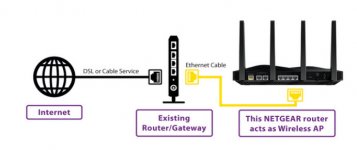
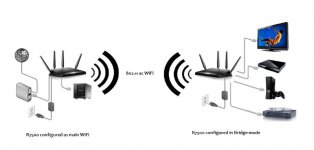
The easiest way would depend on how good your wifi signal is at the point where the garage line comes into the house. If you have a second router, you should be able to go into the options and set it up as a 'bridge'. (A device in Bridge mode gets the internet connection from WiFi. A device in Access Point mode, gets the internet connection from an ethernet connection)

So if you had a good signal over wifi, you would then connect your garage line to it and you would be good to go.

In access point or bridge mode, the internal DHCP server of the device is disabled

Bridge Mode using a WiFi connection
attachment.php


Access Point mode using an ethernet connection
attachment.php
 

Attachments

  • TRI-542.jpg
    TRI-542.jpg
    37.2 KB · Views: 473
  • TRI-543.jpg
    TRI-543.jpg
    31.1 KB · Views: 470
Last edited:

Innovate1

Well-known member
Joined
Jul 28, 2014
Messages
4,295
Location
Illinois near St. Louis, Missouri
Or you could use a router with wifi disabled at the cable entry to get the two ethernet feeds and do DHCP. Then set up a second router for wifi and disable NAT on that one (or just plug all the cables in the LAN ports). I like to use wired where I can.
 
OP
C

C91x

Well-known member
Joined
Aug 26, 2015
Messages
267
Location
Prescott Valley
Well it worked. I didn't permanently run anything but I had internet in the garage. Laptop and echo dot worked fine. Phone kept asking me if I trusted the network and it wasn't protected but the router security setting were at the default.

Attached a pic of the "doohiky"20200117_171030.jpg

Sent from my SM-G960U using The Garage Journal mobile app
 

bottom feeder

Well-known member
Joined
Dec 10, 2012
Messages
331
Location
Utah
The "doohiky" is an Optical Network Terminal, or ONT. Yours has two active connectors - the lowest one is the Internet connection, and the one above it provides your landline telephone connection.
 

wyliesdiesels

Well-known member
Joined
Aug 14, 2012
Messages
20,071
Location
Modesto, CA
Well it worked. I didn't permanently run anything but I had internet in the garage. Laptop and echo dot worked fine. Phone kept asking me if I trusted the network and it wasn't protected but the router security setting were at the default.

Attached a pic of the "doohiky"20200117_171030.jpg

Sent from my SM-G960U using The Garage Journal mobile app

What is it that worked? You only have 1 ethernet port and assumedly one public IP address.
 
OP
C

C91x

Well-known member
Joined
Aug 26, 2015
Messages
267
Location
Prescott Valley
What is it that worked? You only have 1 ethernet port and assumedly one public IP address.

I had internet in the shop and in the house.

Internet out on the ONT went to the switch

Then I plugged in the ethernet for the house and another run for the shop

Then i had internet in both the shop and the house.

speed test showed I didn't have any drop in speed.
 
To avoid these ads, REGISTER NOW!

u2slow

Well-known member
Joined
Nov 20, 2011
Messages
3,611
Location
BC
Is there a way to still configure this with the same SSID so it switches between the two seamlessly.

Yes. The key thing seems to be channel selection.
https://www.hanselman.com/blog/Conf...thOneSSIDNetworkNameAtHomeForFreeRoaming.aspx

I gave up trying because I couldn't make it reliable. My routers are quite different ages/technologies; and 3-4 neighbours' wifi is in range also. I got more stable results with different SSID's.

Also found the tin siding on my shop is quite a signal barrier, so in the house or yard I only pickup the house signal, and in the shop and beyond I only pickup the shop signal. Put both networks in my phone and it flips between them as needed.
 

Denwood

Well-known member
Joined
Sep 22, 2014
Messages
4,202
Location
Thunder Bay, Ontario, Canada
Well it worked. I didn't permanently run anything but I had internet in the garage. Laptop and echo dot worked fine. Phone kept asking me if I trusted the network and it wasn't protected but the router security setting were at the default.

Attached a pic of the "doohiky"20200117_171030.jpg

Sent from my SM-G960U using The Garage Journal mobile app

When you said you connected a switch to the ONT, that is not cool as you may have openly exposed some devices to the interwebs. Move your router to the ONT. Plug your router WAN port to the ONT Internet port. You can add small switches cascading from the LAN ports on your router. So a small switch (or access point like the netgear EX7000) where the router was previously, and another in your garage. This assumes your ONT is inside...
 

wyliesdiesels

Well-known member
Joined
Aug 14, 2012
Messages
20,071
Location
Modesto, CA
I had internet in the shop and in the house.

Internet out on the ONT went to the switch

Then I plugged in the ethernet for the house and another run for the shop

Then i had internet in both the shop and the house.


speed test showed I didn't have any drop in speed.

So do you have 2 routers/firewalls now? one in the shop and one in the house? If not then youre exposing things to the internet like said above.

Is there a way to still configure this with the same SSID so it switches between the two seamlessly.

yes, same SSID and password but make sure your APs are running on different channels, as said above, otherwise you will have issues.

When you said you connected a switch to the ONT, that is not cool as you may have openly exposed some devices to the interwebs. Move your router to the ONT. Plug your router WAN port to the ONT Internet port. You can add small switches cascading from the LAN ports on your router. So a small switch (or access point like the netgear EX7000) where the router was previously, and another in your garage. This assumes your ONT is inside...

Look at pics in #11. His ONT is on the outside of the house and there isnt much room in there.
 
OP
C

C91x

Well-known member
Joined
Aug 26, 2015
Messages
267
Location
Prescott Valley
Thanks for the concern and feedback.

I have a Google OnHub router in the house and a Netgear N750 router in the garage. WPA2 is enabled on both routers. I don't have any neighbors close enough to connect to my WiFi but I still want the network secure.

I still get a Verizon notification on my phone asking me if I trust the network every time I'm in the shop. I've double checked that the security is enabled and it requires a password to connect but still confused.
 

Denwood

Well-known member
Joined
Sep 22, 2014
Messages
4,202
Location
Thunder Bay, Ontario, Canada
You're almost there. You want a router, not a switch at the ONT. WAN on router port plugged into ONT network port.

1. Router1 at ONT location. ONT to Router1 WAN port.

2. Your old router location becomes Access point 1 (AP1). It's connected to Router1 (at ONT) switch port 1.

3. Your shop is AP2. It's connected to Router1(at ONT) switch port 2.

Best bet is to use something like the Netgear EX7000 or similar for your access points It's a WIFI access point with 5 switch ports. You can also use cheap routers as access points, just don't use the WAN ports, turn off DHCP, and set SID/password the same for both units.

Some routers have an option to toggle function between router and access point mode..so you can use that too if supported at AP1, or AP2

These would work for cheap access points: https://www.amazon.ca/dp/B01LFSDZCU/?tag=atomicindus04-20
Netgear WAC104-100NAS Dual Band 802.11ac Wireless Access Point

Most WIFI "extenders" also can be set up as wired access points..that's what I use. 1 router, + 2 wired access points to cover WIFI in the house and shop. An access point with multiple network ports just lets you connect security cameras etc. so they have fast access to your "backhaul" Cat5/6 network runs to the router.

I'd strongly suggest a few of these:

https://www.amazon.ca/dp/B00FY7GMEW/?tag=atomicindus04-20

at both ends of your Cat5 runs from the ONT. I've lost one AP to lightning...added the protection after. It's very easy to see a voltage potential difference between two sites with any distance separating them during a storm...
 
Last edited:

wyliesdiesels

Well-known member
Joined
Aug 14, 2012
Messages
20,071
Location
Modesto, CA
You're almost there. You want a router, not a switch at the ONT. WAN on router port plugged into ONT network port.

1. Router1 at ONT location. ONT to Router1 WAN port.

2. Your old router location becomes Access point 1 (AP1). It's connected to Router1 (at ONT) switch port 1.

3. Your shop is AP2. It's connected to Router1(at ONT) switch port 2.

Best bet is to use something like the Netgear EX7000 or similar for your access points It's a WIFI access point with 5 switch ports. You can also use cheap routers as access points, just don't use the WAN ports, turn off DHCP, and set SID/password the same for both units.

Some routers have an option to toggle function between router and access point mode..so you can use that too if supported at AP1, or AP2

These would work for cheap access points: https://www.amazon.ca/dp/B01LFSDZCU/?tag=atomicindus04-20
Netgear WAC104-100NAS Dual Band 802.11ac Wireless Access Point

Most WIFI "extenders" also can be set up as wired access points..that's what I use. 1 router, + 2 wired access points to cover WIFI in the house and shop. An access point with multiple network ports just lets you connect security cameras etc. so they have fast access to your "backhaul" Cat5/6 network runs to the router.

I'd strongly suggest a few of these:

https://www.amazon.ca/dp/B00FY7GMEW/?tag=atomicindus04-20

at both ends of your Cat5 runs from the ONT. I've lost one AP to lightning...added the protection after. It's very easy to see a voltage potential difference between two sites with any distance separating them during a storm...

The above is the best setup as it allows all devices to be on the same network

As you have it now, you have 2 separate networks connected via the internet.

Im curious if your routers have different public addresses. Almost all residential internet services only come with one public IP address.
 

wyliesdiesels

Well-known member
Joined
Aug 14, 2012
Messages
20,071
Location
Modesto, CA
huh. Most ISPs don’t even give you ONE “public” IP. They usually charge extra and- these days- may require you to provide a rationale for needing this. Just FYI, not important to this thread.

What?

Every single internet service needs a public IP to function.

Are you referring to static IPs? If so, theres dynamic public IPs and static public IPs.

But ISPs do give public IP addresses to every customer. Just depends on what type.

Residential cant get statics. But thats usually not necessary anyways.
 

HenryAZ

MEMBER EMERITUS
Joined
Sep 18, 2012
Messages
1,054
Location
South Congress AZ
What?

Every single internet service needs a public IP to function.

Are you referring to static IPs? If so, theres dynamic public IPs and static public IPs.

But ISPs do give public IP addresses to every customer. Just depends on what type.

Residential cant get statics. But thats usually not necessary anyways.
Some ISPs put their customers behind a NAT device (same as your home network), so the IP assigned to the customer router is from the reserved (non-routable) IP pool (10.x.x.x, 172.16.x.x, 192.168.x.x). The public, routable, IP is at the other end of the ISP's NAT device.

Also, some ISPs DO issue static IPs to residential customers. I have one, from CenturyLink's VDSL service. $10/month extra, and it is so I can operate an smtp server, which has to have a static address. Their documentation says otherwise, but they issued me one nonetheless.
 

wyliesdiesels

Well-known member
Joined
Aug 14, 2012
Messages
20,071
Location
Modesto, CA
Some ISPs put their customers behind a NAT device (same as your home network), so the IP assigned to the customer router is from the reserved (non-routable) IP pool (10.x.x.x, 172.16.x.x, 192.168.x.x). The public, routable, IP is at the other end of the ISP's NAT device.

yes but thats NOT what ARD said. He said quote: "Most ISPs don’t even give you ONE “public” IP" which is not the same thing as what you said. That is incorrect and impossible. Every internet service needs to have a public IP. Whether its assigned to the ISPs gateway equipment(modem, gateway, router, etc) or the customers equipment, there is still a public IP assigned to the service. Which device actually gets the public IP is inconsequential in this discussion.

Furthermore, an ISP assigning the public IP to their gateway device is not an issue if their hardware supports whats called "IP passthrough" capabilities(some ISPs term this "bridge mode" which is not the right term). Turning on IP passthrough assigns the public IP address to the customers router and sends all traffic to it.

I've done this exact thing when I had AT&T uverse because I had to rent their vDSL modem in order to get the service.

Wasnt a big deal and it worked just fine.

I've configured hundreds of internet services, both for residential and commercial clients, and every single one of the services had at least 1 public IP address. I've done this for services from numerous carriers and numerous connection methods- AT&T Uverse DSL/ metro EOC (ethernet over copper) or Fiber/ copper T1 & T3 via coax and fiber, Comcast cable internet & fiber, Century Link copper T1 and Fiber (delivered through either AT&T or Comcast), Charter cable internet and Fiber, & Frontier fiber.

But every single one of them had at least one public IP either dynamic (residential) or static (commercial). So to say that "Most ISPs don’t even give you ONE “public” IP" is patently and technologically false.

An internet service would not function without at least one public IP address. What do you think the "NAT device" you previously mentioned does?

BTW "NAT" is not a device, it is a method. A consumer router can have NAT capability but terming it a "NAT device" is not correct.

Also, some ISPs DO issue static IPs to residential customers. I have one, from CenturyLink's VDSL service. $10/month extra, and it is so I can operate an smtp server, which has to have a static address. Their documentation says otherwise, but they issued me one nonetheless.

None of the ISPs out here give static IPs to residential customers. you cant even order it as an option. Thats why i said that earlier. Obviously they do in other states but I was unaware. So YMMV

I've worked on century link circuits delivered via AT&T, comcast or charter lines but century link does not offer any kind of residential service out here so I was unaware of any ISP giving static IP addresses to residential services.

FWIW, I've had my comcast service for 1.5yrs now and rebooted my modem a couple of times during that period and I've always gotten the same public IP address. Comcast doesn't change their customers dynamic addresses despite them being "dynamic" and not static....
 

jeepxj

Well-known member
Joined
Mar 2, 2008
Messages
17,891
yes but thats NOT what ARD said. He said quote: "Most ISPs don’t even give you ONE “public” IP" which is not the same thing as what you said. That is incorrect and impossible. Every internet service needs to have a public IP. Whether its assigned to the ISPs gateway equipment(modem, gateway, router, etc) or the customers equipment, there is still a public IP assigned to the service. Which device actually gets the public IP is inconsequential in this discussion.

Furthermore, an ISP assigning the public IP to their gateway device is not an issue if their hardware supports whats called "IP passthrough" capabilities(some ISPs term this "bridge mode" which is not the right term). Turning on IP passthrough assigns the public IP address to the customers router and sends all traffic to it.

I've done this exact thing when I had AT&T uverse because I had to rent their vDSL modem in order to get the service.

Wasnt a big deal and it worked just fine.

I've configured hundreds of internet services, both for residential and commercial clients, and every single one of the services had at least 1 public IP address. I've done this for services from numerous carriers and numerous connection methods- AT&T Uverse DSL/ metro EOC (ethernet over copper) or Fiber/ copper T1 & T3 via coax and fiber, Comcast cable internet & fiber, Century Link copper T1 and Fiber (delivered through either AT&T or Comcast), Charter cable internet and Fiber, & Frontier fiber.

But every single one of them had at least one public IP either dynamic (residential) or static (commercial). So to say that "Most ISPs don’t even give you ONE “public” IP" is patently and technologically false.

An internet service would not function without at least one public IP address. What do you think the "NAT device" you previously mentioned does?

BTW "NAT" is not a device, it is a method. A consumer router can have NAT capability but terming it a "NAT device" is not correct.


None of the ISPs out here give static IPs to residential customers. you cant even order it as an option. Thats why i said that earlier. Obviously they do in other states but I was unaware. So YMMV

I've worked on century link circuits delivered via AT&T, comcast or charter lines but century link does not offer any kind of residential service out here so I was unaware of any ISP giving static IP addresses to residential services.

FWIW, I've had my comcast service for 1.5yrs now and rebooted my modem a couple of times during that period and I've always gotten the same public IP address. Comcast doesn't change their customers dynamic addresses despite them being "dynamic" and not static....

you can upgrade your residential service to business and get a static IP anywhere on their network for comcast/xfinity. same lines. just more money to the comcast folks.

just tossing some more fuel on this fire as i pass thru. enjoy
 

Denwood

Well-known member
Joined
Sep 22, 2014
Messages
4,202
Location
Thunder Bay, Ontario, Canada
Thanks for the concern and feedback.

I have a Google OnHub router in the house and a Netgear N750 router in the garage. WPA2 is enabled on both routers. I don't have any neighbors close enough to connect to my WiFi but I still want the network secure.

I still get a Verizon notification on my phone asking me if I trust the network every time I'm in the shop. I've double checked that the security is enabled and it requires a password to connect but still confused.

You're confusing secure WIFI with a router that is secured. If you refer back to my post and place a router at your ONT...with access points in your house and garage, your issues will be resolved.
 

wyliesdiesels

Well-known member
Joined
Aug 14, 2012
Messages
20,071
Location
Modesto, CA
you can upgrade your residential service to business and get a static IP anywhere on their network for comcast/xfinity. same lines. just more money to the comcast folks.

just tossing some more fuel on this fire as i pass thru. enjoy

They wouldnt do that for my service.
 

HenryAZ

MEMBER EMERITUS
Joined
Sep 18, 2012
Messages
1,054
Location
South Congress AZ
yes but thats NOT what ARD said. He said quote: "Most ISPs don’t even give you ONE “public” IP" which is not the same thing as what you said. That is incorrect and impossible. Every internet service needs to have a public IP. Whether its assigned to the ISPs gateway equipment(modem, gateway, router, etc) or the customers equipment, there is still a public IP assigned to the service. Which device actually gets the public IP is inconsequential in this discussion.
My apologies, I did not mean to start up a whole big argument. The gist of this entire thread was that the publicly routable IP was assigned to the CPE. I did miss your comment at the tail end of:

But ISPs do give public IP addresses to every customer. Just depends on what type.

Of course everyone needs a routable IP somewhere inline to gain access to the routed Internet, since IP is a routed protocol. My only point there was that it is not always at the CPE, but sometimes at the other end of the ISP's cloud. I do not believe that a reserved IP (not routable on the public Internet), assigned to the CPE, is a "public IP", no more than the IP address of this Mac I'm typing on has a public IP.


BTW "NAT" is not a device, it is a method. A consumer router can have NAT capability but terming it a "NAT device" is not correct.
This is just semantics and I believe you knew what I meant, i.e., a device that performs NAT, such as a router, access point, layer 3 switch, etc.
 
To avoid these ads, REGISTER NOW!
Top Bottom