To avoid these ads, REGISTER NOW!

Help wiring a wifi door opener

machovato

Member
Joined
Nov 27, 2020
Messages
5
Location
Houston, TX
Help wiring a wifi door opener *solved*

Hello all,

New guy here. I've just started to work on my garage tech. And I've hit a snag on my first upgrade. I bought a Z-Wave compatible door opener (GoControl GD00Z-4) and I'm trying to wire it my existing door opener (Chamberlain 7675). Sounds easy enough, but I don't think I've done it right. Here are the instruction and the back of the Chamberlain...


You can see I tapped the two white wires into the left two slots, without success. Those are the terminals for the wall button. The right two terminals might be for the remotes?

Can someone chime in and tell me where I need to connect this GoControl device? Thanks!!
 

Attachments

  • instructions.jpg
    instructions.jpg
    117 KB · Views: 78
Last edited:
To avoid these ads, REGISTER NOW!
OP
M

machovato

Member
Joined
Nov 27, 2020
Messages
5
Location
Houston, TX
Looks like you hooked it up correctly. Does it give any trouble shooting guide?

I'm digging around in the SmartThings forum and it appears the opener has some type of "smart" control panel... which does not function as a simple momentary-contact switch. The GoControl essentially shorts the connection to activate.

The hack seems to be to solder the GoControl to a wireless remote and let it send the open/close signal to the opener. I would just have to change the battery to the remote once in a while.

I have an extra remote so I'll try it. Why is it so hard to make things easier?! :shocking:
 
OP
M

machovato

Member
Joined
Nov 27, 2020
Messages
5
Location
Houston, TX
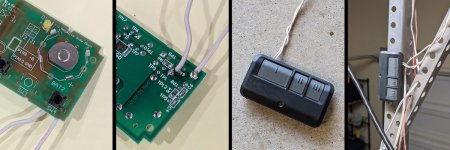
A quick update. I soldered the GoControl to the circuit board of a spare garage door opener remote. There are four posts on the button, so to find the correct two posts I just made contact with two of them with a wire to short it.

Now the GoControl shorts the button on the remote, which opens/closes the door. Pretty easy now that I've done it. (in spite of burning my finger with the soldering gun) :lol:
 

Attachments

  • garage-door-hack.jpg
    garage-door-hack.jpg
    125.6 KB · Views: 40

visionguru

Well-known member
Joined
Jan 2, 2017
Messages
1,233
Location
Chicago
...
Now the GoControl shorts the button on the remote, which opens/closes the door. Pretty easy now that I've done it. (in spite of burning my finger with the soldering gun) :lol:


Great job to have fixed the problem. You did do it the harder way though.
Chamberlain does make a WiFi hub, which does not require any hardwiring to the garage door opener.
Chamberlain - MyQ Smart Garage Hub
 
OP
M

machovato

Member
Joined
Nov 27, 2020
Messages
5
Location
Houston, TX
Yes you are right. I did see that but I had already purchased the GoControl.

The main reason I chose this was because of the Z-Wave protocol, which connects to my Samsung SmartThings hub. I can manage all my smart devices in one app.

I program "rules" that trigger events. For example, when I drive away from my home, if my garage door is open, to automatically close. Or if it's still open after midnight, to send me a notification on my phone. Stuff like that.
 
To avoid these ads, REGISTER NOW!

blz2dwl

Member
Joined
Dec 7, 2012
Messages
7
I'm digging around in the SmartThings forum and it appears the opener has some type of "smart" control panel... which does not function as a simple momentary-contact switch. The GoControl essentially shorts the connection to activate.

The hack seems to be to solder the GoControl to a wireless remote and let it send the open/close signal to the opener. I would just have to change the battery to the remote once in a while.

I have an extra remote so I'll try it. Why is it so hard to make things easier?! :shocking:

Curious about this, as I am upgrading my openers but want to continue to use my GoControl controllers. Even with the new Chamberlain, the wall switch is still a 2-wire momentary switch, right? So why would that not work with the GoControl wiring? No matter how "smart" the Chamberlain is, the wall switch input is still just 2 wires. It seems like the GoControl would still work as a direct-wire solution.
 
OP
M

machovato

Member
Joined
Nov 27, 2020
Messages
5
Location
Houston, TX
Curious about this, as I am upgrading my openers but want to continue to use my GoControl controllers. Even with the new Chamberlain, the wall switch is still a 2-wire momentary switch, right? So why would that not work with the GoControl wiring? No matter how "smart" the Chamberlain is, the wall switch input is still just 2 wires. It seems like the GoControl would still work as a direct-wire solution.

I suppose you could wire the GoControl directly to the wall switch. That should work. There are a couple long threads on this topic in the SmartThings forums. As I said, connecting the GoControl wires directly into the Chamberlain terminals didn't work.
 

jlv03

Well-known member
Joined
Jan 19, 2020
Messages
357
Location
SE IA
Curious about this, as I am upgrading my openers but want to continue to use my GoControl controllers. Even with the new Chamberlain, the wall switch is still a 2-wire momentary switch, right? So why would that not work with the GoControl wiring? No matter how "smart" the Chamberlain is, the wall switch input is still just 2 wires. It seems like the GoControl would still work as a direct-wire solution.
The Chamberlain wall switch communicates with the opener using the two wires. It looks like shorting the wires no longer works to tell the opener to open/close.
 

Denwood

Well-known member
Joined
Sep 22, 2014
Messages
4,307
Location
Thunder Bay, Ontario, Canada
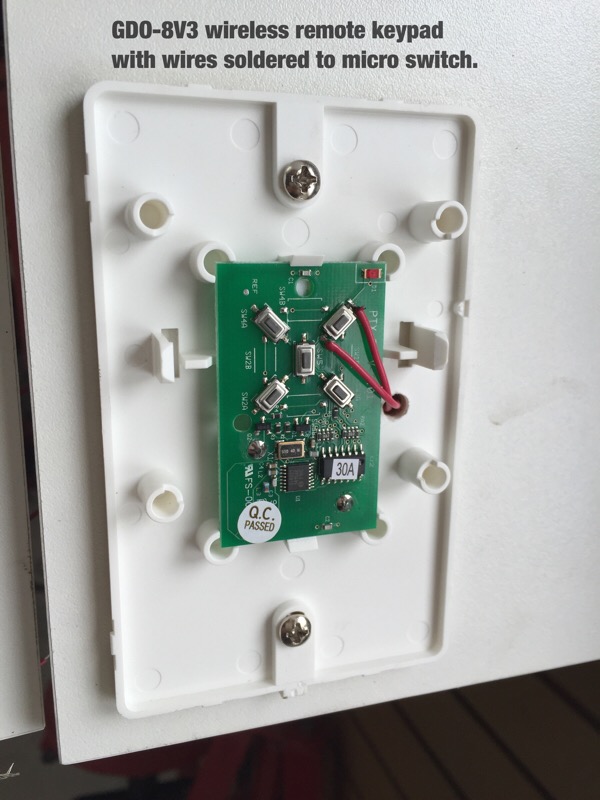
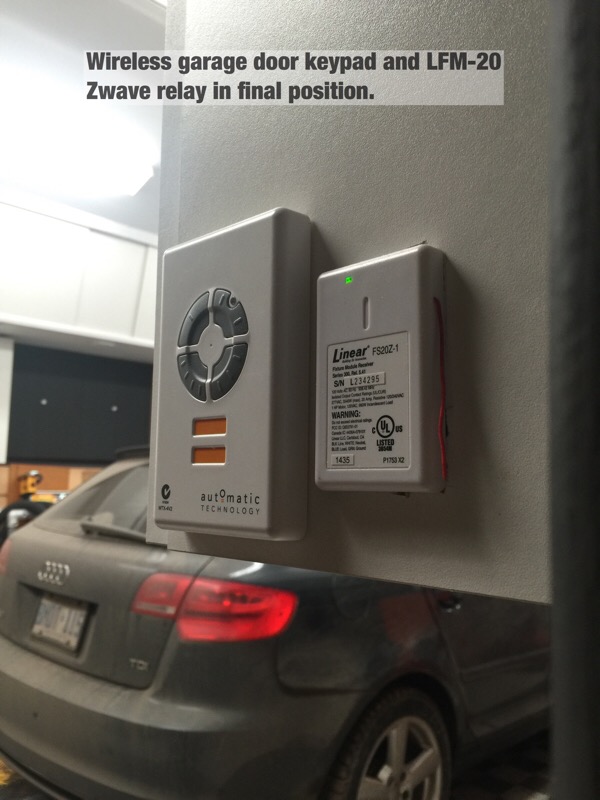
I had the same issue. Used an LFM20 (not reliable..don't use one), but am replacing the dry contact relay with a Zooz unit. You don't really need anything more expensive than a $50 zwave relay (like the Zooz) and a sensor on the door. You can see how I've just soldered the dry contact leads to the open/close wireless unit. The LFM20 unit was randomly opened the door, and apparently "phantom" signals are an issue with these. The Zooz unit has much better reviews and is about $30 less than the Mimolite. I've used a few Mimos and they are reliable.

garage_st6.jpg


garage_st9.jpg


Rboy has a good app for managing the garage door with auto close options with conditions etc. I use their app for my zwave locks as well. You can buy a "lifetime" access code for a few bucks.
 

blz2dwl

Member
Joined
Dec 7, 2012
Messages
7
The Chamberlain wall switch communicates with the opener using the two wires. It looks like shorting the wires no longer works to tell the opener to open/close.

Gotcha. I ended up getting "dumb" openers from Genie and reusing my existing GoControl z-wave controllers. The benefit of getting the dumb openers was my money went toward getting a beefier motor (1-1/4 hp) and backup battery for the same price as the Chamberlain 3/4 hp unit with MyQ.

As an aside, belt drive openers are SOOO much quieter than gear drive openers!
 
To avoid these ads, REGISTER NOW!
Top Bottom