To avoid these ads, REGISTER NOW!

How does residential internet wiring work?

JackOfDiamonds

Well-known member
Joined
Jul 31, 2020
Messages
706
Location
Idaho (USA)
I mean, how does the physical layer usually work in houses 1990's-era subdivisions?

It seems like networking is wild west. Are there any actual residential codes for this type of thing? I think this was originally infrastructure for cable TV but got used for internet now. Now all I care about is the internet. But it doesn't seem like electrical wiring, where I can look up codes on the "correct" way to do it.

How this all started: I want hard-wired internet connections to my TV. So I plan to run CAT6 wiring from my Wifi router to my TV on the other side of the house. I think I can figure out that part out by myself. I will just run CAT6 cable through the crawlspace and put in ethernet jacks. But then I got to thinking that I should also re-do the 30-year-old cable wiring in the wall that goes between the utility box and my cable modem first. Then I can move my cable modem and/or router to a better location in the house to start with.

This is the whole chain between the Internet and my TV:

1. mystery wire from the cable company conduit into the cable facility box on garage exterior wall (can't see it)
2. coax cable into my garage wall (hidden by sheetrock) and running all over my house haphazardly, to various cable jacks in the house. Most of these coax runs are dead at this point, but one of them is live and I have my cable modem plugged into it. I have no idea the condition of those cables.
3. 1-foot cat6 patch cable between my cable modem and Wifi router
4. individual runs of cat6 to my TV (and other runs in the future)

Here's the question: Is it better to keep the coax run No.2 as short as possible, have my cable modem close to the facility box in the garage, then run Cat6 a long ways to my Wifi router in a central location?

Or would it be better to run coax to a central location, keep a short patch cable of CAT6 between my cable modem and wifi router, then branch runs to the TV?

Does the decision change if the coax is all 30+ years old and possibly compromised?

The only live coax I've ever found actually pops up again OUTSIDE the house on the other side, goes through a rubber grommet into the wall, and goes into my cable modem. I have no idea how it's routed in between the facility box and my modem. So I'm thinking it might be good to cut out some sheetrock in the garage and just re-do wiring directly from the facility box with new coax, just re-do it completely, I just don't know if I need special tools to crimp coax cable, or the rules for routing coax correctly, or how far I should run coax vs. CAT6, or what.
 
To avoid these ads, REGISTER NOW!

FredWanaker

Well-known member
Joined
Mar 27, 2021
Messages
1,470
Location
NorCal
I normally don't have time to read lengthy how do I so forgive me. Here are some basics

Coax can be used for Internet, TV and digital all thru the house but it is not commonly done.
Fiber can be used also but it is not that common yet
WI-fi is quite common these days but has limited distance without access points being added
Cat 5e, Cat6 are used for Internet in a hard wired system. Typically 1Gb is the max speed without special equipment. All items on the network need to be 1Gb to get 1Gb. If an older 100M is installed it pulls the whole system down to 100M.

It is impossible to determine in advance what will be the way Internet is connected say 10 years from now. There are many options. You use whatever your current Internet Service Provider (ISP) is using rather than anticipate. 10 years ago I could not have predicted that say Verizon would have a reasonable device you could use in your house with wi-fi to get Internet and streaming.

A typical setup with cable tv is coax or if you are lucky, fiber to the house. Then it is split. One line goes to your modem for the Internet/VOIP, and the other to the TV or TV's. In my house I run coax from the street at a 1GB speed down, 45M up, to my splitter and moca filter on the side of the house. One run of new Cpmcast approve Coax with approved connectors (special tool to install) goes to the cable TV box and the other to the office where the Internet modem is. All the computers in the house, Stereo (pandora), TV apps on the Sony TV, apps on the Sony Blu Ray, run from a router via Cat 5e plugged into the coax modem. The cameras and phones run off wi-fi on the router.

Someone else might have a wi-fi box from Verizon that uses 5G then broadcasts wi-fi all over their house. Someone else might be using Elon Musk's new satellite system, for Internet. Someone else might be using DSL over copper lines to a modem to a router and wi-fi etc. There is no single way of doing things anymore.

Utilities go obsolete over time, they change. Anyone who doesn't believe that walk thru an old part of a downtown are and you may see street lights that have fittings for gas lines but no longer are gas lamps. Dialup is mostly gone and many Telco's are tearing out unused copper lines since many people get VOIP these days or use cell phone instead of POTS.
 

FredWanaker

Well-known member
Joined
Mar 27, 2021
Messages
1,470
Location
NorCal
Make an inventory of the devices you have, and how they connect to the Internet -meaning are they wi-fi, cat5e lan, both etc.. Then from that figure out how you will lay out your system. If you have not wired Cat5e or coax connectors before, they require a little knowledge and dexterity.
 

dcg9381

Well-known member
Joined
Jun 20, 2018
Messages
11,759
Location
Austin, TX
Here's the question: Is it better to keep the coax run No.2 as short as possible, have my cable modem close to the facility box in the garage, then run Cat6 a long ways to my Wifi router in a central location?

Or would it be better to run coax to a central location, keep a short patch cable of CAT6 between my cable modem and wifi router, then branch runs to the TV?
The internet provider can measure "signal" at the end of your coax cable and give you an indication of the health of that cable. Coax can actually do more distance (most circumstances) than Cat5/6. I wouldn't assume (without some cable company diagnostics) that your coax is limiting anything necessarily. So the answer is "we don't know". But one way to "guess" without the cable company is to hard wire a computer into your cable modem and run a speed test - see if you're getting the rated speed that you're paying for with internet service.


I centralize all my CAT6 cable, but that's more about distribution and I hard wire almost everything that stays in one spot. CAT6 is good to 200'+ for "rated speed". It's unlikely that you'll be hitting the limits of CAT6 speed in a normal residence with normal length runs. Hard wiring devices is almost always better, but modern wifi is pretty fast.. There's a little "art" (science) to tuning wifi in a residence though.
 

AP514

Well-known member
Joined
Jan 23, 2014
Messages
768
Location
Pearland, Tx
Typically 1Gb is the max speed without special equipment. All items on the network need to be 1Gb to get 1Gb. If an older 100M is installed it pulls the whole system down to 100M.
Um I do not think this is correct...If your router or cable can give you 1GB then hooking up a Printer that can only handle 100m will not slow the rest of your internet down. It will only slow the speed of the unit communicating with the Printer to the printers max speed.
All units will still talk to the net at 1GB(or the fastest speed each unit can up to 1 GB).
 
OP
J

JackOfDiamonds

Well-known member
Joined
Jul 31, 2020
Messages
706
Location
Idaho (USA)
I don't really care about maximum bandwidth. I am playing online games and just want to minimize latency and jitter to the minimum possible and prevent any lags that tend to happen on wifi even if it's pretty good.

Also, I think my internet gets sketchy in the rain and I wonder if all the random coax has something to do with it.

This is what my connection looks like. I don't even know what to think about this.
 

Attachments

  • PXL_20220304_202147302~2.jpg
    PXL_20220304_202147302~2.jpg
    526.3 KB · Views: 106

Wrench97

Well-known member
Joined
Jun 23, 2018
Messages
12,099
Location
Southeastern Pa
If the coax is from the 90's it too is probably obsolete now.
It's probably RG56 where the better coax is RG6 or RG11, loose fittings can cause leakage of signal and poor internet quality.
I find it best to locate the router as close to where the cable comes in as possible and run cat6 network cable to the PC.
 

lkjk

Well-known member
Joined
Sep 8, 2018
Messages
234
Location
Earth
Um I do not think this is correct...If your router or cable can give you 1GB then hooking up a Printer that can only handle 100m will not slow the rest of your internet down. It will only slow the speed of the unit communicating with the Printer to the printers max speed.
All units will still talk to the net at 1GB(or the fastest speed each unit can up to 1 GB).

Yea, that's not true, your theoretical speed isn't lowered by a slow device, unless it's your modem or router.

Any Coax from the modem back should be the property (responsibility) of the ISP, so if there are issues they should and will fix for free.

Keep in mind your modem has a theoretical max speed, and so does your router, so it's highly possible/likely that your modem is not up to par.

Personally if it were me I wouldn't waste my time hard wiring anything and would just get a wifi mesh system. virtually zero drop in speed anywhere assuming you have a big enough system. At that point it's usually the hardware of the devices you are trying to connect that are dated.
 

FredWanaker

Well-known member
Joined
Mar 27, 2021
Messages
1,470
Location
NorCal
set up a network for 1GB, add a slower device and see what happens. I am a network technician by trade.

Let's say you have a 1GB router and 4 devices attached to it. A is 1gb, B is 1gb, C is 100mb and D is 1gb. When the router goes to send a multicast packet (port to all), it has to consider that not everyone can receive at that speed. Not all packets are unicast (port to port) .
 
Last edited:

lkjk

Well-known member
Joined
Sep 8, 2018
Messages
234
Location
Earth
set up a network for 1GB, add a slower device and see what happens. I am a network technician by trade.

Let's say you have a 1GB router and 4 devices attached to it. A is 1gb, B is 1gb, C is 100mb and D is 1gb. When the router goes to send a multicast packet (port to all), it has to consider that not everyone can receive at that speed. Not all packets are unicast (port to port) .


That's literally false. If you have a wireless device that only supports wifi N and you join a network that is wifi AX, that doesn't make every device switch to N speeds. definitely tons of info out there debunking what youre saying as it is a common myth.
 

quickfarms

Well-known member
Joined
Feb 14, 2021
Messages
1,027
Location
Southern California
My advice is to run all the phone, network and cable lines in low voltage conduit if it is not easily accessible that way when the technology changes the upgrades are easier.

I have multiple unused cat 5e lines running throughout my house, shop and office. Most were installed before WiFi was common and now support the mesh system.

all of my printers are hard wired that way I can be in the house and print in the office, use the 11x17 printer or the plotter

this house dates to 1878
 

dcg9381

Well-known member
Joined
Jun 20, 2018
Messages
11,759
Location
Austin, TX
Shoot. I'm still terminating wires, 8 months after taking residency in the house. I think I've only got 60 more ends to do. Old man hands, eyes, and CAT6, it's not fun.

I've got 2 runs of 1" conduit in the house to the "media closet" "just in case". Agree that the only way to future proof is conduit. But really, I think it's going to be a while before most homes NEED 1GB+.

If you want a no-so-cheap suggestion for Wi-FI, Unifi's Dream Machine, adding new access points, monitoring internal network, adding security - its REALLY slick.
 

u3b3rg33k

Well-known member
Joined
Dec 18, 2017
Messages
4,048
+1 for the UDM. but if you're going for multiple APs at home, consider the UDM-SE. it's an 8 port gigabit PoE switch, plus all the other UDM goodies. it'll do their cameras, too if you put in a nice big SATA drive. cheaper than buying a UDM plus a PoE switch.

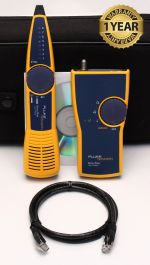
@JackOfDiamonds , my advice, get yourself a toner. I have this kit:

ID all your starts and stops/taps, and label them. hopefully they all end up in a box and it's not trunk and tapped around the house in the attic/walls, but it sounds like it's not that way. maybe make it that way.

having been a former union technician, yes, there are absolutely codes/rules you should follow, but since it's all low voltage, no one really cares if someone slapped some RG59 in your walls all craptastically.

I would run everything to a central location so you don't have equipment in multiple places. if you wanna go nuts, you can put in a mini-rack and use a patch panel with keystone jacks to make your ethernet and coax all tidy.

I no longer make RJ45 ends unless I have no other options. I punch down on jacks, and buy patch cords. if I'm doing a rack, i'll use cat 6 keystone couplers and patch cords to keep it tidy.

if you dedicate the coax line from where it enters the house to the cable modem, the distance won't be an issue. if you're trying to get your internet to work through 15 splitters, you'll probably be upset with the performance. avoid using cable amplifiers, unless you're going to shell out for something nice like a BIDA-100B-43P from Blonder-tongue. don't forget to match the return channel to your cable modem's upstream frequencies (ok but seriously just home-run this don't buy an amp).

set up a network for 1GB, add a slower device and see what happens. I am a network technician by trade.

Let's say you have a 1GB router and 4 devices attached to it. A is 1gb, B is 1gb, C is 100mb and D is 1gb. When the router goes to send a multicast packet (port to all), it has to consider that not everyone can receive at that speed. Not all packets are unicast (port to port) .
Network engineer here. your "router" (actually your gateway) dgaf how fast your devices are. it's attached to the switch that's inside the same box. your switch uses store and forward, unless it's been specifically configured to do otherwise, so if one multicast packet hangs around for an extra millisecond, nothing cares. it's already been put in a buffer.

now if your 100Mb/s device is trying to talk to your gig devices, then yes that conversation will be functionally limited to 100Mb/s. if it's just a broadcast style hello, then it's not enough traffic to matter either way.
 

theoldwizard1

Well-known member
Joined
Feb 22, 2011
Messages
43,169
Location
SE MI
Coax inside your house is useless if you go to streaming TV. It still can be used for OTA TV, but that cable must be separated from the coax that comes into you house and connects to your modem/router (gateway).
 

jmiller_2308

Well-known member
Joined
Nov 16, 2013
Messages
553
Location
Shakopee, MN
I wired the **** out of my house when it was built in 1996. Coax, cat5, phone, sound, ... Everything wired as a star network back to punch downs and distribution blocks. Of that, the sound is currently the most useful. I do use the cat5 and with some tricks am able to get it to do 1Gb even though it shouldn't but it is mostly used as a back haul for connecting mesh routers to a T-mobile 5G internet device. Coax is now useless as I dropped cable as it was too expensive and even though there were 57 channels there was nothing on (credits Bruce Springsteen).

Anyway, my point is that I think @FredWanaker is right on in describing things in his post. From my experience think you may get some benefit from doing all that work but that it will be a lot of work that will likely provide marginal benefit that will quickly fall by the technology wasteland.

At this point in time, with phones, IOT devices, lots of entertainment devices all preferring to be wireless I think you could save yourself a lot of hassle and likely expense if you just invested in good wifi technology. I do believe wireless technology will continue to dominate in the future and that wired technology will be for niche uses in residential likely limited to back haul configurations.
 
OP
J

JackOfDiamonds

Well-known member
Joined
Jul 31, 2020
Messages
706
Location
Idaho (USA)
I think everyone overlooked that I do have a niche use. I specifically want to use a wired connection to my Nintendo so I can have the lowest possible latency for online gaming. Otherwise I would just use my wifi.
 

FredWanaker

Well-known member
Joined
Mar 27, 2021
Messages
1,470
Location
NorCal
then bring in coax from your ISP to the side of your house where the ISP wants it. If underground put it in pvc conduit. At that point add your splitter and moca filter. If you want, find the brand coax that your ISP approves of and run it from that point to your modem location, run the other coax to your TV(s). Run your modem to your router being sure both are on the supported list from your ISP. Run Cat5e or Cat6 to your Nintendo from the router, run also to your computer. If you buy a router buy one that is also wi-fi so you can run your phones, cameras, other wi-fi equipment off it. If you put in the coax yourself, you will need a special tool to put the connectors on. You'll want the water tight ones outdoors. The ISP tech will normally torque them to a specific torque but you can just tighten them with a wrench to a light tightness unless you want to buy the torque tool. We run 1.2 GB to the house. That is more than an individual computer's processor can handle unless one has an exceptional high speed computer. You should be concerned about upstream speeds as well because each TCP/IP packet sends back a reply that it is received or not. Then the computer reassembles the full stream from those packets. If the upstream is slow, it will slow the downstream as the replies get delayed. A really good source for Network and ISP questions is http://dslreports.com You'll find more there than here.
 

FredWanaker

Well-known member
Joined
Mar 27, 2021
Messages
1,470
Location
NorCal
To those who say mix and match. If all the routers and switches are the most modern, they will transmit between each other at the set or auto negotiated rated. However I assure you that you will have a decrease in network efficiency if you add a 100m or a 10m device into a 1g network. You have a network card in your computer whether a plug in card, or wired onto your MB. Even though it is 1g and it may be talking to a 1g port, it will know that some of the conversations are happening at 10m or 100m and it will cause trouble. An analogy is a 30 MPH driver on an 8 lane freeway when everyone else it doing 85mph. They will sense that 30 mph driver and slow even if that driver is not in their lane.
 

reader2580

Well-known member
Joined
Dec 31, 2014
Messages
14,536
Location
Minneapolis, MN
The coax coming in from your cable company seems screwy. It comes up to a coupler and then it goes back underground again. Did the builder or the cable company run the feed for the house underground around the house? The box on the right is for phone and has nothing to do with your coax for cable.

I am lucky and my basement ceiling is mostly open. I ran cat 6 Ethernet from the utility room to pretty much every room of the house except kitchen and bathrooms. I also have a full Unifi wireless network with two APs, but some things I like to go wired with. I don't know if the bedroom Ethernet will ever be used with everything WIFI now, but it was cheap to install. I still have cable TV so I also ran coax to the bedrooms and living room although it may never get used in the bedrooms. I only have one TV in my living room.
 

FredWanaker

Well-known member
Joined
Mar 27, 2021
Messages
1,470
Location
NorCal
If "ethernet flow control" is turned on for the nics, which is by default in most nics, the whole wired network will drop from 1g to 100m if a 100m device is installed in a 1g network. It is normally set that way to avoid buffer overflows and packet loss.
 
To avoid these ads, REGISTER NOW!

quickfarms

Well-known member
Joined
Feb 14, 2021
Messages
1,027
Location
Southern California
Back to the original question. The run from the side of the house to the cable modem should be direct.

no splitters or one max

you need to chase all the cable wires and figure out where the splitters are and if it is not a direct run run a new cable.
 

ScaldedDog

Well-known member
Joined
Jan 15, 2008
Messages
1,065
Location
Sedalia, CO/NSB, FL
I think everyone overlooked that I do have a niche use. I specifically want to use a wired connection to my Nintendo so I can have the lowest possible latency for online gaming. Otherwise I would just use my wifi.
How fast a cable connection are you paying for? Are you using their modem? If so, my suggestions are:

1) Have the cable company test the connection to you modem, as is. That'll tell you if they think the cable, either to your house, or into it, is compromised. Note the speeds and latency you actually get by using speedtest, or something similar.

2) Move the modem to where you want it, using your cable, and see if you goofed anything up by comparing your new test results to the old. You'll likely find no discernable difference. If you're really nuts about it, you could have the cable company test again.

3) Depending on what service you have, buy your own modem. I found that I could get faster than purchased speeds with my own DOCSIS 3.1 modem that with what Comcast provided, even though I was only in the 300mb range.

4) Run your Cat6 cables as you see fit. If your Nintendo is in a cabinet with other devices (e.g. TV, receiver, cable box, etc) put a little GigE switch in the cabinet and run everything there hardwired, with a single wire back to your router.

You can do this cheap, with routers and switches from Best Buy, or expensively, with the Ubiquiti stuff. I went the later route, and am thrilled with it, but you don't have to spend that kind of money if you don't want to. It makes more sense if you use their cameras which are terrific, but also expensive.

Mark
 

wyliesdiesels

Well-known member
Joined
Aug 14, 2012
Messages
20,014
Location
Modesto, CA
There is no standard for residential. So your house couldve been wired any which way

but maybe youre asking how you should run it....
 

wyliesdiesels

Well-known member
Joined
Aug 14, 2012
Messages
20,014
Location
Modesto, CA
Typically 1Gb is the max speed without special equipment.

This is false. you dont need special equipment to go over 1Gbps. just need a router that can aggregate 2 WAN ports and they do exist in the consumer grade devices....

All items on the network need to be 1Gb to get 1Gb. If an older 100M is installed it pulls the whole system down to 100M.....

This is absolutely totally false. a printer or older TV with a 10/100Mbps NIC will not cause the rest of the network to run @ 100Mbps.... that doesnt even make logical sense, as a host running @ 100Mbps has no way to tell a 1Gbps switch to change all its ports to 100Mbps speed.... absolutely false statement....

A typical setup with cable tv is coax or if you are lucky, fiber to the house. Then it is split. One line goes to your modem for the Internet/VOIP, and the other to the TV or TV's. In my house I run coax from the street at a 1GB speed down, 45M up, to my splitter and moca filter on the side of the house. One run of new Comcast approve Coax with approved connectors (special tool to install) goes to the cable TV box and the other to the office where the Internet modem is. All the computers in the house, Stereo (pandora), TV apps on the Sony TV, apps on the Sony Blu Ray, run from a router via Cat 5e plugged into the coax modem. The cameras and phones run off wi-fi on the router.....
its not a special tool. its a compression connector tool and can be bought at home depot...


(you really seem to like the word special lol.....)
 

Max

ALLIANCE MEMBER
Joined
Jun 16, 2018
Messages
3,335
Location
Georgia
OP, you have not said what your current speed from your ISP is or how reliable it is. If it’s reliable and you get the rated speed, I’d leave it alone. Otherwise you are going to do a lot of work just to get back to where you already are.

On the other hand, it seems like you want to move stuff for other reasons. You didn't ask this directly, but it seems like what you want to know is whether it’s better to have the coax or the cat6 cable shorter. The truth is that if you are within the rated maximum length, the ends are terminated correctly, and you are within specs. on the cable, intermediate connectors, etc. - it just doesn't matter. So if you want to move stuff feel free within the limits set by your ISP and cat6.
 

dcg9381

Well-known member
Joined
Jun 20, 2018
Messages
11,759
Location
Austin, TX
set up a network for 1GB, add a slower device and see what happens. I am a network technician by trade.

Let's say you have a 1GB router and 4 devices attached to it. A is 1gb, B is 1gb, C is 100mb and D is 1gb. When the router goes to send a multicast packet (port to all), it has to consider that not everyone can receive at that speed. Not all packets are unicast (port to port) .

That's why some of us don't use "dumb" hubs. Switches solve this issue between higher speed devices, but you're right, you can only talk to the 30mph car at 30mph.

Here, our ISP drop is so close to the house (about 300') that we actually had to attenuate the signal down over co-ax.
 

FredWanaker

Well-known member
Joined
Mar 27, 2021
Messages
1,470
Location
NorCal
This is false. you dont need special equipment to go over 1Gbps. just need a router that can aggregate 2 WAN ports and they do exist in the consumer grade devices....


This is absolutely totally false. a printer or older TV with a 10/100Mbps NIC will not cause the rest of the network to run @ 100Mbps.... that doesnt even make logical sense, as a host running @ 100Mbps has no way to tell a 1Gbps switch to change all its ports to 100Mbps speed.... absolutely false statement....


its not a special tool. its a compression connector tool and can be bought at home depot...


(you really seem to like the word special lol.....)
What? If I say special equipment is needed, and you say to effect, "no that is not true, all you need are a special router and modem with two 1gb ports in them", isn't that a specialized router and modem compared to the most common, or the ones the ISP provides that have only one NIC in them? What the hell is with everyone lately, all they do is whine about the other guy's posts here. It is like that on almost every forum these days. It is like two people arguing that the spelling color is wrong because it should be colour, or curb should be kerb, gray vs grey.
 
OP
J

JackOfDiamonds

Well-known member
Joined
Jul 31, 2020
Messages
706
Location
Idaho (USA)
After reading this thread I think I was wrong about my cable connections. Check my logic.

Actually the utility box on my house is probably for the phone line. I don't have a landline phone, and I have already deleted a couple phone jacks in the house. But if I'm right does this mean I could switch from cable internet to DSL? Is one have a better ping than the other for any reason?

The cable seems to come up to the house and loop right back down into the ground and re-appears in the back where it runs into the house. I'm not sure which leg is which, but one of these goes legs goes to the cable company I think. That means I could restart my wiring here and run new coax straight into the garage right here. I'm surprised these aren't in any kind of locked or weather-resistant box. You would think that water would build up in the conduit or mess up that splice connector, but I live in a desert so maybe they get away with it here.

Does that sound about right?
 

Attachments

  • PXL_20220304_202147302~3.jpg
    PXL_20220304_202147302~3.jpg
    538.3 KB · Views: 101

FredWanaker

Well-known member
Joined
Mar 27, 2021
Messages
1,470
Location
NorCal
go online to this website and run a speed test https://www.speedtest.net/ . A better test is to download their speedtest software https://www.speedtest.net/apps . Keep in mind that your computer or phone can limit the speed too. Your router and modem will have overhead too so a 1gb speed may show up as 950. Compare it to what you pay your ISP for. In answer to the other question. ADSL is usually slower than cable is. We were on ADSL for years then it got too congested, Xfinity pulled fiber to the area and ran 7 homes or so off each fiber line via coax vs the 70 or so they originally had on one coax connection. You need to look at what is available via different ISPs in your area.
 

Max

ALLIANCE MEMBER
Joined
Jun 16, 2018
Messages
3,335
Location
Georgia
Yes, that looks like your cable from your ISP. And as you suggest you can run new cable to that point to replace the existing cable. That looks like a lightning protective device in the middle, so do not remove that.

So far as cable vs dsl, in general cable is much faster than dsl. Also, in many but not all places, the local telcos have lukewarm support for dsl as they’d prefer you were on fiber or cellular. I have both coax and dsl, the dsl is 25 Mb and the cable is 150 Mb.
 
OP
J

JackOfDiamonds

Well-known member
Joined
Jul 31, 2020
Messages
706
Location
Idaho (USA)
This is what the speed test app shows on my phone, using my phone and orbi wifi. I think this is pretty good right? But the problem is sometimes I still drop connections or have lag when gaming. Maybe it's when someone starts the microwave or when my neighbor happens to be on the same wifi channel or something, so I think running Ethernet to my game console is probably the first thing I should try.
 

Attachments

  • Screenshot_20220305-125621~2.png
    Screenshot_20220305-125621~2.png
    48.7 KB · Views: 72

u3b3rg33k

Well-known member
Joined
Dec 18, 2017
Messages
4,048
if it's good depends on what your phone can do, and the plan you're paying for. as for interference, I've seen tons of things eat wifi. baby monitors, cordless phones, microwaves, etc.
That's why some of us don't use "dumb" hubs. Switches solve this issue between higher speed devices, but you're right, you can only talk to the 30mph car at 30mph.

Here, our ISP drop is so close to the house (about 300') that we actually had to attenuate the signal down over co-ax.
I've literally never seen a gigabit hub. hubs ****. just say no to hubs.
 

FredWanaker

Well-known member
Joined
Mar 27, 2021
Messages
1,470
Location
NorCal
I guess one has to click on it. I would try it on a computer. A phone won't give you a true reading because most phones aren't as fast as a wired computer
 

Attachments

  • speed.jpg
    speed.jpg
    24.5 KB · Views: 73

FredWanaker

Well-known member
Joined
Mar 27, 2021
Messages
1,470
Location
NorCal
Can you even buy new hubs these days? Most everything sold are switches, and even those are more and more managed switches with QOS etc in them.
 

wyliesdiesels

Well-known member
Joined
Aug 14, 2012
Messages
20,014
Location
Modesto, CA
What? If I say special equipment is needed, and you say to effect, "no that is not true, all you need are a special router and modem with two 1gb ports in them", isn't that a specialized router and modem compared to the most common, or the ones the ISP provides that have only one NIC in them? What the hell is with everyone lately, all they do is whine about the other guy's posts here. It is like that on almost every forum these days. It is like two people arguing that the spelling color is wrong because it should be colour, or curb should be kerb, gray vs grey.
its not special when comcast is now providing said equipment on new installs and replacements. also one can buy a router @ best buy that has aggregated gigabit ports.

to me special would be something that you cant get off the shelf at best buy or from the comcast tech out of his van or from their customer service counter and has to be SPECIAL ordered....
 

wyliesdiesels

Well-known member
Joined
Aug 14, 2012
Messages
20,014
Location
Modesto, CA
After reading this thread I think I was wrong about my cable connections. Check my logic.

Actually the utility box on my house is probably for the phone line. I don't have a landline phone, and I have already deleted a couple phone jacks in the house. But if I'm right does this mean I could switch from cable internet to DSL? Is one have a better ping than the other for any reason?

whether you could switch to DSL is entirely up to your ISP... ask them... we cant tell you if its available there....

The cable seems to come up to the house and loop right back down into the ground and re-appears in the back where it runs into the house. I'm not sure which leg is which, but one of these goes legs goes to the cable company I think. That means I could restart my wiring here and run new coax straight into the garage right here. I'm surprised these aren't in any kind of locked or weather-resistant box. You would think that water would build up in the conduit or mess up that splice connector, but I live in a desert so maybe they get away with it here.

Does that sound about right?
typically its put in a gray DEMARC box but those connectors are waterproof and so is the cable so no issues with the conduit filling up with water....
 

wyliesdiesels

Well-known member
Joined
Aug 14, 2012
Messages
20,014
Location
Modesto, CA
That's why some of us don't use "dumb" hubs. Switches solve this issue between higher speed devices, but you're right, you can only talk to the 30mph car at 30mph.

Here, our ISP drop is so close to the house (about 300') that we actually had to attenuate the signal down over co-ax.
when was the last time you saw a hub sold at the store?

Can you even buy new hubs these days? Most everything sold are switches, and even those are more and more managed switches with QOS etc in them.
been years since i saw a hub sold in any store
 
Last edited:

FredWanaker

Well-known member
Joined
Mar 27, 2021
Messages
1,470
Location
NorCal
this is what will drop it to 100m if you add a 100m device on the network. This is to prevent buffer overflows when a 100m device gets involved in a 1gb conversation. This is the default setting.

100.jpg
 

wyliesdiesels

Well-known member
Joined
Aug 14, 2012
Messages
20,014
Location
Modesto, CA
this is what will drop it to 100m if you add a 100m device on the network. This is to prevent buffer overflows when a 100m device gets involved in a 1gb conversation. This is the default setting.

100.jpg
Again 100 Mbps host plugged into a gigabit switch does not cause the entire switch to run every port at 100 Mbps. I can say 100% without a doubt your premise is false

I have several hosts on my network that are runnjng at 100 Mbps. The rest of the switch ports are connected to the hosts at gigabit.

My laptop is hardwired to my switch and linked at gigabit. When i do a speed test, I get 720/18 and my internet is 600/15...

If what you claimed was true, then I wouldn't be able to get more than 100Mbps on a speed test to my laptop...
 
Last edited:
To avoid these ads, REGISTER NOW!
Top Bottom