To avoid these ads, REGISTER NOW!

How does residential internet wiring work?

u3b3rg33k

Well-known member
Joined
Dec 18, 2017
Messages
4,047
My understanding is If it has buffer overflows. TCP/IP packets have to re-transmit if they are dropped. One might see a link at Igb but anytime traffic to the 100m device is involved where it creates a buffer overflow in any port involved, then packets have to be re-transmitted. The general rule is when you are setting up a 1GB network try to keep everything 1GB together, and if you have 100m devices try to keep them downstream on a separate switch or better replace them. I had a 24 port netgear switch at a client's business. One port went to an office in the back to a 10/100 switch. On that switch there were two printers. The person who worked in that office had a separate network cable that came back to another port on the 24 port switch. Three servers also went into the 24 port 1gb switch, The client complained that at times the network was slow. One day a friend of one of the co-owners came in with some high end network analysis equipment that I cannot afford. The first thing he did was replace that 10/100 switch with a 1gb switch. The network problem went away. I know it doesn't make sense but I saw it at the state too so I didn't argue but the slowdowns went away. They transfer some very large autocad files. They also had to upgrade their plotters. Thinking it thru, probably a printer would be less prone to creating a buffer overflow because it isn't typically printing 24/7. A switch would be handling traffic 24/7.
once the 100Mb/s link device's buffer is full, you'll end up in a fall-back situation, where you stop sending data to the device until your previous packets are acknowledged (at least, that's how it's supposed to work with TCP. With UDP, the application developer has to handle that themselves). so you'll have very few packets that overflow, if any.

they were probably saturating their uplinks. without QoS enabled, it's really obvious when a (relatively) low priority transfer is stepping on a service that needs higher priority, like VOIP.

in a small environment, I prefer to skip QoS configurations beyond voice (if you even want to bother doing that one), and make sure all uplinks are a bandwidth class above the switchports. so a 48 port gigE switch gets 10G uplinks. now no single user is logically capable of saturating an uplink. my last place had redundant network cores, so each switch got two 10Gig uplinks. each connection would be auto-assigned to the "other" uplink, giving you more bandwidth than having just a failover link.
 
To avoid these ads, REGISTER NOW!

ybnormal

Well-known member
Joined
Jan 3, 2016
Messages
5,002
All it takes is one existence proof that contradicts your theory and you're wrong. Wylie has given you two, and I can see the same behavior on my network. How do you explain that it works for us. Magic?
no, PFM! 😁
 

ybnormal

Well-known member
Joined
Jan 3, 2016
Messages
5,002
now no single user is logically capable of saturating an uplink.
wanna bet? don't be like Fred making that kind of statement.

had a luser at our state employee campus who did indeed saturate the uplink. the ONE link we had to the state network was running slow for at least half a day until network engineers final traced it down. the idiot was uploading his research for his Doctorate to his university account across town....couple hundred gig. this was before large thumb drives and simple portable hard drives that were large enough.

-500+ active users on an Opt-E-Man connection (this was 11 years ago)
-Connections through OPT-E-MAN range from speeds from 5 Mbps to 1 Gbps ---> being a state campus you can be sure they went as cheap as possible
-1 nitwit who decides to upload his research in the middle of the day
 

u3b3rg33k

Well-known member
Joined
Dec 18, 2017
Messages
4,047
wanna bet? don't be like Fred making that kind of statement.

had a luser at our state employee campus who did indeed saturate the uplink. the ONE link we had to the state network was running slow for at least half a day until network engineers final traced it down. the idiot was uploading his research for his Doctorate to his university account across town....couple hundred gig. this was before large thumb drives and simple portable hard drives that were large enough.

-500+ active users on an Opt-E-Man connection (this was 11 years ago)
-Connections through OPT-E-MAN range from speeds from 5 Mbps to 1 Gbps ---> being a state campus you can be sure they went as cheap as possible
-1 nitwit who decides to upload his research in the middle of the day
lol. I was not including "internet" in the category of "uplink". talking LAN not WAN here. and yes, i'm sure you could find a way to broadcast storm the switch and blast 10G of **** at the next hop. but we both know that's not what I meant.

we would get complaints of "slow internet" from internal clients ON GAME DAY. for... THEIR IPHONE, from which THEY were streaming THE GAME. yeah. we didn't investigate complaints of slow internet when we could see all the traffic going to mlb .tv's CDN.
 

Metal-Marc

Well-known member
Joined
Aug 31, 2009
Messages
7,138
Location
Foothills of the Adirondacks
Utilities go obsolete over time, they change. Anyone who doesn't believe that walk thru an old part of a downtown are and you may see street lights that have fittings for gas lines but no longer are gas lamps. Dialup is mostly gone and many Telco's are tearing out unused copper lines since many people get VOIP these days or use cell phone instead of POTS.
Entire floors are now empty in bigger COs.
 

FredWanaker

Well-known member
Joined
Mar 27, 2021
Messages
1,470
Location
NorCal
I've seen entire DC floors converted to a single rack. then you realize the office area you just walked through was all raised floor.
most of the floors in the buildings I worked were raised floors. It allows access to cables and electric underneath.
 
OP
J

JackOfDiamonds

Well-known member
Joined
Jul 31, 2020
Messages
706
Location
Idaho (USA)
Bad news!

I bought a 100ft quad-shielded coax cable from Home Depot (pre-made) and ran it from the RF filter on the side of the house, through garage attic, down to crawl space, and to the middle of the house, and up through the floor to a closet. It worked, but my internet kept dropping out. When I checked the modem, the uplink and downlink lights were typically blinking, so I would reset the power on the modem. It took several minutes for all the lights on the modem to go green again, and then it would work for a while, with good speed results, but it would repeat all the time.

I relocated the modem and router back to the old spot, and re-connected the old wire to the RF filter, and it seemed to connect within a few seconds and so far so good.

Does this mean the cable I bought from home depot was bad? Is there any way to test it? Or do I need to call the cable company and actually have them do something different?

Is coax hyper sensitive to bend radius or being close to electrical wires? I just ran it diagonally across the garage attic on top of a bunch of romex, but I didn't think that would cause interference.
 

FredWanaker

Well-known member
Joined
Mar 27, 2021
Messages
1,470
Location
NorCal
That's fancy. COs have cable trays above the equipment.
only in the cable rooms on each floor, then the cable leave the overhead and dive under the floors. Most of these floors, other than the server rooms have cubicles. When they are reconfigured, or made smaller, wires come up our of boxes on the floors into the bottom of the cubicles. Lots of the server rooms that used to house say 75 - 80 servers now are empty due to virtual servers, and the Cloud. CA is moving much of its servers and software to contractors on the cloud - Amazon, Microsoft etc.. State gets rid of union jobs, space for workers, and pensions, pays more than market to the contracting companies, they donate back to PAC's and political party buttering their bread. Its the $1200 toilet seat game.
 

FredWanaker

Well-known member
Joined
Mar 27, 2021
Messages
1,470
Location
NorCal
Does this mean the cable I bought from home depot was bad?

You can damage coax pulling it too hard. Also, while it is not likely, if you make some really sharp bends in cable that is used for transmitting signals, instead of gentle sweeps, the signal can be degraded. Your connectors could be a problem too.
 
OP
J

JackOfDiamonds

Well-known member
Joined
Jul 31, 2020
Messages
706
Location
Idaho (USA)
The connectors were factory-made connectors that came on the cable...I could cut them off and put new ones on, but if this cable is bad then I might want to return it and get my $35 back.

I made the ASSumption that I would be better off buying a pre-made 100ft cable vs. buying plain coax cable and then putting ends on it myself. For the second time around, should I do the same thing or just buy a roll of coax and some connectors this time?

I think you need an expensive RF tester to test a coax cable, right? I have an oscilloscope, but not a function generator.
 

wyliesdiesels

Well-known member
Joined
Aug 14, 2012
Messages
19,991
Location
Modesto, CA
Bad news!

I bought a 100ft quad-shielded coax cable from Home Depot (pre-made) and ran it from the RF filter on the side of the house, through garage attic, down to crawl space, and to the middle of the house, and up through the floor to a closet. It worked, but my internet kept dropping out. When I checked the modem, the uplink and downlink lights were typically blinking, so I would reset the power on the modem. It took several minutes for all the lights on the modem to go green again, and then it would work for a while, with good speed results, but it would repeat all the time.

100' is most likely too long here. how long is the underground run from the tap in the ROW to the outside of your house?

also thats not an RF filter. its a grounding block

I relocated the modem and router back to the old spot, and re-connected the old wire to the RF filter, and it seemed to connect within a few seconds and so far so good.

Does this mean the cable I bought from home depot was bad?

nope I highly doubt the cable is bad. most likely the cable is too long and therefore your modem doesnt have good enough signal. modems can be sensitive to signal levels, Ive seen it many times..... 100' of RG6 plus whatever length is underground is too long... can you buy a shorter cable and try that?

Is there any way to test it?

yes there is a way to test it. you need a DOCSIS 3.1 QAM meter. but theyre pricey and it doesnt make sense for you to buy one.....


Dont know what speed you have but a gig meter is $2700


Or do I need to call the cable company and actually have them do something different?

nope there isnt anything they could do differently. but you could ask them to come out and measure the signal level at the end of the cable. theyll probably tell you the same thing ive told you about the length and signal level so...

Is coax hyper sensitive to bend radius or being close to electrical wires? I just ran it diagonally across the garage attic on top of a bunch of romex, but I didn't think that would cause interference.

hypersensitive to bend radius? not usually

hypersensitive to electrical wires? definitely not especially when its quad shield...
 
Last edited:

Metal-Marc

Well-known member
Joined
Aug 31, 2009
Messages
7,138
Location
Foothills of the Adirondacks
I made the ASSumption that I would be better off buying a pre-made 100ft cable vs. buying plain coax cable and then putting ends on it myself.

Unless you make a living out of making connectors, you are much better off buying ready made cables.

I think you need an expensive RF tester to test a coax cable, right? I have an oscilloscope, but not a function generator.

You need a TDR to sweep an RF line. That's not for you.
 

u3b3rg33k

Well-known member
Joined
Dec 18, 2017
Messages
4,047
terminating coax is less annoying than putting ends on category cable. too much coiled length is bad. if you bought a 100' cable, and only needed 50', then it should be changed. if you have an extra 6-10', then call that a service loop.

Screen Shot 2022-03-10 at 12.57.16.png


That's fancy. COs have cable trays above the equipment.
There seems to be a move away from deep raised floors. cable abandonment is a real problem, as is cleaning or water leaks. most newer DCs i've seen will use the raised floor for cold air supply only, and all cable is overhead.
 

wyliesdiesels

Well-known member
Joined
Aug 14, 2012
Messages
19,991
Location
Modesto, CA
Unless you make a living out of making connectors, you are much better off buying ready made cables.


You need a TDR to sweep an RF line. That's not for you.
yup and if the cable is good that wont tell him didly about why his connection keeps dropping. what he really needs is a DOCSIS 3.1 QAM meter 🤑
 
Last edited:

u3b3rg33k

Well-known member
Joined
Dec 18, 2017
Messages
4,047
yup and if the cable is good that wont tell him didly about why his connection keeps dropping. what he really needs is a DOCSIS QAM meter 🤑
I used one of those when I re-designed my last sports arena's CATV system. they make things so easy it feels like cheating. you end up getting a "feel" for the constellation and can tell when things are off just by looking at it.
 

Metal-Marc

Well-known member
Joined
Aug 31, 2009
Messages
7,138
Location
Foothills of the Adirondacks
only in the cable rooms on each floor, then the cable leave the overhead and dive under the floors. Most of these floors, other than the server rooms have cubicles. When they are reconfigured, or made smaller, wires come up our of boxes on the floors into the bottom of the cubicles. Lots of the server rooms that used to house say 75 - 80 servers now are empty due to virtual servers, and the Cloud. CA is moving much of its servers and software to contractors on the cloud - Amazon, Microsoft etc.. State gets rid of union jobs, space for workers, and pensions, pays more than market to the contracting companies, they donate back to PAC's and political party buttering their bread. Its the $1200 toilet seat game.

Oh server rooms. I was thinking about older technology that's now mostly out of service.

Capture 3.JPG


Capture 2.JPG

Capture 1.JPG
 
OP
J

JackOfDiamonds

Well-known member
Joined
Jul 31, 2020
Messages
706
Location
Idaho (USA)
100' is most likely too long here....
nope I highly doubt the cable is bad. most likely the cable is too long...
100' of RG6 plus whatever length is underground is too long... can you buy a shorter cable and try that?
nope there isnt anything they could do differently. but you could ask them to come out and measure the signal level at the end of the cable. theyll probably tell you the same thing ive told you about the length and signal level so...

Ok, I'm starting to get the picture. What I don't understand is, where were all these people when I literally created this thread for the purpose of asking if I should extend the coax or extend the cat6, and everyone said it doesn't matter:

if you dedicate the coax line from where it enters the house to the cable modem, the distance won't be an issue.

it seems like what you want to know is whether it’s better to have the coax or the cat6 cable shorter. The truth is that if you are within the rated maximum length, the ends are terminated correctly, and you are within specs. on the cable, intermediate connectors, etc. - it just doesn't matter. So if you want to move stuff feel free within the limits set by your ISP and cat6.

Jeesh, I'm going to have to stop paying you guys so much for free internet advice.

The actual distance of the new run to the new location isn't much longer than the old one. I would say they are about the same. But the actual cable length of the old cable run might be shorter than 100FT, because I have plenty of excess in my 100ft cable. A 100FT cable is longer than I need, but I don't know if 50FT is enough. It sounds like I should buy a roll of RG6 cable and just make it exactly the length I need.

But NOW that everyone is saying that the length of the coax cable actually matters a lot, I'm back to square 1 of maybe I should put the cable modem somewhere closer to the street instead of in the closet, and run a long CAT5 patch cable from the cable modem to the router instead of putting them both in the closet. It would be nice having them both in the same closet but if my internet is better I can have them strung out...would it be a bad idea to leave the cable modem in an unconditioned attached garage? It gets pretty hot in the summer.
 
Last edited:

wyliesdiesels

Well-known member
Joined
Aug 14, 2012
Messages
19,991
Location
Modesto, CA
Ok, I'm starting to get the picture. What I don't understand is, where were all these people when I literally created this thread for the purpose of asking if I should extend the coax or extend the cat6, and everyone said it doesn't matter:

Jeesh, I'm going to have to stop paying you guys so much for free internet advice.

The actual distance of the new run to the new location isn't much longer than the old one. I would say they are about the same. But the actual cable length of the old cable run might be shorter than 100FT, because I have plenty of excess in my 100ft cable. A 100FT cable is longer than I need, but I don't know if 50FT is enough. It sounds like I should buy a roll of RG6 cable and just make it exactly the length I need.

But NOW that everyone is saying that the length of the coax cable actually matters a lot, I'm back to square 1 of maybe I should put the cable modem somewhere closer to the street instead of in the closet, and run a long CAT5 patch cable from the cable modem to the router instead of putting them both in the closet. It would be nice having them both in the same closet but if my internet is better I can have them strung out...would it be a bad idea to leave the cable modem in an unconditioned attached garage? It gets pretty hot in the summer.
i would do that. buy compression fittings, the stripper and the tool. home depot sells it all.

how long is the run from the tap to your house? I've seen some cases where that feed line had to be upgraded to RG11 due to signal loss
 
To avoid these ads, REGISTER NOW!

dcg9381

Well-known member
Joined
Jun 20, 2018
Messages
11,627
Location
Austin, TX
But NOW that everyone is saying that the length of the coax cable actually matters a lot, I'm back to square 1 of maybe I should put the cable modem somewhere closer to the street instead of in the closet, and run a long CAT5 patch cable from the cable modem to the router instead of putting them both in the closet. It would be nice having them both in the same closet but if my internet is better I can have them strung out...would it be a bad idea to leave the cable modem in an unconditioned attached garage? It gets pretty hot in the summer.

The length of the coax CAN matter, it depends on what you're pushing through it and how long it is. That's why I'm telling you to take what you have today, do a speed test AT the cable modem via a hard wired connection. If you're getting rated speed, you're done. Don't make it hard. If you're not getting rated speed, you can call your cable company and they can test the line signal to tell you if it's a cable issue.

You know that all your Cat5/6 runs are within length limits. The only one you don't know about is that co-ax run... And the test above is a simple way to figure it out.

I've put cable modems in the attics of foam insulated homes in Texas. You're in Idaho, so I'll bet your attic is cooler than a foam insulated attic in the Texas summer. Modems don't seem to generate much heat in my experience.
 
OP
J

JackOfDiamonds

Well-known member
Joined
Jul 31, 2020
Messages
706
Location
Idaho (USA)
The cable from the street comes to the corner of my garage, and it's fatter cable. RG11 I guess. I have no idea how far it is from the corner of my garage, back to whatever cable-company equipment it comes from.

The old run (from the corner of my garage to the laundry room) is about 50 feet from the corner of my garage. The new run from the corner to my central closet, if I run dedicated wire, will be about 60 feet. Right now I'm using a 100ft cable. Maybe shortening it from 100ft to 60ft will make all the difference, who knows if it's really the length or there's something wrong with this cable.

That's why I'm telling you to take what you have today, do a speed test AT the cable modem via a hard wired connection. If you're getting rated speed, you're done. Don't make it hard. If you're not getting rated speed, you can call your cable company and they can test the line signal to tell you if it's a cable issue.

At the end of my new 100ft cable, I get my rated internet speed of 100mbps and good ping. The problem is it goes down all the time and the modem has to re-establish the connection. But it's not slow when it works (some people probably think 100mbps is slow)
 
Last edited:

dcg9381

Well-known member
Joined
Jun 20, 2018
Messages
11,627
Location
Austin, TX
The modem goes down all the time (it's indicator lights would probably tell you something is up)?
Or are you describing something else?
 

wyliesdiesels

Well-known member
Joined
Aug 14, 2012
Messages
19,991
Location
Modesto, CA
The length of the coax CAN matter, it depends on what you're pushing through it and how long it is. That's why I'm telling you to take what you have today, do a speed test AT the cable modem via a hard wired connection. If you're getting rated speed, you're done. Don't make it hard. If you're not getting rated speed, you can call your cable company and they can test the line signal to tell you if it's a cable issue.

You know that all your Cat5/6 runs are within length limits. The only one you don't know about is that co-ax run... And the test above is a simple way to figure it out.

I've put cable modems in the attics of foam insulated homes in Texas. You're in Idaho, so I'll bet your attic is cooler than a foam insulated attic in the Texas summer. Modems don't seem to generate much heat in my experience.
this makes absolutely no sense for the problem he's having. did you even read what he said? doing a speed test will not tell you if there's signal issues. with signal issues one can get their plan speed but suffer from disconnects so bringing up speed tests is pointless....
 

wyliesdiesels

Well-known member
Joined
Aug 14, 2012
Messages
19,991
Location
Modesto, CA
The modem goes down all the time (it's indicator lights would probably tell you something is up)?
Or are you describing something else?
totally not necessarily... a cable modem can connect and show lights as being connected but have horrible signal levels and thus suffer from FEC and CRC errors resulting in poor and seemingly disconnected internet.
 

dcg9381

Well-known member
Joined
Jun 20, 2018
Messages
11,627
Location
Austin, TX
He needs a signal test if he's getting drop outs at the modem.
If the modem is solid and he's having upstream issues, he needs to learn tracert.
 
OP
J

JackOfDiamonds

Well-known member
Joined
Jul 31, 2020
Messages
706
Location
Idaho (USA)
When I lose connection to the internet, it's usually accompanied by the modem lights going out. When everything is working, the uplink and downlink lights are both green, but when the internet drops out, they turn off. Usually it will gradually re-connect and the lights will come back on, or else I reset it and the lights eventually come back on. When the connection is up, it seems to be the full 100bmps. None of this is a problem in the old location; it seems pretty solid there. So it basically has to be a problem with the new coax cable I put in, whether it's because it's too long or it's a bad cable somehow.
 

ybnormal

Well-known member
Joined
Jan 3, 2016
Messages
5,002
have you even talked to the cable company about the signal strength you're getting at the demarc?

some years back my CC ran coax from the demarc to the back of the house (20ft), up two floors to the attic (35ft), across the house (30ft) and dropped back down into a bedroom (10ft). they then plugged in a wallwart to boost the signal to the tv-scrambler box so the mother-in-law could watch cable tv (about another 5ft).

a few years later we got a lightning strike in the attic which proceeded to jump to the coax, travel down to the wallwart, and physically blow it off the wall with a bang and a black scorch mark on the wall.
 

FredWanaker

Well-known member
Joined
Mar 27, 2021
Messages
1,470
Location
NorCal
have you tried logging into your modem to see what the logs say, and what the signal strength is? You can compare the two and that may give you an answer. Lord forbid the modem is plugged into a wall socket that is controlled by a switch someone hits once in a while. Best guess as to modem IP is 192.168.100.1 As for user and password. you may have to look at the paperwork that came with it, or find a manual online.

example of log
event.jpg


subhead2-top_noh.gif

Cable Connection


Frequency start Value
This field below allows you to modify the frequency the cable modem start with its scan during initialization and registration. Enter the new start frequency and restart the cable modem for it to take effect.

Starting Frequency
Startup Procedure

Procedure Status Comment
Acquire Downstream Channel 813000000 HzLocked
Connectivity State OKOperational
Boot State OKOperational
Security EnabledBPI+
Downstream Bonded Channels

Channel Lock Status Modulation Channel ID Frequency Power SNR Correctables Uncorrectables
1LockedQAM25632813000000 Hz-1.0 dBmV38.8 dB13113530
2LockedQAM25617717000000 Hz-0.2 dBmV39.7 dB295360
3LockedQAM25618729000000 Hz0.3 dBmV39.7 dB531420
4LockedQAM25619735000000 Hz-0.1 dBmV39.5 dB771210
5LockedQAM25620741000000 Hz0.0 dBmV39.3 dB1238150
6LockedQAM25621747000000 Hz0.2 dBmV39.3 dB1938290
7LockedQAM25622753000000 Hz0.0 dBmV39.3 dB2347790
8LockedQAM25623759000000 Hz0.2 dBmV39.4 dB2541930
9LockedQAM25624765000000 Hz0.4 dBmV39.4 dB3001850
10LockedQAM25625771000000 Hz-0.1 dBmV39.2 dB4026560
11LockedQAM25626777000000 Hz-0.2 dBmV39.3 dB4389100
12LockedQAM25627783000000 Hz0.0 dBmV39.1 dB5949400
13LockedQAM25628789000000 Hz-0.5 dBmV39.0 dB7559960
14LockedQAM25629795000000 Hz-0.8 dBmV38.9 dB9984150
15LockedQAM25630801000000 Hz-0.4 dBmV38.9 dB11676520
16LockedQAM25631807000000 Hz-0.9 dBmV38.7 dB12552370
17LockedQAM25633819000000 Hz-0.8 dBmV38.8 dB14478760
18LockedQAM25634825000000 Hz-1.2 dBmV38.7 dB17436890
19LockedQAM25635831000000 Hz-1.6 dBmV38.6 dB18326800
20LockedQAM25636837000000 Hz-1.4 dBmV38.7 dB19175570
21LockedQAM25637843000000 Hz-1.8 dBmV38.4 dB23725370
22LockedQAM25638849000000 Hz-2.3 dBmV38.3 dB25259390
23LockedQAM25639855000000 Hz-1.9 dBmV38.4 dB23236950
24LockedQAM25640861000000 Hz-2.1 dBmV38.3 dB263808176
25LockedQAM25641867000000 Hz-2.7 dBmV38.2 dB275354681
26LockedQAM25642873000000 Hz-2.4 dBmV38.3 dB272592781
27LockedQAM25643879000000 Hz-2.2 dBmV38.4 dB242402480
28LockedQAM25644885000000 Hz-2.6 dBmV38.3 dB239558878
29LockedQAM25645891000000 Hz-2.4 dBmV38.3 dB277689974
30LockedQAM25646897000000 Hz-2.2 dBmV38.3 dB280200284
31LockedQAM25647903000000 Hz-2.6 dBmV38.3 dB288580578
32Not LockedUnknown00 Hz0.0 dBmV0.0 dB00
Upstream Bonded Channels

Channel Lock Status US Channel Type Channel ID Symbol Rate Frequency Power
1LockedATDMA7256010400000 Hz41.3 dBmV
2LockedATDMA8512016400000 Hz42.0 dBmV
3LockedATDMA9512022800000 Hz42.5 dBmV
4LockedATDMA10512029200000 Hz43.3 dBmV
5LockedATDMA11512035600000 Hz43.5 dBmV
6LockedATDMA12256040400000 Hz43.5 dBmV
7Not LockedUnknown000 Hz0.0 dBmV
8Not LockedUnknown000 Hz0.0 dBmV
Downstream OFDM Channels

Channel Lock
Status
Modulation /
Profile ID
Channel
ID
Frequency Power SNR /
MER
Active Subcarrier
Number Range
Unerrored
Codewords
Correctable
Codewords
Uncorrectable
Codewords
1Locked0 ,1 ,2 ,348921000000 Hz-2.4 dBmV38.2 dB1108 ~ 2987658687043361950263120
2Not Locked000 Hz0 dBmV0.0 dB0 ~ 4095000
Upstream OFDMA Channels

Channel Lock Status Modulation / Profile ID Channel ID Frequency Power
1Not Locked000 Hz0 dBmV
2Not Locked000 Hz0 dBmV
Extended Upstream Transmit Power
Current System Time:Thu Mar 10 15:00:47 2022
System Up Time:4 days 17:50:04
 

u3b3rg33k

Well-known member
Joined
Dec 18, 2017
Messages
4,047
The length of the coax CAN matter, it depends on what you're pushing through it and how long it is. That's why I'm telling you to take what you have today, do a speed test AT the cable modem via a hard wired connection. If you're getting rated speed, you're done. Don't make it hard. If you're not getting rated speed, you can call your cable company and they can test the line signal to tell you if it's a cable issue.

You know that all your Cat5/6 runs are within length limits. The only one you don't know about is that co-ax run... And the test above is a simple way to figure it out.

I've put cable modems in the attics of foam insulated homes in Texas. You're in Idaho, so I'll bet your attic is cooler than a foam insulated attic in the Texas summer. Modems don't seem to generate much heat in my experience.
Agreed. it all depends. category cable "matters less" if you are within distance spec (100m). it should work no matter what then, but nothing is certain.

have you tried logging into your modem to see what the logs say, and what the signal strength is? You can compare the two and that may give you an answer. Lord forbid the modem is plugged into a wall socket that is controlled by a switch someone hits once in a while. Best guess as to modem IP is 192.168.100.1 As for user and password. you may have to look at the paperwork that came with it, or find a manual online.

example of log
event.jpg


subhead2-top_noh.gif

Cable Connection


Frequency start Value
This field below allows you to modify the frequency the cable modem start with its scan during initialization and registration. Enter the new start frequency and restart the cable modem for it to take effect.

Starting Frequency
Startup Procedure

Procedure Status Comment
Acquire Downstream Channel 813000000 HzLocked
Connectivity State OKOperational
Boot State OKOperational
Security EnabledBPI+
Downstream Bonded Channels

Channel Lock Status Modulation Channel ID Frequency Power SNR Correctables Uncorrectables
1LockedQAM25632813000000 Hz-1.0 dBmV38.8 dB13113530
2LockedQAM25617717000000 Hz-0.2 dBmV39.7 dB295360
3LockedQAM25618729000000 Hz0.3 dBmV39.7 dB531420
4LockedQAM25619735000000 Hz-0.1 dBmV39.5 dB771210
5LockedQAM25620741000000 Hz0.0 dBmV39.3 dB1238150
6LockedQAM25621747000000 Hz0.2 dBmV39.3 dB1938290
7LockedQAM25622753000000 Hz0.0 dBmV39.3 dB2347790
8LockedQAM25623759000000 Hz0.2 dBmV39.4 dB2541930
9LockedQAM25624765000000 Hz0.4 dBmV39.4 dB3001850
10LockedQAM25625771000000 Hz-0.1 dBmV39.2 dB4026560
11LockedQAM25626777000000 Hz-0.2 dBmV39.3 dB4389100
12LockedQAM25627783000000 Hz0.0 dBmV39.1 dB5949400
13LockedQAM25628789000000 Hz-0.5 dBmV39.0 dB7559960
14LockedQAM25629795000000 Hz-0.8 dBmV38.9 dB9984150
15LockedQAM25630801000000 Hz-0.4 dBmV38.9 dB11676520
16LockedQAM25631807000000 Hz-0.9 dBmV38.7 dB12552370
17LockedQAM25633819000000 Hz-0.8 dBmV38.8 dB14478760
18LockedQAM25634825000000 Hz-1.2 dBmV38.7 dB17436890
19LockedQAM25635831000000 Hz-1.6 dBmV38.6 dB18326800
20LockedQAM25636837000000 Hz-1.4 dBmV38.7 dB19175570
21LockedQAM25637843000000 Hz-1.8 dBmV38.4 dB23725370
22LockedQAM25638849000000 Hz-2.3 dBmV38.3 dB25259390
23LockedQAM25639855000000 Hz-1.9 dBmV38.4 dB23236950
24LockedQAM25640861000000 Hz-2.1 dBmV38.3 dB263808176
25LockedQAM25641867000000 Hz-2.7 dBmV38.2 dB275354681
26LockedQAM25642873000000 Hz-2.4 dBmV38.3 dB272592781
27LockedQAM25643879000000 Hz-2.2 dBmV38.4 dB242402480
28LockedQAM25644885000000 Hz-2.6 dBmV38.3 dB239558878
29LockedQAM25645891000000 Hz-2.4 dBmV38.3 dB277689974
30LockedQAM25646897000000 Hz-2.2 dBmV38.3 dB280200284
31LockedQAM25647903000000 Hz-2.6 dBmV38.3 dB288580578
32Not LockedUnknown00 Hz0.0 dBmV0.0 dB00
Upstream Bonded Channels

Channel Lock Status US Channel Type Channel ID Symbol Rate Frequency Power
1LockedATDMA7256010400000 Hz41.3 dBmV
2LockedATDMA8512016400000 Hz42.0 dBmV
3LockedATDMA9512022800000 Hz42.5 dBmV
4LockedATDMA10512029200000 Hz43.3 dBmV
5LockedATDMA11512035600000 Hz43.5 dBmV
6LockedATDMA12256040400000 Hz43.5 dBmV
7Not LockedUnknown000 Hz0.0 dBmV
8Not LockedUnknown000 Hz0.0 dBmV
Downstream OFDM Channels

Channel Lock
Status
Modulation /
Profile ID
Channel
ID
Frequency Power SNR /
MER
Active Subcarrier
Number Range
Unerrored
Codewords
Correctable
Codewords
Uncorrectable
Codewords
1Locked0 ,1 ,2 ,348921000000 Hz-2.4 dBmV38.2 dB1108 ~ 2987658687043361950263120
2Not Locked000 Hz0 dBmV0.0 dB0 ~ 4095000
Upstream OFDMA Channels

Channel Lock Status Modulation / Profile ID Channel ID Frequency Power
1Not Locked000 Hz0 dBmV
2Not Locked000 Hz0 dBmV
Extended Upstream Transmit Power
Current System Time:Thu Mar 10 15:00:47 2022
System Up Time:4 days 17:50:04
I was just gonna post this. excellent info.

OP look at this, signal dBmV is around 0, which is excellent, modulation is at max (I think 256QAM is max anyways) and signal to noise is around 40dB, also excellent. Tx power looks a tad high, but I don't know what the max is. when I'm tuning a 43dB amp, the last 3 dB is where all the noise is - this is visible on analog NTSC signals. if you can stay out of that last edge the signal stays cleaner.

Too much signal can clip your input, requiring a pad (not a common thing for long runs), not enough signal and you start having to drop your modulation down to QAM64 and/or your error/retransmission rates spike up.
 

theoldwizard1

Well-known member
Joined
Feb 22, 2011
Messages
43,095
Location
SE MI
wyliesdiesels said:
i would do that. buy compression fittings, the stripper and the tool. home depot sells it all.

how long is the run from the tap to your house? I've seen some cases where that feed line had to be upgraded to RG11 due to signal loss
BEST ADVICE I HAVE SEEN !

I have a 500' spool of RG11 that will likely never get used up. I have at least 50 genuine Snap-N-Seal connector and an expensive tool (IT1000). I have not touched them in years. I'll bet I could find my RS232 crimpers if I looked hard enough. (Made hundreds of those.)

I pretty much have given up making Ethernet twisted pair cords (I go back to the days of the orange hose, vampire tape and AUI cables. Even dabbled in 10Base2.). Cheaper to just buy pre-made. My personal color code is blue is good for 1Gb, yellow is a crossover and everything else is 100Mb.
 
Last edited:

ybnormal

Well-known member
Joined
Jan 3, 2016
Messages
5,002
BEST ADVICE I HAVE SEEN !

I have a 500' spool of RG11 that will likely never get used up. I have at least 50 genuine Snap-N-Seal connector and an expensive tool (IT1000). I have not touched them in years. I'll bet I could find my RS232 crimpers if I looked hard enough. (Made hundreds of those.)

I pretty much have give up making Ethernet twisted pair cords (I go back to the days of the orange hose, vampire tape and AUI cables. Even dabbled in 10Base2.). Cheaper to just buy pre-made. My personal color code is blue is good for 1Gb, yellow is a crossover and everything else is 100Mb.
actually worked at a job 20 yrs ago where they had Cat4 installed. and someone apparently thought they were going to double their band width by plugging in a 2-into-1 spliced patch cable into the the old Thomas Hawking hub.
 

dogdog

Well-known member
Joined
Nov 15, 2011
Messages
12,711
This is what the speed test app shows on my phone, using my phone and orbi wifi. I think this is pretty good right? But the problem is sometimes I still drop connections or have lag when gaming. Maybe it's when someone starts the microwave or when my neighbor happens to be on the same wifi channel or something, so I think running Ethernet to my game console is probably the first thing I should try.

you can't do a wifi speed test to get accurate internet speed on your ISP's connection.

Connect a CAT5 or 6 cable to your laptop/computer directly to the router, if not the cable modem/ FIOS POTS directly and do the test using the Ethernet port. not wifi connection and with nothing else running in the back ground.

If you are that adventurous, go google up how some people do automated internet speed test on raspberrypi that is connected directly to the router. to get a statistic of it every one hour ?


There are more videos like this on utube... that jeff something guy also have something similar.


dogdog

Well-known member
Joined
Nov 15, 2011
Messages
12,711
My router has an internet gateway but I never knew if I can log into the modem. The modem is a TP Link TC-7610 DOCSIS 3.0 modem.

Most cable modem you can login to see the logs @192.168.100.1 provided that your home network is not that subnet of 192.168.100.x

Those logs are gone when you reboot the cable modem or they do a remote reset. so take screen shot of save...

you should be able to access some similar menu of what FredWanaker posted for his combo unit...

even my ex-isp that is cable modem have that.

and you can certainly call your ISP to check that when the lights are flashing and experiencing. They have the capability to see and check those logs, and the advance menu are not locked out from them.... but unfortunatelly for you most level 1 support are instructed to reboot modem if it work , issue resolved type of "Technical" support idiots. SO you may never get to the bottom if you don't squeal loud enough. They are not there to help you actually, but to filter you. I'll spare you my story with the cable modem isp...

bottom line, if your lights blinks at the cable modem and you are sure that the cable in your house are not the problem, it is them, it could be anywhere down to the trunks at their end from un-terminated points to bad connection that can impact your speed / connection. At least here, the ISP is responsible for everything up to the Cable modem... especially if you rent it from them, if you don't they could be fuzzy, but still are responsible if you can proof the logs.
 
OP
J

JackOfDiamonds

Well-known member
Joined
Jul 31, 2020
Messages
706
Location
Idaho (USA)
WOW!

I shortened the coax run so that the modem stays in the garage now. Threw away the junk 100 foot pre-made cable that felt like a twizzler and ran about 40 feet of luxuriously flexible, made-in-by-god-USA quad-shield
bulk cable from Home Depot. Bought the $45 Klein cable crimping kit. Ran the rest of the way to the closet with a 50ft Cat6 patch cable. Speed test went immediately from 100mbps to 260mbps! I didn't even think that was possible because I thought I only have a 100mbps plan. Is it possible that they will throttle me back to 100 eventually?

I could not for the life of me figure out how the weatherproof cable end was supposed to work...it has a long sleeve inside and I can't figure how it can possibly slide on. So I just used a regular end, and maybe I will put some shrink tube on it later.
 

ScaldedDog

Well-known member
Joined
Jan 15, 2008
Messages
1,065
Location
Sedalia, CO/NSB, FL
WOW!

I shortened the coax run so that the modem stays in the garage now. Threw away the junk 100 foot pre-made cable that felt like a twizzler and ran about 40 feet of luxuriously flexible, made-in-by-god-USA quad-shield
bulk cable from Home Depot. Bought the $45 Klein cable crimping kit. Ran the rest of the way to the closet with a 50ft Cat6 patch cable. Speed test went immediately from 100mbps to 260mbps! I didn't even think that was possible because I thought I only have a 100mbps plan. Is it possible that they will throttle me back to 100 eventually?

I could not for the life of me figure out how the weatherproof cable end was supposed to work...it has a long sleeve inside and I can't figure how it can possibly slide on. So I just used a regular end, and maybe I will put some shrink tube on it later.
You may have had your service upgraded by the cable company over time. Comcast did that with us at our last place. If you own your own modem you can get better-than-paid-for speeds (at least we did), but not that much better.

Nice work on getting it fixed.

Mark
 
OP
J

JackOfDiamonds

Well-known member
Joined
Jul 31, 2020
Messages
706
Location
Idaho (USA)
The saga is not over yet. I'm taking bets on how long the cable modem will last in my un-conditioned, dusty garage. Whenever it dies, I will think of something else.
 
Last edited:

FredWanaker

Well-known member
Joined
Mar 27, 2021
Messages
1,470
Location
NorCal
Xfinity has fiber to this neighborhood, then RG11 to riser then about 60' of RG6 from riser to house thru conduit, then moca filter, splitter/arrester. One leg goes 60' thru attic and walls to modem, other goes thru attic and walls to cable TV box. Constantly get 950M speedtests, 5 - 8 ms latency, and 42 upload. Cable, connectors, splitter are all Xfinity/Comcast approved. Anything over 150' from the cable riser to house should be RG11. I think I used Belden 1694A RG6 from wireandcableyourway.com. I'd worry more about heat in summer on your modem etc..
 
Last edited:

SlappyWhite

Well-known member
Joined
Oct 3, 2012
Messages
1,819
Location
Upper Canada
This thread is all over the place....

Connect to the Ethernet port on your modem with your laptop and HTTP to the modem. The most common address is 192.168.100.1 (or 192.168.1.1) but you may need to google the model. If it has a built in router it is usually the default GW address. Unless the provider has blocked the page this will get you to the modem diagnostic page and most modems will give you RF/QAM levels etc.

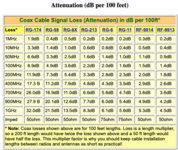
Modem levels on the downstream channels need to be no lower than -15 dBmV and no higher than +15 dBmV, tighter is better as it gives margin for temperature changes (they impact loss) but say -5 will not work better than -10.... Upstream, under 51 dBmV for all channels but under 48 gives margin.

For the cable, more important than being "quad shielded" is what cable it was. 100 feet of RG59 is likely way too much loss if that is what it was. RG6 is better (but that is still long after the initial drop) and in this application a quality dual sheild RG6 will be much better than quad 59 from HD. Even one RG6 to another can have significant differences in loss, mostly due to differences in the dielectric material and centre conductor material. All 59 does not have the same loss, all 6 does not have the same loss....same for all cables. The extra shielding reduces ingress and egress, no impact on loss.
 
Last edited:
To avoid these ads, REGISTER NOW!
Top Bottom