Fingers crossed that I get symmetric day 1 (will know this week I think). I suspect there's some bottleneck of older tech upstream from the new fiber that we ran. Xfinity has plans to upgrade that to be symmetric GB but I haven't heard any dates for that.What's inside the spectrum box? I thought we'd get coax too but it was fiber all the way to the house. It goes to a small modem that has an RJ45 on the other side which goes to my network. We're getting 1GB or more from the router, symmetric.

You are using an out of date browser. It may not display this or other websites correctly.
You should upgrade or use an alternative browser.
You should upgrade or use an alternative browser.
Above 1200 Sq/FT Freshy Fresh - Mountain High Workshop and Storage: 48x30
- Thread starter badonk
- Start date
Wokspaces above 1200 squarefeet.
Jrad235
Well-known member
Everything looks great! Glad to see it coming along. I wouldn't mess with UFO's as your ceilings aren't nearly high enough to give you good light without lots of shadows. I have both tube and UFO's at my shop with 16ft ceilings and I should have just added more LED tube fixtures.And the shop was getting prepped for epoxy coating by moving everything out. One problem in the shop though. That's not enough light. Will either replace those with UFOs or add some. From what I can tell those are 5500 lumens each. Easy fix I'm told.
cccoltsicehockey
Well-known member
I am a big fan of the UFO lights. Mine work really well with 4 of them in my 28x24 bay. I don't really have any shadows with them either and it is like working in an operating room. That said, the lens of mine hang at 16ft from the ground. I know you can get some lower power ones and put them as low as 12ft off the ground and people seem to be really happy.And my next weekly update...getting close, real close!
And the shop was getting prepped for epoxy coating by moving everything out. One problem in the shop though. That's not enough light. Will either replace those with UFOs or add some. From what I can tell those are 5500 lumens each. Easy fix I'm told.
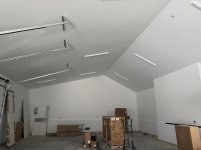
You seem to also have enough ceiling space though that you could replace those 4ft fixtures with 8ft strip fixtures which them make in 10-12k lumen output per 8ft. That should easily double your light output. Though with UFOs you might be able to triple or quardruple you light output.
Good advice as well. I figure as long as I get ones that are dimmable, I can turn it down if it seems like too much?I am a big fan of the UFO lights. Mine work really well with 4 of them in my 28x24 bay. I don't really have any shadows with them either and it is like working in an operating room. That said, the lens of mine hang at 16ft from the ground. I know you can get some lower power ones and put them as low as 12ft off the ground and people seem to be really happy.
You seem to also have enough ceiling space though that you could replace those 4ft fixtures with 8ft strip fixtures which them make in 10-12k lumen output per 8ft. That should easily double your light output. Though with UFOs you might be able to triple or quardruple you light output.
cccoltsicehockey
Well-known member
How many lights per switch? I know the one problem I had was finding smart dimmers that allowed more than 300w of LED lights per dimmer. That is if you are doing smart controls for those. At least for Zwave Innovelli was the only one that supported 300w.Good advice as well. I figure as long as I get ones that are dimmable, I can turn it down if it seems like too much?
That I don't exactly know but I'll be up there again on Friday to check. It's a good point and could be a limiting factor. I want dimmers installed and I want to be able to turn the lights on/off in the storage side independently from the working side. I don't have a need for anything smart there so it should just be simple dimmer switches.How many lights per switch? I know the one problem I had was finding smart dimmers that allowed more than 300w of LED lights per dimmer. That is if you are doing smart controls for those. At least for Zwave Innovelli was the only one that supported 300w.
GlennSullivan
Well-known member
I thought that was a fiber term panel. We used to purchase them from the same company that made that one Century Fiber Optic in Holliston MA.What's inside the spectrum box? I thought we'd get coax too but it was fiber all the way to the house. It goes to a small modem that has an RJ45 on the other side which goes to my network. We're getting 1GB or more from the router, symmetric.
Yes, it likely is a term panel or junction box. Sometimes these get mounted outside but in my case it'll go in the utility room.I thought that was a fiber term panel. We used to purchase them from the same company that made that one Century Fiber Optic in Holliston MA.
I have Xfinity showing up tomorrow to do the final hookup - where they'll bring a gateway or ONT and wifi router. If its a full, integrated gateway I'll have to spend some time putting it into bridge mode, or in some cases I've read about a 'DMZ' method since the XER10 fiber gateway doesn't support bridge mode. If they give me an ONT plus wifi router, I think I can eliminate their router and connect directly into that - although I've read that it might require a call to Xfinity (fun!) to get them to do a few things on their end so my equipment can get assigned an IP directly. I connected my gear directly into the centurylink ONT recently and with the right user id and pwd, it works great.
I'll head up on Friday afternoon with a laptop so I can sort out the internet, finalize the wifi config, and get my cameras up and running. I'll also have a guest network for all the workers to use - I'll have some printed QR codes that'll get them connected up as needed. The cell service is so spotty up there.
And I'm pretty sure the epoxy will be done too so it'll be nice to see how that came out.
ericm
Well-known member
I'll also have a guest network for all the workers to use - I'll have some printed QR codes that'll get them connected up as needed. The cell service is so spotty up there.
That's really thoughtful.
GlennSullivan
Well-known member
We have Xfinity coax at one of our locations and have struggled with speed issues for the last 2 years. If you install your own router they (Xfinity) will FIRST and ALWAYS blame your equipment for any problems. We finally let them reinstall their their equipment ($100 + $15/mo) to prove it was not our equip. After a 2 year battle, ATT is now running fiber through our neighborhood and low and behold the Xfinity problems have miraculously been cured. In a world where all residential Internet providers ****, Xfinity is at the top of the heap.Yes, it likely is a term panel or junction box. Sometimes these get mounted outside but in my case it'll go in the utility room.
I have Xfinity showing up tomorrow to do the final hookup - where they'll bring a gateway or ONT and wifi router. If its a full, integrated gateway I'll have to spend some time putting it into bridge mode, or in some cases I've read about a 'DMZ' method since the XER10 fiber gateway doesn't support bridge mode. If they give me an ONT plus wifi router, I think I can eliminate their router and connect directly into that - although I've read that it might require a call to Xfinity (fun!) to get them to do a few things on their end so my equipment can get assigned an IP directly. I connected my gear directly into the centurylink ONT recently and with the right user id and pwd, it works great.
I'll head up on Friday afternoon with a laptop so I can sort out the internet, finalize the wifi config, and get my cameras up and running. I'll also have a guest network for all the workers to use - I'll have some printed QR codes that'll get them connected up as needed. The cell service is so spotty up there.
And I'm pretty sure the epoxy will be done too so it'll be nice to see how that came out.
I've had the same experiences previously with Comcast/Xfinity but unfortunately, it's the only hard-wired option here. I know a few people who have used Starlink - good most of the time aside from latency but spotty when heavy weather is moving through. And Amazon has a competing product that could be available sometime in 2026. So I'm happy to see some competition in that space and more options for a possibly backup WAN link. My Ubiquiti gear can run dual WAN uplinks.We have Xfinity coax at one of our locations and have struggled with speed issues for the last 2 years. If you install your own router they (Xfinity) will FIRST and ALWAYS blame your equipment for any problems. We finally let them reinstall their their equipment ($100 + $15/mo) to prove it was not our equip. After a 2 year battle, ATT is now running fiber through our neighborhood and low and behold the Xfinity problems have miraculously been cured. In a world where all residential Internet providers ****, Xfinity is at the top of the heap.
One principle I'm trying to follow is that if something goes wrong and I'm not around, my wife should be able to call Xfinity and get things sorted. When service is down, I'll currently have no way to manage things remotely...that's where a possible backup link comes into play. For all my gear, though, I'm designing it to operate without an internet connection. No cloud services needed - unless you want to watch a movie or TV.
kj_mustang
Well-known member
Every time I see someone with fiber internet options out in the middle of nowhere, I curse my luck. I have been living for 10 years within 10 miles of a city of 60,000 + with multiple universities and I have no fiber or coax options still.
GlennSullivan
Well-known member
As someone who has been around this stuff since the early 90's my take is when a vender bites the bullet and goes end to end fiber, 90% of the problems go away. The problem with copper cable plants is in order to achieve modern speeds they require signal boosters every few miles. When any of those devices have issues, everyone downstream has issues or is out. Also, if there is a power outage anywhere along the transmission run from the head end to your location, you will lose connectivity even though their head end has power (or gen) and you have power (or gen)I've had the same experiences previously with Comcast/Xfinity but unfortunately, it's the only hard-wired option here. I know a few people who have used Starlink - good most of the time aside from latency but spotty when heavy weather is moving through. And Amazon has a competing product that could be available sometime in 2026. So I'm happy to see some competition in that space and more options for a possibly backup WAN link. My Ubiquiti gear can run dual WAN uplinks.
One principle I'm trying to follow is that if something goes wrong and I'm not around, my wife should be able to call Xfinity and get things sorted. When service is down, I'll currently have no way to manage things remotely...that's where a possible backup link comes into play. For all my gear, though, I'm designing it to operate without an internet connection. No cloud services needed - unless you want to watch a movie or TV.
We have had Verizon FiOS at our other place for going 20 years and it is dead nuts reliable. The power can be out in the entire town and we still had connectivity running on our backup generator.
I'm thinking you will have good connectivity.
gearhead1960
ALLIANCE MEMBER
Comcast=Comcrap!
Well things aren’t always what they seem. I’ll get some pictures tomorrow morning. Xfinity did their hookup and I started getting emails and texts that it was all up and running. From their app I could see they installed the xb8 gateway. So I dig in and see the xb8 gateway takes coax! Eek. Then it went offline.
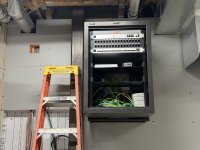
Turns out the low voltage installer (does alarm, Ethernet, ubiquiti install, etc) was there also and as soon as the xfinity guy left the low voltage guy took it all apart. He had mounted the rack and gear and was going to redo all the xfinity stuff so it is nice and tidy…so he unplugged it all. When I have time tomorrow morning I’ll mess around with it a bit and get a speed test. The box in the pic above is fiber all the way to my house and xfinity converts back to coax with another little box. Then coax to the xb8 gateway. No idea what’s needed to get to all fiber or if it even needed. To me that depends on the speed tests.
So we are not ready to fire up internet for the whole house yet. Maybe next week.
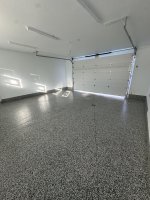
The epoxy floors are done. They look great although I’m going to struggle to find small things that I drop when working. We are now talking utility sink in the shop and my builder suggested one that was over $1k. Looks nice but I know I can find a decent one for less than half that…
Turns out the low voltage installer (does alarm, Ethernet, ubiquiti install, etc) was there also and as soon as the xfinity guy left the low voltage guy took it all apart. He had mounted the rack and gear and was going to redo all the xfinity stuff so it is nice and tidy…so he unplugged it all. When I have time tomorrow morning I’ll mess around with it a bit and get a speed test. The box in the pic above is fiber all the way to my house and xfinity converts back to coax with another little box. Then coax to the xb8 gateway. No idea what’s needed to get to all fiber or if it even needed. To me that depends on the speed tests.
So we are not ready to fire up internet for the whole house yet. Maybe next week.
The epoxy floors are done. They look great although I’m going to struggle to find small things that I drop when working. We are now talking utility sink in the shop and my builder suggested one that was over $1k. Looks nice but I know I can find a decent one for less than half that…
GlennSullivan
Well-known member
Sorry to hear that. In the Verizon world. Fiber comes into the building to the ONT. Then from there Ethernet port to Network Router and MOCA port to Coax for Video.


GlennSullivan
Well-known member
Please tell me the wall rack with the 8 and 24 port switches is yours and not installed by Comcast.
Hah, not Comcast for sure. The rack is from my low voltage sub, along with the keystone panel. I provided the ubiquiti router and 24 port switch. As I looked at it for the first time today, I would have preferred a 24 port keystone so it aligns more cleanly visually with the switch…I hate to be a pain but it might be something I ask about before that gets wired in. I provided some nice 0.5m patch cables to keep it all clean and those extra ports make me itch a little. With that setup I can go port 1 on the keystone to port 1 on the switch. But 9-16 will start to criss cross with 17-24? Maybe I’m over thinking it…that’s all in the utility room and I’m probably the only person that ever sees it. There’s also a small 8 port switch on the shelf that gets installed in the shop. We have a fiber run that’ll connect from the 24 port switch in the house to that 8 port dealio in the shop. I thought we could just run Ethernet cables but there was concern about lighting strikes and copper underground…and it would cost the same to just put a short fiber run in To eliminate that risk.
I’m also adding a cheap UPS to keep it powered if things switch between grid and solar/battery. I still don’t know exactly how that power switching will work but from what I’ve read, some stuff doesn’t like the slight cut that happens when it switches back and forth.
The shop is now a big blank slate. I like the way they brought the epoxy up the wall slightly. The cuts for expansion and drains all came out great. We will deal with more lighting later though. I’ll start moving in before that gets sorted…I’d rather have the electrician finish the core stuff vs letting shop lighting delay the whole thing. Another detail that needs to happen soon is the shop sink and how we cleanly tie it into the bundle of pipes along that west wall. It would be kind of interesting/funny for you all to watch if I were doing the work but fortunately my builder is coming up with some ideas there and it’ll probably be pretty tidy when done.
Has anyone looked at the tables and lockers from 4dock.com? Popped up in a feed lately and am strongly considering sourcing a lot from them including the palette racks for heavier things.


I’m also adding a cheap UPS to keep it powered if things switch between grid and solar/battery. I still don’t know exactly how that power switching will work but from what I’ve read, some stuff doesn’t like the slight cut that happens when it switches back and forth.
The shop is now a big blank slate. I like the way they brought the epoxy up the wall slightly. The cuts for expansion and drains all came out great. We will deal with more lighting later though. I’ll start moving in before that gets sorted…I’d rather have the electrician finish the core stuff vs letting shop lighting delay the whole thing. Another detail that needs to happen soon is the shop sink and how we cleanly tie it into the bundle of pipes along that west wall. It would be kind of interesting/funny for you all to watch if I were doing the work but fortunately my builder is coming up with some ideas there and it’ll probably be pretty tidy when done.
Has anyone looked at the tables and lockers from 4dock.com? Popped up in a feed lately and am strongly considering sourcing a lot from them including the palette racks for heavier things.
Last edited:
Mr onetwo
Well-known member
I don't understand all the fiber talk  , but the floor sure looks nice!
, but the floor sure looks nice!Boosted1
Well-known member
Floor and finished wall look great.
GlennSullivan
Well-known member
Floors look great. Gonna be tough to find small dropped objects in there LOL.
Does your battery / solar setup use a physical Automatic Transfer Switch similar to a generator (large physical contactor) or is it a digital device?
UPS is the safe way to ensure no drop when switching from street to backup power. I have a generator so no choice. Have UPS units on all networking and computer equipment.
Apparently that is the ONT Comcast uses so that they can integrate their "standard" gateway router which has only a coax WAN port. Interesting that this chosen device also requires a splitter to split network and video because of the single coax output
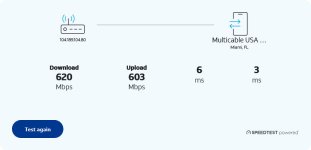
I have the same gateway in FL. The coax / gateway are not the restriction on your upload speeds as mine are 946D / 355U through an all coax cable plant. However with fiber you should get close to symmetrical down and up speeds.
Verizon's ONT has fiber in and RJ45(N) and Coax(V) out, I get 980D / 870U although I no longer subscribe to video services, replaced Verizon and Xfinity video at both locations with a single YouTube TV subscription, which we are able to use at either location.

Does your battery / solar setup use a physical Automatic Transfer Switch similar to a generator (large physical contactor) or is it a digital device?
UPS is the safe way to ensure no drop when switching from street to backup power. I have a generator so no choice. Have UPS units on all networking and computer equipment.
Apparently that is the ONT Comcast uses so that they can integrate their "standard" gateway router which has only a coax WAN port. Interesting that this chosen device also requires a splitter to split network and video because of the single coax output
I have the same gateway in FL. The coax / gateway are not the restriction on your upload speeds as mine are 946D / 355U through an all coax cable plant. However with fiber you should get close to symmetrical down and up speeds.
Verizon's ONT has fiber in and RJ45(N) and Coax(V) out, I get 980D / 870U although I no longer subscribe to video services, replaced Verizon and Xfinity video at both locations with a single YouTube TV subscription, which we are able to use at either location.
Last edited:
Old Man Roger
Well-known member
My counters are a marbled, they camouflage very well, especially any kind of clear plastic cap.lolFloors look great. Gonna be tough to find small dropped objects in there LOL.
GlennSullivan
Well-known member
Look at these, can't find anything, don't event show dirt. Thankfully they are in the kitchen and not in the garage.

Ok back to general layout. The lift locations are set with power and concrete reinforcements in place. So it's just benches, cabinets, and general storage. I have decided to leave the air compressor and blast cabinet at my old shop and will use it there when needed. That'll get reorganized once I move in here and have more space to play with in the old shop.
I'm going back and forth on the layout based on the different benches/etc I can find. I recently stumbled on to 4dock.com and think their warehouse packing tables look pretty stout and are very affordable. Note that some of the benches I'm going with are 30" deep so it isn't quite to scale along that left wall. They also sell storage cabinets and pallet racks so I could get most of the components shipped from the same supplier. I'll probably need to paint the pallet racks before assembling/installing them. For tool storage I'll stick with simple but effective Harbor Freight USG. My builder has some details to work out on the wall where the utility sink will go. We have all the different pipes (drain, hot/cold, and slab heat) coming up from the slab there so they need to be concealed and then tied into whatever I choose for a utility sink. My builder suggested something over $1K but I found this and it looks about the same as what they were suggesting from Ferguson.
This layout has tons of bench top space, good enough large item storage, and should have enough for tools. But it feels a little short on cabinets. I suppose I could always add wall mounted ones later above some of the benches if needed. Some of the bench space will be used to mount bench grinder, drill press, and other bench mount tools but I can figure out the different station organization once the basics are in place.


I'm going back and forth on the layout based on the different benches/etc I can find. I recently stumbled on to 4dock.com and think their warehouse packing tables look pretty stout and are very affordable. Note that some of the benches I'm going with are 30" deep so it isn't quite to scale along that left wall. They also sell storage cabinets and pallet racks so I could get most of the components shipped from the same supplier. I'll probably need to paint the pallet racks before assembling/installing them. For tool storage I'll stick with simple but effective Harbor Freight USG. My builder has some details to work out on the wall where the utility sink will go. We have all the different pipes (drain, hot/cold, and slab heat) coming up from the slab there so they need to be concealed and then tied into whatever I choose for a utility sink. My builder suggested something over $1K but I found this and it looks about the same as what they were suggesting from Ferguson.
This layout has tons of bench top space, good enough large item storage, and should have enough for tools. But it feels a little short on cabinets. I suppose I could always add wall mounted ones later above some of the benches if needed. Some of the bench space will be used to mount bench grinder, drill press, and other bench mount tools but I can figure out the different station organization once the basics are in place.
Bob Heine
ALLIANCE MEMBER
Glenn, I would crown AT&T king of the internet/phone **** pile. The fiber speeds are fine but without notifying me, they gave my land line number to someone at Metro PCS/T-Mobile and gave that person access to all our AutoPay information. I would then crown Wells Fargo king of the bank **** pile for snail mailing us four notices that someone attempted to hack our accounts. While the ninth class envelopes crawled to our house, the bank allowed that person to open two new accounts in Liane's name and transfer $5,000 to one and $4,000 to the other.In a world where all residential Internet providers ****, Xfinity is at the top of the heap.
The level of incompetence the people at both companies displayed boggles my mind. If I didn't run Quicken every morning and discover the transfers the day they happened, they would have emptied our accounts. We eventually got the money back but our primary checking and saving accounts are now with Fidelity. Instead of 0¢ interest per month on our Wells Farkgo checking account, Fidelity gives us $20 to $30. Wells Farkgo blessed us with 4¢ interest per month on the savings account balance while Fidelity pays us close to $20. Two tiny drawbacks: 1) Fidelity doesn't handle cash and 2) the ATMs limit withdrawals to $300-400 (but Fidelity allows $1,500 withdrawals per day). I kept the WF accounts open with the minimum balances to keep them fee-free so I can deposit/transfer checks and get cash in denominations (besides $20s) from the tellers.
Bob Heine
ALLIANCE MEMBER
![Josh [Badonk] Internet Speed Test.jpg](https://www.garagejournal.com/forum/data/attachments/2308/2308047-1d8936cd9ea904230f366af3ecf806dd.jpg "Josh [Badonk] Internet Speed Test.jpg")
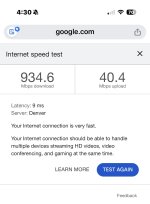
Josh, that's amazing download but kinda sad upload speed. I keep AT&T for the U-Verse and fiber internet. Download and upload speeds are pretty close.
My cell service is Ting because 3 lines costs me about $30 a month. I rarely carry the primary one so I miss a lot of calls and texts. Second (older Samsung) is to have a number to give sites I don't want calling me but who require a number. Third one is a flip phone in the storage drawer under the PT Cruiser passenger seat so Liane can hand it to someone when they don't want to place a call on their phone for her. I did show her how to turn it on and place a call but she thinks it's all bad ju-ju.
We were paying AT&T $55 a month for a 200-minute land line but when they decided to give it away, I signed up for Vonage VOIP unlimited International calling for $22 a month. We have 10 extensions (8 portables) in the house, garage and shop so I never have to look for my cell phone when a call comes in (Vonage also rings the primary cell when their land line rings). Besides being Luddites, we hate hovering over a single phone when we both want to talk to a caller. The phones in the laundry and guest bathroom are wall-mounted pushbutton princess phones -- Liane is still mad about losing the rotary dial.
I haven't told Liane about the wi-fi and network cabling because I fear her head would explode.
All good stuff. I’m going away from landlines, even voip based ones. Used them before and yes they work great. But for me the world has changed. Most people no longer call a house looking for a person. They just call the person directly. Years ago I had a voyage setup at home and it never rang.
Josh, that's amazing download but kinda sad upload speed. I keep AT&T for the U-Verse and fiber internet. Download and upload speeds are pretty close.
My cell service is Ting because 3 lines costs me about $30 a month. I rarely carry the primary one so I miss a lot of calls and texts. Second (older Samsung) is to have a number to give sites I don't want calling me but who require a number. Third one is a flip phone in the storage drawer under the PT Cruiser passenger seat so Liane can hand it to someone when they don't want to place a call on their phone for her. I did show her how to turn it on and place a call but she thinks it's all bad ju-ju.
We were paying AT&T $55 a month for a 200-minute land line but when they decided to give it away, I signed up for Vonage VOIP unlimited International calling for $22 a month. We have 10 extensions (8 portables) in the house, garage and shop so I never have to look for my cell phone when a call comes in (Vonage also rings the primary cell when their land line rings). Besides being Luddites, we hate hovering over a single phone when we both want to talk to a caller. The phones in the laundry and guest bathroom are wall-mounted pushbutton princess phones -- Liane is still mad about losing the rotary dial.
I haven't told Liane about the wi-fi and network cabling because I fear her head would explode.
Cell service is really spotty in the new place so that’s where strong WiFi and good internet service come into play. At some point I may add a backup or failover internet - starlink or Leo - if the xfinity is unreliable or slower upload speed is a problem.
The drain on the storage side likely won’t get much use but it is nice to have just in case. The one on the working side under the 2 post could be used as a wash bay…for cleaning undercarriages etc. I’ll have one of the fancy power washer setups nearby although I bet having the 2 post there will be a pain when washing. A space purely dedicated to washing would be better.Ive no idea what most of this chat is about, never mind what it means, but thats looking like a nice space. Like the drainage arrangement.
In the main house garage I have a drain for each parking spot under the car with the floor sloping toward the drain. Snow melt should shed from the car and drain inwards away from where we walk around the car. That’s the idea at least.
Happy new year everyone and hopefully you had a great holiday. I spent a couple of days in Mexico making sure the Pacific ocean was still there.
Things are moving along quickly throughout the house but slowly in the shop. It does mean that the lifts should get installed soon - trying to pin down an install date for later this week or next week. We have weather moving in now so that will be a complication.
We got the outdoor grill area counters installed and the appliance company was supposed to bring the grill along with the other appliances. But they couldn't find the grill! So that may be delayed if they have to order another one.
We are getting close across the board though. I'm waiting on some sort of final inspection of the solar stuff to get the interconnection agreement approved, then we program the meter for bi-directional power to fire it all up. Plumbing fixtures, mirrors, appliances, outdoor light fixtures, and all the rest getting done so that we can receive final inspections and a certificate of occupancy in about 2 weeks, then handoff to me on Feb 6.
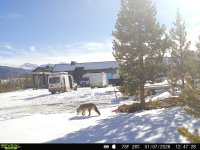
So all in all, lots of activity at the house today...with a surprising visitor keeping track of things. Or maybe looking to be opportunistic and grab someone's lunch from their truck when they aren't looking. Nice winter coat on that coyote although we haven't had much winter up there yet.


Things are moving along quickly throughout the house but slowly in the shop. It does mean that the lifts should get installed soon - trying to pin down an install date for later this week or next week. We have weather moving in now so that will be a complication.
We got the outdoor grill area counters installed and the appliance company was supposed to bring the grill along with the other appliances. But they couldn't find the grill! So that may be delayed if they have to order another one.
We are getting close across the board though. I'm waiting on some sort of final inspection of the solar stuff to get the interconnection agreement approved, then we program the meter for bi-directional power to fire it all up. Plumbing fixtures, mirrors, appliances, outdoor light fixtures, and all the rest getting done so that we can receive final inspections and a certificate of occupancy in about 2 weeks, then handoff to me on Feb 6.
So all in all, lots of activity at the house today...with a surprising visitor keeping track of things. Or maybe looking to be opportunistic and grab someone's lunch from their truck when they aren't looking. Nice winter coat on that coyote although we haven't had much winter up there yet.
cccoltsicehockey
Well-known member
That sunset view is just perfect.
The place is really coming along then. I want to know the conversation though at the appliance place on how you just lose a grill. Obviously not as big as losing a refrigerator but still not a small box I imagine.
The place is really coming along then. I want to know the conversation though at the appliance place on how you just lose a grill. Obviously not as big as losing a refrigerator but still not a small box I imagine.
Totally. It probably goes like this. "Hey we're getting ready to deliver the appliance order for that house up in Tabernash. Need to pull all the pieces we've been holding. I have the fridge, freezer, range, dishwashers, etc over here. Where'd you put that grill?" "Grill, what grill?" "uhhhh, boss we might have a problem"That sunset view is just perfect.
The place is really coming along then. I want to know the conversation though at the appliance place on how you just lose a grill. Obviously not as big as losing a refrigerator but still not a small box I imagine.
ericm
Well-known member
How much solar are you getting?
ericm
Well-known member
We did 15kw and 28kwh of battery for our 3000 sq ft all electric house. The sizing was a total guess on my part. The installer didn't even have a rule of thumb for new construction. If it's not enough I'll put another bank on the shop.
My going in approach was more like…what can I fit on this roof and is it enough? That’s how we got to 23KW. Then later when I said I wanted to pull the trigger on batteries, they said let’s try 27KW and if you need more you can easily add on another bank. I think I will have plenty of capacity.We did 15kw and 28kwh of battery for our 3000 sq ft all electric house. The sizing was a total guess on my part. The installer didn't even have a rule of thumb for new construction. If it's not enough I'll put another bank on the shop.

Last edited:
kj_mustang
Well-known member
Big Bad Wolf. I have the next size down.
A quick shot for the ubiquiti fans, some signs of life. The Comcast equipment had been fired up again earlier in the day but my gear wasn’t connected…yet. Then I checked last night and bam! There it was. A few things that I’ll sort out on Saturday - they didn’t use the SFI cables I provided to connect the UDM to the switch. And the garage cam orientation is a bit off…but I now have one camera and all APs in the main house are up and running. The one camera is showing FE for uplink speed which will also need to be looked into. That's only 100 Mbps and that should be GbE at a minimum. Maybe a wiring/pinout issue? My first time in the Protect side of Unifi and it looks pretty nice for security monitoring, etc. I'll need to find some tutorials to learn how to trigger motion alerts or at least have a way of highlighting activity that I might want to see at a later date. It looks like it is already listening for smoke and CO alarms. There are tons of pre-set alarms that can be confirgured for alerting, things like Vehicle of interest (based on license plate), person of interest, package, animals, dog barking etc. Super cool, if it works.


Last edited: