To avoid these ads, REGISTER NOW!

Above 1200 Sq/FT Freshy Fresh - Mountain High Workshop and Storage: 48x30

Wokspaces above 1200 squarefeet.
OP
B

badonk

Well-known member
Joined
Aug 20, 2011
Messages
216
We did 15kw and 28kwh of battery for our 3000 sq ft all electric house. The sizing was a total guess on my part. The installer didn't even have a rule of thumb for new construction. If it's not enough I'll put another bank on the shop.

Did you use Tesla PW for your batteries? If so, can you point me to anything about configuring the system or fine tuning stuff, or just give me some tips? I'm sure there's a ton out on the internet but as is typical, some is better than others.
 
To avoid these ads, REGISTER NOW!

ericm

Well-known member
Joined
Apr 17, 2016
Messages
1,963
Location
Southern Oregon
We used Briggs & Stratton batteries (they bought SimpliPHI) and a Sol-Ark inverter. There's a lot of configuration but most of that is stuff I don't want to touch like cut off voltages. We have 1:1 net metering so there's nothing I need to configure for when to use the battery. If we were on NEM 3.0 or similar I'd be tweaking that.

I've been watching the solar app a lot. It's addicting. I ran some numbers using the NREL tool so I have a guesstimate of what it should be producing each month (and being a nerd I'm keeping a spreadsheet). So far it's not been meeting those but it's been unusually foggy.
 

cccoltsicehockey

Well-known member
Joined
Apr 3, 2014
Messages
1,385
Location
Charlotte, NC
A quick shot for the ubiquiti fans, some signs of life. The Comcast equipment had been fired up again earlier in the day but my gear wasn’t connected…yet. Then I checked last night and bam! There it was. A few things that I’ll sort out on Saturday - they didn’t use the SFI cables I provided to connect the UDM to the switch. And the garage cam orientation is a bit off…but I now have one camera and all APs in the main house are up and running. The one camera is showing FE for uplink speed which will also need to be looked into. That's only 100 Mbps and that should be GbE at a minimum. Maybe a wiring/pinout issue? My first time in the Protect side of Unifi and it looks pretty nice for security monitoring, etc. I'll need to find some tutorials to learn how to trigger motion alerts or at least have a way of highlighting activity that I might want to see at a later date. It looks like it is already listening for smoke and CO alarms. There are tons of pre-set alarms that can be confirgured for alerting, things like Vehicle of interest (based on license plate), person of interest, package, animals, dog barking etc. Super cool, if it works.

IMG_1066.png

IMG_1067.png
Glad to see you are up and running on the Ubiquiti side now. The G5 Turret Ultra is working correctly. All of the cameras with 2k sensors only do 100Mbps. You don't need anything more. Only the 4k cameras make the switch to 1Gbps.

Protect has come a long long way since I first started using with a total of 2 cameras 6 years ago. Notifications are amazingly granular if you want them to be. The one major problem though is sometimes when they redesign things they break all of the alerts. One particular alert type, crossing a line, which I use on the entrace of my driveway I seem to have to delete and recreate almost quarterly as of late. I am not sure why.
 
OP
B

badonk

Well-known member
Joined
Aug 20, 2011
Messages
216
Glad to see you are up and running on the Ubiquiti side now. The G5 Turret Ultra is working correctly. All of the cameras with 2k sensors only do 100Mbps. You don't need anything more. Only the 4k cameras make the switch to 1Gbps.

Protect has come a long long way since I first started using with a total of 2 cameras 6 years ago. Notifications are amazingly granular if you want them to be. The one major problem though is sometimes when they redesign things they break all of the alerts. One particular alert type, crossing a line, which I use on the entrace of my driveway I seem to have to delete and recreate almost quarterly as of late. I am not sure why.
As I looked at the camera spec I did notice that it is only 100Mbps so that's great to not have to mess with that. Noted about the redesigns and updates. They seem to move pretty quickly on their product lines with new stuff all the time...so that kind of volatility comes with the territory.

The other cameras need a junction box to mount. The Unifi consultant I talked to advised to have some on hand for the installer...but I didn't listen or I forgot. There are so many things we made decisions about 6+ months ago that are now becoming reality. And we seem to be constantly wondering what we chose and why. Do you have the email? Wait maybe I found it…. So end result is now they are out of stock - unless I want to buy them at 2x the price on Amazon. My installer would prefer the OE ones vs universal so I either wait for them to be back in stock or open up the wallet. Fun!

For those still following along, this is one of the criticisms with Unifi. They run out of stock on stuff with no real ETA. The power adapter for the Flex 2.5G PoE I'm installing was also out of stock (in stock today though). The alternative is use a PoE adapter but theirs only provides 60W and based on my planning I needed more. So I found a different brand injector with 90W to cover it. But that's sometimes the deal with Ubiquiti - they run out of stuff and you either wait or scramble to find some alternative way to make it work.
 
Last edited:

cccoltsicehockey

Well-known member
Joined
Apr 3, 2014
Messages
1,385
Location
Charlotte, NC
As I looked at the camera spec I did notice that it is only 100Mbps so that's great to not have to mess with that. Noted about the redesigns and updates. They seem to move pretty quickly on their product lines with new stuff all the time...so that kind of volatility comes with the territory.

The other cameras need a junction box to mount. The Unifi consultant I talked to advised to have some on hand for the installer...but I didn't listen or I forgot. There are so many things we made decisions about 6+ months ago that are now becoming reality. And we seem to be constantly wondering what we chose and why. Do you have the email? Wait maybe I found it…. So end result is now they are out of stock - unless I want to buy them at 2x the price on Amazon. My installer would prefer the OE ones vs universal so I either wait for them to be back in stock or open up the wallet. Fun!

For those still following along, this is one of the criticisms with Unifi. They run out of stock on stuff with no real ETA. The power adapter for the Flex 2.5G PoE I'm installing was also out of stock (in stock today though). The alternative is use a PoE adapter but theirs only provides 60W and based on my planning I needed more. So I found a different brand injector with 90W to cover it. But that's sometimes the deal with Ubiquiti - they run out of stuff and you either wait or scramble to find some alternative way to make it work.
They definitely have stock problems on newer products and the accessories. Why not just use the 16port POE Pro Max switch? Power supply already included to run a bunch of devices?
 
OP
B

badonk

Well-known member
Joined
Aug 20, 2011
Messages
216
They definitely have stock problems on newer products and the accessories. Why not just use the 16port POE Pro Max switch? Power supply already included to run a bunch of devices?
Mostly for cost and the smaller packaging at $199 vs $399. I'm only plugging in 2 PoE devices (AP and camera) so I figure there's plenty of room for growth as is. Also in my shop I'm putting it in some kind of wall box so I think it would be nicely hidden in there (box on the right). Something PoE with SFI uplink and 2 ports was the requirement.

IMG_4478.jpg


IMG_0171.jpg
 
OP
B

badonk

Well-known member
Joined
Aug 20, 2011
Messages
216
Details? How does 19 thermostats sound? Ugh. For radiant heat floors it was pretty easy to make each room a zone, giving us optionality. I thought about tying a few rooms to the same thermostat, but in the end having more flexibility will be nice. Separate thermostats for each bedroom. Each bathroom. The laundry room. And of course one for the garage and one for the workshop. The downside is a bit more cost and seeing thermostats on the walls. Those were going in today when I was up there. I'm doing ecobee thermostats. This will allow me to set up some automations through home assistant depends on how the house is being used. One setting while away. Another when just me and my wife are there and mostly on the main floor. Another when we have a full house and the bedrooms on the lower floor are used. Trigger the automation and not have to visit all 19 thermostats. Then let guests adjust their bedroom and bathroom to their liking. I've stayed in houses before that had the opposite problem - too few thermostats. So two bedrooms tied to the same thermostat, with one cooking and one freezing. That shouldn't be a problem at my house.

My wife went to Ikea this week to order up a Pax closet system. Fairly inexpensive and it'll get the job done. I hate building Ikea stuff though. But they will pull all the items and deliver so I avoided that part at least. We also have all the furniture being delivered in just under a month.

The lift install is scheduled for next week. They say they need 3 days...really? The electrician set up temp power for them, then after the lifts are installed and tested, his crew will put the permanent ceiling drops in. There's still no power or fiber lines connected in the shop but the lift install will get the electrician going since it is now necessary.

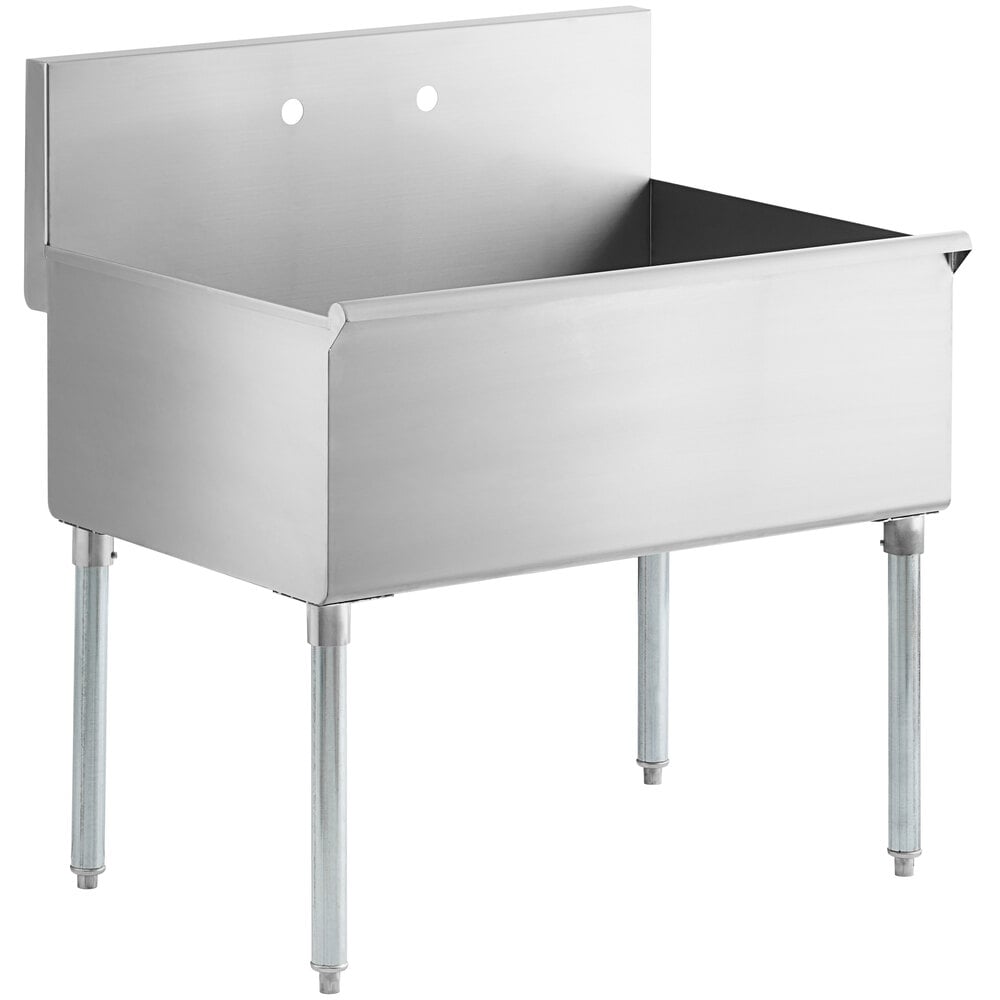
I made the next purchase for the workshop (aside from tools I've been stockpiling). I pulled the trigger on an Icon 73" tool box. We'll see how delivery goes but I'm sure I'll get some complaining about my driveway. My plan is to start with the toolbox, the lifts, and the shop sink. Then figure out what fits around that. I'd rather have a few things in place to take real measurements from before committing to anything more. For the shop sink - I'm leanings towards a commercial utility sink - something around 36" wide. Finding the right one is tonight's project - I want the faucet head to have a pull down sprayer. This is 36"x24"x14" but I'm not sure about mounting the faucet. I want a clear floor under it too.

Screenshot 2026-01-16 154004.jpg

We are really just buttoning up the little things on the house. Drywall touch ups were happening this week. The mirrors are going in. I had a little sticker shock when my wife picked out these custom lighted mirrors but now that I see them I'm pretty happy. They fit the spaces really well - as they should. The ceramic logs and finishing pieces were set up in the fireplaces. The fire department inspected and signed off on the fire system w/ alarms. Cool thing - my Ubiquiti camera alerted me when it heard the smoke alarms being tested! The fridge and freezer panels are on and I'm happy. We shouldn't ever run out of space - these are beasts. The lost grill was found and gets installed next week. The last light fixtures are going in. The last of the countertops go in. Next week the floor protection comes up and cleaning starts. And final paint touch ups are next week too (using drop cloths). And then final inspections for CO at the end of the week.

IMG_0406.jpg

IMG_0410.jpg

IMG_0407.jpg

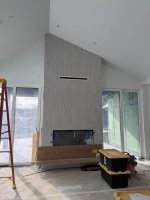
As I walked in today the tile guys were cutting a slot for a vent for one fireplace. WTF? Apparently it is required to meet code and let heat escape. We need to come up with a cleaner solution - had no idea that was coming. Ruined a really cool space. No TV planned for this space - might need to find some cool art to just help that vent disappear. Any ideas?
IMG_0411.jpg

And I stopped by Mary Jane today to check on conditions. Not great but I had low expectations. Got my first turns in for the season!

IMG_0421.jpg
 

kwyjibo

Well-known member
Joined
Apr 8, 2008
Messages
738
As I walked in today the tile guys were cutting a slot for a vent for one fireplace. WTF? Apparently it is required to meet code and let heat escape. We need to come up with a cleaner solution - had no idea that was coming. Ruined a really cool space. No TV planned for this space - might need to find some cool art to just help that vent disappear. Any ideas?

you know what i'd suggest, but i don't think the wife would be happy :p
IMG_9313 copy.jpg

oh yeah, it really ties the room together
IMG_0411.jpeg
 
OP
B

badonk

Well-known member
Joined
Aug 20, 2011
Messages
216
Settled into a more expensive version of the commercial sink that is made out of 16 gauge 304 stainless - shipping on the cheaper one was over $300 whereas free on the 304 sink. Everything should arrive in 7-10 days...

The lift installs are supposed to start tomorrow. The person from the power company who was supposed to inspect and sign off on the solar hookups had trouble finding the house last week. She came down with the flu this week and rescheduled for next week. When I pushed back she said we could do a facetime or photo inspection to get things moving again. Fingers crossed.

The Icon toolbox won't arrive until March 17-ish.
 

GlennSullivan

Well-known member
Joined
Mar 15, 2006
Messages
334
Location
Yorktown, NY
Settled into a more expensive version of the commercial sink that is made out of 16 gauge 304 stainless - shipping on the cheaper one was over $300 whereas free on the 304 sink. Everything should arrive in 7-10 days...

The lift installs are supposed to start tomorrow. The person from the power company who was supposed to inspect and sign off on the solar hookups had trouble finding the house last week. She came down with the flu this week and rescheduled for next week. When I pushed back she said we could do a facetime or photo inspection to get things moving again. Fingers crossed.

The Icon toolbox won't arrive until March 17-ish.
can you post a pic and link for the sink you ended up purchasing?
 
OP
B

badonk

Well-known member
Joined
Aug 20, 2011
Messages
216
can you post a pic and link for the sink you ended up purchasing?
Here's a link. Will take a pic once it is installed.

 
OP
B

badonk

Well-known member
Joined
Aug 20, 2011
Messages
216
Received a few pics from my builder this morning...I'll go up on Saturday to get a closer look. The install crew should be back onsite today to reposition the 4 post, get the hydraulic setup installed along with the pneumatic lock release system. The 4 post is centered on the double doors, set back about 4 feet as planned. That also leaves me with 8 feet behind the lift. Plenty of room for 3 foot deep pallet racks and the ability to put other toys like snowmobile or motorcycle there if I end up needing the space (too many cars?). The turret cam is installed but not online yet - same with the wifi hotspot. That won't happen until we get the fiber connection up and running between buildings.

IMG_6029.jpg
 
OP
B

badonk

Well-known member
Joined
Aug 20, 2011
Messages
216
Nice to see it all in person today. We need the electrician to do the final hookup so I don’t get to mess around with it yet. It is a quiet day at the house with some light snow falling and someone doing some grout work. On the 4 post, I went with the little accessory air compressor for the safety locks on the 4 post. Hopefully that’s not a pain. I was surprised to see the narrow gripper strips on the tracks…thought there might be something more permanent or substantial.

The grill is installed. Now I need some good steaks.

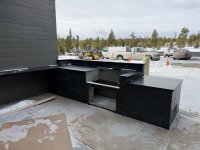
And here is a pic of the snowmelt system for the outdoor zones. I think that’s a heat exchanger and they fill the system with glycol or something that won’t freeze. Need to fire that up and clear off that grill area. A sheet of ice building up now.

More next week I hope!

IMG_0458_Original.jpeg

IMG_0460_Original.jpeg

IMG_0461_Original.jpeg

IMG_0474_Original.jpeg

IMG_0469_Original.jpeg
 
Last edited:
OP
B

badonk

Well-known member
Joined
Aug 20, 2011
Messages
216
And previously I said thermostats...yes we have thermostats. Set up my Home Assistant server today and got all but two connected up there. I can manage them all from HA - either from a dashboard like this or through automations. For instance set the lower level to an 'away' mode. I know that presence sensors in the Ecobees can do that too, maybe? This will be my first time with Ecobee. I've had Nest ones before never thought their smart logic was very smart. Plus this is radiant heat flooring. So it takes time to bring things up to temp. I have more reading to do about other's experience with the Ecobee and radiant flooring to find all the right settings.

IMG_0472 (1).jpg


Screenshot 2026-01-24 172430.jpg
 
OP
B

badonk

Well-known member
Joined
Aug 20, 2011
Messages
216
Thanks for the feedback - I'm not sure I have the experience to tell a good job from a bad one. The Tekmar controller has a sensor to detect snow, slab temp, etc, then cycles the system on. Once fired up for the first time I'm told it will take a while (weeks?) to melt off the ice buildup we have. It is really meant to prevent anything from accumulating so we'll see how it works melting off the thick ice we have.

Adding these 3 snowmelt zones was around $20K - the grill area, 6' of concrete garage apron and 6' of workshop apron. I looked at electric options and that was quoted at over $30K. The electric setup might've been the smarter choice in the long run if the electric consumption was offset by my solar/battery setup. But then again, we had the boiler capacity to cover the gas fired setup.

Since it runs off the main house boiler, I'm not sure how I'd monitor the energy use separately from the rest of the house radiant heat or the hot water tank. I'm open to ideas - maybe through the Tekmar controller itself or the IoS app they have? As of 2025 it doesn't look like anyone has come up with a way to integrate with Home Assistant - apparently their support team is aware of Home Assistant but won't open up their API or make an integration. I think this is a cloud based controller, unfortunately (prefer all local control).
 
Last edited:
To avoid these ads, REGISTER NOW!

Mr onetwo

Well-known member
Joined
Apr 6, 2011
Messages
2,006
Location
Coastal Maine
check these out


cccoltsicehockey

Well-known member
Joined
Apr 3, 2014
Messages
1,385
Location
Charlotte, NC
Congrats on the lift installs. They look great. I have been considering those double 4 posts more and more for the house garage so the lower level stays more open. I will be interested to hear your experience with the air compressor setup for the air locks. I planned future air line locations for my 4 posts lifts in the new garage, just incase, as I wasn't sure I would trust that thing to work well enough.

Glad to see I am not the only one with a dog room. That is a lot of thermostats. I hate that, unfortunately, you have to use a workaround now to add Ecobee to HA since they closed the API a few years back.
 
OP
B

badonk

Well-known member
Joined
Aug 20, 2011
Messages
216
Congrats on the lift installs. They look great. I have been considering those double 4 posts more and more for the house garage so the lower level stays more open. I will be interested to hear your experience with the air compressor setup for the air locks. I planned future air line locations for my 4 posts lifts in the new garage, just incase, as I wasn't sure I would trust that thing to work well enough.

Glad to see I am not the only one with a dog room. That is a lot of thermostats. I hate that, unfortunately, you have to use a workaround now to add Ecobee to HA since they closed the API a few years back.

We'll see about the compressor. As I said before I was going to move my big compressor and blast cabinet and may do that someday. But I also don't tend to keep it full - I only fill it when I'm going to use it. If this BendPak one fails I'll get a little/cheap HF one and plumb that in.

I have messed around in HA a bit and there's quite a bit I think I can automate on the Ecobees through the HomeKit config. For instance I think I could create an automation that sets all the downstairs thermostats to Away. I did set the eco+ mode with smart away using the proximity sensors but for some reason one room wasn't going into smart away. Weird - which is why I'd want some scripts/automations to quickly get things set the way I want. There's only a few configurations that I think I'll need to script for.

Yeah dog room! In my Denver house we have a combined mud room / dog room. We built in kennels with doors, but we've removed the doors so they can come and go as they want. They mostly hang in their kennels when we aren't home. So we'll have the same in the new place - and will likely remove the doors. Throw some dog beds in there...what's always fun is figuring out which dog takes which kennel.

IMG_5985_Original.jpeg
 

cccoltsicehockey

Well-known member
Joined
Apr 3, 2014
Messages
1,385
Location
Charlotte, NC
We'll see about the compressor. As I said before I was going to move my big compressor and blast cabinet and may do that someday. But I also don't tend to keep it full - I only fill it when I'm going to use it. If this BendPak one fails I'll get a little/cheap HF one and plumb that in.

I have messed around in HA a bit and there's quite a bit I think I can automate on the Ecobees through the HomeKit config. For instance I think I could create an automation that sets all the downstairs thermostats to Away. I did set the eco+ mode with smart away using the proximity sensors but for some reason one room wasn't going into smart away. Weird - which is why I'd want some scripts/automations to quickly get things set the way I want. There's only a few configurations that I think I'll need to script for.

Yeah dog room! In my Denver house we have a combined mud room / dog room. We built in kennels with doors, but we've removed the doors so they can come and go as they want. They mostly hang in their kennels when we aren't home. So we'll have the same in the new place - and will likely remove the doors. Throw some dog beds in there...what's always fun is figuring out which dog takes which kennel.

IMG_5985_Original.jpeg
Yeah, I saw the HomeKit work around for it. Just was bummed while doing my HA migration this weekend to learn that I missed out on doing it with the API by waiting so many years to do it. Won't be a deal breaker though. I found the proximity sensors to be hit or miss at accurately detecting people being around. I went to a geofencing model with our phones to control home and away now. I don't really change our thermostat that much anymore as I felt I wasn't getting much savings from forcing it to potentially recover 6-8 degrees while we were gone. I mainly use the automations now to set which Ecobee temp sensor it heats and cools off of. Basically when we leave, the only room I care about is the dog room.

We don't entertain or host any big dinners so never had a use for a dinning room. With four dogs we made it our kennel room and it is pretty perfect as it is right off the kitchen mudroom entrance. I have always wanted to do built in kennels but have never gotten around to figuring out a layout. I almost had one when we had 2 smaller dogs and two larger dogs but now we have 4 larger dogs and thus needed bigger kennels. I think at a minimum I am finally going to build some countertops for over the wire kennels to better use space in the room. I really like the idea of making the doors removable. More so for cleaning out and getting beds in and out. We don't let ours out when we are gone.
 
OP
B

badonk

Well-known member
Joined
Aug 20, 2011
Messages
216
Yeah, I saw the HomeKit work around for it. Just was bummed while doing my HA migration this weekend to learn that I missed out on doing it with the API by waiting so many years to do it. Won't be a deal breaker though. I found the proximity sensors to be hit or miss at accurately detecting people being around. I went to a geofencing model with our phones to control home and away now. I don't really change our thermostat that much anymore as I felt I wasn't getting much savings from forcing it to potentially recover 6-8 degrees while we were gone. I mainly use the automations now to set which Ecobee temp sensor it heats and cools off of. Basically when we leave, the only room I care about is the dog room.

We don't entertain or host any big dinners so never had a use for a dinning room. With four dogs we made it our kennel room and it is pretty perfect as it is right off the kitchen mudroom entrance. I have always wanted to do built in kennels but have never gotten around to figuring out a layout. I almost had one when we had 2 smaller dogs and two larger dogs but now we have 4 larger dogs and thus needed bigger kennels. I think at a minimum I am finally going to build some countertops for over the wire kennels to better use space in the room. I really like the idea of making the doors removable. More so for cleaning out and getting beds in and out. We don't let ours out when we are gone.

I might try the geofencing thing with Ubiquiti - maybe using device wifi connectivity to track. I may also have all the alarm sensors to tie into as well for motion, doors. That and the cameras could get crazy though. And that would require my wife to participate even if she doesn't know it. And I'm sure there's something I won't anticipate in the logic and it will get screwed up....so on the end I'll probably keep it as simple as possible. For instance take an old iPad, load up a few simple HA dashboards and have it in a drawer where anyone can access it. Someone wants make some change, go to the iPad and hit a button or two. We may also let friends and family use the house when we aren't around and I don't want to have to write up a huge set of instructions.

Our dogs don't get free reign when we aren't home, they stay in their room with open kennel doors. The tiled floors in the dog kennels are key for cleanup if a dog gets sick, etc, or just for general cleaning up dog hair. We also don't often host large groups for dinner. In the new house we have a dining room but we also have 4 barstools on the kitchen island. That's what we'll use most of the time.

I'm about 2 weeks away from having everything turned over to me. Planning to take a little time off work, wait for deliveries, and start messing with all this stuff and getting settled in. For now I set up a VPN tunnel that gets me into the network remotely to check on stuff.
 
Last edited:

Nolift911

Well-known member
Joined
May 16, 2011
Messages
1,007
Location
Lansdowne, VA
Looks great! My experience with the air locks on my Bendpak has not been stellar. Need to keep them super lubed and loose and even then I can't get them to budge under 100psi.

Also, before you go down with the lift walk around and manually make sure they released - I have a sticky one and if you start to lower - it gets wonky fast with one locked. It may just be a bad lock. Could have been installer error on mine (me).

If you are parking cars underneath I would double up on the drip trays just in case. Also the standard ramps were not even close in terms of getting my 911 on the lift without bottoming out - had to go with the 48's
 
OP
B

badonk

Well-known member
Joined
Aug 20, 2011
Messages
216
Looks great! My experience with the air locks on my Bendpak has not been stellar. Need to keep them super lubed and loose and even then I can't get them to budge under 100psi.

Also, before you go down with the lift walk around and manually make sure they released - I have a sticky one and if you start to lower - it gets wonky fast with one locked. It may just be a bad lock. Could have been installer error on mine (me).

If you are parking cars underneath I would double up on the drip trays just in case. Also the standard ramps were not even close in terms of getting my 911 on the lift without bottoming out - had to go with the 48's
Well that's good to note, kind of. I should be able to mess around with them this weekend and see how they operate. Were your air locks ever working great? Or was that something that developed over time? That mini air compressor says 90 psi max. If it is a problem at least I can have the installer come back out and adjust/advise under some kind of warranty. My standard chinesium 4 post has mechanical locks so it is easy to see, adjust etc. And yes, I've tried lowering without a single lock fully disengaged and it caught. I always pay attention as I lower it.

Agree on drip trays. At this point I have to do a bit of thinking about what goes where and more specifically what's parked up top. I currently have my '81 911 parked on a 4 post and yes, the drip trays are a must. While I wait for this new space to be built out, I have racked and stacked cars in the old shop, using the 2 post for storage with a car underneath. The only things I put on the 2 post are the 992 and M3...as they don't drip.

My installer put together the accessory package that has the 90 psi air compressor, the 2x drip trays, and the 48" diamondplate aluminum ramps. He had originally included a quote for 4 of the ramps but I think I'll only ever need 2 at a time.
 

Nolift911

Well-known member
Joined
May 16, 2011
Messages
1,007
Location
Lansdowne, VA
They never worked right out of the box - I complained, they said adjust them, keep them lubed etc. If I hit them with 120psi they don't protest and usually work. Wonder if they redesigned? You also need to be up a certain height off the locks for them to engage also.

So for things that never leak - they may and then it is too late. That is why I just cover the entire length of the lift with drip trays.

For the 911 I had just one tray in the rear mainly for the 915 nose cone leak, then it was an oil line in the rear - one tray caught all that...but then fuel hose line in the front started to weep...no car under the lift then but noticed gas on the floor.

That would have been a gas drip on the hood of the 507 or Quad - bad - so I don't take chances on things that should not leak and then do. How often do you go out there and check for leaks, like never then it is too late.
 
OP
B

badonk

Well-known member
Joined
Aug 20, 2011
Messages
216
A project I'm contemplating is making some decking to fill the gap between the tracks and create a full deck - adding some weight but also more storage flexibility. Since I don't plan on doing any servicing on these, that might be a nice add-on. One of my friends that has a few of the Advantage double wide 4 posts has had Advantage or someone they subbed out to building some steel decking, unsuccessfully.
 

Nolift911

Well-known member
Joined
May 16, 2011
Messages
1,007
Location
Lansdowne, VA
A project I'm contemplating is making some decking to fill the gap between the tracks and create a full deck - adding some weight but also more storage flexibility. Since I don't plan on doing any servicing on these, that might be a nice add-on. One of my friends that has a few of the Advantage double wide 4 posts has had Advantage or someone they subbed out to building some steel decking, unsuccessfully.
The $3k decking from BendPak will not suffice :sneaky:?
 
OP
B

badonk

Well-known member
Joined
Aug 20, 2011
Messages
216
The $3k decking from BendPak will not suffice :sneaky:?
Sure they make an aluminum panel that fits between the tracks on a single wide 4 post - which is good enough for motorcycles etc. And two of those will fit on the double wide. But nothing I found covers the center area - the part between the right side of the left track set, and the left side of the right track set. The advantage lift comes with this center walkway. But BendPak says mind the gap?
 

Swanny1953

ALLIANCE MEMBER
Joined
Jul 28, 2010
Messages
1,052
Location
Lucas, TX
My experience with my BendPak double wide 4-post lift is that it's easy to walk between the cars when on the lift just staggering steps left to right! Haven't fallen yet!! I don't see the need for a filler panel between the left and right inner ramps.
 
OP
B

badonk

Well-known member
Joined
Aug 20, 2011
Messages
216
My experience with my BendPak double wide 4-post lift is that it's easy to walk between the cars when on the lift just staggering steps left to right! Haven't fallen yet!! I don't see the need for a filler panel between the left and right inner ramps.
Good to know. My angle was less about safety although I can see that too. Mostly I wanted more flexibility to put things other than cars up there...

We went up today to do a walk-around and progress check. This coming Friday, we take formal possession from the builder. They'll still have some things to do in the spring and I'm sure we'll find some small issues that will need attention. There was still no permanent power on the lifts.

My sink was there. Shipping wasn't friendly - dented a bit with one leg bent. The builder thinks he can fix it otherwise it becomes a warranty thing. I might also make some sort of shelf to go underneath.

IMG_0529.jpg

Our first time inside the house with the film removed from the windows. Finally can take in the view.

IMG_0530.jpg

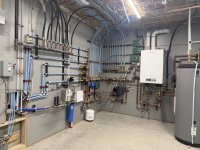
And the utility room is pretty much done. Passed electrical, etc etc. Snowmelt is on and working well. The controller is great but it may need some tuning - it was on today and I'm not sure it should have been. That'll cost a lot if it runs all the time. And it did a great job melting the snow and ice off the areas that had built up.

IMG_0533.jpg
 

ToySnake

Member
Joined
Oct 7, 2017
Messages
13
Location
Willow Spring NC
Wow. Great build thread. Just read it all front to back this afternoon as we get a small piece of winter weather passing thru NC today. Didn’t understand all the interweb fiber talk, but that’s okay! I’m a 61 yr old dinosaur who looks away from AI GBChat at every turn.

However, as an air-cooled enthusiast with a freshly built 3.2ss twin plug EFI DBW build, I will now head over to your Pelican thread!! Look forward to that rabbit hole. Congrats on the house - your patience and willingness to let the contractors build your place with attention to detail is going to pay off for y’all. The little sports cars will be happy there. Patrick

Don’t want to clutter up your thread, but here’s a link:
 
Last edited:
OP
B

badonk

Well-known member
Joined
Aug 20, 2011
Messages
216
Wow. Great build thread. Just read it all front to back this afternoon as we get a small piece of winter weather passing thru NC today. Didn’t understand all the interweb fiber talk, but that’s okay! I’m a 61 yr old dinosaur who looks away from AI GBChat at every turn.

However, as an air-cooled enthusiast with a freshly built 3.2ss twin plug EFI DBW build, I will now head over to your Pelican thread!! Look forward to that rabbit hole. Congrats on the house - your patience and willingness to let the contractors build your place with attention to detail is going to pay off for y’all. The little sports cars will be happy there. Patrick
Oooo, 3.2ss twin plug sounds tasty!
 
OP
B

badonk

Well-known member
Joined
Aug 20, 2011
Messages
216
Handoff day! It was a good day at the house doing the handoff with the builder. They will be back in the house on Mon/Tues next week handling a few punchlist items, then more visits for things that might take longer, and then spring/summer to address some things outside. It'll be a while. We'll have all the furniture in by next Thursday. And I got a call from the HF delivery crew (Ryder?) that my toolbox is ready to be dropped off. I had it scheduled for Wednesday but they had the address in their system wrong so we're working to reschedule that.

But overall we are so happy with the way everything came out. The electrician was there to get the lifts wired up today and they are all working now. I spent some time with the solar installer and while it is all online and working, we are questioning some of the install decisions. As it stands now, solar can only charge one of the Powerwall batteries. That battery hooks up to one of the 200 amp panels. The second battery is hooked up to the second 200 amp panel but isn't pulling from the solar panels - grid only. He's going back to talk to his boss about having them both charge from solar. While we were standing there my solar was putting what I think is max charge (5 Kw) to one battery, powering the full load (2 Kw? just lights and very little else) on that 200 amp panel, and then dumping the rest into the grid. Meanwhile the other battery was charging off the grid? Anyway, more work to do there or at least I need someone to explain it to me in a better way other than it works weird on a house with 400amp service.

As we were leaving the house and locking things up, I pulled the car out of the daily garage where we had been unloading a few things. Hmm, the door installer hadn't paired up the remote that I was given. Oh well, hit the button on the wall and just exit through the side door. And bam. Wtf. Door jammed and stuff bent. I had run it up/down one or two times before and thought it didn't sound great. My builder had done the same and had a note for the garage door installers to come back and fine tune. Looks like more than a fine tune needed. Ugh. What a pain for everyone. The doors on the shop run on liftmaster jackshaft openers and seem simpler and quieter. We were supposed to go the same route on the garage door but somehow things were installed in a way where there isn't enough room to mount that style opener. So back to a chain drive one.

 
Last edited:
OP
B

badonk

Well-known member
Joined
Aug 20, 2011
Messages
216
A learned a bit more on the Powerwall setup as I tried to understand the settings, etc overnight. Maybe it's ok as is? Here's the deal. My power company put me on a net metering plan. Here's how that works with my utility.

Any time my solar panels are generating more power than I can use (powerwall is 100%, or charging is at 5 kW, the house load is covered), excess power goes to the grid. The net metering basically established a 'bank' that tracks how much I put in. Any time I need to pull from the grid, it pulls from that bank and I'm not charged. So the grid and bank basically become a conduit to get my extra solar power transferred to the other powerwall. So I get 1:1 transfer rate...I think. I am still working on the right settings for that second powerwall. Last night it topped itself up at 100% and didn't draw down at all. And maybe that doesn't matter if I'm banking enough during the day and it's best to have the second powerwall topped up at 100% should there be a power outage? And maybe I do the same on the other powerwall? Why draw from the batteries at night if the rate per kWh is the same regardless of time of day and any excess I make from my solar panels during the day are available to use at night. Basically with this net metering setup, I didn't need batteries for efficiency - they only act as backup in the event of an outage.

If I consume more from the grid than I generate (likely during winter months), I pay the normal rate at about $0.13 per kWh. But as the days get longer into spring and summer, I should be banking quite a bit that I'll draw from in the winter.

And finally once a year every March, if I have anything left in the banked balance from the past year, the power company pays me the wholesale amount (currently $0.04213/kWh) for what's left and the bank balance is reset to 0.

Simple enough? This of course would vary depending on how your utility works as there are lots of different arrangements out there.
 

GlennSullivan

Well-known member
Joined
Mar 15, 2006
Messages
334
Location
Yorktown, NY
A learned a bit more on the Powerwall setup as I tried to understand the settings, etc overnight. Maybe it's ok as is? Here's the deal. My power company put me on a net metering plan. Here's how that works with my utility.

Any time my solar panels are generating more power than I can use (powerwall is 100%, or charging is at 5 kW, the house load is covered), excess power goes to the grid. The net metering basically established a 'bank' that tracks how much I put in. Any time I need to pull from the grid, it pulls from that bank and I'm not charged. So the grid and bank basically become a conduit to get my extra solar power transferred to the other powerwall. So I get 1:1 transfer rate...I think. I am still working on the right settings for that second powerwall. Last night it topped itself up at 100% and didn't draw down at all. And maybe that doesn't matter if I'm banking enough during the day and it's best to have the second powerwall topped up at 100% should there be a power outage? And maybe I do the same on the other powerwall? Why draw from the batteries at night if the rate per kWh is the same regardless of time of day and any excess I make from my solar panels during the day are available to use at night. Basically with this net metering setup, I didn't need batteries for efficiency - they only act as backup in the event of an outage.

If I consume more from the grid than I generate (likely during winter months), I pay the normal rate at about $0.13 per kWh. But as the days get longer into spring and summer, I should be banking quite a bit that I'll draw from in the winter.

And finally once a year every March, if I have anything left in the banked balance from the past year, the power company pays me the wholesale amount (currently $0.04213/kWh) for what's left and the bank balance is reset to 0.

Simple enough? This of course would vary depending on how your utility works as there are lots of different arrangements out there.
Do you have the choice of leaving the power credit in the "bank" from year to year? If it were me, I'd rather have it banked for free use vs paying 0.13/kwh than take it in cash at 0.4/kwh.
 
OP
B

badonk

Well-known member
Joined
Aug 20, 2011
Messages
216
Do you have the choice of leaving the power credit in the "bank" from year to year? If it were me, I'd rather have it banked for free use vs paying 0.13/kwh than take it in cash at 0.4/kwh.
I don't think so. Since I'm just up and running now at the low point from a solar production standpoint, I'll probably end up buying from the grid at that 0.13/kwh rate for this month. Then ideally I start banking for use as days shorten 9 months from now. In the solar proposal they estimated I'd use more than I generate from November - February. So if those estimates were correct I'll be banking from March - October. No guarantee their estimates are correct either - in fact I bet they put in estimates to show a net gain for me so that I sign on the dotted line. I'll keep on eye on the actuals. Also there's a good chance I consume a lot less electricity than expected. All my heat (floors, hot water) is using gas.
 
To avoid these ads, REGISTER NOW!
Top Bottom