I don't think you're trying to help anybody... you're on some weird crusade... it's really odd, man.Figure it out yet? I'm really just trying to help.
Gdoc, pits and flaking chrome are bad. Pits lead to rust which leads to flaking chrome. Flaking chrome can go places you don't want it, eyes, engines, under finger nails, etc. That's why aircraft guys often used black oxide tools. Yes "real men" use beat up tools. But buying brand new tools already beat up is unacceptable.
Life is too short for cheap sockets or ratchets you don't love. Send them back.


You are using an out of date browser. It may not display this or other websites correctly.
You should upgrade or use an alternative browser.
You should upgrade or use an alternative browser.
SK compared to the big 3's 2nd tier tools?
- Thread starter gdocktor3
- Start date
- Status
- Not open for further replies.
Shoot, if I don't get it exchanged now and in a few months it's covered in rust, they'll hit me with neglect and I'll never get it exchanged.
The above statement has to be in the top 10 of the dumbest things I've ever read on GJ.
Congrats.. You are in elusive company.
How about some pictures of these defective tools?
Brownsfan
Well-known member
It does seem as he has a personal vendetta against SK. I applaud SK for their commitment to an entire tool brand USA made. Refreshing in this day and age
HanShotFirst
Well-known member
The people who see Snap On as the only choice in tools would be very comfortable raising alpacas.
My SK long pattern wrenches have served me for 25 years with flawless perfection. No trashed fasteners, no chipped chrome, not one damaged wrench; nothing but excellent service. I suspect they'll do the same for my grand children. Just as my 1/2" SK socket set has done for me, after serving two generations before me. Chrome is all intact, not a single socket is broken and the 70 year old ratchet is still working perfectly.
Now people can talk a lot, but in my book, that's a good tool!!!
My SK long pattern wrenches have served me for 25 years with flawless perfection. No trashed fasteners, no chipped chrome, not one damaged wrench; nothing but excellent service. I suspect they'll do the same for my grand children. Just as my 1/2" SK socket set has done for me, after serving two generations before me. Chrome is all intact, not a single socket is broken and the 70 year old ratchet is still working perfectly.
Now people can talk a lot, but in my book, that's a good tool!!!
HanShotFirst
Well-known member
Why? Because it's not the new stuff? I think there is value in knowing that a company is consistent. My boss just bought one of the green box 1/4" sets with std and deep well sockets. I got to look it over well 'cause I'm thinking about buying one also. I found no flaws and I see no reason to believe it will work just fine. Additionally I'm also confident that if something were to be wrong that SK would make it right. Now if you have solid evidence that I'm wrong about that, then have at it....
What help did we offer the OP who took our advice and received tools that have the chrome flaking off, bits of stuff in the finish inside the profile, and a ratchet that rattles? "well" says Han, "I have old SK and they are flawless". That's not helpful. Forget SK for a minute. What does this say about GJ?
And it seems you get more than your fair share of Snap On Kool Aid.
The OP hasn't posted any photos of the chrome extension or the finish inside the sockets as of yet. I am pretty sure the sockets have the coating/paint inside that has been discussed before. And if there is a problem, I have a pretty good feeling SK will make it right.
At this point I prefer to wait and see how it will all shake out with SK's customer service before bashing them or predicting their imminent demise.

At this point I prefer to wait and see how it will all shake out with SK's customer service before bashing them or predicting their imminent demise.
The above statement has to be in the top 10 of the dumbest things I've ever read on GJ.
Congrats.. You are in elusive company.
How about some pictures of these defective tools?
That was a joke. You must not speak sarcasm. Perhaps you are in elusive company my friend. :stfu:
Fedwrench
ALLIANCE MEMBER
Right now, I think GJ is a good place to get bad information. We're at risk of just becoming another curmudgeon chat room, talking nonsense and politics. The OP asked a simple question and you guys gave him the wrong answer. Clearly.
I disagree. I mentioned the issues some people had with SK items after SK Daze and also gave him other options such as Gearwrench and Williams. In the end you still don't know what the brown truck will bring you quality wise.
However, if you take a stance against a particular brand repeatedly, then yes you run the risk of being that old guy yelling buy snap on instead of get off of my lawn.
 beer:
beer:We can only judge a brand based on our experience using it. If you don't own any, it's hard to form an opinion.
LB-1911
ALLIANCE MEMBER

I am computer illiterate sometimes. I cannot figure out how to upload pics. I have them on my phone, saved in my email, and on my computer at work. How the heck do I do it?

Have you tried - Additional Options - Attach Files
Don't know if anyone needs it, but posting pics thread is getting buried fast out in Free parking, so I Copied a link for here ...thanks again Stuart..
http://www.garagejournal.com/forum/showthread.php?t=162883
This is for pics in the hard-drive
After you click on Post Reply and write some text, scroll down to the Manage Attachments buttons and click on that. A second window will pop up, where you can browse your hard drive, select, and then upload the photos you want to include. Make sure they sized properly - if they're right off your digital camera they're probably be too large. 800 x 600 or maybe 1024 x 768 is about as big as they should be. After you click on the upload button wait for the picture file names to appear in the 'current attachments' blank.
After that's done, close that popup window and you can then enter the post.
*****************************************************************
And guidance on posting from Photobucket, courtesy of 383 240Z
http://www.garagejournal.com/forum/showthread.php?t=166833
Do you see the little box in your reply screen that shows the mountains and a sun?
Click it, that will open a box that will have http:// in it. clear that out and put the direct link in there
*********************************************************
I added another pic posting thread in this section too
http://www.garagejournal.com/forum/showthread.php?t=176028
How to post pics, with pictures on doing it
http://www.garagejournal.com/forum/showthread.php?t=287703
http://www.garagejournal.com/forum/showthread.php?t=293604
I think I got it. I always used quick reply and never saw the options in the "post reply" tab. Thanks for the help guys.
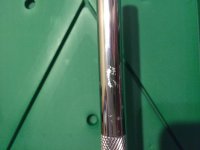
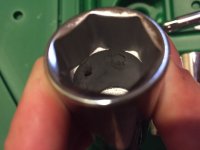
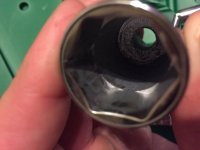
I tried to show the face of the sockets where the paint and chrome are mixed together. The piece in my hand was the flake hanging off inside the socket. Obviously it isn't terrible quality and won't affect anything, but they are brand new, never used. I did not expect a product made in the USA to be sold like this.
I tried to show the face of the sockets where the paint and chrome are mixed together. The piece in my hand was the flake hanging off inside the socket. Obviously it isn't terrible quality and won't affect anything, but they are brand new, never used. I did not expect a product made in the USA to be sold like this.
Attachments
![IMG_1078[1].jpg](/forum/data/attachments/395/395932-4111278081d135c0a3f68ba158ebdf50.jpg)


That was a joke. You must not speak sarcasm. Perhaps you are in elusive company my friend. :stfu:
If that was Sarcasm or a "Joke" it was terrible.. You Win Again..

My Advice, BTW Not a Joke if your Wondering, Channel about 2% of the Effort you are currently Using in this thread, CALL SK and Speak with there Customer Service, I believe the Main Lady's Name is Lauren, Let your Concerns be known and things should get better for you.
Last edited:
Bigblue&Goldie
Well-known member
The only thing in those pics that would concern me is that extension, the chrome looks really thin. As far as the metal flakes in the sockets go, it looks like SK needs to either use a different media in their tumblers or tumble their sockets longer Before polish/chrome. I have a set of Wright flex sockets that retail for $400 that have an interior that look exactly like the other sockets pictured.
Last edited:
Askme42
Well-known member
Why? Because it's not the new stuff? I think there is value in knowing that a company is consistent. My boss just bought one of the green box 1/4" sets with std and deep well sockets. I got to look it over well 'cause I'm thinking about buying one also. I found no flaws and I see no reason to believe it will work just fine. Additionally I'm also confident that if something were to be wrong that SK would make it right. Now if you have solid evidence that I'm wrong about that, then have at it.
And it seems you get more than your fair share of Snap On Kool Aid.
He's one of the biggest snap on kool aid drinkers I have seen on here.
The only thing in those pics that would concern me is that extension, the chrome looks really thin. As far as the metal flakes in the sockets go, it looks like SK needs to either use a different media in their tumblers or tumble their sockets longer Before polish/chrome. I have a set of Wright flex sockets that retail for over $700 that have an interior that look exactly like the other sockets pictured.
I believe the Reason you dont see the Thicker Chrome on Extensions is due to there rotational properties, which would probably make it hard to adhere under Load, All my Snap on Extensions (3/8 and Up) are Duller than the Sockets and exhibit different finish properties than your typical "Bling". Obviously Just a Guess as I definitely dont have any inside information, but ive put enough wrench time in to know even the best Names in extensions, will flex somewhat under load.
cgv69
Well-known member
Now that is the dumbest thing I've read in a while. So he got unlucky and had some issue with the tools he bought and somehow that "clearly" show GJ gave him bag advice? Really???No vendetta. No emotion here. The OP asked about SK tools. Pretty sure everything I've said here has been spot on. I get that some people are emotionally attached to their tools and don't want to hear anything negative. We call them kool aid drinkers here (which I think is rude, but oh well, that's GJ).
What help did we offer the OP who took our advice and received tools that have the chrome flaking off, bits of stuff in the finish inside the profile, and a ratchet that rattles? "well" says Han, "I have old SK and they are flawless". That's not helpful. Forget SK for a minute. What does this say about GJ?
Right now, I think GJ is a good place to get bad information. We're at risk of just becoming another curmudgeon chat room, talking nonsense and politics. The OP asked a simple question and you guys gave him the wrong answer. Clearly.
So what is the right answer? Had he gone with what ever brand that you deem as the "correct" answer and still had issues, would that have meant your recommendation is actually the wrong answer too?
Last time I checked, no tool manufacturer has a perfect reputation. They all make mistakes and sometimes release tools that are not 100% perfect.
Askme42
Well-known member
There might be an issue with the extension. Outside of that though I see no problems. The bitching about paint inside the sockets is frankly getting old at this point.
The inside of the sockets look just fine. They're tools vs. jewelry. SO sockets have the same issues.
The extension should be replaced. It looks like it was banged around in inventory or during S&H.
I'm confident SK would resolve the issue with the extension with a 2 minute phone call and I doubt they'd want you to send the original back to them first.
Why don't you do this and report back your experience with SK cust. service.
The extension should be replaced. It looks like it was banged around in inventory or during S&H.
I'm confident SK would resolve the issue with the extension with a 2 minute phone call and I doubt they'd want you to send the original back to them first.
Why don't you do this and report back your experience with SK cust. service.
HanShotFirst
Well-known member
I think I got it. I always used quick reply and never saw the options in the "post reply" tab. Thanks for the help guys.
I tried to show the face of the sockets where the paint and chrome are mixed together. The piece in my hand was the flake hanging off inside the socket. Obviously it isn't terrible quality and won't affect anything, but they are brand new, never used. I did not expect a product made in the USA to be sold like this.
I think your complaints are 100% legitimate. The chrome should be perfect and uniform. When it's not, that's a sign of inconsistent plating. SK should have caught these and rejected them but these things happen. Contact customer service and give them the opportunity to make this right.
Everyone relax. I've owned this set for about 14 hours now. Please stop telling me what I should and shouldn't do. I emailed SK about the problem along with the pictures I took for them to see what I am speaking of. Before purchasing the set, a few guys informed me about some items missing chrome in their sets. Its not a coincidence that my set it also missing chrome. This forum has many purposes. One purpose is to share our experiences to better assist others. Hopefully the next guy interested in buying SK tools will have a better idea of what to expect once making that decision.
HanShotFirst
Well-known member
Apologies sir, didn't mean to tread where I'm not welcome.Everyone relax. I've owned this set for about 14 hours now. Please stop telling me what I should and shouldn't do. I emailed SK about the problem along with the pictures I took for them to see what I am speaking of. Before purchasing the set, a few guys informed me about some items missing chrome in their sets. Its not a coincidence that my set it also missing chrome. This forum has many purposes. One purpose is to share our experiences to better assist others. Hopefully the next guy interested in buying SK tools will have a better idea of what to expect once making that decision.
I agree with you about the value of this forum. Any smart company would use this forum to make themselves better. SK has a great reputation and my expectation is that they'll correct these little problems and move on. It is disconcerting that the chrome/paint thing has been seen more than once here on this one forum. Makes me think some middle manager decided to be a "hero" and save some tools from the recycle bin...but such "hero" ideas can seriously damage a company's reputation; and it's NEVER worth that. In business your reputation is all you really have.
Look at what Sears has done to their reputation. Look at Harbor Freight who are now making some seriously damn good tools (their sockets and ratchets), yet still can't get ANY respect...because they've trashed their reputation.
SK plays at the low end of the tool truck market. The EXPECTATION in that part of the market (right or wrong), is that you're getting tools that are 99% the quality of Mac, Matco, and Snap On at a lower price. So it's expected the tools will be flawless and exhibit a higher level of fit and finish than anything coming out of the Pacific Rim; that's a reasonable expectation given the price point. Harbor Freight's sockets these days typically exhibits perfect or near perfect chrome plating, shiny and uniform (at least that's how MY HF sockets look). So it's reasonable to expect the same from SK.
And finally when you buy SK you believe you're buying a good warranty and good customer service.
My faith in SK isn't gone, but I do find it disconcerting that more than one user here on this forum has found the same kind of "band aid" type finish on their sockets. Let's hope it is just a batch that slipped by, and the person responsible has been corrected, and SK's reputation not tarnished.
SK tools has been VERY good to me and I'll buy more if they stay committed to quality.
1950mercury
Well-known member
Wow i just noticed the tags.
rice rocket
Well-known member
- Joined
- Mar 24, 2011
- Messages
- 3,175
Here's something that I discovered last night.
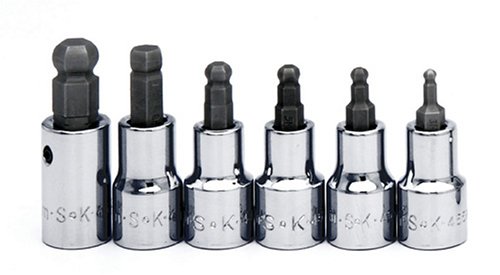
I had ordered the imperial ball hex drivers from SK Day last September, and tossed them into my toolbox not thinking to check them before I had to use them.
Well, turns out, the 5/16" one barely has a ball-end to it. I thought it must be a manufacturing error and pulled up Amazon's page on it someone else had the same complaint. To boot, even the picture shows that it wasn't cut right. I thought it was a QC issue given the widespread complaints of QC fails, but now it's clearly an engineering fail as well...
http://www.amazon.com/dp/B0002SR39Q/?tag=atomicindus08-20
My set:

I had ordered the imperial ball hex drivers from SK Day last September, and tossed them into my toolbox not thinking to check them before I had to use them.
Well, turns out, the 5/16" one barely has a ball-end to it. I thought it must be a manufacturing error and pulled up Amazon's page on it someone else had the same complaint. To boot, even the picture shows that it wasn't cut right. I thought it was a QC issue given the widespread complaints of QC fails, but now it's clearly an engineering fail as well...
http://www.amazon.com/dp/B0002SR39Q/?tag=atomicindus08-20
My set:
HanShotFirst
Well-known member
Looks like it's missing a machining cut. Send it back.
rice rocket
Well-known member
- Joined
- Mar 24, 2011
- Messages
- 3,175
Looks like it's missing a machining cut. Send it back.
I will give them a ring, but I don't have too much confidence they can do anything other than tell me to buy another brand.
It looks like this is a design error given how widespread it is.
From Grainger:
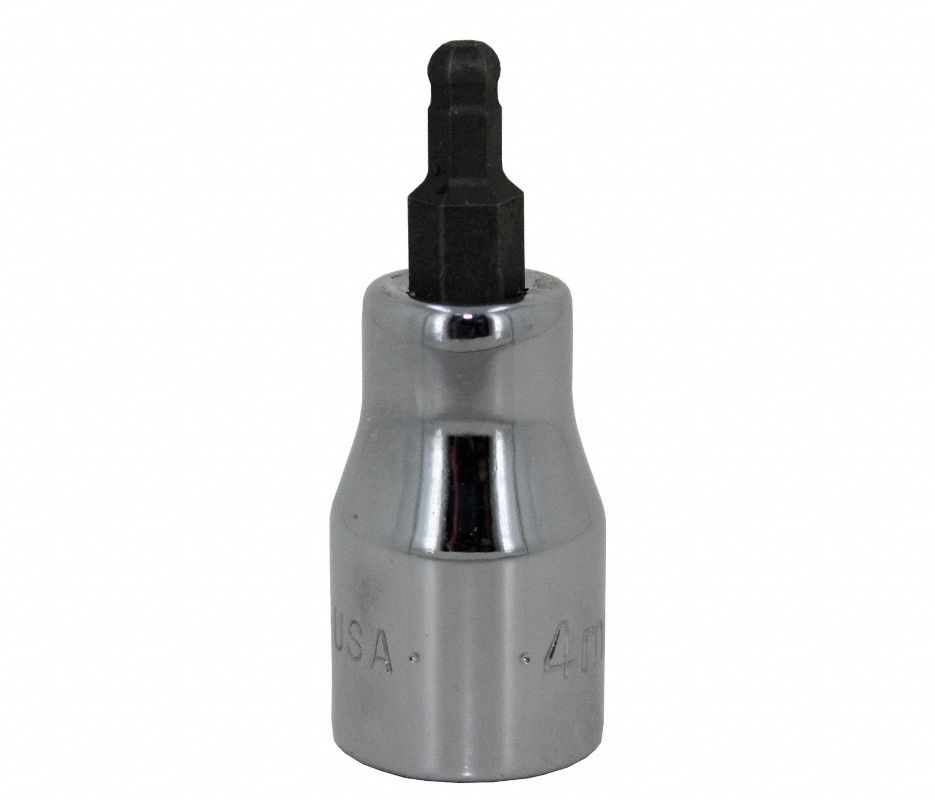
Advance Auto/Toolsource:

Thanks SK ERIC. Now with that said, I'm the op and I'm a bit unhappy with a few items in the set I just received. Is it possible SK could replace the items that have flaking chrome and what not? Could you explain the idea behind the grey internals of the sockets and why they aren't chrome? Thanks
Yes, and I'll check. If you're unhappy with the product, please call customer service at 800 822 5575. It'll probably be Lauren that you talk to. If you need to follow up on anything, email me directly at [email protected], and I'll make sure you're taken care of.
As far as the inner coating, I'll check with engineering--I've heard it before, but I can't remember.
I will give them a ring, but I don't have too much confidence they can do anything other than tell me to buy another brand.
That ain't going to happen, rice rocket. Please call Customer Service at the above number, and if you need a follow-up, email me.
Last edited:
u118224
Well-known member
There are lots of SK tools purchased by members of this site. So, I'll be a little different and share that I recently purchased the 1/4 metric mid length sockets and they look great. I didn't critically inspect them for defects, I plan to use them and have. SK is no different than any other business, dissatisfied customers share their experience with others much more often than satisfied customers do.
Yes, and I'll check. If you're unhappy with the product, please call customer service at 800 822 5575. It'll probably be Lauren that you talk to. If you need to follow up on anything, email me directly at [email protected], and I'll make sure you're taken care of.
.
Thanks a lot. I am not worried about whether or not they will take care of it. I know they will. One thing every company should stand behind is that all tools are free of defects in material and workmanship. Thanks again for the help.
kythri
Well-known member
Thanks a lot. I am not worried about whether or not they will take care of it. I know they will. One thing every company should stand behind is that all tools are free of defects in material and workmanship. Thanks again for the help.
You need to understand that mistakes happen, and no company can QC every single product off the line, especially when they're cranking out the quantities that these folks are cranking out.
QC/QA/inspection can't possibly inspect EVERY item off of a line - they inspect a sample out of every X parts.
One could argue that the trunk brands have "better" QC, but they also have a distribution network that acts as a second level of QC outside the factory - drivers who receive the hardware and have the ability to inspect before a customer sees the stuff, and return/exchange faulty stuff. This is something SK doesn't have.
SK likely ships products to a distributor, who then sends out to individual dealers, or engages in drop-shipping for online sellers. This means that there's nobody opening/inspecting the individual items prior to the customer receiving it, so, ultimately, some stuff is going to slip through.
Quite frankly, since these issues aren't happening to everyone, the more important issue is how the business takes care of these issues, not how they seek to mitigate what is essentially an anomaly.
Now, if everyone here that bought SK products had the same issues? That would be a reason to look at the QC/QA process.
But why is it only the extensions? Three people that have bought similar sets all had problems with the extensions, nothing else. Plus, I could be wrong, but I don't think 47 pieces just land facing the same way in their intended spots in the plastic case. Someone must be hand picking each item and placing it in its designated spot. Again, I could be wrong, but something doesn't add up.
d.mcfarland
Well-known member
Who makes the thread tags?!? Lots of variety there.
Who makes the thread tags?!? Lots of variety there.
Just hit edit tags and add your own.
I don't think 47 pieces just land facing the same way in their intended spots in the plastic case. Someone must be hand picking each item and placing it in its designated spot
I would assume that's automated. And hopefully with inspection equipment to ensure that all slots are filled. I think that's why some people get two of one item (two 7/16" sockets, for example, with a missing 3/8" socket). As in a socket got mixed in the wrong "bin".
kythri
Well-known member
Even if someone is manually picking and packing 47 sockets and accessories in a case, that person isn't inspecting the inside of a socket for some loose flashing. That person is hastily assembling the set.
Your item blemishes are something that would get missed by someone not specifically looking for them while handling thousands of pieces per day.
Your item blemishes are something that would get missed by someone not specifically looking for them while handling thousands of pieces per day.
I don't have any SK sockets yet, but i'm looking for a chrome set of 1/2 drive metric shallows. Its either them or Proto, have not decided yet. I do have a set of SK's line wrenches (6 piece metric set) and they are still flawless after use and many brake fluid baths.
John in OH
Well-known member
Regarding SK's target markets and distribution .....
I was hoping that NAPA would pick up the SK line in lieu of developing the Carlyle. I've bought a few Carlyle tools (sockets, ratchet, extension) and they have been very nice tools with good fit and finish and I've had no problems with them, but they are all Taiwan COO. It would have been a lot nicer, IMHO, if NAPA had a US-manufactured tool line to serve as their upper-tier tools to complement the lower-tier, Asian made, Evercraft line.
NAPA would have been a great distribution network for SK.
I was hoping that NAPA would pick up the SK line in lieu of developing the Carlyle. I've bought a few Carlyle tools (sockets, ratchet, extension) and they have been very nice tools with good fit and finish and I've had no problems with them, but they are all Taiwan COO. It would have been a lot nicer, IMHO, if NAPA had a US-manufactured tool line to serve as their upper-tier tools to complement the lower-tier, Asian made, Evercraft line.
NAPA would have been a great distribution network for SK.
HanShotFirst
Well-known member
Yeah there are some very good tools out there from Taiwan, but I don't know a single guy who has spent any quality time wrenching that doesn't prefer the "Made in USA" stamp on their tools. I will take a vintage tool which is likely to metallurgically inferior to the best that Taiwan makes just because of my preference for the U.S. Made tools.
I don't have any SK sockets yet, but i'm looking for a chrome set of 1/2 drive metric shallows. Its either them or Proto, have not decided yet. I do have a set of SK's line wrenches (6 piece metric set) and they are still flawless after use and many brake fluid baths.
I just bought 3 sets of 1/2" Blackhawk by Mac from their website for cheap as they were on close out special. I'm talking $30+/- a set of 1/2" in deep or shallow, metric or sae. They're actually very nice. Just food for thought. Can't go wrong for that price.
One could argue that the trunk brands have "better" QC, but they also have a distribution network that acts as a second level of QC outside the factory - drivers who receive the hardware and have the ability to inspect before a customer sees the stuff, and return/exchange faulty stuff. This is something SK doesn't have.
I would also argue that techs that buy tool off the truck are a little less "****" about minor imperfections. I doubt they make a fuss about the inside of the sockets.
This is not a slam on the OP because he has a valid complaint on the extension IMHO.
I just bought 3 sets of 1/2" Blackhawk by Mac from their website for cheap as they were on close out special. I'm talking $30+/- a set of 1/2" in deep or shallow, metric or sae. They're actually very nice. Just food for thought. Can't go wrong for that price.
thanks for the heads up... picked up the 3/8" set for $22
- Status
- Not open for further replies.