To avoid these ads, REGISTER NOW!

3D anythhing Printer, Laser, CNC

Jazzman442

Well-known member
Joined
Sep 17, 2013
Messages
553
Location
Tampa Bay area, FL
I am looking into getting a 3D printer, CNC, Laser or one of each. I want to learn more about them and want to use them to make parts and templates for my Shop.

Anyone who has one. Please let me know what you have and what you like or dislike about it.

Any advice or info will be greatly appreciated.
 
To avoid these ads, REGISTER NOW!

RPH

Well-known member
Joined
Dec 17, 2006
Messages
4,190
Location
Michigan Thumb
Software, that is an issue. I have a small Cnc mill that uses stepper motors for a 4 axis machine. Getting the product from design to completion requires a few steps. I use turbocad for design. It allows me to save the file in the appropriate format. Nest the file is moved to deskproto, this software takes the cad file and writes the gcode that runs on the mill. Last, but not least is mach3. This software runs the mill proper. The good news in all this is these software packages though not cheap are affordable. Just as hard tooling engages the material, software is required to get it to that point. I have about a grand in the software packages.
 

kd3pc

Well-known member
Joined
Aug 10, 2013
Messages
3,630
Location
Northern Neck
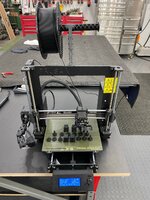
I would start with a 3D printer. I have a tevo tarantula and it is about $250 on the web. This is a kit of parts and you build it yourself. Filament is extra and there is a big difference in quality, good filament helps get a decent finish.

Like the others SW is the magic. The Tevo runs a machine code local and it expects a specific gcode and you must "tweak" the unit as it prints. Print is slow...temperature is an art to keep it printing correctly. I use cura and scad. I also go to thingiverse.com to see if someone else has invented the wheel I want, else you have to do the front end cad design.

Once you learn how and what is required for this thing to print...then you can move on to bigger things.

Laser and CNC head replace the print head assembly but keep in mind the laser can be costly and it is subtractive...ie you are cutting/burning away, printer is additive ...ie you are adding material so plastics are the norm, spitting carbon fiber or hot metal for a "real" prototype is a different beast. Just much more $$$$

What ever you start with you will need temperature control space and a decent size table or bench. The print is slow. And can go wrong at any point, so being able to keep an eye on it is a bonus.
 

astroracer

Well-known member
Joined
Jun 22, 2005
Messages
3,001
Location
Mid_Michigan
Like was mentioned, software is key. If you can't model in 3D, a printer will do you no good, especially for custom stuff.
And don't expect a lot from a desktop unit. Slow and finicky means frustrating.
I model my jobs in NX and send .DXF Files to Shapeways for printing. No frustration, maintenance or wasted space. I know I will get a usable part every time. :)
Mark
 
OP
J

Jazzman442

Well-known member
Joined
Sep 17, 2013
Messages
553
Location
Tampa Bay area, FL
My son is in College and he can get the Auto cad and their other packages software for free while he is going to school and a really big discount when he graduates. I was thinking of using those. Maybe not if they are to hard to learn. The 3d printers most of which look the same.

What do you all use them for? I am making some bench power supplys and need some custom parts and parts I can not get anymore for some old cars. I am planing on getting a 3d scanner as well.

As I read the comments it might be a lot to tackle at first. It seems like 3d stuff is coming fast.
 
OP
J

Jazzman442

Well-known member
Joined
Sep 17, 2013
Messages
553
Location
Tampa Bay area, FL
I would start with a 3D printer. I have a tevo tarantula and it is about $250 on the web. This is a kit of parts and you build it yourself. Filament is extra and there is a big difference in quality, good filament helps get a decent finish.

Like the others SW is the magic. The Tevo runs a machine code local and it expects a specific gcode and you must "tweak" the unit as it prints. Print is slow...temperature is an art to keep it printing correctly. I use cura and scad. I also go to thingiverse.com to see if someone else has invented the wheel I want, else you have to do the front end cad design.

Once you learn how and what is required for this thing to print...then you can move on to bigger things.

Laser and CNC head replace the print head assembly but keep in mind the laser can be costly and it is subtractive...ie you are cutting/burning away, printer is additive ...ie you are adding material so plastics are the norm, spitting carbon fiber or hot metal for a "real" prototype is a different beast. Just much more $$$$

What ever you start with you will need temperature control space and a decent size table or bench. The print is slow. And can go wrong at any point, so being able to keep an eye on it is a bonus.

This is interesting. So do i need to use it inside in ac or can I leave it in the garage?
 
OP
J

Jazzman442

Well-known member
Joined
Sep 17, 2013
Messages
553
Location
Tampa Bay area, FL
Software, that is an issue. I have a small Cnc mill that uses stepper motors for a 4 axis machine. Getting the product from design to completion requires a few steps. I use turbocad for design. It allows me to save the file in the appropriate format. Nest the file is moved to deskproto, this software takes the cad file and writes the gcode that runs on the mill. Last, but not least is mach3. This software runs the mill proper. The good news in all this is these software packages though not cheap are affordable. Just as hard tooling engages the material, software is required to get it to that point. I have about a grand in the software packages.

AutoDesk is what I was planing? Any Thoughts?
 

kd3pc

Well-known member
Joined
Aug 10, 2013
Messages
3,630
Location
Northern Neck
I have found that it works much better in that 70-90 degree F range. There is a lot of heat at the nozzle and that heat needs to settle on the previous layering and then cool slowly. I have a heated bed and that helps, but I still have to make sure the bed and the filament and the nozzle heats consistently. I have two small fans on my print head and that helped some.

For me, it was well worth the $300 to learn how the thing works, tune the motors and screws and get it to consistently print a 20MM cube that is square. I print a lot of ham radio gadgets, call sign name plates, cases, shrouds and so on
 

RPH

Well-known member
Joined
Dec 17, 2006
Messages
4,190
Location
Michigan Thumb
Anything Auto Cad is big money. For the places that truly need and can afford their products it’s worth the licensing fees. As I guy in barn type I looked for the reasonable cost solutions to the software. Turbocad products are reasonably priced option for me and can have a much easier learning curve. They offer different levels products for different users.
Deskproto writes the g-code to make the vision you made in cad. Takes some tuning for your machine but that’s what practice is for.
The software that runs the machine itself can be proprietary to the machine or open based. Once again tuning the equipment, software, and you working together will take practice. Check out the products above. Both offer tryout versions for 30 days free.
 

pmason0

Well-known member
Joined
Nov 12, 2011
Messages
251
Location
East Tennessee
Last Dec. I bought an Ender3 3D printer, I search Thingiverse for things to print, but design my own items in TinkerCad for quick easy things. I do have Fusion360 (free for hobbyist, just need to spend time learning it.
I'm currently putting together the Mostly Printed CNC (MPCNC) machine to play with.
 

gte718p

Well-known member
Joined
Mar 12, 2009
Messages
3,950
One of each is always fun. Depends on what you want to do. My 3D printer gets a ton more use, but the laser does some really cool things.
 

astroracer

Well-known member
Joined
Jun 22, 2005
Messages
3,001
Location
Mid_Michigan
My son is in College and he can get the Auto cad and their other packages software for free while he is going to school and a really big discount when he graduates. I was thinking of using those. Maybe not if they are to hard to learn. The 3d printers most of which look the same.

What do you all use them for? I am making some bench power supplys and need some custom parts and parts I can not get anymore for some old cars. I am planing on getting a 3d scanner as well.

As I read the comments it might be a lot to tackle at first. It seems like 3d stuff is coming fast.

The learning curve for any comprehensive 3D CAD package is usually pretty steep. I have been using Unigraphics/NX since '93 so it is second nature for me. I do a lot of model car parts, using the 3D printed masters to resin cast copies.
The thing you will find with the cheap desktop printers is the resolution is huge and you will not get very good quality parts out of them, especially if the parts are on the small side. You will also find the parts are not very robust. Breaking at the layering lines and crumbling are common if the parts are under any kind of stress.
I will suggest you pick out a 3D CAD program and learn to use it before jumping off into the 3D stuff. You HAVE to be able to design and model viable parts before you can print or cut anything so that is where you need to focus your effort.
Mark
 
Last edited:

sz0k30

Well-known member
Joined
Feb 12, 2014
Messages
881
Location
SE Michigan
The learning curve for any comprehensive 3D CAD package is usually pretty steep.

I will suggest you pick out a 3D CAD program and learn to use it before jumping off into the 3D stuff. You HAVE to be able to design and model viable parts before you can print or cut anything so that is where you need to focus your effort.
Mark

X2 (retired GM chassis designer) and current "Alibre" user.
 

redragoon

Well-known member
Joined
Jun 12, 2018
Messages
295
Location
Greenville SC
There is also the OnShape web-base 3D modeling software. Make a free profile and you can create models/documents that are public. You can also search for existing public models. Being web-based, it does all of the computing offsite so the working computer specs can be lower. I wouldn't use it for professional results, but it is similar to the Pro-E software I was taught in college.

I've used it for models of personal projects and occasionally to get a simple print for our machinist at work. They also have a database of videos and tutorials to teach someone how to use it for free.

They are still currently adding export file structures and compatibility for CNC usage, but it is a decent way to learn without having a 3D modeling spec'd PC.
 
To avoid these ads, REGISTER NOW!

manwithtools

ALLIANCE MEMBER
Joined
Aug 24, 2015
Messages
13,639
Location
Lebanon, TN
I have all three. I will stress the software is the key if you want to make things of your own design. I am a long time Autodesk user (AutoCad , Inventor, etc.) so I chose Fusion 360, it's a decent 3D package that is free to the hobbyist. It has a strong user community and plenty of on-line video tutorials. It also has a built in post processor that is very good for G-code generation (needed for a CNC mill).

As far as printers, lasers and mills are concerned, the sky is the limit. You can start with small simple printer to learn the basics and then upgrade without losing much in the transaction, especially if you can sell your existing hardware to someone wanting to get started.
 

LeonardY

Well-known member
Joined
Apr 16, 2011
Messages
5,020
Location
Southern California
My first question is.

What do you want to make?
Your answer would help me guide you. (and everyone else who is helping.)

Things get more complicated from here.

Do you want a FDM or SLA 3D printer?
Do you want a CNC router or a machinist mill?
What do you expect to cut with the laser?
What's your budget?
Are you good with computers?

I work with all of these for a living. I want to help you take the right step.
 

floridafarmer

Well-known member
Joined
Nov 27, 2010
Messages
233
Location
Central Florida
I am looking into getting a 3D printer, CNC, Laser or one of each. I want to learn more about them and want to use them to make parts and templates for my Shop.

Anyone who has one. Please let me know what you have and what you like or dislike about it.

Any advice or info will be greatly appreciated.

You might enjoy a YouTube channel called Rainfall Projects - the young man is very talented and spends a lot of time designing things for his laser. Talks a lot about the software.
 

slodat

ALLIANCE MEMBER
Joined
Feb 6, 2010
Messages
3,679
Location
Central-ish, WA
I own a large (5' x 8' x 12") CNC router (6hp spindle) and 36" x 55" 150 watt CO2 laser. I plan to order Prusa's new Mini (3d printer) when it starts shipping in a month or so. I use Vectric Aspire for my 2d/2.5d stuff thus far. I recently started 3d modeling in Autodesk's Fusion 360. It is a LOT of bang for the buck. They are offering the commercial subscription for $310/yr through the end of the month. Not going to get anything better for less.

I'm happy to answer questions. I also have a large Logic Trace digitizing table.
 

banjopete

Well-known member
Joined
Oct 5, 2014
Messages
300
Location
Edmonton, Alberta, Canada
Last Dec. I bought an Ender3 3D printer, I search Thingiverse for things to print, but design my own items in TinkerCad for quick easy things. I do have Fusion360 (free for hobbyist, just need to spend time learning it.
I'm currently putting together the Mostly Printed CNC (MPCNC) machine to play with.
Down the rabbit hole. I also bought an ender 3 to build a cnc actually. The lowrider 2 caught my fancy. The 3d printer has been fun and useful, you can find reasons to make all sorts of things. The last item I made just tonight actually was a trial at a round soffit vent. Lots of fun. 20191026_140852.jpg20191026_191659.jpeg

Sent from my SM-G960W using The Garage Journal mobile app
 

WoodsTruck

Well-known member
Joined
Jan 12, 2013
Messages
1,019
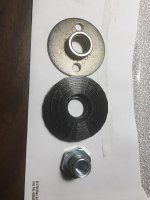
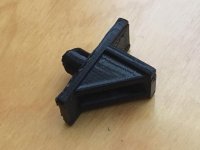
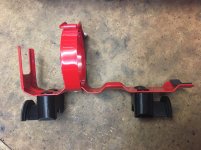
I have printed several gadgets so far.

Fire extinguisher brackets, light switch extender, kitchen shelf brackets, sanding disc backer plate, fuel line spacer and a bi-fold closet door lift kit blocks.
 

Attachments

  • image2.jpg
    image2.jpg
    63 KB · Views: 24
  • IMG_5136.jpg
    IMG_5136.jpg
    103.1 KB · Views: 28
  • IMG_5155.jpg
    IMG_5155.jpg
    86.6 KB · Views: 29
  • IMG_5151.jpg
    IMG_5151.jpg
    107.2 KB · Views: 27
  • IMG_5107.jpg
    IMG_5107.jpg
    147.2 KB · Views: 27
  • IMG_5044.jpg
    IMG_5044.jpg
    151.3 KB · Views: 27

slodat

ALLIANCE MEMBER
Joined
Feb 6, 2010
Messages
3,679
Location
Central-ish, WA
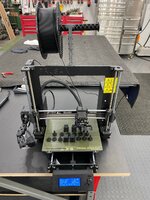
I’ve been wanting a 3d printer for a while. It’s an aspect of digital fabrication that I know fits in with what I’m doing in the shop. On a good friend’s strong recommendation and after a ton of research I settled on a Prusa i3 MK3S. I bought it factory assembled. It’s also available as in kit form. I can’t recommend the assembled Prusa i3 MK3S enough. Great prints out of the box. First project was beyond impressive.

These parts mount a Raspberry Pi 3 and Pi camera for OctoPrint- a nice remote management and monitoring setup. Instead of shuttling an SD card between the PC and Prusa, OctoPrint lets you send the file via WiFi. It also allows you to monitor the status of the printer remotely. It even creates the cool stop motion videos. Higher quality prints take longer. They are so worth the wait. Really happy with it all.

02c9ea672ff775680bf545918e1a0824.jpg

9cd2ebe7e4f28913bc5987596adc27f7.jpg

726d8afc4858f6c32aecdb498ff449c6.jpg

32a66136aeea37654892a5bcce3beeb4.jpg

c558db791058092590b8d6253d3c6251.jpg

b280bc99a5aafb5c37a8af43f605153e.jpg

a7a06e7df2a969262d175be5512b0eea.jpg

The missing screws are because I’m waiting on a hardware order.
1eda02b02546622e5fb7545141deb6ff.jpg

13140c4d0f72a3ebbaffc133a0188467.jpg

a016da3d951f600ce35507618a2f83a9.jpg

d20f75995dd23913e840ae74d243036b.jpg
 

Attachments

  • d20f75995dd23913e840ae74d243036b.jpg
    d20f75995dd23913e840ae74d243036b.jpg
    100 KB · Views: 0
  • a016da3d951f600ce35507618a2f83a9.jpg
    a016da3d951f600ce35507618a2f83a9.jpg
    408.7 KB · Views: 0
  • 13140c4d0f72a3ebbaffc133a0188467.jpg
    13140c4d0f72a3ebbaffc133a0188467.jpg
    370.9 KB · Views: 0
  • 1eda02b02546622e5fb7545141deb6ff.jpg
    1eda02b02546622e5fb7545141deb6ff.jpg
    351.6 KB · Views: 0
  • a7a06e7df2a969262d175be5512b0eea.jpg
    a7a06e7df2a969262d175be5512b0eea.jpg
    301 KB · Views: 0
  • b280bc99a5aafb5c37a8af43f605153e.jpg
    b280bc99a5aafb5c37a8af43f605153e.jpg
    369.2 KB · Views: 0
  • c558db791058092590b8d6253d3c6251.jpg
    c558db791058092590b8d6253d3c6251.jpg
    427.3 KB · Views: 0
  • 32a66136aeea37654892a5bcce3beeb4.jpg
    32a66136aeea37654892a5bcce3beeb4.jpg
    407.9 KB · Views: 0
  • 726d8afc4858f6c32aecdb498ff449c6.jpg
    726d8afc4858f6c32aecdb498ff449c6.jpg
    343.1 KB · Views: 0
  • 9cd2ebe7e4f28913bc5987596adc27f7.jpg
    9cd2ebe7e4f28913bc5987596adc27f7.jpg
    595.8 KB · Views: 0
  • 02c9ea672ff775680bf545918e1a0824.jpg
    02c9ea672ff775680bf545918e1a0824.jpg
    632.4 KB · Views: 0

banjopete

Well-known member
Joined
Oct 5, 2014
Messages
300
Location
Edmonton, Alberta, Canada
38 pieces later my soffit vents have worked out great.

w39saFUl.jpg
 

shortykorte

Well-known member
Joined
Sep 1, 2014
Messages
8,034
Location
Tallahassee, Fl
Let me see if I understand this. So the Raspberry gives you WiFi and a place to attach a camera. This is connecting back to your PC. You model in software of choice then load file Into Octaprint, do the print settings, then let it start printing?


Shorty Korte
Always remember quality in QST

Sent from my iPhone using Garage Journal
 

brianh

Well-known member
Joined
Apr 6, 2010
Messages
1,299
Location
grahamsville NY
I have a Shopbot 2003 48x96 cnc router and a homemade cnc with long z axis.

The biggest time investment is learning the design software. I see a lot of people in cnc groups get a machine all excited and then get frustrated with the software end.

My cad program is solidworks and my cam is RAMS they are out of business now, and artcam.

Some people are using sketchup for cad with a dxf export plugin.
 
To avoid these ads, REGISTER NOW!
Top Bottom