To avoid these ads, REGISTER NOW!

$5 Traffic light Controller

gte718p

Well-known member
Joined
Mar 12, 2009
Messages
3,950
This is an out growth of the 60 year old traffic control sign thread. I was offended by the $50 controller to $10 in parts. Robert Haas challenged me to make on for him, ( which I will do) but I have received a good number of private messages so there is enough interest to justify a thread.

To do this for ~$5 you have to buy the parts direct from China. Depending on where you live that means a 30-90 day lead time for parts to show up. I personally have a 5-10% DOA rate. All the sellers have been great and issued prompt refunds or sent new parts. However that increases lead time and if you are new to electronics and don't know how to trouble shoot that can be incredibly frustrating.

I also buy a lot of parts from Adafruit. Local US company making a lot of boards in NYC (with Chinese chips, but there is no way around that) . You pay a large premium to order from them, but their shipping is incredibly fast and I have never had a DOA part. They also have really great tutorials and support for their products so if I need parts quickly or need something to work I have not problem paying the price

Parts:

Adafruit
Trinket M0 -8.95.
Relay -$9.95 x3

Chinese:
Arduino -$1.68 + .68 shipping
Relay - $.69+.$.73shipping x3
or
Relay Board -$1.95 +$2.59 shipping
Optional, but will save you running an extra wire
Power supply $.66 +.$73 shipping.

It is amazing that our little trade war has doubled prices in the last 6 months, but still ridiculously cheap.

Personally I would spend the money to by the M0 from Adafruit, and the relay and power supply from Aliexpress. You will also need a button and some wire.

Next up Wiring:
 
Last edited:
To avoid these ads, REGISTER NOW!

bradpac

Well-known member
Joined
Sep 8, 2013
Messages
721
Location
Central TX
Waiting for this. I've been looking into doing some micro controller stuff for a while now, just never have had the time to sit down and figure it all out.

In your post above, do you need all of what's on your list or is it everything from each of the groupings, pick a grouping?
 

John T

Well-known member
Joined
Nov 15, 2011
Messages
903
Very interesting

Can anyone provide a link to the
60 year old “ traffic control sign” thread?


Sent from my iPhone using Tapatalk Pro
 

Mandres

Well-known member
Joined
Jun 22, 2006
Messages
1,151
Great info, thanks for sharing your knowledge. I haven't had the opportunity to play around with microcontroller programming, but this would be a good learning experience. Basic control electronics really should be a part of every modern man's knowledge base. If the zombies come for us I want to be able to build the good weapons!
 
OP
G

gte718p

Well-known member
Joined
Mar 12, 2009
Messages
3,950
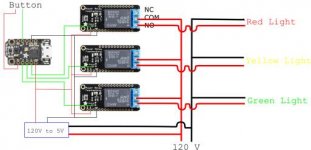
Sorry the wiring diagram is s small GJ keeps auto scaling the image. The thick black and red wires are 120v lamp cord type wires. You different traffic lights use different types of bases. I've scene normal screw in lamp bases to bayonet plugs.

The small wires are all love voltage DC. you can use an 18-22 gauge wire. Red and black are the power wires to the relay, the green are the control that turn the relay on. In the basic example we will not use the button, but I'm sticking it in there for later.

Basic:
attachment.php


For this to work you are going to need a USB cable plugged into the trinket board. You could power it from a computer while you are messing with it or a phone charger type USB cable.

A little more advanced:
attachment.php


In the second example the power supply is providing the power to drive the relays and the micro controller. The relays are 3v driven, but I don't think 5v will hurt them. It is important that all the DC grounds are tied together.

For a project this size, you could get away with using the same color wire. I strongly recommend getting many colors of wire, picking a color scheme, and sticking with it. I also highly recommend labeling your wires. It is just a good habit to be in. When you have something like my CNC project where you have 100s of wires trouble shooting becomes a nightmare if every wire is white.

Mounting:

There are electrical connections on the back of the boards. As a result you can't mount them directly on metal. You could 3D print something, mount them to a scrap of wood, or if careful mount them to the sign with some thick double sided tape.

Next up Programming
 

Attachments

  • traffic light sequencer.jpg
    traffic light sequencer.jpg
    20.9 KB · Views: 2,308
  • traffic light sequencer power supply.jpg
    traffic light sequencer power supply.jpg
    21.3 KB · Views: 2,268
Last edited:
OP
G

gte718p

Well-known member
Joined
Mar 12, 2009
Messages
3,950
Waiting for this. I've been looking into doing some micro controller stuff for a while now, just never have had the time to sit down and figure it all out.

In your post above, do you need all of what's on your list or is it everything from each of the groupings, pick a grouping?

They are grouped by source. You need a micro controller, some relays, wire, and a button. You can pick a group or you can mix and match your sources. You might also want a power supply so that you don't have to have an extra USB cable, but it is not required.
 

racingtadpole

Well-known member
Joined
Dec 3, 2011
Messages
2,029
Location
The far side of crazy.. but sometimes Australia
I did my apprenticeship at a traffic signal repair work shop, we used to get foreign order requests all the time for drivers for the old signals that got sold off at the departments salvage yard.

If you are just making them sequence like real traffic lights, forget the $5 challenge, let’s see you do it with discrete electronics.. bonus points if you can sneak a 555 in there!
 
OP
G

gte718p

Well-known member
Joined
Mar 12, 2009
Messages
3,950
I did my apprenticeship at a traffic signal repair work shop, we used to get foreign order requests all the time for drivers for the old signals that got sold off at the departments salvage yard.

If you are just making them sequence like real traffic lights, forget the $5 challenge, let’s see you do it with discrete electronics.. bonus points if you can sneak a 555 in there!

555 are easy if you just want a basic red, yellow, green on a consistent time. You can change the timing with a potentiometer, but anything beyond that gets really complex. I like microcontrollers, you can do so much more. I believe the $50 controller that started the conversation was 555 based.

Thanks for sharing these! What did you use to draw them?

I use two programs. I use GIMP to edit the images of the microcontroller and Inkscape to do the layout. Both are open source projects. GIMP has better selection and editing tools for photos, Inkscape does a better job tracking vectors so it is easy to go back and manipulate an image later. GIMP can do it, it is just more cumbersome. Inkscape kind of falls on its face on none vector images.

If I was going to do actual wiring diagrams I use KiCad to make pictures. If it is something that is actually going into production I use Eagle.
 

Outlander

Well-known member
Joined
Jul 30, 2010
Messages
5,154
Location
Quebec, Canada
I use two programs. I use GIMP to edit the images of the microcontroller and Inkscape to do the layout. Both are open source projects. GIMP has better selection and editing tools for photos, Inkscape does a better job tracking vectors so it is easy to go back and manipulate an image later. GIMP can do it, it is just more cumbersome. Inkscape kind of falls on its face on none vector images.

If I was going to do actual wiring diagrams I use KiCad to make pictures. If it is something that is actually going into production I use Eagle.

Thanks, more learning to do :) I'm familiar with GIMP....been using it for years .
 

rattle_snake

Well-known member
Joined
Jun 25, 2015
Messages
5,144
Location
Chandler, AZ
As stated it can be done in simple logic. Any micro is like 1,000hp in a scooter for this application. But time is money so a $0.25 mirco running a state machine is easy and can be changed/modified as needed.

But, what exactly should the sequence/function be?
It would be cool to use sensors or other information to alter behavior to make it less boring. Proximity sensor or use some data from the 'web

In electrical safety system, just arguing and writing the functional specification would cost $100,000 in salaries. Redundant HW, lock step, independent verification, and so on...
:)
 
OP
G

gte718p

Well-known member
Joined
Mar 12, 2009
Messages
3,950
You can program an Arduino microcontroller in a variety of ways. You can write the code in any text editor and there are a bunch of ways to upload it to the chip. However, the easiest is the Arduino IDE.

Arduino uses a variety of C++. Spacing is not important but groups of code are wrapped in curly brackets {} and each line generally ends in a semicolon ;. There are some exceptions like the #define lines but generally good rules of thumb.

The lines that start with // are comments. They are not part of the code, they just aid in code being read by humans. As code gets more complex it is a good idea to explain to your self or others what you though was going on. I'm currently revising some code I wrote last year. I was in a hurry and didn't comment the code. It was brilliant, but for the life of me I can't figure out how all the parts worked together.


Code:
/*
Traffic light Sequencer
Autor Gte718p

*/

//Global variables that will be used in the program
//Give a name to the pin that the relats are connected to
#define RedLight 0
#define YellowLight 1
#define GreenLight 2

//sets how long the lamp will be on or off
int DelayTime=1000;


// the setup function runs once when you press reset or power the board
void setup() {
  
  //sets up the pins to be output.
  pinMode(RedLight, OUTPUT);
  pinMode(YellowLight, OUTPUT);
  pinMode(GreenLight, OUTPUT);
}

// the loop function runs over and over again forever
void loop() {
  digitalWrite(RedLight, HIGH);   // turn the LED on (HIGH is the voltage level)
  delay(DelayTime);                       // wait for a second
  digitalWrite(RedLight, LOW);    // turn the LED off by making the voltage LOW
  delay(DelayTime);                       // wait for a second

  digitalWrite(YellowLight, HIGH);   // turn the LED on (HIGH is the voltage level)
  delay(DelayTime);                       // wait for a second
  digitalWrite(YellowLight, LOW);    // turn the LED off by making the voltage LOW
  delay(DelayTime);                       // wait for a second

  digitalWrite(GreenLight, HIGH);   // turn the LED on (HIGH is the voltage level)
  delay(DelayTime);                       // wait for a second
  digitalWrite(GreenLight, LOW);    // turn the LED off by making the voltage LOW
  delay(DelayTime);                       // wait for a second


}

The code turns a lamp on, waits a second, then turns that lamp off, waits a second, turns the next lamp on, waits......etc. If you want the lamp to be on or off longer you change the line with "int DelayTime=1000;" to something else. Say you wanted 2 seconds, he line becomes "int DelayTime=2000;"

Even using a $2 microcontroller, this is the equivalent to using a bazooka to kill a fly. As racingtadpole pointed out you can do this easily with a 555 timer chip that costs about $.10.

Lets go a little further and do something that would be quite a bit harder with a 555. Lets have the lamp on for two second and off for one second. It is a simple change:


Code:
/*
Traffic light Sequencer
Autor Gte718p

*/

//Global variables that will be used in the program
//Give a name to the pin that the relats are connected to
#define RedLight 0
#define YellowLight 1
#define GreenLight 2

//sets how long the lamp will be on or off
int DelayTimeOn=2000;
int DelayTimeOff=1000;


// the setup function runs once when you press reset or power the board
void setup() {
  
  //sets up the pins to be output.
  pinMode(RedLight, OUTPUT);
  pinMode(YellowLight, OUTPUT);
  pinMode(GreenLight, OUTPUT);
}

// the loop function runs over and over again forever
void loop() {
  digitalWrite(RedLight, HIGH);   // turn the LED on (HIGH is the voltage level)
  delay(DelayTimeOn);                       // wait for a second
  digitalWrite(RedLight, LOW);    // turn the LED off by making the voltage LOW
  delay(DelayTimeOff);                       // wait for a second

  digitalWrite(YellowLight, HIGH);   // turn the LED on (HIGH is the voltage level)
  delay(DelayTimeOn);                       // wait for a second
  digitalWrite(YellowLight, LOW);    // turn the LED off by making the voltage LOW
  delay(DelayTimeOff);                       // wait for a second

  digitalWrite(GreenLight, HIGH);   // turn the LED on (HIGH is the voltage level)
  delay(DelayTimeOn);                       // wait for a second
  digitalWrite(GreenLight, LOW);    // turn the LED off by making the voltage LOW
  delay(DelayTimeOff);                       // wait for a second

}

This is where you imagination is your only limit. Want it to flash morris code, want random unnatural combinations, want a inverted order all easy.

Even doing interesting patterns we are not really taxing the microcontroller. You'll also remember I threw a button in the wiring diagram that I said wouldn't be used in the simple example.

Next Up Lets do something more complex.

PS: Sorry for the typos. I'm a horrible typist to begin with and I'm trying to fit this in in spare time between two major project I'm working. I'm not proofreading as well as I should.
 
Last edited:
OP
G

gte718p

Well-known member
Joined
Mar 12, 2009
Messages
3,950
As stated it can be done in simple logic. Any micro is like 1,000hp in a scooter for this application. But time is money so a $0.25 mirco running a state machine is easy and can be changed/modified as needed.

But, what exactly should the sequence/function be?
It would be cool to use sensors or other information to alter behavior to make it less boring. Proximity sensor or use some data from the 'web

Your ahead of me. :) I will get there I promise. I did promise a $5 traffic light sequencer. Adding a web interface adds a good bit of money. Probably will get there just because. I have the chips to do on my desk, as one of the projects I'm working on is a web enabled LED sign.


In electrical safety system, just arguing and writing the functional specification would cost $100,000 in salaries. Redundant HW, lock step, independent verification, and so on...
:)

My normal job I work for the government. On the side I'm a consultant. I do process analysis, data acquisition, and data analysis. I bill at $160 and hour. I'm actually a mechanical and system engineer by training. If I have to bring in a real programmer or EE that is another $100 an hour each. I have two college kids who do most of my CAD work these days. They are $30 an hour each. You can get to six figures quick.
 

slodat

ALLIANCE MEMBER
Joined
Feb 6, 2010
Messages
3,679
Location
Central-ish, WA
Why are you using the normally closed contact of the form c relays? Relay coils are energized to turn the light off..
 
OP
G

gte718p

Well-known member
Joined
Mar 12, 2009
Messages
3,950
Why are you using the normally closed contact of the form c relays? Relay coils are energized to turn the light off..

Because I made a mistake. Switching back and forth between to many products and projects.

Though really it doesn't make a difference. A slight change in the code and it will work either way. Though it would be wasteful to keep the coils energized when it is not needed.

I'll change the drawings.
 
To avoid these ads, REGISTER NOW!

PNWguy

Well-known member
Joined
Jan 3, 2018
Messages
494
Location
Near Grants Pass, OR
I found a bunch of LED walk/don't walk signs at the local salvage yard for $5 each. I'm not down to 2 or 3 after giving them to friends.

My favorite one:
A friend lives in a big warehouse and the only bathroom is pretty far from the living quarters & kitchen. At a party, it was always annoying to walk a good distance and find that the bathroom was occupied. I modified one of the signs to accept voltage from the bathroom light, and use it as a signal to a relay. It would display the walking guy when the bathroom light was off. When the light was on, the red "don't walk" hand would light up.
 

gungatim

Well-known member
Joined
Jan 8, 2013
Messages
8,101
Location
west mich
^nice idea!

I've got a walk/don't walk and a couple traffic lights I need to get around to doing. I have all the stuff I bought for the $10 mechanical timer (from nuts and volts magazine), the motors and the leaf switches, cut the disc but never got it all mounted right.

I picked up a NIB Arduino at a yard sale for $5 this summer and have been looking for something to do with it.

will be watching this thread for sure...

FYI: appears some spelling errors in the Arduino code (YellosLight should be YellowLight in both versions and DelayTimeOff missing an f.)
 
Last edited:
OP
G

gte718p

Well-known member
Joined
Mar 12, 2009
Messages
3,950
^nice idea!

I've got a walk/don't walk and a couple traffic lights I need to get around to doing. I have all the stuff I bought for the $10 mechanical timer (from nuts and volts magazine), the motors and the leaf switches, cut the disc but never got it all mounted right.

I picked up a NIB Arduino at a yard sale for $5 this summer and have been looking for something to do with it.

will be watching this thread for sure...

FYI: appears some spelling errors in the Arduino code (YellosLight should be YellowLight in both versions and DelayTimeOff missing an f.)

Thank you. I have no idea how I managed to post old code. Some day I will learn to proof read and type. Nt today. :).

Microcontrollers and micro computers are addictive. I have probably 30 of them running projects around the house or on the bench waiting for a purpose.

Unfortunately I have not had time to test some more advance code. Mode advanced code, multiple programs, real time clock, and other random things to come.
 

gungatim

Well-known member
Joined
Jan 8, 2013
Messages
8,101
Location
west mich
so I got my relay board yesterday, 2 boards with 4 relays each for around $10 on amazon. I figured i'd get the two pack in case I blow one.

finished the code, I made a few slight modifications, have 4 delay times setup, RYG with a different time for each, and changed the 4th delay between each. Red is 8 seconds, then off for half a second, Green is 5 seconds, again delay off 1/2 sec, then Yellow is 2 seconds, then delay 1/2 and loop.

I uploaded the code and put led's in place of the relays and it works!! so excited, it's my first Arduino project.

The relay board is hooked up but I haven't wired the 120v side for the lights yet but will hopefully have it completed tomorrow.

the little Arduino kit I bought came with a bunch of components, LED's, switches, diodes, and a couple photoelectric sensors.

Plan is to put one of the light sensors between the ground from the board to the relays so it only runs when it is dark out. (it's probably better to figure out a way to put the photo sensor between the board power so the whole thing is off but i'm still learning).

Thanks for posting this, was a fun little project.

my modified code is below:

/*
Traffic light Sequencer
Authors Gte718p & Gungatim
*/

//Define Global variables that will be used in the program
//Give a name to the pin that the relays are connected to

#define RedLight 0
#define YellowLight 1
#define GreenLight 2

//sets how long the lamp will be on or off

int DelayTimeOnR=8000;
int DelayTimeOnY=2000;
int DelayTimeOnG=5000;
int DelayTimeOff=500;


// the setup function runs once when you press reset or power the board

void setup() {

//sets up the pins to be output.
pinMode(RedLight, OUTPUT);
pinMode(YellowLight, OUTPUT);
pinMode(GreenLight, OUTPUT);
}

// the loop function runs over and over again forever

void loop() {
digitalWrite(RedLight, HIGH); // turn the LED on (HIGH is the voltage level)
delay(DelayTimeOnR); // wait for 8 seconds
digitalWrite(RedLight, LOW); // turn the LED off by making the voltage LOW
delay(DelayTimeOff); // wait for a half-second

digitalWrite(GreenLight, HIGH); // turn the LED on (HIGH is the voltage level)
delay(DelayTimeOnG); // wait for 5 seconds
digitalWrite(GreenLight, LOW); // turn the LED off by making the voltage LOW
delay(DelayTimeOff); // wait for a half-second

digitalWrite(YellowLight, HIGH); // turn the LED on (HIGH is the voltage level)
delay(DelayTimeOnY); // wait for 2 seconds
digitalWrite(YellowLight, LOW); // turn the LED off by making the voltage LOW
delay(DelayTimeOff); // wait for a half-second
}
 
OP
G

gte718p

Well-known member
Joined
Mar 12, 2009
Messages
3,950
so I got my relay board yesterday, 2 boards with 4 relays each for around $10 on amazon. I figured i'd get the two pack in case I blow one.

finished the code, I made a few slight modifications, have 4 delay times setup, RYG with a different time for each, and changed the 4th delay between each. Red is 8 seconds, then off for half a second, Green is 5 seconds, again delay off 1/2 sec, then Yellow is 2 seconds, then delay 1/2 and loop.

I uploaded the code and put led's in place of the relays and it works!! so excited, it's my first Arduino project.

:rocker: AWESOME :rocker:

Watch out its addictive.

The light sensor is probably analog. So that is slightly different setup. Basically one side will got to the +v pin and the other will go to a pin capable of reading analog inputs. If you are using the Trinket M0 I listed pins 3 and 4 both are analog capable. When you read the pin you will get a number 0 to however many bits the ADC is. 0 should be completely dark and 4096 or something like that is so bright the sensor is saturated. You then have to figure out what numbers you want for your on and off.

Speaking of Adafruit trinkets M0, did GJ create a run on electronics. They had 120 in stock last week, went to order on this morning and they are out of stock.

I'm finishing up two projects this afternoon (hopefully). Should be able to build some more advanced code.
 
OP
G

gte718p

Well-known member
Joined
Mar 12, 2009
Messages
3,950
The Uno is a good board. It is what most people think of as an Arduino. The term Arduino is actually a really broad term that has no particular meaning. Arduino is an educational foundation foundation. They packaged AVR microcontrollers in a convenient an approachable package and build a user friendly Integrated Development Environment (IDE). Most "Arduino" are now actually ARM processors and not made by the Arduino foundation.

The Trinket M0 is one of the newer knock off "arduinos" My stupid desk camera would not focus this morning, but the Metro on the right is a Uno knockoff same size. You can see the trinket on the top left.
attachment.php


Despite being tiny, it is actually 4 times faster then a standard Uno and has more storage space. The draw back to the trinket is it only has 5 IO pins. That can be kind of constraining, but often I only need two of three pins and the form factor is hard to beat.

The walk sign should be easy. I might skip hacking the HF light. it might be simple, it might be more trouble then it is worth. A battery pack, an Arduino, a solar cell, motion detector, relay, and some leds should all be doable for ~$40 from Aliexpress or Fleabay.
 

Attachments

  • WIN_20190920_08_38_25_Pro.jpg
    WIN_20190920_08_38_25_Pro.jpg
    139.7 KB · Views: 757

itgoze211

Member
Joined
Aug 26, 2015
Messages
12
Location
Keller, Texas
Awesome code samples sir! I have tinkered off and on (more off than anything due to lack of time and family) with small electronics and I really need to dive more into the arduino stuff as it really can be fun with all the different things you can do with the coding aspect.

Have any of you shopped here at Electronic Goldmine (goldmine-elec-products.com)?

They have some pretty random stuff at times but I have used them to pick up small motors, resistors, LEDs of all sorts and even some screens in various sizes. Like OP said...be wary of the addiction factor.

Oh...and definitely sub'd this one for sure.

:beer:
 
OP
G

gte718p

Well-known member
Joined
Mar 12, 2009
Messages
3,950
It has been a crazy couple of weeks. I have had a couple of days of leave and I thought I was going to get more done, but my side jobs have been crazy. Drama in the foundation I work with and the final presentation and acceptance of a consulting job. Drama has been resolved and my analysis was excepted so overall a great week.

Anyway back to the topic at hand. Having a micro controller do one thing is incredible over kill. The same thing could be accomplished with twenty cents of analog electronics. The power of having a baby computer is you can do lots of interesting things. Once you have the basics, it is easy to add more features.

We are going to use the button I randomly stuck in the drawing to access two different programs. I have two programs one that flashes the Red, Yellow, Green in order and one that flashes all three together.

To do this we had to add an input. The Trinket has internal pull down resisted. Depending on the board you are using you may not have pull up or pull down resisters. The pull resister keep you from triggering on noise. A pull down resister forces the input to ground unless you are intentionally applying a voltage. You can occasionally get away with floating an input, but you may get a stray voltage triggering the circuit. It is generally considered bad form. If your board does not have an internal pull down resister, you can accomplish the same thing by putting a resister between the input pin and ground. The exact value isn't important but you want a large resister 10k or more.

The next thing needed is an Interrupt. An interrupt tells the microcontroller to stop what it is doing, do something and then go back to what you where doing.

Next, you need to tell the microntroller what to do when the interrupt is triggered. In this case it is the function ModeChange. Mode++ add 1 to the value of Mode. I also added an if statement that if it gets bigger then the number of mode I have programmed it restarts counting at mode 1.

Finally I added if statement. Each if statement is a little program. If they got more complicated you might want to break them out into their own functions, but for simple things each little block is a series of instructions that is only executed if the mode associated is selected.

Code:
/*
Traffic light Sequencer
Slightly More advanced
Author Gte718p

*/

//Global variables that will be used in the program
//Give a name to the pin that the relays are connected to
#define RedLight 0
#define YellowLight 1
#define GreenLight 2
#define ModeButton 3

//sets how long the lamp will be on or off
int DelayTime=1000;
//selects the mode we will be in
int Mode=1;


// the setup function runs once when you press reset or power the board
void setup() {
  
  //sets up the pins to be output.
  pinMode(RedLight, OUTPUT);
  pinMode(YellowLight, OUTPUT);
  pinMode(GreenLight, OUTPUT);
  pinMode(ModeButton, INPUT);  //creates an input for our button
  pinMode(ModeButton,LOW); //activates the pull down resister
  

  attachInterrupt(digitalPinToInterrupt(ModeButton), ModeChange, HIGH);
  
}

void ModeChange(){
  Mode++;  //adds one to the mode
  if (Mode > 2){   //if the mode gets larger then the number of available mode start at the begging
    Mode=1;
  }
}

// the loop function runs over and over again forever
void loop() {
  
  if (Mode == 1)  //Normal top to bottom
  {
  
  
  digitalWrite(RedLight, HIGH);   // turn the LED on (HIGH is the voltage level)
  delay(DelayTime);                       // wait for a second
  digitalWrite(RedLight, LOW);    // turn the LED off by making the voltage LOW
  delay(DelayTime);                       // wait for a second

  digitalWrite(YellowLight, HIGH);   // turn the LED on (HIGH is the voltage level)
  delay(DelayTime);                       // wait for a second
  digitalWrite(YellowLight, LOW);    // turn the LED off by making the voltage LOW
  delay(DelayTime);                       // wait for a second

  digitalWrite(GreenLight, HIGH);   // turn the LED on (HIGH is the voltage level)
  delay(DelayTime);                       // wait for a second
  digitalWrite(GreenLight, LOW);    // turn the LED off by making the voltage LOW
  delay(DelayTime);                       // wait for a second
  }
 
 if (Mode == 2)  //flash all
  {
  
  //Set all three lights on
  digitalWrite(RedLight, HIGH);   // turn the LED on (HIGH is the voltage level)  
  digitalWrite(YellowLight, HIGH);   // turn the LED on (HIGH is the voltage level)
  digitalWrite(GreenLight, HIGH);   // turn the LED on (HIGH is the voltage level)
  delay(DelayTime);             
  //Turn all three lights off
  digitalWrite(RedLight, LOW);    // turn the LED off by making the voltage LOW
  digitalWrite(YellowLight, LOW);    // turn the LED off by making the voltage LOW
  digitalWrite(GreenLight, LOW);    // turn the LED off by making the voltage LOW
  delay(DelayTime);                   // wait for a second
  }

}

This is very scalable. You two button on to go to the next mode up, one to go to the next mode down. You could have a button enter a change mode and use the lights to tell you what mode you have selected.


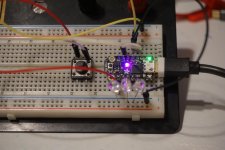
I put together a quick test bed. I don't have any relays.
attachment.php


Next up using and analog component.
 

Attachments

  • DSC00368.jpg
    DSC00368.jpg
    137 KB · Views: 709
OP
G

gte718p

Well-known member
Joined
Mar 12, 2009
Messages
3,950
I noticed they were out, but found a 3 pack of these knock-off UNO like boards for only $16 on Amazon, so I ordered a set. at just over $5 each, they seem like a pretty good deal and more pins vs. the M0 trinket.

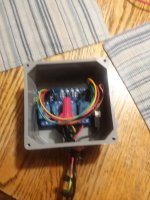
I got my relays working this weekend, didn't realize I needed a separate power input along with the relay inputs but when I added one, the relays clicked in sequence and the little lights on the relay board light up as well. all I need now is a little project box to mount it all in...overkill for sure but cheap fun.

link and specs on the little boards I found below.

https://www.amazon.com/gp/product/B07TTN2HMQ/?tag=atomicindus08-20

The ELEGOO Nano 3.0 is a small, complete, and breadboard-friendly board based on the ATmega328P; offers the same connectivity and specs of the UNO board in a smaller form factor.

Technical Parameters:

•Microcontroller:ATmega328
•Architecture:AVR;Operating Voltage:5 V
•Flash Memory:32 KB of which 2 KB used by bootloader;SRAM:2 KB
•Clock Speed: 16 MHz;Analog IN Pins:8;EEPROM:1 KB
•DC Current per I/O Pins:40 mA (I/O Pins)
•Input Voltage:7-9 V
•Digital I/O Pins:22 (6 of which are PWM);PWM Output:6
•Power Consumption:20 mA


Those look good.

I have quite a few of that style. Your right they pack a good amount of GPIO and decent memory into a very nice form factor. Something like an UNO is nice for playing can be a pain to package if you actually want to use a project.

I haven't actually used the HT42B534-1 chipset, but the CH340 it replaced was a pain in the @$$. The chipset FTDI, CH340, or HT42B534-1 are translators. They read in USB and cache it and speak serial to the microcontroller. Basically chip still speak in serial communications. Modern computers don't. USB does a poor job simulating a serial link. No reason for it to, serial is slow and inefficient. FTDI was the standard, but it was a copyrighted design and expensive (a couple dollars each). Most of the Chinese knock offs used the CH340 chip at was literally $.01. Unfortunately it is a buggy chip that windows didn't support. The drivers written to support the chipset were obviously written by people who where selling one cent chips and didn't car about quality. I hope the new one works better.
 

gungatim

Well-known member
Joined
Jan 8, 2013
Messages
8,101
Location
west mich
I kinda sorta got this to work, but not as expected. maybe I'm missing something...

when first setup and wired, I got 2 lights on, 1 off.

G Y on 8 seconds
Y R on 5 seconds
G R on 2 seconds

what I wanted was:
R on 8 seconds
G on 5 seconds
Y on 2 seconds

seemed to be 180 degrees off, complete opposite.

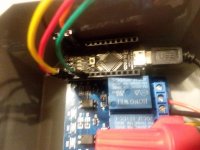
What I found, and this is where i'm not understanding, is that the relays default to NC position out of the box, not connected to anything. so this is what I expected and wired to the NO connections.

Once you power the board, however, the NC becomes Open, and the NO becomes closed. In this state, the Arduino triggers the relays as normal. Obviously not the way a typical relay works.

so when I wire it backwards, and use the NC terminals on the relay, the arduino does it's job and the lights work as expected. BUT, if the board ever loses power, with the 120v hooked up, ALL relays default back to the NC unpowered state. That means if the Arduino power goes out, all the lights will come on.

Doesn't seem very safe. I had expected to leave the 120v power connected all the time, and just turn off the power to the Arduino. Obviously that wouldn't work.

It also seems inefficient to keep the relays powered on 100% of the time to keep them in the NO state, is this normal for these relay boards?
 

Attachments

  • 20190925_052107.jpg
    20190925_052107.jpg
    80.7 KB · Views: 55
  • 20190925_052115.jpg
    20190925_052115.jpg
    132.6 KB · Views: 53
  • 20190925_174153_001.jpg
    20190925_174153_001.jpg
    61.6 KB · Views: 42
Last edited:
OP
G

gte718p

Well-known member
Joined
Mar 12, 2009
Messages
3,950
I kinda sorta got this to work, but not as expected. maybe I'm missing something...

when first setup and wired, I got 2 lights on, 1 off.

G Y on 8 seconds
Y R on 5 seconds
G R on 2 seconds

what I wanted was:
R on 8 seconds
G on 5 seconds
Y on 2 seconds

seemed to be 180 degrees off, complete opposite.

What I found, and this is where i'm not understanding, is that the relays default to NC position out of the box, not connected to anything. so this is what I expected and wired to the NO connections.

Once you power the board, however, the NC becomes Open, and the NO becomes closed. In this state, the Arduino triggers the relays as normal. Obviously not the way a typical relay works.

so when I wire it backwards, and use the NC terminals on the relay, the arduino does it's job and the lights work as expected. BUT, if the board ever loses power, with the 120v hooked up, ALL relays default back to the NC unpowered state. That means if the Arduino power goes out, all the lights will come on.

Doesn't seem very safe. I had expected to leave the 120v power connected all the time, and just turn off the power to the Arduino. Obviously that wouldn't work.

It also seems inefficient to keep the relays powered on 100% of the time to keep them in the NO state, is this normal for these relay boards?

That is distinctly not normal.

I defaulted to triggering the relay on high because that is what I normally do and is generally the standard for outputs. Triggers however can be high or low. You are doing digital communications at it s simplest level. All the circuits are doing is looking at the input and if input == x do y. They don't care if x is a true or false.

The relay board may be looking for a low trigger instead of a high trigger. You could wire the 120 back to the normally closed side and then swap change the code so off is HIGH and when you want the light to come on it sets the output to LOW.

The other thing you can try is disconnecting the dc input to the relay boards. Just have the trigger and ground.
 

gungatim

Well-known member
Joined
Jan 8, 2013
Messages
8,101
Location
west mich
That is distinctly not normal.

I defaulted to triggering the relay on high because that is what I normally do and is generally the standard for outputs. Triggers however can be high or low. You are doing digital communications at it s simplest level. All the circuits are doing is looking at the input and if input == x do y. They don't care if x is a true or false.

The relay board may be looking for a low trigger instead of a high trigger. You could wire the 120 back to the normally closed side and then swap change the code so off is HIGH and when you want the light to come on it sets the output to LOW.

The other thing you can try is disconnecting the dc input to the relay boards. Just have the trigger and ground.

The relay board doesn't work without the DC input' it needs power to activate the relays and the digital signal to trigger it. I thought about switching the high and low triggers as well, that will probably work as well.

specs for the relay say:
This relay module is 5V active low.
♦ 4-channel relay output modules, relay output contacts 250V 10A.
♦ Input IN1, IN2, IN3, IN4, the signal line LOW effective.

I assume active low is why it acts this way. one of the reviews states
"These relays are great. Simple and work just how you would expect. They are active low which tripped me up a bit. I just ended up using a #define RELAY_OFF HIGH and #define RELAY_ON LOW then digitalWrite(RELAY1_PIN, RELAY_ON); to turn it on. it will save you the confusion trying to remember that it is 0/LOW on and 1/HIGH off."

I gues that explains it!
 
OP
G

gte718p

Well-known member
Joined
Mar 12, 2009
Messages
3,950
I have been meaning to come back to this thread for a while.

So you have a micro controller in your stop light, what else can you do? You might not need or want to run the stoplight 24/7. The solution add a clock.

To make this work, you need one additional part, a Real Time Clock Module.

It is $5 from Adafruit or $1 from Aliexpress.

Adafruit has a good tutorial on setup and wiring of the module so I will not reinvent the wheel.

https://learn.adafruit.com/adafruit-pcf8523-real-time-clock/rtc-with-arduino

Code:
/*
Traffic light Sequencer
Slightly More advanced with clock
Author Gte718p

*/

//Adds the library for the clock
#include "RTClib.h"

//Creates the clock.  If you use a different chip this line needs to change for the chip you are using
RTC_PCF8523 rtc;


//Global variables that will be used in the program
//Give a name to the pin that the relays are connected to
#define RedLight 0
#define YellowLight 1
#define GreenLight 2
#define ModeButton 3

//sets how long the lamp will be on or off
int DelayTime=1000;
//selects the mode we will be in
int Mode=1;


// the setup function runs once when you press reset or power the board
void setup() {
  
  //sets up the pins to be output.
  pinMode(RedLight, OUTPUT);
  pinMode(YellowLight, OUTPUT);
  pinMode(GreenLight, OUTPUT);
  pinMode(ModeButton, INPUT);  //creates an input for our button
  pinMode(ModeButton,LOW); //activates the pull down resister
  

  attachInterrupt(digitalPinToInterrupt(ModeButton), ModeChange, HIGH);

  //sets up the clock
  
}

void ModeChange(){
  Mode++;  //adds one to the mode
  if (Mode > 2){   //if the mode gets larger then the number of available mode start at the begging
    Mode=1;
  }
}

// the loop function runs over and over again forever
void loop() {


  //read the time on the clock
  DateTime now = rtc.now();

  //Turns on the clock a 8 and turns it off an 10pm (2200)
  //You could choose days to have it on, or further refine it to minutes.
  if (now.hour() > 8 && now.hour() < 22){ 

  
  if (Mode == 1)  //Normal top to bottom
  {
  
  
  digitalWrite(RedLight, HIGH);   // turn the LED on (HIGH is the voltage level)
  delay(DelayTime);                       // wait for a second
  digitalWrite(RedLight, LOW);    // turn the LED off by making the voltage LOW
  delay(DelayTime);                       // wait for a second

  digitalWrite(YellowLight, HIGH);   // turn the LED on (HIGH is the voltage level)
  delay(DelayTime);                       // wait for a second
  digitalWrite(YellowLight, LOW);    // turn the LED off by making the voltage LOW
  delay(DelayTime);                       // wait for a second

  digitalWrite(GreenLight, HIGH);   // turn the LED on (HIGH is the voltage level)
  delay(DelayTime);                       // wait for a second
  digitalWrite(GreenLight, LOW);    // turn the LED off by making the voltage LOW
  delay(DelayTime);                       // wait for a second
  }
 
 if (Mode == 2)  //flash all
  {
  
  //Set all three lights on
  digitalWrite(RedLight, HIGH);   // turn the LED on (HIGH is the voltage level)  
  digitalWrite(YellowLight, HIGH);   // turn the LED on (HIGH is the voltage level)
  digitalWrite(GreenLight, HIGH);   // turn the LED on (HIGH is the voltage level)
  delay(DelayTime);             
  //Turn all three lights off
  digitalWrite(RedLight, LOW);    // turn the LED off by making the voltage LOW
  digitalWrite(YellowLight, LOW);    // turn the LED off by making the voltage LOW
  digitalWrite(GreenLight, LOW);    // turn the LED off by making the voltage LOW
  delay(DelayTime);                   // wait for a second
  }
}
//If not between run hours wait before checking again
else{
	delay(6000);
}

}

Lot of other cool things you could do. Want a parking distance sensor at an ultrasonic transducer

Turn on or off with motion. Add a motion sensor.

Maybe you want to change color based on the sound level or frequency of sound in the garage add a microphone.
 
OP
G

gte718p

Well-known member
Joined
Mar 12, 2009
Messages
3,950
some good ideas! been getting more into the Arduino lately as well.

I recently got one of the UBITX radio kits that runs off one of these little arduino's. a bit more advanced than the traffic light controller but there is a ton of stuff you can do tweaking the software. more fun than the SDR dongles...

I actually love SDR. Lots of nefarious things you can do to amuse yourself :)

I hate HF with a passion. Occupational hazard, I have spent to much of my life listening to static to hope to hear something. As an amateur I never took the code test to get HF access. That being said the radio looks pretty cool and a fun project.

I have a bunch of chips trying to find me in Italy. They finally escaped China, so hopefully there will be a few new projects for me in a month or two.
 
OP
G

gte718p

Well-known member
Joined
Mar 12, 2009
Messages
3,950
I can't pickup much with the SDR dongles, I finally realized there is way too much RF interference in my office with 3 computers running along with all the electronic junk.

this little HF rig can have an external antenna I run out the window into the trees and it picks up pretty good. the SDR's were barely able to pickup 2m without a lot of static.

same here with the HF access, i'm still a tech. was studying for the General license until they locked us down. supposedly you dan do the test via Skype now, but it's a huge PITA.

I use this one. Defiantly not the cheapest.
https://shop.hak5.org/collections/sdr/products/hackrf

Of course I am not your average HAM using it as a glorified scanner. I part of my grad school education was learning to be a bad guy.

I have done all kinds of fun things with it. It was disturbingly easy to hack my garage door with a simple play back attack. It is amazing what your neighbors are broadcasting into your house if you know how and where to look :).

I absolutely love it. I don't however us it in the house. I have no idea how much noise is in my office, but I bet it is a ton. Well technically none right now as my office is in a shipping container on its way to Italy. In any case, I have it hooked to a raspberry pi for a mobile setup. I have a couple of rubber duckies depending on the frequency band I'm working and it is stellar.
 
To avoid these ads, REGISTER NOW!
Top Bottom