
You are using an out of date browser. It may not display this or other websites correctly.
You should upgrade or use an alternative browser.
You should upgrade or use an alternative browser.
$5 Traffic light Controller
- Thread starter gte718p
- Start date
I read the write up on the garage opener, and a few college papers on warspying, I don't want to know if that was you....
I do enjoy a little war driving, but no you have never read about any of my work.
I'm a systems guy not a programmer by trade. As my professor said, to be a good systems engineer you have to know a lot of different be able to speak coherently about a lot of topic. The only way to be to garner the respect you need is to be able to speak the language. The best way to learn to speak is to do.
Really you have to know enough to know when someone is BSing you. The down side of being a systems guy is I am never the smartest person in the room. The plus side is the smart people all work for me

I'm passable in a lot of fields from machine work to programming to electronics to finance. A lot of my professional work revolves around radars and communications. I try to stay current in all the fields academically. I as it turns out I enjoy them so they have become hobbies as well. Hands on doing really backs up the academic work.
A couple of years ago when I moved to Hawaii, I sold most of my cars and my machine shop and really went all in on the programming and electronics as my main hobby. I thought it would be cheaper, nope. However it takes up much less space and shipping chips to Hawaii was much cheaper then engine blocks.
bugnut
ALLIANCE MEMBER
Need some help. I have finished the mechanical restoration of my traffic light. However it is a four stack with the fourth light being like a turn arrow.
I need help with updating the to be purchased parts and assembly and also may require a little programming assistance.
What I would like to be able to do is red, yellow, green as normal, but then turn on the turn arrow first blinking then steady on for a period of time.
so any help is appreciated, Thanks
I need help with updating the to be purchased parts and assembly and also may require a little programming assistance.
What I would like to be able to do is red, yellow, green as normal, but then turn on the turn arrow first blinking then steady on for a period of time.
so any help is appreciated, Thanks
Easy.
You need a relay board with four relays. Something like this:
https://www.amazon.com/dp/B01HEQF5HU/?tag=atomicindus08-20
And you need an arduino or raspberry pi. Arduino is a little easier, a pi zero will actually be cheaper and have more options, but is a little harder.
I would recommend starting with a real Arduino uno or nano or an Adafruit metro. You can find knock offs cheaper on amazon and super cheap on aliexpress. I have had pretty good luck with them but occasionally you get a dud. If you are learning that can be very frustrating.
https://store.arduino.cc/
https://www.adafruit.com/product/2488
Code is pretty much what is posted above. You will just add an extra line for the new light. I’ll post an update when I get to a real computer. To hard to do on the phone.
You need a relay board with four relays. Something like this:
https://www.amazon.com/dp/B01HEQF5HU/?tag=atomicindus08-20
And you need an arduino or raspberry pi. Arduino is a little easier, a pi zero will actually be cheaper and have more options, but is a little harder.
I would recommend starting with a real Arduino uno or nano or an Adafruit metro. You can find knock offs cheaper on amazon and super cheap on aliexpress. I have had pretty good luck with them but occasionally you get a dud. If you are learning that can be very frustrating.
https://store.arduino.cc/
https://www.adafruit.com/product/2488
Code is pretty much what is posted above. You will just add an extra line for the new light. I’ll post an update when I get to a real computer. To hard to do on the phone.
The Relay boards I used for mine have 4 relays and were like 3 for $11 on amazon...no need for the optocoupler, a cheap Arduino and relay board will be around $14...
Because you are switching line voltage the optocouplers are not a bad idea. Could easily save you a controller. However they are cheap enough it may not be worth it.
If cheap is the main goal you can do this for like $4
Relay board:
https://m.it.aliexpress.com/item/10...add844489bafb98cdd3437bf7E.jpg_640x640Q90.jpg
Arduino:
https://m.it.aliexpress.com/item/10...b969244c08fceaf1ac438f1e8j.jpg_640x640Q90.jpg
Though I would strongly recommend no going this way if this is a first electronics project.
bugnut
ALLIANCE MEMBER
Thanks for the update. I have an older Arduino sitting in a drawer was going to learn how to do this type of stuff I'll drag it out and post up the information. Appreciate the help!
Code:
/*
Traffic light Sequencer
Slightly More advanced with a Turn light
Author Gte718p

*/

//Global variables that will be used in the program
//Give a name to the pin that the relays are connected to
#define RedLight 0
#define YellowLight 1
#define GreenLight 2
#define TurnLight 3

#define ModeButton 4


//sets how long the lamp will be on or off
int DelayTime=1000;
//selects the mode we will be in
int Mode=1;

//How many times the turn light should flash
int TurnFlash=5;


// the setup function runs once when you press reset or power the board
void setup() {

  //sets up the pins to be output.
  pinMode(RedLight, OUTPUT);
  pinMode(YellowLight, OUTPUT);
  pinMode(GreenLight, OUTPUT);
  pinMode(TurnLight, OUTPUT);
  pinMode(ModeButton, INPUT);  //creates an input for our button
  pinMode(ModeButton,LOW); //activates the pull down resister

  digitalWrite(RedLight, HIGH);
  digitalWrite(YellowLight, HIGH);
  digitalWrite(GreenLight, HIGH);
  digitalWrite(TurnLight, HIGH);


  attachInterrupt(digitalPinToInterrupt(ModeButton), ModeChange, HIGH);

}

void ModeChange(){
  Mode++;  //adds one to the mode
  if (Mode > 2){   //if the mode gets larger then the number of available mode start at the begging
    Mode=1;
  }
}

// the loop function runs over and over again forever
void loop() {

  if (Mode == 1)  //Normal top to bottom
  {


  digitalWrite(RedLight, LOW);   // turn the Relay on
  delay(DelayTime);                       // wait for a second
  digitalWrite(RedLight, HIGH);    // turn the relay off
  delay(DelayTime);                       // wait for a second

  digitalWrite(YellowLight, LOW);   // turn the Relay on
  delay(DelayTime);                       // wait for a second
  digitalWrite(YellowLight, HIGH);    // turn the relay off
  delay(DelayTime);                       // wait for a second

  digitalWrite(GreenLight, LOW);   // turn the relay on
  delay(DelayTime);                       // wait for a second
  digitalWrite(GreenLight, HIGH);    // turn the relay off
  delay(DelayTime);                       // wait for a second

  //Loop for flashing walk light
  for(int i=0; i++; i < TurnFlash){     //starts a counter and loop to flash
    digitalWrite(TurnLight, LOW);  //Turns relay on
    delay(DelayTime);               //wait
    digitalWrite(TurnLight, HIGH);  //Turns relay off
    delay(DelayTime);                //wait

  }
  }

 if (Mode == 2)  //flash all
  {
  digitalWrite(RedLight, HIGH);
  digitalWrite(YellowLight, HIGH);
  digitalWrite(GreenLight, HIGH);
  digitalWrite(TurnLight, HIGH);
  delay(DelayTime);
   digitalWrite(RedLight, LOW);
  digitalWrite(YellowLight, LOW);
  digitalWrite(GreenLight, LOW);
  digitalWrite(TurnLight, LOW);
  delay(DelayTime);

  }

}
Last edited:
bugnut
ALLIANCE MEMBER
going to start after the new year when parts are in hand many thanks!!
don long
Well-known member
i have a traffic light that I started on last week too
 1 by don long, on Flickr
After disassembly and a little sand blasting. I also replaced all the light sockets and installed led bulbs
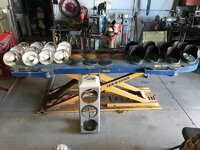 2020-12-26 14.57.07 by don long, on Flickr
Only broke 1 lens cutting it out of the gasket.
.
1 by don long, on FlickrAfter disassembly and a little sand blasting. I also replaced all the light sockets and installed led bulbs
2020-12-26 14.57.07 by don long, on FlickrOnly broke 1 lens cutting it out of the gasket.
.
Last edited:
bugnut
ALLIANCE MEMBER
Don following your new light project. Good to see a green one. I really enjoy your work.
Outlander
Well-known member
cool stuff guys!
bugnut
ALLIANCE MEMBER
Okay need some more help. Bench testing the 4 channel and the code I continue to get a message
at this line
//Loop for flashing walk light
for(i=0, i++, i < TurnFlash){ //starts a counter and loop to flash
the message is 'i' was not declared.
looked on line, read a few answers, watched a couple youtube videos tried a few ideas and cannot get beyond here.
So please help me out this is my first project and I am green as grass!
thanks bugnut
at this line
//Loop for flashing walk light
for(i=0, i++, i < TurnFlash){ //starts a counter and loop to flash
the message is 'i' was not declared.
looked on line, read a few answers, watched a couple youtube videos tried a few ideas and cannot get beyond here.
So please help me out this is my first project and I am green as grass!
thanks bugnut
Oops I left out the variable declaration. The line should be for( int i = 0; ...
Have to tell the program what type of variable i is. I guess I should have actually compiled the code.
There area also two other errors. I forgot to put two slashes in front of the comment on line 81 and I used code from a different project where it was a walk light instead of a turn light and forgot to change the variable name in the second part. Line 92 and 97 need to be corrected.
Anyway the code above is correct and compiles.
Have to tell the program what type of variable i is. I guess I should have actually compiled the code.
There area also two other errors. I forgot to put two slashes in front of the comment on line 81 and I used code from a different project where it was a walk light instead of a turn light and forgot to change the variable name in the second part. Line 92 and 97 need to be corrected.
Anyway the code above is correct and compiles.
Last edited:
i have a traffic light that I started on last week too
1 by don long, on Flickr
After disassembly and a little sand blasting. I also replaced all the light sockets and installed led bulbs
2020-12-26 14.57.07 by don long, on Flickr
Only broke 1 lens cutting it out of the gasket.
.
Don, you work is always epic. I wish I had your skills and I am envious of your space.
I would love to wire your garage so you could turn on and off all your displays and make scenes remotely controlled with an app. It is a variation on this project. Doing my house was easy, doing something on your scale would be epic.
bugnut
ALLIANCE MEMBER
gte appreciate your continued support but I can't get it to compile. I get an error message on line 78
exit status 1
expected ';' before '++' token
Please help me out!
THANKS
exit status 1
expected ';' before '++' token
Please help me out!
THANKS
gte appreciate your continued support but I can't get it to compile. I get an error message on line 78
exit status 1
expected ';' before '++' token
Please help me out!
THANKS
My last edit didn’t saves. In the for statement, there should be semi colons not comas. Pulled code from a Python without thinking about it.
It should be for(int i=0; i++;i<TurnFlash){
bugnut
ALLIANCE MEMBER
gte got back at it today. Finally able to make a little sense of the coding. I have made changes cutting, pasting, googling etc. I think I am good to go!! I'll post up the results but the leds on the 4 channel tell me I'm close if not spot on. Cannot THANK you enough! Off to the hardware for wire and boxes!!

Bugnut
Bugnut
gte got back at it today. Finally able to make a little sense of the coding. I have made changes cutting, pasting, googling etc. I think I am good to go!! I'll post up the results but the leds on the 4 channel tell me I'm close if not spot on. Cannot THANK you enough! Off to the hardware for wire and boxes!!
Bugnut
You have probably found these but Arduino foundation pages are great for how things are supposed to look. I primarily work in Python, but switch back and forth between, Java, C++, visual basic, and arduino C. I often have to go look up what something is supposed to look like.
https://www.arduino.cc/reference/en/
Adafruit also has very good documented examples for about everything from the most basic blink to very complex circuits and code
https://learn.adafruit.com/
I installed o a semaphore that I had on the outside of my garage. I just use an Alexa smart outlet for now. I have it on a schedule to turn on each hour for 5 minutes starting at 06:00 until 21:00. I can then also control it from my phone or any other Alexa at my place.