To avoid these ads, REGISTER NOW!

6 X 48/12 belt disc sander switch question

Tomstir

Well-known member
Joined
Dec 29, 2014
Messages
70
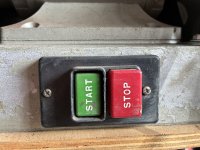
I am trying to go through this Taiwanese unit and the switch is not what I’m used to. It looks like the cover plate is missing and there appears to be two push buttons which I’m guessing are overload/reset? I would like to replace it with a general on/off switch.

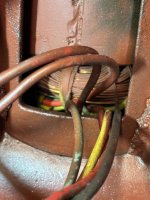
There are four wires from the motor to the switch on one side (paired up 2-1) and the other side of the switch goes to power. Can I purchase a standard switch that doesn’t have those push buttons? I have another sander that is 99% identical to this one and it has what I call standard switch.

Thanks
Tomstir
 

Attachments

  • IMG_3012.jpeg
    IMG_3012.jpeg
    743.7 KB · Views: 33
  • IMG_3039.jpeg
    IMG_3039.jpeg
    818.8 KB · Views: 32
To avoid these ads, REGISTER NOW!

whateg01

Well-known member
Joined
Mar 13, 2006
Messages
11,323
Location
doo dah, kansas, usa
Maybe post a pic of the wiring so we understand what you mean, but yes, most likely you can just replace the switch with something else.

ETA, maybe that's a maybe. I thought both photos went to the same machine. Need pics of the switch, wiring, and motor.
 

micromind

Well-known member
Joined
Sep 24, 2023
Messages
3,039
Location
Fernley, Nevada, about 30 miles east of Reno.
The switch on the left very likely has motor overloads built on to it. The switch on the right might have them but most likely not.

Look at the motor. Does it have a red pushbutton on one end? If so then is has built-in overload protection. If not then look at the nameplate and see if it states O/L, it'll be either automatic or manual reset.

If not doesn't have any type of built-in O/L then either provide it remotely (like the switch on the left) or don't install any and be careful to not push the motor too hard and burn it up.

But yes, generally speaking, a simple light switch can be installed to control it.
 

RTM

Well-known member
Joined
May 13, 2019
Messages
13,164
Location
SF Bay Area
looks like the cover plate is missing and there appears to be two push buttons which I’m guessing are overload/reset?
The left whitish button looks like an overload setting dial, I swear I see a slot in the middle. Turn that to set the level of current draw that pops the overload. When it blows, let it cool down, push the red button to restart.

So, unless you install some type of overload, you are risking bad things happening if you push it. IMO
 
OP
T

Tomstir

Well-known member
Joined
Dec 29, 2014
Messages
70
Maybe post a pic of the wiring so we understand what you mean, but yes, most likely you can just replace the switch with something else.

ETA, maybe that's a maybe. I thought both photos went to the same machine. Need pics of the switch, wiring, and motor.
Sorry about the confusion. The first pic is of the switch that is currently on the unit I’m working on… the second pic is of a unit that is very similar with a different/newer switch. The second switch does not have an overload button.

The switch on the left very likely has motor overloads built on to it. The switch on the right might have them but most likely not.

Look at the motor. Does it have a red pushbutton on one end? If so then is has built-in overload protection. If not then look at the nameplate and see if it states O/L, it'll be either automatic or manual reset.

If not doesn't have any type of built-in O/L then either provide it remotely (like the switch on the left) or don't install any and be careful to not push the motor too hard and burn it up.

But yes, generally speaking, a simple light switch can be installed to control it.
The motor on both do not have overload button on them. I cannot read the nameplate to see if it has O/L. I’m guessing manual reset is a button I would have to push….. the automatic would be “self clearing” after a cool down period?

The left whitish button looks like an overload setting dial, I swear I see a slot in the middle. Turn that to set the level of current draw that pops the overload. When it blows, let it cool down, push the red button to restart.

So, unless you install some type of overload, you are risking bad things happening if you push it. IMO
The white button slot looks like a cast parting line. It is pushed in and not proud enough to turn.


Thanks for the info gang. After looking at the switch wiring it doesn’t factory.
 

Attachments

  • IMG_3040.jpeg
    IMG_3040.jpeg
    544.9 KB · Views: 18
  • IMG_3041.jpeg
    IMG_3041.jpeg
    935.5 KB · Views: 15
  • IMG_3042.jpeg
    IMG_3042.jpeg
    669.3 KB · Views: 15
  • IMG_3043.jpeg
    IMG_3043.jpeg
    601.9 KB · Views: 14
  • IMG_3044.jpeg
    IMG_3044.jpeg
    634.5 KB · Views: 18

whateg01

Well-known member
Joined
Mar 13, 2006
Messages
11,323
Location
doo dah, kansas, usa
My guess is that the motor is a dual voltage, currently wired for low. Normally you'd see those 4 wires terminated in a pecker head and that's where the cord or wires from the switch would connect. Regardless, I'm not sure I would be too concerned about a sander not having an overload. If a workpiece got jammed between the with table and the belt or disc, though, you could have a problem. If I was really worried that might happen, I would use a regular switch (I prefer magnetic though) and add an emergency stop button.
 
To avoid these ads, REGISTER NOW!

Steve_P

Well-known member
Joined
Sep 15, 2010
Messages
5,185
Obviously, it seems that there is more going on there than a "light switch", but I have a simple switch on mine. When it bogs down, I ease up on the workpiece, so I don't really see a need for an overload under realistic conditions.
 
OP
T

Tomstir

Well-known member
Joined
Dec 29, 2014
Messages
70
Thanks for all the info. It is a dual voltage machine. 110/12-220/6. The hole the switch is in has some non factory looking grinds on it…. Enough to clearance that switch. I’ll replace it with another one.

I’m usually pretty kind to my tools and have never overloaded the other belt/disc I have.
 
To avoid these ads, REGISTER NOW!
Top Bottom