To avoid these ads, REGISTER NOW!

60" ceiling fan

To avoid these ads, REGISTER NOW!

jomobco

Well-known member
Joined
Nov 12, 2010
Messages
436
Location
Denver, CO
Mine are still in the box. The HD item number is 526 012.

9-22-07 113.jpg

Sean

I have three of these in my shop in series running for the last year pretty much straight through. They work fine. If you're only concerned about circulating air direction won't matter. Either way does the same thing. If you want a breeze blowing on you that's a different story.
 
Last edited:

Dugan

Well-known member
Joined
Sep 30, 2013
Messages
605
Location
New Castle, DE
Just picked one up off the website, no store anywhere seems to carry them anymore. They are also 90$ ea. now. If i see a sale Ill get another but it seems the price has jumped drastically
 

aka Larry

Well-known member
Joined
May 2, 2012
Messages
8,010
Location
Eastern, NC
I've sold a few things recently so I'm looking to finally add ceiling fans to my shop. The 56" Westinghouse one from Amazon gets good reviews and with Prime may just be the ticket.

I'm thinking of buying three of them and have a few questions for you guys (Charles?)

All the reviews say the included speed control is huge and doesn't fit a standard box. I assume pretty much any fan speed control would work?

Can I wire all three fans to one speed control or would I need to have a master switch with individual speed controls? I don't see the need to have different fans at different speeds.
 
Last edited:

Charles (in GA)

Well-known member
Joined
Jan 11, 2006
Messages
12,489
Location
50 mi south of Atlanta
Just picked one up off the website, no store anywhere seems to carry them anymore. They are also 90$ ea. now. If i see a sale Ill get another but it seems the price has jumped drastically

The Home Depot fans? I visit about three or four stores regular, and one of those dropped the 60" industrial fan, the others still stock three or four at a time and have a display fan. It just varies by store. Yes, price keeps creeping up and is $89 now. Was $69 when I installed mine.

Charles
 

Charles (in GA)

Well-known member
Joined
Jan 11, 2006
Messages
12,489
Location
50 mi south of Atlanta
I've sold a few things recently so I'm looking to finally add ceiling fans to my shop. The 56" Westinghouse one from Amazon gets good reviews and with Prime may just be the ticket.

I'm thinking of buying three of them and have a few questions for you guys (Charles?)

All the reviews say the included speed control is huge and doesn't fit a standard box. I assume pretty much any fan speed control would work?

Can I wire all three fans to one speed control or would I need to have a master switch with individual speed controls? I don't see the need to have different fans at different speeds.

As noted in other threads linked to in a post above, yes, you can buy a controller that will control all three. My Home Depot fans came with ones that fit in a box with a decora cover plate. I have a master fan switch and the three speed controls. Sometimes I have to be able to turn one off or slow it down if I am working directly under it and it is blowing too hard.

My HD fans have been run virtually every day in the summer, all day, since spring of '09. I run them in the winter with the heater, on low. They work fine and have given good service.

Charles

attachment.php
 
Last edited:

Charles (in GA)

Well-known member
Joined
Jan 11, 2006
Messages
12,489
Location
50 mi south of Atlanta
Here's the one I bought for my 48x30x14 steel framed insulated shop

have yet to install but it looks like a nice heavy duty reversible unit......

will add a natural gas tube heater this fall.......

http://www.homedepot.com/p/Hampton-...n-26629/202670138?N=5yc1vZbvlqZp4Z12l2Z2bctnt

Exact same fan as the 526 012 discussed here, just in black, didn't know they made it in black.

Don't expect to reverse it very often. You have to shut it off, use a ladder or lift and access it, and loosen the screw holding bell on top and slide it up, and flip a slide switch to reverse it.

They do not recommend installing these below 10 ft above the floor... They blow you away.

Question... Is the speed controller the same as mine (pic above) and is it white, or black?

TIP: click on the third thumbnail in the HD link above, it is a video that tells you a little about it.

Charles
 
Last edited:

aka Larry

Well-known member
Joined
May 2, 2012
Messages
8,010
Location
Eastern, NC
Another question about installing these fans.

All my switch boxes in the shop are the standard 4" galvanized metal ones typically used with EMT. I was surprised to read the other day "Not for use with ceiling fans" printed on the box at Lowes. This is an all-metal box box which is secured directly to an overhead steel beam so I didn't get what was special about the double-the-price "Ceiling fan specific" one.

Sure, I can buy three of these ceiling fan boxes, but I already have three of the other ones so if I don't need to buy a specific box I won't.

Opinions?
 

Charles (in GA)

Well-known member
Joined
Jan 11, 2006
Messages
12,489
Location
50 mi south of Atlanta
Another question about installing these fans.

All my switch boxes in the shop are the standard 4" galvanized metal ones typically used with EMT. I was surprised to read the other day "Not for use with ceiling fans" printed on the box at Lowes. This is an all-metal box box which is secured directly to an overhead steel beam so I didn't get what was special about the double-the-price "Ceiling fan specific" one.

Sure, I can buy three of these ceiling fan boxes, but I already have three of the other ones so if I don't need to buy a specific box I won't.

Opinions?

If you look at the standard 4x4 box, you see it has two tabs for mounting of front covers. These two 8-32 threaded holes have only about two threads in them, not nearly enough to hold a ceiling fan that might be a little out of balance. Look closely at a ceiling fan box (they do make metal ones). They have a long sleeve like insert pressed into the box from the back side. This has a large flange on the sleeve to retain it, and an inch and a half or more thread for the screw to grip into.

Look at THIS PDF of a Westinghouse brochure, look at the pics of the Saf-T-Bar or Saf-T-Brace. Look inside the box. You see the two cover mounting pads. You also see in the opposite corners from the cover mounting tabs, long sleeves inside the box that are 10-24 threaded for the actual fan mounting itself. What you need are the Saf-T-Box on page 5 of the Brochure.

I could have used metal fan boxes, but instead I used standard 4x4 boxes and ran ¼-20 bolts thru the fan mounting, thru a flat box cover, thru the box's back side and thru a metal strap that I installed to act as a safety on the box mounting. The box itself is mounted with two ¼-20 bolts inside that go up into cone nuts in the unistrut. I double nutted these with self locking nuts on the backside of the cone nuts, inside the unistrut. There is also a safety cable from the unistrut down thru the down rod to the fan housing.

Charles

attachment.php


attachment.php
 
Last edited:

aka Larry

Well-known member
Joined
May 2, 2012
Messages
8,010
Location
Eastern, NC
Thanks for the info Charles. In my case I think it will be better/easier to use the appropriate box. I hope to start running the conduit this weekend.
 
To avoid these ads, REGISTER NOW!

seth13_1984

Well-known member
Joined
Aug 6, 2014
Messages
63
Location
Shawnee, Ohio
Not sure if this has already been posted or not, but I got a flyer the other day from a company called "Big *** Solutions." Had huge ceiling fans for indoor & outdoor use, they're huge n look really nice but are costly also. Cheapest I think was around $700-$800
 

buening

Well-known member
Joined
Dec 17, 2007
Messages
1,338
Location
Decatur, IL
Sorry to bump an old thread, but for those that have the older version of the HD Hampton Bay 60", are your blade metal or plastic? I just noticed the one on HDs website says it is an indoor fan and has plastic blades. For an "industrial" fan, I would think it would have metal blades. If they were plastic in the previous version, do you have any blade sag after being installed for a few years??
 

Charles (in GA)

Well-known member
Joined
Jan 11, 2006
Messages
12,489
Location
50 mi south of Atlanta
Sorry to bump an old thread, but for those that have the older version of the HD Hampton Bay 60", are your blade metal or plastic? I just noticed the one on HDs website says it is an indoor fan and has plastic blades. For an "industrial" fan, I would think it would have metal blades. If they were plastic in the previous version, do you have any blade sag after being installed for a few years??

Plastic, hard as a rock and not the least bit of flex or droop. This is in a steel building that when closed up in the summer heat (on days when I'm away at work or wherever) I'm sure it goes way above a hundred inside.

I noticed today that the leading edges of the blades are dirty, need to get up there (scissor lift) with a bucket of soapy water and clean them.

Installed them in late 2008.

Charles
 

buening

Well-known member
Joined
Dec 17, 2007
Messages
1,338
Location
Decatur, IL
Thanks Charles! Just making sure its likely the same fan that has great reviews. We all know how "revised" items end up getting cheaper made rather than improving the product.
 

bzinsky

Well-known member
Joined
Oct 27, 2014
Messages
5,565
just an fyi, I buy a lot of fans for apartment buildings from the big box stores, the same brand came be great or junk, it's like the are completely different companies slapping their badge on them. Haven't quite figured it out.

This is the fan I buy for every apartment...
http://www.homedepot.com/p/Hampton-Bay-Glendale-52-in-Brushed-Nickel-Ceiling-Fan-AG524-BN/204175445

It's the cheapest one I've found that isn't built like ****. Been using the hamptom bay glendale for 7 years now, not a single failure. Quiet, reliable, looks nice, and I haven't had to balance a single one. Buying anything cheaper, unless it's on sale, is just a waste of money.
 

stage20

Well-known member
Joined
Nov 5, 2013
Messages
3,722
Location
pcola FL
any help with this? looks to be the industrial fan that home depot sells but ive never seen one in person.

00g0g_97bET8tHuKo_600x450.jpg

i can get it local sale for 30 bucks.
 

sbosecker

Well-known member
Joined
Sep 25, 2012
Messages
3,539
Location
Peachtree City, GA
Bumping this thread to, as been noted before, try to keep the info in one area.

I think the Hampton Bay 60-Inch Industrial Ceiling Fan (Model 52860) is the updated item available at Home Depot that has been referred to several times in this thread.

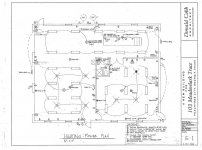
Based upon the positive feedback on this item I'm considering it for my garage build. Electrical plan containing fan locations follows:

Sheet E1 - Fans- Small.jpg

The electrical plan has been highly modified from what's on this sheet. However, the location of the fans on the plan is correct. All the fans are located on 16-foot tall ceilings EXCEPT for the one in the woodshop that is indicated by a white "F" on a black background. That one is on an 11-foot high ceiling.

Basically there are 7 fans in two rooms. The fans in each room will be controlled by a single switch.

I believe the Hampton Bay fans come with a "speed control" switch for a single fan. I do not think they would be able to safely control more than one fan. Is it possible to find and use a single speed control switch for each room? The switch would have to be able to safely control up to 4 of these fans.

I hope that makes sense.

Scott
 

sbosecker

Well-known member
Joined
Sep 25, 2012
Messages
3,539
Location
Peachtree City, GA
I am the one that bumped this thread to the top in an effort to get an answer to a question (see Post 108 just prior to the previous post). No offence to the fellow that posted number 109 but I'm afraid that the comment on an 8+ year old post might cause folks to miss my query.

Scott
 

forAK

Well-known member
Joined
Nov 11, 2015
Messages
380
Location
Peters Creek AK
Bumping this thread to, as been noted before, try to keep the info in one area.

I think the Hampton Bay 60-Inch Industrial Ceiling Fan (Model 52860) is the updated item available at Home Depot that has been referred to several times in this thread.

Based upon the positive feedback on this item I'm considering it for my garage build. Electrical plan containing fan locations follows:

Sheet E1 - Fans- Small.jpg

The electrical plan has been highly modified from what's on this sheet. However, the location of the fans on the plan is correct. All the fans are located on 16-foot tall ceilings EXCEPT for the one in the woodshop that is indicated by a white "F" on a black background. That one is on an 11-foot high ceiling.

Basically there are 7 fans in two rooms. The fans in each room will be controlled by a single switch.

I believe the Hampton Bay fans come with a "speed control" switch for a single fan. I do not think they would be able to safely control more than one fan. Is it possible to find and use a single speed control switch for each room? The switch would have to be able to safely control up to 4 of these fans.

I hope that makes sense.

Scott

This was from the Q&A section -

Yes/No! You will need to buy a dimmer switch that is rated at 600W or 5A and it will control up to 3 fans only, 600W dimmers are as big as you can buy. More than 3 fans will require additional switches, unless you wire them to a standard light switch that is either on or off. If you use a standard switch the fan will be at full speed all the time, but you can wire as many as fans as you want based off the switch power capacity which is 15A. I have 3 of them wired to 1 600W dimmer switch and they all work perfectly, the switch that comes with the fan is rated at 1.25A which is 1 fan and will not be able to provide enough amps to power more than 1 fan correctly. These fans move a lot of air and are wonderful in my garage


I actually found some better priced ones on Amazon looking at "commercial ceiling fans" and they have more color options.
 
Last edited:

sbosecker

Well-known member
Joined
Sep 25, 2012
Messages
3,539
Location
Peachtree City, GA
This was from the Q&A section -

Yes/No! You will need to buy a dimmer switch that is rated at 600W or 5A and it will control up to 3 fans only, 600W dimmers are as big as you can buy. More than 3 fans will require additional switches, unless you wire them to a standard light switch that is either on or off. If you use a standard switch the fan will be at full speed all the time, but you can wire as many as fans as you want based off the switch power capacity which is 15A. I have 3 of them wired to 1 600W dimmer switch and they all work perfectly, the switch that comes with the fan is rated at 1.25A which is 1 fan and will not be able to provide enough amps to power more than 1 fan correctly. These fans move a lot of air and are wonderful in my garage


I actually found some better priced ones on Amazon looking at "commercial ceiling fans" and they have more color options.

forAK,

Yes I saw that in the Q&A as well. I didn't really put a lot of stock in this answer since he referred to a "dimmer switch". I'm not an electrician but I was under the impression one should not use a dimmer switch on a fan.

Also...

I guess that I shouldn't limit my quest to a wall mounted Multi-Fan-Control-Switch. If wireless remote controls could individually control each fan but still have all the fans turned on & off by a single wall switch, that would be OK as well.

Best regards,

Scott
 
Last edited:

Dragfluid

ALLIANCE MEMBER
Joined
Sep 15, 2013
Messages
17,460
Location
Pillager, MN
I "think" that the switch that I bought with my fans is capable of handling 4 fans. A pic is in my build thread. Look it up. I got the fans and controller from Northern.
 

sbosecker

Well-known member
Joined
Sep 25, 2012
Messages
3,539
Location
Peachtree City, GA
I "think" that the switch that I bought with my fans is capable of handling 4 fans. A pic is in my build thread. Look it up. I got the fans and controller from Northern.

Dragfluid,

Thank you very much!

I hope you won't mind answering a few questions.

It looks like you have 3 fans on your controller; is that correct?

Did your controller fit in a standard switch box?

Are there infinite control speed settings between "High" & "Low" or are there 2or 3 "steps"?

I did find an User Guide here.

Looking at the wiring diagram I can see that the first question I need to ask the electrician is "How many wires are running from the fan boxes to the switch box?"

If he answers with, "A hot, a neutral & a ground." Then we're done with the wall mounted wired version and will have to move to the individual "wireless" receivers for each fan if I want to be able to control the fan's speed. I'm going to be VERY surprised if he ran more than the 3 wires mentioned from the fan to the switch box. We shall see.

While on the subject of your controller... I also found this document which indicates your controller is rated for 5 amps. Looks like they make a couple of controllers that can handle 10 & 15 amps but these appear to protrude from wall a bit. I'm guessing some sort of a heat sink.

EDIT: What I should have written above is If he answers with "A single black wire coming and going from the switch box."

Best regards,

Scott
 
Last edited:

Dragfluid

ALLIANCE MEMBER
Joined
Sep 15, 2013
Messages
17,460
Location
Pillager, MN
Dragfluid,

Thank you very much!

I hope you won't mind answering a few questions.

It looks like you have 3 fans on your controller; is that correct?

Did your controller fit in a standard switch box?

Are there infinite control speed settings between "High" & "Low" or are there 2or 3 "steps"?

I did find an User Guide here.

Looking at the wiring diagram I can see that the first question I need to ask the electrician is "How many wires are running from the fan boxes to the switch box?"

If he answers with, "A hot, a neutral & a ground." Then we're done with the wall mounted wired version and will have to move to the individual "wireless" receivers for each fan if I want to be able to control the fan's speed. I'm going to be VERY surprised if he ran more than the 3 wires mentioned from the fan to the switch box. We shall see.

While on the subject of your controller... I also found this document which indicates your controller is rated for 5 amps. Looks like they make a couple of controllers that can handle 10 & 15 amps but these appear to protrude from wall a bit. I'm guessing some sort of a heat sink.

Best regards,

Scott

Yes, all three fans are controlled by the one controller that also has forward and reverse, with infinite speed settings, and fits in a standard metal box. :)

You need four wires from controller to fans in order to take advantage of the direction control. In other words, 14/4, which is overpriced, or like I did, and run a pair of 14/2. Both with ground, of course.
 

sbosecker

Well-known member
Joined
Sep 25, 2012
Messages
3,539
Location
Peachtree City, GA
Yes, all three fans are controlled by the one controller that also has forward and reverse, with infinite speed settings, and fits in a standard metal box. :)

You need four wires from controller to fans in order to take advantage of the direction control. In other words, 14/4, which is overpriced, or like I did, and run a pair of 14/2. Both with ground, of course.

Dragfluid,

Thanks.

I described the wiring to the switch incorrectly. I should have written "If he has just a black wire going and coming from the switch's electrical box."

Best regards,

Scott
 
Last edited:

aka Larry

Well-known member
Joined
May 2, 2012
Messages
8,010
Location
Eastern, NC
Bringing this thread back from the dead...

Backgound (*** seen earlier in this very thread) I have three of these popular on GJ 56" Westinghouse Industrial Ceiling Fans in my shop. They were cheap, and work great. I love them.

As anyone who owns these knows, the block-like surface-mounted 5-speed control that comes with the fan looks like it came from the 50's. Not sure how well it actually works since I tossed all mine in the trash the day I bought the fans.

Since I liked the function/cost of the fans, I recently bought another pair for our screened porch. I wanted a good looking multi-purpose switch so I bought one from Lowe's that is a dual function as a dimmer and 3-speed fan control. I don't recall the name/model though.

The problem is the fan only seems to work on HIGH or LOW, with no in between. The HIGH in this case is fast enough to produces a blade clipping sound not unlike a helicopter (moves a ton of air though) that unless it's really hot, not wanted/needed. The MID setting is enough to spin the blades, but not enough to move any discernible amount of air. The LOW setting pretty much OFF, not much different than the MID, IMO. BTW, this is the 3rd switch of this type/style that I've tried, all with similar results.

Is there something about this fan's design, or have I somehow picked the wrong three switches in a row? If the fan can't run on a MED setting, the wife isn't going to have it, and I'll have to buy another. In this case, it's not the end of the world, as I can just add these two fans to the others already in my shop, but I don't want to spend the money of I don't have to.

Thoughts/advise/help!?
 
To avoid these ads, REGISTER NOW!
Top Bottom