To avoid these ads, REGISTER NOW!

8500w door remote problem

dante2

Well-known member
Joined
Dec 27, 2011
Messages
500
Location
Central OK
I have 2 door openers a LJ8900 and a 8500W. When I installed the 8900 I borrowed the remote from the 8500 since that door was seldom used. Fast forward and I am using the 8500 door more frequently now and want to use the opener again. I got a generic 893max and have it connected to the 8900 and it works fine. Now I can't reconnect the 893max to the 8500 opener. I pulled the wall control off after hearing about the random openings here and added a switch at the door. It's been a few years and I can't find the wall control unit. Is there another way to connect the opener to the 8500 without having the wall control? There's only the limit buttons on the opener a black and might be yellow. I called CS and the only info they had was the same as the manual. Any help or suggestions would be appreciated.
 
To avoid these ads, REGISTER NOW!

Skellyii

ALLIANCE MEMBER
Joined
Nov 13, 2021
Messages
1,757
Location
KC Area
How old is your 8500? I have a 2007 and a 2022 vintage 8500 and they both have a learn button that allows you to program remotes.
The only issue I ran into was some of the generic ones couldn't be programmed to one or the other 8500s. The genuine remotes were fine.
 
OP
D

dante2

Well-known member
Joined
Dec 27, 2011
Messages
500
Location
Central OK
It's a 2021. The learn button is on the wall control which I either can't find or don't have. I tried using the yellowish button on the opener but that didn't work. I called CS again to ask if a 882LMW "dumb" wall control unit would work and they said it would. Just looking for an alternate way before I buy a wall unit that I don't want.
 

wssix99

Well-known member
Joined
Mar 2, 2011
Messages
5,162
Location
Chicago, IL
There is a limit to the number of remotes the openers can store. If you program remotes too much, you may fill up the memory. Its best to erase all remotes from the memory. (The garage door openers instructions will show you what buttons to push.)

You should then be able to go back through the programming procedure for both doors and be fine.
 
OP
D

dante2

Well-known member
Joined
Dec 27, 2011
Messages
500
Location
Central OK
Edited: No luck there. Chamberlain wall unit wouldn't connect.

I remembered I have a Chamberlain door on the house with a wall unit from 2015. It has a learn button on it so maybe I can get it that way.
 
Last edited:
OP
D

dante2

Well-known member
Joined
Dec 27, 2011
Messages
500
Location
Central OK
There is a limit to the number of remotes the openers can store. If you program remotes too much, you may fill up the memory. Its best to erase all remotes from the memory. (The garage door openers instructions will show you what buttons to push.)

You should then be able to go back through the programming procedure for both doors and be fine.
Instructions show that you use the wall control to erase codes. Hard to do that without one. I'm willing to get an 882LMW wall unit if I can confirm that it works on the 8500w.
 

Smilodon

Well-known member
Joined
Oct 27, 2009
Messages
1,225
Location
Titusville, FL
I originally read this as a 8500 *watt* remote... That would work from another planet!

I have had the issue with too many remotes being programmed. If you do a "hard" reset from the panel on the unit itself you can start all over again with remotes. They aren't clear anywhere how many are supported (in the case of my unit). I was messing around with a repeater for an older version of homelink when I got myself in this situation.
 
OP
D

dante2

Well-known member
Joined
Dec 27, 2011
Messages
500
Location
Central OK
There is a limit to the number of remotes the openers can store. If you program remotes too much, you may fill up the memory. Its best to erase all remotes from the memory. (The garage door openers instructions will show you what buttons to push.)

You should then be able to go back through the programming procedure for both doors and be fine.
I originally read this as a 8500 *watt* remote... That would work from another planet!

I have had the issue with too many remotes being programmed. If you do a "hard" reset from the panel on the unit itself you can start all over again with remotes. They aren't clear anywhere how many are supported (in the case of my unit). I was messing around with a repeater for an older version of homelink when I got myself in this situation.
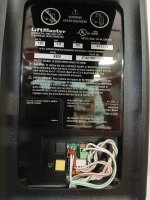
Ok little mistake on my part it is just an 8500 not an 8500W. The instructions only reference using the wall control to do a reset. The black and yellow buttons are the only available on the opener itself.
 

Attachments

  • 20260209_105523.jpg
    20260209_105523.jpg
    747.9 KB · Views: 9

Smilodon

Well-known member
Joined
Oct 27, 2009
Messages
1,225
Location
Titusville, FL
Ah, yeah not sure what to do in that case. Is the main "programming" remote wired?

The variety of stuff they make to do one simple function always astounds me. I get that they have models with different features at different price points, but they seem to change basic functionality between models each year for no obvious reason.
 
To avoid these ads, REGISTER NOW!
OP
D

dante2

Well-known member
Joined
Dec 27, 2011
Messages
500
Location
Central OK
Ah, yeah not sure what to do in that case. Is the main "programming" remote wired?

The variety of stuff they make to do one simple function always astounds me. I get that they have models with different features at different price points, but they seem to change basic functionality between models each year for no obvious reason.
I can't find the wall unit that came with the door and it looks like everything runs off of that. I use a cheap doorbell switch to open the door. I did check with Chamberlain and they said an 882LMW wall unit would work. I checked another source and they said the same so I'm going to get one and hope for the best outcome. I'm normally not lazy but it would be nice not to have to walk around and thru the shop to open the door when I need to park inside that door.
 
OP
D

dante2

Well-known member
Joined
Dec 27, 2011
Messages
500
Location
Central OK
Just found this on the Chamberlain website. "Compared with other models, the learn button is not on the opener itself, it is on the myQ Control Panel. The learn button on the opener is used only for setting the travel limits and force." Looks like I need a wall control unit whether I want one or not. Going to hunt around a little more to try and find the original.
 

wssix99

Well-known member
Joined
Mar 2, 2011
Messages
5,162
Location
Chicago, IL
There is a way to short out the board to clear the memory but I wasn't thinking... You won't be able to program any new remotes in without the wall control and that learn button.

The new wall controls that are for sale now don't have the opening gremlin. (I haven't seen anyone report the problem since they started shipping the "blue dot" boxes of them. We should be far enough in the stock now that they don't need to "dot" the packages for the good controls.)
 
OP
D

dante2

Well-known member
Joined
Dec 27, 2011
Messages
500
Location
Central OK
889LM wall control got it going again. Had to switch to the generic 893max openers due to the original 893 opening both doors at the same time.
 
To avoid these ads, REGISTER NOW!
Top Bottom