To avoid these ads, REGISTER NOW!

Another question about wifi to the shop

58Yeoman

Well-known member
Joined
Oct 1, 2010
Messages
8,999
Location
Central IL
I visited a friend today who has two wireless cameras at his shop, but the signal won't reach his house. He has a wireless router in the metal shop, and his house is about 300' away, as a man walks. He has run 300' of ethernet cable from the house to the shop, and is not getting a signal. I think he might have the wrong equipment.

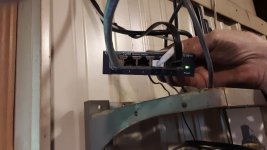
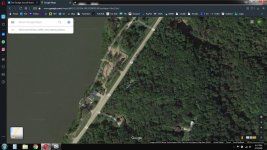
In the shop, he as the router w/ 3 antennas, and a switch. The camera is plugged into the switch, and the switch is plugged into the router. The switch is plugged into the router in the house. I've enclosed three not so good pic of his switch and router, and of his house/shop. His house is at the lower left of the pic, and to the right of rt. 26, and his shop is the light colored "line" north of his house. There is a large hill between his house and his shop, so there isn't a line of sight from the shop to the garage.

I can call him to get more info if needed.
 

Attachments

  • eddir.jpg
    eddir.jpg
    150 KB · Views: 82
  • ed1.jpeg
    ed1.jpeg
    88.1 KB · Views: 77
  • ed2.jpeg
    ed2.jpeg
    67.2 KB · Views: 78
  • ed3.jpeg
    ed3.jpeg
    63.3 KB · Views: 72
To avoid these ads, REGISTER NOW!

Captain Spaulding

Well-known member
Joined
Feb 13, 2017
Messages
753
Location
Southern Indiana
Configuring such a setup is pretty easy, but at 300ft he is close to maximum distance. 328 ft is the spec limit. But I don’t see any lights indicating the router is connected to a live Ethernet connection. Take the router into the house and connect to the household router with a short Ethernet cable and see if it works there.
 

jchetty

Well-known member
Joined
Aug 18, 2005
Messages
431
Location
Central New Jersey
Your explanation is rather confusing.

[Metal Shop] Camerax2 -> switch -> router -> ///House\\\ switch -> router -> modem.

Is this the setup?

If he has 2 routers, that is probably the problem. Can he bypass the router in the garage?

The 2 routers both have dhcp servers and I think this is the problem. He can try disabling the dhcp server on the garage router. That would put it into client mode making it like a switch. Another way is more complicated by changing subnet masks and local ip ranges which is more complicated.
 

wagoncrazy

Well-known member
Joined
May 5, 2016
Messages
81
Location
Newhall CA
ALways useful to test a network cable that's been hand-terminated (vs. machine molded). Things can go wrong.

I second this comment. That's exactly what was problematic for my recent 280 foot cable run to the seperate garage at the rear of my property. Once I got the connectors on their correctly, plugged in the garage modem, the system booted right up.
 

east_tn_emc

Well-known member
Joined
Aug 30, 2008
Messages
426
Location
East Tennessee
And most likely needs the second router to be configured in AP mode so it acts like a wireless access point. Two routers like that will be nothing but headaches.
 
To avoid these ads, REGISTER NOW!
OP
5

58Yeoman

Well-known member
Joined
Oct 1, 2010
Messages
8,999
Location
Central IL
You think you're confused? LOL. I may have to go back and get more info and better pix. IIRC, the red cable is the one that me made, said he bought the correct tool for it. I think the dark grey cable is the one coming from the router in the shop, going to the switch. The white one is from the camera(s). I'll call him tomorrow and see if he is around...maybe I can take another ride to see it all.

Thanks so far for the ideas and suggestions.
 

infinkc

Well-known member
Joined
Jan 19, 2012
Messages
862
Very confusing setup. I’d first confirm the 300ft line is good. Plug like a laptop in to see if it works. No need for the switch if the router is configured for an access point as you can use those ports on it also.
 

jeep63

Well-known member
Joined
Feb 8, 2006
Messages
264
Location
Maryland, USA
I make all my own ethernet cables and it is very easy to miss the wire sequence or not get a good crimp. For sure confirm that cable is working first. Also good advice to look into how to use a second router as an access point; there are config changes to make for it to be operational.
 
OP
5

58Yeoman

Well-known member
Joined
Oct 1, 2010
Messages
8,999
Location
Central IL
Got an email from Ed last night. He checked the cable at the shop with a laptop, and didn't have a signal. I replied for him to recheck the cable ends, as a start.
 

Denwood

Well-known member
Joined
Sep 22, 2014
Messages
4,191
Location
Thunder Bay, Ontario, Canada
You need to test 100% of DIY connections with a tester. Start there. It’s very easy to cross or improperly terminate an Ethernet cable! Testers are cheap and will confirm that all pairs are terminated correctly.
 
To avoid these ads, REGISTER NOW!
Top Bottom