To avoid these ads, REGISTER NOW!

Another WiFi in the barn thread

Nathan Cox

Active member
Joined
May 11, 2015
Messages
28
Location
Alvin, Tx.
I will start by stating I have tried to read the many other threads regarding this topic. However, I'm a complete idiot when it comes to this topic and I just end up getting more confused.

Here is what I have to work with. I know for sure that hardwiring is out of the question. I am not digging a new trench so I need some kind of wireless option.

New barn is approximately 60' from house. Current Wifi router is in corner of house nearest barn. I can stand under the lean to on the barn that faces the house with my back against the barn wall looking at the house and get good signal. As soon as I step inside, not so much, as would be expected with the metal walls and roof.

Would like to find a solution I can purchase at one of the box stores locally. In my case, best selection would be a Fry's.

If I need to upgrade my current router in the process, that is fine as its nearly 10 years old anyway.

I don't mind running a short cable from outside of barn to inside of barn between equipment(bridge, repeater, extender etc.) but want to remain wireless once inside for all devices (laptop, tablet, phone, etc.)

Thanks in advance for any help.
 
To avoid these ads, REGISTER NOW!

wyliesdiesels

Well-known member
Joined
Aug 14, 2012
Messages
19,994
Location
Modesto, CA
I will start by stating I have tried to read the many other threads regarding this topic. However, I'm a complete idiot when it comes to this topic and I just end up getting more confused.

Here is what I have to work with. I know for sure that hardwiring is out of the question. I am not digging a new trench so I need some kind of wireless option.

New barn is approximately 60' from house. Current Wifi router is in corner of house nearest barn. I can stand under the lean to on the barn that faces the house with my back against the barn wall looking at the house and get good signal. As soon as I step inside, not so much, as would be expected with the metal walls and roof.

Would like to find a solution I can purchase at one of the box stores locally. In my case, best selection would be a Fry's.

If I need to upgrade my current router in the process, that is fine as its nearly 10 years old anyway.

I don't mind running a short cable from outside of barn to inside of barn between equipment(bridge, repeater, extender etc.) but want to remain wireless once inside for all devices (laptop, tablet, phone, etc.)

Thanks in advance for any help.

The poor performance youre seeing inside the barn is expected with the metal siding. Metal attenuates wireless signals.

If u dont want to run a CAT5e cable between buildings, then the next best option is a wireless bridge.

I use ubiquiti nano station m5s for wireless bridges at that distance.

U will need to run a CAT5e cable from the house router outside to the location for the house NSM5.

Then do the same for the barn NSM5.

The NSM5s use whats called mid-span POE injectors that send power for the radio through the ethernet cable. The POE injector will go in between the router or AP and radio. So u will need 2 CAT5e cables at each end.

Keep in mind that certain UBNT models, such as the NSM5s, use non standard 24v POE voltage and will be fried if u plug them into a standard 48v POE switch.

On the barn side u can buy either a wireless router or a wireless AP.

If u use a wireless router, then u will need to put it in AP mode so u dont have DHCP conflicts with the house router.

U will have to buy the radios for the wireless bridge online. No one sells them in store.

http://www.amazon.com/gp/aw/d/B0049...words=nsm5&dpPl=1&dpID=315Ec7am20L&ref=plSrch

BTW I do this for a living so if u have any detailed questions u can ask away!


Wow!

Those are a rip-off.

I have several old linksys routers in my garage.

I could build one of those for a lot cheaper!

Plus they are old technology so they will have piss poor performance for newer hosts!

First you need s good router that can get signal into the barn.
http://thewirecutter.com/reviews/best-wi-fi-router/

Then to cover the barn if the router is not cutting it, get an extender.
http://thewirecutter.com/reviews/best-wi-fi-extender/


This is stuff you can get at Fry's.

If that doesn't work, you will need a wifi bridge, not likely sold at Fry's.

No matter which router one uses, signal will still be poor in the barn because of the metal.

And because of the nature of extenders, using an extender will just add insult to injury. Going the route you suggested simply isn't gonna work.

Whatever the OP does, DONT use an extender for this situation due to the poor signal in the barn. It will be nothing more than a frustrating experience.

A wired link or a wireless bridge is the way to go!!

The FCC is cracking down on modified firmware Routers, which this unit has. Plus it's old RF technology. I would not recommend this for your setup.

http://hackaday.com/2016/02/26/fcc-locks-down-router-firmware/

That may be so but the FCC isnt gonna give a damn or have the time to worry about a home user operating on unlicensed frequencies. They have much larger fish to fry that they dont even have time to deal with.

I have personal experience with the FCC. Believe me. They dont even have time to deal with licensed frequency issues!

My shop had a medi-flight client that had licensed radios repeated from a local mountain top that frequently had interference issues. This created a very bad situation for the client. The interference was caused by someone else's radio equipment transmitting on the same frequency.

We bugged the FCC over and over and over again to get their act together and investigate and figure out who was causing the issues. Apparently, they didnt have the man power to do it as there is only 2-3 FCC techs for the entire state. So the client, paying thousands each year for radio licenses, was very pissed needless to say! Im not sure what came of it but im sure it got ugly!
 
Last edited:

Pwrgeek

Well-known member
Joined
Oct 18, 2015
Messages
288
Location
Texas USA
The problem you're having inside the barn is due to the fact that a metal building is a reasonable approximation of a Faraday cage. The router on the house end is fine and you can leave it alone. What you need is a solution where one antenna is outside and one is inside. Something like this will work. Just run one of the antennas outside on the house side of the building and leave the unit inside.

Extender
http://www.amazon.com/dp/B002YK1B8Y/?tag=atomicindus08-20

Extension cable to run the antenna outside

http://www.amazon.com/dp/B00428R89M/?tag=atomicindus08-20


Sent from my iPhone using Tapatalk
 

ModClean

Well-known member
Joined
Jul 4, 2013
Messages
120
Location
Americus, GA
If you share an electrical connection with the barn, you could use a powerline network adapter. You would plug one into a 110v outlet in the house and one in the barn, then link the one in the house to your router (standard network cable) and the one in the barn to a WiFi access point (again, standard cable). I'm not sure what speeds they're up to now, but I suspect they're at least near the maximum bandwidth you'd be pushing to your barn WiFi clients.
 

pedrodagr8

Well-known member
Joined
Aug 25, 2013
Messages
613
The poor performance youre seeing inside the barn is expected with the metal siding. Metal attenuates wireless signals.

If u dont want to run a CAT5e cable between buildings, then the next best option is a wireless bridge.

I use ubiquiti nano station m5s for wireless bridges at that distance.

U will need to run a CAT5e cable from the house router outside to the location for the house NSM5.

Then do the same for the barn NSM5.

On the barn side u can buy either a wireless router or a wireless AP.

If u use a wireless router, then u will need to put it in AP mode so u dont have conflicts with the house router.

U will have to buy the radios for the wireless bridge online.

BTW I do this for a living so if u have any detailed questions u can ask away!


Wow!

Those are a rip-off.

I have several old linksys routers in my garage.

I could build one of those for a lot cheaper!


No matter which router one uses, signal will still be poor in the barn because of the metal.

And because of the nature of extenders, using an extender will just add insult to injury.

DONT use an extender for this situation due to the poor signal in the barn. It will be nothing more than a frustrating experience.

A wired link or a wireless bridge is the way to go!!


T

I came to say pretty much almost exactly what this guy said, he knows what he is talking about. Extenders are really bad for overall network throughput.

THe method he mentioned is EXACTLY how anyone competent in network design would do this. Ubiquiti also makes some really great stuff. They are what I would consider a prosumer line, they are not nearly as flashy as the garbage sold in stores but instead perform really damn well and really transparently. They focus a lot on the needs of customers outside of the standard home router in a corner of the room kind of needs. This means that they have a lot of devices which can accomplish this. Many designed for external outdoor mounting and what not. The NanoStations should work. There are others PowerBridge plus a few others that I am not familiar with that might also work.
 

Bigbandguy

Well-known member
Joined
Oct 18, 2014
Messages
1,168
Location
North Carolina
My shed is about the same distance but it is a wooden shed so I was able to get "some" signal inside but it was not all that great.. YouTube in particular was slow and jerky. All I did was move the USB wireless adapter from being plugged into the computer to being placed in a window at the end of a USB cord. Problem solved. I expect if I moved it outside it would be even stronger. The problem that I see for your situation is that you want other devices besides one computer to operate inside the building. This will likely involve the bridge as has been advised.
 

REKIII

Well-known member
Joined
Oct 30, 2014
Messages
102
Location
Wisconsin
If you share an electrical connection with the barn, you could use a powerline network adapter. You would plug one into a 110v outlet in the house and one in the barn, then link the one in the house to your router (standard network cable) and the one in the barn to a WiFi access point (again, standard cable). I'm not sure what speeds they're up to now, but I suspect they're at least near the maximum bandwidth you'd be pushing to your barn WiFi clients.

I think there have been better solutions suggested, but if you are considering this, look into how your shed is grounded.

My shed is 350' from my house, so we tried this. It didn't work at all. What we realized is that it actually sends the signal through the ground. My power comes from the house, but my shed is grounded at the shed.
 

wyliesdiesels

Well-known member
Joined
Aug 14, 2012
Messages
19,994
Location
Modesto, CA
I think there have been better solutions suggested, but if you are considering this, look into how your shed is grounded.

My shed is 350' from my house, so we tried this. It didn't work at all. What we realized is that it actually sends the signal through the ground. My power comes from the house, but my shed is grounded at the shed.


No they dont work through the EGC. And even if they did and u only had a 3-wire feed, the neutral should be the EGC for the shed. Either distance was your issue or u had it plugged into the wrong leg.

The ground youre referring to is the grounding electrode which is different than the equipment ground. The equipment grounding is either ran through the neutral, if u have a 3-wire feed or a 4th wire called the EGC.

Keep in mind that EGCs and grounding electrodes are 2 different animals. Dont confuse the 2. Heres an article that will help u understand it better:

http://www.electriciantalk.com/articles/the-confusion-of-the-term-grounding/
 

Denwood

Well-known member
Joined
Sep 22, 2014
Messages
4,184
Location
Thunder Bay, Ontario, Canada
Having experimented with power line, I would not suggest it. It's far too susceptible to noise, and troubleshooting this is very difficult.

You're not running CAT5 or fiber, and you have a metal shop. This clearly points to the Ubiquiti solution as your best bet with antennaes on the outside of each building.

That said, what are you planning to do with respect to devices in your shop? In most of these threads bandwidth is never mentioned..but really that's where the conversation should start.

WyliesD, what bandwidth (actual, measured) are you seeing with the nano bridges? I know there are a lot of variables. The last wireless building link we "maintained" was encrypted up the yin yang and hands off as it was a CRA (like the IRS) data link.

The Ubiquiti looks very slick. This video describes a simple point to point setup:
 
Last edited:

wyliesdiesels

Well-known member
Joined
Aug 14, 2012
Messages
19,994
Location
Modesto, CA
Having experimented with power line, I would not suggest it. It's far too susceptible to noise, and troubleshooting this is very difficult.

You're not running CAT5 or fiber, and you have a metal shop. This clearly points to the Ubiquiti solution as your best bet with antennaes on the outside of each building.

That said, what are you planning to do with respect to devices in your shop? In most of these threads bandwidth is never mentioned..but really that's where the conversation should start.

WyliesD, what bandwidth (actual, measured) are you seeing with the nano bridges? I know there are a lot of variables. The last wireless building link we "maintained" was encrypted up the yin yang and hands off as it was a CRA (like the IRS) data link.

The Ubiquiti looks very slick. This video describes a simple point to point setup:

Well i wouldnt use a nano bridge for a 60' P2P link. Nano bridges are focused directionally and the signal will be too hot. Use a nano station instead.

The theoretical max throughput is 150Mbps. However, the ethernet port is only 10/100. So max u could do is 100Mbps. At 60', with clear line of sight(without any obstructions or interference from other 5ghz devices), he should be able to hit close to max. If there is obstructions, such as trees, the OP should think about switching to NSM2s which operate on 2.4ghz and penetrate trees and obstructions better.
 

checkthisout

Well-known member
Joined
Sep 5, 2008
Messages
5,232
Just dig a trench but only go down about 6 inches. It's cheating but it's just a signal wire.
 
OP
N

Nathan Cox

Active member
Joined
May 11, 2015
Messages
28
Location
Alvin, Tx.
Well i wouldnt use a nano bridge for a 60' P2P link. Nano bridges are focused directionally and the signal will be too hot. Use a nano station instead.

The theoretical max throughput is 150Mbps. However, the ethernet port is only 10/100. So max u could do is 100Mbps. At 60', with clear line of sight(without any obstructions or interference from other 5ghz devices), he should be able to hit close to max. If there is obstructions, such as trees, the OP should think about switching to NSM2s which operate on 2.4ghz and penetrate trees and obstructions better.

Thanks for all the help so far. I will be looking in to this set up. Im sure I will have many more questions.

There are zero obstructions. its a straight open shot from the window where the current router is directly over to the barn. Nothing in between but grass.
 

wyliesdiesels

Well-known member
Joined
Aug 14, 2012
Messages
19,994
Location
Modesto, CA
Thanks for all the help so far. I will be looking in to this set up. Im sure I will have many more questions.

There are zero obstructions. its a straight open shot from the window where the current router is directly over to the barn. Nothing in between but grass.

U will want to mount them outside either on the eve or just below it.

There is a mount u can get for mounting the radios.

http://www.amazon.com/gp/aw/d/B004E...-1&pi=AC_SX236_SY340_QL65&keywords=ubnt+ns-wm
 

TK-421

Well-known member
Joined
Dec 29, 2015
Messages
1,398
Location
Pflugerville, TX
Walk into Fry's, tell a guy you need a wi-fi extender with a remote antenna that you can mount to the outside of your barn and then have the transmitter inside the barn, they should be able to help you out.
 
To avoid these ads, REGISTER NOW!

wyliesdiesels

Well-known member
Joined
Aug 14, 2012
Messages
19,994
Location
Modesto, CA
Walk into Fry's, tell a guy you need a wi-fi extender with a remote antenna that you can mount to the outside of your barn and then have the transmitter inside the barn, they should be able to help you out.

Wifi extenders are garbage. Why do people waste their time with them?
 

John T

Well-known member
Joined
Nov 15, 2011
Messages
903
Wifi extenders are garbage. Why do people waste their time with them?


Define garbage...

2 years ago I had basically no signal in my detached garage.

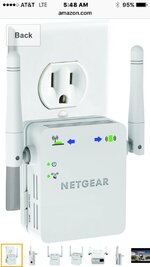
So I bought a Netgear Wi-Fi extender.
Simply plugged into the wall in the house....

And I instantly had a great signal in the garage.

Probably the best 40 bucks I ever spent.

6e7b38e9a19cde50b60886b3effdbb51.jpg
 

sdleo26

Member
Joined
Sep 25, 2015
Messages
7
When he says garbage, I believe he is referring to bandwidth and the ability to stream large data packets like HD video etc. While I agree a bridge is the best alternative as described, I have to say the TP LINK extender for $19 on Amazon works great. I have two , one two floors down from router (router in attic) and the other in detached garage about 50' from house. I can stream Sonos and sling box with no issue so I am happy with throughput.
 

CJ7VFR

Well-known member
Joined
Jan 13, 2015
Messages
2,939
Location
Central New Jersey
Define garbage...

2 years ago I had basically no signal in my detached garage.

So I bought a Netgear Wi-Fi extender.
Simply plugged into the wall in the house....

And I instantly had a great signal in the garage.

Probably the best 40 bucks I ever spent.

I have a similar extender from Netgear in my breezeway between my house and the garage, and it works great as well.

I have Verizon Fios in my house, and the WIFI router is in our "office" room in the house, which is located in the far end of the house.

This location is about 50 feet from the breezeway and our outdoor deck. My wife does some of her work on her laptop, and she likes to sit out on the deck when the weather is nice. But the WIFI signal was very weak there, and downloading things could take a long time. The WIFI signal from the router has to go thru several walls and one floor to get to the deck.

So I bought the Netgear EX6100 for about 40 bucks, and installed it in the breezeway. It was actually very easy to sync with the router and only took a few minutes to have it up and working.

Now, I can get full WIFI bars on the deck, in my garage (which is next to the breezeway), in my driveway and I can even get full bars in my shed, which is about 50 feet away from the deck and about 60 feet from the extender in the breezeway.

I could never get any WIFI signal in the shed before I installed the EX6100. None, zero.

I don't move tons of data, but if I run an upload and download test using Speedtest.net, I can get virtually the same speeds from any of my phones, tablets, iPads, and my wife's laptop using the WIFI signal from the extender as I can from my desktop computer that is directly connected to the router with an eithernet cable.

Here is a screen grab I just did from my iPad from out on the deck. I have almost the same download speeds as upload speeds using the WIFI extender.

I do not think they are garbage, and for only 40 bucks and literally 5 minutes of my time, I now have very good WIFI all over my house (including the basement), garage, deck and shed. And I didn't have to buy any other expensive pieces of equipment, dig any trenches to run cables and wires all over the place, attach anything to the outside of my house, and best of all, my wife is happy!

Maybe these extenders would not work for some applications, but for me, it was an easy and cost effective way to get a good WIFI signal everywhere I needed/wanted it.

Jim
 

Attachments

  • wifi-speeds.JPG
    wifi-speeds.JPG
    66.4 KB · Views: 33
Last edited:

Tim C

Well-known member
Joined
Dec 21, 2012
Messages
263
http://www.outsideourbubble.com/sec...making-a-better-park-connection-for-under-100

I followed this guy's instructions to add WiFi to my shop, similar to yours. My shop is 75' from the window to the room in my house where the router is. I had excellent signal just outside the shop, nothing inside if the bay doors were closed. Way to much stuff going on in the yard to try to trench in a cable.

I bought the ubiquiti stuff on Amazon for $90, not sure if you can find them locally or not. I mounted the nanostation (antenna) on the corner of the shop closest to the house, ran 25' of Ethernet Cable into the shop, and hooked it to the airgateway hooked the power adapter and the ubiquiti airgateway (router) together and plugged it into an outlet that is switched with my shop lights.

The setup was pretty easy and I'm a computer networking idiot. When I'm not in the shop and the lights are off, there's no internet out there messing up my own or the neighbors wifis with more radio signals. When I go out there and switch the lights on it takes about 2-3 minutes for the setup to boot up then the airgateway starts broadcasting a wifi signal. I just setup a new WiFi setting on my laptop and cell phone, as soon as the system comes up they connect to the strongest password protected signal automatically.

Basically this new "shopnet" gets its signal from "homenet". It's plenty fast for me, I'm not streaming movies or playing games in the shop, but I can look up specs or wiring diagrams, and watch YouTube videos that buffer just slightly longer than they do in the house.

Sent from my XT1254 using Tapatalk
 

cybrdyke

Well-known member
Joined
Sep 9, 2014
Messages
3,442
Location
USA
Wifi extenders are garbage. Why do people waste their time with them?

Because we dont know any better.
I completely agree after my recent fiasco with one.

What wireless bridge would you recommend?
Thanks for sharing your insight on this.
CD
 

CJ7VFR

Well-known member
Joined
Jan 13, 2015
Messages
2,939
Location
Central New Jersey
Because we dont know any better.
I completely agree after my recent fiasco with one.

What wireless bridge would you recommend?
Thanks for sharing your insight on this.
CD

It is a shame you had such a bad experience with your extender.

But to say "because we don't know any better" is really not fair. Just because you had a bad experience, does not mean they are all garbage.

I can get at least 20 people I know, including some of my neighbors, that will tell you differently.

Which model number of Netgear extender did you have your issues with? Perhaps that was a bad one that has since been replaced by a better unit like the one I have.

It's like anything else in life. Sometimes you win, sometimes you get **** on.

Jim
 
Last edited:

Denwood

Well-known member
Joined
Sep 22, 2014
Messages
4,184
Location
Thunder Bay, Ontario, Canada
Extenders in general cut your wireless bandwidth in half. For some, this may be ok where you only have one or two smartphones and demand is low. Anyone doing network work professionally will rarely go this route as it doesn't hold up well with multiple users doing work over that link.

Netgear's Extenders using "Fast Lane" tech introduced in 2015 work differently as they can be configured to use one of their 2.4GHZ or 5GHz radios as a back haul to your router. This is not the default setup, however it makes a huge difference in bandwidth if set up correctly. I have tested two EX7000 units in various FastLane configurations and measured 30Mbps in my wood frame shop, about 110 ft from the house router (brick and plaster house) using an EX7000 in the house at the closest wall to the shop.

Even with newer extender tech, folks will still set that up incorrectly and therefore be unhappy with performance. If you do run a Cat5 to the shop and use an AC class access point, then a measured 300Mbps at a newer iOS device is typical, an increase of 10 to 20X over an extended WIFI network.
 

yaidunno

Well-known member
Joined
Feb 10, 2011
Messages
1,336
Location
WI
I've got a Netgear extender sitting on the window sill in my detached garage. It's about 160 feet from where the wireless router is located in the house. I'm about the farthest thing from being an expert in networking, so keep that in mind. I wasn't about to add some goofy bridge devices, nor did want to pull CAT5. I get about 2 bars of signal from the router in the house when standing outside the garage, or when my phone is in the window. Other than that, there was no WiFi signal to be found inside the structure. With the extender, I've got full signal throughout. It streams music flawlessly, and downloads high content web pages with out issue. Sure, it might have limitations on streaming HD video signal, but i can assure you i have no desire to watch a movie in my garage.
 

CJ7VFR

Well-known member
Joined
Jan 13, 2015
Messages
2,939
Location
Central New Jersey
Extenders in general cut your wireless bandwidth in half....Netgear's Extenders using "Fast Lane" tech introduced in 2015 work differently as they can be configured to use one of their 2.4GHZ or 5GHz radios as a back haul to your router. This is not the default setup, however it makes a huge difference in bandwidth if set up correctly. I have tested two EX7000 units in various FastLane configurations and measured 30Mbps in my wood frame shop, about 110 ft from the house.

My EX6100 does not appear to cut the bandwidth in half. It also has the 2.4 and 5.0 GHz settings. I use the 5.0GHz setting, and I get the same upload and download speeds on the extenders wifi signal as I do from my desktop that is hardwired directly into the router via an eithernet cable. I get a consistent 25-30 mbps.

I was just outside this morning testing how far I can go and still get a good wifi signal from my Netgear extender.

I was able to walk to the farthest corner of my property, which is 220' from the extenders location, and I could still get two bars of wifi signal.

Now, this was a direct shot from the extender to the corner of my property where I was standing, and there was only the glass patio sliding door for it to go thru. But I thought that was still pretty impressive.

There are no areas of my house, shed, garage, deck or basement that I can't get a full set of bars of wifi signal coming from the extender. And that is going thru multiple walls and one floor, with a distance of about 60 feet to the shed.

For only 40 bucks and not having to buy any other expensive equipment, or run a bunch of cables around, and attach other things to the outside of my house, I am very happy with my extender.

Jim
 
Last edited:
OP
N

Nathan Cox

Active member
Joined
May 11, 2015
Messages
28
Location
Alvin, Tx.
I've got a Netgear extender sitting on the window sill in my detached garage. It's about 160 feet from where the wireless router is located in the house. I'm about the farthest thing from being an expert in networking, so keep that in mind. I wasn't about to add some goofy bridge devices, nor did want to pull CAT5. I get about 2 bars of signal from the router in the house when standing outside the garage, or when my phone is in the window. Other than that, there was no WiFi signal to be found inside the structure. With the extender, I've got full signal throughout. It streams music flawlessly, and downloads high content web pages with out issue. Sure, it might have limitations on streaming HD video signal, but i can assure you i have no desire to watch a movie in my garage.

That's more what I am thinking. First off, its just me here so there will never be multiple users. Second, this isn't for work or streaming hd video. I like to have it just for google and websites like you mentioned to look up a part or diagram while working rather than going back in the house to do so.

I appreciate all the suggestions. For me, sounds like the extender will work just fine.
 

CJ7VFR

Well-known member
Joined
Jan 13, 2015
Messages
2,939
Location
Central New Jersey
ac1200/ex6150

That is just like the one I have (EX6100), but yours is the upgraded version that says it can handle up to 1200mbps of wifi, whereas mine says it can handle up to 750mbps.

Did you set it up as a booster/extender or an access point? It can do both. I have mine setup as a booster/extender.

Also, which band did you use, 2.4 or 5.0 GHz?

I did notice that with mine, the 5.0 GHz band is MUCH faster than the 2.4GHz band, and with the 5.0GHZ I get the same download and upload speeds from the extender as I do from my desktop computer which is hardwired right into my router via an Eithernet cable. And the distance the extender can send a wifi signal is incredible. I can literally get a wifi signal everywhere on my property (.72 acres). I even tried to see how far I could get a signal, even if it was one bar, and I could walk over into my neighbors property, about 300 feet away from the extender, and that was where the signal finally dropped off.

The unit you bought is very highly rated, and perhaps you just received a defective one. That happens sometimes.

Where did you buy it? Did you send it back and ask for a replacement? I buy most of my electronic stuff from Newegg.com. They have a great return policy, and I have never had any trouble with them regarding any returns or trouble with items that I had to send back for a replacement.

Jim
 

cybrdyke

Well-known member
Joined
Sep 9, 2014
Messages
3,442
Location
USA
That is just like the one I have (EX6100), but yours is the upgraded version that says it can handle up to 1200mbps of wifi, whereas mine says it can handle up to 750mbps.

Did you set it up as a booster/extender or an access point? It can do both. I have mine setup as a booster/extender.

Also, which band did you use, 2.4 or 5.0 GHz?

I did notice that with mine, the 5.0 GHz band is MUCH faster than the 2.4GHz band, and with the 5.0GHZ I get the same download and upload speeds from the extender as I do from my desktop computer which is hardwired right into my router via an Eithernet cable. And the distance the extender can send a wifi signal is incredible. I can literally get a wifi signal everywhere on my property (.72 acres). I even tried to see how far I could get a signal, even if it was one bar, and I could walk over into my neighbors property, about 300 feet away from the extender, and that was where the signal finally dropped off.

The unit you bought is very highly rated, and perhaps you just received a defective one. That happens sometimes.

Where did you buy it? Did you send it back and ask for a replacement? I buy most of my electronic stuff from Newegg.com. They have a great return policy, and I have never had any trouble with them regarding any returns or trouble with items that I had to send back for a replacement.

Jim

Jim,
I had it set on extender. I used the 2.4 for a couple of reasons. I'm not near neighbors and I live alone, so there's no other wifi traffic. Also, the 5.0 channel would not present itself as available in my toolbar icon.
Once I had it installed, I connected to it while still inside my house. Performance was so miserable. I couldn't even watch a short youtube video without constant buffering. I have no idea how far it reached because I didn't bother to find out once I saw how bad the performance was.
Unlike others that have posted here, I did intend to watch Netflix, Hulu, Youtube on my garage TV. Also I was hoping to use my Sonos out there.
I bought it from Amazon and sent it back immediately.
The thing that really set me off was that Netgear's idea of support was to refer me to their FAQ webpage for answers. If I didn't find it there, I was to sign up for their forum and "ask the community". I think that's pretty crappy customer service.
Thanks
CD
 

Denwood

Well-known member
Joined
Sep 22, 2014
Messages
4,184
Location
Thunder Bay, Ontario, Canada
If you want to future proof a bit, look at the AC1900 class. This is a cut/paste from my review thread, but you can see measured results of:

An older router 2.4GHz (G)
EX7000 2.4Ghz (G)
EX7000 5 Ghz (N)
EX7000 5 GHz (AC)

G does better through obstacles so may have more range in a given situation. Extended, I was seeing an average of 8Mbps. This would be fine for web surfing and YouTube for one person. Running cable and using the EX7000 as an access point, we're just under 300Mbps in the shop. From the review thread:

Network access to my shop has been a bit of pain since doing the shop renovation. I tried a simple wifi extender, powerline (LAN over house wiring) and recently the Netgear EX7000 wifi extender (on sale at Best Buy right now for $129 CAD). The EX7000 was the best performing of those efforts, but in my shop, about 50 ft from our house, the speed was only about 8 Mbps. Aside from streaming Spotify to the 5.1 audio system in the shop, I'd also like to install a bit of automation and added security...so some more speed was needed.

The shop in it's initial chaos state had no need for wifi.
mess.jpg


Cleaned up, and with a 5.1 audio setup, it was time to take things up a notch. Note the disco light in the middle of the ceiling. My kids love to sequester their friends in the shop, turn off the lights, fire up the disco ball, and crank the tunes.
rd4.jpg


If you're eyes glaze over when reading networking tech, stop reading now :) Otherwise, there's a few things to think about if you'd like fast internet/LAN access in your shop.

Going back about 14 yrs, I had run a gas line to the shop and at the same time buried 1" waterline with 2 x CAT5 cables run through it. These have been left completely exposed to weather, coiled up at each end. A quick test of both lines last night (using my LAN analyser) showed surprisingly that they were both just fine. It was time to drill a few holes, including through my basement concrete walls, and sort out proper LAN connections to the shop. My 7 yr old daughter got a quick training session on using a LAN cable tester and was a great help fishing/pulling LAN cable through the basement ceiling, and testing the runs once terminated.

As usual I learned a few things, and sorted out at least one existing LAN wiring problem in my home network which turned up during testing. In terms of the speeds you see here, keep in mind that a CAT5 LAN cable plugged into a Gigabit ethernet switch is good for a maximum of 125MB/s, or 1000 Mbps. Previous to today's testing, I've never seen more than 120 Mbps from a WIFI connection...so finally some significant speed advancements from newer 802.11AC wifi tech. Surprisingly, my iPhone 6 plus has 802.11AC capabilities and showed very impressive performance when connected via WIFI to the Netgear EX7000 extender/access point.

First of all, there are a few iOS and Android apps that are very useful if you're trying to tune up your wifi network. Ookla's "Speedtest" is handy for quick tests of your internet speed. To test how fast your wifi access is to your local network (LAN) "Wifi Sweetspots" is very handy. You can use this app to tune up an existing wifi installation by testing speeds as you re-orient external antennas, and/or reposition your WIFI router or access point. I found a surprising difference can be made in weak spots in a house or shop by getting a helper (my 12 yr old was happy to help today) by just rotating the WIFI access point or router 90 degrees, and reorientation of the external antennas. If you have an Android device, Netgear's Wifi Analytics is free, and puts the iOS apps to shame. It will let you tune up your access point location, adjust channels and examine surrounding Wifi signals to avoid interference. It's excellent.

The pleasant surprise is that 802.11 AC wifi combined with the iphone 6 plus means I can finally play 1080p files from my NAS directly on the phone over WIFI. My kids will be happy.

Finally, proper LAN connections in the shop!
shopwifi1.jpg


The old Wifi access point.
shopwifi2.jpg


The new EX7000 extender/access point.
shopwifi3.jpg


Speedtest is good for testing max internet speed. You may want to run this from a wired PC/MAC to set your baseline. Note that my old wifi router 802.11G speeds were a bit slower than the house internet connection itself.
shopwifi4.jpg


Netgear's Wifi Analytics on Android = awesome!
shopwifi5.jpg


shopwifi6.jpg


"Wifi Sweetspots" on iOS makes wifi speed testing easy. If you have an older router or access point, you may want to replace it.
shopwifi7.jpg


The new EX7000 is twice as fast over plain old 802.11G
shopwifi8.jpg


Wireless N speeds were similar on both access points...much faster than G.
shopwifi9.jpg


This result shows how much faster again 802.11 AC is. I'll be adding another EX7000 in the shop.
shopwifi10.jpg


Hope that all makes sense :)
 
Last edited:

CJ7VFR

Well-known member
Joined
Jan 13, 2015
Messages
2,939
Location
Central New Jersey
Jim,
I had it set on extender. I used the 2.4 for a couple of reasons. I'm not near neighbors and I live alone, so there's no other wifi traffic. Also, the 5.0 channel would not present itself as available in my toolbar icon.

Are you referring to the toolbar on a desktop or laptop? I am using my desktop computer right now, and when I check the toolbar, only the 2.4GHz band appears from the extender, along with the routers normal wifi signal.

I have to search for the 5.0GHz band from the extender for it to show up. But once I did that, and put in the password, it now shows up in the toolbar along with the other connections.

Did you try your extender with any mobile devices? All of my tablets, iPads, iPhones and other mobile devices show both the 2.4GHz and 5.0GHz bands.

Did try your Sonos to see if it worked with the extender, or did you just give up before you tried it?

I have never had to deal with Netgears customer service, so I can't speak personally as to whether or not they are any good.

But I will say that once the extender is set-up properly, it has exceeded my expectations as to providing a very good and strong wifi signal to anywhere in my house. As a matter of fact, we just bought a new Bluray/DVD player for our basement TV, and it has the ability to connect to the internet via wifi.

Once it was hooked up to the TV, it walked me thru all the steps to connect it to the internet via wifi, and I used the 5.0GHz band from the extender. Once that was done, I can now stream music from places like Pandora or radiopup, and can also stream movies from Netflix, Hulu and other places. My wife loves it.

I am sorry you had such a bad experience with your extender. Hopefully you will find the right wifi connection equipment that suits your needs.

Jim
 
To avoid these ads, REGISTER NOW!
Top Bottom