To avoid these ads, REGISTER NOW!

Another WIFI to the shop question

ixlr8

Well-known member
Joined
Sep 15, 2009
Messages
435
Location
Mid-Coast Maine---> Eastern Shore Virginia
I am trying to get an internet connection/wifi in my all metal shop. My shop is about 100ft from my house, about 130ft from my wifi router in the house. I have a enough signal to connect outside the shop, barely, but being an all metal building, there is no signal inside. I don't need a high speed connection, no video or gaming, but it does need to be reliable. I have read some of the older threads on this and most of the equipment listed is no longer available. Installing an Ubiquiti receiver at the shop would be easy, installing a Ubiquiti transmitter at my house would be tough. I do have an empty conduit running from the basement of the house to the shop. Although getting a wire from my router to the conduit would be a pain and total connection length would be about 150ft. I do have 220 to the shop from the house, maybe Internet over power line would be easiest. Any suggestions would be appreciated.
 
To avoid these ads, REGISTER NOW!

Evilcactuar

Well-known member
Joined
May 31, 2013
Messages
94
Location
Connecticut
The length is no problem, I would just pull the cable and be done with it. The ubiquiti ptp devices are pretty good, but you just can't compete with the simplicity and stability of a wired connection. I......wouldn't consider the ethernet over the power line option if it was I.
 

M0E

Member
Joined
Oct 30, 2015
Messages
11
Location
Ohio
I use two Ubiquiti Nanobeams and they work well enough; obviously not as fast running a wire.

I have one bridge in the house basement mounted to a floor joist and aimed through the side of the house, and the second in a window of the shop (behind a curtain) and pointed towards the house.

In my case, I was willing to sacrifice a bit of performance to keep the bridges inside (i.e., non-visible). If this hadn't worked well I was going to run conduit (and still may down the road).
 

My Old Tools

Well-known member
Joined
Jun 4, 2014
Messages
5,437
Location
Hamrick Lake, TX
I just used Google Mesh pods. One attaches to your modem/access point. Put one in a window nearest the shop and another in the shop window. Works great, full bandwidth.
 

loganb

ALLIANCE MEMBER
Joined
Dec 29, 2011
Messages
5,527
Location
Omaha, NE
With the ability to pull an ethernet line to the shop in the empty conduit that will the most trouble free way to do it

Distance is not a problem, properly terminated ethernet is good to 100m total run length without any extenders so you're well within range there. Run the cable and put an access point in the shop but set it to AP mode(vs router) with the same name(SSID) and password if required as the home setup and that should allow your phone or other devices to bounce between whichever point has the strongest signal.

Getting the signal to the basement end of the conduit to the shop has (2) options as I see it:
  1. Wifi to Ethernet Bridge
  2. Run the cable

The wifi bridge will be a device that takes your existing wifi signal and can then feed it to ethernet cable to plug the line to the shop into. Will need 120V wall power at that device...and of course consistent wifi signal

Other option is to just "cry once" so to speak and run the cable and be done with it. At a minimum leave a couple "service coils" worth of extra cable on each end of the conduit in case you need to make a connection there down the road. Should be a more reliable connection and eliminates 1 extra device to manage/update/forget about on your network
 

FrancisJ

Well-known member
Joined
Mar 18, 2015
Messages
93
I have external 2.4/5Ghz antennas and while they directly address the metal building problem and some add'l attenuation, propagation issues they still suffer RF water absorption issues resulting in slower data rates / degradation when it rains or there's high humidity.

Can't beat direct hardwiring.
 

Dave5863

New member
Joined
Dec 11, 2020
Messages
3
Location
Washington
Obviously I agree running a cable would be the most reliable option but I was in the same situation with running power to the shop from the house and used a TP-Link. It works good, sometimes lags a little bit but i can live with that
 
OP
I

ixlr8

Well-known member
Joined
Sep 15, 2009
Messages
435
Location
Mid-Coast Maine---> Eastern Shore Virginia
Thanks for the info and suggestions. I have some more research to do but this gives me a good start. The only local sources of cable for me are Lowes and HD, I can't believe they would be very good quality. Any suggestions for where to find decent quality outdoor rated cable? I also have more learning to do, I have no clue what some of the terms folks have used here mean. Time to learn something new.
 

Evilcactuar

Well-known member
Joined
May 31, 2013
Messages
94
Location
Connecticut
If it's in conduit you don't need outdoor cable, the stuff from hd is fine. Outdoor cable is for exposure to the elements.
 

matt_i

Well-known member
Joined
Mar 14, 2008
Messages
10,727
Location
SE Michigan
If it's in conduit you don't need outdoor cable, the stuff from hd is fine. Outdoor cable is for exposure to the elements.

The conduit is likely going to fill with water at certain points in time or all of the time. A pressure rated sealed pipe system it is not. I would go with the outdoor stuff to avoid having to redo it in a couple of years.
 

boatshoes

Well-known member
Joined
Feb 20, 2019
Messages
126
Location
Atlanta
My understanding is that UV protection is the main reason to buy outdoor cable. In conduit, it will be protected. The outdoor cable usually requires larger-than-standard RJ45 connectors, FYI. I would pull the standard stuff, cat5e is probably fine for your uses:
"I don't need a high speed connection, no video or gaming, but it does need to be reliable"
 

Titan1

Member
Joined
Dec 16, 2020
Messages
19
Location
TX
You can get cables in pre made lengths, but it might be cheaper to buy a roll online, some RJ45 ends and a crimper. It's pretty simple to do. Plus if you mess up the end pulling it through, you will need the tools anyway. You could get cat6 for a few bucks more.

If you want to skip all the repeater/access point junk, just bite the bullet and hardwire all the way. It will also be more stable that way. I went the access point to repeater route and have issues every once in a while.
 

dcg9381

Well-known member
Joined
Jun 20, 2018
Messages
11,752
Location
Austin, TX
Lower end options - a directional antenna - if you have a router with external antennas.
I've also used Ubiquiti (single unit) as it has a focused antenna to receive/transmit and provide connectivity to a remote network.
 

Briguy_123

Well-known member
Joined
Oct 17, 2010
Messages
53
Location
Scotia, NY
200 foot cat 6 cable will cost about $25, and is by far the most reliable option. You can stream TV, run POE security cameras, ETC. Most of these other options come into play if you don't have pipe running out there. The only issue I can see is how close is the empty conduit to the power you have running out there?
 

Negen

Well-known member
Joined
Jul 15, 2015
Messages
1,909
Location
Seatltle WA
If you use an outdoor antenna you could be good for around a mile or so. 237 miles is current maximum for WiFi. Outdoor roof mounted antenna is what you need. One router in house and one in shop.

Sent from my ONEPLUS A6013 using The Garage Journal mobile app
 

andersen24

Well-known member
Joined
Jan 7, 2009
Messages
385
Location
Central Coast, CA
I was in your exact same shoes other than the pipe I had going to my shop had a blockage about 3/4 the way through. I tried repeaters, ubiquiti, extenders, etc. All of them basically sucked. I finally rented a utility locator and dug up the section that was sticking. It ended up being the previous one put in a 90 elbow instead of a sweep and my fishline wouldn't go through. Get a fiberglass fish tape and order some outdoor waterproof cat5 from Amazon. I paid $65 for a 1000ft roll and hands down the best decision ever. I put a mesh router in my shop and now my entire 1 acre property has insanely good coverage! It is a PIA, but trust me, you will be so dang happy you did it! I ultimately installed a security camera in my shop as well as now I can access all the cameras on my property through HomeKit on my TV in the shop as well. Sometimes the best solution, although timely, ends up being the cheapest in the long run! Here is the link to the Cat5 cable i bought.

https://www.amazon.com/dp/B07DY7PT24/?tag=atomicindus08-20
 
To avoid these ads, REGISTER NOW!

Briguy_123

Well-known member
Joined
Oct 17, 2010
Messages
53
Location
Scotia, NY
The OP lives in Maine. I wonder how WIFI antennas do buried in snow or coated in a few inches of ice. Climbing on 2 roofs to clean antennas and possibly damaging them doesn't sound like fun....
 

eastbaysubaru

Well-known member
Joined
Dec 6, 2009
Messages
340
Location
NorCal
I would also suggest laying some conduit and running cat6. Set it and forget it. Buy a crimper and some end pieces and watch a youtube video and you'll be good to go. I only like to use WiFi with devices that don't have ethernet ports. Wifi presents too many issues with reliability for your situation IMHO.

-Brian
 
OP
I

ixlr8

Well-known member
Joined
Sep 15, 2009
Messages
435
Location
Mid-Coast Maine---> Eastern Shore Virginia
Update;
Went to Lowes/HD, they only had cheap CCA (Copper Coated Aluminum) wire. The engineer in me knows that Copper and Aluminum don't play well together long term. I also found that by the time I bought cable, crimpers, connectors at L or HD that I could buy a better quality cable, with connectors installed, on Amazon for less. I have ordered 150ft of cat 5e cable w/connectors to be delivered next week. If I can get approval from SWMBO to put a few holes in the living room wall to run the wire to the router, I will be good to go. If she vetoes that, which is highly likely, I will get a WiFi to ethernet adaptor. Conduit entry point is about 15 ft below and to the left of the wifi router so signal strength should be good for the adaptor. I am still finishing the room where the conduit to the shop comes into the house so it will be easy to add an outlet near the conduit for the adaptor. I hope to have something functioning by the first of the year.
 

Robert01

Member
Joined
Nov 19, 2018
Messages
14
Location
Minnesota
I have a Cat 6 cable in conduit running underground to my shop. Had a router in the shop and house. Worked fine for a year or so then started having issues. Tried putting in a switch and that seemed to help for a few days but the issue returned.

My ISP said that sometimes even shorter cable runs have caused issues like that - loss of connection. I bought a Google mesh 3 pack. Have two in the house, one in the shop. Have line of sight to a window in the house so I put one at the house window and the other in a cabinet in the shop- wall nearest to the house. Has been working great so far.
 

Negen

Well-known member
Joined
Jul 15, 2015
Messages
1,909
Location
Seatltle WA
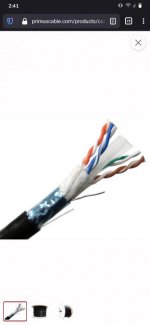
If using direct burial get the shielded with the gel tape. But still think setting your router to repeater mode and using a second router in the shop with an outdoor antenna is the best solution. Most 2.4GHz routers with three antenna will use omni directional antennas . so using the outdoor antenna you may need only one outside if you use a directional and have the shop router connect to house router for access to the network. Screenshot_Fennec_20201222-144121.jpg

Sent from my ONEPLUS A6013 using The Garage Journal mobile app
 
OP
I

ixlr8

Well-known member
Joined
Sep 15, 2009
Messages
435
Location
Mid-Coast Maine---> Eastern Shore Virginia
Well, I got this cable;
https://www.amazon.com/gp/product/B001B6C5H8/?tag=atomicindus08-20
And this WiFi extender;
https://www.amazon.com/gp/product/B0118SPFCK/?tag=atomicindus08-20
Set up the wifi extender, plugged the cable into the extender and into the WAN port on a wifi router in my shop and I don't seem to have any wifi signal in the shop. Wifi router was working when I removed it for an upgrade. Do I need a different wire configuration to go between the extender and the router? A crossover cable maybe? I am fairly clueless when it comes to network stuff.
 

infinkc

Well-known member
Joined
Jan 19, 2012
Messages
862
Well, I got this cable;
https://www.amazon.com/gp/product/B001B6C5H8/?tag=atomicindus08-20
And this WiFi extender;
https://www.amazon.com/gp/product/B0118SPFCK/?tag=atomicindus08-20
Set up the wifi extender, plugged the cable into the extender and into the WAN port on a wifi router in my shop and I don't seem to have any wifi signal in the shop. Wifi router was working when I removed it for an upgrade. Do I need a different wire configuration to go between the extender and the router? A crossover cable maybe? I am fairly clueless when it comes to network stuff.

you have to configure your router in the shop as an access point, but depending on the type of router it may not have a setting to do that, it will not work in the WAN port as that is meant for a modem to be connected to that.

What you really need is a wireless access point in the shop side.
 

boatshoes

Well-known member
Joined
Feb 20, 2019
Messages
126
Location
Atlanta
I would turn off DHCP on your shop router and plug the cable into a LAN port. That way it's essentially a wireless switch or access point. WAN will do another layer of routing, which should give you internet but no visibility between shop devices and home devices.
Have you confirmed, by plugging a device into the port, that your Wifi adapter is passing traffic to the port?
 

mustangcrazy77

Well-known member
Joined
Oct 15, 2009
Messages
174
Location
Simpsonville, SC
Digging trenches ****.

I am using 3 google mesh pucks in the house. I have one located in a convenient location for a Ubiquiti transmitter. I then ran a cat 5 cable from the remote puck to the transmitter. Opposite end in the pole barn is exactly opposite.

Speeds are great. I wouldn’t have done it any other way.
 
OP
I

ixlr8

Well-known member
Joined
Sep 15, 2009
Messages
435
Location
Mid-Coast Maine---> Eastern Shore Virginia
Have you confirmed, by plugging a device into the port, that your Wifi adapter is passing traffic to the port?
Good idea, I have not, at the moment all my devices are wireless. I have wired internet radio, but I put it in 'away' 3 years ago, until I got internet in my shop, and I have no idea where it is. Guess it is time to go digging.
 

GTUnit

Member
Joined
May 22, 2009
Messages
10
Save yourself any future headaches and run Ethernet.
WIFI will be a PITA sooner or later.
 
OP
I

ixlr8

Well-known member
Joined
Sep 15, 2009
Messages
435
Location
Mid-Coast Maine---> Eastern Shore Virginia
Save yourself any future headaches and run Ethernet.
WIFI will be a PITA sooner or later.

I agree WiFi can be a pain. I have run an Ethernet cable to the shop, SWMBO won't let me cut holes in our living room wall to run the wire to the WiFi router, hence the WiFi ethernet adapter. I want WiFi in my shop for using computer for troubleshooting and coding my cars and for controlling charging and preheating my EV that is on order.
 

GTUnit

Member
Joined
May 22, 2009
Messages
10
Pull a baseboard off and bore a hole through the floor to pull the from router ethernet down to the basement and then run it out to the shop.
You can set up a second router as a WiFI bridge but its too much customization and not worth the hassle. Better to get a turn key solution like one of the newer WIFI Mesh systems such as https://www.netgear.com/home/wifi/mesh/rbk752
 

coljar

Well-known member
Joined
Sep 26, 2010
Messages
6,243
Location
Belpre, Ohio
I have never regretted laying a 1" communications conduit to my metal pole building garage from the house. If you ran yours in conduit, leave a pull string in the conduit for future wire pulls of the next technology advancement.
 

ScaldedDog

Well-known member
Joined
Jan 15, 2008
Messages
1,065
Location
Sedalia, CO/NSB, FL
Curious, for you guys using antennas and signal enhancers; how do those penetrate a metal building?
In my experience, not at all. I ran a wire from my outside bridge antenna through the wall and to a PoE switch which also has an AP plugged into it. Works perfectly.

Mark

Sent from my SM-G986U using Tapatalk
 

eacmen

Active member
Joined
Dec 3, 2020
Messages
32
Location
Maryland
If you have coax in the main house near the conduit and the router, run the ethernet in the conduit then use a MOCA adapter to connect the two locations in the main house.

I’ve also used powerline adapters in the house, but prefer MOCA. Dont try the powerline adapter for the long run to the shop. Id only use powerline for between rooms in the main house.
 
To avoid these ads, REGISTER NOW!
Top Bottom