To avoid these ads, REGISTER NOW!

Any free Drafting software out there ?

maxspeed96ct

Well-known member
Joined
Apr 6, 2012
Messages
379
Hey guys, I plan on building my 24x24 garage soon, id like to draft up some plans . And I need something to show to my town zoning department aswell for my varience request.

Is there anything out there for free software or should I just hit the old paper and pencil?
 
To avoid these ads, REGISTER NOW!

ra42mario

Banned
Joined
Sep 5, 2011
Messages
116
the learning curve to drafting software is big. If you haven't used it before, graph paper & pencil will save you a lot of frustration.
 

Kevin54

MEMBER EMERITUS
Joined
Jan 12, 2005
Messages
29,341
Location
Urbana, Ohio
I use DeltaCad quite a bit, both for work and for home. Their site has a free demo, but in my opinion is well worth the little bit of money that they want for it. http://www.deltacad.com/ It is real simple to use and what you can do with it is only limited to how far you want to go with it. I use it at work for tool designs for all of the tooling and dies I make. It is also compatible with other programs. If one does buy it, you can download it right online. The demo has all of the features I believe, but you cannot print from the demo.
 

zuk123

Well-known member
Joined
Mar 25, 2012
Messages
957
Location
Houston TX via Chicago, Phoenix, LA, and San Diego
Sketchup from Google is free. It takes a different approach to the drawing process than most drafting programs. There is lots of tutorial help. You will need it if you have any experience with traditional cad programs. It is a 3D modelling program vs. a 2D drafting program. I use it in addition to cad.

Autodesk has 123D available free. http://www.123dapp.com/ Again, it is 3D based. I haven't used it, but Autodesk is the maker of AutoCad, the industry standard.

LibreCAD is totally free, open source software. Its feature set is somewhat limited compared to the big boys, but it is probably good for 95% of users. http://librecad.org/cms/home.html

I've been a TurboCAD user since version 1.0 and it has worked well. The versions that are one or 2 generations behind are more than capable, and are less than $50 which is almost free...

laroke mentioned DraftSight, I'm in the same boat as him... downloaded it but haven't tried it out. Lots of tutorials, and their other products are industry standards.

I haven't used DeltaCAD in a while, but it used to be awkward, and really dated looking. Price is right though.

So, if you need .dwg or dxf files, then any older IMSI (TurboCAD) or DesignSight, or DeltaCAD, or LibreCAD will work for you. If you want to do 3D modeling, Sketchup is probably the way to go, given the online support (you can get 2D views out of it using the section tool.)

Given that most are free, try them out and find the one that matches your personality and needs.

Good luck,

zuk

(Just re-read your intended use, I'd go for Sketchup. That will give you views of what it looks like for the planning variance, and you can do sections thru the model to get floorplans.)
 
OP
M

maxspeed96ct

Well-known member
Joined
Apr 6, 2012
Messages
379
I have downloaded and installed Draftsight, but have not gotten around to messin' with it yet.

http://www.3ds.com/products/draftsight/download-draftsight/

the learning curve to drafting software is big. If you haven't used it before, graph paper & pencil will save you a lot of frustration.

I use DeltaCad quite a bit, both for work and for home. Their site has a free demo, but in my opinion is well worth the little bit of money that they want for it. http://www.deltacad.com/ It is real simple to use and what you can do with it is only limited to how far you want to go with it. I use it at work for tool designs for all of the tooling and dies I make. It is also compatible with other programs. If one does buy it, you can download it right online. The demo has all of the features I believe, but you cannot print from the demo.

I just tried the draftsight, its no qwk easy learn.
Im going to mess with it alittle , but I might have to stick with the old paper and pencil.

Ill try the deltacad too in a few
 

Brian_B_

Well-known member
Joined
May 12, 2012
Messages
505
Location
North Central, AR
the learning curve to drafting software is big. If you haven't used it before, graph paper & pencil will save you a lot of frustration.


Totally agree with you there!

I have taught various CAD software for the last 10 years. There is a huge learning curve even for just 2D drawings.

Sketch up works well, but you do need to spend a lot of time on the tutorials as others have stated. By the time you get proficient with it, you could have already completed your project on graph paper.
 
OP
M

maxspeed96ct

Well-known member
Joined
Apr 6, 2012
Messages
379
You guys arent kiding , stuff isnt as easy as it looks. The google sketch up is pretty neat tho, im gonna keep messing with it in my spare time.
 

Olyar15

Well-known member
Joined
Oct 2, 2009
Messages
207
Location
Bowser, BC
I find Sketchup quite easy to use compared to Autocad and other 3d modelling software. Just using the Rectangle, Offset, and Push/Pull tools, you should be able to create the garage in no time (assuming you plan for a rectangular garage). Remember that you can type in the size directly when using most tools, so if you want a 24'x24' garage, just use the rectangle tool, pick a beginning spot, then type in 24',24' then hit enter, and you will have the floor of your garage.

Also, one thing that originally threw me was that once you have basic garage shape done, turn it into a group before adding anything like fixtures or furniture inside. Also, take advantage of the layers.
 

madstat

Well-known member
Joined
Mar 22, 2011
Messages
98
Location
Southeast Michigan
Did all my plans for the city with Sketchup. All I needed was 2d drawings so I actually just left the model(s) flat, no push-pull. This seemed to work the best for me. Sketchup's learning curve was steep, could I have done it with paper and pencil quicker? I'm not so sure, I was able to make very detailed drawings with text, leaders and dimensioning. All this would have taken very long by hand. This is a sample
 

Attachments

  • Screen shot 2012-06-04 at 11.22.08 PM.jpg
    Screen shot 2012-06-04 at 11.22.08 PM.jpg
    15.1 KB · Views: 261

ejm1961Tbird

Well-known member
Joined
Oct 1, 2010
Messages
356
Location
Knoxville, TN
SketchUp is awesome. Free, free tutorials, and easy to use after you learn a few basic skills. It is worth the time to learn to use it. Good luck.
 

mzbk2l

Well-known member
Joined
Feb 29, 2012
Messages
83
Location
Superstition Mountain, AZ
I'd never heard of sketchup until I joined GJ earlier this year. I spent a couple hours watching some tutorials on youtube and then found it pretty quick to pop out garage designs until I found one I could live with.

3cubegarage.jpg


Housewithparallel3cubegarageelevation.jpg
 

BFBOB

Well-known member
Joined
Sep 20, 2011
Messages
5,073
For versatility, you can't beat CorelDraw! No contest. Drafting, sketching, photos, amazing text manipulation. Not free, but not terribly expensive either. Best deal on the program is download straight from Corel, but for a first-timer I think it's worth it to buy retail to get the manuals on paper. Maybe just my neo-Luddite nature showing.
 

markallen

New member
Joined
Jun 5, 2012
Messages
1
coreldraw and photoshop are the best software for drafting. You can adjust on yourself.
 
OP
M

maxspeed96ct

Well-known member
Joined
Apr 6, 2012
Messages
379
I'd never heard of sketchup until I joined GJ earlier this year. I spent a couple hours watching some tutorials on youtube and then found it pretty quick to pop out garage designs until I found one I could live with.

3cubegarage.jpg


Housewithparallel3cubegarageelevation.jpg

wow nice job man, im gonna hit up youtube . My current work looks like a 3yr old did it compared to yours! lol
 

KELLHAMMER

Well-known member
Joined
Nov 20, 2006
Messages
222
Location
south eastern pennsylvania
Cad is a tool, and like any tool requires some investment by the user to develop the skill necessary to use it properly

Sketchup is by far the easiest to learn. It truly has amazing abilities to do very complicated work

2 story 2 car garage section - Copy.jpg


TWO CAR GARAGE.jpg

We edited from a previous design

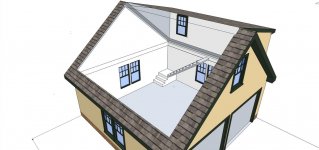
We are currently building this Garage which has the added second story

2 story TWO CAR GARAGE.jpg
 
Last edited:
To avoid these ads, REGISTER NOW!

Jim Johnstone

Well-known member
Joined
Apr 11, 2011
Messages
1,841
Location
Brantford, Ontario
After working in the CAD and Engineering industry for several years, the best advice I can give to anyone is to pick one CAD software that has the features you want, and spend the time to get to know it. All of them seem to have a pretty steep learning curve, but in my opinion, the 3D packages seem to be easier to get up to speed with, at least for me. So I guess what I'm getting at, is if you like the look of the results other people get with Sketchup, then stick to it, and stay patient! :thumbup:
 

BlackdogJunkyard

Well-known member
Joined
Jan 3, 2012
Messages
55
Autodesk offers 30 day free trials for all their programs directly from their website. Then you can take steps to permanently unlock it but I wont get into that...

Revit Architecture is probably the easiest for what you want.

Sent from my DROID X2
 

Brian_B_

Well-known member
Joined
May 12, 2012
Messages
505
Location
North Central, AR
I totally agree with most of the comments in this thread. Pick one that has the features you want and work only with that software. Jumping around gets way way way to confusing.

If Sketchup does what you need, stick with it. You will soon be fast and accurate.

Personally, I prefer working with BIM and parametric modeling. Building Information Modeling (Revit Architecture) and Inventor (solidworks, solidedge) are the ones I currently work with. Even threre its a little difficult jumping back and forth, but they are for two different purposes for different types of drawing and results.
 

SUPERFORD

Well-known member
Joined
Jun 7, 2008
Messages
138
add my vote for Google Sketchup.

For the price (free) it is a pretty fun way to do some design work.

It will take some practice and patience but it's neat to be able to view a structure from all angles and see how it looks.

I used it to draw this:
garage3_2_2-vi.png


Which let my architect know EXACTLY what I wanted so he could (presumably use a much more complicated program) to draw up and help build this:

DSC_0090-vi.jpg


aside from window placement & extending the overhangs over the doors to keep the rain off, it's identical to my Sketchup plan!

I think it worked well for me.
 

mzbk2l

Well-known member
Joined
Feb 29, 2012
Messages
83
Location
Superstition Mountain, AZ
add my vote for Google Sketchup.

For the price (free) it is a pretty fun way to do some design work.

It will take some practice and patience but it's neat to be able to view a structure from all angles and see how it looks.

I used it to draw this:
(pic)

Which let my architect know EXACTLY what I wanted so he could (presumably use a much more complicated program) to draw up and help build this:
(pic)

aside from window placement & extending the overhangs over the doors to keep the rain off, it's identical to my Sketchup plan!

I think it worked well for me.
Nice work! I hope my drawings translate as well to the final product as yours did.
 

Broadie

Well-known member
Joined
Feb 23, 2010
Messages
47
Location
SE Alaska
My 6th grade students love Sketchup and are very proficient with it. I'm amazed at some of the houses they've drawn up on there.
 

W650Mike

Well-known member
Joined
Dec 17, 2010
Messages
1,093
Location
North Central Texas
There may be a learning curve on CAD packages – but it is a fun learning curve. It’s a cool tool and that’s what this site is all about. Download and enjoy the journey!:)
 
OP
M

maxspeed96ct

Well-known member
Joined
Apr 6, 2012
Messages
379
Wow guys, I spent a few hours tooling around with scethcup earlier, what a cool program ! I couldnt get myself off the computer !

I still have so much to learn on it though .

:beer:
 
OP
M

maxspeed96ct

Well-known member
Joined
Apr 6, 2012
Messages
379
Just figured Id share an update on what Ive done.

My first task for my build is a plan a zoning varience, they want a proposal and some basic plans drawn out.

So here what I have for them , should be more then sufficient I think.


plotplanforbelairewithnumbersandwritingfinalwithoutaddress.jpg
 
OP
M

maxspeed96ct

Well-known member
Joined
Apr 6, 2012
Messages
379
Guys I have to say, Im realy hooked on sketchup!

I just had knee surgery so Ive had some time to realy play with it and plan my garage build. Hope to break ground in aug. I just purchased the home in may, and im waiting on approval for a zoning variance.

Here are some details, it will be a attached 24deep x 25 wide . Right now my house has a single car-port attached.

Here are my sketchup pics and kind of what I hope the interior will look like but that wont be right away .


garageinteriorlayout2withpaint.jpg


and the exterior.

completewithmeasurements6-14.jpg


completewithmeasurementsrear.jpg
 
To avoid these ads, REGISTER NOW!
Top Bottom