To avoid these ads, REGISTER NOW!

Bendpak GP-7LC Wiring Problem

Alstann

New member
Joined
Mar 21, 2020
Messages
2
Location
Charlotte, NC
Morning and Merry Christmas all,

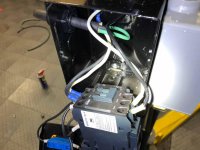
I was working on wiring my GP-7LC lift this morning and finished everything to what I believed was correct, but something is wrong and when I turn on the power disconnect to the lift, it immediately trips both the 30A 240V breaker it's run off, as well as the home's main breaker (older home, has a separate panel outside that feeds 60A into the home and has other breakers for well pump/oven/air conditioning with no utility disconnect)

I have a 10/3 wire (Red/Black/White/Green) 240v drop coming from my ceiling that goes into a DPST 30A switch, which is then wired into the contactor/motor per Bendpak's design. I've also wired up the limit switch per Bendpak's instructions and wired it normally closed to one of the 240v legs. Since I had a 10/3 wire and the lift doesn't require neutral, I capped the neutral in the switch box as you can see.

The wiring in the ceiling does not have any shorts or issues - the circuit has two parallel legs (one for the lift, the other for an oven in the garage) and everything before the DPST switch can be powered and hot with no issues. The breaker only trips when I flip the DPST switch to on, which leads me to believe I have some wiring issue, or perhaps an issue with the components on the lift. Sorry for the long post, but hopefully someone can help!
 

Attachments

  • 1-Edited.jpg
    1-Edited.jpg
    107.4 KB · Views: 43
  • 2-Edited.jpg
    2-Edited.jpg
    125.9 KB · Views: 40
  • 3-Edited.jpg
    3-Edited.jpg
    133.6 KB · Views: 134
  • 4-Edited.jpg
    4-Edited.jpg
    132 KB · Views: 46
  • 5-Edited.jpg
    5-Edited.jpg
    136.2 KB · Views: 41
  • 6-Edited.jpg
    6-Edited.jpg
    136.1 KB · Views: 37
To avoid these ads, REGISTER NOW!

PCustoms

Well-known member
Joined
Jul 23, 2011
Messages
22,383
Location
VT
I can't quite tell what you've got wired.

Based on that and your description it sounds like you've got your switch wired wrong causing a dead short.

I also do not see a capped neutral.

You also need some bushing on those holes in the box.
 

matt_i

Well-known member
Joined
Mar 14, 2008
Messages
10,724
Location
SE Michigan
I believe your problem is here, and on the other side.

attachment.php


From Home D website, the Line terminals are the two black colored screws and the Load terminals are the two gold colored screws.


I believe you have a dead short red-to-black on the picture above. I think you should a) test my theory, un-land the red wire and wire-nut it. Then turn on the power. No breakers should trip.

If that proves successful, then I think you should b) turn power back off and re-configure the switch so those red and black wires pictured are both landed under the black colored screws, and the black/white pair going to the lift are under the gold colored screws.
 

PCustoms

Well-known member
Joined
Jul 23, 2011
Messages
22,383
Location
VT
I believe your problem is here, and on the other side.

attachment.php


From Home D website, the Line terminals are the two black colored screws and the Load terminals are the two gold colored screws.


I believe you have a dead short red-to-black on the picture above. I think you should a) test my theory, un-land the red wire and wire-nut it. Then turn on the power. No breakers should trip.

If that proves successful, then I think you should b) turn power back off and re-configure the switch so those red and black wires pictured are both landed under the black colored screws, and the black/white pair going to the lift are under the gold colored screws.

Good find on the pic, that is what I suspected his problem was!

OP needs to move the shiny black wire in this pic down to the black screw.
 
To avoid these ads, REGISTER NOW!

Meursault74

Well-known member
Joined
Apr 1, 2019
Messages
21,900
Location
Southern California
The stranded wire connection to the screw terminals looks "iffy" from the picture.

I'd put some forked terminals on those wires, especially if you're going to be undoing the connections for trouble shooting.

This post subject might get more views in the lighting/electrical section of this forum.
 

Attachments

  • 4-Edited.jpg
    4-Edited.jpg
    132 KB · Views: 18

PCustoms

Well-known member
Joined
Jul 23, 2011
Messages
22,383
Location
VT
The stranded wire connection to the screw terminals looks "iffy" from the picture.

I'd put some forked terminals on those wires, especially if you're going to be undoing the connections for trouble shooting.

This post subject might get more views in the lighting/electrical section of this forum.

Forked terminals are a waste of money and just introduce another contact point.

Strip the wire, twist the strands tight and stick them into the back wire hole, then tighten down the screw to clamp the wire between the plates.
 

Meursault74

Well-known member
Joined
Apr 1, 2019
Messages
21,900
Location
Southern California
Forked terminals are a waste of money and just introduce another contact point.

Strip the wire, twist the strands tight and stick them into the back wire hole, then tighten down the screw to clamp the wire between the plates.

I didn't see the back wire hole. I thought the wire was partially wrapped underneath the screw terminal.
 

GTUnit

Member
Joined
May 22, 2009
Messages
10
The green switch wiring is the problem like guys have mentioned. Both white wires should be on left side of switch, Both black wires on right side of the switch.
 
To avoid these ads, REGISTER NOW!
Top Bottom