To avoid these ads, REGISTER NOW!

Best Coaxial Cable & Connectors For Antenna?

BigGarage

Well-known member
Joined
Jun 5, 2019
Messages
2,347
Location
Just south of Detroit, MI.
I have a box of cable given to me 4 years ago by the Comcast installer for my high-speed internet line. I have a package of push-on connectors. Would these get the job done to connect my digital roof antenna? Whether I go up the side of the house or through the attic I'm guessing it will be 50-60 ft. long.

The line has written on it "PPC Perfect Flex 6 Series 18 AWG CATV, CL1, CL2, CL3" and a few other things. It does not say if it's rg-6 and neither does the box given to me. Would this work for my antenna?

P.S. I'd like to get the cable installed before the antenna arrives.

Dennis
 
To avoid these ads, REGISTER NOW!
OP
B

BigGarage

Well-known member
Joined
Jun 5, 2019
Messages
2,347
Location
Just south of Detroit, MI.
It's 75 ohm CATV cable. Spec sheets are here: https://www.ppc-online.com/coax-cable-spec-sheets#6Indoor

Only thing you need to figure out is if it's indoor or outdoor cable. Push on fittings will not survive in an outdoor installation for very long. You need water resistant/proof outdoor connections for outside, no matter which type of cable it is.

I see that I should get some outdoor connectors then. Would my cable work or should I buy something else?

My cable is what's used from the pole to the house so I'd imagine it's good for outdoors.

Dennis
 

dogdog

Well-known member
Joined
Nov 15, 2011
Messages
12,711
Series 6 have both indoor and outdoor cables, there is the number in there.
https://www.ppc-online.com/series-6-coaxial-cable

but if you were to buy a cable, just get the one that says quad shield ... those are supposedly the best...

as far as connectors, these days it's all compression connectors, no one use crimped connector.


as far as "Digital"antenna... there is no such thing.. it's just a UHF antenna... so any of those cable would do.... of cause length of run matters..
 

volleyball

Well-known member
Joined
Aug 29, 2011
Messages
4,127
Location
NY, not NYC
Did the connectors come from the installer? If so they should be in/outdoor rated.
I have a bunch of threaded on connectors that I use. The cable guys always love to say that thats my problem with reception. I say prove it. They swap them out for compression and they are never any better. sometimes worse.
A little sealer over an outdoor connection isn't a bad idea but other than that they should last a long time.
Best to loop a drip edge on any outdoor cable. It will give you an opportunity to replace the existing connector after 10 years
 

wyliesdiesels

Well-known member
Joined
Aug 14, 2012
Messages
20,067
Location
Modesto, CA
I have a box of cable given to me 4 years ago by the Comcast installer for my high-speed internet line. I have a package of push-on connectors. Would these get the job done to connect my digital roof antenna? Whether I go up the side of the house or through the attic I'm guessing it will be 50-60 ft. long.

The line has written on it "PPC Perfect Flex 6 Series 18 AWG CATV, CL1, CL2, CL3" and a few other things. It does not say if it's rg-6 and neither does the box given to me. Would this work for my antenna?

P.S. I'd like to get the cable installed before the antenna arrives.

Dennis

Can you post a pic of the connectors?
 

wyliesdiesels

Well-known member
Joined
Aug 14, 2012
Messages
20,067
Location
Modesto, CA
Series 6 have both indoor and outdoor cables, there is the number in there.
https://www.ppc-online.com/series-6-coaxial-cable

but if you were to buy a cable, just get the one that says quad shield ... those are supposedly the best...

as far as connectors, these days it's all compression connectors, no one use crimped connector.


as far as "Digital"antenna... there is no such thing.. it's just a UHF antenna... so any of those cable would do.... of cause length of run matters..

He said push-on not crimped.

Some people confuse compression connectors to be push-on connectors because they do get pushed onto the wire.
 
OP
B

BigGarage

Well-known member
Joined
Jun 5, 2019
Messages
2,347
Location
Just south of Detroit, MI.
Did the connectors come from the installer? If so they should be in/outdoor rated.
I have a bunch of threaded on connectors that I use. The cable guys always love to say that thats my problem with reception. I say prove it. They swap them out for compression and they are never any better. sometimes worse.
A little sealer over an outdoor connection isn't a bad idea but other than that they should last a long time.
Best to loop a drip edge on any outdoor cable. It will give you an opportunity to replace the existing connector after 10 years

The package of connectors says they are "weatherproof". They did not come from the installer.

Dennis
 
OP
B

BigGarage

Well-known member
Joined
Jun 5, 2019
Messages
2,347
Location
Just south of Detroit, MI.
Can you post a pic of the connectors?

He said push-on not crimped.

Some people confuse compression connectors to be push-on connectors because they do get pushed onto the wire.

I can post a pic if needed. I just went out and got the package. I made an error, they are "twist-on F connectors" not push on. The package states they are "weatherproof".

They are GE RG59 twist on "F" connectors. Part #AV23512

Dennis
 

wyliesdiesels

Well-known member
Joined
Aug 14, 2012
Messages
20,067
Location
Modesto, CA
I can post a pic if needed. I just went out and got the package. I made an error, they are "twist-on F connectors" not push on. The package states they are "weatherproof".

They are GE RG59 twist on "F" connectors. Part #AV23512

Dennis

well there ya have it.

RG59 connectors will NOT work on RG6 cable.

The comcast tech would not have given you RG59 cable.

You will need some new connectors.

I recommend the compression style.

Most come in packages of 20-50 and obviously you dont need that many.

Maybe you can find a comcast tech in your area to bum a few off of then just buy the tool at home depot or amazon...
 

theoldwizard1

Well-known member
Joined
Feb 22, 2011
Messages
43,241
Location
SE MI
I recommend the compression style.

The most common type are Snap-N-Seal. They do require a special tool to install. They are sized for your cable (you must use an RG6 connector on RG6 cable).

I have never bothered using "outdoor" rated cable as long as it had no splices outdoors.
 
Last edited:

rlitman

Well-known member
Joined
Oct 18, 2010
Messages
24,649
Location
Long Island
The most common type are Snap-N-Seal. They do require a special tool to install. They are sized for your cable (you must use an RG6 connector on RG6 cable).

I have never bothered using "outdoor" rated cable as long as it had no splices outdoors.

For the Snap-N-Seal (which is all I use and recommend), they have a lot of sizes that are color coded. RG6 is different from RG6-QS and the OP's RG6-CATV.

Standard RG6 has a single wire and a single foil shield.
CATV has two foil shields and one wire between them, and yes, RG6 connectors do fit this, but technically, they're not the same.
RG6-QS has foil, wire, foil wire (going from inside to outside). That extra wire will cause fit issues with normal RG6 connectors.

When in doubt, choose the red SnS connectors. They should fit all of the above, and are rated for exterior use. The blue are meant for the RG6, while the purple are for RG6-QS (other colors are for different types of RG59).

http://www.tnb.com/pubint/docs/snapnseal.pdf
 
Last edited:

HenryAZ

MEMBER EMERITUS
Joined
Sep 18, 2012
Messages
1,054
Location
South Congress AZ
as far as "Digital"antenna... there is no such thing.. it's just a UHF antenna... so any of those cable would do.... of cause length of run matters..
It may be only UHF in your market, but there are stations also using VHF high band frequencies for digital broadcast (channels 7-13). In our market (PHX) we have four stations broadcasting digital on VHF-high. Stations that had a VHF-high assignment used a UHF channel during the transition period from analog to digital, but many switched back to their VHF-high assignment when we went full digital. VHF-high has the advantage of better propagation than UHF.

In those markets, a combo VHF yagi/UHF antenna is needed. It is not the same size as the old fashioned yagis in use for decades, but one of those will work. A new style "digital" (or "HD") antenna for such markets eliminates the VHF-low antenna elements (the longest ones at the rear of the antenna), plus a UHF element also, resulting in an antenna with much less wind load.

I use a Wingard HD7694P to receive both UHF and VHF-high.

Antenna.jpg
 
Last edited:

theoldwizard1

Well-known member
Joined
Feb 22, 2011
Messages
43,241
Location
SE MI
It may be only UHF in your market, but there are stations also using VHF high band frequencies for digital broadcast (channels 7-13). In our market (PHX) we have four stations broadcasting digital on VHF-high.
And there has been much discussion about the FCC taking that band back for other uses.

I always wondered why local TV stations stayed with that band. I don't buy the "better propagation" even if it is true. One thing drives companies. Cost !
 
To avoid these ads, REGISTER NOW!

rlitman

Well-known member
Joined
Oct 18, 2010
Messages
24,649
Location
Long Island
Rlitman- you messed up the quotation and really need to fix it because you misattributed the quote to the wrong person.

Sorry bout that. Fixed. It seems that your quote which TOW quoted got into my quote and messed the whole thing up somehow. Weird. When I went to edit, I saw them as nested, but this site doesn't support quote nesting. I blame Tapatalk. ;)

Anyway, yes, compression is the ONLY way to go. I stick to Snap-N-Seal, partly because when it comes to T&B connectors (of any sort), they're one of the few brands that have never let me down.
 

rlitman

Well-known member
Joined
Oct 18, 2010
Messages
24,649
Location
Long Island
Yeah you cant nest quotes here.

But you can stack them.

Yeah, I'm good with that part. What was weird is that usually when I quote a message in Tapatalk, any quotes in the original message get stripped. This time, somehow they didn't, which left it in to screw up my reply.
 

dogdog

Well-known member
Joined
Nov 15, 2011
Messages
12,711
It may be only UHF in your market, but there are stations also using VHF high band frequencies for digital broadcast (channels 7-13). In our market (PHX) we have four stations broadcasting digital on VHF-high. Stations that had a VHF-high assignment used a UHF channel during the transition period from analog to digital, but many switched back to their VHF-high assignment when we went full digital. VHF-high has the advantage of better propagation than UHF.

In those markets, a combo VHF yagi/UHF antenna is needed. It is not the same size as the old fashioned yagis in use for decades, but one of those will work. A new style "digital" (or "HD") antenna for such markets eliminates the VHF-low antenna elements (the longest ones at the rear of the antenna), plus a UHF element also, resulting in an antenna with much less wind load.

I use a Wingard HD7694P to receive both UHF and VHF-high.

Antenna.jpg

LOL ... for OP's purpose that cable can support 5mhz to 3000mhz so he'll be fine for VHF/UHF... that would dependent on his antenna not at his cable... the signal still VHF or UHF band doesn't matter much for cable wise..... If OP is really silliest about his reception... those LMR400 or LMR600 with N type or UHF bulk heads might be his choices :)

Oh right... most amplified "DIgital" antennas have both UHF/VHF bands in them... at least the ones I took apart and never got to re-use as pre-amp... for my antennas...
 
Last edited:

SGKent

Banned
Joined
Feb 12, 2010
Messages
1,959
Location
Citrus Heights CA
back to the original question, I have the same question too. We are considering moving from Consolidated async DSL to Comcast Xfinity. I'd rather run my own cable because their contractors do a crappy job here and bury it an inch or two deep. I run it in the attic and they staple it to the side of the house. I already have most of the run in conduit that I buried but I think it is about 20 years ago that I did it. Is there a general consensus as to what brand and type of rg6 cable is the best for this today in 2019? I have about 60' from their pedestal to the connection into the house, and another 60' to where the DSL modem is now - all the cat5 comes from there and I'd rather not rewire the house. I lack a central electronic closet like a new house might have, and there is no space for one. I have no idea what rg6 cable I used 20 years ago, probably foil with a braid and central wire but moisture will have gotten into it by now. It is also possible we will drop cable all together and just use off air in which case the reflections off the Sierras pretty much screw up 300 ohm even with twists in it. I tried RG6 for a while with the last off air antenna I had but the attenuation was a lot over a 60' run, in the end I had to put in a small head end amplifier. In addition the wires on the balum transformers crack and corrode even though a strain relief is involved. When in my 20's I could take down a 40' mast, rotor, and antenna by myself but no way today. I'll probably just use a chimney mount and go up 5' - 8'. No one in the tract has a tall mast anymore so I'd stick out like a sore thumb with anything taller. But I'd like to minimize the signal attenuation whether off air or Comcast. We don't have fiber here in this area yet, DSL works because we are about a mile from the old Roseville Telephone CO building but Consolidated is always screwing with something and they don't tell you in advance when they will be down consolidating servers, changing IP and server names for e-mail services etc..
 

SGKent

Banned
Joined
Feb 12, 2010
Messages
1,959
Location
Citrus Heights CA
20years ago you may have ran RG59.

Broadband internet does not run on RG59

It is possible it was RG59. Either way it needs to come out, and be replaced with the best I can put in. I did call the cable co to ask them what cable to buy, which is irrelevant because the ends are exposed to moisture will have infiltrated.

I guess this would be a good time to ask if anyone knows. Does Xfinity run coax to their modem, then coax to a cable box then HDMI to the TV, or do they run coax to their modem then CAT5e between it and their cable box? Is a cable box even needed for a modern two or three year old big screen? It is for Consolidated DSL. Trying to figure how to get around the CAT5e wiring in the house now - everything after DSL modem is Cat5e whether the TV signal or the Internet.

current DSL setup. Coax arrives on the opposite side of house.

OP - not trying to hijack your thread. Figure the question is better here than starting another thread just for this question.

View media item 96523
 
Last edited:

wyliesdiesels

Well-known member
Joined
Aug 14, 2012
Messages
20,067
Location
Modesto, CA
It is possible it was RG59. Either way it needs to come out, and be replaced with the best I can put in. I did call the cable co to ask them what cable to buy, which is irrelevant because the ends are exposed to moisture will have infiltrated.

I guess this would be a good time to ask if anyone knows. Does Xfinity run coax to their modem, then coax to a cable box then HDMI to the TV, or do they run coax to their modem then CAT5e between it and their cable box? Is a cable box even needed for a modern two or three year old big screen? It is for Consolidated DSL. Trying to figure how to get around the CAT5e wiring in the house now - everything after DSL modem is Cat5e whether the TV signal or the Internet.

current DSL setup. Coax arrives on the opposite side of house.

OP - not trying to hijack your thread. Figure the question is better here than starting another thread just for this question.

View media item 96523

Go read the label on the jacket.

The best you can get is RG6QS/quad shield.

I have comcast and yes they run coax to everything.

They install a splitter then run coax to each device from the splitter.

They do not have boxes that do IP TV aka TV signal over ethernet.

Carriers like ATT Uverse which is aDSL or Fiber, are the ones that use IP TV and ethernet.
 

SGKent

Banned
Joined
Feb 12, 2010
Messages
1,959
Location
Citrus Heights CA
Thanks Wylie. Is this correct:

splitter -> coax to the cable box then coax to the TV, or is it HDMI from the cable box to TV?

splitter -> coax to the modem then cat5e to the router from the modem?
 

theoldwizard1

Well-known member
Joined
Feb 22, 2011
Messages
43,241
Location
SE MI
Go read the label on the jacket.

The best you can get is RG6QS/quad shield.

I have comcast and yes they run coax to everything.
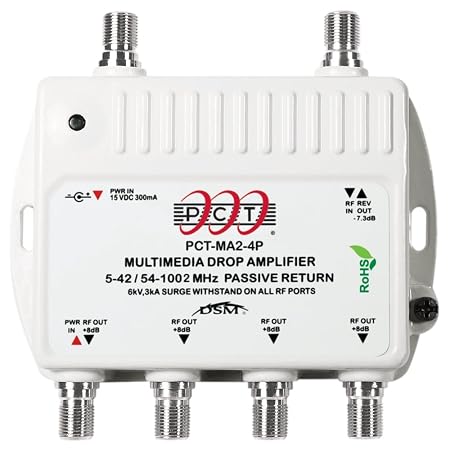
When they installed cable TV in my house they did "home runs" using RG6 to this

61YO54RvQ0L._SY450_.jpg


The wire and this amplifier/splitter are all there. I actually pulled Cat 5 to 2 bedrooms before 802.11 was widely available (at a reasonable cost). Now I have one wire going to a combination modem/wireless access point. Everything else (4 streaming TVs, 2 notebooks, 3 tablets) is wireless.

One of these days, I am going to hang an OTA antenna and start using that amplifier/splitter again (he said 2 years ago) !
 

HenryAZ

MEMBER EMERITUS
Joined
Sep 18, 2012
Messages
1,054
Location
South Congress AZ
I always wondered why local TV stations stayed with that band. I don't buy the "better propagation" even if it is true. One thing drives companies. Cost !
Cost may certainly be an issue, but there is no doubt lower frequencies propagate better than higher frequencies. Amateur radios operators can attest to that. VHF high band is 148MHz-174MHz while UHF (for TV) starts at 450MHz and goes up from there. The same is true for your home Wi-fi. 2.4GHz propagates better than the 5GHz band (goes through walls and obstructions better, and goes further).

The Differences Between UHF And VHF Radio Frequencies
 
OP
B

BigGarage

Well-known member
Joined
Jun 5, 2019
Messages
2,347
Location
Just south of Detroit, MI.
Last Thursday I mounted the antenna on the peak of my roof. I needed a rope to climb the roof safely because it's just steep enough to climb but easy to slip also, especially for an old fat guy. I tried to save time and work by using the coax cable from the Dish Antenna Network dish since it was already ran out of the LR across the basement ceiling and out the wall. It got power to the antenna so the electric motor rotated it but it did not get a TV signal.

I just ran a 40' section of new line through the wall and connected to the 40' section that came new with the antenna. I now have 52 channels and they come in perfectly.

"We don't need no stinkin' cable":bounce:

Thanks to everyone for all the help.

Dennis
 

Attachments

  • DSC01647.jpg
    DSC01647.jpg
    52.1 KB · Views: 8
  • DSC01648.jpg
    DSC01648.jpg
    73.6 KB · Views: 7
To avoid these ads, REGISTER NOW!
Top Bottom