To avoid these ads, REGISTER NOW!

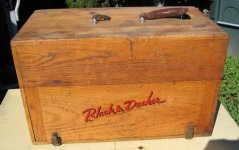
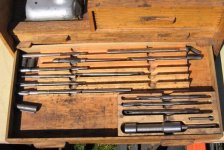
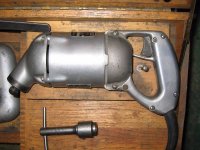
Black and Decker valve grinder

To avoid these ads, REGISTER NOW!

Bdgjr215

Well-known member
Joined
Oct 21, 2015
Messages
760
Nobody is posting because there busy calling the seller!! Hurry up and get that piece before
Its gone
 

Modern Garage

Well-known member
Joined
Mar 26, 2015
Messages
583
Location
Southern Minnesota
The word "awesome" is overused a lot.
But not today. That thing is COOL.
I used a seat grinder like that many moons ago when I was in school, but I've never seen one in such a beautiful case.
Joe
 

rsanter

Well-known member
Joined
Dec 22, 2007
Messages
18,521
Location
visalia ca
Someone want to grab that for me? I'll send you the money.
I don't even care about the box if you want to keep that. I just want to add the parts to my valve grinder system

Bob
 

southalabama

Well-known member
Joined
Jan 10, 2011
Messages
5,538
Location
Brewton AL
If it were on ebay for $40 bucks for buy it now I'd own it for the box.

Alas I'm on the gulf coast not the pacific coast.
 
OP
T

toddmp

Well-known member
Joined
May 27, 2014
Messages
133
Location
Eastbay, CA
Someone want to grab that for me? I'll send you the money.
I don't even care about the box if you want to keep that. I just want to add the parts to my valve grinder system

Bob

I emailed him and will pick it up for you if still available. -todd
 

alwaysFlOoReD

Well-known member
Joined
Sep 24, 2013
Messages
2,400
Location
Airdrie, Alberta, Canada
Can someone grab the pictures from that ad and post in this thread or PM me? If I knew how I would myself. I'd like to see the pics to compare to the same set I picked up last year. My set isn't nearly as nice and I'd like to know what belongs and what is missing.
Thanks in advance,
Richard
 

lilredex

Well-known member
Joined
Apr 29, 2006
Messages
5,956
Location
Toronto
Beautiful piece of history. I've never seen one that complete and dressed up so elegantly.
 

Attachments

  • B+D Valve Grinder 1A.jpg
    B+D Valve Grinder 1A.jpg
    35.4 KB · Views: 76
  • B+D Valve Grinder 1B.jpg
    B+D Valve Grinder 1B.jpg
    32.3 KB · Views: 64
  • B+D Valve Grinder 1C.jpg
    B+D Valve Grinder 1C.jpg
    26 KB · Views: 56
  • B+D Valve Grinder 1D.jpg
    B+D Valve Grinder 1D.jpg
    44.9 KB · Views: 59
  • B+D Valve Grinder 1E.jpg
    B+D Valve Grinder 1E.jpg
    41.9 KB · Views: 60
  • B+D Valve Grinder 1F.jpg
    B+D Valve Grinder 1F.jpg
    48 KB · Views: 59
  • B+D Valve Grinder 1G.jpg
    B+D Valve Grinder 1G.jpg
    40.1 KB · Views: 59
To avoid these ads, REGISTER NOW!

lilredex

Well-known member
Joined
Apr 29, 2006
Messages
5,956
Location
Toronto
The balance.
 

Attachments

  • B+D Valve Grinder 1H.jpg
    B+D Valve Grinder 1H.jpg
    41.6 KB · Views: 39
  • B+D Valve Grinder 1I.jpg
    B+D Valve Grinder 1I.jpg
    40.4 KB · Views: 40

disston

Well-known member
Joined
Oct 1, 2012
Messages
943
Location
Silver Spring, Md
And that sold for $40? Very seldom see these in such complete condition. I don't have much use for such a machine but I would have bought that.
 

lilredex

Well-known member
Joined
Apr 29, 2006
Messages
5,956
Location
Toronto
Thanks for posting those pics.

You're welcome!

An easy chore..... "copy" from the original ad, "paste" into your picture folder, then "attach" from there, when you post.

For the stubborn that won't let you copy, you can press the "prt sc" button to capture it, open your "paint" program and paste it in there.

I use "Windows Photo Gallery" To remove shadows, brighten, crop,etc.......

I'm using Windows Vista and Opera browser on this lap top.
 
Last edited:

2oolhound

Well-known member
Joined
Dec 18, 2010
Messages
5,918
Location
BC Canada
Yes, thanks for the pics lilredex. Without them us late comers wouldn't have known what the fuss was about.
 

raddksn

Well-known member
Joined
Oct 3, 2011
Messages
1,304
Location
south central upper peninsula michigan
You're welcome!

An easy chore..... "copy" from the original ad, "paste" into your picture folder, then "attach" from there, when you post.

For the stubborn that won't let you copy, you can press the "prt sc" button to capture it, open your "paint" program and paste it in there.

I use "Windows Photo Gallery" To remove shadows, brighten, crop,etc.......

I'm using Windows Vista and Opera browser on this lap top.
I wish I understood what you just said there!!!
 

gben

Banned
Joined
Jul 16, 2016
Messages
54
I have that same set, been using it for decades. I got the valve grinder with it too. Both from a guy who raced stock-cars and at Daytona in the 1940s. I have the accessories to do flathead Ford four and eight cylinders etc.. Works well on small engines because it was designed and made when all engines and valves were smaller.

https://scontent-atl3-1.**.fbcdn.net/t31.0-8/13667918_1075402832550596_5492967975643619487_o.jpg

https://scontent-atl3-1.**.fbcdn.net/t31.0-8/13662253_1075402765883936_4114847488794254078_o.jpg

https://scontent-atl3-1.**.fbcdn.net/t31.0-8/13923794_1075407579216788_1355418929825676256_o.jpg
 
Last edited:

lilredex

Well-known member
Joined
Apr 29, 2006
Messages
5,956
Location
Toronto
I wish I understood what you just said there!!!

OK, lets look a little deeper. If you wanted to save those B+D pictures I posted you would start here:

> You need a folder on your desktop to save them to. Go to your desktop and right click on an open spot. On the list that appears you should see "new", left click on that to open a new folder. The title appears highlighted (blue), so put your mouse on that blue section and type in your new title. Then open the folder...it should be empty.

> Go back to the B+D pictures (on GJ) and right click on the picture you want to save....the list should show "copy", left click on that. Now move back to that new picture folder and right click on a open spot and the list that appears should include "paste". Left click on that and your picture should
appear. If you don't like the title it came with you can left click on it and it turns blue, then type in your title.

> If you right click on a picture and there is no "copy" feature available, you press the upper right button that sez "Prt Sc".......that copies what is shown on your screen. Then open your "Paint" program and look for the "Paste" button. On mine it shows up under the "edit" button. Pasting duplicates what was shown previously, now in your Paint program.

>Under the "file" button you should see a "save as" choice which will allow you to put it in that picture folder you generated.

> Windows picture gallery allows me to crop and lighten, Etc. to rid your picture of the extra baggage. Windows 7 has more features (over Vista).

Let me know if I left out anything, or you need further explanation.
 
To avoid these ads, REGISTER NOW!
Top Bottom