To avoid these ads, REGISTER NOW!

Blueprint/Floor Plan Software

jgiles101982

Well-known member
Joined
Jan 15, 2018
Messages
58
Location
South Alabama
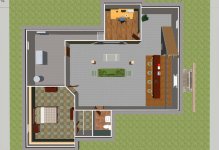
I am trying to prepare a personalized floor plan for a house & shop to present to a builder on exactly what I want and was looking for something decent and not to expensive to use to draw up my ideas. I was wanting the monthly online visio but it seems it's not available for "personal" use :dunno:, Can anyone recommend anything they have used that's not ridiculously expensive?
 
To avoid these ads, REGISTER NOW!

Bad Habit

Well-known member
Joined
Mar 19, 2014
Messages
1,978
Location
Chumstick WA
Try Sketchup, there's a free version. Bit of learning curve, but you can make things pretty photo realistic if you want to go that far
 
OP
J

jgiles101982

Well-known member
Joined
Jan 15, 2018
Messages
58
Location
South Alabama
Just a suggestion, but if you are only interested in floor plans, a scale ruler and a pencil and your all done. You can even use graph paper if you're real bad at drawing.

I have used graph paper on the PC, don't think I'm at the stage for pencil and paper yet. Too many changes happening right now :lol:, my reasoning is to be able to move things around to see what it looks like and I can easily hit the "undo" button if I don't like it.
 

polizei1

Well-known member
Joined
Feb 2, 2017
Messages
243
Location
Cinci, OH
Use Sketchup to give him an idea, but you'll need to have actual blueprints drafted. Why not just seek out an architect? You'll need them eventually anyway, just go through revisions. That's what I did anyway.
 

glentre

Well-known member
Joined
May 21, 2016
Messages
909
Location
Gloucester, Virginia
Bad Habit is correct about Sketchup. It is a great program that lets you do about anything an experienced draftsman can do but it takes some time to learn. If you have the time to devote, maybe several weeks, the end result is really worth it since you can see exactly how everything goes together. Even stick car, work benches, lifts and tool cabinet images in the garage and rotate it in 3D mode to get a feel of how the layout will work for you.

I laid out my garage using that program and only had to get a regular draftsman to convert my Sketchup pages to a full set of plans. If you are including a house along with the garage, it will be a bit more complicated but still worth the effort provided you have the time, patience and perhaps a little beginner mechanical drawing background. You could also go on the net to review the thousands of house and garage plans and then adapt them to your needs. You could also use an architect but they are quite expensive. Also, there are design/build general contractors who have the expertise to take a set of plans similar to what you want and change them.

As a caution, you will want to have a complete set of plans with attached written specifications on every aspect of the build that both you and your contractor sign off on. There are just too many builds on this forum that have resulted in horror stories because of poor or no up front communication between owner and contractor.

Glen
 

benjamintmiller

Well-known member
Joined
Feb 8, 2011
Messages
284
Location
IA
I use Home Designer Architectural. It's about $200 IIRC and is a light version of Chief Architect, which is probably what your builder uses. You can send him the plans you draw and they'll be in a format he'll actually understand and be able to import.

Sketchup is a toy for this sort of work. You want a tool.
 

ChaseDE

Well-known member
Joined
Aug 25, 2016
Messages
2,178
Location
Delaware
Sketchup isn't really a toy, it is actually quite good and especially for free. I work in engineering and have access to Visio, Microstation, AutoCAD, REVit, all the way to full blown Aveva PDMS and I use Sketchup for home use pretty much exclusively.

Footnote, AutoCAD does offer a free version for students on their website if you have someone in the house with a .edu email address.

Sketchup is great though.

base1.jpg

base2.jpg
 

benjamintmiller

Well-known member
Joined
Feb 8, 2011
Messages
284
Location
IA
Sketchup isn't really a toy, it is actually quite good and especially for free

Note that I said it's a toy for this sort of work, not for everything. I might use it for general purpose 3d modeling, but for building design, a dedicated CAD package will get you much more:
- Interoperability with what your architect and GC probably use
- Blueprints that tradespeople can actually use
- Material take-off lists
- Wiring, plumbing, and HVAC diagrams
- Multiple stories, staircases, roof layouts, windows

Home designer will do all of this with a lot less work than sketchup. Could you model this all with sketchup? Yes, of course, but why would you use a hammer to drive a screw?

I have no affiliation with Chief Architect, I'm just very satisfied with their purchase. I had never spent this much money on software prior, but it was worth it.

We talk all the time about buying the best tools here... that applies to software, too.
 
Last edited:

gumbellion

Active member
Joined
Jul 4, 2014
Messages
38
I just submitted our rough plans for our new build to our architect using
Homestyler.com
For what you need to do, draw walls, rooms etc its simple and its all to scale. You shouldnt draw your own plan on that software thats cheap and expect to build a house from it. Hire a professional to do your plans and that will ensure everything works the way it should, rooms are appripriate size, and they will make suggestions on ways you can improve your plan

Best of all its free and a chimp can use it

https://www.homestyler.com/floorplan/?lang=en_US&assetId=aa361aa3-f106-41af-ad8b-80900ce06036
 
Last edited:
OP
J

jgiles101982

Well-known member
Joined
Jan 15, 2018
Messages
58
Location
South Alabama
I just submitted our rough plans for our new build to our architect using
Homestyler.com
For what you need to do, draw walls, rooms etc its simple and its all to scale. You shouldnt draw your own plan on that software thats cheap and expect to build a house from it. Hire a professional to do your plans and that will ensure everything works the way it should, rooms are appripriate size, and they will make suggestions on ways you can improve your plan

Best of all its free and a chimp can use it

https://www.homestyler.com/floorplan/?lang=en_US&assetId=aa361aa3-f106-41af-ad8b-80900ce06036

I tried several and I have to say this was the best, especially because there's no software to download and it's free! Thanks
 
OP
J

jgiles101982

Well-known member
Joined
Jan 15, 2018
Messages
58
Location
South Alabama
Sketchup isn't really a toy, it is actually quite good and especially for free. I work in engineering and have access to Visio, Microstation, AutoCAD, REVit, all the way to full blown Aveva PDMS and I use Sketchup for home use pretty much exclusively.

Footnote, AutoCAD does offer a free version for students on their website if you have someone in the house with a .edu email address.

Sketchup is great though.

Well my wife is a student so I got her to sign up but my piddly laptop don't have enough free space to install the software :sad:
 
To avoid these ads, REGISTER NOW!

kaiser715

Well-known member
Joined
Jan 15, 2017
Messages
151
Location
central NC
We are currently in construction phase of new house and shop. I did complete house design (hundreds of revisions as we worked thru options), then had draftsman work up a full set of prints, elevation drawings, etc.

Program I used, and was very happy with results, was EZblueprint http://ezblueprint.com

$35.99. You can d/l a trial before purchase, and the 'pro' version, if you buy, has a 30 day money back if you don't like it.

I've used it for several projects, worked for me.
 

Rusty Bolt

Well-known member
Joined
Nov 12, 2017
Messages
87
Location
Carson City, NV
+1 on Chief Architect under its various names.

I use Chief Architect. It's a specialized CAD package. Years ago it was called 3D Home Architect. Floor plans are easy and people who are good at it can make really nice plans and nice photorealistic drawings.

I've got Home Designer Suite 2015. I've used it for a complete remodel of my house and designing my shop. My wife is now using it to design the landscaping.

Note that the licensing *****. It comes in quite a few versions and it can be confusing to figure out which one you want. There's an activate/deactivate process if you want to use it on more than one device.

I gave copies of my plans to the draftsman, who uses AutoCad to make the actual drawings.
 

Jlbc212

Well-known member
Joined
Dec 7, 2013
Messages
1,530
Location
Northeast MA
I did residential design work for many years. When I first started back in the 80's all drawings when done on a drafting board with pencil and paper. I still have the blueprint machine. When computers became available I researched CAD software. There wasn't much available back then. Somehow I learned about a program called DataCad, specifically written for architects. The first version I bought was the full blown program. Now I have the LT version which is more than adequate for my now limited need. It will produce builder ready drawings in 2d and/or 3d. It will print out drawings in any scale your printer can handle. As benjamintmiller pointed out
We talk all the time about buying the best tools here... that applies to software, too.
But like any other high quality, capable tool, such as a lathe or a welder, no one should expect to be proficient without time and effort. A good set of plans requires not only a knowledge of putting it on paper, but also a thorough knowledge of building construction. I had many clients with great ideas that were unrealistic to actually build. A reputable designer is well worth the investment.
 

CraigStu

Well-known member
Joined
May 22, 2014
Messages
4,013
Location
Blacksburg, Va
I used a program from HGTV to take a builder's standard design and modify it. He and I worked through emails to get to our final version and then he turned that over to his draftsman who did the real plans. They had a get started function that allowed me to take his floorplan, import it into the program and trace over it. I was very pleased w/ how it worked. I worked in 2d for 95% of it and then switched to 3d so I could virtually walk through the house. I used their standard set of furniture, decoration pieces, windows, doors, etc modified a little to make them look like ours. Every piece has a detail sheet so you can change dimensions and colors and make a nice facsimile of your own to see how things will work out. One thing I really liked once I discovered it was the ability to model which way a standard interior door opens. I could 'walk' toward a door and try hinges on left or right, opens into or out of the room.
 

billconner

Well-known member
Joined
Jul 20, 2021
Messages
6,932
Location
Thousand Islands NYS
I think you have to decide if you want drawings - drafting - for construction or you want visualization - 3d - to see how it looks or show people how it looks.

Nearly 40 year AutoCAD user and for me it's drafting (and geometry calculator for intersecting curves and diagonals - faster than trig like I started) and I do pencil sketch perspectives to see how it looks.
 

engineer2

Well-known member
Joined
Dec 13, 2009
Messages
11,795
Location
Chicago burbs
I tired Home Architect in 2014 and found it to be very buggy. I contacted them and they agreed it was full of bugs. $159 for nothing. I'm sure they have most of the bugs worked out by now.
 

rayra

Well-known member
Joined
Dec 1, 2014
Messages
4,724
Location
Escaped from Los Angeles
I use Home Designer Architectural. It's about $200 IIRC and is a light version of Chief Architect, which is probably what your builder uses. You can send him the plans you draw and they'll be in a format he'll actually understand and be able to import.

Sketchup is a toy for this sort of work. You want a tool.
wrong-o. At the stage he is at in the process, a piece of graph paper and a pencil will do. Particularly if he is trying to convey general layout to the person actually drawing up the plans.

And depending whether he's building rural or in town, he may not even have to submit plans.

Sketchup can be used in a crude fashion, but its learning curve is pretty steep for that. Visio work well.
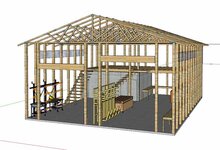
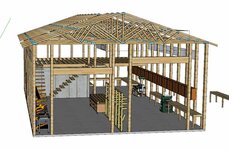
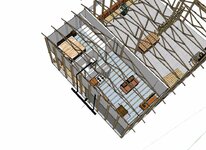
I got into Sketchup several years ago while working out some ideas for a Barndo, it's very capable of drawing full plans to as exacting a measurement as you care to use.
 

Attachments

  • barndominium006.jpg
    barndominium006.jpg
    62.1 KB · Views: 18
  • barndominium007.jpg
    barndominium007.jpg
    40.1 KB · Views: 16
  • barndominium008.jpg
    barndominium008.jpg
    60 KB · Views: 17
  • barndominium009.jpg
    barndominium009.jpg
    65.3 KB · Views: 17
  • barndominium010water.jpg
    barndominium010water.jpg
    140.1 KB · Views: 19

rerod

Well-known member
Joined
Jan 30, 2015
Messages
376
Location
North English Iowa
As a caution, you will want to have a complete set of plans with attached written specifications on every aspect of the build that both you and your contractor sign off on. There are just too many builds on this forum that have resulted in horror stories because of poor or no up front communication between owner and contractor.

Glen
Sorry to resurrect an ancient thread, but this is where I'm at. I'm rural where they don't require inspections.

Can I rely on my draftsman to know code and apply it to the blueprint? Maybe even add additional rebar, and about mixing in Xypex? Or do I need to hire a architect to develop blue prints that the contractors sign off on? And is the sign off process additional paperwork? I cant imagine them signing the actual blueprint.

Little side horror story.. I had some rebar left over from a previous project that I gave my dad for his new "rural" garage. I was at work when they poured, but it never got installed. I don't even know if they used any, and when they poured the slab, they created a huge bird bath at the garage door.. They also didn't have a sufficient header over the door so it was sagging bad..

Thanks!
 

FJ 432

Well-known member
Joined
Aug 2, 2010
Messages
3,725
Location
Littleton Colorado
I have a friend who does side work in CAD. He's a capable designer who also knows the more common building codes associated with remodels. He brings to the table this knowledge at a fraction of the cost of an architect. He adds notes all the time for the contractors. I would search out someone like this in your area. But the truth is a qualified GC should also know what is needed, especially if you direct them to build it up to code.
 

rerod

Well-known member
Joined
Jan 30, 2015
Messages
376
Location
North English Iowa
But the truth is a qualified GC should also know what is needed, especially if you direct them to build it up to code.
Thanks, but I have a trust issue. Old friends have hit on my X. Friends have not re-payed loans Ive given them. Old GF stiffed me on months of rent. I must have gullible tattooed on my forehead, but I don't even know these GC's and there are no inspections in my county.. Im retired and live on the site, so that might help, but I need a legal contract that holds them accountable.
 

kettch

Member
Joined
Dec 7, 2016
Messages
16
Thanks, but I have a trust issue. Old friends have hit on my X. Friends have not re-payed loans Ive given them. Old GF stiffed me on months of rent. I must have gullible tattooed on my forehead, but I don't even know these GC's and there are no inspections in my county.. Im retired and live on the site, so that might help, but I need a legal contract that holds them accountable.
I hear you on the trust issues. I knew my current place was a fixer-upper, but I ended up redoing a lot of it, starting with the foundation. I looked up the county records, and saw decades of work that had been duly permitted, performed by licensed contractors, electricians, and plumbers, then inspected by county inspectors. It's all ****, and I couldn't live with myself if I left that quality of work behind.
 

rerod

Well-known member
Joined
Jan 30, 2015
Messages
376
Location
North English Iowa
I hear you on the trust issues. decades of work that had been duly permitted, performed by licensed contractors, electricians, and plumbers, then inspected by county inspectors. It's all ****, and I couldn't live with myself if I left that quality of work behind.
When I re roofed my crappy mobile home down to the rafters alone, I found previous roofer has cut my tornado straps. Missed most of the rafters when fastening new osb, and worst was they cut back the old metal roof to right over the walls, so the leaks got diverted right on top of the top plate. I didn't think it was leaking because there was no stains. But one wall section was bad.
 

pcmeiners

Well-known member
Joined
Aug 13, 2009
Messages
7,848
Location
In the only town in Pennsylvania, Bloomsburg.
Aside from a preliminary sketch I would hire an Architect., They know most of the engineering, the zoning laws, the building codes, the building department personal ( generally) and they can give you a good materials list along with stated building codes and contract specification which you are not aware of. If you are going to take bids from contractors this will give you and the contractors a level playing field
 
To avoid these ads, REGISTER NOW!
Top Bottom