To avoid these ads, REGISTER NOW!

Building a DIY CNC Plasma Table....

Keyblazer

Well-known member
Joined
Jul 30, 2009
Messages
1,471
Location
Irvine, CA
I've wanted a CNC Plasma table for a while, but don't have the need regularly, nor do I have the space.... so budget was prioritized elsewhere.
However, I found a Budget table that fitted my space, needs and budget requirements!

Legs even fold up and it can be stored away when not in use.
The table, by the plans has an envelope of 27.5" on X axis, by 31.5" on Y axis(Gantry arm), but can be scaled to 34.5" x 40.5".
I have not decided yet what mine will be but I have a limited space so might tweak it slightly from stock.


Plans are $25... so I bought them and have started printing already...
C837D6F4-6F83-4B7A-B93D-11F4CF1FB5A7.jpeg
This is a bonus...
Included in the plans are a driven Z axis upgrade, AND this Rotary CNC Tube Broacher...
I was impressed...

Here is their Website with plans.

No connection with JD's Garage, but I like the things they have done.
I just think a its neat and affordable way to get into this space.

So, I will document my build both here, and on my own thread.

Let me know what you guys think?
 
Last edited:
To avoid these ads, REGISTER NOW!

rmack898

Well-known member
Joined
Jan 23, 2007
Messages
3,158
Location
Honu Grove NE Florida
Having built my own 5x10 table from plans I bought, I will tell you that the table is the easiest and cheapest part of a successful CNC plasma table.

Motion control software, drivers, and your plasma source, are what will make it a useful tool.
Do your homework on what makes the table work. Good components are not cheap.

Good luck with your build. I'm along for the ride.
 
OP
K

Keyblazer

Well-known member
Joined
Jul 30, 2009
Messages
1,471
Location
Irvine, CA
Thanks...
I have no previous experience with this type of thing, so anyone feel free to comment, or add info and advice.

I have a Plasma Cutter already... an Eastwood Versa-Cut 40... and I dont know if that is compatable with this setup yet... but its only a 3/8 max machine anyhow.
 
OP
K

Keyblazer

Well-known member
Joined
Jul 30, 2009
Messages
1,471
Location
Irvine, CA
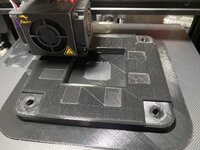
Well, it didn’t start well…
First bearing block print was a fail.
Filament got birdsnested at 99%… and starved the extruder.
Also when I pulled the print there was warpage on the base, so wouldn’t have been good anyway.

89B51774-C549-4113-A694-16BFC4F58862.jpeg

Need to try again, but I’ve decided to use a different filament.
The stuff I’ve ordered is a Dark Grey PLA, and is described as “High Toughness and resilience”.
SUNLU PLA Meta 3D Printer Filament, High Toughness PLA Meta Filament 1.75mm , No Clogging, Highly Fluid, Fast Printing for 3D Printer,Dimensional Accuracy +/- 0.02 mm,1 KG Spool,Grey https://www.amazon.com/dp/B0B1ZV3C46/?tag=atomicindus08-20

It just arrived so I will start printing today.
 

Walkers

Well-known member
Joined
May 17, 2021
Messages
3,912
Location
Cave Creek Az
From experience, I can tell you that, while a table can be fun at smaller dimensions, it really becomes useful once the width of cut gets to at least 48” I bought a Go Torch when they first came out. I have upgraded and hacked the machine ever since. It is now a 4x8 with height control and all the integrated software. I probably have 7 grand in it now, most of which is software upgrades.
 
OP
K

Keyblazer

Well-known member
Joined
Jul 30, 2009
Messages
1,471
Location
Irvine, CA
Sounds like fun.
I don’t have the need for such a large table… yet… but I welcome your input!

Prints are underway…
The filament looks good so far… feels less brittle than what I’ve used before.
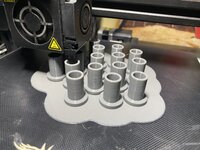
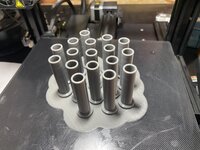
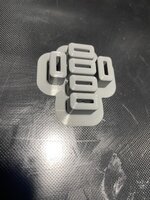
Tube spacers.
35F1210E-C52F-4BD6-A7CB-022FA6303641.jpeg

5CD33E3F-22D5-42B8-AF07-9AD810C08F80.jpeg

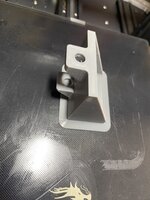
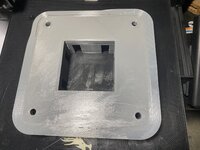
Printed first axis flange.
A5EEBC03-27B0-44F7-A029-34287B8D3FC0.jpeg
DD3F0380-F03B-45B2-AFE3-BBA260B34F1C.jpeg
B159887C-2198-4431-B5D6-6C888D40F1D6.jpeg

I’m considering making some changes to the JD design… as my table will be an occasional use item, I don’t have the space, currently for it to be a permanent floor hog.
So, I think it will spend a good amount of time, stood on end or edge against a wall or under a bench. With that in mind, I’m concerned about rigidity… so I might mirror the Y axis on both sides and make the X axis a “Bridge” style. Might need 2x Y axis motors, to do that, but I think it will be better, but add complication and cost.
I think the “Folding” legs will be replaced by stubs that stay bolted in but have a slip in style leg.
 

MadeByMiller

Well-known member
Joined
Dec 29, 2018
Messages
1,230
Location
Rapid City, SD
Cool project! Looks very similar to the bearing block setup on a Langmuir Crossfire table. I was curious why you print your parts on a raft, especially that large flange, it seems like plenty of surface area for proper bed adhesion? I'd wonder based off the picture of the flange's bottom layer on top of the raft that your z height off the raft is too large, and could be the culprit for your lack of adhesion in your bearing block attempt. The bottom layer of the spacers also show clearly that it's not adhering well to the raft. If it were slicing them, I would try just using a brim on those tube spacers instead of a raft, and simply printing the larger parts straight on the bed, but perhaps there's something with your machine that I'm not considering?

Sorry for the unsolicited advice, just thought I'd toss my two cents in to try to save you some headaches!
 
OP
K

Keyblazer

Well-known member
Joined
Jul 30, 2009
Messages
1,471
Location
Irvine, CA
No problem on the advice, in fact I welcome it.
I've been having lots of issues with warping during bigger prints.
Ive tried brim, and in fact that's what the black print was, on a brim, not a raft....
The Black print that failed, was due to a snarl up in that last layers... but when I peeled the part off... and it was warped up at the corners.

The grey one, I thought I would do raft to see if that helped... and I bought some Layoneer Bed Weld, and it came out fine.
 

MadeByMiller

Well-known member
Joined
Dec 29, 2018
Messages
1,230
Location
Rapid City, SD
No problem on the advice, in fact I welcome it.
I've been having lots of issues with warping during bigger prints.
Ive tried brim, and in fact that's what the black print was, on a brim, not a raft....
The Black print that failed, was due to a snarl up in that last layers... but when I peeled the part off... and it was warped up at the corners.

The grey one, I thought I would do raft to see if that helped... and I bought some Layoneer Bed Weld, and it came out fine.
That seems unusual to me. I don't have any experience on an Ender, but I know that @nicholam77 has done a lot of in depth work with his, perhaps he could offer some insight into your issue? If you're experiencing warping/adhesion issues with the print bed, I'd take a closer look and your initial Z height as it may be too high. Your print bed could also be not flat (I'm not sure what the bed levelling procedure is on your machine) causing parts of your initial print layer to not properly adhere to the bed. You could also try bumping up your bed temp (I run 70C for PLA) and make sure that your print fan is not running on the initial layer.

Maybe I've mentioned something useful in that for you. My Prusa with PEI buildsheet doesn't require any adhesive, but if the Bed Weld product you mentioned worked well, you may be able to now nix the rafts.
 

vpd66

Well-known member
Joined
Mar 1, 2010
Messages
709
Location
Central Wisconsin
MadeByMiller is right on all his info. I have owned a Ender 3 since 2019 and for the first year printed with my Z height too high. About 90% of my prints came out great the other 10% I would get bed adhesion problems. The problem really came to light when I decided to try printing PETG. I spent a lot of time getting the first layer right. My suggestion is to find a good first layer test print and spend some time printing tests. Instead of making a few adjustments and calling the first layer good keep baby stepping the z height down a few tenths of a millimeter until you get too much squish. Then baby step it up until the z height is to high and the first layer doesn't stick. You will find that .03 mm of z height adjustment makes a world of difference. I do this everytime I remove my nozzle or take my hot end apart. Once you learn the proper z height (or z off set) your prints will come out much better. This is the most common problem that people have when they start 3d printing.
 

bdbecker

ALLIANCE MEMBER
Joined
Nov 18, 2015
Messages
5,557
Location
Iowa
I'm very interested in this... looking forward to following along!

Also (if you haven't done so already) verify that your printed part dimensions are coming out correctly. I'm not familiar with the plasma table you are building, but if the parts need to mate to other items, too loose or too tight can make for a big headache if your prints are off.
 
OP
K

Keyblazer

Well-known member
Joined
Jul 30, 2009
Messages
1,471
Location
Irvine, CA
Good info.
I have upgraded my Ender 3 V2, with the latest main board, Cr Touch and direct drive extruder…
The Z offset was -3.32mm… so a few days ago I Changed that to -3.36mm. I hope I went the right way, as it seems to be better.
Is there a way to measure the width of the test strip the printer lays down to rate the amount of squish?
Another question I’ve never seen specified… how often are people replacing your nozzles?
 

vpd66

Well-known member
Joined
Mar 1, 2010
Messages
709
Location
Central Wisconsin
I don't know of any measurement for proper first layer squish. It is kind of a "you just know its right from experience" type of thing. That is why I said to lower it until it is too low then raise it until it is too high. You will see the difference and know how to spot it in the future. Also I find certain colors has well has certain types of filament require different Z offsets. I don't change nozzles very often. Only if I have a hot end clog. I know certain filament are hard on nozzles then others. If your having print quality problems try a new nozzle. They don''t cost that much.
 

gearhead1

Well-known member
Joined
Oct 14, 2013
Messages
1,935
Location
NC
I also bought the JD plans, but haven‘t started yet. You’re ahead of me so maybe I can learn from any issues you have. Thanks for posting.
 
OP
K

Keyblazer

Well-known member
Joined
Jul 30, 2009
Messages
1,471
Location
Irvine, CA
Good info.
Prints are going well so far.
Second gantry flange came out good with just brim.
905DA370-9232-48B0-BE08-747752A6FE4A.jpeg
4E7A00C7-D4F2-4D6A-9445-1902B5654276.jpeg

Now working on belt system parts now.
B724FB3B-7960-42EA-9CDC-990ABCB0FCB1.jpeg
457B2141-C4FE-4B42-84BF-D9A029975569.jpeg

I have been thinking about my specific needs for this plasma table.
I need a smaller table but trying to decide on my work envelope.
I was thinking 48 x 48… but they advise that the one sided gantry is unstable at longer lengths.
Having such a big footprint when not in use is not gonna fly with my small work space, so I realized when not in use, I could stand it against a wall… but I was concerned about rigidity…
I wondered if I could just mirror the Y axis rails, and covert it into a bridge axis.

So, I reached out to JD Garage about running a bridge Y axis so the unit is more stable, and they said it’s been done by others, so that’s the way I’m gonna go.
 
Last edited:

vpd66

Well-known member
Joined
Mar 1, 2010
Messages
709
Location
Central Wisconsin
watch

Check out this guy's CNC plasma build. It is very similar to JD Garage CNC plasma. It is all in German but you'll get the idea. He has a 3d printed roller bearing support for the "hanging" end of the Y axis. He has free plans for it online put its all sized for metric square tubing. You could take has STL and put it back into Fusion 360 and resize it to US tubing size.
 
OP
K

Keyblazer

Well-known member
Joined
Jul 30, 2009
Messages
1,471
Location
Irvine, CA
Thanks.
I had seen that guys build when I was searching around. It does look very similar, but my German is pretty basic… ordering a Beer and Bratwurst does not a CNC Plasma table make…
Lol
 

vpd66

Well-known member
Joined
Mar 1, 2010
Messages
709
Location
Central Wisconsin
I was wondering who is copying who? Or is this a common deign and maybe there are more like this. They could have been group designing on a forum?
 
To avoid these ads, REGISTER NOW!
OP
K

Keyblazer

Well-known member
Joined
Jul 30, 2009
Messages
1,471
Location
Irvine, CA
Had to take a break from Printing....
We had guests in the guest room where the printer in over Thanksgiving... see what I am prepared to sacrifice for them... :)

So, in spite of that, I started ordering Parts...
Nema 23 Stepper Motors first...


Took a look at my Eastwood Versa-cut 40... wondering if I can use it...
It has easily adaptable Pilot Arc Trigger, that the gun trigger plugs into...
But I don't know from the manual if its suitable...


Anyone enlighten me?
 

fordkid88

Well-known member
Joined
Nov 10, 2013
Messages
680
I'm interested in seeing the direction you're going. I've been working on one on and off for 3 years, whenever I have time to fiddle around and am in the process of a major redesign.
 

fordkid88

Well-known member
Joined
Nov 10, 2013
Messages
680
I think you'll be ok, you will need to do something to set the torch via an add on torch height controller or manually. You could make a floating z axis and modify your g code output to incorporate it.
 
OP
K

Keyblazer

Well-known member
Joined
Jul 30, 2009
Messages
1,471
Location
Irvine, CA
Yes, that’s the plan, and indeed, the JD Garage plans comes with all the files and drawings to make a driven Z axis with a limit switch to “Touch down” to set the Z axis offset, and also lift up between cuts to clear any warming and tipped up parts.

This:

And I know I can’t help myself some days… but I was wondering if I can’t also use this rig for some light Cnc routing by swapping the torch for a Router…😝
 

gearhead1

Well-known member
Joined
Oct 14, 2013
Messages
1,935
Location
NC
And I know I can’t help myself some days… but I was wondering if I can’t also use this rig for some light Cnc routing by swapping the torch for a Router…😝
Given the plastic, I would think it would have to be a very light depth of cut and very slow traversing speed or I bet it would break quickly.

I think what would be better is take the plastic parts and CNC cut them out of aluminum. Then it would be more robust for routing.

You could do what racers do, push the envelope, see what breaks. You make the broken part stronger then something else breaks. Repeat until you have the reliability you want.
 

gearhead1

Well-known member
Joined
Oct 14, 2013
Messages
1,935
Location
NC
Here is an aluminum assembly design concept. Let me know how it works - can be modified as necessary.

BLOCK

1669656979180.png

PLATE

1669657224567.png

ASSEMBLY

1669657341054.png

There is a chamfer / bevel where the blocks meet to allow for welding if that is needed later.
 

thebmrust

Well-known member
Joined
Jul 12, 2021
Messages
95
Location
99336
Maybe I missed something, but the title says “CNC Plasma Table” but the OP talks about 3D printing.

They are not the same.
 
OP
K

Keyblazer

Well-known member
Joined
Jul 30, 2009
Messages
1,471
Location
Irvine, CA
Rust,
If you go back and read the thread, and look at the links in the first post, you will understand better.

Mellon,
I’m following the JD Garage plan instructions…. 3mm walls, 80% infill.
There was some other instructions about using 5 “Walls” which a 3D printer rookie like me didn’t understand so I think I did 5 or 7… don’t remember.

After a little research, I went with the strongest and most stable infill… I think it’s called quartic or something similar.
After the first failure, and the advice that was given, I adjusted the first layers for more “squish” onto the build plate, and it seems to have done the trick!
I’m printing the Y Axis bearing blocks right now. They take 36 hours a piece… and I need 4x for my “Bridge mod”, the first one will be done soon, and as of last night, it was good, with no warping or peeling that I could see.
191A430A-D6D7-44B4-BE7E-3AC5A100F405.jpeg

3D42A409-9563-4969-A8D8-B776ECAE2724.jpeg

The new filament I’m using is definitely interesting. As the brim adhesive layer has a tiny bit more flexibility than other PLA I’ve used to date, it is not as brittle. We will see if that’s good or bad over time I guess.
 

thebmrust

Well-known member
Joined
Jul 12, 2021
Messages
95
Location
99336
I reread the title. It still says:

“ Building a DIY CNC Plasma Table.... “​


and the pics you post are still 3D printing.

You may have changed the content in your first post, but the pics and your title still don’t match.
 

gearhead1

Well-known member
Joined
Oct 14, 2013
Messages
1,935
Location
NC
I reread the title. It still says:

“ Building a DIY CNC Plasma Table.... “​


and the pics you post are still 3D printing.

You may have changed the content in your first post, but the pics and your title still don’t match.
The plastic parts being printed are required to build the CNC plasma table. I purchased the same plans.

The light blue parts in the CNC Plasma table in the video are the 3D printed plastic parts.

Fast forward the video to the 2 minute mark - the creators of the plans sitting in front of the CNC Plasma table specifically talk about the 3D printed parts.


MadeByMiller

Well-known member
Joined
Dec 29, 2018
Messages
1,230
Location
Rapid City, SD
The initial layer is looking much better in the pictures of that most recent part. I'm glad that lowering the initial Z height solved your issues!
 

Beelzeboss

Well-known member
Joined
Jul 31, 2020
Messages
540
Location
Sydney
Plasma cutters are an excellent use of 3D printed parts because there is next to no load on the cutting head. I know when I built my 1200x2400 cnc plasma I way overbuilt it, doing it again I'd make it far lighter duty.

Have you thought about integrating a cheap THC into it? I went with one straight off the bat because it means you can be a bit more lax with how flat the bed needs to be. The torch height will remain consistent even if the sheet deforms or the bed isn't totally flat.
 
OP
K

Keyblazer

Well-known member
Joined
Jul 30, 2009
Messages
1,471
Location
Irvine, CA
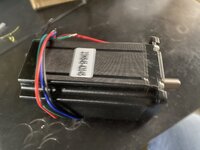
Y Axis Motor arrived.
43626B2D-192E-4D99-A122-416EC1D52606.jpeg

But if I go the route I’m thinking, I will need another motor and parts to drive the other side of the bridge.
I think I’m going that route.
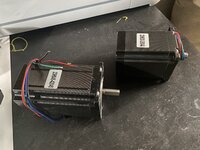
Y motor is bigger than X motor.
750706D3-C86C-4F9F-87D7-071EB2DFE06F.jpeg

3D printer is working non stop, and the parts count is growing steadily. DDDF1423-6AE4-4D0A-8026-71894DD6F3A0.jpeg

I had a few packs of bearings already.
Everything I have for the build so far.

1A80AB52-59AE-4544-B793-85C66E98EC26.jpeg

Bearing block #2 will be done today, but as I’m going with a Bridge X axis, I will need 2x more, plus 2x more tube supports.
They take 36 hours a piece.
Closeup shows the 80% infill.

68E7FC27-918C-4CFF-B126-7EE9C92EB1C2.jpeg
 
OP
K

Keyblazer

Well-known member
Joined
Jul 30, 2009
Messages
1,471
Location
Irvine, CA
More parts have been arriving by the day.
Z axis motor, or Torch Height Control. 0456F5D2-A9E2-4DE7-8529-2A6DDB2464E4.jpeg

Also the linear bearings and rods arrived…

Printing is ongoing, and the Ender has been basically running 24/7 for 2 weeks now. Lol.
I’ve had a couple of parts fail for a few reasons, but it’s going good.
By my calculation I have 6 or so more prints to do, all smaller parts.
Because I’m going with a bridge Y axis, I’ve got double the gantry flanges and bearing blocks to print. They take between 30 and 44 hours a piece to print.
The filament I’m using seems to be good, and with 80% infill they seem substantial.
I think I’m going to be close to 4kg or 4x spools when I’m done.

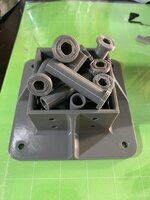
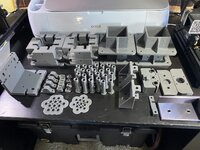
Parts printed so far.
6BC8F8B1-FABA-44D4-B648-576F9D99CC31.jpeg

As the Ender has been fully committed to this project…
Decided to add another printer to my collection.
Everything for this CNC Plasma Table has been printed on my Ender 3 v2. Only has a 220x220x300 envelope but everything fits. .
The new printer is a Longer LK5 Pro that has a 300x300x400 envelope… I need to for some other stuff I’m planning.

D42D3EE0-E626-434F-B90C-D5F26EB6B91B.jpeg

I will be starting to process the printed parts this weekend, and next week I’m planning to get down to the metal store and get my Tubing.
 

Attachments

  • C7886A9D-5867-446C-B865-35A7D2B1A817.jpeg
    C7886A9D-5867-446C-B865-35A7D2B1A817.jpeg
    764.4 KB · Views: 28
To avoid these ads, REGISTER NOW!
Top Bottom