To avoid these ads, REGISTER NOW!

Cable and wi-fi in detached building

Donttouchthat

Well-known member
Joined
Apr 11, 2021
Messages
147
Location
CONNECTICUT
I have a detached building that will be an in-law apt and want to get wifi and cable there from the main house about 125ft away. We have recently switched over to YouTube TV for our main TV type viewing and turned in our xfinity cable boxes. Here is what I have:
IMG_20230421_041252640_HDR.jpgIMG_20230421_041225198.jpgIMG_20230421_041110720.jpgIMG_20230421_042310530_HDR.jpgIMG_20230421_041632307.jpgIMG_20230421_041644797_HDR.jpg

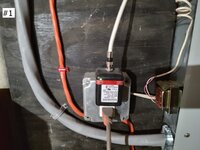
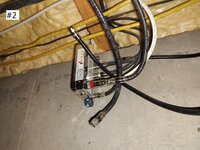
Pic 1 & 2 - my cable in the basement with junction splitter showing new in-law underground cable not connected (top one) and also a not connected (bottom one) spare bedroom cable.

Pic 3 - is a splitter from the main junction that splits cable for closet modem (pic 4) and same room TV.

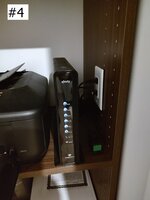
Pic 4 - Closet wifi modem

Pic 5 - shows utility closet in the new in-law apt where I have a wall cable jack and electrical outlet thinking this is where I would put another wifi modem similar to the main house.

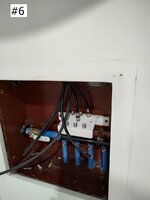
Pic 6 - is closeup of access panel in the closet serving water and cable 😮 distribution. I have 4 wall jack locations throughout the in-law.

Can I just connect the new in-law apt cable to my basement junction splitter and then get a separate wireless modem as mentioned for inside that utility closet as planned? Will this work? Thanks!
 
To avoid these ads, REGISTER NOW!

kj_mustang

Well-known member
Joined
Feb 9, 2011
Messages
1,213
Location
Harrisonburg, VA
Youtube tv is a streaming tv service over the internet. There will need to be an internet connection to each TV via either wireless or wired (cat5 or 6 wire) ethernet from the Internet modem. You are only showing RG cable for cable tv. This will not carry ethernet.
 

35k0

Well-known member
Joined
Feb 19, 2020
Messages
621
Location
Minnesota
You only need to get wifi to the new spot, no need to run any cables.
Check out this article as an example on point to point wifi bridging. It's pretty inexpensive.
This is an example, there may be better solutions, but this should give you an idea of what is possible without running wires.
 
OP
D

Donttouchthat

Well-known member
Joined
Apr 11, 2021
Messages
147
Location
CONNECTICUT
Youtube tv is a streaming tv service over the internet. There will need to be an internet connection to each TV via either wireless or wired (cat5 or 6 wire) ethernet from the Internet modem. You are only showing RG cable for cable tv. This will not carry ethernet.
We get our internet through cable. So once cable is hooked up then we should have internet at each TV location. I believe.
 
OP
D

Donttouchthat

Well-known member
Joined
Apr 11, 2021
Messages
147
Location
CONNECTICUT
You only need to get wifi to the new spot, no need to run any cables.
Check out this article as an example on point to point wifi bridging. It's pretty inexpensive.
This is an example, there may be better solutions, but this should give you an idea of what is possible without running wires.
If what I have run is usable since I need to get cable at the new locations, I'd like to try and find something that works with what I have done already with some tweaks.
 

Denwood

Well-known member
Joined
Sep 22, 2014
Messages
4,192
Location
Thunder Bay, Ontario, Canada
Your internet is via cable, however in Pic 4, you have shown what I'm guessing is your internet router. Cable is not used to connect ethernet devices (unless you purchase ethernet over cable baluns). You would normally run ethernet cable from your modem shown in pic 4 to each device, or connect them via WIFI.

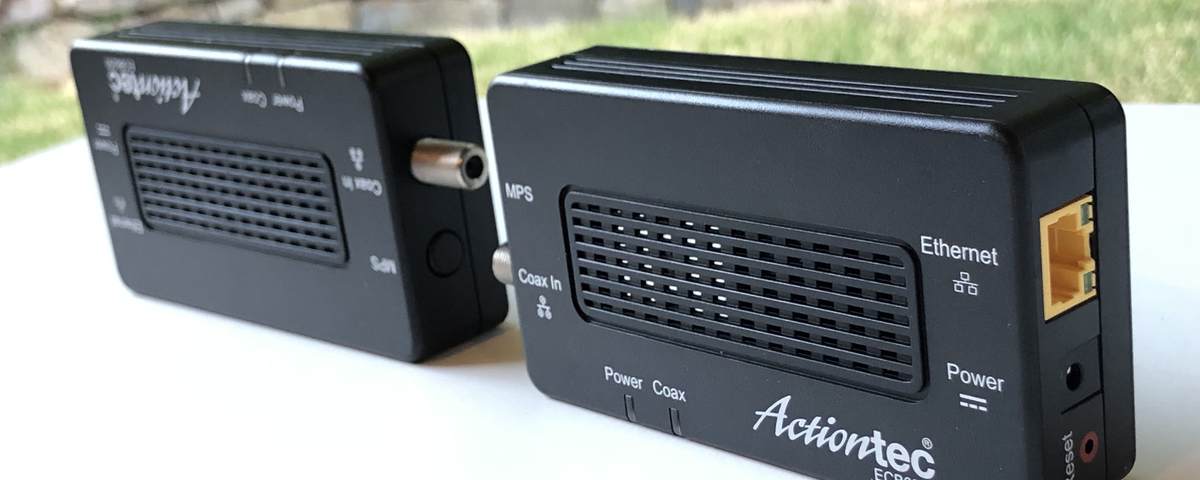
If you have buried coax from your main building to outbuilding then you can extend ethernet using devices like these: https://www.gocoax.com/ma2500d . One end goes to your ethernet router, interbuilding coax connects them. Or you can pull the coax out and pull in a length of CAT6 network cable, or fibre (a bit more technical).

Then you would install a WIFI access point in your outbuilding.
 
Last edited:
OP
D

Donttouchthat

Well-known member
Joined
Apr 11, 2021
Messages
147
Location
CONNECTICUT
Your internet is via cable, however in Pic 4, you have shown what I'm guessing is your internet router. Cable is not used to connect ethernet devices (unless you purchase ethernet over cable baluns). You would normally run ethernet cable from your modem shown in pic 4 to each device, or connect them via WIFI.
We get our internet from xfinity which is through the cable outlets run through out the main house. Pic 4 is a modem for wireless signal for our computers, printer, cell phones etc. Not sure what you mean re ethernet devices?
 

dougf

Well-known member
Joined
Feb 22, 2013
Messages
402
Location
Missouri
What I did to get internet out to my shop 160ft from the house was run direct bury cat 6 (found out later its fake cat 6 off amazon so beware about counterfit cable but this wont matter for my bandwidth requirements) right from the back of my router, down through the floor into the crawl space, through a small hole in my sheeting/siding outside, straight down into a shallow 6" trench. I made the trench with a spade shovel pretty easily, and connected the wire out to my shop to a cheap router. cost me $80 to get everything setup and its much more reliable than wifi. The cable was so cheap im not worried out it being only 6", if it ever goes out i'll just rip it up and reinstall new in less than an hour.
 
OP
D

Donttouchthat

Well-known member
Joined
Apr 11, 2021
Messages
147
Location
CONNECTICUT
What I did to get internet out to my shop 160ft from the house was run direct bury cat 6 (found out later its fake cat 6 off amazon so beware about counterfit cable but this wont matter for my bandwidth requirements) right from the back of my router, down through the floor into the crawl space, through a small hole in my sheeting/siding outside, straight down into a shallow 6" trench. I made the trench with a spade shovel pretty easily, and connected the wire out to my shop to a cheap router. cost me $80 to get everything setup and its much more reliable than wifi. The cable was so cheap im not worried out it being only 6", if it ever goes out i'll just rip it up and reinstall new in less than an hour.
Right now just looking if what I already have in place is workable. RG cable run from basement to in-law and into the closet distribution hub (Pics 5&6)
 

Denwood

Well-known member
Joined
Sep 22, 2014
Messages
4,192
Location
Thunder Bay, Ontario, Canada
Your internet comes into the house over cable, but WIFI and ethernet in your house is provided by the modem. If your TVs are connected to coax cable, then they are getting TV signal only via that cable, not internet. If it's Youtube TV only, and you have "smart" TVs, then your TV sets are connected to the internet via the WIFI on your cable modem...and don't need a coax connection any longer.

Coax = cable in your setup.

An ethernet network cable (looks like a phone cable, but wider, and has 8 pins) connects laptops, computers, tvs etc. to your home network (internet). That is ethernet. Your modem will have network ports on the back that you can connect ethernet network cables to.

Other devices connect to your home network (to access internet) over WIFI, provided by your modem.

Is it just one coax between buildings? How close is your exfinity modem to the cable going to the outbuilding?
 
Last edited:
OP
D

Donttouchthat

Well-known member
Joined
Apr 11, 2021
Messages
147
Location
CONNECTICUT
Your internet comes into the house over cable, but WIFI and ethernet in your house is provided by the modem. If your TVs are connected to coax cable, then they are getting TV signal only via that cable, not internet. If it's Youtube TV only, and you have "smart" TVs, then your TV sets are connected to the internet via the WIFI on your cable modem...and don't need a coax connection any longer.

Is it just one coax between buildings?
I had thought an internet signal traveled through all the cable jack location throughout the house. Yes only one 75ohm RF RG6 cable run. Which I have connected to the mini distribution block (PIC 6) So if I connect the cable (top one) shown in Pic 2 that should feed TV signal to through out the in-law (4 wall locations) then can't I get another wireless router for inside the closet (pic 5) and get wireless internet in the in-law? Just like I have for the main house?
 
To avoid these ads, REGISTER NOW!

Denwood

Well-known member
Joined
Sep 22, 2014
Messages
4,192
Location
Thunder Bay, Ontario, Canada
You said that you had returned your cable boxes, so my assumption is that the cable in your house is no longer used, and does not carry cable TV signal. At this point, all you can offer in the in-law, is internet. You need to get ethernet from your cable modem in your house, to the in-law building. You can use the existing coax cable running between buildings to carry ethernet using the baluns I had linked to.

Then, in your inlaw building, you would connect a WIFI access point to the coax/ethernet cable. The cable runs in your in-law building will do nothing for you.

You normally would not get a 2nd cable modem unless you want the in-law suite on it's own internet account, not sharing your existing internet account. In that case, the cable company could likely use the existing coax cables to get service out there. In that case you would pay for two internet accounts and modem rentals.

Are you wanting to have just one internet account and share it with the inlaw suite?

Take a look at the pics on this page..it might help explain: https://www.gocoax.com/ma2500d

1682085712519.png
 
Last edited:

PoorUB

Well-known member
Joined
Mar 29, 2021
Messages
11,657
Location
Fargo, ND
then can't I get another wireless router for inside the closet (pic 5) and get wireless internet in the in-law? Just like I have for the main house?

One consideration. Your internet provider may charge you for each router that is connected to the coax cable. So a second router in the other building my end up being a second account.

Look at the back of your existing router. My bet it will have a RJ45 jack that you can connect a CAT6 cable. Run that CAT6 out to the other building and install an access point there for WiFi internet.

The only reason to run another coax would be if you want cable in the second building.
 

Denwood

Well-known member
Joined
Sep 22, 2014
Messages
4,192
Location
Thunder Bay, Ontario, Canada
Your path forward will be determined by your desire to:

1. Share one internet account over the two buildings. You'll need to pick a few pieces of hardware.

or

2. Pay for a 2nd account in the 2nd building. This is the easy path for you, but the more expensive one monthly. However, if you're renting that space out, it's the only way to go as the tenant would be paying.
 

fireblue

Member
Joined
Apr 22, 2012
Messages
5
As stated above, I’m sure you don’t want to pay another $100 a month internet bill for getting a second cable modem. And most providers like comcast will only activate another cable modem at the same house if you are planning on a second internet account subscription. I know that seems dumb, but it’s the way it is because the modem controls your speed of service.

So if you can’t run an Ethernet cable to the detached building, you need MOCA adapters to allow the appropriate coax cable to act as an ethernet cable out to the detached building, then you need a wireless access point in the detached building.


Alternatively, you could use the point-to-point wireless solution linked earlier.

If this is a new building, you should obviously run multiple coax and ethernet cables out to the new building. Or if you have buried conduit out to the building, re-pull the conduit using the existing coax to have at least 2 coax and 2 cat-6 ethernet cables.
 
OP
D

Donttouchthat

Well-known member
Joined
Apr 11, 2021
Messages
147
Location
CONNECTICUT
As stated above, I’m sure you don’t want to pay another $100 a month internet bill for getting a second cable modem. And most providers like comcast will only activate another cable modem at the same house if you are planning on a second internet account subscription. I know that seems dumb, but it’s the way it is because the modem controls your speed of service.

So if you can’t run an Ethernet cable to the detached building, you need MOCA adapters to allow the appropriate coax cable to act as an ethernet cable out to the detached building, then you need a wireless access point in the detached building.


Alternatively, you could use the point-to-point wireless solution linked earlier.

If this is a new building, you should obviously run multiple coax and ethernet cables out to the new building. Or if you have buried conduit out to the building, re-pull the conduit using the existing coax to have at least 2 coax and 2 cat-6 ethernet cables.
Thanks
 
OP
D

Donttouchthat

Well-known member
Joined
Apr 11, 2021
Messages
147
Location
CONNECTICUT
Your path forward will be determined by your desire to:

1. Share one internet account over the two buildings. You'll need to pick a few pieces of hardware.

or

2. Pay for a 2nd account in the 2nd building. This is the easy path for you, but the more expensive one monthly. However, if you're renting that space out, it's the only way to go as the tenant would be paying.
I did a test and disconnected the coax cable to the back of a TV I had YoutubeTV playing and right, nothing happened, just kept playng. Who new. See my next post for more. Thanks
 
OP
D

Donttouchthat

Well-known member
Joined
Apr 11, 2021
Messages
147
Location
CONNECTICUT
Some other details. I am going to be selling my home ( so I am not using the in-law) so I am only interested in providing adequate/proper provisions for future homeowner. Who may use the in-law as such or an office or whatever. It's about 500sf. But I do want to provide cable TV possibility to the locations throughout the in-law. And I think I have that in place already. So done. As far as the internet/wifi goes, I will probably pull a ethernet cable (under ground rated) through the conduit (from house basement to in-law) and get it into the in-law closet. This way the future homeowner has the rudiments for an adequate setup. The only thing I wanted to connect right now in the in-law is an ecobee3 lite thermostat I just installed. But I see that I could set the wifi up with an ios mobile device. So I will try that today and be done with it (besides pulling the new ethernet cable)

Sound appropriate? Thanks!
 

Keep

Well-known member
Joined
Jan 1, 2009
Messages
1,398
Location
Oshawa, Ontario
Some other details. I am going to be selling my home ( so I am not using the in-law) so I am only interested in providing adequate/proper provisions for future homeowner. Who may use the in-law as such or an office or whatever. It's about 500sf. But I do want to provide cable TV possibility to the locations throughout the in-law. And I think I have that in place already. So done. As far as the internet/wifi goes, I will probably pull a ethernet cable (under ground rated) through the conduit (from house basement to in-law) and get it into the in-law closet. This way the future homeowner has the rudiments for an adequate setup. The only thing I wanted to connect right now in the in-law is an ecobee3 lite thermostat I just installed. But I see that I could set the wifi up with an ios mobile device. So I will try that today and be done with it (besides pulling the new ethernet cable)

Sound appropriate? Thanks!

Hate to be an ***, but who cares about "future home owners". I don't usually use anything the previous person left me. I may not like it or it may not be "current tech". So do what you need to do for YOU, and dont worry about whomever may buy your place in the future. (unless of course you are selling to family, then do what you want)
 

Denwood

Well-known member
Joined
Sep 22, 2014
Messages
4,192
Location
Thunder Bay, Ontario, Canada
The fact that you have conduit there is already a sell feature in my book..however pulling an ethernet cable through and getting it all set up will not hurt as a sell feature for the buyer that is thinking along those lines.

Cable, phone and satellite will eventually be replaced by streaming services/VOIP via internet so the ethernet connectivity is more important in my book vs cable. The local teleco has replaced analog copper altogether with fibre to the house, ONT devices, and digital communications.
 
Last edited:
To avoid these ads, REGISTER NOW!
Top Bottom