To avoid these ads, REGISTER NOW!

CAD and Shop design

imjustdave

Well-known member
Joined
Apr 9, 2014
Messages
204
Location
Sumner WA
I'm starting the process of building a shop. :bounce:

But the closer I get the more I'm really not sure of finial size, what I really need in terms of size and how the lay out should be... Should my door be here or there, power enter here to save on feeder or over there to save on the multitude of runs...
Where the bathroom, storage ETC should be.

I'm also looking for some CAD software that can do front view VS overhead view. I have some building height restrictions, city and trying to figure out what door I can used and how I might be able to squeeze in a bifold main door.

So any must use or better to use software out there that I can manipulate options.

Thanks
 
To avoid these ads, REGISTER NOW!

Stuart in MN

Well-known member
Joined
Sep 8, 2005
Messages
23,111
Location
Minneapolis
Sketchup is the common response, it's a free download. Otherwise, a pencil, ruler and paper works still works pretty well. :)
 

cvairwerks

Well-known member
Joined
Aug 12, 2016
Messages
7,210
Location
Within hearing distance of Texas Motor Speedway
Try starting out with graph paper and scale cut out's of your tools, benches ect. Lay them on the graph paper and move them around to get a general idea as to how much space everything needs. Once you have a general idea, now simply add lines to enclose the area, and add doors and windows. Since you know the scale of your paper tools, you can now determine building size. Don't forget to give yourself some growth room too.

With a good feel for what you need size wise, now you can migrate to any of the inexpensive building design programs and go from there. Trying to start in CAD, with limited or no drawing experience can be an exercise in significant frustration and agitation. You will have a significantly easier time picking up the CAD part, if you already know the general layout you want and are not having to figure that out as you draw.
 
To avoid these ads, REGISTER NOW!

matt_i

Well-known member
Joined
Mar 14, 2008
Messages
10,726
Location
SE Michigan
If you've ever used a pencil & sliding parallel, squares via the classic methods, Ashlar Vellum's Graphite program is pretty intuitive. However its not free.

But yes if you are a CAD user then it makes a ton of sense to use the software. If you have a software that allows "layers" then this is also super helpful as you can turn layers on and off to figure out the interaction you want...as the build progresses.

At first its probably basic framing but you want to setup benches, tools, vehicles, etc inside. Then figure out interactions of lights and fans. The potential for a very busy drawing is there...
 
Last edited:

bullnerd

Well-known member
Joined
Sep 17, 2012
Messages
5,690
Location
Jersey
Also, Grizzly has a shop visualizer thingy, Its quick and they have a lot of pre-drawn tools and machinery.

I used the grizzly and Sketchup, but they changed sketchup and I dont like it now.
 

Git

Well-known member
Joined
May 18, 2008
Messages
6,894
Location
S Cal
Sketchup is the common response, it's a free download. Otherwise, a pencil, ruler and paper works still works pretty well. :)

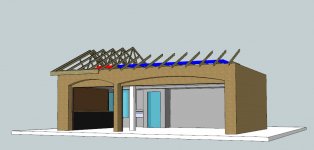
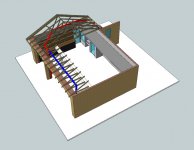
Ya, you should try sketchup. Here is a model of my 3 stall garage that I was playing around with when I was trying to visualize some stuff
 

Attachments

  • GR8-175.jpg
    GR8-175.jpg
    72.1 KB · Views: 29
  • GR8-176.jpg
    GR8-176.jpg
    120.7 KB · Views: 26
To avoid these ads, REGISTER NOW!
Top Bottom