

Hi all,
I just bought a new home. It has a detached 3 car garage. I haven't moved yet but coming from a much smaller garage i have all kinds of ideas for decking out this garage. I found a cad/cam tool that really helped me visualize a few things i wanted to try out.
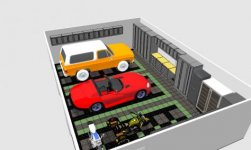
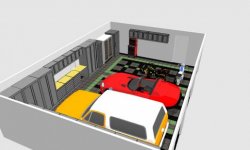
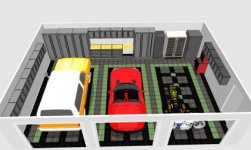
I used a completely free open source tool called sweethome3d. I did the following layout of racedeck floors, my cars and motorcycles, newage pro cabinets, a safe, winefridge and freezer, my old craftsman tool cabinet in almost no time. And i'm no expert at cad/cam.
Truly impressive and completely free tool. I highly recommend it for trying out layouts and getting a feel for flow and dimensions of your garage.
(i haven't ordered anything from racedeck nor new age, i just wanted to get a feeling for how the garage would look like if i would make that kind of investments).
Attached are a couple of printouts from the tool. Hopefully someone else can benefit from it! On screen the pictures are much higher resolution. I downsized them for uploading to the web.
I just bought a new home. It has a detached 3 car garage. I haven't moved yet but coming from a much smaller garage i have all kinds of ideas for decking out this garage. I found a cad/cam tool that really helped me visualize a few things i wanted to try out.
I used a completely free open source tool called sweethome3d. I did the following layout of racedeck floors, my cars and motorcycles, newage pro cabinets, a safe, winefridge and freezer, my old craftsman tool cabinet in almost no time. And i'm no expert at cad/cam.
Truly impressive and completely free tool. I highly recommend it for trying out layouts and getting a feel for flow and dimensions of your garage.
(i haven't ordered anything from racedeck nor new age, i just wanted to get a feeling for how the garage would look like if i would make that kind of investments).
Attached are a couple of printouts from the tool. Hopefully someone else can benefit from it! On screen the pictures are much higher resolution. I downsized them for uploading to the web.
Attachments
Last edited: