To avoid these ads, REGISTER NOW!

CAD package for home use

xtremek

Well-known member
Joined
Apr 13, 2012
Messages
11,603
Location
St. Johns, Mi
Just curious, is there a reasonable CAD package that's available for hobby/home use? If so, what kind of specs should the computer have to run it?
 
To avoid these ads, REGISTER NOW!

ed_v

Well-known member
Joined
Sep 15, 2007
Messages
1,418
Location
Kentucky
Try Draftsight. It is very similar (90% of the commands the same) to autocad. You can download it for free and will run on most computers. Shetchup is not really a CAD program in my opinion, especially when compared to Autocad, Microstation, or Pro/E as an example.

I say try Draftsight or Autocad LT if you want to spend the money. Sketchup can be used as well to do the cool 3D drawings, but isn't the greatest if you just want to draw up a quick, simple floor plan or to do a fabrication drawing.

Ed
 

Flounder_Pounder

Well-known member
Joined
Jan 6, 2012
Messages
81
Location
Spring Branch Texas
Try Draftsight. It is very similar (90% of the commands the same) to autocad. You can download it for free and will run on most computers. Shetchup is not really a CAD program in my opinion, especially when compared to Autocad, Microstation, or Pro/E as an example.

I say try Draftsight or Autocad LT if you want to spend the money. Sketchup can be used as well to do the cool 3D drawings, but isn't the greatest if you just want to draw up a quick, simple floor plan or to do a fabrication drawing.

Ed

....You know Ed might have nailed it if you don't need 3D
 

rbonitz

Well-known member
Joined
Oct 25, 2012
Messages
140
Try Draftsight. It is very similar (90% of the commands the same) to autocad. You can download it for free and will run on most computers. Shetchup is not really a CAD program in my opinion, especially when compared to Autocad, Microstation, or Pro/E as an example.

I say try Draftsight or Autocad LT if you want to spend the money. Sketchup can be used as well to do the cool 3D drawings, but isn't the greatest if you just want to draw up a quick, simple floor plan or to do a fabrication drawing.

Ed

Yup. Sketchup does a lot of stuff well - its worth its price and is pretty simple to use - but it's not CAD it doesn't store curved geometry accurately etc. - but for most simple projects it works fine. (I'm one of the original MicroStation developers and wrote an interface to Sketchup so I know it well).
 

jwith68

Well-known member
Joined
Jan 10, 2006
Messages
1,639
Location
EC Missouri
I just installed DraftSight as an upgrade to an old version of AutoCAD LT. I like it very well so far. There is another one called DoubleCad XT that has a free version and gets good reviews.
 
OP
X

xtremek

Well-known member
Joined
Apr 13, 2012
Messages
11,603
Location
St. Johns, Mi
I want to get back into building fun robots, and parts for my motorcycle and cars, so I was looking for something like AutoCad. I'm not going to design an engine, but I'd lilke to finish an electric FSAE car I have. I'll have to give DraftSight or DoubleCad a try.
 

zuk123

Well-known member
Joined
Mar 25, 2012
Messages
957
Location
Houston TX via Chicago, Phoenix, LA, and San Diego
Draftsight for 2d, traditional CAD style drawing, Sketchup for 3d, volumetric stuff. Not really either or, both have their place and usage.

Sketchup is great for quickly getting a feel for the shape of something, especially rooms, buildings, objects. NOT so great for detailed engineering drawings (although you can use it that way.) Using Sketchup is very different from traditional CAD.

Any traditional CAD style product is going to have a bigger learning curve. Online tutorials and practice will make all the difference.

For diagramming, flowchart, floorplans, etc Visio is great but pricy. Dia is the free open source clone of Visio, and is reportedly pretty good although I haven't used it. http://dia-installer.de/

I'll recommend any of the TurboCAD products if you insist on paying for something! The one or 2 version out of date ones are a cheap $40-ish. It is very autocad compatible, and slightly easier to use.


Any of them will take some work on your part to learn to use well. Sketchup is fast to get results, but can be maddening unless you understand how it works. Traditional CAD will have you sitting there staring at a blank screen wondering how to get started.

Good luck,

zuk
 

jeffmoss26

Well-known member
Joined
May 25, 2011
Messages
12,854
Location
Cleveland, Ohio
I will also recommend Draftsight. We use it here at work for some stuff and it's a nice program. All of the real work gets done in SolidWorks :D
In the IT world, I use Visio for diagrams.
 

ixlr8

Well-known member
Joined
Sep 15, 2009
Messages
435
Location
Mid-Coast Maine---> Eastern Shore Virginia
Any of them will take some work on your part to learn to use well. Sketchup is fast to get results, but can be maddening unless you understand how it works. Good luck,

zuk

Sketchup ... maddening
This describes my attempts to do anything with Sketchup. After hours of trying to get anything meaningful out of it.. I gave up and bought Punch! Home Design. It is not exactly easy to use, but at least I was able to layout and design my home.
 

zoff

Member
Joined
Aug 2, 2011
Messages
5
Sketchup is free and not terribly hard to use but it isn't great by any means and figuring out how to do some things in it can be frustrating. I am a ProE user so I'm spoiled but your opinion of sketchup will probably depend on how complex your design is. If it is simple, then sketchup is fine. If you want a lot of detail work and you require precision then sketchup probably isn't the way to go. I am not sure how well the pay version of sketchup is but I know the free version is exactly that.
 

DirtRoad

Well-known member
Joined
Oct 24, 2012
Messages
607
Location
Lowell, Mi
Yup. Sketchup does a lot of stuff well - its worth its price and is pretty simple to use - but it's not CAD it doesn't store curved geometry accurately etc. - but for most simple projects it works fine. (I'm one of the original MicroStation developers and wrote an interface to Sketchup so I know it well).

Small world, i use Microstation j, Microstation v8/v8i, and A/D for a living.

Also Arcmap, GIS, Regis and SAP.

I wouldnt recomend any of those for a home user though.
 
To avoid these ads, REGISTER NOW!

rbonitz

Well-known member
Joined
Oct 25, 2012
Messages
140
Small world, i use Microstation j, Microstation v8/v8i, and A/D for a living.

Also Arcmap, GIS, Regis and SAP.

I wouldnt recomend any of those for a home user though.

Yeah - MicroStation is not suited to the casual user.

Thanks for using it though - sounds like you've been at it for a while!

Ray
 

CADtech

Active member
Joined
Dec 8, 2012
Messages
28
Location
Southwest Chicagoland
I use Microstation and Solidworks for a living. Used to use Inventor. None are home programs though. Draftsight is a product of the same people who make Solidworks.
 

zuk123

Well-known member
Joined
Mar 25, 2012
Messages
957
Location
Houston TX via Chicago, Phoenix, LA, and San Diego
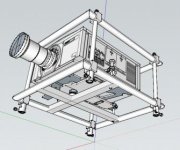
Mind you, you can produce some fairly complex models in Sketchup. I'm no expert, and these parts were developed by tracing over 2d pdfs and applying Sketchup's 'scale drawing' function. The result is within a mm or 2 of correct. You wouldn't want to manufacture from this model, but it is WAY more detailed than needed for visualization.

zuk
 

Attachments

  • proj_in_frame_down.jpg
    proj_in_frame_down.jpg
    19.3 KB · Views: 74
  • proj_in_frame_up.jpg
    proj_in_frame_up.jpg
    19.3 KB · Views: 52

rbonitz

Well-known member
Joined
Oct 25, 2012
Messages
140
I use Microstation and Solidworks for a living. Used to use Inventor. None are home programs though. Draftsight is a product of the same people who make Solidworks.

I've been programming MicroStation since 1988 or so - it has paid for my garage, but it (or a computer) is the last thing I want to see in it.

Ray
 
OP
X

xtremek

Well-known member
Joined
Apr 13, 2012
Messages
11,603
Location
St. Johns, Mi
I'm not looking for garage layout, but fabbing simple parts and assemblies. I've used AutoCad, but that was about 10 years ago. I don't think Sketchup is what I'm after, but in the interest of helping everyone out, how much memory would you need for it. How much memory would you need for Draftsight and Prodge. What does Prodge cost?
 

Kevin54

MEMBER EMERITUS
Joined
Jan 12, 2005
Messages
29,341
Location
Urbana, Ohio
I highly recommend DeltaCad. I bought it and used it at work and also turned a lot of others onto it. You can save the files in a variety of formats. You can download a picture, scale it, then get all of your dimensions. It's a simple program, but I haven't found any thing yet it doesn't do. The only downfall it that it is 2D and not 3D. They have a trial program you can download to try. It has a couple of features for nut's and bolts built in, it will do electrical layouts, and you can change the Default sheet that you first open to how you want things to be for a default. By that I mean the fonts, font size, line size, and so on. The website is www.deltacad.com At least give it a look over and try the trial version. I think I've used it for approximately 5 or 6 years now, maybe longer. They also have a forum you can go to for any questions you have if you are in a pinch.
 

The J

Well-known member
Joined
Mar 4, 2010
Messages
152
Another vote for Draftsight if you're making parts in 2D.

It's very similar to AutoCAD and it's free. You can save in all "AutoCAD" formats too.

I play around with Sketchup for 3D concepts. But it is clunky in some aspects, great in others. It's all about understanding "how" things are drawn to determine the best method of getting to where you want to go.
 

BigE

Well-known member
Joined
Jan 14, 2009
Messages
928
Location
Central Alabama
Try emachineshop.com. They provide their own CAD program for you to design parts. Their core business is manufacturing the parts you design so the CAD program is free and designed for easy use. It's not SWX or Pro/E, but it is designed for exactly the type of work you're looking to do. It also has the added benefit of pricing the part out for you and suggesting modifications to make it cheaper. It imports other CAD formats so maybe it will export to them as well. I haven't tried it so I don't know.
 

laser3kw

Well-known member
Joined
Nov 17, 2012
Messages
7,276
Location
northen IL
Another vote for Draftsight at home. I also have MasterCam draft 7, old but fairly easy to use.
I use Inventor 2013 all day for the crazy stuff.
 

kwb

Well-known member
Joined
May 1, 2009
Messages
1,771
Location
PNW
Alibre - personal edition is pretty good. Not as fast as a ProE or Solidworks to do the work in but not bad for home use. Other bummer is that it won't publish drawings to .pdf, but does do .dxf/.dwg export of drawings.

Legit copy for $200 was impossible to pass up for me.
 

budss396

Well-known member
Joined
Oct 22, 2012
Messages
51
Location
Evansville, In
Try Progecad you can get it for free for personal/home use. be sure to register your copy so it will not expire in 30 days.

If you want to at a later date you can upgrade to the professional version for about 500 usd
 

DirtRoad

Well-known member
Joined
Oct 24, 2012
Messages
607
Location
Lowell, Mi
Yeah - MicroStation is not suited to the casual user.

Thanks for using it though - sounds like you've been at it for a while!

Ray

Only 10 years.

The company i work for is moving away from Microstation completely soon, it will take years to move away from it but its going to happen.

The problem is Microstation is out dated, J isnt even supported anymore and V8 and V8i wont be for long either so the company needs something different and much newer.

I will miss it for sure though, great program.
 

pmiranda

Well-known member
Joined
Jul 15, 2008
Messages
1,504
Location
Austin, TX
you can get these free, if you sign up and act like your a student. i have auto cad 2013 on my comp and its registered for 3 years. it is autoCADs website called autodesk. here is the link

https://students.autodesk.com/?nd=download_center

Note that you can legitimately BE a student and learn how to use this great software and/or gain other skills like welding, etc. by taking a class from your local community college.

Having said that, I think I'll give Draftsight a try... autocad takes forever to load on my laptop!
 

TOOL_MONGER

Well-known member
Joined
Oct 23, 2012
Messages
182
Location
So. Dak.
I've used 25 years of the evolution of AutoCad, also use ESRI products...
I dont have any experience of my own with the free or lower cost programs, but a guy at work uses TommyDraw or TommyCad... not sure of the name...think he said it was around 100 bucks... anyway he seems to like it.
 
To avoid these ads, REGISTER NOW!
Top Bottom