

You are using an out of date browser. It may not display this or other websites correctly.
You should upgrade or use an alternative browser.
You should upgrade or use an alternative browser.
CADCAM Suggestions
- Thread starter TxDoc
- Start date
FunfDreisig
Well-known member
- Joined
- Feb 12, 2008
- Messages
- 413
Unless you need to produce scaled "blue prints" try the free Google SkecthUp. It lets you begin with a rough 3D sketch and refine your model to any level you want. FWIW the model of my new 3 bay includes full framing details, etc.Anyone use any CADCAM drawing software, preferably not $1,000,000.00
What you use and where you purchased is appreciated.
The model is accurate to 1/16" but the only hard copy of the free version is the equivalent of a screen dump.
Funf Dreisig
ddawg16
Well-known member
I use AutoCad Lite....I think it goes for around $500...but check online, sometimes you can find older versions a lot cheaper.....
Caution....learning curve is a little steap......
Caution....learning curve is a little steap......
Kevin54
MEMBER EMERITUS
Check on BobCad. It is reasonably priced and is becoming more popular everyday. I talked to one of the reps on the phone a few weeks ago. For a 2, 2/1/2, or 3 axis programming software, it will do everything that you want. They do have a trial version that you can download to mess around with to see if it has what you want, but the CAM software is not with it so you cannot actually try it out on any equipment.
boiler7904
Well-known member
I use AutoCad Lite....I think it goes for around $500...but check online, sometimes you can find older versions a lot cheaper.....
Caution....learning curve is a little steap......
Retail on AutoCAD 2009 LT is about $1,200.
To get the full 3D capability of AutoCAD 2009, expect to pay about $4,000.
They approach $6,000 per license when you get into AutoCAD and industry specific add on packages at one time.
They're really starting to crack down on licensing and making sure that you aren't using one license on a lot of machines at once.
1320stang
Well-known member
RickP330
Well-known member
You can get a stripped down version of autodesk inventor for free, google Autodesk Labs , Inventor you can download it right from autodesk. You can only do parts, not assemblies.
Regards,
RickP
Regards,
RickP
PAToyota
Well-known member
One thing to clarify is whether CADCAM is needed - are you really looking for something for machining? There are a number of basic suggestions for CAD and CAD-like drafting programs if you are just looking to draw stuff. But for actual machining you're looking for something different. BOBCAD would be a good suggestion there.
Kevin54
MEMBER EMERITUS
If you want just a reasonable drawing program that is 2D only and no frills download DeltaCad. It is free to try and the full version is like $39.00. I use it at work on a daily basis and have turned others on to it. Great program. Also a lot of other all over use it to do their designs. I know that quite a few of the machining sites use DeltaCad for their prints.
RickP330
Well-known member
One thing to clarify is whether CADCAM is needed
Well that's the Key. We are talking about two seperate software packages, I know Master CAM does both, but I don't think there is one software that does both user friendly enough. They will need "two" cheap programs....
RickP
Freejack
Well-known member
I know you said you are looking for just something to do 2D, but Alibre Express is free, fairly powerful and relatively easy to use if you are a first timer.
http://www.alibre.com/xpress/
Jake
http://www.alibre.com/xpress/
Jake
Boy! Thanks for all the suggestions. A friend uses AutoCad Lite, but was not sure how much it would cost. I AM going to look at all of the suggestions and try them all. I am not doing blueprints, or machining, but would like to be able to draw and print or email ideas or projects and not have it on scrap paper.
Sorry for the slow reply, but I appreciate the suggestions and help A LOT!
ps-I love to watch people machine parts on a lathe, but I remember the pic posted on here of the guy...well, use to be a guy, with loose clothing and inadequate space between him and the lathe. That is more scary to me than a shark.
Sorry for the slow reply, but I appreciate the suggestions and help A LOT!
ps-I love to watch people machine parts on a lathe, but I remember the pic posted on here of the guy...well, use to be a guy, with loose clothing and inadequate space between him and the lathe. That is more scary to me than a shark.
FunfDreisig
Well-known member
- Joined
- Feb 12, 2008
- Messages
- 413
Here is the kind of stuf you can do with the free version of Google SketchUp......I am not doing blueprints, or machining, but would like to be able to draw and print or email ideas or projects and not have it on scrap paper. ....
Funf Dreisig
Attachments

rsanter
Well-known member
for what you are looking for, you can get a very inexpensive cad program that will even output in DWG format
I have used the google sketchup and its pretty cool, but I am faster with the autocad.
also, if you want to get into solidworks, you can request Solidworks PE which is free. it is intended for you to learn and for tryingit out so the outputs are limited, but for you could work fine
bob
I have used the google sketchup and its pretty cool, but I am faster with the autocad.
also, if you want to get into solidworks, you can request Solidworks PE which is free. it is intended for you to learn and for tryingit out so the outputs are limited, but for you could work fine
bob
merlin
Active member
Turbocad has been around for a long time. Under 100.00. 1 or 2 version old are available on ebay for around 20. Also Designcad 3d Max.
I use Microstation and Solidworks at work, but recently lost the home use rights. So, probably go back to TurboCad. Alibre seems okay, but they really want you to upgrade for about 400.00.
Right now, Alibre use Microsoft VM that needs to be loaded on your PC, and supposedly, once installed, VM can't be removed. I've talked to one of the guys at Alibre, and if we wait, the next free version will be a standalone version that won't need VM.
I'm not real clear on VM, but guys at work have run it and it does take up some memory.
Turbocad and DesignCad seem to be the most common for basic drafting. DeltaCad seems a little disorganized after using a commercial cad program.
CAM? Most people don't need it unless you've upgraded your lathe and mill for NC. I'd rather spend the money on DRO only. The poor man's NC.
Billy
PS - nice Sketchup drawing!
I use Microstation and Solidworks at work, but recently lost the home use rights. So, probably go back to TurboCad. Alibre seems okay, but they really want you to upgrade for about 400.00.
Right now, Alibre use Microsoft VM that needs to be loaded on your PC, and supposedly, once installed, VM can't be removed. I've talked to one of the guys at Alibre, and if we wait, the next free version will be a standalone version that won't need VM.
I'm not real clear on VM, but guys at work have run it and it does take up some memory.
Turbocad and DesignCad seem to be the most common for basic drafting. DeltaCad seems a little disorganized after using a commercial cad program.
CAM? Most people don't need it unless you've upgraded your lathe and mill for NC. I'd rather spend the money on DRO only. The poor man's NC.
Billy
PS - nice Sketchup drawing!
FunfDreisig
Well-known member
- Joined
- Feb 12, 2008
- Messages
- 413
I designed and produced the plans for my cabin in a 2D CAD package. I was so proud that by going to the nearby Kinkos I could print out scaled drawings of the floor plan, elevations, etc.
But then I realized that most crews don't actually work from the plans in detail. They just get the gist and then build it like they have been doing for years. It turned out that I was the only one that really used the plans. And I did not need scaled hard copies. In fact, I rarely used the hard copies at all. I worked from the electronic version on my PowerBook where I could zoom in etc.
In the end, I wished I had used a 3D package that would have made it much easier for me to visualize and think through the details prior to construction. That's why I'm using Google Sketchup for the garage.
The learning curve for any 3D software is steep. But it is very rewarding once mastered
Funf Dreisig
But then I realized that most crews don't actually work from the plans in detail. They just get the gist and then build it like they have been doing for years. It turned out that I was the only one that really used the plans. And I did not need scaled hard copies. In fact, I rarely used the hard copies at all. I worked from the electronic version on my PowerBook where I could zoom in etc.
In the end, I wished I had used a 3D package that would have made it much easier for me to visualize and think through the details prior to construction. That's why I'm using Google Sketchup for the garage.
The learning curve for any 3D software is steep. But it is very rewarding once mastered
Funf Dreisig
merlin
Active member
Fun,
3D is great, if you have it. When I had the Solidworks solid modeler, it was great! Had the whole yard, driveway, and garage modeled. Foundation, sills, studs, joists. Didn't bother with the rafters, though. Toolboxes, shelves, machine tools, vehicles.... Of course, some items are just cubes that are there for size reference, and arranging to make things fit.
I haven't tried the Sketchup, you really like it? I may try it till the new Alibre comes out.
Thanks,
Billy
3D is great, if you have it. When I had the Solidworks solid modeler, it was great! Had the whole yard, driveway, and garage modeled. Foundation, sills, studs, joists. Didn't bother with the rafters, though. Toolboxes, shelves, machine tools, vehicles.... Of course, some items are just cubes that are there for size reference, and arranging to make things fit.
I haven't tried the Sketchup, you really like it? I may try it till the new Alibre comes out.
Thanks,
Billy
FunfDreisig
Well-known member
- Joined
- Feb 12, 2008
- Messages
- 413
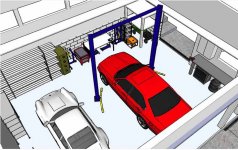
I really like it now that I've got the hang of it...I haven't tried the Sketchup, you really like it? ...
When I was designing the garage I found and modified or built 3D models of all of the major bits I need to fit into the garage. Then I laid out where I was going to put the stuff. And then thought through how I would use the space. I actually changed the design based on this exercise.
Funf Dreisig
Attachments
ddawg16
Well-known member
How about MS Visio? Real easy to use....and pretty cheap...
Kevin54
MEMBER EMERITUS
I am not doing blueprints, or machining, but would like to be able to draw and print or email ideas or projects and not have it on scrap paper.
Do you want a 2D program or a 3D then. For ease of drawing in 2D then DeltaCad would be up your alley. For 3D, then you want Sketchup, or something similiar. If you don't know the difference, 2D is just like a flat horizontal/vertical line flat drawing. 3D is like FUN shows in his attachment
JDRimmer
New member
Try progeCAD. www.progecad.com It's free, and a full-featured CAD that works in .dwg natively.