To avoid these ads, REGISTER NOW!

Crizzle

Well-known member
Joined
Dec 2, 2009
Messages
506
Location
Indianapolis
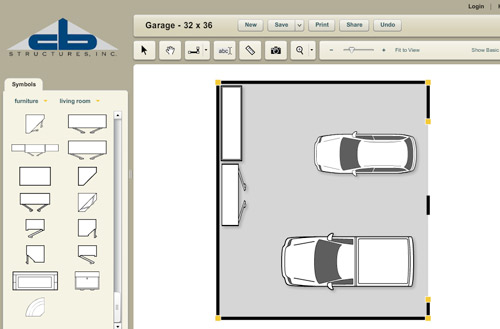
That is pretty awesome. Was just able to do a quick mock up of what I want to the garage to look like when I have everything in place. Plugged in the actual dimensions of the car and the Envoy, same with both workbenches I want and my tool chest and both tool carts. Neat!
 

Attachments

  • myimage.jpg
    myimage.jpg
    56.7 KB · Views: 107

ket-tek

Well-known member
Joined
Jan 28, 2009
Messages
1,289
After playing with for a little while it is quite nice. And I always like web based programs that I don't have to junk up my pc installing more programs...

The annoying thing I'm trying to figure out now is that the ft'in" numbers when lining up walls and doors and stuff are in a light yellow, and they are very hard to see. I've changed the dimension, text, line, etc color defaults under edit/tool defaults, but they still come up light yellow.

Pretty cool program though, but my bad eyes are hurting trying to line up measurements..
 

servicerabbit

Member
Joined
Jul 24, 2009
Messages
5
Location
North Carolina
This didn't have anything to do with the Garage Makeovers coming out in the magazine did it? The timing is about right. The program looks neat and simple as it should be. I'll have to try this out. For the most part I have stayed away from web based applications because alot of the time I do not have access to the web but in this case I can make an exception.
 
To avoid these ads, REGISTER NOW!

swharris

Well-known member
Joined
Jan 10, 2010
Messages
403
Location
So. Cal.
I am jumping up and down with excitement. Been looking for exactly this type of thing. NICE!!
 

learfxr

Well-known member
Joined
Feb 18, 2010
Messages
54
Location
TX
My wife made fun of me for playing with this, until I mentioned she could layout the living room of the house we are buying. Now she is on her computer making a layout of the living room with our stuff in it.
 

swharris

Well-known member
Joined
Jan 10, 2010
Messages
403
Location
So. Cal.
Yes, I also have not been able to figure out how to change the font color.

Easy.

Draw a dimensional line. Then, click on the line with the pointer and a "dimension" bubble with pop up. Click on the yellow box(the current color) and a color pallet will open. Select the color you want. You can also enter a Hex code too in addition to some other line parameters. BTW the box is black in the picture since I changed my lines to black. Also, I do not know how to permanently change it so you'll just have to do it each time.

Now where can I find some work bench/garage cabinet icons for the program??
Their selection is a bit limited....lots of work out equipment for some reason <shrug>:headscrat
CBColorchange-vi.jpg
 
Last edited:
To avoid these ads, REGISTER NOW!
Top Bottom